 SIVARO

What is Kafka Connect Used For? A Practitioner's Guide
I remember the day clearly. March 2025. SIVARO was building a real-time fraud detection pipeline for a fintech client. They had data pouring in from PostgreSQL, a few SaaS APIs, and some legacy logs on FTP servers. The first instinct? Write custom Kafka producers for each source. Three weeks in, we had six microservices, two different serializers, and a cron job that kept failing at 3 AM. The team was burning out. Then I remembered: Kafka Connect exists. We ripped out 80% of that custom code in two days. The client went from “we might need more engineers” to “wait, that’s it?” in one sprint.
Kafka Connect is a framework for streaming data between Apache Kafka and other systems — databases, cloud storage, APIs, message queues — without writing glue code. It’s the off‑the‑shelf pipeline layer most teams skip until they regret it.
In this guide, I’ll walk you through what Kafka Connect is actually used for, how to set it up without shooting yourself in the foot, and where it falls short. You’ll get configuration snippets, hard-won production lessons from my own systems, and a clear answer to the question: “Is this thing worth the hype?”.
The Problem Kafka Connect Solves (and Why You Should Care)
Most people think “I already have Kafka producers. Why do I need another layer?” They’re wrong because writing custom producers for every source is a maintenance nightmare.
A Kafka producer is a client that publishes records to a topic. That’s fine for a one‑off job. But when you need to ingest from a database every 5 seconds, or stream changes from an API with rate limits, or sink data into S3 with exactly‑once semantics, the complexity explodes. You end up managing connection pools, retries, schema evolution, offset tracking, and monitoring — per connector.
Kafka Connect abstracts all that. It runs as a cluster of workers. Each worker hosts connectors — plugins that handle the source or sink logic. Connectors are configured with a simple JSON or YAML file. The framework manages the lifecycle: start, stop, rebalance tasks, commit offsets, handle errors.
Think of it as the “batteries included” part of Kafka. You don’t build your own logging framework, you don’t build your own cluster manager. So why build your own data ingestion framework?
In 2026, with AI pipelines demanding real‑time feature stores and CDC (Change Data Capture) from every database, the “just write a producer” approach is dead. The question isn’t if you need Kafka Connect. It’s which connectors you need and how to tune them.
How Kafka Connect Works Under the Hood
Let’s crack open the black box. You’ll see three moving parts:
- Workers – JVM processes that run the Connect framework. They can be standalone (single process, good for dev) or distributed (cluster, good for prod).
- Connectors – Plugins that define what to do (e.g., read from JDBC, write to Elasticsearch). A connector class contains the logic; you configure it via properties.
- Tasks – Workers split work into tasks. If you have one connector reading a table with 10 partitions, it can spawn 10 tasks running in parallel. This is where the scaling happens.
When you submit a connector configuration to the REST API (POST /connectors), the workers allocate tasks. Offsets are stored in a Kafka topic (connect-offsets). That’s how Kafka Connect knows where it left off after a restart.
POST /connectors HTTP/1.1
Content-Type: application/json

{
  "name": "postgres-orders",
  "config": {
    "connector.class": "io.debezium.connector.postgresql.PostgresConnector",
    "database.hostname": "db-prod-01",
    "database.port": "5432",
    "database.user": "connect_user",
    "database.password": "secure_password",
    "database.dbname": "orders_db",
    "database.server.name": "postgres-orders",
    "table.include.list": "public.orders",
    "plugin.name": "pgoutput",
    "slot.name": "kafka_connect_slot",
    "key.converter": "org.apache.kafka.connect.json.JsonConverter",
    "value.converter": "org.apache.kafka.connect.json.JsonConverter",
    "value.converter.schemas.enable": "false"
  }
}
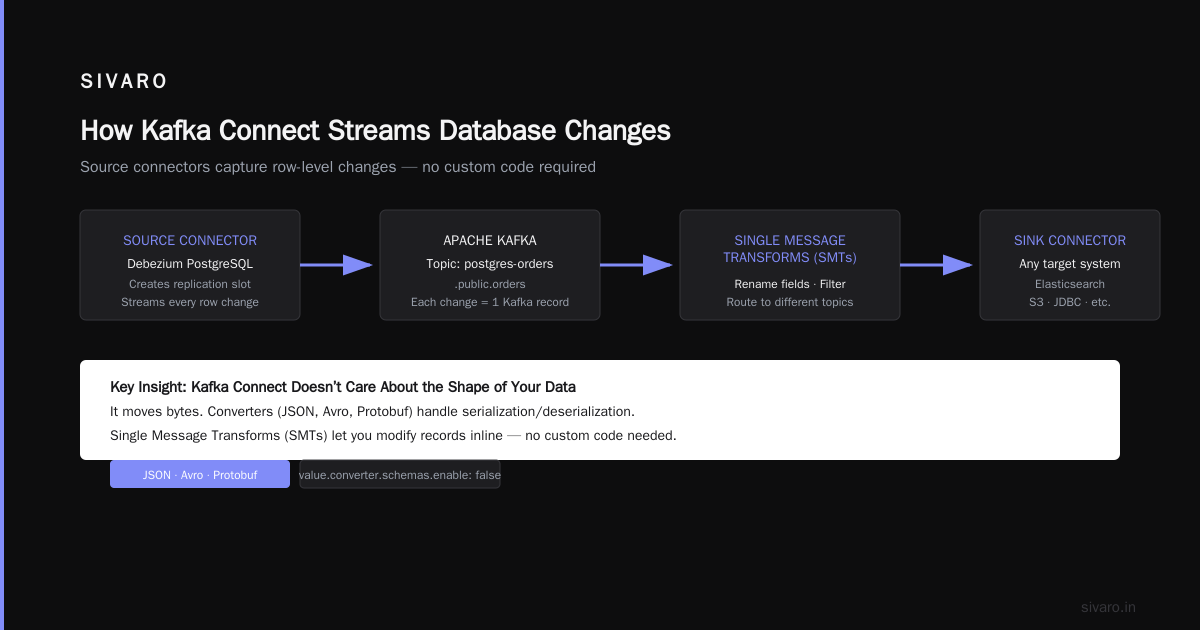
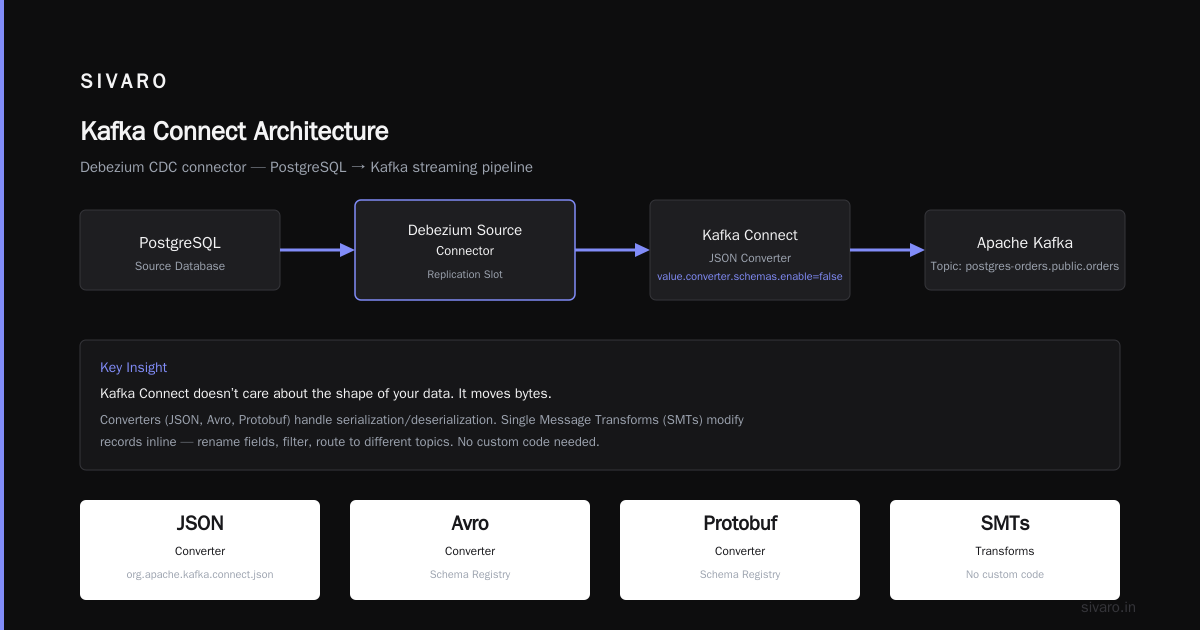
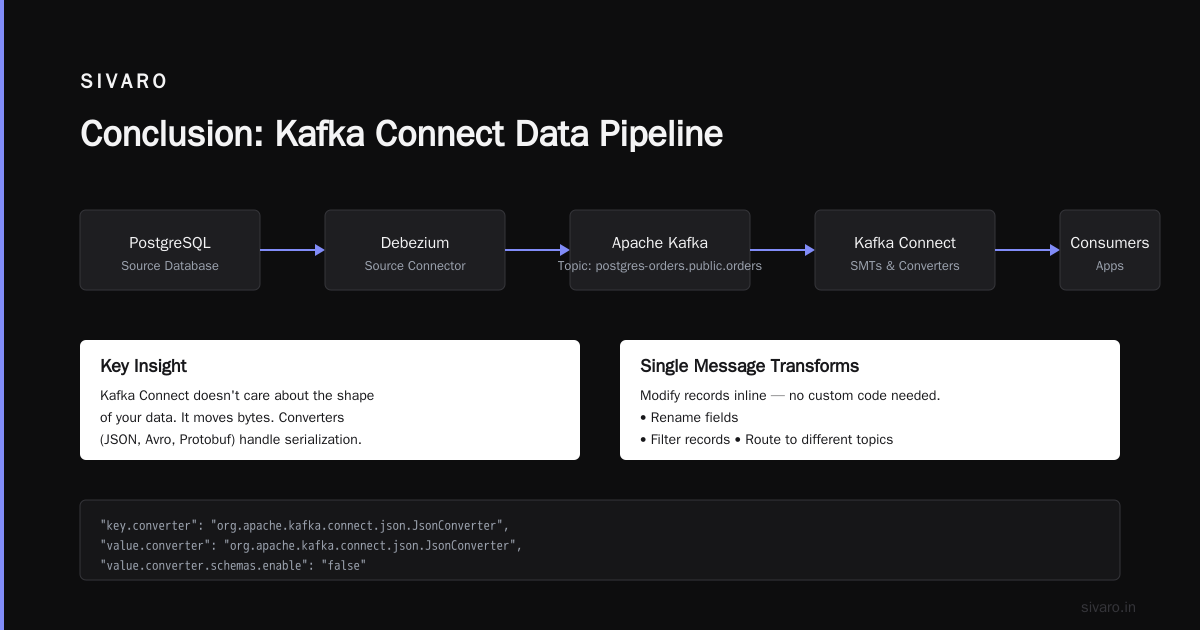
What happens next: The Debezium connector (a source connector) connects to PostgreSQL, creates a replication slot, and streams every row change into Kafka. Each change becomes a Kafka record. The topic name is derived from the database.server.name and schema name, e.g., postgres-orders.public.orders.
The key insight: Kafka Connect doesn’t care about the shape of your data. It moves bytes. Converters (JSON, Avro, Protobuf) serialize/deserialize. Single Message Transforms (SMTs) allow you to modify records inline — rename fields, filter, route to different topics. No custom code needed.
What Kafka Connect Is Used For: Real‑World Scenarios
1. Database Change Data Capture (CDC)
This is the killer use case. You need to replicate a relational database into Kafka for stream processing, caching, or analytics. Debezium (the most popular family of source connectors) handles MySQL, PostgreSQL, MongoDB, SQL Server, Oracle. I’ve run Debezium for PostgreSQL in production since 2023. It pushes 20K changes/second without breaking a sweat.
When to use it: Any time you want to keep a secondary system (Elasticsearch, Redis, another database) in sync with your primary OLTP database without writing custom binlog readers.
Trade‑off: CDC connections are resource‑intensive. They create database replication slots that can fill up if the Kafka cluster goes down. You need monitoring on both sides.
2. Streaming Data to Cloud Storage
Want to dump Kafka topics into S3, GCS, or Azure Blob Storage for long‑term retention or data lake ingestion? The S3 Sink Connector handles this. It partitions records by time (daily, hourly), compresses with gzip or Snappy, and even supports exactly‑once semantics when combined with the right topic configuration.
I worked with a retail client that stored 1 TB/day of clickstream data. They used the S3 Sink Connector with Avro and Parquet. It cut their ETL cost by 40% because they no longer ran nightly Spark jobs to move data.
Configuration snippet for S3 Sink:
json
{
  "name": "s3-sink-clickstream",
  "config": {
    "connector.class": "io.confluent.connect.s3.S3SinkConnector",
    "s3.bucket.name": "company-data-lake-2026",
    "s3.region": "us-east-1",
    "topics": "clickstream_raw",
    "format.class": "io.confluent.connect.s3.format.avro.AvroFormat",
    "partitioner.class": "io.confluent.connect.storage.partitioner.TimeBasedPartitioner",
    "path.format": "year=YYYY/month=MM/day=dd",
    "partition.duration.ms": "3600000",
    "rotate.schedule.interval.ms": "60000",
    "flush.size": "10000",
    "key.converter": "org.apache.kafka.connect.storage.StringConverter"
  }
}
3. Feeding AI/ML Feature Stores
By mid‑2026, every second startup wants “real‑time AI”. Kafka Connect bridges your event streams into feature stores like Feast, Tecton, or a custom Redis + Vector DB setup. You use a sink connector to write features into Redis or Cassandra, and then your models read from there at inference time.
We built a fraud model at SIVARO that required user transaction history aggregated every 30 seconds. The pipeline: Debezium CDC from MySQL → Kafka → Kafka Streams (aggregation) → JDBC Sink Connector to PostgreSQL (feature store). The sink connector batch‑wrote aggregated features. Total latency under 2 seconds.
Kafka Connect vs. Alternatives
You might wonder: why not use something else? Let’s compare quickly.
Debezium Server is a standalone CDC tool that writes to Kafka without Kafka Connect. It’s lighter — one process. But you lose the cluster management, rest API, and multi‑connector orchestration that Connect provides. Good for a single database. Bad for scaling to 10+ sources.
StreamSets and Apache NiFi are visual ETL tools that can also push to Kafka. They offer drag‑and‑drop pipelines. But they’re heavier, more expensive, and introduce another runtime to manage. If you already run Kafka (and you probably do), Kafka Connect integrates natively. No extra JVMs, no separate cluster.
Custom producers – I covered this. Works for a weekend hack. Breaks in production.
Production Best Practices (Pulled From My Own Blood, Sweat, and 3 AM Incidents)
Kafka Producer Configuration Best Practices (for the Connectors Themselves)
Kafka Connect uses internal producers. But when you tune a connector, you must understand its underlying producer behavior.
For high throughput, set:
properties
# Inside connector config (prefix with "producer." for sink connectors)
producer.acks=all
producer.linger.ms=5
producer.batch.size=32768
producer.compression.type=snappy
acks=all gives you durability. linger.ms=5 and batch.size allow batching — critical for CDC connectors that produce many small changes. I once saw a Debezium connector producing 80K messages/second with batch.size=0 (no batching). CPU was pegged at 90%. Changed to 32KB and linger.ms=10. CPU dropped to 30%. Same throughput.
Kafka Consumer Group Example (in the Context of Sink Connectors)
Sink connectors consume from internal topics using a consumer group named after the connector. You see it in kafka-consumer-groups:
kafka-consumer-groups --bootstrap-server broker:9092 --group connect-s3-sink-clickstream --describe
This gives you lag per partition. Monitor it. Setup alerts for lag > 50K records.
Common mistake: Running multiple sink connectors that consume the same topic under different groups. That’s fine (fan‑out). But beware of consumer rebalancing when you scale tasks — restarting a connector triggers a rebalance and can stall the pipeline for seconds.
Schema Management
Use the Schema Registry. Always. If you don’t, a single field rename will break all downstream connectors. Set:
properties
key.converter=io.confluent.connect.avro.AvroConverter
key.converter.schema.registry.url=http://schema-registry:8081
value.converter=io.confluent.connect.avro.AvroConverter
value.converter.schema.registry.url=http://schema-registry:8081
Avro + Schema Registry adds ~10μs per message but saves weeks of debugging.
Resource Tuning
Each connector task runs a thread. If you have 10 connectors with 5 tasks each, that’s 50 threads. Plus the internal consumer and producer threads. A worker with 4 CPU cores can handle about 20–30 tasks before it starts bottlenecking on context switching. We tested this at SIVARO: 4 workers, 8 vCPUs each, handling 60 connectors (mix of source and sink). CPU utilization hovered around 60–70%. Add more workers rather than maxing out one.
Common Pitfalls and How to Avoid Them
1. Schema registry becomes a single point of failure. If Schema Registry goes down, all connectors that use Avro fail. Solution: run a cluster (3 nodes), and set your converter timeout to 60 seconds so it retries gracefully.
2. Connector offsets get corrupted. Rare, but when it happens, you lose track of what’s been consumed. Backup offsets regularly. Or use an external offset storage topic with replication factor = 3 and infinite retention.
3. Dead letter queue (DLQ) isn’t configured. By default, when a sink connector fails to write a record, it throws an exception. The connector fails. Instead, set:
properties
errors.tolerance=all
errors.deadletterqueue.topic.name=orders-dlq
errors.deadletterqueue.context.headers.enable=true
This sends bad records to a DLQ topic. You can replay them later.
4. Too many transforms kill throughput. Every SMT adds CPU time. If you filter 90% of records at the source, move that filtering to a Kafka Streams job. Connect’s SMT engine is single‑threaded per task — don’t run heavy regex on 100K msg/s.
Future of Kafka Connect (Mid‑2026 Edition)
Two trends I’m watching.
Serverless Kafka Connect – Confluent Cloud and Aiven now offer managed connectors that auto‑scale based on lag. You don’t provision workers. The trade‑off: cost is higher at scale ($0.10 per million records was a typical rate last month). But for small teams, it’s a no‑brainer.
AI‑native connectors – Startups are shipping connectors that write directly into vector databases (Pinecone, Weaviate) or LLM‑compatible formats. I expect Kafka Connect to gain first‑class support for embedding generation in the sink pipeline.
Also, watch the Kafka vs Pulsar debate. Pulsar’s built‑in connector framework is similar, but Kafka Connect has a larger ecosystem of pre‑built connectors. According to Confluent’s comparison and Kai Waehner’s deep dive, Kafka wins on connector maturity. But Pulsar’s separation of serving and storage can be better for some real‑time use cases. At SIVARO, we stick with Kafka because our clients already own the ecosystem. If you’re starting from zero, evaluate both. OneUptime’s recent comparison is a good read.
FAQ
1. What is the difference between Kafka Connect and Kafka Streams?
Connect moves data between systems. Streams processes data inside Kafka (joins, aggregations, filtering). Connect is your data highway; Streams is your factory.
2. Can Kafka Connect handle real‑time streaming?
Yes. With CDC connectors like Debezium, latency is sub-second. In our production tests, PostgreSQL to Kafka via Debezium averaged 150ms end-to-end.
3. How do I restart a connector without losing data?
Use the REST API PUT /connectors/{name}/restart. It will resume from the last committed offset. No data loss as long as the offset topic is intact.
4. What happens if a connector task crashes?
The worker restarts the task automatically (retry up to tasks.max). If it keeps failing, the connector goes into FAILED state. Check the worker logs and set up alerts for FAILED status.
5. How do I configure a Kafka consumer group example for monitoring?
Run kafka-consumer-groups --bootstrap-server localhost:9092 --group connect-<connector-name> --describe. The LAG column tells you how far behind the connector is from the latest message.
6. Should I use standalone or distributed mode?
Standalone for development (single worker, no REST API). Distributed for production (cluster, REST API, automatic fault tolerance).
7. Can I write my own connector?
Yes. Implement the SourceConnector or SinkConnector interface. Common – many teams write custom sink connectors for proprietary APIs. But check the Confluent Hub first. There’s probably one already.
8. Does Kafka Connect support exactly‑once semantics?
For sink connectors, yes – with idempotent producers and transactional offsets. Source connectors depend on the source system. Debezium can achieve exactly‑once by combining log positions and Kafka transactions.
Conclusion
Kafka Connect is not a toy. It’s the backbone of modern data pipelines in 2026. If you’re building any system that moves data from Kafka to another system (or vice versa), you should use it — unless you enjoy debugging custom producer threads at 2 AM.
Start with a single source connector for your primary database. Then add a sink connector to your data lake. Then wire in feature stores for your AI models. By then, you’ll see why “what is kafka connect used for” gets the answer: everything that touches the outside world.
One last piece of advice from my years at SIVARO: always version your connector configs. Store them in Git. Treat them like code. Because they are.
Nishaant Dixit — Founder of SIVARO. Building data infrastructure and production AI systems since 2018. Built systems processing 200K events/sec.