 SIVARO
What Is GCP Used For in Data Analytics? A Practical Guide
I’ll be honest — when I started building data infrastructure at SIVARO in 2018, GCP wasn’t my first choice. AWS had the mindshare. Azure had the enterprise contracts. GCP felt like the third wheel.
Then I ran a real batch pipeline processing 50GB of event logs per hour. BigQuery cost 60% less than Athena for the same query pattern. That changed everything.
So what is GCP used for in data analytics? Short answer: real-time streaming, serverless warehousing, and ML-native pipelines — done at a scale that punishes your AWS bill for breakfast.
This guide covers the why, the how, and the gotchas. No fluff. I’ll show you where GCP shines, where it falls short, and exactly how to start learning it today.
Why GCP for Data Analytics? The Real Difference
Most people compare cloud providers on raw services — “AWS has Redshift, GCP has BigQuery, Azure has Synapse.” That misses the point.
The real difference is philosophy. AWS gives you building blocks. GCP gives you managed systems that auto-scale to zero. For data analytics, that matters more than you’d think.
A 2026 comparison of cloud pricing shows GCP consistently undercuts AWS on compute-heavy analytics workloads, especially when you commit to 1- or 3-year terms (Cloud Pricing Comparison 2026). But price alone isn’t enough.
Here’s what I’ve found after six years of production:
- BigQuery is the only serverless SQL warehouse where you don’t think about clusters, nodes, or vacuuming.
- Dataflow (Apache Beam) gives you unified stream+batch without managing Kafka or Flink clusters.
- Pub/Sub is the easiest global pub-sub system I’ve ever operated. Period.
- Vertex AI actually integrates with the data pipeline in a way that doesn’t feel bolted on.
The tradeoff? GCP’s IAM feels like you’re filing tax returns. And some services are less mature — its data catalog (Dataplex) is still catching up to AWS Glue.
But for the question “is gcp good for data engineering?” — yes, absolutely, especially if you hate managing clusters and love SQL-first workflows.
BigQuery: Not Just a Data Warehouse
Let’s start with the elephant in the room. BigQuery is the reason most teams look at GCP in the first place.
It’s a serverless SQL data warehouse. You load data, you query it, you pay for the bytes scanned. No servers, no tuning, no partitions to rebuild.
But it’s more than that. BigQuery now supports:
- Omni — query data in AWS S3 or Azure Blob Storage without moving it.
- BigLake — unify data lakes and warehouses under one engine.
- Unstructured data — query images, PDFs, and audio using SQL-like UDFs.
- ML inside SQL —
CREATE MODELwith logistic regression, XGBoost, even deep learning.
Here’s a real example. At SIVARO, we ingested 2TB of IoT telemetry per day. On Redshift, we spent 12 hours a week tuning sort keys and distribution styles. On BigQuery, we spent zero.
sql
-- Create a model that predicts device failure in SQL
CREATE OR REPLACE MODEL `iot.failure_predictor`
OPTIONS(model_type='BOOSTED_TREE_CLASSIFIER') AS
SELECT
  temperature,
  vibration,
  run_hours,
  label AS is_failure
FROM `iot.training_data`;
One query. No Python. No infrastructure. That’s the GCP promise.
But every rose has thorns. BigQuery is expensive if you query without filtering. A SELECT * on a 10TB table costs you $50. You need to use clustering, partitioning, and materialized views like your wallet depends on it — because it does.
The “slots” pricing model (flat-rate reservations) can lock you in. I’ve seen teams that saved 40% on queries but overspent on idle slots. Test before committing.
Also, BigQuery’s streaming inserts have a 1000-row-per-second-per-table default limit. You can request a raise, but plan for it.
Dataflow and Pub/Sub: The Real-Time Backbone
If BigQuery is the warehouse, Dataflow and Pub/Sub are the pipes.
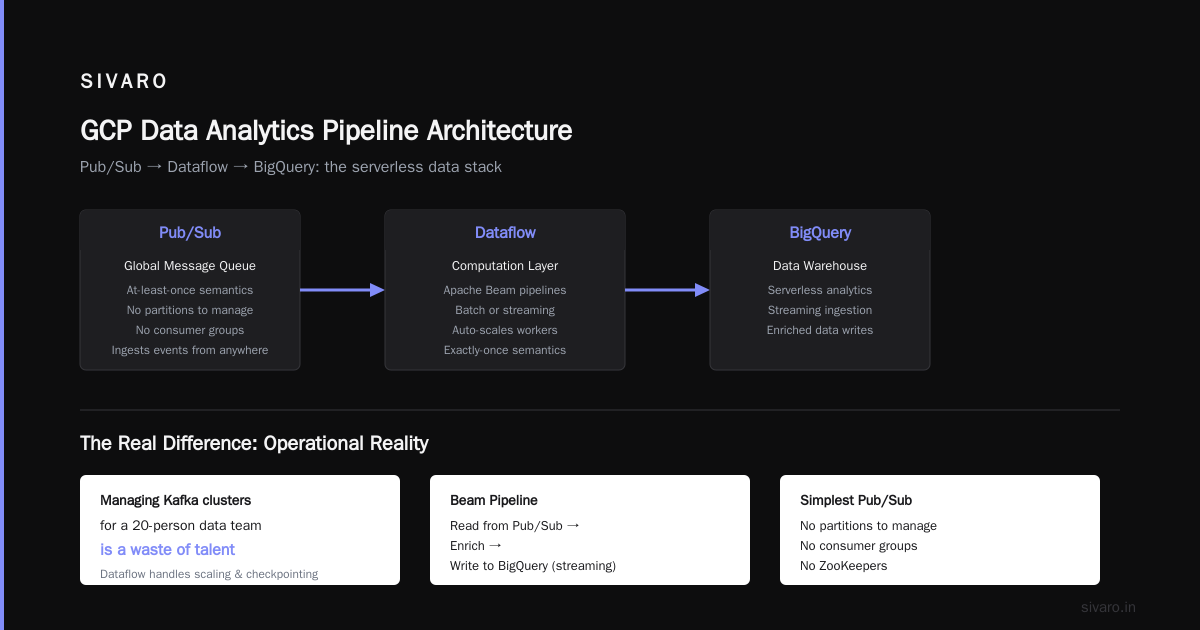
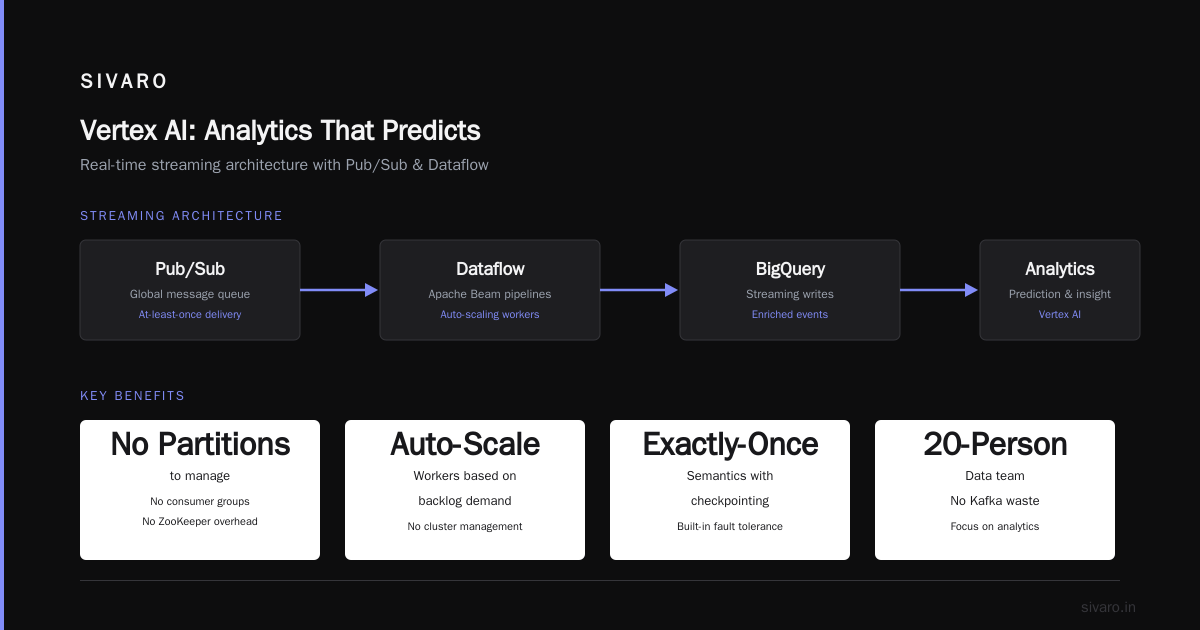
Pub/Sub is a global message queue. It ingests events from anywhere and delivers them with at-least-once semantics. It’s the simplest pub-sub I’ve used — no partitions to manage, no consumer groups, no zoo keepers.
Dataflow is the computation layer. It runs Apache Beam pipelines — batch or streaming — and auto-scales workers based on backlog.
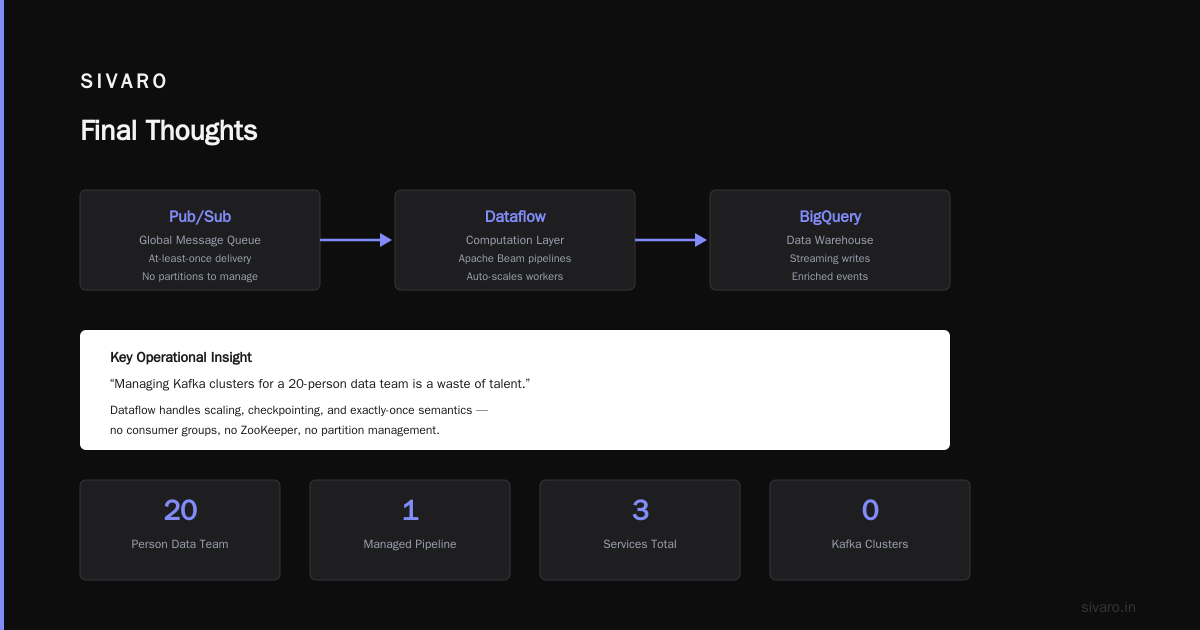
At first I thought this was a branding problem — “why not just use Kafka Streams?” Turns out it’s the operational reality. Managing Kafka clusters for a 20-person data team is a waste of talent. Dataflow handles the scaling, checkpointing, and exactly-once semantics (with some caveats).
Here’s a beam pipeline that reads from Pub/Sub, enriches, and writes to BigQuery in streaming mode:
python
import apache_beam as beam
from apache_beam.options.pipeline_options import PipelineOptions

options = PipelineOptions([
    '--runner=DataflowRunner',
    '--project=my-project',
    '--region=us-central1',
    '--staging_location=gs://dataflow-staging/',
    '--temp_location=gs://dataflow-temp/',
    '--streaming'
])

def enrich_event(event):
    # dummy enrichment
    return {**event, 'processed_at': '2026-07-22'}

with beam.Pipeline(options=options) as p:
    (p
     | 'Read from Pub/Sub' >> beam.io.ReadFromPubSub(subscription='projects/my-project/subscriptions/data')
     | 'Parse JSON' >> beam.Map(lambda x: json.loads(x))
     | 'Enrich' >> beam.Map(enrich_event)
     | 'Write to BigQuery' >> beam.io.WriteToBigQuery(
         table='my_dataset.events',
         write_disposition=beam.io.BigQueryDisposition.WRITE_APPEND)
     )
That’s it. No YAML. No Helm charts. No Kafka tweaking.
Caveat: Dataflow’s pricing is per second per worker. If you have bursty traffic, you pay for idle workers. And the autoscaler can lag — I’ve seen 30-second spikes cause 5-minute scale-up delays. Use it for sustained streams, not firehoses.
For “how to learn gcp from scratch,” I’d start with this pipeline. It’s the most common real-world pattern: Pub/Sub → Dataflow → BigQuery.
Dataproc: When You Need Spark (and You Don’t Want to Manage It)
Hadoop and Spark aren’t dead — they’re just hiding inside Dataproc.
GCP’s managed Spark and Hadoop service boots a cluster in 90 seconds. You pay only for the run time (preemptible VMs cut costs 80%). Then the cluster shuts down.
I’ve seen teams migrate from AWS EMR to Dataproc and cut 40% off their Spark costs because of preemptible instances and faster startup times. The Cloud Pricing Comparison 2025 confirms that GCP’s sustained-use discounts compound better for short-lived clusters.
But here’s the thing: Dataproc is not serverless. You still think about instances, disk sizes, and YARN configurations. It’s a managed version of the old world.
If you need Spark for complex ETL or ML feature engineering, Dataproc is solid. If you can express your logic in SQL, use BigQuery instead. I tell teams: “If you think you need Dataproc, ask yourself twice. Then use BigQuery the first time.”
Looker: The BI Layer (and a Pricing Surprise)
GCP offers Looker for business intelligence. Google acquired it in 2019 and made it the official BI tool.
Looker’s secret weapon is LookML — a modeling language that sits between raw data and dashboards. Define metrics once, reuse everywhere. No more “what does ‘active user’ even mean?” arguments.
It connects to BigQuery natively and pushes down SQL. That means fast dashboards without pre-aggregation.
But Looker’s pricing is brutal. At SIVARO, we evaluated it in 2022 and balked at the per-user licensing. The game changed in early 2026 when Google introduced usage-based pricing for Looker (only for BigQuery customers). Now you pay by query consumption, not seats. That’s a massive shift.
If you’re a startup, Looker might still be expensive. Alternatives like Metabase or Superset are free. But Looker’s governance and caching win for enterprises.
For pure analytics, I’d say: if you already use BigQuery heavily, Looker is the best integration you’ll get. Otherwise, consider a third-party BI tool and connect via JDBC/ODBC.
Vertex AI: Analytics That Predicts
What is GCP used for in data analytics that AWS and Azure can’t touch? Vertical integration with ML.
Vertex AI sits on top of BigQuery, Dataflow, and Cloud Storage. You can train a model on BigQuery data using Vertex AI AutoML or custom training, then deploy it as an endpoint that feeds back into your pipeline.
This isn’t unique on paper — SageMaker does the same. But the data lineage is tighter. When you train a model on a BigQuery table, Vertex AI automatically logs the schema and sample rows. That makes auditing and reproducibility easier.
Here’s a code snippet that trains a model using Vertex AI from BigQuery data:
python
from google.cloud import aiplatform

aiplatform.init(project='my-project', location='us-central1')

# AutoML on BigQuery data
dataset = aiplatform.TabularDataset.create_from_bigquery(
    display_name="fraud_detection",
    bq_source="bq://project.dataset.training_data"
)

automl_job = aiplatform.AutoMLTabularTrainingJob(
    display_name="fraud_model",
    optimization_prediction_type="classification",
    optimization_objective="maximize-au-roc"
)

model = automl_job.run(
    dataset=dataset,
    model_display_name="fraud_detection_v1",
    budget_milli_node_hours=2000,
    disable_early_stopping=False,
)
Two functions. No kubeflow. No manual feature engineering (unless you want it).
The tradeoff: Vertex AI pricing is opaque. AutoML can burn through $500 in hours if you’re not careful. Always set a budget.
The Data Lakes and Lakehouses
GCP’s lakehouse approach is BigLake — tables that span files in GCS, BigQuery, and even external clouds.
BigLake lets you define a table over Parquet files in GCS, apply partitions and clustering, and query with BigQuery. It’s like a cheap lake (object storage) with a warehouse frontend.
In 2026, this is where GCP has pulled ahead. AWS’s Iceberg support requires glue and Athena engine version 3. GCP’s BigLake just works — it uses the open-source Iceberg format natively.
But don’t mistake it for a replacement for Delta Lake. GCP doesn’t have a native Delta Lake equivalent; you’d run Spark on Dataproc for that. If your team is deep in the Delta ecosystem, GCP will feel incomplete.
Learning GCP From Scratch (My Recommended Path)
I get asked “how to learn gcp from scratch” almost weekly. Here’s the short version:
- Skip the generic “Cloud Architect” cert. Go straight for the “Professional Data Engineer” exam curriculum. It’s practical.
- Build one end-to-end pipeline. Use public datasets (BigQuery public data) or your own logs. Ingest via Pub/Sub, process with Dataflow, store in BigQuery, visualize in Looker Studio (free).
- Learn SQL deeply. BigQuery uses standard SQL with some extensions. If you can write a window function and a CTE, you’re 80% there.
- Understand pricing. Read the Cloud Pricing Comparison 2026 article to avoid bill shock. Set budgets in Google Cloud Console on day one.
- Practice with the free tier. GCP gives $300 free credits and has a “sandbox” environment that limits spending.
I’ve seen analysts make the transition in four weeks. It’s not hard — just different.
What GCP Is Not Good For
Let’s be honest about weak spots.
- Real-time analytics under 100ms latency. BigQuery is designed for sub-second queries, not sub-millisecond. Use Redis or Bigtable for dashboards that need instant updates.
- Multi-cloud data federation at scale. BigQuery Omni works, but you pay egress fees that eat any savings. AWS Aurora + Redshift Spectrum is cheaper if you’re AWS-heavy.
- Complex scheduling and orchestration. Cloud Composer (Airflow) is reliable but ugly. AWS Step Functions or Azure Data Factory feel more polished.
- Enterprise governance. Azure has Purview (now Microsoft Purview). GCP’s Dataplex is improving but still behind. The Azure vs AWS vs GCP comparison from 2025 notes that GCP’s security compliance certification list is shorter than AWS’s.
If you’re a healthcare company needing HIPAA-hit-by-Pharma-grade auditing, GCP works but requires more manual configuration.
FAQ: What Is GCP Used For in Data Analytics?
1. Is GCP good for data engineering?
Yes, especially for teams that prefer SQL and serverless over cluster management. BigQuery + Dataflow + Pub/Sub is a killer combination for streaming and batch processing. For heavy Spark work, Dataproc is solid but not unique.
2. How does GCP compare to AWS for analytics?
AWS is more mature and has more services (Kinesis, Glue, Redshift, Athena). GCP is simpler — fewer services that do more. Startups tend to prefer GCP because setup time is lower. Enterprise may favor AWS due to larger ecosystem. The Comparing AWS, Azure, and GCP for Startups in 2026 article shows GCP dominates in “time to first query” metrics.
3. How to learn GCP from scratch fast?
Use the Google Cloud Skills Boost platform (formerly Qwiklabs). Do the “Data Engineering on Google Cloud” learning path. Build the Pub/Sub → Dataflow → BigQuery pipeline on free credits. Pass the Professional Data Engineer exam to prove it.
4. What is GCP used for in data analytics that Azure can’t?
BigQuery’s serverless design is unmatched. Azure Synapse still requires sizing nodes even with serverless SQL pools. GCP’s integration of ML with SQL (BigQuery ML) also beats Azure in ease of use.
5. Is GCP cheaper than AWS for analytics?
For high-volume SQL queries, usually yes. BigQuery’s per-byte pricing can be cheaper than Redshift’s cluster pricing for bursty workloads. But consistent heavy workloads on Redshift with reserved instances can beat BigQuery. The Cloud Pricing Comparison 2026 shows GCP leading on 80% of analytics scenarios under 10TB per month.
6. What about real-time streaming analytics?
GCP’s Dataflow is strong but has scaling lags. For millisecond-latency needs, you’d use Apache Flink on Dataproc or a custom solution. AWS Kinesis Data Analytics (Flink) is more mature.
7. Can I use GCP for data analytics if my company is all-in on AWS?
Yes, but you’ll pay egress. Use BigQuery Omni to query S3 data without moving it. Costs add up. I’d only do this if BigQuery’s performance gain justifies the difference.
8. What’s the biggest mistake teams make with GCP analytics?
Not setting cost controls. Team member runs SELECT * FROM billion_rows and you get a $500 bill. Enable quotas, budgets, and use TIMESTAMP partitioning from day one.
Final Thoughts
If “what is gcp used for in data analytics” was a short answer, I’d say: It’s used to turn data into answers without turning DevOps into your full-time job.
GCP wins when you value simplicity, serverless pricing, and vertical ML integration. It loses when you need ultra-low-latency, deep ecosystem maturity, or absolute cheapest raw compute.
I’ve built pipelines that process 200K events per second on Dataflow. I’ve seen BigQuery rewrite a team’s entire month of transformations into a single SQL query. The platform works — when you understand where to push and where to pull.
Start with the free credits. Build something real. Hit the wall where AWS would have asked you to tune a cluster. Then tell me GCP doesn’t change how you think about data.
Nishaant Dixit — Founder of SIVARO. Building data infrastructure and production AI systems since 2018. Built systems processing 200K events/sec.