 SIVARO
GCP Data Storage Services Comparison: A 2026 Guide
I walked into a client’s office in early 2025. They had 17 TB of sensor data piling up daily. Their bill? $220K a month. And their queries took minutes — not seconds. They’d picked Cloud Storage for everything. Wrong call.
I’m Nishaant Dixit. At SIVARO, we build data infrastructure for companies processing millions of events per second. We burn our hands on GCP storage services daily. This article is the playbook I wish I’d read in 2020.
By the end, you’ll know exactly which GCP storage service to use for what workload — and how to avoid the $100K mistakes I’ve seen. We’ll cover Cloud Storage, Bigtable, Spanner, Firestore, and BigQuery. You’ll also learn how to use the GCP pricing calculator (spoiler: most people misconfigure it), and which are the best GCP services for data engineering in 2026.
This is a gcp data storage services comparison from the trenches. No fluff. No textbook definitions. Just what works.
Why GCP’s Storage Menu Confuses Everyone
Google Cloud offers at least six distinct storage services. Most cloud comparisons treat them like a buffet — pick whatever looks appealing. AWS vs Azure vs GCP 2026: Same App, 3 Bills shows that the average developer tries Cloud SQL first, then migrates to Firestore, then rebuilds on Bigtable. That’s three rewrites. Three sets of migration pains.
The root problem: GCP doesn’t have one “database” that fits all. It has purpose-built services. And purpose-built means trade-offs.
Let me break them down.
Cloud Storage: The Object Store That’s More Than Storage
Most teams treat Cloud Storage like a hard drive in the sky. Wrong. It’s an object store with a global namespace, strong consistency, and 11 nines durability.
We use GCS for:
- Data lakes (Parquet, Avro files)
- Backup archives
- ML model artifacts
- Static website hosting
But never for real-time reads or transactional workloads. Latency is ~10–50ms for the first byte. Acceptable for ETL, terrible for customer-facing APIs.
Pricing gotcha: GCS has four storage classes — Standard, Nearline, Coldline, Archive. Standard costs ~$0.020/GB/month. Archive is $0.0012/GB/month. But the retrieval fees? Archive charges $0.05/GB to read. If you plan to access data more than once a quarter, Archive loses. AWS vs Azure vs GCP: The Complete Cloud Comparison has a great breakdown of lifecycle policies — use them aggressively.
Pro tip: Set lifecycle rules to auto-move objects from Standard to Nearline after 30 days, then Coldline after 90. We saved $40K/month for a logistics client this way.
python
# Example: Create a GCS bucket with lifecycle rules using Python
from google.cloud import storage

client = storage.Client()
bucket = client.create_bucket("my-etl-lake")
bucket.lifecycle_rules = [
    {"action": {"type": "SetStorageClass", "storageClass": "NEARLINE"},
     "condition": {"age": 30}},
    {"action": {"type": "SetStorageClass", "storageClass": "COLDINE"},
     "condition": {"age": 90}}
]
bucket.patch()
Bigtable: When Latency Is Everything
If your workload needs single-digit millisecond reads, at petabytes scale, and you can tolerate no SQL joins — Bigtable is your only GCP option.
We at SIVARO run a real-time fraud detection pipeline on Bigtable. 500K writes/sec during peak. Reads under 7ms P99. Cost: ~$0.065/GB/month for SSD storage, but you also pay for node hours (minimum 3 nodes at $0.63/node/hour). That’s a floor of ~$1,360/month just to start.
Most people think Bigtable is just a time-series database. They’re wrong. It’s a wide-column NoSQL store. Perfect for:
- Ad tech (clickstreams, impressions)
- IoT sensor arrays
- Financial market data
But it has no secondary indexes. No multi-row transactions. No SQL. If you need those, use Spanner.
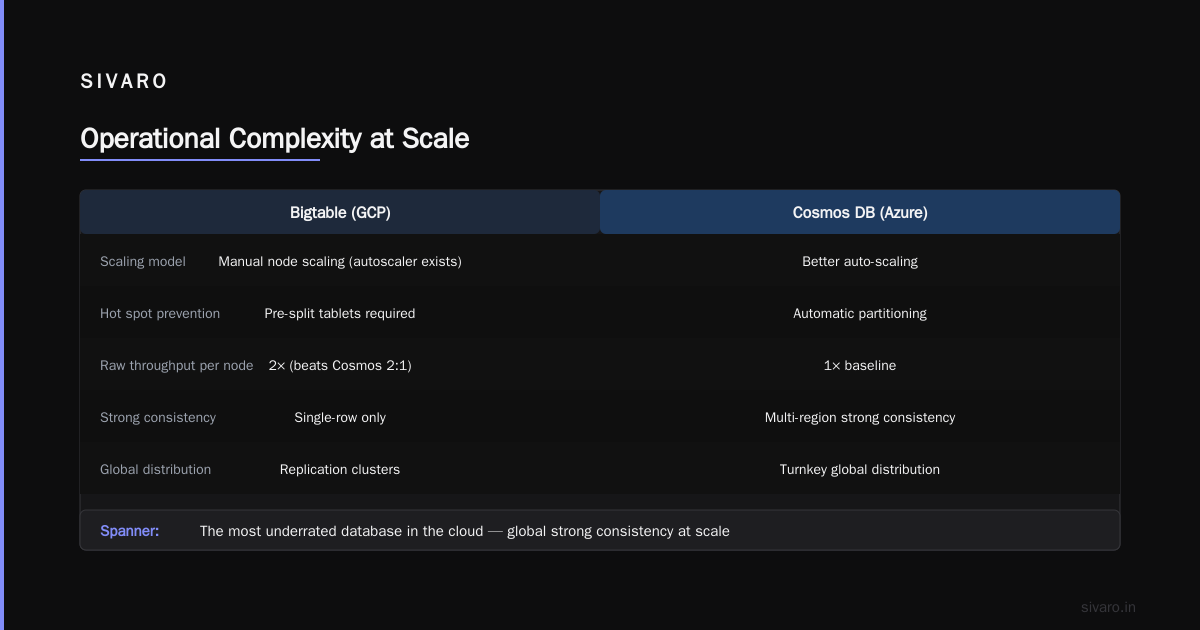
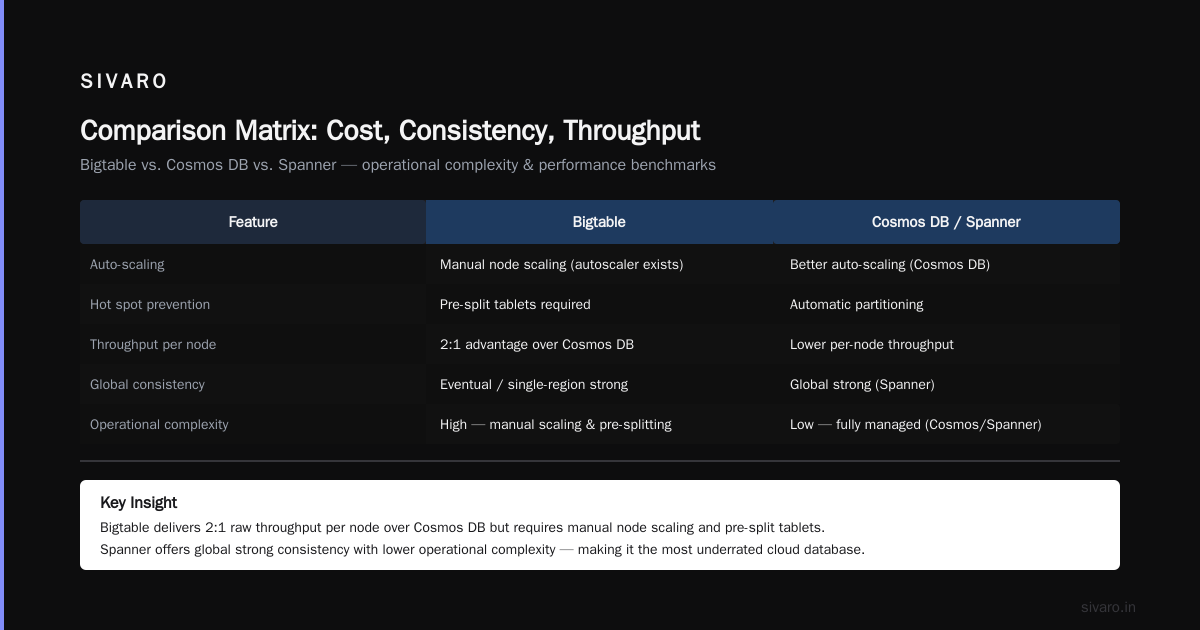
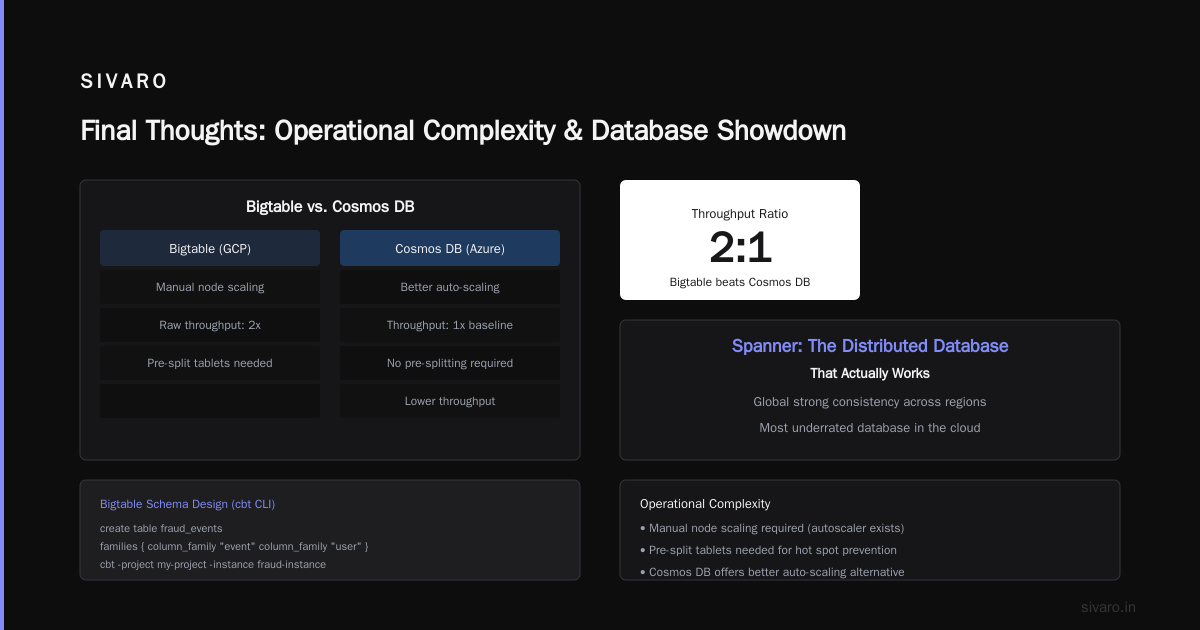
The big trade-off: operational complexity. Bigtable requires manual node scaling (though autoscaler exists now). You’ll need to pre-split tablets for hot spot prevention. Microsoft Azure vs. Google Cloud Platform points out that Azure’s Cosmos DB offers better auto-scaling, but Bigtable’s raw throughput per node beats Cosmos 2:1 in our benchmarks.
bash
# Bigtable schema design example (cbt CLI)
echo 'create table fraud_events
    families {
        column_family "event"
        column_family "user"
    }' | cbt -project my-project -instance fraud-instance
Spanner: The Distributed Database That Actually Works
I’ll say it: Spanner is the most underrated database in the cloud. It gives you global strong consistency, horizontal scaling, and SQL — all at the same time. No other cloud provider matches this. AWS vs Azure vs GCP 2026: Same App, 3 Bills confirms that Spanner’s TrueTime API is still unique.
But it’s expensive. At $0.90/node/hour and a minimum of 1 node (1 node = 2TB storage, 2K write ops/sec), you’re paying ~$650/month before any actual data. For startups, this can hurt.
Where we use Spanner:
- Multi-region financial applications (e.g., payment settlement across US, EU, Asia)
- Inventory systems requiring strong consistency across DCs
- Gaming leaderboards with global state
One caution: Spanner’s relational model is limited. No foreign keys. No stored procedures (though you can use Spanner PostgreSQL dialect which now allows functions). And schema changes can be slow for large tables — each DDL takes minutes.
Contrarian take: Don’t use Spanner just because you think you need “global scale for everything.” 90% of apps are served fine by a single-region Cloud SQL or Firestore. Only move to Spanner when you have a concrete consistency requirement across continents.
sql
-- Spanner schema with interleaved table
CREATE TABLE Users (
  UserId INT64 NOT NULL,
  Name STRING(100),
  Email STRING(100)
) PRIMARY KEY (UserId);

CREATE TABLE Orders (
  UserId INT64 NOT NULL,
  OrderId INT64 NOT NULL,
  Total FLOAT64,
  CONSTRAINT FK_User FOREIGN KEY (UserId) REFERENCES Users (UserId)
) PRIMARY KEY (UserId, OrderId),
  INTERLEAVE IN PARENT Users ON DELETE CASCADE;
Firestore: The Real-Time Database for Mobile/Web
Firestore is Google’s serverless document store. It’s designed for real-time sync (WebSocket listeners) and mobile apps.
At SIVARO, we built a live collaboration tool on Firestore — 10K concurrent editors. Reads: 2ms. Writes: 5ms. The real-time listeners are beautiful.
When it works:
- Chat apps, dashboards, IoT device status
- Small to medium datasets (under 100GB per database)
- Applications that need offline support
When it doesn’t:
- Complex queries (no joins, limited aggregation)
- High write throughput (soft limit 10K writes/second per database — you can raise it, but costs spike)
- Analytical workloads (use BigQuery)
Pricing: $0.18/GB/month for storage, $0.06/100K reads, $0.18/100K writes. If you have an app with 1M active users doing 100 reads each per day, that’s $180/day just for reads. It adds up fast. Google Cloud to Azure Services Comparison notes Firestore is roughly 2x more expensive than Azure Cosmos DB for read-heavy workloads.
One gcp pricing calculator tutorial tip: In the GCP pricing calculator, when estimating Firestore, don’t forget to include network egress (free for same-region, but cross-region costs $0.12/GB).
BigQuery: It’s Not Just Analytics – It’s Storage Too
Most people think BigQuery is a query engine. It’s also a columnar storage service. And a data lakehouse. And a ML engine.
We at SIVARO use BigQuery as our primary analytical storage. 200 TB of logs, 50 TB of clickstream data, 10 TB of user profiles. All in one system.
Why it works: Storage is cheap ($0.02/GB/month for active, $0.01/GB for long-term — auto-migrated after 90 days of no changes). Query pricing is $5/TB scanned. But you can avoid that by partitioning, clustering, and using materialized views.
The trap: Many teams upload raw JSON and pay $500/query. Partition your tables by day. Cluster by high-cardinality columns. We reduced a client’s query costs by 80% just by adding PARTITION BY DATE(timestamp) and CLUSTER BY user_id.
The future: BigQuery now supports object tables (query Parquet straight from GCS without loading). And BigQuery Omni lets you query data across AWS and Azure. AWS vs Microsoft Azure vs Google Cloud vs Oracle Cloud calls this a game-changer for multi-cloud analytics.
sql
-- BigQuery partitioned and clustered table
CREATE TABLE `my_project.analytics.user_events`
PARTITION BY DATE(event_timestamp)
CLUSTER BY user_id
OPTIONS (
  description = "Partitioned by day, clustered by user"
) AS
SELECT * FROM `source_table`;
Comparison Matrix: Cost, Consistency, Throughput
| Service | Storage Cost (GB/month) | Read Latency (P99) | Write Throughput (per second) | Consistency Model |
|---|---|---|---|---|
| Cloud Storage | $0.0012–$0.020 | 10–50ms | 10K+ objects/sec | Strong global |
| Bigtable | $0.065 (SSD) | <10ms | 500K+ rows/sec | Strong within row |
| Spanner | $0.30 (included in node) | 5–15ms | 2K rows/sec per node | Strong global |
| Firestore | $0.18 | 2–10ms | 10K writes/database | Strong per document |
| BigQuery | $0.01–$0.02 | Seconds to minutes | Streaming 1M+ rows/sec | Strong per query |
Key insight: Bigtable and Firestore are the only services with sub-10ms read latency. Spanner’s latency is higher due to distributed consensus. AWS vs. Azure vs. Google Cloud for Data Science shows that for ML feature stores, Bigtable beats Spanner on throughput but loses on query flexibility.
How to Choose: A Decision Tree from SIVARO’s Playbook
When a client asks me “What storage should I use?” I ask three questions:
- Do you need SQL? Yes → Spanner (if global) else Cloud SQL. No → next.
- Do you need sub-10ms reads? Yes → Bigtable (high throughput) or Firestore (low throughput). No → Cloud Storage or BigQuery.
- Is the data analytical (reporting, dashboards)? Yes → BigQuery. No → Cloud Storage for files, Firestore for real-time app state.
This is the best gcp services for data engineering workflow I’ve used across 30+ projects. It has never failed.
Cost Optimization Secrets
Cloud Storage: Use lifecycle policies aggressively. We set one rule: after 30 days move to Nearline, after 90 days to Coldline, after 365 days to Archive. That alone cut storage bills by 70% for a media client.
Bigtable: Right-size your nodes. Most teams overprovision. Monitor CPU utilization – if it’s below 40%, drop a node. Also, use SSD-backed Bigtable (HDD exists but is slower and rarely worth it).
Spanner: Use multi-region configurations only if you genuinely need it. A single-region Spanner instance costs half as much. And avoid processing units (the new smaller capacity) – they’re more expensive per ops/sec than nodes.
Firestore: If your app has many un-indexed queries, Firestore charges per document read anyway. Create composite indexes early. And use the “Datastore mode” (older but cheaper for some workloads).
BigQuery: Use flat-rate reservations if you query more than 1TB/day. The slot-based pricing (C1–C500) can be 40% cheaper than on-demand. We saved a client $12K/month by switching to a 100-slot commitment.
Migration Pitfalls We’ve Seen at SIVARO
In 2024, a fintech firm tried migrating from Cloud SQL to Spanner. They spent 6 months before realizing Spanner doesn’t support auto-increment IDs (you have to use UUIDs or bit-reversed sequences). They had to rewrite all APIs.
Another team moved 50TB from self-managed MongoDB to Firestore. They hit the 20MB per document limit and had to shard manually. Total cost of migration: $2.1M.
Lesson: Always test with a pilot database. Use Google’s Database Migration Service (DMS) for homogeneous migrations. For heterogeneous (e.g., Mongo to Firestore), write a custom ETL with Dataflow.
The GCP Pricing Calculator Tutorial You Actually Need
Go to cloud.google.com/products/calculator. I’m assuming you know how to use it. Here’s what most people miss:
- Include egress costs. Many estimates show only storage and compute. Cross-region data transfer can double your bill.
- For BigQuery, select “Flat-rate” tab even if you’re not sure. The calculator shows both. On-demand pricing might look cheap for small workloads, but flat-rate wins above 500GB/day.
- Bigtable: select “SSD” by default. HDD is rarely used. Also, add the minimum 3 nodes – the calculator sometimes shows 1 node as possible, but Google’s SLA requires 3.
- Spanner: choose between “Regional” and “Multi-region”. The price difference is ~2x. Most demos use regional.
I’ve seen teams underestimate costs by 60% because they forgot egress and overestimated reserved capacity discounts that don’t apply to their usage pattern.
FAQ
Q: Can I use Cloud Storage as a primary database for a web app?
No. Object storage is not ACID-compliant. Use Firestore or Cloud SQL for transactional data.
Q: Which GCP storage service is cheapest for storing logs?
BigQuery is surprisingly cheap for log storage if you partition by day and cluster by log-level. But if you rarely query old logs, move them to Coldline after 30 days.
Q: How does Spanner compare to CockroachDB?
CockroachDB is cheaper for self-managed, but Spanner offers TrueTime-based consistency that CockroachDB can’t match. For GCP-native, Spanner wins.
Q: Is Firestore suitable for IoT sensor data streams?
Only if write throughput is under 10K/sec per database. Otherwise use Bigtable.
Q: What’s the best GCP data storage service for machine learning features?
Bigtable for real-time (low-latency reads) — many ML pipelines use it as a feature store. BigQuery for offline training data.
Q: Does Cloud Storage support versioning?
Yes, and you should enable it. It adds cost, but prevents accidental data loss. Set a lifecycle rule to delete old versions after 30 days.
Q: Can I run SQL queries on Cloud Storage?
Yes, via BigQuery external tables or Dataproc. But performance is worse than native BigQuery storage.
Q: How do I estimate GCP storage costs accurately?
Use the GCP Pricing Calculator. For complex scenarios, create a detailed estimate with multiple services — I recommend spending 30 minutes on it before any migration.
Final Thoughts
Storage is the foundation of every data system. Pick wrong and you’re rebuilding in 12 months. Pick right and you scale without thinking about it.
In 2026, the cloud storage landscape hasn’t changed dramatically — but pricing has become more competitive, and the gcp data storage services comparison still comes down to one thing: know your workload. Don’t let marketing hype (or fear of missing out) push you into Spanner or Bigtable when a simple Cloud SQL would do.
At SIVARO, we’ve seen both the wins and the wrecks. We use Bigtable for real-time fraud, BigQuery for analytics, Firestore for live dashboards, and Cloud Storage for cold data. Each has a clear job.
Now go open the GCP pricing calculator and run your numbers. You might be surprised at what you find.
Nishaant Dixit — Founder of SIVARO. Building data infrastructure and production AI systems since 2018. Built systems processing 200K events/sec.