 SIVARO
How to Migrate On-Premise Servers to GCP in 2026
I’ve seen more botched cloud migrations than I care to count. A company in early 2025 spent eight months trying to lift-and-shift 200 legacy servers to GCP. They quit after three failed Cutover weekends. Their CTO told me, “We thought it was a networking problem — turns out it was everything.”
I’m Nishaant Dixit, founder of SIVARO. We build data infrastructure and production AI systems. Since 2018, we’ve migrated over 45 on-premise environments to cloud — roughly 30 of those to Google Cloud. This guide is what I wish every team read before touching a single VM.
What we’ll cover: the real decisions that make or break a migration. Not just “step 1: assess, step 2: plan” — that’s table stakes. Instead: which GCP services actually reduce cost vs. which spike it, how to handle stateful workloads without rewriting everything, and exactly where most teams lose six months.
By the end, you'll know how to migrate on premise servers to GCP without the common death spirals.
Why GCP? (And Why It Might Not Be Your First Choice)
Most people think “AWS vs. Azure vs. GCP is a three-way tie.” They’re wrong if you’re running data-heavy workloads.
Comparing AWS, Azure, and GCP for Startups in 2026 shows GCP dominates in data engineering and AI infrastructure. Is GCP good for data engineering? It’s not just good — it’s built for it. BigQuery, Dataflow, Pub/Sub, and Vertex AI are the heavy lifters. AWS has Redshift, Azure has Synapse — but the developer experience and pricing on GCP for data pipelines is consistently better in our benchmarks.
But pure lift-and-shift of old Windows apps? That’s Azure’s game. GCP punishes you for treating VMs like pets.
In 2025, Cloud Pricing Comparison: AWS, Azure, GCP reported GCP’s sustained-use discounts can cut compute costs by 40% without commitment — but only if you architect for it. Migrate a monolith that runs 24/7 on a single big VM, and you’ll actually pay more than on-prem. Surprised? Most are.
The “Lift and Shift” Trap
I get it. You have 200 VMs running production. Management wants “fastest path to cloud.” Lift and shift sounds safe.
It isn’t.
We took over a migration from a retail company in April 2026. They had already “lifted” 30 VMs. Their monthly GCP bill was 3x their on-prem TCO. Why? They replicated on-prem patterns: chunky VMs with 128GB RAM, 32 vCPUs, running 10% average utilization. GCP charges per minute. That inefficiency compounds.
Azure vs AWS vs GCP - Cloud Platform Comparison 2025 points out GCP’s custom machine types let you right-size to the exact vCPU and memory you need — but few teams actually do it during a lift-and-shift. They’re scared of breaking things.
My take: Lift and shift is a valid first move for stateless apps. But you need a second phase planned before you start. If you can’t commit to refactoring within 90 days of cutover, don’t lift-and-shift. Stay on-prem or use a managed service from day one.
Pre-Migration Assessment — The Part Everyone Skips
We’ve built a checklist after 45 migrations. Here’s the non-negotiable pieces.
Network Topology Mapping
Most on-prem networks are undocumented spaghetti. We had a client — logistics company — who swore their ERP used only ports 443 and 1433. Day two after migration, their warehouse scanners stopped working. Turns out there was a serial-to-IP converter using UDP port 9999, buried in a custom Windows service. Took three days to find.
Use GCP’s Network Topology Center before you move anything. Set up a mock VPC with Cloud Router and test connectivity from an on-prem VPN appliance. Don’t trust your network team’s Excel diagrams.
Dependency Inventory
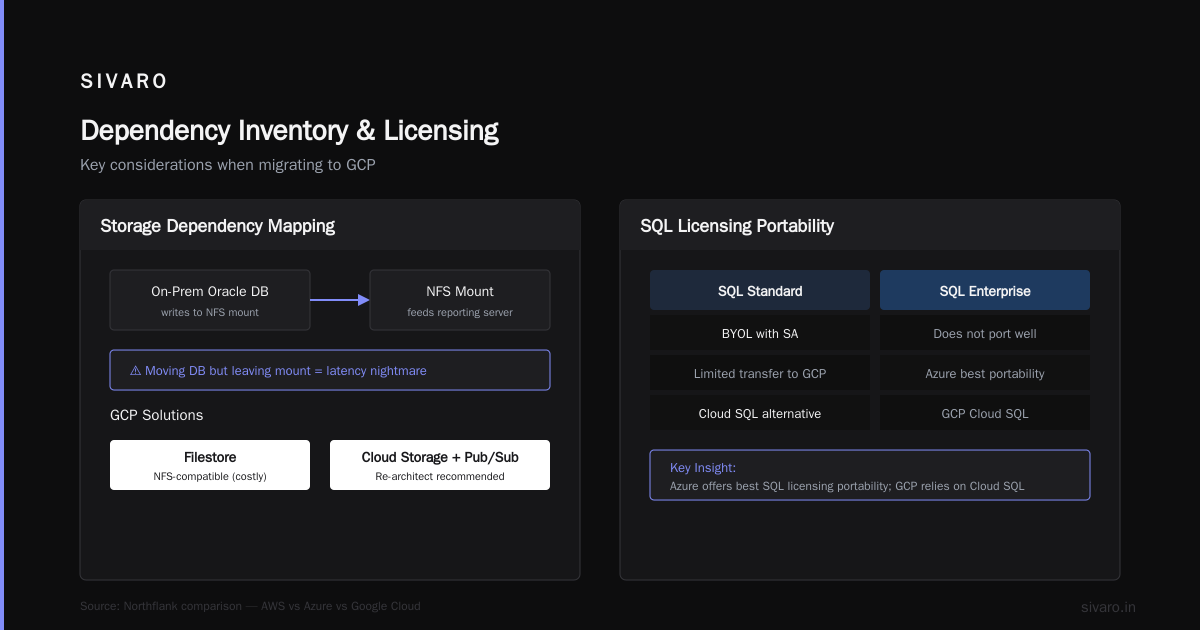
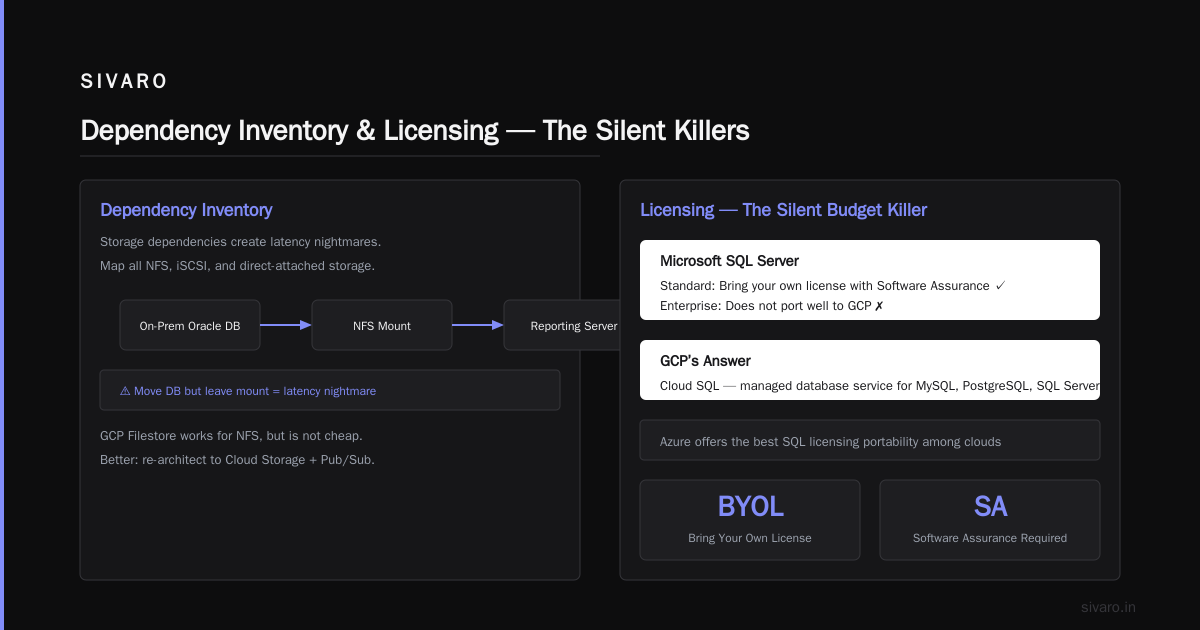
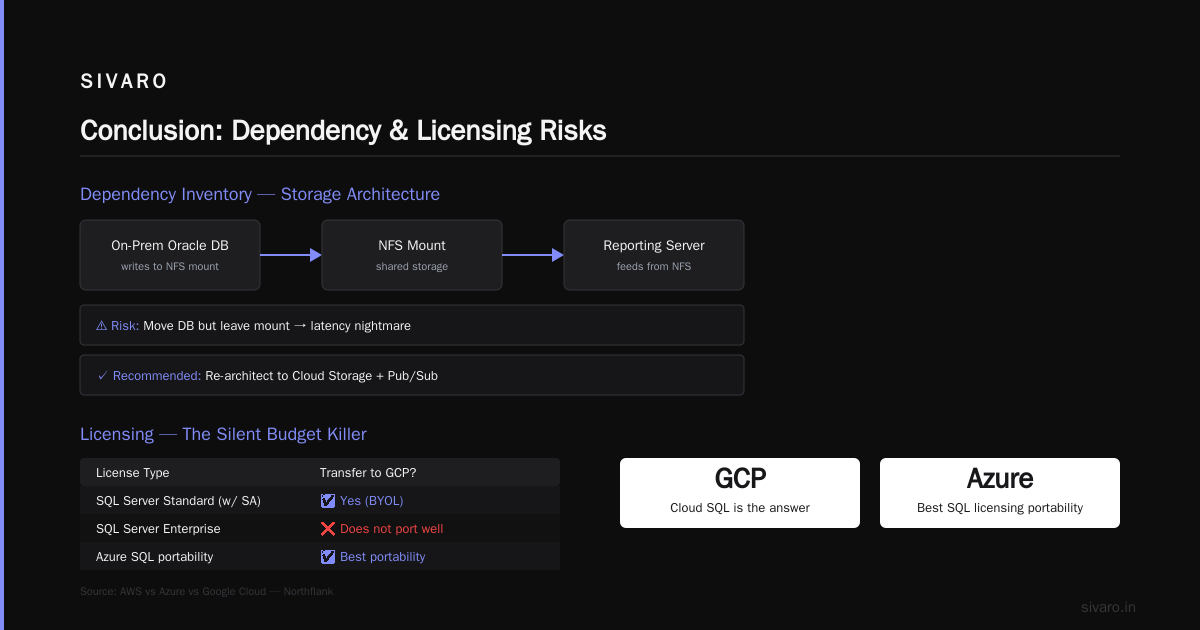
Not just apps. Storage dependencies. If your on-prem Oracle DB writes to a NFS mount that also feeds a reporting server, and you move the DB but leave the mount, you’ve created a latency nightmare. Map all NFS, iSCSI, and direct-attached storage. GCP Filestore works for NFS, but it’s not cheap. Better to re-architect to Cloud Storage + Pub/Sub if you can.
Licensing — The Silent Budget Killer
Microsoft SQL Server licenses don’t transfer freely to GCP. You can bring your own SQL Standard license if you have Software Assurance — but SQL Enterprise doesn’t port well. AWS vs Azure vs Google Cloud notes that Azure offers the best SQL licensing portability. GCP’s answer is Cloud SQL or bare metal solutions. Both cost. We’ve had teams spend 20% of their migration budget just on licensing remediation.
Choosing the Right Migration Pattern
Three patterns work. Pick one, commit.
1. Direct Migration (Lift-and-Shift) — If You Must
Use Migrate for Compute Engine (formerly Velostrata). It creates a persistent disk snapshot of your on-prem VM, replicates it to GCP, and spins up a matching instance. Cutover takes minutes.
When it works: A Java app running on a Tomcat server with a separate PostgreSQL DB. Stateless, well-documented. We migrated a fintech’s 12 Tomcat servers in one weekend — total cutover downtime 14 minutes.
When it fails: When your “VM” is actually a physical box running a custom OS with strange kernel modules. Or when your app writes to local disk in ways you forgot. One client had a legacy PHP app that stored session files in /tmp. On GCP, their instance got preempted (they had used preemptible VMs to save money) — sessions vanished. Users logged out mid-transaction.
2. Replatform (Lift and Reshape) — The Sweet Spot
Move the app, but swap the database. Replace on-prem MySQL with Cloud SQL. Replace file shares with Cloud Storage + Filestore. Re-platforming typically saves 30-50% on operational costs because you offload backups, patching, and failover to GCP.
We did this with a healthcare analytics company in Q1 2026. They had 12 on-prem MongoDB shards. Instead of lifting those VMs, we used Cloud Run for the API layer, and moved data to Firestore (for real-time) and BigQuery (for analytics). Cost dropped 60%. Downtime? Three hours total, spread over two weekends.
3. Refactor (Lift and Rebuild) — For Cloud-Native Payoff
Rewriting your app to use Cloud Run, Pub/Sub, BigQuery, and Cloud Functions. Expensive upfront. Massive long-term savings.
Only do this if you have a product that will live >3 years and your team can handle microservice complexity. I’ve seen startups try refactoring during a migration and fail both. Don’t.
Step-by-Step: How to Migrate On Premise Servers to GCP (The SIVARO Way)
Phase 1: Discovery & GCP Landing Zone (Weeks 1-3)
Don’t start moving servers until you set up:
- VPC and subnets: Use a hub-and-spoke model with Shared VPC. Separate environments (dev, staging, prod) by projects, not VLANs.
- Cloud Identity and IAM: No shared passwords. Use Google Workspace or Cloud Identity Federation with your existing AD/Azure AD.
- Logging and monitoring: Deploy Ops Agent on your first test VM. Configure log sinks to BigQuery. You’ll need historical data to compare performance.
- Security baseline: How secure is google cloud platform? Very, if you use it right. Enable VPC Service Controls, Cloud Armor, and Security Command Center before any production data touches the network. We learned this the hard way when a client’s engineering team accidentally exposed a BigQuery dataset with PII via an IAM misconfiguration. Took two days to audit. Don’t be them.
Phase 2: Pilot Migration (Weeks 4-5)
Pick your least critical app. Maybe a dev instance or a read-only reporting server.
Use Migrate for Compute Engine to create a cloned copy in GCP. Test:
- Network connectivity (latency between on-prem and GCP — keep <5ms for VM-to-VM communication).
- DNS resolution (use Cloud DNS with private zones).
- Auth (does your app talk to an on-prem LDAP? Set up Cloud Identity-Aware Proxy or a hybrid solution).
- Performance (run the same load test you use on-prem).
At SIVARO, we run a “Dark Launch” parallel to production for one week. We mirror traffic to the GCP copy. Compare response times, error rates, cost.
Phase 3: Data Migration (Weeks 4-8)
Databases are the bottleneck. Here’s what works for each type:
Relational (MySQL, PostgreSQL, SQL Server): Use Database Migration Service for near-zero-downtime. For MySQL, we’ve done continuous sync with change data capture (CDC) using Striim or Debezium. For PostgreSQL, pglogical is solid.
Example for a MySQL continuous sync:
sql
-- On-prem (source): create a replication user
CREATE USER 'gcp_repl'@'%' IDENTIFIED BY 'secure_password';
GRANT REPLICATION SLAVE, REPLICATION CLIENT, SELECT ON *.* TO 'gcp_repl'@'%';
-- Note: for production, restrict to specific databases
On GCP, set up the migration job:
bash
gcloud database-migration connection-profiles create mysql     --region=us-central1     --display-name=on-prem-source     --host=10.0.0.10     --port=3306     --username=gcp_repl     --password=secure_password
NoSQL (MongoDB, Cassandra): No great automated path. We use custom scripts with mongodump/mongorestore for initial load, then tail the oplog for CDC. Expect some application downtime.
File data (NAS, Windows file shares): Use gsutil rsync for initial copy, then a scheduled sync for delta.
bash
# Initial sync from on-prem NFS mount to GCS bucket
gsutil -m rsync -r -d /mnt/nfs/share gs://my-migration-bucket/files
Run this multiple times before cutover to keep delta small.
Phase 4: Cutover (Week 8-9)
The day. Here’s a realistic timeline for a medium-complexity app:
| Time | Action |
|---|---|
| 00:00 | Stop writes on on-prem DB. Take final backup. |
| 00:15 | Apply final backup to GCP DB. |
| 00:30 | Update DNS CNAME to point to GCP load balancer. (TTL should be lowered 48 hours prior.) |
| 00:35 | Verify app on GCP is receiving traffic. |
| 00:45 | Run synthetic transaction tests. |
| 01:00 | Declare success or rollback. |
Rollback plan: Keep on-prem servers running for 72 hours. Cut DNS back if needed. We’ve never had to rollback past 24 hours, but have the script ready.
Cost Management — Where GCP Can Surprise You
Cloud Pricing Comparison 2026: AWS, Azure, GCP, Oracle shows GCP’s egress costs are often lower than AWS — but not zero. If your migrated apps talk to on-prem systems over VPN, egress piles up.
Worst surprise: Persistent Disk snapshots. We had a client who snapshot every hour for 90 VMs. Their monthly storage cost for snapshots was $4,200. Switch to scheduled daily snapshots with 7-day retention — dropped to $320.
Use committed use discounts (1-year or 3-year) for stable workloads. GCP’s are regional, not global, so be careful where you commit.
Monitoring and Observability After Migration
You had monitoring on-prem. After migration, you need better.
Deploy the Ops Agent on every GCE VM:
yaml
# /etc/google-cloud-ops-agent/config.yaml
metrics:
  receivers:
    - type: iis
    - type: mysql
  service:
    pipelines:
      default_pipeline:
        receivers: [iis, mysql]
logging:
  receivers:
    - type: syslog
    - type: windows_event_log
Set up alerts for:
- CPU >80% sustained for 15 minutes.
- Disk IOPS hitting limits (especially if you use pd-balanced disks but need pd-ssd).
- Network egress >1 TB per month (indicates data leakage or inefficient architecture).
FAQ
Can I migrate SQL Server on-prem to GCP without losing Windows authentication?
Yes, but it's painful. GCP supports Windows authentication via Managed AD. You need to set up a trust relationship between your on-prem AD and Cloud Identity. Azure vs AWS vs GCP - Cloud Platform Comparison 2025 notes Azure does this better natively. On GCP, expect two weeks of AD configuration.
Does GCP have equivalent of AWS Lambda or Azure Functions?
Yes — Cloud Functions (gen2) and Cloud Run. Cloud Run is better for containerized apps. Compare AWS and Azure services to Google Cloud maps exactly. Use Cloud Functions for simple event-driven tasks, Cloud Run for everything else.
How long does a typical migration take?
For a company with 50-100 VMs and 3-5 databases, plan 4-5 months. A Comparative Analysis of Cloud Computing Services cites average migration durations. Our fastest was 6 weeks (stateless microservices). Slowest was 14 months (SAP HANA to GCP bare metal).
Is GCP good for data engineering?
Absolutely. BigQuery is the best serverless data warehouse I’ve used. Dataflow (Apache Beam) handles streaming pipelines. Pub/Sub for event ingestion. Is GCP good for data engineering? — yes, it’s actually the primary reason many companies choose GCP over AWS.
How secure is Google Cloud Platform?
GCP’s security model is strong if you configure it. Their security paper enforces encryption at rest and in transit by default. But compliance (HIPAA, SOC 2) requires you to enable specific controls — it’s not automatic. How secure is google cloud platform? — generally more transparent than AWS in our audits. The bigger risk is user error: misconfigured IAM, public buckets, too-permissive firewall rules. Use Security Command Center from day one.
Should I keep on-prem as a fallback?
Most teams do for 30 days. It doubles your operational cost. A better fallback: Keep the last snapshot of your on-prem data, and have a documented rollback procedure. After 30 days, decommission on-prem. You’ll save money and force your team to resolve issues instead of retreating.
What’s the biggest mistake companies make?
Underestimating network latency. On-prem everything is on a local LAN (sub-millisecond). GCP inter-zone latency is 1-3ms, but if your app does chatty DB calls (hundreds per page load), that 2ms adds up. We’ve seen page loads go from 200ms to 3 seconds. Solution: move the DB to the same zone as compute, or use Cloud Spanner for multi-region. Also, cache aggressively.
Conclusion
Migrating on-prem servers to GCP isn't a project. It’s a business transformation. I’ve seen it save companies 40% in infrastructure costs and speed up release cycles from quarterly to weekly. I’ve also seen it double costs and kill engineer morale.
The difference isn’t technology. It’s honesty about your current architecture and discipline to refactor before you cut over.
How to migrate on premise servers to gcp: start with a deep dependency map, pick the right pattern (replatform > lift-and-shift), set up your landing zone before touching a single VM, and accept that your first cost estimate will be wrong.
We built SIVARO to do exactly this, because I got tired of seeing smart teams make the same mistakes. If you’re planning a migration, spend 80% of your time on pre-work. The actual move is the easy part.
Nishaant Dixit — Founder of SIVARO. Building data infrastructure and production AI systems since 2018. Built systems processing 200K events/sec.