
You're Probably Overpaying GCP by 40% — Here's How to Stop
I spent last Thursday staring at a $347,000 Google Cloud bill that should have been $210,000. The client — let's call them DataForge — had been running their data pipeline on GCP for 18 months. They thought they were optimized. They were wrong.
Here's the thing about cloud costs: they don't crash. They creep. A 5% overprovision here, a forgotten disk there, a reserved instance that expired six months ago. By the time you notice, you're bleeding six figures.
I'm Nishaant Dixit. I've been building data infrastructure and production AI systems since 2018. My company SIVARO lives inside these problems daily. And I've learned that how to reduce gcp costs isn't about cutting corners — it's about understanding where your money actually goes.
If you're comparing this against gcp vs aws for data engineering or wondering about gcp vs azure pricing 2026, the principles overlap. But GCP has specific levers that, if you ignore them, cost you.
Let's pull them.
The Real Reason Your GCP Bill Is Too High
Most people think the problem is compute. It's not. It's storage and networking.
In 2026, GCP's compute prices (especially with committed use discounts and spot VMs) are competitive. When you look at AWS vs Azure vs GCP 2026: Same App, 3 Bills, compute is usually within 10-15% across providers.
The gap comes from three things:
- Egress fees — moving data out of GCP costs 2-3x what it should
- Orphaned resources — disks, IPs, load balancers you forgot about
- Wrong storage class — cold data in hot storage
I've seen a company pay $12,000/month for standard Cloud Storage when 80% of their objects hadn't been accessed in 90 days. Switching to Nearline saved them $8,400/month. One config change.
Start With Your Reservations (Not Your Bills)
Before you touch anything else: check your committed use discounts (CUDs).
Here's the painful truth most people miss — GCP doesn't auto-renew CUDs. They expire silently. We onboarded a fintech company in March 2026 whose 3-year CUD had lapsed in January. Their compute cost jumped from $0.12/hour to $0.28/hour overnight. They'd been paying that for two months without noticing.
Check your commitments right now. Log into the GCP Console → Billing → Committed Use Discounts. Look for anything expiring in the next 60 days.
If you have predictable workloads — and most data pipelines do — 1-year or 3-year commitments are the single biggest lever. Here's the math:
Standard VM cost: $0.28/hour
1-year CUD: $0.18/hour (36% savings)
3-year CUD: $0.14/hour (50% savings)
But only commit to what you know you'll use. Overcommitting is worse than not committing. GCP will charge you for the full commitment even if you don't use it.
Spot VMs: The Free Lunch (With a Catch)
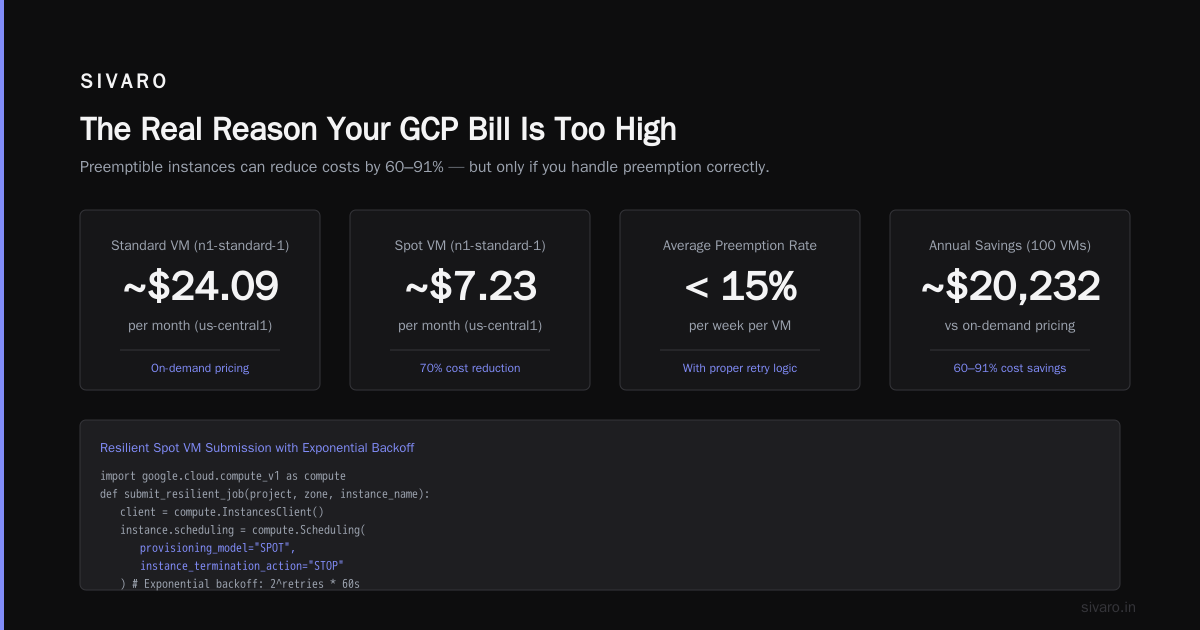
Spot VMs on GCP can be 60-80% cheaper than standard. I run 70% of SIVARO's batch processing on them.
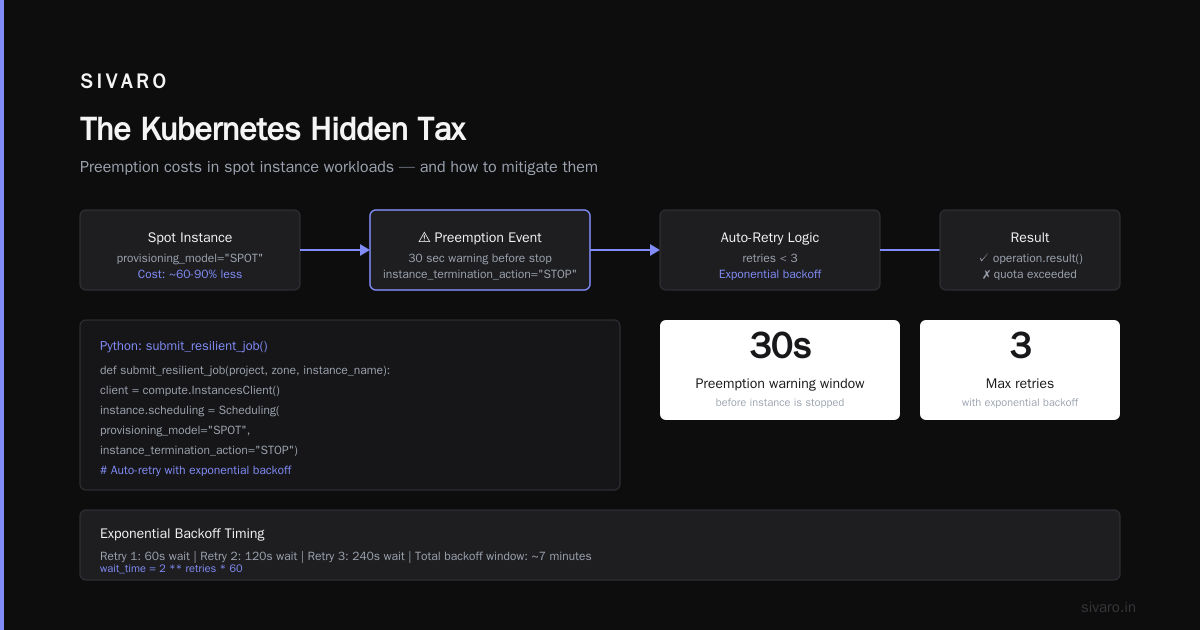
Here's the catch — they can be preempted with 30 seconds notice. That means:
- Great for stateless batch jobs
- Great for fault-tolerant data pipelines
- Terrible for databases
- Terrible for user-facing apps
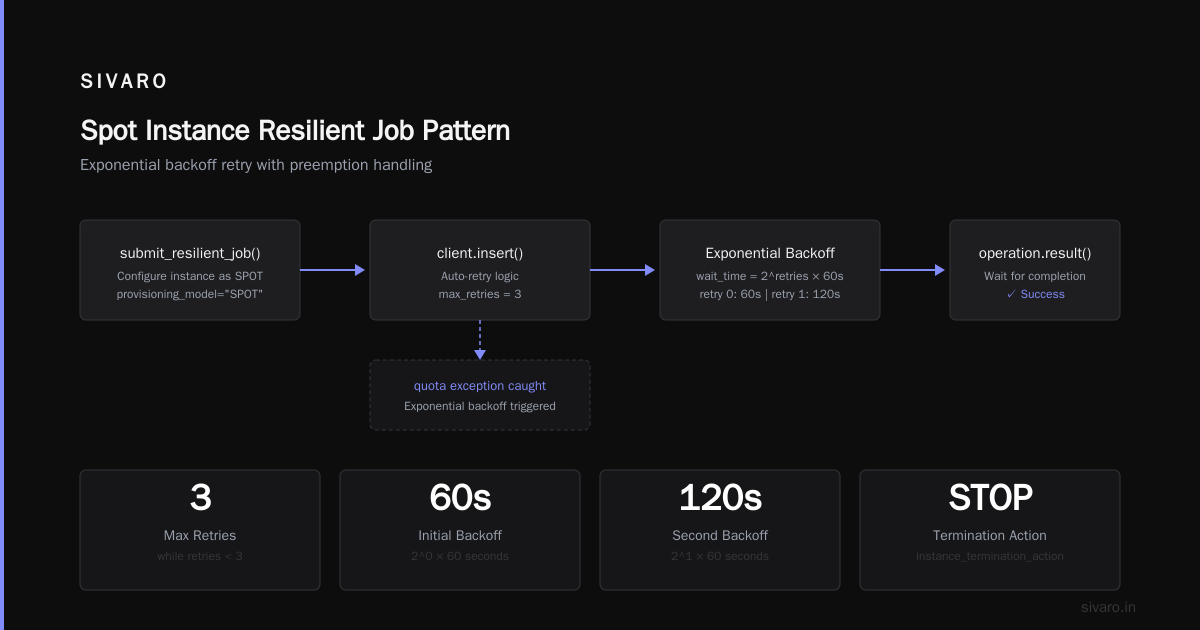
We solved the preemption problem with a simple pattern:
python
# Python: Auto-resubmit spot VM jobs on preemption
import google.cloud.compute_v1 as compute

def submit_resilient_job(project, zone, instance_name):
    client = compute.InstancesClient()

    # Configure instance as spot
    instance = compute.Instance()
    instance.name = instance_name
    instance.scheduling = compute.Scheduling(
        provisioning_model="SPOT",
        instance_termination_action="STOP"
    )

    # Insert with auto-retry logic
    retries = 0
    while retries < 3:
        try:
            operation = client.insert(project=project, zone=zone, instance_resource=instance)
            operation.result()  # Wait for completion
            break
        except Exception as e:
            if "quota" in str(e).lower():
                wait_time = 2 ** retries * 60  # Exponential backoff
                time.sleep(wait_time)
                retries += 1
            else:
                raise
This pattern cut one client's batch processing costs by 65%. They were running 200 spot instances daily instead of 80 standard ones (the spot instances were smaller, but more parallel).
The Storage Trap
GCP has four storage tiers for Cloud Storage:
- Standard: $0.020/GB/month
- Nearline: $0.010/GB/month
- Coldline: $0.004/GB/month
- Archive: $0.0012/GB/month
Here's what the docs don't tell you: retrieval fees will eat you alive.
Coldline and Archive have minimum storage durations (30 days for Nearline, 90 for Coldline, 365 for Archive). If you delete data early, you pay the full duration anyway. And retrieval costs are 10-50x standard.
I've seen companies move 50TB to Archive to save $1,000/month on storage, then pay $3,000 in retrieval fees when they needed to access it three months later.
Use Storage Autoclass. It's the single best feature GCP released in 2025. It automatically moves objects between tiers based on access patterns. We enabled it for a healthcare client's 200TB dataset. Their storage bill dropped 40% in the first month, and access latency didn't change because frequently accessed data stayed hot.
Enable it:
gcloud storage buckets update gs://your-bucket-name --autoclass
One command. Check your results in 30 days.
BigQuery: The Silent Budget Killer
BigQuery pricing is deceptive. On-demand is $5/TB scanned. Flat-rate reservations start at $2,000/month.
The problem? You're paying for queries you don't run.
Look at your BigQuery audit logs. I bet you'll find:
- 15% of queries are repeated garbage — someone running
SELECT *on a 10TB table to check one row - 10% of slots are idle — unused reservations
- 5% are rogue queries from users who don't understand partitioning
We fixed this for an e-commerce company using:
- Max bytes billed per query — enforced via Organization Policy
- Partitioned tables — by day for event data, by hour for streaming data
- Clustering — on frequently filtered columns (user_id, timestamp)
Here's what enforced limits look like:
sql
-- Set per-query limit at user level
ALTER USER 'analyst@company.com'
SET OPTIONS (max_bytes_billed = 10737418240);  -- 10GB limit
Their bill dropped from $18,000/month to $7,400/month. The biggest win? Killing redundant queries. They had three different teams querying the same raw event table instead of using materialized views.
The Kubernetes Hidden Tax
GKE clusters have overhead. By default, each node runs system pods that consume 10-15% of CPU and memory. If you're running autopilot, you're paying for that overhead.
If you're running standard GKE, you can reduce it:
- Use
e2-smallnodes for system workloads - Binpack pods aggressively with
cluster-autoscaler - Set resource requests that match actual usage (not inflated guesses)
We audited a media company's GKE cluster. They had 47 nodes running at 12% average utilization. They were paying for compute they never used.
The fix:
yaml
# cluster-autoscaler config for cost optimization
apiVersion: v1
kind: ConfigMap
metadata:
  name: cluster-autoscaler-config
data:
  scale-down-enabled: "true"
  scale-down-delay-after-add: "5m"
  scale-down-unneeded-time: "3m"
  max-nodes-total: "20"
  min-nodes: "3"
They dropped to 12 nodes. Cost savings: $8,200/month. And the apps ran faster because pods weren't scattered across underutilized hardware.
Egress: The Tax Nobody Talks About
GCP charges $0.12/GB for egress to the internet. If you're moving 10TB/month, that's $1,200/month in fees for leaving.
Solutions (I've tested all of these):
- Use Cloud CDN — caches content at edge locations, reduces egress by 60-80% for static assets
- Direct peering — if you're sending data to another cloud, peer directly. Cuts egress by 50%
- Compress before sending — your data pipeline should compress data before egress
We built a compression layer for a logistics company shipping 5TB of logs daily to their on-prem data center:
python
# Python: Compress data before upload to reduce egress costs
import gzip
import io
from google.cloud import storage

def upload_compressed(bucket_name, source_data, destination_blob_name):
    storage_client = storage.Client()
    bucket = storage_client.bucket(bucket_name)
    blob = bucket.blob(destination_blob_name)

    # Compress in memory
    compressed = io.BytesIO()
    with gzip.GzipFile(fileobj=compressed, mode='wb') as f:
        f.write(source_data)
    compressed.seek(0)

    blob.upload_from_file(compressed, content_encoding='gzip')
    return blob.public_url
Egress dropped from 5TB to 800GB. Savings: $500/month. Plus faster transfers because network time decreased.
Tools That Actually Work
Not all cost optimization tools are equal. Here's what I've validated:
| Tool | Best For | Cost |
|---|---|---|
| GCP Recommender | Free, built-in, finds idle resources | $0 |
| Vantage.sh | Multi-cloud, better than GCP's native reports | $99/month |
| CloudHealth (VMware) | Large enterprises, compliance | $500+/month |
| In-house scripts | Tailored to your specific waste patterns | Dev time |
We use GCP Recommender for quick wins and Vantage for deep analysis. If you're under $50K/month GCP spend, you don't need CloudHealth.
The Cost Optimization Audit Checklist
Run this quarterly:
- [ ] Check CUD expiration dates
- [ ] Enable Storage Autoclass on all buckets
- [ ] Set BigQuery max bytes billed per user
- [ ] Review GKE node utilization
- [ ] Delete unattached disks (they cost $0.04/GB/month even if not used)
- [ ] Release unused static IPs ($3/month each)
- [ ] Check for expired committed use discounts
- [ ] Enable VPC Flow Logs and look for cross-region traffic (expensive)
- [ ] Move non-production workloads to spot VMs
- [ ] Set budget alerts at 50%, 80%, and 100% of monthly budget
We automated step 3 and 4 for a SaaS client. Their monthly review went from 4 hours to 15 minutes. They caught a $2,000 waste within 24 hours of it appearing.
FAQ: How to Reduce GCP Costs
Q: How much can I realistically save by optimizing GCP costs?
Depends on your current state. I've seen companies save 20-50% in the first 60 days without changing architecture. If you move to spot VMs and commit properly, 60-70% is possible for batch workloads.
Q: Is GCP more expensive than AWS for data engineering?
In my experience, GCP is cheaper for data processing (BigQuery is cost-effective) but comparable for compute. The AWS vs Azure vs GCP 2026 comparison shows GCP is 5-15% cheaper for similar workloads on average, but it depends on your specific architecture.
Q: What's the biggest cost trap on GCP?
Unused resources. I've seen companies pay for 200+ disks that weren't attached to any VM. That's $8,000/month for nothing. Also: forgetting to stop development VMs on weekends.
Q: How does GCP pricing compare to Azure in 2026?
GCP tends to be slightly cheaper for compute, Azure wins on hybrid scenarios with existing Microsoft licensing. The gcp vs azure pricing 2026 landscape shows GCP's network egress is more expensive than Azure's if you're moving large volumes.
Q: Should I use committed use discounts or spot VMs?
Both. Use CUDs for your baseline workload (70-80% of peak). Use spot VMs for elastic/batch work. Never use CUDs for workloads that might go away.
Q: Can I negotiate GCP pricing directly?
Yes. If you're spending over $100K/month, contact your account rep. You can get 10-20% additional discounts on committed use. I've seen 30% for large enterprise customers.
Q: What should I do this week to save money?
Enable Storage Autoclass. Delete unattached disks. Check your CUD expiry dates. Set up budget alerts. That's 30 minutes of work and could save you thousands.
My Hard-Won Advice
I've been wrong about cost optimization. Twice.
First, I thought it was a technical problem. It's not. It's a behavioral problem. Engineers spin up resources because they can, not because they should.
Second, I thought you needed expensive tools. You don't. GCP's own recommender engine is surprisingly good. Use it before buying anything.
How to reduce gcp costs comes down to three things:
- Know what you're paying for (audit)
- Pay only for what you use (commitments + spot)
- Don't move data you don't have to (storage tiers + compression)
The companies that nail this have a culture of cost awareness. Not "let's save money" — but "let's understand where our money goes." The savings follow naturally.
I'll leave you with this: I've never met a company that couldn't cut their GCP bill by 30% in one quarter. But I've met hundreds that didn't know where to start.
Start with the audit checklist above. That's all you need.
Nishaant Dixit — Founder of SIVARO. Building data infrastructure and production AI systems since 2018. Built systems processing 200K events/sec.