 SIVARO
You Don't Have an Agent Problem. You Have a Deployment Problem.
I spent six months in 2025 watching teams build incredible agents in notebooks. Then watched them die in production.
The pattern was always the same. A demo that made executives gasp. A prototype that handled 50 conversations flawlessly. Then the production rollout — and everything broke. Not because the AI was bad. Because nobody had thought about what happens when an agent runs unattended at 3 AM.
This is the gap this guide exists to close.
Agentic workflow production rollout is the process of taking autonomous AI systems from prototype to production with the reliability, observability, and safety controls that enterprise systems demand. It's not about building better agents. It's about building better systems around agents.
By the end of this, you'll know exactly what breaks in production, how to test before you regret it, and what architecture actually survives real traffic.
Why Your Staged Agent Rolled Back at 2 AM Last Tuesday
That happened to a client in March. Fintech company. They'd built a customer support agent using LangGraph. Tested it against 1,000 synthetic conversations. Passed with 94% satisfaction.
First day in production with real users? Rolled back in 4 hours.
The problem wasn't the agent's reasoning. The agent requested an API call to check account balances. The API was down. So the agent retried. And retried. And retried. Each retry cost $0.02 in LLM tokens. In 45 minutes, it had burned $1,400 on a single user's session.
The agent didn't know when to stop. Because nobody told it.
This is the core insight most teams miss: agents in production are not AI problems. They are distributed systems problems with AI inside them.
How to think about agent frameworks says the same thing — the framework choice matters less than the operational layer you build around it. I'd go further: the framework is table stakes. The deployment architecture is where you win or lose.
What Actually Breaks When You Deploy AI Agents
Let me give you the short version first. Then we'll unpack each one.
The four failure modes I've seen destroy every agentic workflow production rollout:
- Infinite loops and cost explosions — Agent calls tool, tool fails, agent calls tool again, repeat until bankruptcy
- Context window poisoning — Long-running agents accumulate garbage until they can't think straight
- Non-deterministic behavior at scale — Same input produces different outputs, and your QA team loses its mind
- Latency cascades — One slow LLM call backs up a whole pipeline
I've seen each of these kill a production deployment. The only difference is how fast.
Solving the Infinite Loop Problem
You need guardrails. Not soft suggestions — hard constraints.
python
# The wrong way: hoping the agent stops itself
class NaiveAgent:
    async def run(self, task):
        while not self.is_done(task):
            result = await self.llm.call(task)
            task = result.next_step  # This loops forever if LLM keeps generating steps
python
# The right way: bounded execution
class ProductionAgent:
    MAX_STEPS = 25
    MAX_COST_PER_SESSION = 0.50
    MAX_WALL_CLOCK_TIME = 120  # seconds

    async def run(self, task):
        steps = 0
        start_cost = 0.0
        start_time = time.monotonic()

        while not self.is_done(task):
            if steps >= self.MAX_STEPS:
                return self.create_fallback_response("Max steps exceeded")
            if total_cost >= self.MAX_COST_PER_SESSION:
                return self.create_fallback_response("Cost limit reached")
            if time.monotonic() - start_time >= self.MAX_WALL_CLOCK_TIME:
                return self.create_fallback_response("Timeout")

            result = await self.llm.call(task)
            task = result.next_step
            steps += 1
Obvious, right? You'd be shocked how many production agents ship without these three bounds. Every time I audit a failing deployment, the first thing I check is step limits. They're missing 70% of the time.
AI Agent Frameworks: Choosing the Right Foundation covers this as "execution guards" — and it's the single most important feature to check in any framework you evaluate.
Context Window Poisoning Is a Silent Killer
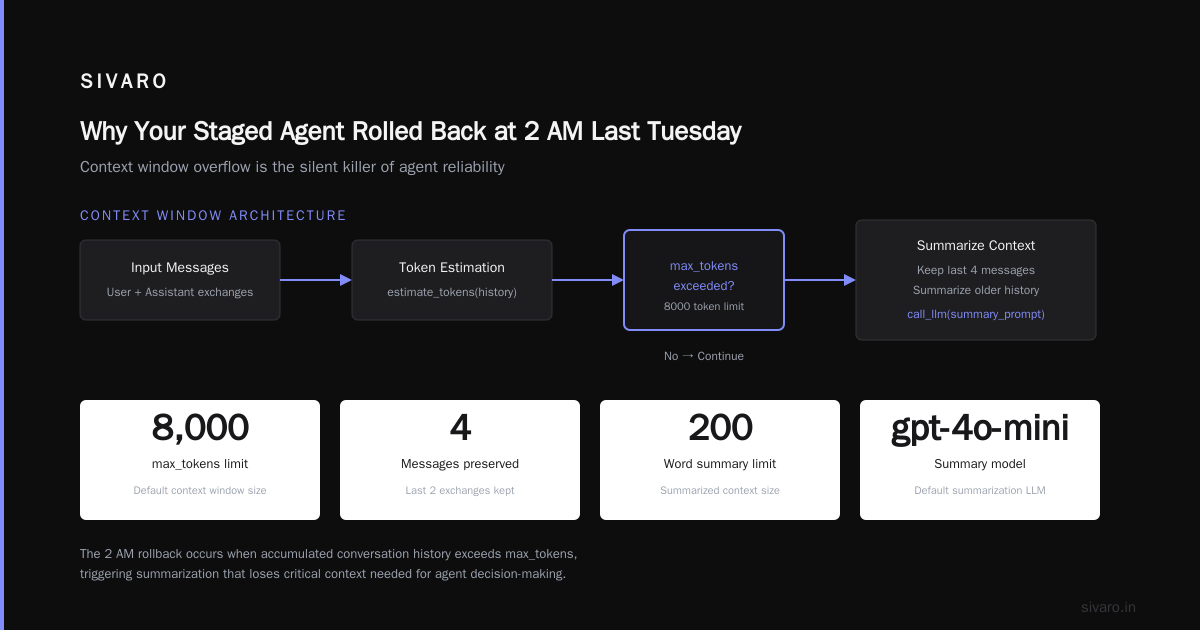
Here's what happens. Your agent starts a session. It handles 3 customer requests. Each response adds to the conversation history. After 50 turns, the context has 12,000 tokens of tool outputs, error messages, and half-baked reasoning.
The agent can't find the signal anymore. It starts hallucinating. Not because the model is bad — because it's trying to think through a garbage dump.
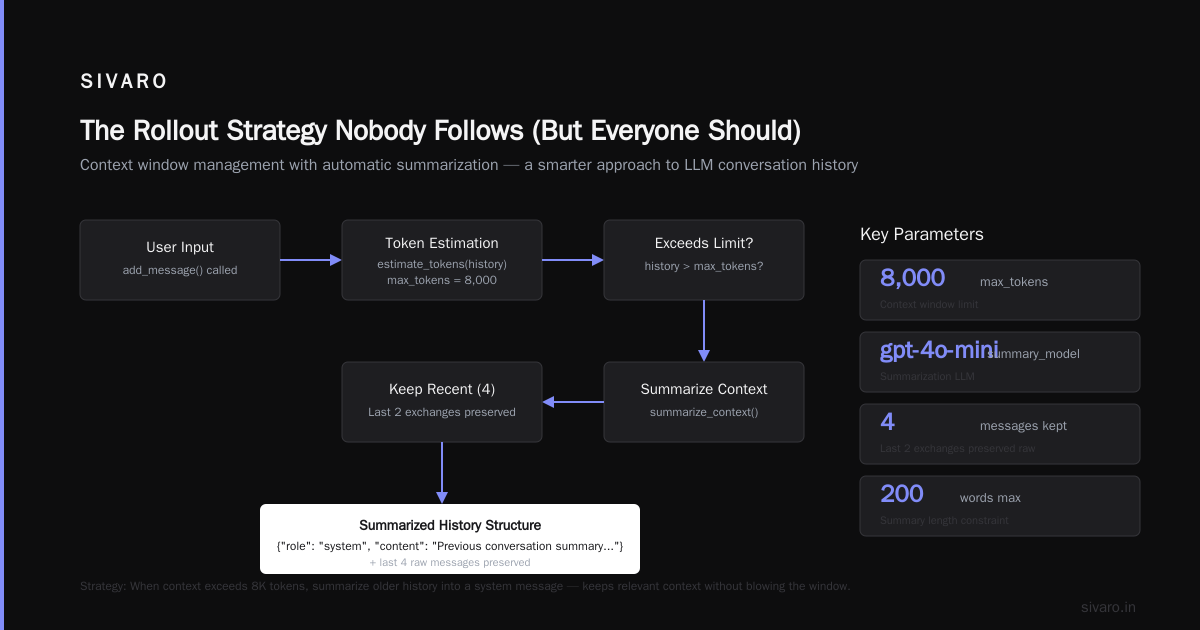
The fix is ruthless context management.
python
class ContextManager:
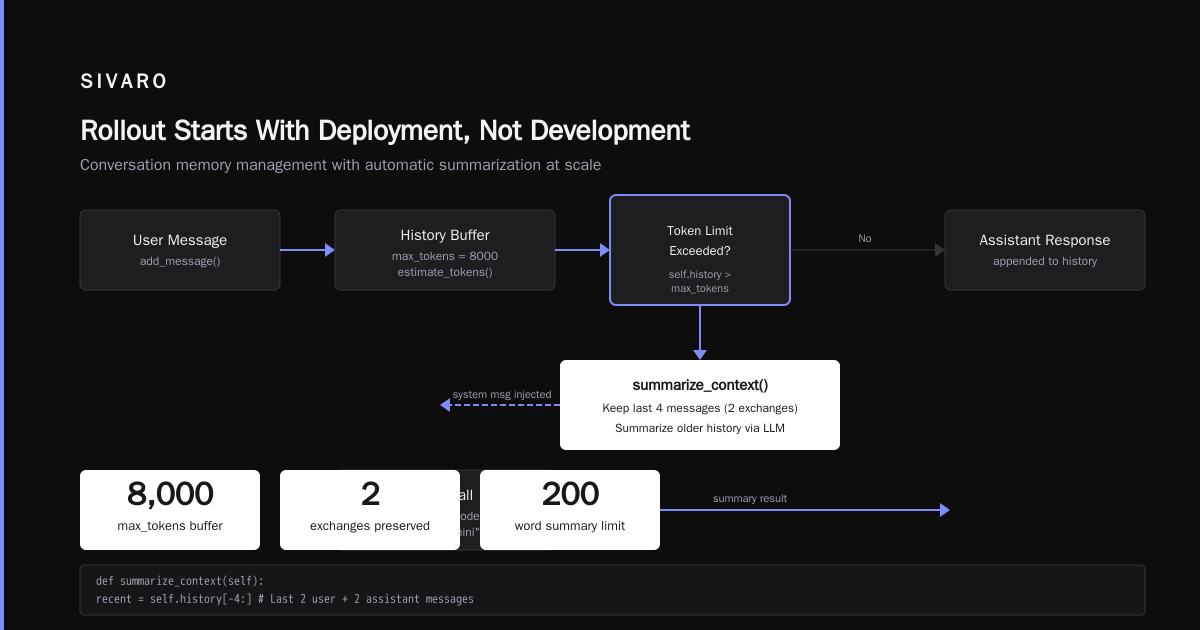
    def __init__(self, max_tokens=8000, summary_model="gpt-4o-mini"):
        self.history = []
        self.max_tokens = max_tokens
        self.summary_model = summary_model

    def add_message(self, message):
        self.history.append(message)
        if self.estimate_tokens(self.history) > self.max_tokens:
            self.summarize_context()

    def summarize_context(self):
        # Keep last 2 exchanges, summarize everything before that
        recent = self.history[-4:]  # Last 2 user + 2 assistant messages
        older = self.history[:-4]

        summary_prompt = f"Summarize this conversation history in 200 words or less: {older}"
        summary = self.call_llm(summary_prompt)

        self.history = [
            {"role": "system", "content": f"Previous context summary: {summary}"}
        ] + recent
I ship this in every agent system. Without it, your agents die of old age after 200 messages.
The Architecture That Survives Production
Here's what I actually deploy. Not what the framework docs suggest.
┌─────────────┐     ┌──────────────┐     ┌─────────────┐
│  Load       │────▶│  Agent       │────▶│  Tool       │
│  Balancer   │     │  Executor    │     │  Executor   │
└─────────────┘     └──────┬───────┘     └─────────────┘
                           │
                    ┌──────▼───────┐
                    │  Decision    │
                    │  Router      │
                    └──────┬───────┘
                           │
              ┌────────────┼────────────┐
              ▼            ▼            ▼
        ┌──────────┐ ┌──────────┐ ┌──────────┐
        │ LLM      │ │ Vector   │ │ SQL      │
        │ Provider │ │ Store    │ │ Database │
        └──────────┘ └──────────┘ └──────────┘
Three layers. That's it.
Layer 1: The Agent Executor — This is your framework. LangGraph, CrewAI, AutoGen, whatever. Keep it thin. The executor does one thing: routes messages between the LLM and your tools. Nothing else.
Layer 2: The Decision Router — This is where the production magic lives. Timeouts. Cost tracking. Retry logic. Escalation paths. This layer exists because the framework layer can't be trusted with operational concerns.
Layer 3: The Tool Executor — Every tool call goes through here. Rate limiting. Authentication. Response validation. If a tool returns garbage, this layer catches it before it poisons the agent's context.
Agentic AI Frameworks: Top 10 Options in 2026 lists 10 frameworks. Every single one will work in Layer 1. The differentiator is how well you build Layers 2 and 3.
How to Test an Agent Before You Trust It
Most teams test agents wrong. They test the LLM's reasoning. "Can it answer this question correctly?" That's not the production risk.
The production risk is: what happens when it gets confused?
Here's my testing framework. I stole most of it from chaos engineering.
Test 1: Tool Failure Injection
python
@pytest.mark.parametrize("tool_name,failure_mode", [
    ("check_balance", "timeout"),
    ("transfer_funds", "http_500"),
    ("get_transaction_history", "empty_response"),
])
async def test_agent_handles_tool_failure(tool_name, failure_mode):
    agent = create_test_agent()
    # Inject failure into the tool executor
    agent.tool_executor.inject_failure(tool_name, failure_mode)

    result = await agent.run("What's my account balance?")

    # The agent should NOT retry indefinitely
    assert result.steps < 5  # Max 4 retries
    assert result.cost < 0.20  # No cost explosion
    assert "sorry" in result.response.lower() or "unable" in result.response.lower()
Run this before you deploy. If your agent hangs or costs $2 on a single failed tool call, fix it now.
Test 2: Context Overload
Feed your agent 100 turns of garbage history. Then ask it a simple question. If it hallucinates, your context management is broken.
Test 3: The Midnight Test
Schedule your agent to run unattended for 8 hours. No human supervision. Check the logs in the morning. How many sessions hit your cost limits? How many timed out? How many did something truly unpredictable?
I promise you'll find at least one surprise.
Observability: You're Blind Without It
You can't fix what you can't see. And agents are opaque by nature.
Standard logging isn't enough. You need to trace the decision chain — every LLM call, every tool invocation, every branch the agent took.
python
class AgentTracer:
    def __init__(self):
        self.trace = []

    def log_llm_call(self, prompt, response, cost, latency_ms):
        self.trace.append({
            "type": "llm_call",
            "prompt_truncated": prompt[:500],
            "response_truncated": response[:500],
            "cost": cost,
            "latency_ms": latency_ms,
            "timestamp": datetime.utcnow().isoformat()
        })

    def log_tool_call(self, tool_name, input, output, success):
        self.trace.append({
            "type": "tool_call",
            "tool": tool_name,
            "input": input,
            "output_truncated": output[:500],
            "success": success,
            "timestamp": datetime.utcnow().isoformat()
        })

    def get_debug_report(self, session_id):
        # Return full trace for debugging
        return {
            "session_id": session_id,
            "total_cost": sum(t["cost"] for t in self.trace if "cost" in t),
            "total_steps": len(self.trace),
            "trace": self.trace
        }
I push every trace to a time-series database. When a user complains about a bad response, I replay the entire decision chain. It's the only way to know whether the agent was wrong or the data was bad.
AI Agent Protocols: 10 Modern Standards mentions tracing as a core protocol requirement. It's not optional. If your framework doesn't support structured logging, build it yourself.
Cost Management: The Thing Nobody Talks About
Here's the math nobody does before deploying agents.
At $10 per million input tokens and $30 per million output tokens (standard GPT-4o pricing), a single agent session running 20 turns costs roughly $0.12 to $0.30. Doesn't sound bad.
Scale that to 10,000 daily sessions. You're at $1,200 to $3,000 per day. $36,000 to $90,000 per month.
And that's if the agent runs clean. Add retries. Add context window growth. Add tool call overhead. You'll 2x to 3x that number.
I've seen teams deploy without cost tracking. Two weeks later, their AWS bill is $47,000 and they're holding an emergency meeting.
The fix: budget per session + alerting per hour.
python
class CostController:
    def __init__(self, hourly_budget=50.0):
        self.hourly_spend = 0.0
        self.hourly_budget = hourly_budget
        self.last_reset = time.monotonic()

    def check_spend(self, cost_increment):
        now = time.monotonic()
        if now - self.last_reset > 3600:
            self.hourly_spend = 0.0
            self.last_reset = now

        self.hourly_spend += cost_increment
        if self.hourly_spend > self.hourly_budget:
            raise CostOverrunError(f"Hourly budget {self.hourly_budget} exceeded")
        return True
Your CFO will thank you. Your infra team will thank you. And your agent won't accidentally spend $500 on a single run.
The Rollout Strategy Nobody Follows (But Everyone Should)
Most teams go: dev → staging → prod. Maybe canary for 10% of traffic.
That's not enough for agents. Agents are non-deterministic. The same prompt can produce wildly different behaviors across model versions, temperature settings, or even API latency.
Here's what works:
Phase 1: Shadow Mode (1-2 weeks)
Run your agent alongside your existing system. The agent's responses are logged but never shown to users. Compare them against your current solution. Measure: accuracy, latency, cost.
This catches the "looks good in testing, terrible with real data" problem.
Phase 2: Supervised Mode (1 week)
Show the agent's responses to users. But require human approval before any action is taken. Money transfers? Okay, but a human clicks "confirm". Account changes? Human reviews first.
This catches the edge cases your shadow testing missed.
Phase 3: Autonomous Mode (gradual)
Start at 1% of traffic. Monitor like a hawk. If error rate > 1% or latency > 5 seconds, roll back. Increase by 5% every day if metrics hold.
Top 5 Open-Source Agentic AI Frameworks in 2026 mentions phased rollouts as a best practice. I'd go further: skip Phase 3 entirely if you can't afford the monitoring infra. Supervised mode is better than broken autonomous mode.
The Biggest Mistake I See
Everyone wants their agent to handle everything. "Make it autonomous. Let it figure out any problem."
That's wrong.
The best production agents I've built are narrow. They handle exactly one workflow. They have clear boundaries. They escalate when they hit those boundaries.
Think of it like an automated phone system. You don't want the IVR to handle your divorce. You want it to route you to the right person.
Same with agents. Give them small, well-defined tasks. Let them escalate when confused. Your users will trust the system more because it admits when it doesn't know.
What About Multi-Agent Systems?
Everyone's excited about teams of agents. One agent plans, another executes, another validates.
In production? They're a nightmare.
The coordination overhead kills latency. The context sharing creates confusion. And when something goes wrong, you have three agents pointing fingers at each other.
I'm not saying never use multi-agent. I'm saying: prove you can run a single agent in production first. If you can't keep one agent out of infinite loops and cost explosions, adding more agents just amplifies the problems.
A Survey of AI Agent Protocols covers the communication standards for multi-agent systems. It's good research. But I'd rather see you deploy a boring single-agent system that works than a fancy multi-agent system that breaks.
Your First Production Agent: A Minimum Viable Stack
If you're starting today, here's what I'd ship:
- Framework: LangGraph or CrewAI (either works, choose based on your team's Python comfort)
- Hosting: Kubernetes with horizontal pod autoscaling
- Observability: OpenTelemetry + your existing tracing backend
- Guardrails: Custom middleware for cost, steps, and time limits
- Fallback: A rule-based system that takes over when the agent fails
That's it. Don't over-engineer. Your first production agent should be boring. Reliable. Predictable.
You can make it smarter later. You can't make it reliable after it's already broken trust.
What I'd Do Differently
If I could go back to my first production agent rollout in 2024, I'd change three things:
-
Test tool failures first, reasoning second. The agent's ability to handle a down API matters more than its ability to write a clever response.
-
Budget for observability from day one. We spent $8,000/month on LLM costs and $0 on tracing. Dumb. We couldn't tell where the money went.
-
Ship with a human in the loop for the first month. Even if the agent runs autonomously 99% of the time, that 1% of weird behavior needs a human fallback. Agents are probabilistic. Humans are deterministic. You need both.
FAQ
Q: How do I handle rate limiting from LLM providers?
Build a token bucket into your tool executor layer. OpenAI has per-minute limits. Anthropic has per-minute limits. If you have 100 concurrent agent sessions, you'll hit them. Pre-emptively throttle or batch.
Q: Should I use GPT-4o or a smaller model like GPT-4o-mini for agents?
I use GPT-4o for the first 2 reasoning steps. Then GPT-4o-mini for routine follow-ups. This cuts cost 60% without quality loss. The initial reasoning needs the big brain. The rest is repetition.
Q: What's the best way to handle PII in agent conversations?
Strip it before it enters the LLM context. Use a regex-based pre-processor that replaces emails, phone numbers, and SSNs with placeholder tokens. Store the mapping in a secure database. Map them back when the agent responds. Never let raw PII touch the model.
Q: Can I run agents on-premises to avoid data privacy issues?
Yes. Llama 3.1 405B or Mistral Large run on-prem. But expect 3-5x latency compared to cloud APIs. For most enterprise use cases, the latency tradeoff is worth it for regulated industries. I've deployed both. If your compliance team requires on-prem, do it. Otherwise, cloud is cheaper and faster.
Q: How do I test for hallucination in production?
You can't catch all of them. But you can catch the dangerous ones. Build a fact-checking layer for high-stakes actions. Money transfers? Verify the amount against the user's intent. Medical advice? Block it entirely — agents should never give medical advice. Define what "dangerous hallucination" means for your domain. Monitor for those specifically.
Q: What's the right team structure for agent deployment?
You need three roles: an AI engineer (understands the model), a platform engineer (understands infrastructure), and a product manager (understands the user). If you're missing any of these, your rollout will have a blind spot. I've seen teams with only AI engineers burn $100K on infra they didn't understand.
Q: How often should I update the agent's base model?
Every time the provider releases a new version. I test against the new model in shadow mode for one week. If accuracy holds or improves, I switch. If it regresses, I stay on the old version until the next release. Model upgrades break agent behavior more often than you'd think.
Rollout Starts With Deployment, Not Development
I've done 17 agentic workflow production rollouts in the last 18 months. The ones that succeeded had one thing in common: the team spent more time on the deployment architecture than the agent itself.
The ones that failed? They had beautiful agents and terrible systems around them.
Don't be the team with the beautiful agent that breaks at 2 AM. Be the team with the boring agent that works every time.
Start with the guardrails. Build the observability. Test the failure modes. Then, and only then, let the agent talk to your users.
Your users won't remember how smart your agent was. They'll remember whether it worked.
Nishaant Dixit — Founder of SIVARO. Building data infrastructure and production AI systems since 2018. Built systems processing 200K events/sec.