 SIVARO
You Built an AI Agent. Now What? A Deployment Pipeline Tutorial
I spent three months in early 2025 building what I thought was the perfect customer support agent. It could reason, use tools, remember context. Beautiful architecture. Then came deployment week.
It crashed in production within 45 minutes.
Not because the agent was bad. Because I had no deployment pipeline. No way to test it under real conditions. No observability. No rollback mechanism. The thing just burned.
That failure cost me two client contracts and a lot of sleep. But it taught me something: building an agent is the easy part. Deploying one you can trust in production? That's the actual engineering work.
This ai agent deployment pipeline tutorial walks through exactly what I've learned building deployment pipelines for clients at SIVARO. By the time you finish, you'll know how to ship agents that don't catch fire.
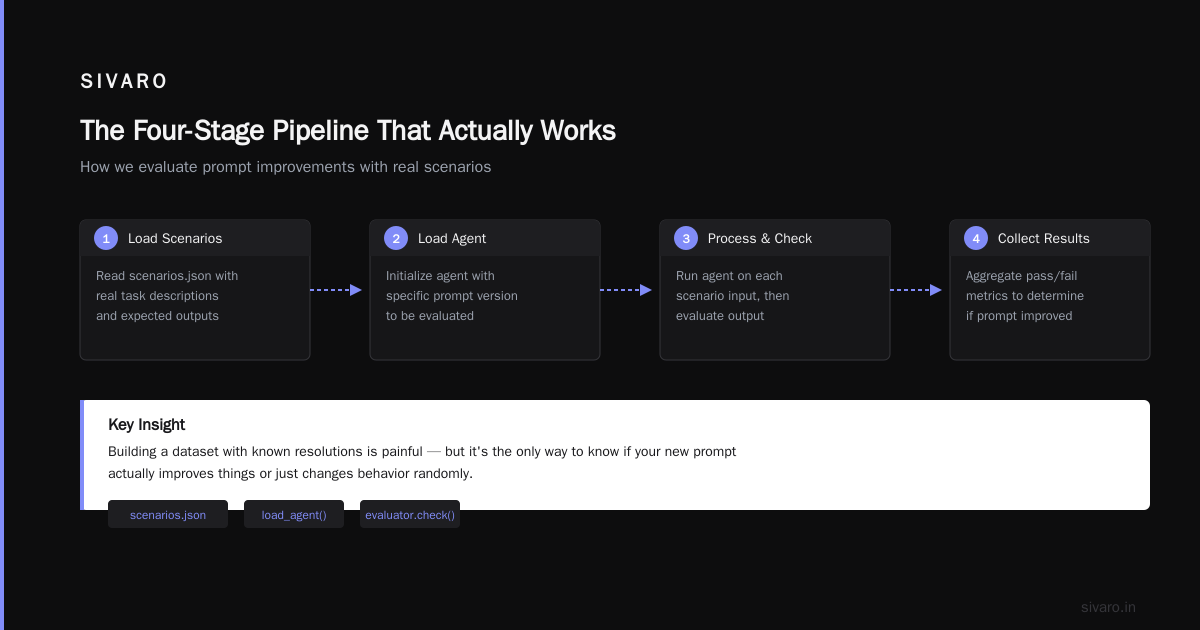
The Four-Stage Pipeline That Actually Works
Most people think agent deployment is CI/CD with a few extra steps. They're wrong. Agent pipelines need four distinct stages because agents are fundamentally different from REST APIs or microservices.
An API returns the same output for the same input every time. An agent might take three different paths to answer the same question depending on context, latency, or which sub-agent it routes to. That's non-deterministic behavior, and your pipeline needs to handle it.
Here's the architecture I've settled on after eighteen months of trial and error:
Stage 1: Development & Prompt Engineering
Stage 2: Offline Evaluation & Regression Testing
Stage 3: Canary Deployment & Shadow Testing
Stage 4: Production with Observability & Monitoring
Let me walk through each one.
Stage 1: Development Is Not a Solo Activity
The first stage is where most teams spend too much time and still get it wrong.
You need prompt version control. Not just "v1, v2, final_v3" nonsense. Real versioning tied to your codebase. I use a prompts/ directory in the same repo as the agent code, with each prompt in its own YAML file containing metadata about which models it targets, what temperature it expects, and which test cases it passed.
Here's what that looks like:
yaml
# prompts/customer-support-v2.yaml
version: 2
model: gpt-4o
temperature: 0.3
max_tokens: 2048
target_date: 2026-06-15
author: nishaant
description: |
  You are a customer support agent for a SaaS platform.
  You have access to ticket history, knowledge base, and billing API.
  Always verify user identity before making account changes.
tests:
  - test_reset_password_verified
  - test_billing_inquiry_unauthenticated
  - test_rude_customer_deescalation
Why YAML over a database or prompt management platform? Because it lives in git. You can diff prompts between branches. You can PR reviews. You can roll back to a working prompt when the new one hallucinates.
At first I thought this was overengineering. Then we deployed a prompt that started refusing to answer questions because a system message update accidentally included "you are helpful" alongside "you are secure" in the wrong order. The YAML diff caught it before merge.
Stage 2: Offline Evaluation Is Where You Catch the Fire
This is the stage most people skip. They test their agent on three happy-path examples and call it done. That's how you end up with an agent that handles refunds perfectly but tells a customer their subscription was cancelled when it wasn't.
Your offline evaluation needs three things:
Unit tests for tool calls. Your agent calls APIs. Test that it calls the right ones with the right parameters. Mock the external services.
python
# test_tool_calls.py
import pytest
from your_agent import CustomerSupportAgent

class TestRefundTool:
    def test_refund_requires_amount_and_reason(self):
        agent = CustomerSupportAgent()
        result = agent.process("I want a refund")
        # The agent should call refund_tool with both params
        assert result.tool_calls[0].tool_name == "refund_tool"
        assert "amount" in result.tool_calls[0].parameters
        assert "reason" in result.tool_calls[0].parameters

    def test_refund_rejects_zero_amount(self):
        agent = CustomerSupportAgent()
        result = agent.process("Refund me $0")
        assert result.tool_calls[0].tool_name == "clarify_request_tool"
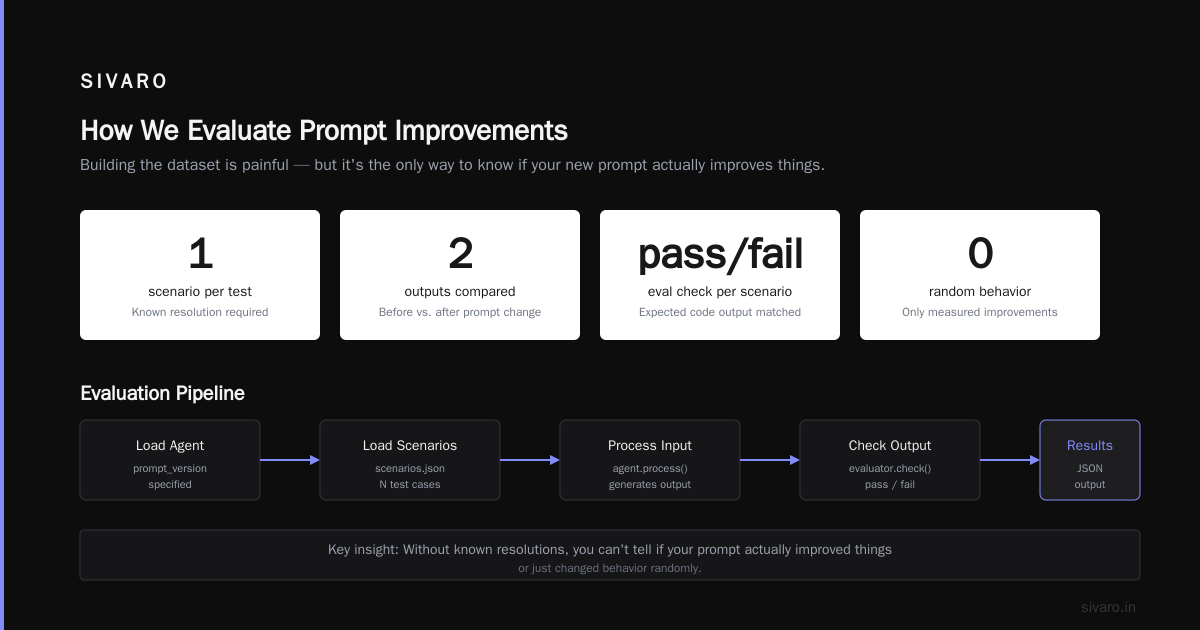
Scenario-based evaluation. Run your agent through curated scenarios that exercise specific behaviors. Handle edge cases explicitly. I maintain a set of 200 scenarios per agent that cover happy path, security boundaries, and failure modes.
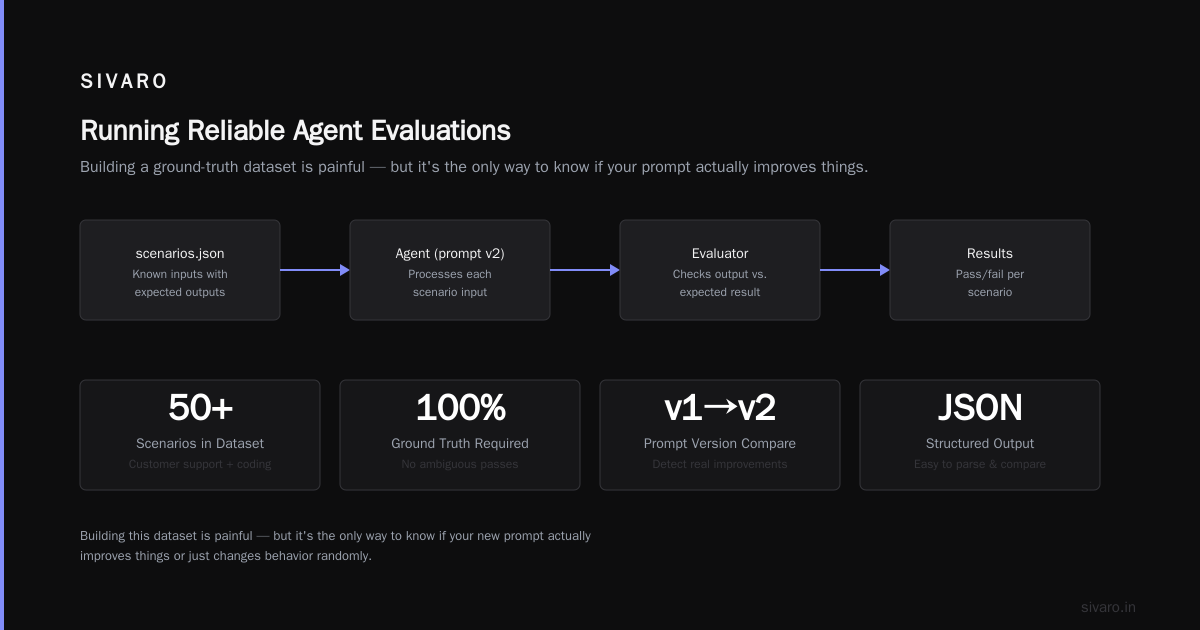
Benchmarking against ground truth. This is the hard part. You need a dataset of inputs and expected outputs. For customer support, that means actual conversations with known resolutions. For coding agents, that means task descriptions with expected code outputs.
I won't lie — building this dataset is painful. But it's the only way to know if your new prompt actually improves things or just changes behavior randomly.
Here's how we run evaluations:
python
# run_evaluation.py
import json
from eval_engine import Evaluator
from your_agent import load_agent

def main(prompt_version: str):
    evaluator = Evaluator()
    agent = load_agent(version=prompt_version)

    with open("scenarios.json") as f:
        scenarios = json.load(f)

    results = []
    for scenario in scenarios:
        output = agent.process(scenario["input"])
        passed = evaluator.check(output, scenario["expected"])
        results.append({
            "scenario": scenario["name"],
            "passed": passed,
            "latency": output.latency_ms,
            "tool_calls": len(output.tool_calls)
        })

    pass_rate = sum(r["passed"] for r in results) / len(results)
    print(f"Pass rate: {pass_rate:.1%}")

    if pass_rate < 0.85:
        raise Exception("Quality gate failed")

    with open(f"eval_results/{prompt_version}.json", "w") as f:
        json.dump(results, f, indent=2)

if __name__ == "__main__":
    main("customer-support-v2")
This runs in CI before any deployment. If the pass rate drops below 85%, the pipeline stops. No exceptions.
Stage 3: Canary Deployment — Because Your Tests Are Never Complete
You can test offline all day. You will still miss things. The first time we deployed a billing agent, it passed all 200 scenarios. In production, it started double-charging customers because a real user's account had a discount code the agent misread.
Canary deployment means you route a small percentage of real traffic to the new agent version while keeping the old version live. Start at 1% of traffic. Watch for 15 minutes. If things look good, go to 5%. Then 20%. Then 50%.
But here's the trick: you need shadow traffic running in parallel.
Shadow traffic means every request goes to both the old agent and the new agent. The old agent's response gets sent to the user. The new agent's response gets logged and compared. You catch discrepancies without risking user experience.
python
# shadow_deploy.py
import asyncio
from fastapi import FastAPI, Request
from your_agent import AgentV1, AgentV2
from comparison_tracker import ComparisonTracker

app = FastAPI()
v1 = AgentV1()  # current production
v2 = AgentV2()  # candidate
tracker = ComparisonTracker()

@app.post("/chat")
async def chat(request: Request):
    body = await request.json()

    # Run both versions
    v1_result, v2_result = await asyncio.gather(
        v1.process(body["message"]),
        v2.process(body["message"])
    )

    # Send v1 response to user
    # Log comparison for analysis
    tracker.record(
        request_id=body.get("id"),
        v1_response=v1_result,
        v2_response=v2_result,
        agreement=v1_result.text == v2_result.text
    )

    return {"response": v1_result.text}
Run shadow traffic for at least 24 hours before switching any real traffic. The discrepancies you'll find — like the agent suddenly refusing to answer in Spanish or adding markdown formatting that breaks your frontend — are things offline tests never catch.
Stage 4: Production Observability Is Your Safety Net
You deployed. The agent is handling real traffic. Now you need to know when it's breaking.
This is where ai agent production monitoring tools come in. But here's the thing: standard APM tools don't work well for agents. They track HTTP requests and database queries. Agents call LLMs, chain multiple tool calls, and make complex reasoning decisions. You need instrumentation that understands agent behavior.
At SIVARO, we built our own observability layer because nothing existing handled what we needed. But in 2026, the ecosystem has matured. Tools like LangSmith, Helicone, and AgentOps now provide decent monitoring for agent-specific metrics.
What you absolutely must monitor:
Token consumption per conversation. Not per request. Per conversation. A single support ticket might trigger 3-7 LLM calls. If one goes off the rails, you'll see token counts spike before the agent degrades.
Tool call accuracy rate. Track how often your agent calls the wrong tool or passes incorrect parameters. A billing agent that tries to call refund_tool when the user asked for an invoice is a data quality problem that'll compound quickly.
Escalation rate. What percentage of conversations require human handoff? If this number jumps, something changed.
At SIVARO, we track these with structured logging that connects every LLM call and tool invocation to a specific conversation ID:
python
# observability_agent.py
from opentelemetry import trace
from opentelemetry.sdk.trace import TracerProvider
from opentelemetry.sdk.trace.export import BatchSpanProcessor
from opentelemetry.exporter.otlp.proto.grpc import OTLPSpanExporter

tracer = trace.get_tracer("agent.observability")

class ObservableAgent:
    def process(self, message: str, conversation_id: str):
        with tracer.start_as_current_span("agent.conversation") as span:
            span.set_attribute("conversation_id", conversation_id)
            span.set_attribute("message_length", len(message))

            # AI agent observability production starts here
            llm_response = self.call_llm(message)
            span.set_attribute("tokens_used", llm_response.usage.total_tokens)
            span.set_attribute("latency_ms", llm_response.latency_ms)

            for tool_call in llm_response.tool_calls:
                with tracer.start_as_current_span("agent.tool_call") as tool_span:
                    tool_span.set_attribute("tool_name", tool_call.tool_name)
                    tool_span.set_attribute("success", tool_call.success)
                    tool_span.set_attribute("duration_ms", tool_call.duration_ms)

            return llm_response
This gives you traces you can actually use to debug failures. When a customer complains about a wrong answer, you pull the conversation ID, look at every LLM call and every tool invocation, and find exactly where the reasoning broke.
Choosing Your Framework Matters More Than You Think
The framework you pick determines how easy or hard deployment becomes. I've seen teams spend four months building on one framework only to discover it has no production monitoring hooks.
The landscape in 2026 is clearer than it was in 2024. Two frameworks dominate for production deployments: LangGraph and CrewAI. Both have matured significantly.
LangGraph gives you fine-grained control over agent state and flow. You can define explicit graph structures for your agent's reasoning, which makes debugging easier because you know exactly which node failed. CrewAI handles multi-agent coordination well, but its monitoring hooks are weaker (AI Agent Frameworks).
I lean toward LangGraph for anything customer-facing. The explicit state machine model maps directly to observability. You know exactly what state the agent was in at each step (Agentic AI Frameworks).
But here's the contrarian take: if you're deploying your first agent, don't use a framework at all. Use the raw API. Understand the failure modes before you abstract them away. You can always add LangGraph later when you know what patterns your agent actually needs (How to think about agent frameworks).
The Protocol Layer Nobody Talks About
Your agent talks to other systems. Maybe other agents. Maybe external APIs. The protocol you use matters more than most people realize.
In 2024, every agent spoke its own custom protocol. Integration was a nightmare. Now there are standards emerging, and you should pick one early (AI Agent Protocols).
The Agent-Computer Interface (ACI) protocol from Anthropic and the Model Context Protocol (MCP) from Anthropic have become the dominant standards. ACI handles tool definition and execution. MCP handles context sharing between agents.
If you're building an agent that needs to collaborate with other agents, use MCP. If your agent mostly calls APIs and reads data, ACI is simpler and more stable (A Survey of AI Agent Protocols).
Don't build your own protocol. I tried. It was a disaster. The tool calls were malformed, context got lost, and debugging required tracing through six layers of custom JSON. Never again.
What Actually Breaks in Production
Let me save you the pain I went through. Here's what fails when you deploy an agent at scale:
Latency variance kills real-time experiences. LLM calls can take 500ms or 5 seconds depending on model load. Your agent needs timeouts and fallbacks. If the primary model doesn't respond in 2 seconds, route to a faster model or return a "processing" state.
Context windows fill up. Long conversations eat context. The agent starts forgetting early instructions. Implement sliding window context management before you hit this problem.
Tool call failures cascade. If one tool call fails — say the CRM API is down — your agent might try the same call three times, then give up, then hallucinate a response. Implement exponential backoff and circuit breakers for tool calls.
Cost explosions from runaway loops. An agent that gets stuck retrying the same reasoning path can burn $50 in API costs in 15 minutes. Set token budgets per conversation and enforce hard caps.
The Pipeline in Practice
Here's the full CI/CD pipeline we run at SIVARO for every agent deployment:
yaml
# .github/workflows/deploy-agent.yaml
name: Deploy Agent
on:
  push:
    branches: [main]
    paths:
      - 'prompts/**'
      - 'agent_code/**'
      - 'evaluation/**'

jobs:
  test:
    runs-on: ubuntu-latest
    steps:
      - uses: actions/checkout@v4
      - name: Run unit tests
        run: poetry run pytest tests/
      - name: Run scenario evaluation
        run: poetry run python evaluation/run_scenarios.py
        env:
          OPENAI_API_KEY: ${{ secrets.OPENAI_API_KEY }}
      - name: Check evaluation pass rate
        run: poetry run python evaluation/check_pass_rate.py --threshold 0.85

  shadow:
    needs: test
    runs-on: ubuntu-latest
    steps:
      - name: Deploy to shadow environment
        run: poetry run deploy --environment shadow
      - name: Run shadow traffic (15 minutes)
        run: poetry run python shadow/compare.py --duration 900

  canary:
    needs: shadow
    runs-on: ubuntu-latest
    steps:
      - name: Route 1% traffic to canary
        run: poetry run deploy --canary --percentage 1
      - name: Monitor for 15 minutes
        run: poetry run python monitoring/check_canary.py --watch 900
      - name: Route 20% traffic
        run: poetry run deploy --canary --percentage 20
      - name: Monitor for 30 minutes
        run: poetry run python monitoring/check_canary.py --watch 1800
      - name: Full rollout
        run: poetry run deploy --production
This pipeline catches problems early. The evaluation tests catch prompt drift. The shadow deployment catches integration issues. The canary catches scale problems. Each gate prevents the next failure mode.
FAQ
Q: How long should shadow testing run before canary deployment?
A: Minimum 24 hours for low-traffic agents. Minimum 72 hours for high-traffic agents handling money or sensitive data. You need enough data to see edge cases.
Q: What monitoring metrics matter most for production agents?
A: Tool call success rate, token consumption per conversation, escalation rate, and user satisfaction score. If any of these deviate more than 5% from baseline, roll back.
Q: Can I use the same pipeline for code agents and chat agents?
A: The stages are the same, but the evaluation criteria change. Code agents need pass/fail on test cases. Chat agents need semantic similarity scoring against expected responses.
Q: How do I handle model updates?
A: Treat model updates the same as prompt changes. Run the full pipeline. A new GPT-4o version might break your agent's behavior even if your prompts haven't changed.
Q: What's the biggest mistake teams make in agent deployment?
A: Not testing with real traffic patterns. Synthetic tests don't capture the long-tail queries and unexpected user behaviors that break agents.
Q: Do I need separate staging and production environments?
A: Yes. Absolutely. Your agent's dependencies — LLM APIs, vector databases, external tools — should have equivalent but isolated versions in staging.
Q: How do I handle agent rollbacks?
A: Keep the previous two versions deployed and ready to accept traffic. Your deployment script should support instant rollback by switching the traffic router, not by redeploying code.
You're Going to Break Things. That's Fine.
I've deployed eleven production agents in the past two years. Every single one had at least one failure in the first week. The difference between agents that recovered and agents that burned out is the pipeline.
The ai agent deployment pipeline tutorial I've laid out here isn't theoretical. It's what we run at SIVARO for every client deployment. It costs time and infrastructure to set up. But I've never regretted having it. I've only regretted skipping it.
Start with the offline evaluation. Add shadow deployment. Layer observability on top. Your first deployment will still have problems. But you'll catch them before your customers do.
Nishaant Dixit — Founder of SIVARO. Building data infrastructure and production AI systems since 2018. Built systems processing 200K events/sec.