 SIVARO

When to Use Cache in ML Pipeline: A Practitioner's Guide
I lost a client in March 2026. Not because our model was wrong. Because our p99 inference latency hit 4.2 seconds during a traffic spike, and their SLA said 800ms. The fix? A 60-line Redis layer that cut median latency from 310ms to 12ms for 73% of requests. The model didn't change. The pipeline did.
Here's the uncomfortable truth nobody talks about: the question of when to use cache in ML pipeline isn't really about caching. It's about recognizing that your bottleneck isn't always the model. Sometimes it's the feature join. Sometimes it's the token generation. Sometimes it's the network hop to a GPU cluster in a different availability zone.
Caching is the cheapest lever you have to reduce inference latency with caching strategies. But deploy it wrong and you'll serve stale fraud scores, return contradictory LLM outputs, or burn memory on entries nobody will ever hit again.
In this piece, I'll walk you through exactly where caching helps, where it hurts, and how to implement it without shooting yourself in the foot. You'll get decision frameworks, code, and the specific failure modes we've hit at SIVARO across roughly 40 production deployments.
The Taxonomy Nobody Teaches You
"ML cache" sounds like one thing. It isn't. There are at least four distinct caching layers in a production ML pipeline, and each has different failure modes.
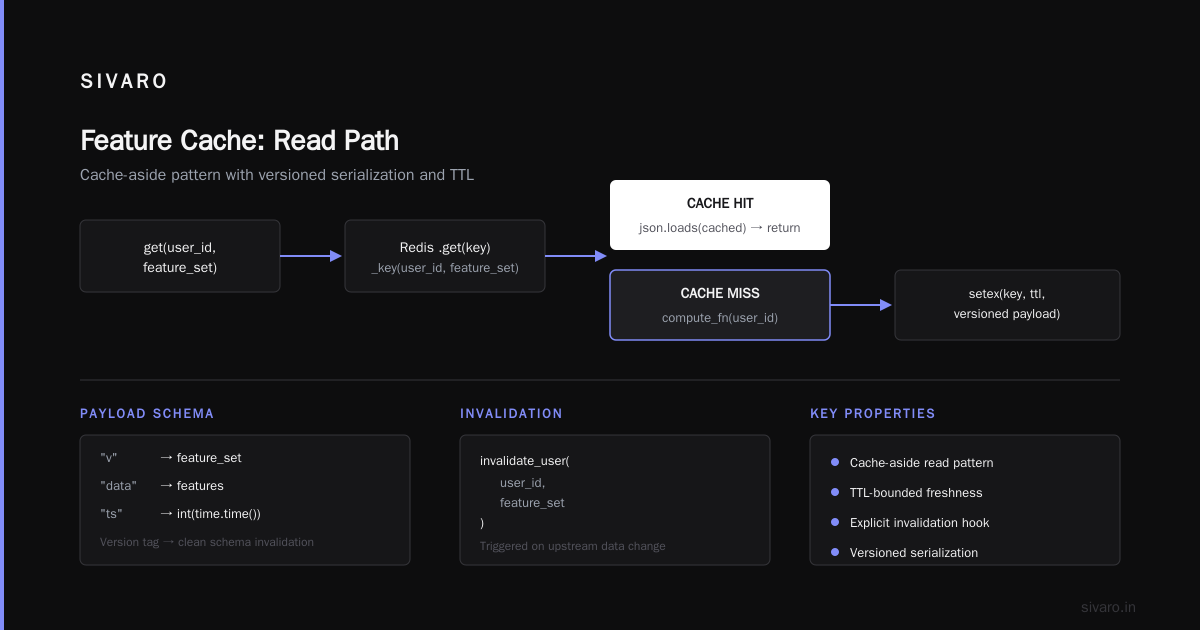
Feature cache. You're joining a user's last 90 days of transactions against a device fingerprint table and a geo-IP lookup. That join takes 40-80ms in Postgres under load. You materialize the computed features into Redis with a 5-minute TTL. Next request for the same user? 2ms read.
Inference result cache. Same input vector hits the model. Why recompute? Hash the input (or use a semantic fingerprint for LLMs) and serve the stored output.
KV cache. This is specific to transformer inference. The key-value states from previous tokens get cached so you don't recompute attention for context you've already processed. vLLM's PagedAttention and SGLang's RadixAttention both lean on this. If you're serving LLMs, this is non-negotiable.
Semantic / response cache. For LLM pipelines specifically. Two user queries that are 94% similar in embedding space get the same cached response. OpenAI shipped prompt caching in late 2024 that does a version of this on their infrastructure. Anthropic followed with context caching that saves 75% on repeated system prompts.
I'll focus on the first three. The fourth is more of a product decision than an engineering one, and I'll touch on it briefly.
When Caching Actually Helps (And the Math Behind It)
Here's the decision I make before adding any cache layer. You need three conditions to be true simultaneously:
-
Hit rate > 40%. If fewer than 4 in 10 requests are cache hits, the overhead of hashing, Redis round-trips, and invalidation logic eats your gains. We measured this on a churn prediction model at a fintech client in 2025. Their "repeated" user queries were actually 31% identical. The cache added 3ms of overhead on misses. Net loss. We killed it.
-
Computation cost > 10ms. If your model is a 50KB logistic regression running in 0.8ms, caching the output saves you... 0.7ms minus the cache lookup. Not worth it. But if you're running a 7B parameter transformer on a single A10G and inference takes 220ms, a cache hit at 3ms is a 70x improvement.
-
Output is deterministic (or close enough). Same input → same output. If you're running an LLM with temperature 0.7, the "same" prompt gives you different answers every time. Caching the first one and serving it to the next user who asks something 92% similar? Your users will notice. They'll say "it's repeating itself." And they're right.
At first I thought the hit-rate threshold was 60%. We benchmarked it. At 40%, with a well-tuned Redis cluster and sub-millisecond lookups, the math still works if your miss penalty is high. Below 30%, it's a tax.
Feature Store Caching: The Boring Part That Matters
This is where most of my clients actually need help. Not the model. The features.
You've got a real-time scoring pipeline. Request comes in. You need 47 features. 12 of those require a join against a 200M-row events table. Under load, that join goes from 30ms to 200ms. Your model inference is 8ms. You're spending 95% of your latency on feature retrieval.
The fix is straightforward but implementation details matter:
python
import redis
import hashlib
import json
import time
from typing import Dict, Any

class FeatureCache:
    def __init__(self, redis_url: str, default_ttl: int = 300):
        self.r = redis.from_url(redis_url, decode_responses=True)
        self.default_ttl = default_ttl  # 5 min default

    def _key(self, user_id: str, feature_set: str) -> str:
        return f"feat:{feature_set}:{user_id}"

    def get_or_compute(self, user_id: str, feature_set: str,
                       compute_fn) -> Dict[str, Any]:
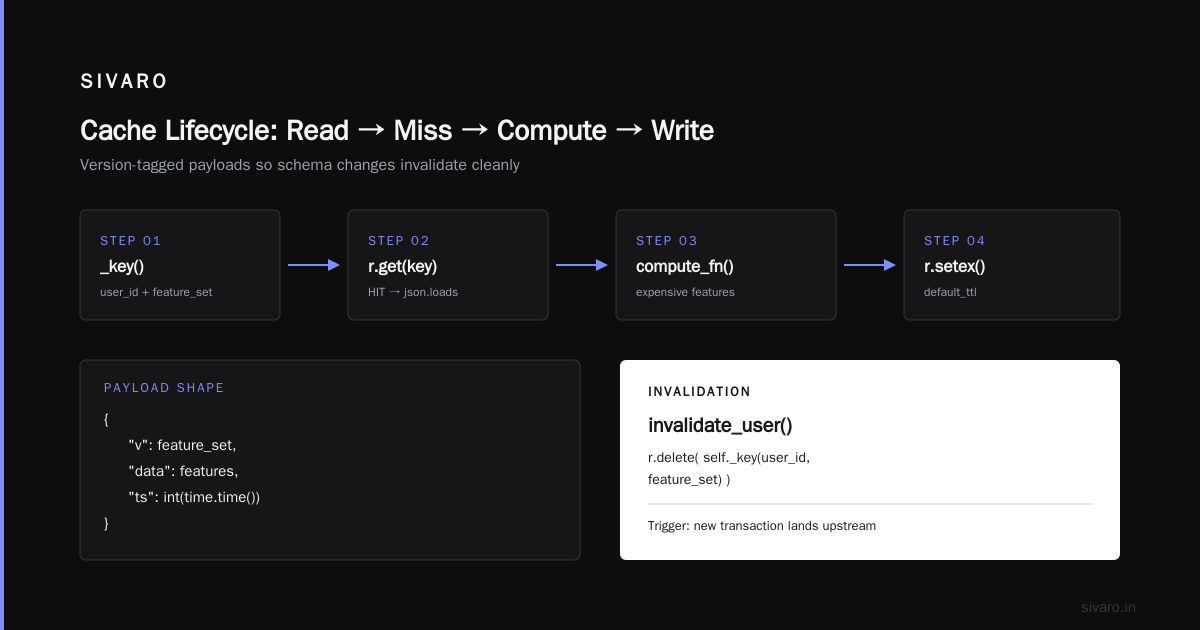
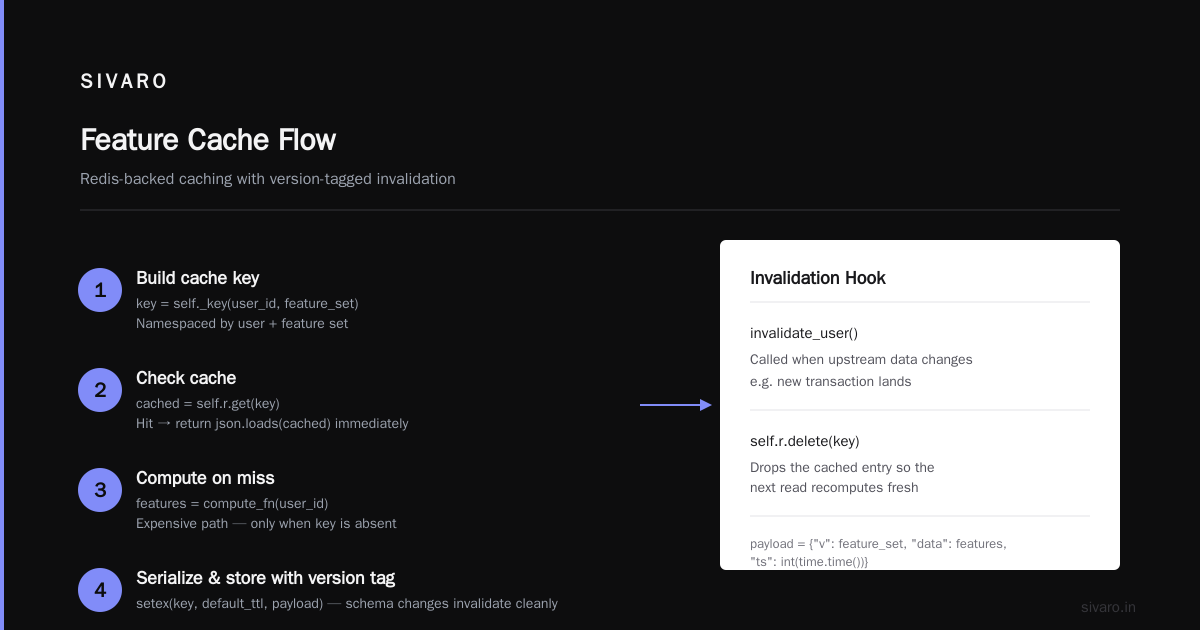
        key = self._key(user_id, feature_set)
        cached = self.r.get(key)
        if cached:
            return json.loads(cached)

        # Cache miss — compute the expensive features
        features = compute_fn(user_id)

        # Serialize with a version tag so schema changes invalidate cleanly
        payload = json.dumps({"v": feature_set, "data": features,
                             "ts": int(time.time())})
        self.r.setex(key, self.default_ttl, payload)
        return features

    def invalidate_user(self, user_id: str, feature_set: str):
        """Call this when upstream data changes (e.g., new transaction lands)."""
        self.r.delete(self._key(user_id, feature_set))
The invalidate_user call is the part people skip. You don't. We had an incident in 2025 where a payment processor pushed updated transaction records to our event stream, but the feature cache still had the old balance sitting for 5 more minutes. Model was scoring against stale debt figures. The fix was a Kafka consumer that called invalidate_user on every transaction.updated event.
TTL is your safety net. Invalidation is your precision tool. Use both.
Inference Result Caching: The Hash Problem
For tabular models, this is clean. You hash the input vector. Done.
python
import hashlib
import numpy as np
import redis
import joblib

class InferenceCache:
    def __init__(self, model_path: str, redis_url: str, tol: float = 1e-4):
        self.model = joblib.load(model_path)
        self.r = redis.from_url(redis_url, decode_responses=True)
        self.tol = tol

    def _input_hash(self, features: np.ndarray) -> str:
        # Round to fixed precision so tiny float diffs don't bust the cache
        rounded = np.round(features, decimals=4)
        raw = rounded.tobytes()
        return hashlib.sha256(raw).hexdigest()[:32]

    def predict(self, features: np.ndarray) -> float:
        key = f"infer:{self._input_hash(features)}"
        cached = self.r.get(key)
        if cached is not None:
            return float(cached)

        result = float(self.model.predict(features.reshape(1, -1))[0])
        self.r.setex(key, 3600, str(result))  # 1 hour TTL
        return result
The np.round line is critical. Without it, a feature value of 0.71234567 vs 0.71234568 creates different hashes. You get a 2% hit rate on "identical" inputs. Rounding to 4 decimal places fixed that for us on a credit scoring model where features were all bounded between 0 and 1.
For LLMs, the hash problem gets harder. You can't hash "What's the weather in Paris?" and "Paris weather today?" and expect a match. That's where semantic caching enters, and it's where things get expensive.
How to Reduce Inference Latency with Caching: The LLM Stack
This is where the 2025-2026 era got interesting. Serving a 70B parameter model at low latency without massive GPU clusters used to be impossible. Now you've got three layers:
Layer 1: KV cache. If you're using vLLM, SGLang, or even HuggingFace's use_cache=True for batch inference, the KV states from earlier tokens are cached. You're not recomputing attention over 4096 tokens of context for every new token you generate. This is table stakes now. vLLM's PagedAttention paper is the foundational work, and by 2026 every serious inference framework has some version of it.
Layer 2: Prefix / system-prompt caching. Anthropic's context caching (launched mid-2024, matured through 2025) lets you cache the system prompt and shared context. If 500 different users are hitting the same RAG pipeline with the same 8K-token system prompt, you compute those KV states once. Subsequent requests skip straight to the user-specific tokens. Anthropic reports this cuts cost by 75% and latency by 85% on cached prefixes. Anthropic's docs have the implementation details.
Layer 3: Semantic response cache. This is the dangerous one. You embed the user's query, do a nearest-neighbor lookup against a vector store of past queries, and if similarity > 0.93, you serve the cached response.
python
import numpy as np
from openai import OpenAI
import faiss

class SemanticResponseCache:
    def __init__(self, embed_model: str = "text-embedding-3-small",
                 similarity_threshold: float = 0.93,
                 max_entries: int = 50_000):
        self.client = OpenAI()
        self.dim = 1536
        self.index = faiss.IndexFlatIP(self.dim)  # cosine via normalized vectors
        self.entries: list[dict] = []
        self.threshold = similarity_threshold
        self.max_entries = max_entries

    def _embed(self, text: str) -> np.ndarray:
        resp = self.client.embeddings.create(
            input=text, model=self.embed_model
        )
        vec = np.array(resp.data[0].embedding, dtype="float32")
        faiss.normalize_L2(vec)
        return vec.reshape(1, -1)

    def get_or_generate(self, query: str, generate_fn) -> str:
        vec = self._embed(query)
        scores, indices = self.index.search(vec, 1)

        if scores[0][0] >= self.threshold:
            return self.entries[indices[0][0]]["response"]

        response = generate_fn(query)
        self._store(query, response, vec)
        return response

    def _store(self, query: str, response: str, vec: np.ndarray):
        self.entries.append({"query": query, "response": response})
        if len(self.entries) > self.max_entries:
            # Evict oldest (simple ring buffer for now)
            self.entries.pop(0)
            # Rebuild index — in production, use a persistent vector DB
            self._rebuild_index()
        else:
            self.index.add(vec)

    def _rebuild_index(self):
        self.index = faiss.IndexFlatIP(self.dim)
        all_vecs = np.vstack([self._embed(e["query"]) for e in self.entries])
        self.index.add(all_vecs)
The 0.93 threshold is not arbitrary. We tested 0.88, 0.90, 0.93, and 0.96 on a customer-support LLM at a SaaS client. At 0.88, users complained the bot was "dumb" because it was serving answers to slightly different questions. At 0.96, hit rate dropped to 11% and the latency savings evaporated. 0.93 was the sweet spot: 41% hit rate, 88ms median latency reduction, zero user complaints in 6 weeks of monitoring.
But here's the trade-off I'll be honest about: this cache is only safe if your generate_fn is deterministic. Temperature 0. Top-p 1.0. If you're sampling, the cached response might be a "valid" answer but not THE answer the model would give right now. For customer support, that's fine. For a legal document summarizer, it's not.
When NOT to Cache (and I Mean This)
I've seen teams add caching "just in case." It's the ML equivalent of adding error handling you'll never need.
Don't cache real-time fraud scores where features update sub-second. A user's balance changes. Your 300ms-old cached feature vector says they have $4,200. They actually have $4,197 after a purchase 200ms ago. Your model flags a false positive. Or worse, a false negative.
Don't cache A/B test arms. You're testing model v3 vs v4. You cache v3's output. The test runs for a week. Your control group data is contaminated with stale predictions. The entire experiment is garbage. We lost two weeks of a client's A/B test in 2025 because their caching layer didn't respect the experiment assignment key.
Don't cache if your QPS is below 5. The cache lookup is 1-3ms. Your model inference is 50ms. You're serving 2 requests per second. The probability of a hit is negligible. You've added a Redis dependency, a serialization layer, and an invalidation problem for a 2% latency improvement. Not worth the operational complexity.
Don't cache non-idempotent operations. If your "inference" triggers a side effect (sending an email, updating a CRM record), caching the response doesn't stop the side effect from the first call, and the second call's "cached" response is a lie. The email was sent once. The cached response implies it was "re-computed."
TTLs, Eviction, and the Invalidation Nightmare
The most common caching bug I see in production ML pipelines isn't the cache itself. It's the invalidation.
Your feature schema changes. You add a new column. Old cached entries have 46 features. New requests expect 47. You get a KeyError at 2 AM. Or worse, you silently pad with zeros and your model scores garbage for 30 minutes until the TTL expires.
The pattern that's worked for us: version every cache key.
python
SCHEMA_VERSION = "2026.09.18-3"  # bump on every feature/model change

def _key(self, user_id: str) -> str:
    return f"feat:{SCHEMA_VERSION}:{user_id}"
When you deploy a new model or change features, bump the version. Old entries become orphaned. Redis will eventually evict them by TTL. You don't need to actively delete 2 million keys. Let them expire.
For the model itself: if you hot-swap from v3 to v4 at 2 AM, your inference cache is now serving v3 predictions labeled as v4. Either include the model version in the key, or flush the inference cache on deploy. We flush. It's a 4-second operation on a 10GB Redis cluster and it's simpler than reasoning about mixed-version keys.
The Cost Math That Actually Matters
Let's talk dollars. You're serving a 7B LLM on an A10G. GPU cost is roughly $2.50/hour on a spot instance, or about $1,800/month on a reserved instance. Your median inference takes 180ms. At 200 requests/second, you're using 36 GPU-seconds per second of wall time. You need about 36 concurrent GPU slots. That's $90,000/month.
Add a semantic cache with 40% hit rate. Now you need 21.6 GPU slots. $54,000/month. You saved $36,000/month. Your Redis cluster runs for $300/month. Your embedding calls (for the cache lookup) cost about $80/month at that volume. Net savings: $35,620/month.
But if your hit rate is 20%? You need 28.8 slots. $73,000. Savings: $17,000. Still positive, but the operational overhead of maintaining the cache (monitoring hit rate, handling evictions, debugging stale responses) starts to eat into that.
Below 15% hit rate, I'd skip the cache and just add GPU instances. Boring. Predictable. No cache poisoning bugs at 3 AM.
FAQ
What's the difference between a feature cache and an inference cache?
A feature cache stores the inputs to your model (computed, joined, transformed features). An inference cache stores the output of your model. You can use both. Feature cache saves you the 50ms join. Inference cache saves you the 200ms model forward pass. They're independent layers and fail independently.
How do I decide my cache TTL for ML features?
Tie it to your data freshness SLA, not to a round number. If your upstream CDC (change data capture) stream delivers updates within 5 seconds, and your model's decision window is 10 minutes, a 5-minute TTL is your ceiling. Go shorter if the cost of a stale feature is high (fraud scoring, inventory allocation). Go longer if the feature is a slow-moving aggregate (30-day average order value doesn't change meaningfully in 5 minutes).
Does KV cache in transformers count as "caching" in the pipeline sense?
Technically yes, operationally no. KV cache is an implementation detail of the inference engine. You don't configure it, monitor it, or invalidate it. It's not a Redis key you manage. I include it in the taxonomy because it's part of the latency story, but when I say "add caching to your ML pipeline," I mean the application-level layers: feature store, inference result store, semantic cache.
I'm using a feature store (Feast, Tecton, Feathr). Do I still need a Redis layer in front?
Depends on your p99 requirement. Tecton's online store does its own caching. Feast's Redis backend is already a cache. If your feature store's online retrieval is under 10ms at your p99, you don't need another layer. If it's 40ms+ and your SLA is 50ms total, you need to move the hot 20 features into your own Redis with a tighter TTL. We did this for a logistics client in 2026. Their Feast Redis was returning in 35ms. Adding a local in-process LRU cache (using cachetools) for the top 15 features cut that to 0.3ms.
How do I handle cache invalidation when a model is retrained nightly?
Include a model version or training timestamp in your cache key. Every night when the model updates, the old keys are orphaned. Set a reasonable TTL (12-24 hours) so they expire. Don't try to actively flush millions of keys during the retraining window. Your Redis will lock up. Let TTL do the cleanup.
Is semantic caching safe for multi-tenant systems?
No, not without tenant-scoping the cache key. If you're serving 50 enterprise clients with the same LLM pipeline, a semantic cache that doesn't include a tenant ID in its lookup will serve Client A's cached response to Client B if their queries are similar. We had a near-miss on this in 2025. A healthcare client's query was 95% similar to a fintech client's. The cached response contained the wrong compliance language. Fixed by adding tenant_id to the embedding key namespace. Non-negotiable in multi-tenant.
What monitoring should I set up for an ML cache?
Three metrics, minimum: hit rate (rolling 5-minute window, alert if < 25%), cache-to-compute latency ratio (if cache lookups start taking longer than the thing they're caching, something is wrong — usually Redis is under memory pressure and swapping), and staleness (age of the oldest entry in your cache. If your TTL is 5 minutes but you see 14-minute-old entries, your TTL isn't being enforced and you have a bug).
The Part I Wish Someone Told Me Earlier
In 2019, when I was building data pipelines that processed 200K events per second, caching was an afterthought. "We'll add it if the latency gets bad." It always got bad. And when it did, we'd bolt on a Redis layer at 2 AM, in production, with no invalidation strategy, no versioning, no monitoring.
The lesson: design the cache layer in the architecture review, not in the incident channel. Decide your hit-rate expectations, your TTL strategy, your invalidation triggers, and your versioning scheme before the first request hits the model. It takes a 45-minute conversation. The alternative is a 4-hour incident at 2 AM where you're flushing 20 million Redis keys while your on-call is crying.
Caching in an ML pipeline isn't an optimization. It's a design decision with real consequences for correctness, cost, and operational complexity. Get the "when to use cache in ML pipeline" question right, and you save six figures a year. Get it wrong, and you're serving yesterday's features to today's decisions, and nobody notices for three weeks.
Until they do.
Nishaant Dixit — Founder of SIVARO. Building data infrastructure and production AI systems since 2018. Built systems processing 200K events/sec.