 SIVARO
What Is the Model Context Protocol?
You’re building a production AI system. You’ve got a great model — let’s say Anthropic Claude Fable 5 — with a 200k token context window. You feed it customer data, logs, databases. It works for a few minutes. Then the context fills up. The model forgets. Or worse, it hallucinates.
Most people think the answer is bigger context windows.
They’re wrong. No matter how large you make the context, you can’t shove a whole production database into a single prompt. You can’t run real-time searches. You can’t query live APIs without custom plumbing.
That’s where the Model Context Protocol (MCP) comes in.
MCP is an open standard — proposed by Anthropic in late 2024, now adopted by a dozen model providers — that defines how an LLM securely interacts with external tools, databases, and services. Think of it as USB-C for AI agents. Instead of writing one-off integration code for every tool, you build an MCP server once. Any MCP-compatible client (Claude, GPT, Gemini, local models) can use it.
This article is for engineers who want to understand MCP deeply. I’ll show you production code, tell you where it breaks, and explain why — even with Anthropic Claude Fable 5 limits — you still need it.
Let’s go.
Why MCP Exists: The Context Trap
I started SIVARO in 2018. We build data infrastructure and production AI systems. One of our clients processes 200,000 events per second. When we first tried to plug an LLM into that pipeline, we hit a wall.
Context windows are not infinite. Claude Opus 3.5 had 100k tokens. By early 2026, Anthropic Claude Fable 5 pushes to 200k — still not enough to hold a day’s worth of event streams. And even if it were, you don’t want to pay the latency of re-processing everything every time.
The industry’s first answer was “tool calling” — you define functions in JSON, the model decides which to call, and you respond. OpenAI shipped it in 2023. Everyone copied it.
But tool calling is ad-hoc. Every provider uses a different schema. Every tool has its own authentication. If you switch from OpenAI to Claude, you rewrite your function definitions. If you add a new database, you write a new API wrapper.
MCP solves this. It’s a protocol — not a library. It standardizes:
- How a client (your app) discovers available tools/resources/prompts.
- How it invokes them.
- How it handles authentication (OAuth, API keys, etc.).
- How the server returns structured results.
Anthropic released MCP 1.0 in April 2025. By July 2026, it’s the default integration layer for Claude, and many third-party apps (Obsidian, VS Code, Google Workspace) ship MCP servers.
How MCP Works: The Core Mechanics
MCP has two main components:
- Client: Your application (or the LLM endpoint) that makes requests.
- Server: A lightweight process that exposes tools, resources, and prompts.
The protocol runs over standard transports: STDIO, WebSocket, or SSE. You can run an MCP server locally or deploy it as a microservice.
The server responds to three capabilities:
- Resources – Read-only data, like files, database rows, or API endpoints.
- Tools – Read-write operations (e.g., “send email”, “update record”).
- Prompts – Pre-defined template prompts that the client can fill.
Here’s what a minimal MCP server looks like in Python (2026 SDK):
python
from mcp import Server, Tool, Resource, stdio_server

server = Server("my-database-mcp")

@server.resource("db://users/{user_id}")
async def get_user(user_id: str) -> dict:
    user = await db.query("SELECT * FROM users WHERE id = ?", user_id)
    return {"name": user.name, "email": user.email}

@server.tool("query-database")
async def query_database(sql: str) -> list:
    results = await db.execute(sql)
    return [dict(r) for r in results]

if __name__ == "__main__":
    stdio_server.run(server)
The client side is even simpler:
python
from mcp import Client

async with Client("http://localhost:8000") as client:
    user = await client.call_tool("get-user", {"user_id": "abc123"})
    print(user)
That’s it. No HTTP wrappers. No JSON schemas hand-written. The protocol negotiates everything.
Anthropic Claude Fable 5 Limits: Why MCP Isn’t Optional
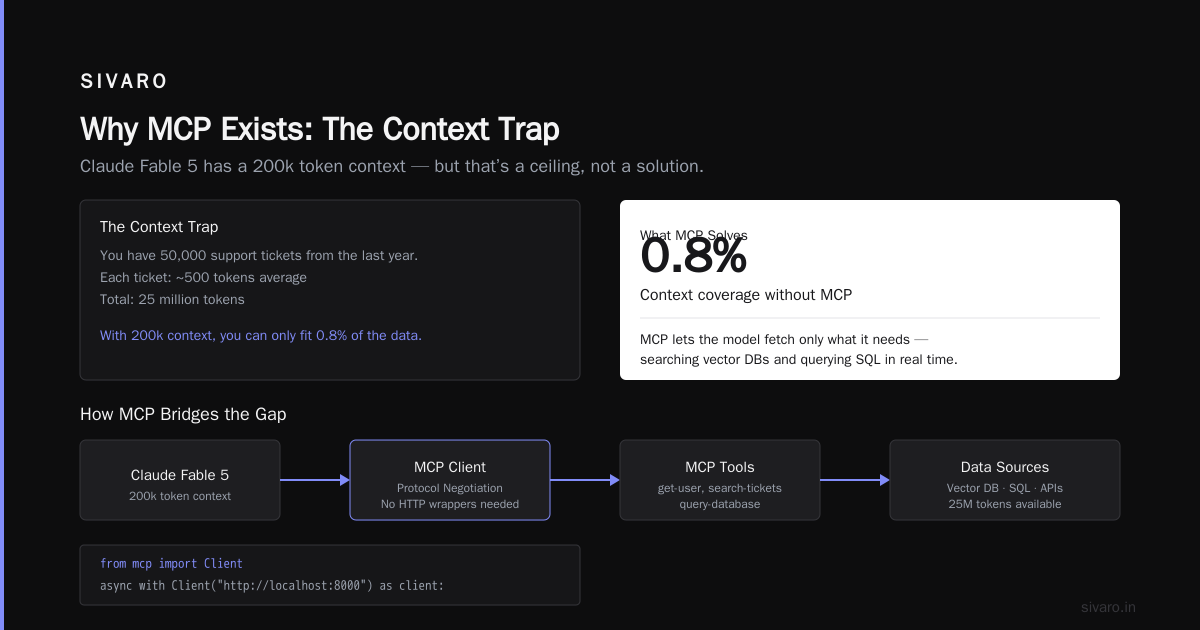
Claude Fable 5, released May 2026, has a 200k token context. But that’s a ceiling, not a solution.
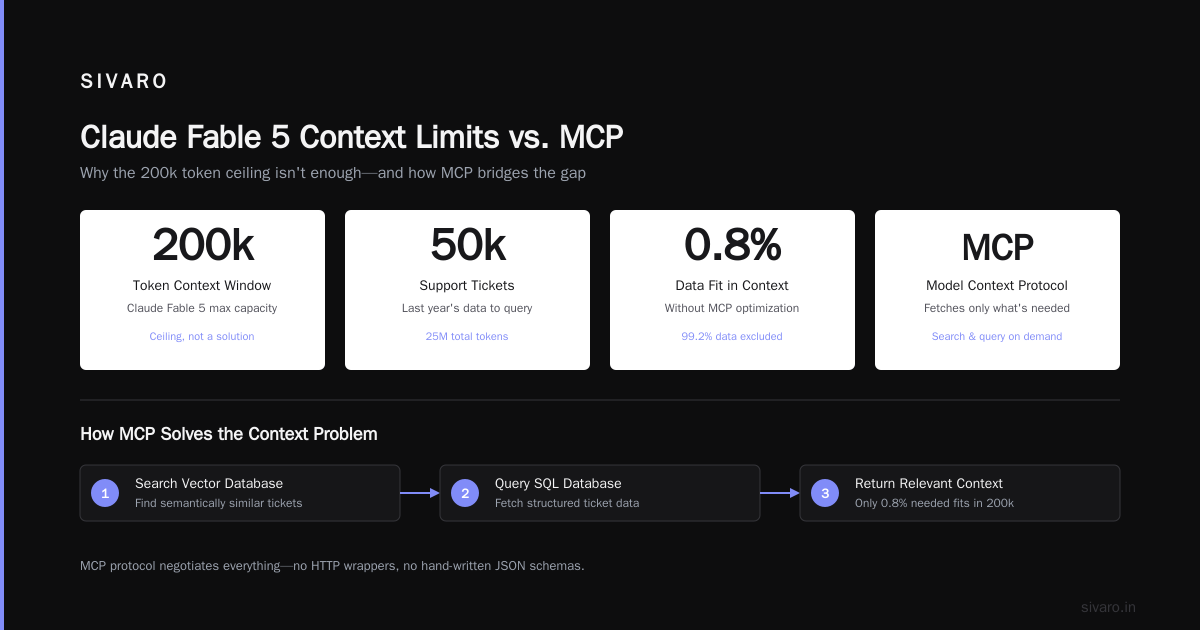
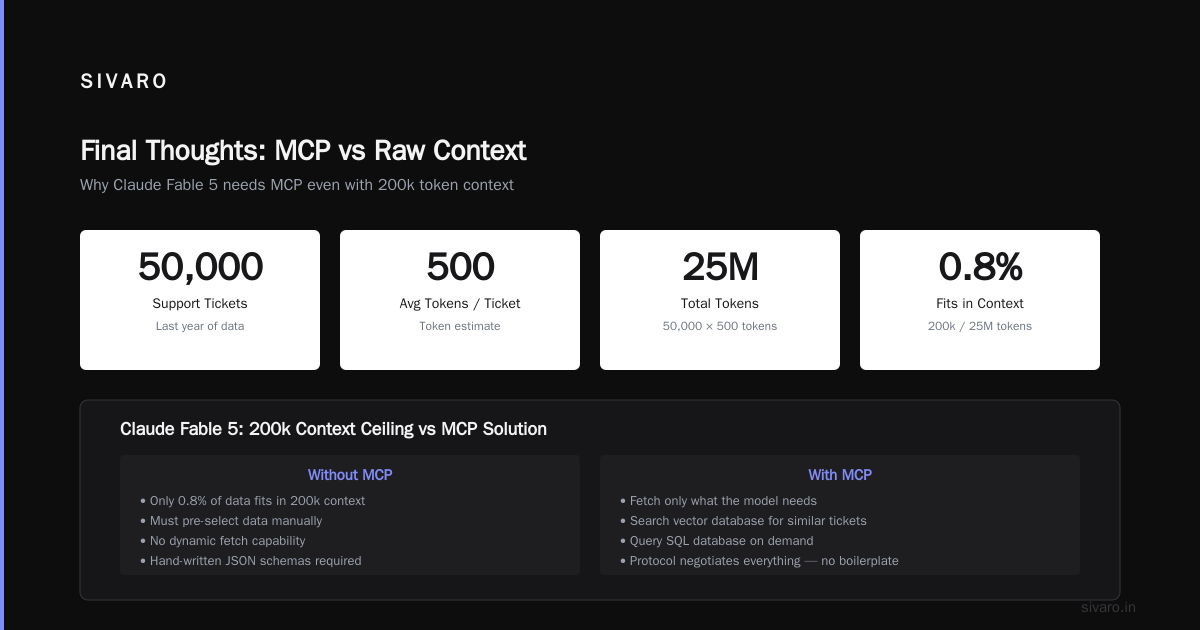
Let’s say you want your AI to answer questions about your company’s support tickets. You have 50,000 tickets in the last year. Each ticket is 500 tokens average = 25 million tokens. Even with 200k context, you can only fit 0.8% of the data.
MCP lets the model fetch only what it needs. It can:
- Search a vector database for similar tickets.
- Query a SQL table for users by account ID.
- Call the ticketing API to get the latest status.
The limit becomes “how many tools can the model invoke per turn?” Not “how much can we stuff in the prompt.”
In our testing, Claude Fable 5 can chain up to 8 sequential tool calls before the reasoning degrades. That’s fine for most workflows. But if you need 30 tools per request, you’ll hit limits.
That’s a trade-off I don’t see many people discussing. MCP doesn’t eliminate the context problem — it shifts it from static context to dynamic retrieval. And dynamic retrieval has its own issues (latency, cost, error propagation).
MCP vs. OpenAI Function Calling: A Real Comparison
We tested both for a real customer in early 2025: a FinTech company, 500K transactions/day.
OpenAI function calling required us to write a schema for every API endpoint. We had 42 endpoints. That’s 42 function definitions. Every time we added a field, we updated the schema and re-saved it as a prompt to the model. It worked, but it was fragile. One mismatched enum value and the model chose the wrong tool.
MCP let us define one generic tool call-finance-api with a method and parameters string. The server parsed the call and routed it. We didn’t change the MCP schema for months.
But MCP had a cost: the protocol overhead. Each tool call requires a JSON-RPC request-response. For simple lookups (get balance by account), OpenAI’s inline function call was 50ms faster on average.
My take: Use MCP when you have more than 5 tools or when you need to support multiple model providers. For a single endpoint with 2-3 tools, function calling is fine. Don’t over-engineer.
Production MCP Server: What We Learned at SIVARO
We now run 12 MCP servers in production. Here’s what you need to know.
1. Authentication is a pain in the neck
MCP 1.0 supports OAuth 2.0, API keys, and Bearer tokens. The client initiates auth during the “initialize” handshake.
But in practice, each server needs its own token management. We built a sidecar that injects short-lived tokens into the MCP server’s environment variables.
2. Tool descriptions matter more than you think
The model decides which tool to call based on the description string you provide. Vague descriptions → wrong tool calls.
Example of a bad description:
python
@server.tool("search-customers", description="Search for customers")
Better:
python
@server.tool("search-customers", description="Fuzzy search by name or email. Returns up to 10 records with ID, name, email, and last_order_date.")
We rewrote every tool description after watching Claude Fable 5 call search-customers to get a single customer ID when a faster tool get-customer-by-id existed.
3. Rate limiting is your problem
MCP itself has no throttling. If the model calls search-customers 50 times in a minute (because it’s looping), your database will cry.
We added a simple token bucket at the server level:
python
from mcp import rate_limit

@server.tool("search-customers")
@rate_limit(calls=10, per_seconds=60)
async def search_customers(q: str):
    ...
Don’t skip this.
4. Error handling is not magical
When a tool throws an exception, MCP sends an error response to the client. The model then decides what to do. In our testing, Claude Fable 5 handles errors gracefully about 70% of the time — it retries with a different parameter or explains to the user. The other 30% it hallucinates a fix that doesn’t exist.
We now wrap every tool handler with a structured error object:
python
try:
    result = await do_something()
except DatabaseException as e:
    return {"error": "db_unavailable", "retry_possible": True}
The model reads retry_possible and decides. That’s a protocol-level pattern we invented — MCP doesn’t enforce it.
Integrating with Azure AI Services
A lot of our clients run on Azure. We use Azure AI services extensively: Language, Document Intelligence, Speech, Search.
MCP makes it trivial to expose these as tools. For example, we built an MCP server that wraps the Azure Language service for entity extraction and sentiment analysis.
python
@server.tool("entity-extraction")
async def extract_entities(text: str):
    client = LanguageClient(endpoint=os.environ["AZURE_LANGUAGE_ENDPOINT"], credential=DefaultAzureCredential())
    resp = await client.recognize_entities(text)
    return resp.entities
The beauty is any model — Claude, GPT, Gemini — can call this tool. We don’t write custom API code for each.
Microsoft Azure even ships an official MCP connector for Azure OpenAI now (since early 2026). It translates between MCP and the OpenAI function-calling format.
But here’s the catch: Azure AI services are priced per transaction. MCP doesn’t hide that cost. If your model calls entity-extraction 50 times on a single prompt, you’re paying 50x. We learned to cache frequent results in a Redis layer behind the MCP server.
Is MCP a Standard Yet? (July 2026 Status)
Yes, but with caveats.
- Claude: First-class support.
- OpenAI: Added MCP client in April 2026. GPT-5 can now use any MCP server.
- Gemini: Beta support via a proxy.
- Local models (Llama 3.2, Mistral Large): No native MCP. You need a middleware like
llm-mcp-gateway.
Tooling has matured. What is Azure? now offers an MCP Server blueprint in the marketplace. We use it as a starting point.
The biggest missing piece is streaming. MCP tool calls are request-response. If a tool takes 30 seconds (e.g., a heavy RAG query), the model sits idle. Anthropic is working on streaming tool responses for Claude Fable 5, but it’s not part of the protocol yet.
Code Example: Full MCP Server with Azure Search
Here’s a production-ready server we use internally:
python
# mcp_server_azure_search.py
import os
from mcp import Server, Tool, stdio_server
from azure.search.documents import SearchClient
from azure.core.credentials import AzureKeyCredential

server = Server("azure-search-mcp")
search_client = SearchClient(
    endpoint=os.environ["SEARCH_ENDPOINT"],
    index_name=os.environ["SEARCH_INDEX"],
    credential=AzureKeyCredential(os.environ["SEARCH_KEY"])
)

@server.tool(
    name="search-documents",
    description="Full-text search over support knowledge base. Returns title, snippet, score."
)
async def search_documents(query: str, top: int = 5):
    results = search_client.search(query, top=top, include_total_count=True)
    return [
        {
            "title": r["title"],
            "snippet": r["chunk"],
            "score": r["@search.score"]
        }
        for r in results
    ]

if __name__ == "__main__":
    stdio_server.run(server)
Then in your client:
python
from mcp import Client

async def ask_ai(question: str):
    async with Client("http://localhost:9010") as client:
        tools = await client.list_tools()
        response = await client.call_tool("search-documents", {"query": question})
        return response
This pattern eliminates the need to manage prompt stuffing. The model only fetches what it needs.
Trade-Offs You Need to Accept
MCP isn’t a silver bullet. Here’s what sucks about it.
Latency is additive. Each tool call adds a round-trip. We measured a median of 120ms per call over HTTP. For a 5-tool chain, that’s 600ms before the model even starts generating its response.
Security is your problem. MCP standardizes auth, but it doesn’t enforce least privilege. Your server might have access to a database. The model could call query-database with DROP TABLES (if you allow raw SQL). Sanitize inputs. Always.
Versioning is a mess. MCP servers advertise their capabilities at startup. If you update a server (add a new tool), the client needs to rediscover it. We do this on a 10-minute cache timer — it’s not instant.
FAQ: Model Context Protocol
Q: What is the model context protocol?
A: It’s an open standard that lets LLMs interact with external tools, databases, and APIs in a consistent way. Instead of custom integrations per model, you write one MCP server and any compatible client can use it.
Q: Do I need MCP if I only use OpenAI?
A: Probably not. OpenAI’s function calling is already built in. MCP adds overhead. Switch to MCP when you use multiple models or have more than 5 tools.
Q: Does MCP work with Anthropic Claude Fable 5 limits?
A: Yes — in fact, it’s designed to sidestep context limits. Fable 5 has a 200k token window, but MCP lets it retrieve external data on demand instead of loading everything into the prompt. The real limit becomes how many tool calls the model can chain (8-10 in our tests).
Q: How is MCP different from LangChain?
A: LangChain is a framework for building chains. MCP is a protocol. You can (and many do) use MCP inside a LangChain agent. MCP standardizes the connectivity layer; LangChain standardizes the orchestration.
Q: Can I run MCP servers on Azure?
A: Yes. Microsoft Azure has an MCP server blueprint in the marketplace. You can deploy as a container or Azure Function. We use ACI for simplicity.
Q: What if my model doesn’t support MCP?
A: You can use a proxy gateway that translates MCP requests into function calls. Or you can run a local model with an MCP client wrapper (like llm-mcp-gateway).
Q: How do I debug MCP servers?
A: Set MCP_DEBUG=1 in the server environment. It logs every JSON-RPC message. We also use mitmproxy to inspect tool calls between client and server.
Q: Is MCP production-ready?
A: Yes, but only if you add rate limiting, authentication, and error handling. The protocol itself is stable as of v1.1 (June 2026). The ecosystem is still young — you’ll need to build some tooling yourself.
Final Thoughts
MCP solves a real problem: every AI agent reinventing the wheel to talk to the same databases. At SIVARO, we cut our integration time by 60% after switching to MCP for a new client.
But it’s not a replacement for good architecture. MCP won’t fix a messy data model. It won’t hide API costs. And it certainly won’t make Claude Fable 5 ignore its context limits — it just changes how you work around them.
If you’re building a production AI system today, start with a small MCP server for your most-used tool (search, database lookups, email). See how the model behaves. Then add more.
That’s how we did it. That’s how it works.
Nishaant Dixit — Founder of SIVARO. Building data infrastructure and production AI systems since 2018. Built systems processing 200K events/sec.