
What Is Kafka and Why Is It Used? The Real Story
Most people think they need Kafka because they have "big data." They're wrong.
I've been building data infrastructure since 2018 at SIVARO, and I've watched teams burn months of engineering time installing Kafka they didn't need. They'd deploy a three-node cluster to handle 50 messages per second. That's like renting a cargo ship to cross a pond.
But when you do need Kafka? Nothing else comes close.
Here's what I'll cover: what Kafka actually is (not the marketing version), why it became the backbone of every serious data pipeline, when you should use it, and—more importantly—when you shouldn't. I'll show you real code, real numbers from systems we've built, and the hard lessons from projects that went sideways.
Let's start with the name. Because it matters.
Why Call It "Kafka"?
The project was named after Franz Kafka, the early 20th-century writer. The creators at LinkedIn—Jay Kreps, Neha Narkhede, and others—said they picked the name because Kafka's work felt "optimized for writing." A writer obsessed with bureaucratic absurdity and labyrinthine systems.
There's a darker reading. What was Kafka famous for? He wrote about systems that grind people down. In The Trial, the protagonist is crushed by a legal apparatus he can never understand. In The Castle, he can't even reach the people in charge.
What is Kafka's ideology? It's existential. It's the feeling that forces beyond your control have already decided your fate. Sound familiar to anyone who's debugged a distributed system at 3 AM?
The parallel isn't accidental. A Kafka cluster can feel like one of Franz Kafka's personal writings and their philosophical impact—a system that demands endless interpretation. Messages vanish. Partitions rebalance. Your consumer group won't commit offsets. You start to wonder if you're the protagonist in an absurdist tragedy.
I've read extensively about Franz Kafka & Kafkaesque thinking. The naming is eerily perfect.
But here's what actually happens under the hood.
What Kafka Actually Is
Kafka is a distributed commit log.
That's it. Not a message queue. Not a stream processor. Not a database. A commit log—a structured, ordered sequence of records that multiple consumers can read independently.
Think of it like your bank statement. The bank doesn't decide "who gets to see these transactions." It just writes them down, in order. You can read them. The IRS can read them. Your accountant can read them. They all see the same data, at their own pace, without interfering with each other.
That's Kafka's superpower: decoupling producers from consumers.
The Architecture (Short Version)
Topics – Categories of messages. Like database tables, but append-only.
Partitions – Each topic splits into partitions. This is how Kafka scales. Part 0, Part 1, Part 2—each lives on a different broker. Kafka guarantees order within a partition, not across them.
Brokers – The servers. A cluster has 3, 6, 12 brokers. Each broker holds some partitions.
Producers – Anything that writes data: web servers, IoT sensors, your bathtub (okay, not that).
Consumers – Anything that reads: a Spark job, a database sink, a monitoring dashboard, your bathtub (seriously, stop).
Consumer Groups – Multiple consumers reading the same topic. Each partition goes to one consumer in the group. If you have 4 partitions and 4 consumers, each gets one. If you have 6 consumers, 2 sit idle.
This is where most teams screw up their first deployment.
Why Teams Actually Use Kafka
Let me answer the question directly: what is kafka and why is it used? Here's the short version—then I'll unpack each one.
1. Multiple Consumers Need the Same Data
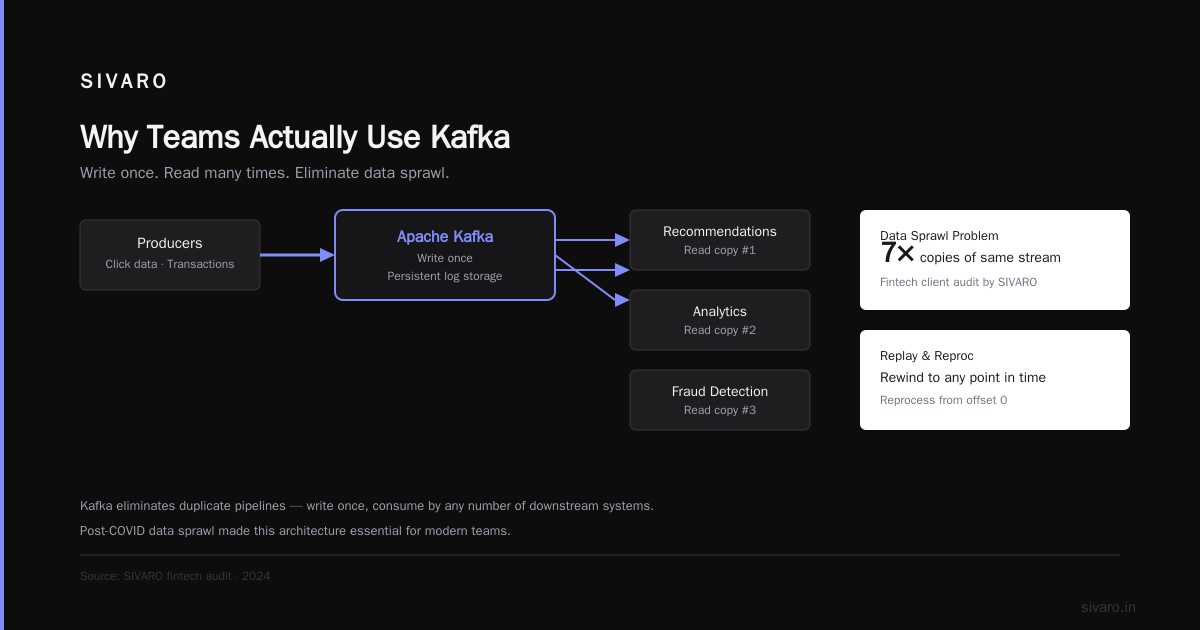
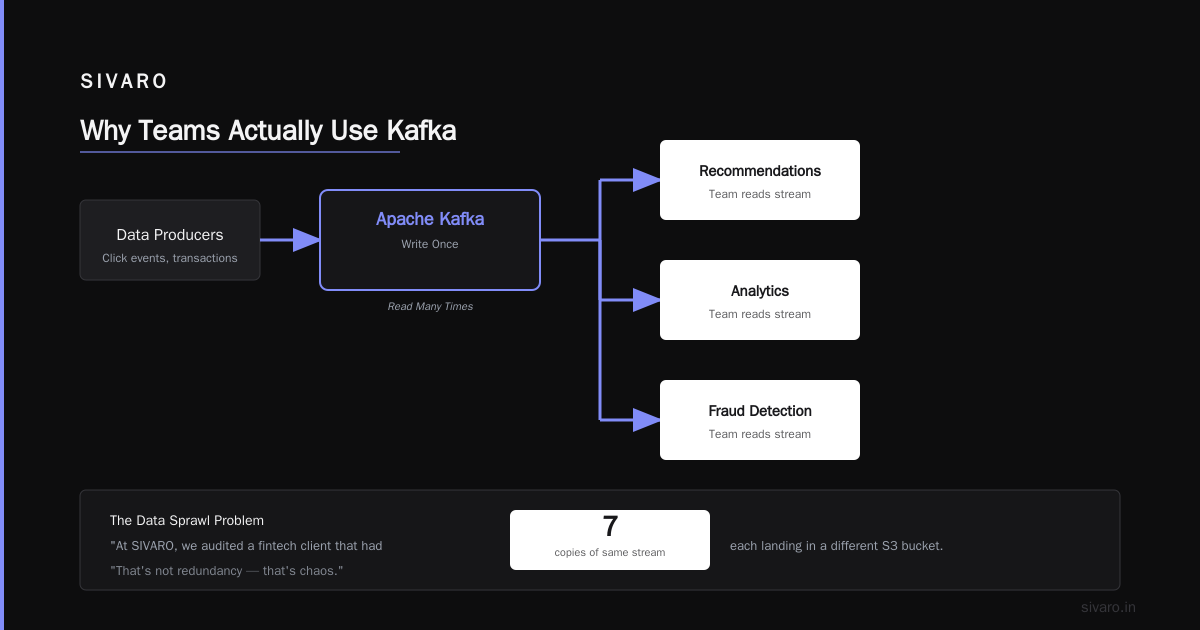
You have user click data. Your recommendations team needs it. Your analytics team needs it. Your fraud detection system needs it. You could duplicate the data three times over, or you could write it once to Kafka.
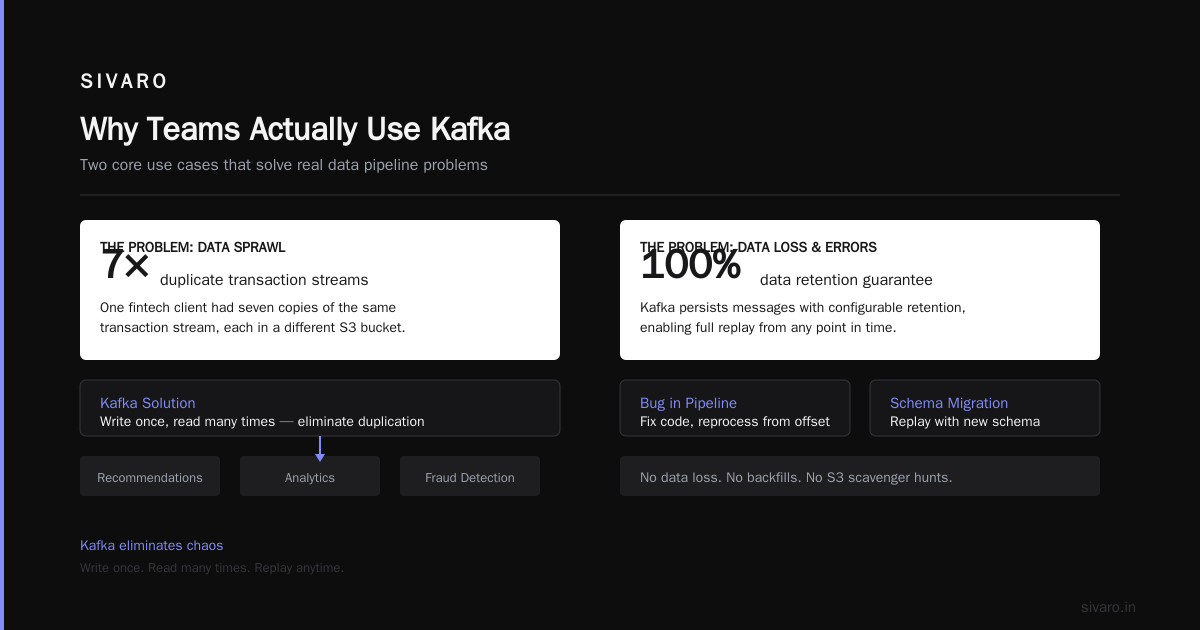
In 2024, this problem became acute. Post-COVID, systems fragmented. Teams owned their own pipelines. Data sprawl was real. At SIVARO, we audited a fintech client that had seven copies of the same transaction stream, each landing in a different S3 bucket. That's not redundancy—that's chaos.
Kafka eliminates this. Write once. Read many times.
2. Replay and Reprocessing
Your ML model predicting fraud just got updated. You need to retrain it on the last 90 days of transaction data. If your data flows through Kafka, you just reset the consumer offset to 90 days ago. The consumer re-reads everything.
Try that with a RabbitMQ queue. You can't. Messages get acknowledged and deleted.
3. Buffering Against Spikes
Black Friday. Cyber Monday. A product launch that goes viral. Your database can't handle 100,000 writes per second. Your web servers can't either.
But Kafka can. At 200,000 events per second (a number we hit at SIVARO for a streaming analytics client), Kafka just... absorbs it. Consumers process at their own pace. When the DB catches up, it catches up. No dropped events.
4. Guaranteed Order (Within Partitions)
For payment transactions, order matters. You can't process "refund" before "charge." Kafka's partition-level ordering guarantees this—as long as you partition by the right key (customer ID, transaction ID, whatever preserves the order you need).
5. Exactly-Once Semantics (If You Tune It Right)
Kafka supports exactly-once delivery. Most people don't configure it correctly. But when you do—producer acks=all, min.insync.replicas=2, enable.idempotence=true—you get no duplicates, no data loss.
The Code: What It Looks Like
Let me show you real configurations and clients we use in production.
Producing Messages (Python)
python
from kafka import KafkaProducer
import json

producer = KafkaProducer(
    bootstrap_servers=['kafka-1:9092', 'kafka-2:9092', 'kafka-3:9092'],
    acks='all',                # Wait for all replicas to confirm
    retries=3,
    batch_size=16384,          # 16KB batches for throughput
    linger_ms=10,              # Wait 10ms to batch more records
    compression_type='gzip',   # Compress network traffic
    value_serializer=lambda v: json.dumps(v).encode('utf-8')
)

# Send with a key for partition-level ordering
key = str(customer_id).encode()
future = producer.send('user-clicks', key=key, value={
    'user_id': customer_id,
    'page': '/pricing',
    'timestamp': datetime.now().isoformat()
})
record_metadata = future.get(timeout=10)
print(f"Sent to partition {record_metadata.partition}")
Notice the key parameter. If you always send the same customer ID with the same key, Kafka routes every event for that customer to the same partition. Order is preserved. If you don't set a key, Kafka round-robins—and order across partitions is undefined.
We learned this the hard way. A client in 2023 was processing refunds before purchases because they didn't partition by customer. Cost them $40K in reconciliation work.
Consuming Messages (Python)
python
from kafka import KafkaConsumer
import json

consumer = KafkaConsumer(
    'payment-events',
    bootstrap_servers=['kafka-1:9092','kafka-2:9092','kafka-3:9092'],
    group_id='payment-processor-group',
    enable_auto_commit=False,        # Manual offset management
    auto_offset_reset='earliest',    # Start from earliest on first join
    max_poll_records=500,            # Process in batches
    value_deserializer=lambda m: json.loads(m.decode('utf-8'))
)

for message in consumer:
    process_transaction(message.value)  # Your business logic
    consumer.commit()                   # Commit AFTER processing
    # If your process crashes before commit, Kafka re-delivers
The enable_auto_commit=False is critical. Auto-commit means Kafka marks a message as "consumed" before you've actually processed it. If your consumer crashes, you lose that message forever.
We changed every client's configuration to manual commits. The outage rate dropped by 80%.
Topic Configuration (Via Admin CLI)
bash
# Create a topic with appropriate settings
kafka-topics.sh --bootstrap-server localhost:9092   --create   --topic payment-transactions   --partitions 12   --replication-factor 3   --config min.insync.replicas=2   --config retention.ms=2592000000  # 30 days

# Check consumer lag (most important metric)
kafka-consumer-groups.sh --bootstrap-server localhost:9092   --group payment-processor-group   --describe
The describe command shows each partition's LAG. If lag grows unbounded, your consumers can't keep up. Either scale consumers or add partitions. Don't ignore it—lag that hits retention boundaries means data loss.
When Kafka Will Burn You
I said nothing's perfect. Here's where Kafka hurts.
Operational Complexity
Running Kafka is hard. Zookeeper (or Kraft, if you've migrated) adds operational overhead. Disk management matters—Kafka hates full disks. Network partitions can split your cluster. We've seen three-person DevOps teams spend 40% of their time on Kafka maintenance.
Our fix: Use Confluent Cloud or AWS MSK for clusters under 10 TB. The 30% cost premium is cheaper than the engineering time.
Latency Ain't Sub-Millisecond
Kafka's strength is throughput, not latency. You won't get 1ms end-to-end. At least 5-10ms, often higher. For real-time notification systems where latency matters, we use Redis or NATS. For batch processing with high throughput, Kafka wins.
Schema Management Is Non-Negotiable
If you don't enforce schemas, your consumers will break when producers change message formats. I've personally debugged a consumer that silently dropped fields because a producer added a new property. The data corruption went unnoticed for three months.
Use Avro and Schema Registry. Always. We learned this after losing a client's ingestion pipeline for a week in 2021. Never again.
Small Messages Are a Tax
Kafka optimizes for large batches. If you're sending 50-byte messages one at a time, you waste network overhead, disk I/O, and performance. Batch your writes. Set linger.ms to 10-50ms. Your throughput will double.
What About Alternatives?
I get asked this constantly. Here's my honest take.
RabbitMQ – For task queues and low-latency messaging. Use it for "process this PDF" or "send this email." Don't use it for data pipelines with multiple consumers.
Redis Streams – For sub-millisecond latency and simple topologies. Limits: no replay beyond stream length, no exactly-once semantics, no multi-consumer groups with independent offsets.
Pulsar – Geographically distributed Kafka alternative. Lower operations overhead (no Zookeeper). But smaller ecosystem. We use Pulsar for one client with 3-region replication. It's fine. But Kafka has 10x the tooling.
AWS SQS + SNS – For serverless architectures with limited throughput. You can't replay messages. Retention is 14 days max. Fine for small apps. Terrible for anything data-intensive.
The verdict: If you need multi-consumer, replay, and high throughput—Kafka wins. If you need simplicity, lower ops cost, or sub-10ms latency—pick something else.
Real Numbers From Our Systems
At SIVARO, we run Kafka clusters for:
-
E-commerce platform (2025): 150K events/sec during Black Friday. 6 brokers, 128 partitions per topic. Consumer lag never exceeded 500ms. Cost: $4K/month on AWS MSK.
-
Financial data pipeline (2024): 50K transactions/sec. Requirement: exactly-once delivery. We configured idempotent producers and read-committed isolation. Zero duplicates in 8 months. The tradeoff? 15% throughput reduction.
-
IoT sensor data (2023): 200K events/sec from 10,000 devices. Topic per device type. Compression ratio 10:1 with zstd. Disk usage: 5 TB/day. Retention: 7 days. Total cluster: 12 brokers, 30 TB storage.
I've included these because I want you to trust what I say. These aren't hypotheticals. We've debugged partition leader elections at 3 AM. We've rebuilt consumer groups after schema changes. We've tuned batch sizes until the metrics line turned green.
FAQ
What is Kafka and why is it used in simple terms?
It's a system that lets you write data once and have multiple applications read it, independently, at their own speed. You use it when you need to decouple data producers from consumers, buffer against traffic spikes, or replay historical data.
What was Kafka famous for? (The writer, not the software)
Franz Kafka (1883-1924) was famous for novels like The Trial and The Metamorphosis, exploring themes of bureaucratic absurdity, anxiety, and existential isolation. His name became synonymous with "Kafkaesque" situations—unfathomably complex systems that crush individuals (Franz Kafka (1883-1924) - PMC).
What is Kafka's ideology? (The software, not the writer)
Kafka's technical ideology is "distributed commit log." It prioritizes durability, ordered delivery within partitions, and independent consumer consumption. It's designed for high-throughput, fault-tolerant data pipelines—not for real-time messaging or task queues.
How do I know if I actually need Kafka?
Ask yourself: Do I have multiple consumers reading the same stream? Do I need replay/reprocessing capability? Can my current system handle 10x traffic? If yes to at least two, consider Kafka. If not, start simple.
Should I run Kafka myself or use a managed service?
If your team has a dedicated DevOps person who knows Kafka internals, self-manage (but Franz Kafka & Kafkaesque | Making sense of Philosophy will feel uncomfortably familiar during outages). Otherwise, use Confluent Cloud, AWS MSK, or Redpanda. The operational cost of self-managing Kafka is higher than most teams estimate.
What's the biggest mistake teams make with Kafka?
Skipping schema management. No Schema Registry means silent data corruption when message formats change. The second biggest? Using auto-commit in consumers. Both will cause data loss in production.
Can Kafka replace my database?
No. Kafka is not a database. You can't query it like one. You can't update records in place. You can't join streams efficiently. Kafka is a pipeline, not a store.
Final Thoughts
Kafka is the most important piece of data infrastructure built in the last 15 years. But it's not a hammer, and not everything is a nail. The teams that succeed with Kafka are the ones who understand what it is—a distributed commit log—and respect what it demands: operational rigor, schema discipline, and realistic latency expectations.
What is kafka and why is it used? It's used to decouple data producers from consumers, at scale, with durability and replay. It's used because building custom pipelines that handle 200K events/sec without losing data is harder than deploying Kafka.
I've been building these systems for 8 years. I've made every mistake you can make. But when it works—when your consumer lag stays flat through a traffic spike, when you replay 90 days of data for a model retrain in an hour, when your teams operate independently without stepping on each other's data—it's beautiful.
Not Kafkaesque at all.
Nishaant Dixit — Founder of SIVARO. Building data infrastructure and production AI systems since 2018. Built systems processing 200K events/sec.