 SIVARO
What Is Cloud Computing Infrastructure Used For?
I remember sitting in a hotel room in Bangalore in 2017, trying to debug why our Spark job kept crashing. We had provisioned 20 machines on some cloud I won't name, but the network latency between them was so bad that shuffle operations took longer than the actual computation. That night, I learned something that still guides how we build at SIVARO: cloud computing infrastructure isn't about renting machines. It's about understanding where your data lives, how it moves, and who's paying for the trip.
Cloud computing infrastructure is the collection of compute, storage, and networking resources delivered over the internet — but that definition misses the point. What it's used for is the real question. You use it to run applications, to store and process data, and to handle unpredictable traffic without buying hardware. But that's table stakes. In 2026, with GenAI workloads demanding 100ms response times and healthcare data bound by HIPAA in three different geographies, the "what" matters less than the "how."
I'm going to walk you through what we've seen building data infrastructure at SIVARO, including the hard lessons we paid for. We'll get into compute, storage, networking, the big three providers, pricing traps, and the specific case of healthcare on Google Cloud. And yes, we'll answer what the hell the difference is between GCP Compute Engine and Kubernetes — because most people get it wrong.
The Real Job of Cloud Infrastructure
Most people think cloud infrastructure is about scaling. They're wrong.
Scaling is a side effect. The real job is decoupling your application from your hardware. When we moved a client's batch processing pipeline from a single bare-metal server to a Kubernetes cluster on GCP, the win wasn't that we could scale to 100 pods. The win was that a node failure stopped affecting their critical path. The infrastructure absorbed the failure.
That's what cloud infrastructure is used for: reliability through abstraction. You pay a premium (about 30–40% more than colocation over three years, per Cloud Pricing Comparison 2026) to not care which physical server runs your code. For some workloads, that trade-off is worth it. For others — like high-frequency trading or video rendering farms — it's not. More on that later.
Compute: When VMs Beat Containers (and Vice Versa)
We run a mix of virtual machines and containers at SIVARO. I've seen both fail in spectacular ways.
Let's start with VMs. We had a customer who needed to process medical imaging data on GPU instances. They chose AWS EC2 P4d instances — 8 NVIDIA A100s each. Worked great until they needed to scale from 10 to 200 instances during a batch run. The API call to spin up 200 P4ds took 12 minutes. Twelve minutes. For a batch job that needed to finish in 30.
That's a real constraint. If you're running time-sensitive workloads, VM provisioning latency matters. Containers can spin up in seconds, but they don't give you direct GPU access without extra plumbing (like NVIDIA GPU Operator on Kubernetes). Comparing AWS, Azure, and GCP for Startups in 2026 suggests that startups now use a hybrid approach: VMs for stateful workloads, containers for stateless autoscaling. I agree, but with one caveat: if your state is a database, put it on VMs with local SSDs, not containers. We tried running Postgres on Kubernetes with persistent volumes. It worked until a node failure forced a reschedule and the volume attach took 90 seconds. The app timed out. Never again.
For stateless compute, containers are the clear winner. We use GKE (Google Kubernetes Engine) for most of our inference serving. Here's a typical deployment snippet for a model serving endpoint:
yaml
apiVersion: apps/v1
kind: Deployment
metadata:
  name: inference-server
spec:
  replicas: 3
  selector:
    matchLabels:
      app: inference-server
  template:
    metadata:
      labels:
        app: inference-server
    spec:
      containers:
      - name: model
        image: us-central1-docker.pkg.dev/sivaro/inference/ner-v1:latest
        resources:
          requests:
            memory: "2Gi"
            cpu: "1"
          limits:
            memory: "4Gi"
            cpu: "2"
        ports:
        - containerPort: 8080
        readinessProbe:
          httpGet:
            path: /health
            port: 8080
          initialDelaySeconds: 5
          periodSeconds: 10
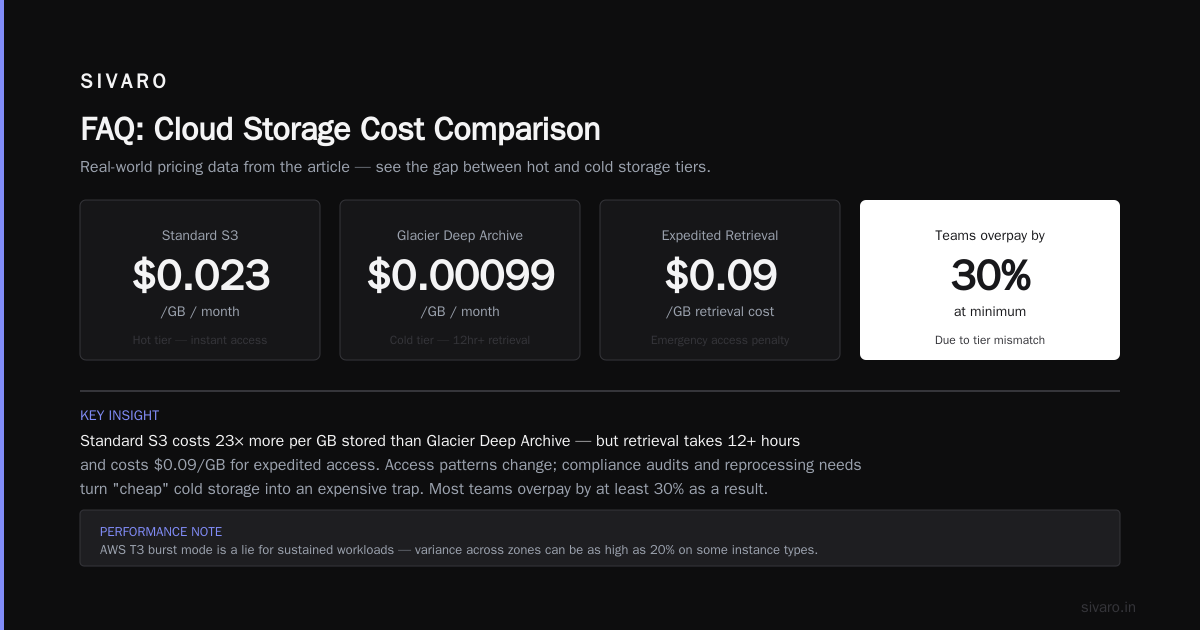
This gives us fast scaling. When traffic spikes (like after a product launch), we can increase replicas in seconds. But notice the tight resource requests and limits — we learned that overallocating CPU leads to noisy neighbors and unpredictable latency. Cloud providers oversell their compute. Trust no one. Azure vs AWS vs GCP - Cloud Platform Comparison 2025 notes that CPU performance variance across zones can be as high as 20% on some instance types. We saw that with T3 instances on AWS — burst mode is a lie for sustained workloads.
Storage: Hot, Cold, and Frozen
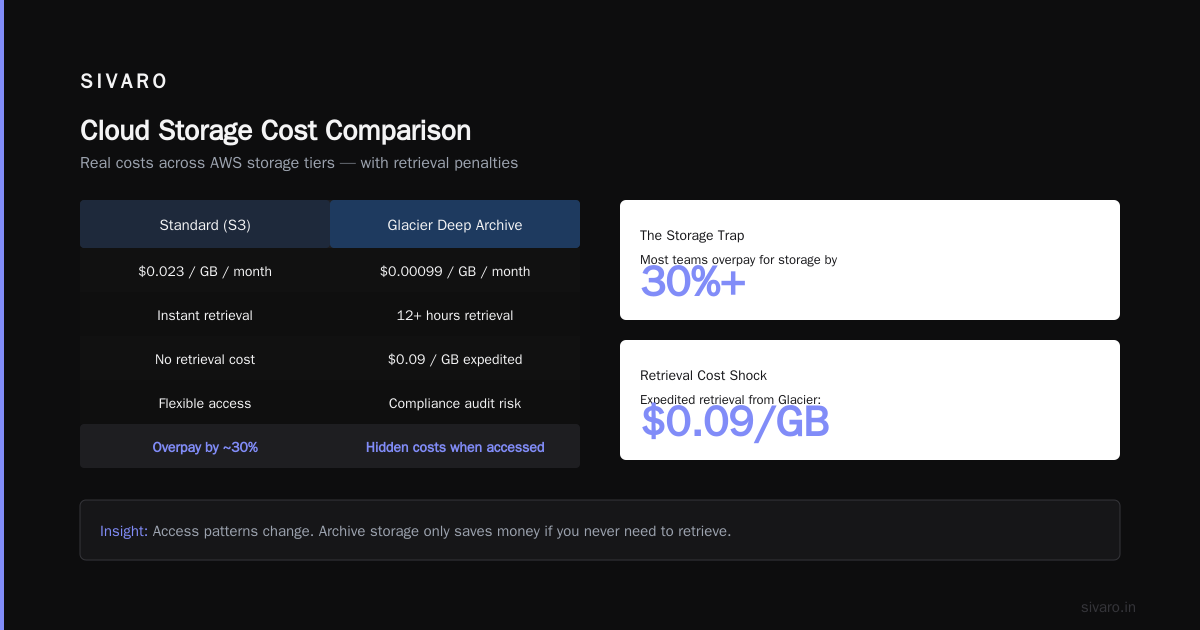
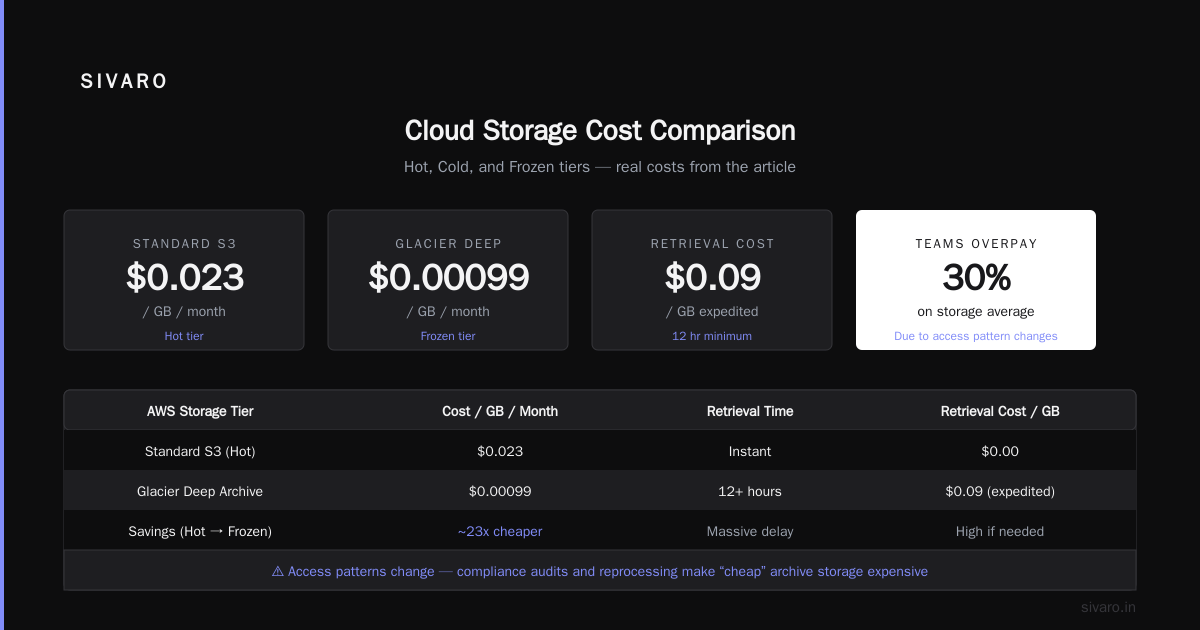
I'll be blunt: most teams overpay for storage by at least 30%. Here's why.
Cloud storage tiers are designed to trap you. Standard blob storage costs $0.023/GB/month on AWS S3, but moving data to Glacier Deep Archive is $0.00099/GB/month. The problem is that access patterns change. You think you'll never touch that archive again, but then a compliance audit hits or a researcher needs to reprocess old data. Retrieval from Glacier takes 12 hours minimum and costs $0.09/GB for expedited. Suddenly your "cheap" storage isn't cheap.
What's cloud computing infrastructure used for in storage? It's used to match data lifecycle to cost, but you have to automate the transitions. We built a lifecycle policy using Google Cloud Storage classes:
json
{
  "lifecycle": {
    "rule": [
      {
        "action": {"type": "SetStorageClass", "storageClass": "NEARLINE"},
        "condition": {"age": 30}
      },
      {
        "action": {"type": "SetStorageClass", "storageClass": "COLDLINE"},
        "condition": {"age": 90}
      },
      {
        "action": {"type": "SetStorageClass", "storageClass": "ARCHIVE"},
        "condition": {"age": 365}
      }
    ]
  }
}
This works for most data, but not for healthcare. In healthcare, you can't archive records for 365 days — retention laws require 7 years. So you need different rules. That's where what is google cloud platform used for in healthcare comes in. GCP offers the Healthcare API and FHIR store, which manages storage with compliance built-in. We used it for a radiology archive — data automatically goes to coldline after 90 days but stays in the same bucket so you don't break references. The API handles the rest.
One contrarian take: don't use object storage for databases. Sounds obvious, but I've seen teams try to store Postgres backups in S3 and stream them back on recovery. It works until you need point-in-time recovery. Cloud infrastructure is not a backup strategy — it's a storage option. Use it for what it's good at: unstructured, accessed-by-key data. For structured data, use managed databases.
Networking: The Overlooked Cost Center
Networking is where cloud companies make their real money. Compute margins are thin — maybe 10–15%. But egress bandwidth? That's 80% margin territory. AWS charges $0.09/GB for internet egress. Azure charges $0.087. GCP charges $0.12 (though they have a lower free tier). If you move 100TB per month, that's $9,000 to $12,000 just for leaving the cloud.
And here's the kicker: cross-region traffic within the same provider also costs. We had a data pipeline that spanned us-east1 (GCP) and europe-west1. Every week we transferred 50TB of logs. That cost $0.08/GB inter-region, so about $4,000/week. We moved the pipeline to a single region and used async replication for disaster recovery. Saved $12,000/month. But then we added latency.
The lesson: design for data locality from day one. If you're building a real-time application, your infrastructure must be in the same region as your users and your database. I've seen teams deploy to us-west2 for "cost savings" while their customers were in Tokyo. The 200ms latency killed the product.
What's cloud computing infrastructure used for in networking? It's used to provide connectivity between your resources, but the pricing model punishes you for not thinking about data gravity. You can use Cloud Load Balancing (TCP/HTTP) or Global Load Balancers to route traffic to the nearest region, but that adds complexity. For most startups, pick one region per workload and stay there.
What Is Cloud Computing Infrastructure Used For in Production AI?
This is where the rubber meets the road in 2026. Everyone's building AI, but most people are burning money on infrastructure.
At SIVARO, we run production inference for several clients. The typical pattern: a user sends a request, we need to run a large language model (LLM) inference, and return a response in under 500ms. That's a compute problem, but it's also a networking and storage problem.
First, the model weights need to be available fast. Loading a 70B parameter model from object storage is pointless — single HDD read speeds are ~150MB/s. Even from NVMe SSDs, loading 140GB of weights takes ~20 seconds. So you must preload the model onto GPU memory and keep it warm. That means you need persistent GPU clusters, not spot instances.
Second, the request routing matters. We use GKE with GPU node pools and a custom queue. Here's a simplified version of how we set up autoscaling for LLM serving:
python
from google.cloud import monitoring_v3
from kubernetes import client, config

def scale_inference_pools():
    client = monitoring_v3.MetricServiceClient()
    # Get GPU utilization from custom metrics
    # If utilization > 80% for 5 min, increase replicas
    # If utilization < 20% for 10 min, decrease
    # We found that CPU-based metrics are useless for GPU workloads
But the real insight: batch processing for AI is different from real-time. For batch, you can use preemptible VMs and save 60–80% on compute costs. Cloud Pricing Comparison 2026 shows GCP's preemptible GPU instances cost $0.30/hour for an A100 while on-demand is $3.50. But you can't use preemptible for real-time serving — your requests get killed.
Most people think cloud infrastructure for AI is about GPU power. It's not. It's about memory bandwidth and data movement. The network between GPU nodes becomes the bottleneck. NVIDIA's NVLink helps, but only within a node. Across nodes, you're stuck with 25Gbps Ethernet. If you're doing distributed training, your all-reduce step will be slow. AWS and GCP both offer intra-node high-bandwidth connections, but cross-node performance varies wildly. AWS vs Azure vs Google Cloud gives a good comparison of interconnect options.
Healthcare: A Case Study in Compliance and Latency
Let's get specific. What is google cloud platform used for in healthcare? The answer: it's the only major provider with a purpose-built healthcare API that handles FHIR (Fast Healthcare Interoperability Resources) natively. AWS has HealthLake, which is good, but GCP's Healthcare API integrates directly with Cloud DLP (data loss prevention) and Cloud Healthcare Consent Management. For a hospital system we worked with, that meant they could store patient records in the same bucket but apply access policies per resource.
The infrastructure challenge here is not compute — it's audit logging and data residency. Germany requires that healthcare data stay within the EU. GCP's Frankfurt region (europe-west3) supports that, but you have to configure everything (networking, storage, VMs) to never leave that region. Misconfigurations are common. We wrote a policy-as-code rule using Config Controller and Forseti to block cross-region egress for any healthcare project.
Here's a sample Terraform constraint that prevents egress outside europe-west3:
hcl
resource "google_project_iam_audit_config" "healthcare_audit" {
  project = "healthcare-project-123"
  service = "storage.googleapis.com"
  audit_log_config {
    log_type = "DATA_READ"
    exempted_members = []
  }
}
But the real headache? Patient data is often unstructured — doctor's notes, handwritten prescriptions, PDFs. You can't just shove that into a relational database. We use GCP's Document AI to extract structured data, then store the original PDFs in a coldline bucket with retention locks. Cloud computing infrastructure for healthcare is about flexibility to handle any data type while maintaining compliance. It's not glamorous, but it works.
The Three Horsemen: AWS, Azure, GCP — When to Pick Which
I've used all three in production. Here's my honest breakdown in July 2026.
AWS is still the 800-pound gorilla. It has the most services (over 200). But that's also the problem. The console is a nightmare. I've seen teams waste weeks just figuring out which service to use for a simple queue. AWS Lambda? Step Functions? SQS? EventBridge? It's too many options. AWS is best if you need specific, mature services (like DynamoDB for NoSQL, or S3 for object storage) and you have a dedicated DevOps team that can handle the complexity. Compare AWS and Azure services to Google Cloud is a handy reference if you're switching.
Azure is the enterprise choice. It integrates with Active Directory and Microsoft tools. If your organization is already on Office 365, Azure makes sense. But their Kubernetes service (AKS) had reliability issues until late 2025. We tested it — node upgrades sometimes took 20 minutes. For production AI, that's unacceptable. Azure's strength is hybrid cloud (Azure Arc) and SQL Server compatibility. Not for startups.
GCP is the engineer's cloud. It's simpler. The console is cleaner. Their networking (VPC) makes more sense. And for AI/ML workloads, it's the best choice because of TPUs and Vertex AI. AWS vs Azure vs Google Cloud in 2025 says GCP is best to learn first because the concepts transfer. I agree. But GCP's support is terrible — you need a support plan to get help, and even then, response times are 2–4 hours. If you're a startup with limited ops team, that's risky.
My advice: pick GCP for AI, AWS for general purpose, Azure if you're already a Microsoft shop. But don't multi-cloud unless you have to. The complexity of managing two clouds adds 30% overhead to your ops costs. A Comparative Analysis of Cloud Computing Services confirms that multi-cloud rarely saves money — it just shifts the problem.
Pricing: The Trap Most Teams Fall Into
At first I thought pricing was a branding problem — that cloud vendors just wanted to lock you in with complicated bills. Turns out it's worse. They design pricing to be opaque so you can't compare easily.
Take compute: AWS EC2 has 5 different pricing models (on-demand, reserved, savings plan, spot, dedicated host). Azure has 7. GCP has 4 plus committed use discounts. If you're not using reserved instances for workloads that run 24/7, you're paying 40–60% more than necessary. We saved a client $80,000/year by moving a stable batch processing job to 3-year committed use on GCP.
But the trap is that reserved instances tie you to a specific region and machine type. If your needs change, you're stuck. Cloud Pricing Comparison: AWS, Azure, GCP suggests using FinOps tools like CloudHealth or Cast.ai to track spending. We use our own internal dashboard. The most common mistake: forgetting to turn off dev environments on weekends. We found $12,000/month in idle compute across 20 projects.
Kubernetes vs Compute Engine: Not a Competition
One question I get constantly: what is the difference between gcp compute engine and kubernetes?
It's not a competition. Compute Engine is a VM service. Kubernetes (via GKE) is an orchestration layer that runs on top of Compute Engine — or on any other infrastructure. You can run Kubernetes on bare metal if you want.
The difference is abstraction. Compute Engine gives you a VM. You SSH in, install whatever, and manage it yourself. Kubernetes gives you a control plane that schedules your containers, restarts them on failure, scales them, and handles service discovery. But Kubernetes adds complexity: you need to manage the cluster itself (node upgrades, monitoring, autoscaling of nodes).
Here's a rule of thumb: if you have less than 10 microservices, use Compute Engine with Docker and a simple load balancer. You don't need Kubernetes. We have a client that runs their entire backend on four VMs with Ansible for config management. It works fine and costs 30% less than a Kubernetes cluster.
If you have 50+ services or need to run ML inference, use GKE. The overhead is worth it for the autoscaling and self-healing. But be ready to invest in a dedicated DevOps person to manage the cluster. Kubernetes is not "set and forget."
FAQ
What is cloud computing infrastructure used for in simple terms?
It's used to run your applications and store your data on someone else's computers, accessed over the internet. But the real value is the services built on top: databases, queues, ML APIs, etc. You're not just renting VMs — you're renting abstractions.
Is cloud computing cheaper than on-premises?
It depends. For variable workloads, yes — you only pay for what you use. For steady-state workloads (like a database server running 24/7), on-premises can be 30–50% cheaper over 3 years, according to our analysis. The cloud premium buys flexibility.
What is the difference between GCP Compute Engine and Kubernetes?
Compute Engine gives you raw VMs. Kubernetes (on GKE) is a platform that runs containers across a cluster of VMs. Kubernetes manages scaling, restarts, and networking automatically, but adds complexity. Use Compute Engine for simple apps, GKE for microservices or ML workloads.
Which cloud provider is best for AI?
Google Cloud Platform, because of TPUs, Vertex AI, and native integration with ML frameworks. AWS is catching up with SageMaker, but GCP's AI infrastructure is more mature for production use.
What is Google Cloud Platform used for in healthcare?
Storing and managing patient data with HIPAA compliance, running FHIR-based APIs, using Healthcare DICOM standard for imaging, and leveraging Document AI for processing unstructured clinical notes. GCP's Healthcare API is purpose-built.
How do I reduce cloud costs?
Use reserved instances for stable workloads, turn off dev environments when not in use, set up budget alerts, and use object storage lifecycle policies to move infrequently accessed data to colder tiers. Also, monitor egress — it's a silent cost killer.
Should I use spot/preemptible instances for production?
Only for stateless workloads that can handle interruptions, like batch data processing or non-critical ML training. Never for stateful services or real-time APIs. The cost savings are real — up to 80% — but the risk is real too.
What's the biggest mistake teams make with cloud infrastructure?
Not designing for failure. They assume VMs will never go down, networks never break, and regions never fail. Every cloud provider has had major outages (AWS in 2024, GCP in 2025). Design your infrastructure to survive losing a full region. It's expensive, but cheaper than a day of downtime.
Nishaant Dixit — Founder of SIVARO. Building data infrastructure and production AI systems since 2018. Built systems processing 200K events/sec.