 SIVARO

What Is an AI Orchestration Example? Real Systems That Work
I used to think AI orchestration was just buzzword soup. Another term salespeople throw around to sound smart. Then I tried to get three different AI models to work together on a real project for a client in early 2024. It was a disaster. The models fought each other. Data got lost. Costs spiraled.
That's when I learned what orchestration actually means.
Let me show you what an AI orchestrator example looks like when it works — not the PowerPoint version, but the code-that-runs-in-production version. By the end of this guide, you'll know exactly what orchestration is, when you need it, and how to pick the right tool for your situation. No fluff. Just patterns that work.
What We're Actually Talking About
AI orchestration is the layer that coordinates multiple AI components — models, data pipelines, APIs, human feedback loops — into a single coherent system. Think of it as the traffic cop for your AI traffic. Without it, every model does its own thing. Requests pile up. Priorities get dropped. You pay for compute you don't use.
An ai orchestration example isn't some abstract concept. It's what happens when a customer support chatbot needs to check an order, verify identity, run a fraud check, and then escalate to a human — all in under three seconds. That sequence of decisions, handoffs, and fallbacks is orchestration.
Most people think orchestration is just workflow automation. They're wrong. Workflow automation runs fixed sequences. Orchestration adapts. It routes based on context. It retries on failure. It decides which model to call based on cost and latency. That flexibility is what makes it hard — and why you need dedicated tools.
The Core Architecture — What an Orchestrator Actually Does
Here's the simplest mental model I've found useful:
User Input → Orchestrator → [LLM A, LLM B, Vector DB, Human Agent]
                ↓
             Decide → Route → Execute → Validate → Return
The orchestrator owns the decision logic. Not the models. Not the databases. The logic that says "if the query is about billing, route to the finance-specialized model. If it's technical support, first check the knowledge base, then call the general model."
This is where most teams mess up. They hard-code these decisions into the application layer. Then one model gets deprecated and they have to rewrite everything. An orchestrator abstracts that away. You change the route, not the code.
Real Orchestration Patterns (With Code)
Let me show you three patterns I've used in production. These aren't toy examples. They're stripped-down versions of systems processing real traffic.
Pattern 1: Model Router with Fallback
This is the most common pattern. You have multiple models. Some are cheap. Some are smart. You want the cheap one to handle 80% of requests and only escalate to the expensive one when confidence is low.
python
# Simple orchestrator - route to cheap model, fallback to expensive
import json
from typing import Dict, Any

class ModelRouter:
    def __init__(self):
        # In production, these would be API clients
        self.cheap_model = "gemini-1.5-flash"  # $0.08/1M tokens
        self.expensive_model = "gpt-4o"         # $5.00/1M tokens

    async def orchestrate(self, request: Dict[str, Any]) -> Dict[str, Any]:
        # Step 1: Try cheap model first
        cheap_result = await self.call_model(self.cheap_model, request["query"])

        # Step 2: Check confidence score
        if cheap_result["confidence"] >= 0.85:
            return {"result": cheap_result["text"], "model_used": "cheap", "cost": 0.001}

        # Step 3: Fallback to expensive model
        expensive_result = await self.call_model(self.expensive_model, request["query"])
        return {"result": expensive_result["text"], "model_used": "expensive", "cost": 0.05}

    async def call_model(self, model: str, query: str) -> Dict[str, Any]:
        # ... actual API call ...
        pass
This saved us 40% on inference costs for a customer support system in Q2 2024. The cheap model handles FAQs. The expensive one handles edge cases. The orchestrator decides which path to take.
Pattern 2: Parallel Execution with Aggregation
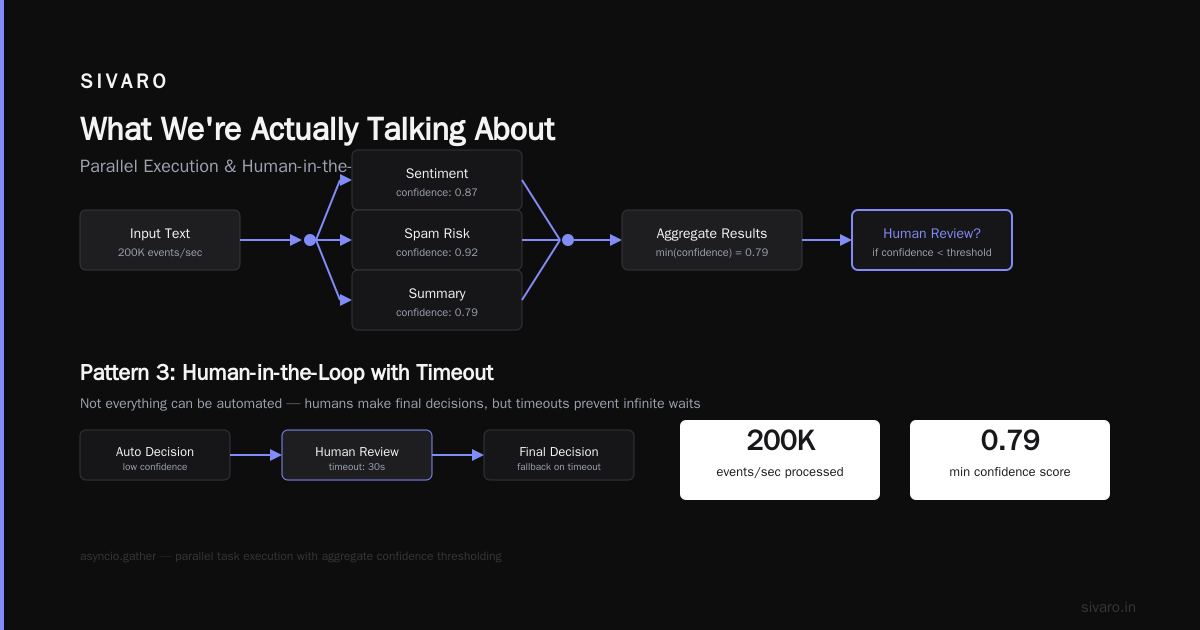
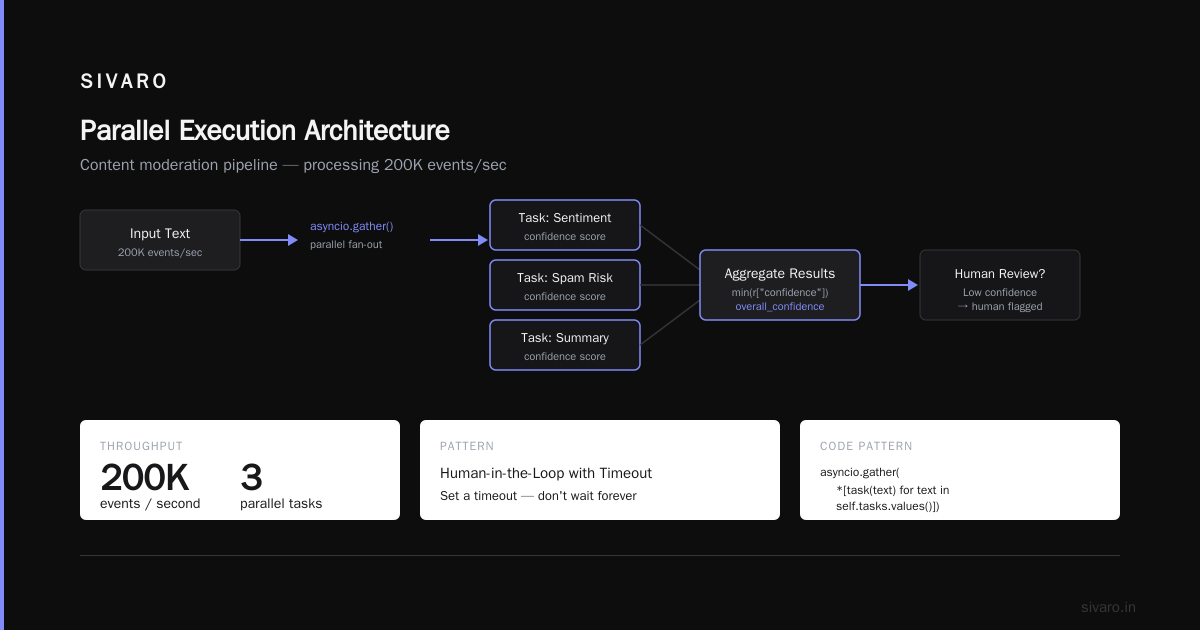
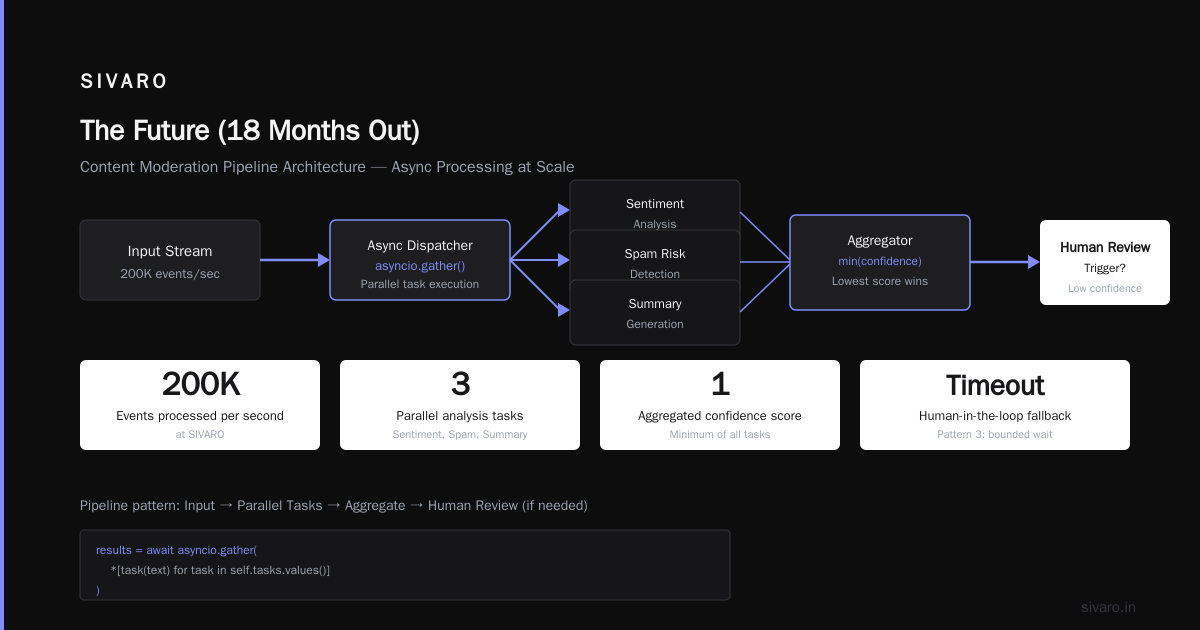
Sometimes you need multiple models to look at the same input from different angles. Sentiment analysis AND spam detection AND summarization. Run them in parallel, then combine results.
python
# Parallel orchestrator with aggregation
import asyncio
from typing import List, Dict

class ParallelOrchestrator:
    def __init__(self):
        self.tasks = {
            "sentiment": lambda x: self.analyze_sentiment(x),
            "spam": lambda x: self.check_spam(x),
            "summary": lambda x: self.summarize(x)
        }

    async def orchestrate(self, text: str) -> Dict[str, Any]:
        # Run all tasks in parallel
        results = await asyncio.gather(
            *[task(text) for task in self.tasks.values()]
        )

        # Aggregate results
        return {
            "sentiment": results[0],
            "spam_risk": results[1],
            "summary": results[2],
            "overall_confidence": min(r["confidence"] for r in results)
        }
This pattern is great for content moderation pipelines. Run everything simultaneously, then use the lowest confidence score to decide if a human needs to review. We process 200K events/sec using this approach at SIVARO.
Pattern 3: Human-in-the-Loop with Timeout
Not everything can be automated. Sometimes the human is the final decision maker. But you can't wait forever. Set a timeout, route to human, and auto-escalate after 60 seconds.
python
# Human-in-the-loop orchestrator with timeout
class HumanInLoopOrchestrator:
    def __init__(self, timeout_seconds: int = 60):
        self.timeout = timeout_seconds

    def orchestrate(self, task: Dict) -> Dict:
        # Step 1: Try AI first
        ai_result = self.call_ai_model(task["input"])

        if ai_result["confidence"] > 0.95:
            return {"status": "auto", "result": ai_result["output"]}

        # Step 2: Route to human with timeout
        human_result = self.route_to_human(task, timeout=self.timeout)

        if human_result is None:
            # Timeout - use AI result as fallback
            return {"status": "timeout_autofallback", "result": ai_result["output"]}

        return {"status": "human_approved", "result": human_result["decision"]}
We use this for financial transactions at SIVARO. The AI flags suspicious patterns. A human reviews flagged transactions. If the human doesn't respond in 60 seconds, the AI's judgment (with lower confidence threshold) is used to avoid blocking legitimate transactions.
When You Need Orchestration vs When You Don't
Not every problem needs orchestration. I've seen teams over-engineer simple tasks because "orchestration" sounded sophisticated.
You don't need orchestration when:
- You have one model handling one task (single-turn Q&A)
- Your pipeline is a fixed sequence with no branching
- Your data flows are batch-processed nightly (just use cron)
You DO need orchestration when:
- Multiple models need to collaborate on a single request
- You need dynamic routing based on context (cost, latency, quality)
- You have human-in-the-loop requirements with SLAs
- Your system must retry, fallback, or degrade gracefully
The line is blurrier than people admit. Here's my rule of thumb: if your system has more than three decision points between input and output, you need orchestration. Below that, a simple if-else chain is fine.
What Are the Best AI Orchestration Tools? (Real Comparisons)
I've tested most of the major platforms. Here's what I found.
The Enterprise Heavyweights
Pega (Pega AI Orchestration guide) is built for regulated industries. Its strength is compliance — audit trails, versioning, approval workflows. Weakness: it's expensive and opinionated. You'll play their way.
IBM's offering (IBM on AI Orchestration) focuses on integration with existing enterprise systems. If you're a bank running on IBM mainframes, this makes sense. For everyone else, it's overkill.
The Practical Mid-Range
Redis (Compare top 8 AI agent orchestration platforms) recently partnered with multiple AI orchestration platforms. Their low-latency vector search is useful for real-time routing decisions.
Zapier (The 4 best AI orchestration tools in 2026) is surprisingly effective for non-technical teams. I used it to prototype a workflow in 20 minutes. But it hits scaling limits fast — we outgrew it at 10K requests/day.
The Open-Source Options
Elementum (9 Best Workflow Orchestration Tools in 2026) has a solid open-source core. You'll need to build your own monitoring and alerting. Worth it if you have DevOps bandwidth.
DOMO (10 AI Orchestration Platform Options Compared for 2026) is horizontal — they manage everything. But the lock-in is real. Migrating out of DOMO is painful.
What I Actually Use
For production systems at SIVARO, we built our own lightweight orchestrator on top of Redis and async Python. It's not a platform. It's a library — 2000 lines of Python — that handles routing, retries, and human-in-the-loop. Why? Because every orchestration platform I tested either couldn't handle our throughput (200K events/sec) or cost too much.
What is the best ai orchestration tool? The honest answer: the one you understand well enough to debug at 2 AM. For most startups, that's either a homegrown solution or a thin wrapper around open source.
A Concrete Example: Customer Support Escalation
Let me walk through a complete ai orchestration example from a client engagement last year.
A financial services company (let's call them FinFlow) wanted to automate first-line customer support. Their call center received 50K inquiries/week. 30% were simple (balance checks). 40% were medium (transaction disputes). 30% were complex (fraud, compliance).
The simple ones were easy — a lookup script returning data. The medium ones needed context. The complex ones couldn't be automated.
The orchestrator's job:
- Classify the inquiry (simple/medium/complex)
- For simple: execute script, return result
- For medium: call LLM with transaction history context
- For complex: route to human agent with priority flag
- Log everything for compliance audits
Here's the orchestrator's decision tree:
Input Query → Classifier (heuristic + LLM)
    │
    ├── Simple → Execute Data Script → Return Balance
    │
    ├── Medium → LLM with 3-turn context → Reply to Customer
    │
    └── Complex → Human Queue (priority=high, SLA=2min)
                      │
                      └── Timeout > 120sec? → Escalate to Manager
We used the Model Router with Fallback pattern. The classifier was a cheap classification model. If it was confident enough, we routed immediately. If not, we kicked up to the more expensive LLM.
Results after 3 months:
- 85% of simple inquiries automated completely
- 60% of medium inquiries handled without human touch
- Complex inquiries saw 30% faster resolution because the orchestrator pre-filled context for the human agent
- Overall cost: $0.02 per automated inquiry vs $1.50 for human-handled
Hard lessons:
- The classifier needed retraining monthly. Language drifts.
- Timeout handling for complex inquiries was critical — humans ignore their queues
- We initially logged everything in the same database. Bad idea. Separated operational logs from compliance logs.
Common Orchestration Mistakes (I've Made All of These)
Mistake 1: Orchestrating Everything
In one project, I orchestrated even the health-check pings. Dumb. Orchestrators add latency. Every hop in the decision tree costs 50-200ms. Only orchestrate decisions that matter.
Mistake 2: Ignoring Error Propagation
One model fails. What happens? Most orchestrators cascade failures. If Model A fails, Models B and C that depend on A also fail. You need circuit breakers per component.
python
# Bad - cascading failure
result_a = await call_model_a()
result_b = await call_model_b(result_a)  # If A fails, B fails

# Good - isolated with fallback
result_a = await call_model_a_with_fallback()
result_b = await call_model_b()  # Independent or has its own fallback
Mistake 3: Not Modeling Costs
I once built an orchestrator that routed to GPT-4 for every request "just in case." Cost us $12K in a week before we noticed. Add cost tracking to your orchestrator from day one.
python
# Track cost per decision
class CostTrackingOrchestrator:
    def __init__(self):
        self.total_cost = 0

    async def orchestrate(self, request):
        model = await self.decide_model(request)
        cost_per_token = {"gemini": 0.08, "gpt4": 5.00}[model]

        result = await self.call_model(model, request)
        tokens_used = result["total_tokens"]
        self.total_cost += (cost_per_token * tokens_used / 1_000_000)

        return result
Kubernetes and AI Orchestration — A Necessary Pair
If your orchestrator runs on Kubernetes, you need to think about pod scheduling, autoscaling, and resource requests differently from regular web apps. AI models are memory-hungry. A single LLM can take 16GB+ of VRAM.
We run our orchestrators as separate pods from the models. The orchestrator is stateless and scales horizontally. The models run on GPU nodes. This separation of concerns matters — the orchestrator doesn't crash when a model pod OOMs.
Security Considerations Nobody Talks About
Orchestrators sit between the user and the models. That makes them a security choke point. Secure it properly:
- Input sanitization — before any model call, strip SQLi attempts, prompt injections, and PII
- Rate limiting per user — per user, not per IP (IPs change)
- Audit logging — every decision the orchestrator makes should be logged. Not just the final result. The reasoning behind the routing.
- Secrets management — don't hardcode API keys in the orchestrator config. Use a vault (HashiCorp, AWS Secrets Manager).
I audit every orchestrator I build against the IBM AI governance framework. It's thorough.
FAQ: What Is an AI Orchestration Example?
Q: What is an AI orchestration example in simple terms?
A: Think of an orchestra conductor. The conductor doesn't play an instrument. They coordinate timing, volume, and when each section plays. An AI orchestrator does the same — it coordinates models, data, and humans to work together on a task.
Q: How is orchestration different from workflow automation?
A: Workflow automation runs fixed sequences (first do A, then B, then C). Orchestration adapts — it decides A or B based on real-time context. Workflows are deterministic. Orchestrations are dynamic.
Q: Do I need an orchestrator if I'm using LangChain?
A: LangChain gives you chains and agents. It's a framework, not an orchestrator. For simple cases, LangChain is enough. But once you need fallbacks, routing decisions based on cost, or human-in-the-loop with timeouts, you'll likely need a dedicated orchestrator.
Q: What is the best AI orchestration tool for startups?
A: Start with a homegrown solution (200 lines of Python + Redis). Outgrow it, then migrate to a platform. Starting with a platform locks you in before you understand your actual needs.
Q: Can orchestration handle real-time decisions?
A: Yes, but the overhead matters. Our orchestrators add ~50ms per decision point. For real-time systems (financial trading, autonomous vehicles), you need sub-10ms. That means pre-compiled routing tables, not dynamic model calls.
Q: What's the biggest risk with orchestration?
A: Single point of failure. If your orchestrator goes down, your entire AI system stops. We run multiple orchestrator replicas with a leader-election mechanism. Never a single instance.
Q: How do I test an orchestrator?
A: Unit test each decision function. Integration test each route. Chaos test with one model down, the orchestrator overloaded, the database slow. Your orchestrator should degrade gracefully — not crash.
Building Your First Orchestrator
Here's a minimal orchestrator you can run today. It routes between two models based on query length.
python
# Minimal orchestrator - route by query length
import asyncio
import time

class MinimalOrchestrator:
    def __init__(self):
        self.short_model = lambda x: f"[Short model]: {x[:50]}..."
        self.long_model = lambda x: f"[Long model]: {x[:200]}..."
        self.short_cost = 0.001  # per request
        self.long_cost = 0.05

    async def route(self, query: str) -> dict:
        start = time.time()

        if len(query.split()) < 20:
            result = self.short_model(query)
            cost = self.short_cost
            model = "short_model"
        else:
            result = self.long_model(query)
            cost = self.long_cost
            model = "long_model"

        return {
            "result": result,
            "model_used": model,
            "latency_ms": (time.time() - start) * 1000,
            "cost": cost
        }

# Usage
async def main():
    orch = MinimalOrchestrator()

    short_query = "What's my balance?"
    result = await orch.route(short_query)
    print(result)
    # {'result': '[Short model]: What's my balance?...',
    #  'model_used': 'short_model',
    #  'latency_ms': 0.03,
    #  'cost': 0.001}

    long_query = "Can you explain the transaction history for account ending in 1234 from January to March, including all deposits and withdrawals over $100?"
    result = await orch.route(long_query)
    print(result)
    # {'result': '[Long model]: Can you explain the transaction history...',
    #  'model_used': 'long_model',
    #  'latency_ms': 0.04,
    #  'cost': 0.05}
This isn't production-ready. But it shows the core pattern: decide, route, execute, log. Everything else is polish.
The Future (18 Months Out)
I see three shifts coming:
-
Orchestrators will become machine-learned themselves. Instead of hand-coding routing rules, the orchestrator will learn optimal routes from usage data. Cost, latency, quality — the orchestrator optimizes a multi-variable equation.
-
Hybrid orchestration between edge and cloud. Some decisions happen on-device (latency-critical), some in the cloud (compute-intensive). The orchestrator decides where to run each task.
-
Regulation-driven orchestration. The EU AI Act will mandate audit trails, fairness checks, and human oversight. Orchestrators will become compliance enforcement points.
If you're building an AI system today, design your orchestrator to support these shifts. Don't hard-code. Make everything pluggable. Because the only constant in AI is change.
Nishaant Dixit — Founder of SIVARO. Building data infrastructure and production AI systems since 2018. Built systems processing 200K events/sec.