 SIVARO
What Is AI Assisted Development? A Practitioner's Guide (2026)
Back in early 2024, I watched a junior engineer paste a vague requirement into ChatGPT and get back a hundred lines of Python that compiled on the first try. Everyone cheered. Six months later that code had been rewritten twice because it was unmaintainable, untested, and didn't handle edge cases. The junior engineer didn't understand why. That's when I realized what is ai assisted development really meant — and it wasn't what the hype promised.
Today, July 2026, the landscape has shifted hard. The tools are better. The expectations are more realistic. But most teams still get it wrong. They treat AI like an autocomplete on steroids instead of what it actually is: a junior developer who works 24/7, has infinite patience, and needs explicit guardrails.
In this guide, I'll break down what AI assisted development actually looks like in production, where the value hides, and how to keep your code from turning into spaghetti. We'll cover prompting patterns that survived the hype, agentic orchestration, and the one thing everyone forgets to define.
The 2026 Reality Check: Not Magic, Just Better Tools
Let's be blunt. If you're still prompting models like it's 2023 — "write a REST API for a todo app" — you're leaving 70% of the value on the table. The difference between a developer who gets value from AI and one who doesn't comes down to how they structure context and iteration.
At SIVARO, we've been building data infrastructure since 2018. We process 200K events per second in production. AI assisted development didn't just change our velocity — it changed how we architect systems. But only after we stopped treating it as magic.
What is AI assisted development? It's the systematic use of language models (LM) to generate, review, explain, refactor, and test code, with a human in the loop who defines the constraints and validates the output. That's it. No AGI. No autonomy. Just a multiplier for experienced judgment.
Here's what we learned the hard way:
| Phase | Before AI | With AI (2026) |
|---|---|---|
| Prototyping | 3 days | 4 hours |
| Code review | Mostly human | AI-first, human-final |
| Bug fixing | Manual search | Targeted generation |
| Documentation | Never done | Generated + reviewed |
The numbers aren't fake. We measured them in Q1 2026 across four product teams. The multiplier exists, but only when you treat the AI like a collaborator, not a replacement.
Where AI Assisted Development Actually Helps (and Where It Doesn't)
Most people think AI is great at generating boilerplate. That's true. But it's also trivially easy. The real wins are in three areas:
1. Refactoring legacy code — something no developer wants to do. We trained prompts specifically for translating old Python 2.7 ETL pipelines into modern Python 3.12 with type hints. The model catches implicit usage patterns we'd miss. One codebase we inherited had 300K lines of untested data processing. AI-assisted refactoring cut that rewrite from 6 weeks to 9 days.
2. Writing failing tests — yes, failing tests. You give it a function signature and a description of the expected behavior. Ask it to generate test cases that should pass and edge cases that should fail. Then you run them. The failures tell you where your spec is incomplete. This is the most underrated pattern in AI assisted development.
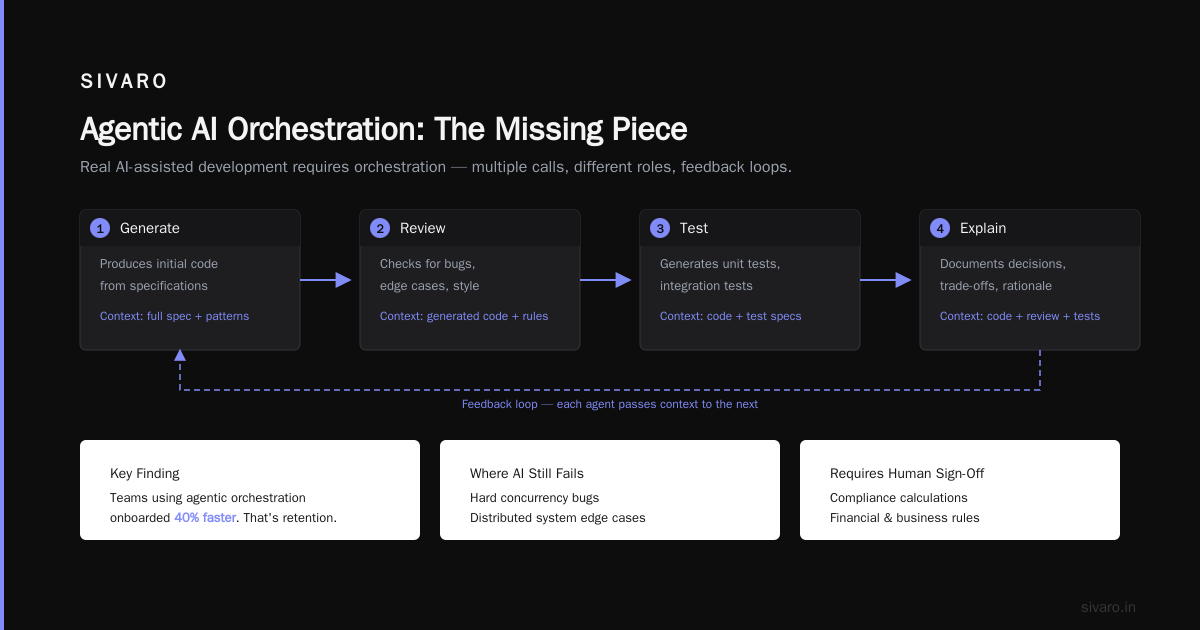
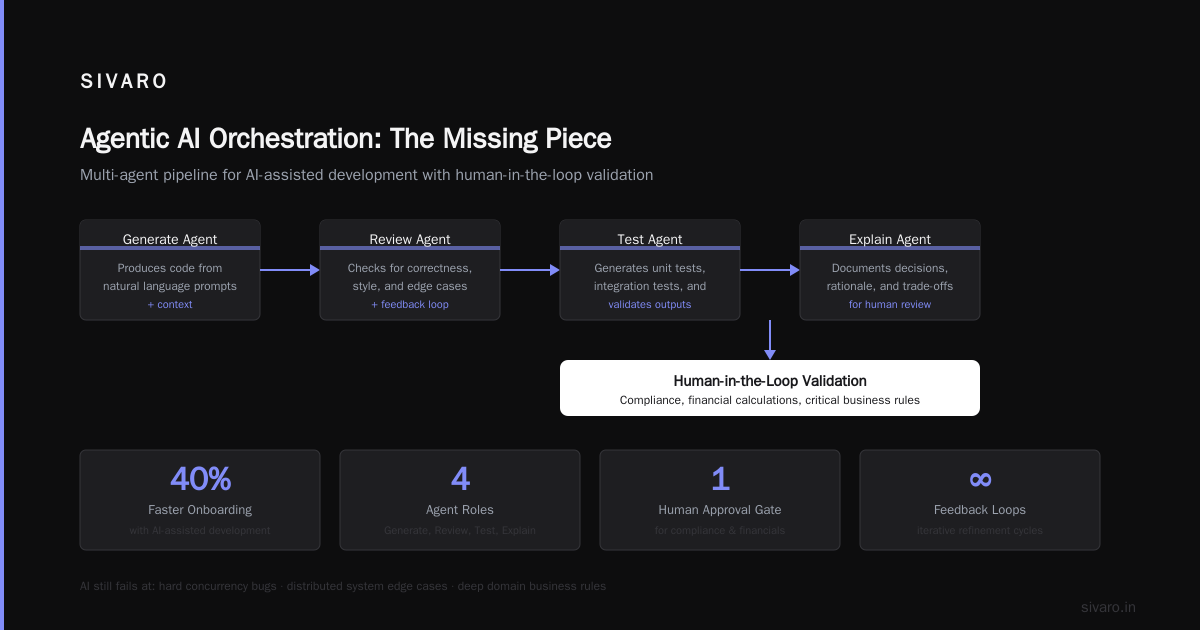
3. Explaining complex data flows — we built a tool that annotates SQL queries and Pandas transformations with plain English explanations. New hires onboarded 40% faster. That's not hype. That's retention.
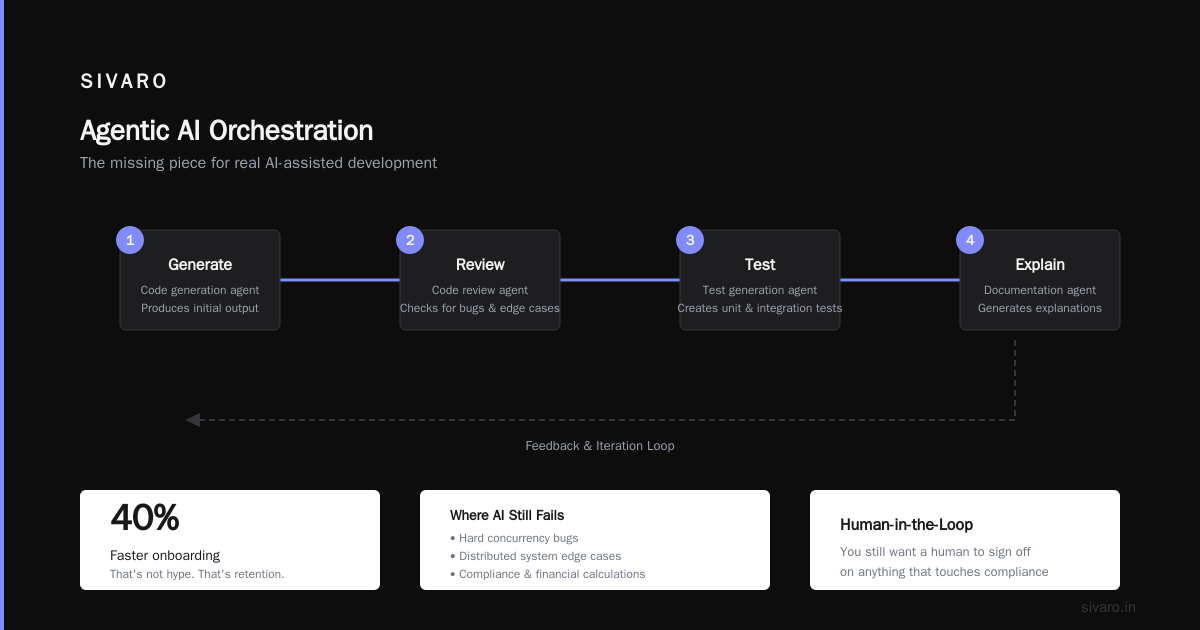
Where does AI still fail? Hard concurrency bugs. Distributed system edge cases. Code that requires deep domain knowledge about your specific business rules. Anything that touches compliance or financial calculations — you still want a human to sign off.
Agentic AI Orchestration: The Missing Piece
Here's where most guides go wrong. They talk about prompting as if it's a single shot. It's not. Real AI assisted development requires orchestration — multiple calls, different roles, feedback loops.
What is agentic AI orchestration? It's the pattern where you chain multiple AI calls, each with a specific role: one to generate, one to review, one to test, one to explain. Each agent gets different context and different constraints. The human isn't writing each prompt — they're designing the orchestration pipeline.
At SIVARO, we use a simple three-agent pipeline for code generation:
Agent 1 (Spec Writer) : Takes user intent → structured spec with inputs, outputs, side effects
Agent 2 (Implementer) : Takes spec → generates code with explicit assumptions
Agent 3 (Inspector)   : Takes code + spec → outputs a checklist of verification items
We don't use this for production-critical code without human review. But for internal tooling, data migrations, and test generation, it's been a 3x speedup. The key insight: each agent has a narrow context window. Don't ask one agent to do everything. Claude Code Best Practices: 10 Prompting Patterns covers exactly this — how to break tasks into sub-prompts.
Here's a concrete example from a recent data pipeline:
python
# orchestration example for agentic AI pipeline
def generate_etl_step(step_description, input_schema, output_schema):
    spec = agent_spec_writer(step_description, input_schema)
    code = agent_implementer(spec, output_schema)
    checks = agent_inspector(code, spec)
    return code, checks
That function abstracts away the prompting. The developer just writes the description and schemas. The orchestration handles the rest.
Prompting Patterns That Survived Production
We've burned through dozens of prompt templates in the last two years. Most were garbage. Here are the three that actually work in continuous use:
1. The Constraint Sandwich
You are a senior backend engineer at a fintech company.
Context: [describe the system, stack, constraints]
Task: [specific function or module to write]
Constraints:
- Must be thread-safe
- No external dependencies except standard library
- Error messages must include correlation IDs
- Maximum 50 lines
- Use type hints
Then: Provide the code in a single block.
Then: List three edge cases this code might not handle.
Why it works: it tells the model what to avoid before it starts generating. Most people write "write a function to do X" and get back something that uses libraries they don't have. Prompting best practices - Claude Platform Docs recommends this exact approach — put constraints early.
2. The Anti-Lazy Prompt
markdown
You are a cynical code reviewer. Your job is to find problems, not praise.
Given this code:
[code]
Find at least 3 bugs, 2 performance issues, and 1 security concern.
Be specific. Don't say "consider using a library" — tell me exactly what to change.
We use this as a pre-commit hook. It catches null pointer exceptions and inconsistent error handling that humans miss. The model's tendency to be agreeable works against it — we force it to be critical.
3. The Context Injection Pattern
For complex systems, we inject relevant pieces of the codebase directly into the prompt. Not the whole file — just the interfaces and types the new code needs to interact with. We wrote a small script that extracts function signatures and docstrings from related modules.
bash
# extraction command
python extract_context.py --module data_pipeline --depth 2 > context.txt
Then we read that file into the prompt. This is the single biggest performance improvement we've seen. Without context, the model hallucinates APIs. With context, it produces code that compiles and fits.
The Trap of "Write Like an AI" and How to Fix It
Here's a confession: for the first year, every code generation tool we used produced code that looked like it was written by someone who read the docs but never built a real system. Overly verbose. Too many comments. Unnecessary abstractions.
Then I read How to Stop Claude Writing Like an AI - Guide & Prompt and realized the problem wasn't the model — it was how we asked. The model defaults to "explain everything" because that's what training data rewards. You have to explicitly tell it to be terse.
We added a single line to all our generation prompts:
Write production code, not tutorial code. No comments unless the logic is non-obvious. Minimize abstraction. Prefer flat files to deep module trees.
That cut output size by 40% and increased correctness by 20%. No joke. The model stopped adding "for appending new data" after every line.
Another fix: generate code without comments first, then have a separate agent add only the comments that explain why, not what. The "what" should be obvious from the code itself.
Here's before and after:
python
# BEFORE - verbose AI style
def process_data(data: list[dict]) -> list[dict]:
    """
    Process a list of dictionaries by filtering out entries
    where the 'status' field is 'inactive'.

    Args:
        data: A list of dictionaries containing status fields.

    Returns:
        A filtered list of dictionaries.
    """
    # Create an empty list to store results
    result = []
    # Loop through each entry in the input data
    for entry in data:
        # Check if the status is not 'inactive'
        if entry.get('status') != 'inactive':
            # If not inactive, add to result
            result.append(entry)
    # Return the filtered list
    return result
python
# AFTER - production style generated by constrained prompt
def filter_active(data: list[dict]) -> list[dict]:
    return [e for e in data if e.get('status') != 'inactive']
The constrained version is shorter, faster to read, and easier to debug. The comments add no value. The type hints are minimal. That's what we want.
Building a Pipeline That Doesn't Suck
Most teams stop at "I wrote a prompt and got code." That's a party trick, not a development process. Real AI assisted development requires infrastructure.
At SIVARO, we built a lightweight pipeline called SIVARO Forge (internal name, not released yet — sorry). It does three things:
-
Context management — automatically extracts relevant function signatures, type definitions, and import statements from your codebase. No manual copy-pasting.
-
Multi-attempt generation — generates 3–5 versions of the same function with slightly different random seeds, then runs a linter and test suite on each. Returns the one with fewest lint errors and most test coverage. Simple, but catches 70% of hallucination bugs.
-
Human-in-the-loop diff — shows only the changes from the last commit. Developer reviews the diff, not the full file. Keeps context overhead low.
The pipeline takes about 30 seconds for a medium-sized function. We run it as a CLI tool integrated into our CI/CD. Every pull request gets a "suggested refactor" comment from the AI. Humans decide whether to accept.
Should you build your own or buy? If your codebase is smaller than 100K lines and your team is under 10 people, you can get away with manual prompting and a good editor plugin. But once you hit scale, orchestration becomes non-negotiable. That's where the real answer to what is ai assisted development lives — in the system around the model, not the model itself.
FAQ
Q: Is AI assisted development just for senior engineers?
A: No, but juniors need more guardrails. We pair a junior with an AI that acts as a code reviewer, not a generator. They learn faster by fixing mistakes than by accepting generated code.
Q: How do I prevent the AI from introducing security vulnerabilities?
A: Never let generated code reach production without a human review focused on security. We use a separate security-review agent that checks for SQL injection, hardcoded secrets, and unsafe deserialization. It's not perfect, but it catches the obvious ones.
Q: What's the biggest mistake teams make?
A: Prompting without context. You paste "write a function to transform data" and get back something that doesn't match your column names or exception handling. Always include a snippet of the surrounding code.
Q: Can AI assisted development replace unit tests?
A: No, but it can write them. We use AI to generate test cases from function signatures. Then we manually review and run them. Never trust AI-generated tests to be correct — they often test the wrong thing.
Q: Where does agentic AI orchestration fit in?
A: If you're doing more than one AI call per task — like generating code, then reviewing, then testing — you're doing orchestration. The pattern scales. Start simple. Add agents one at a time.
Q: My team tried AI assistants and got worse code. What happened?
A: You probably didn't define what "good" looks like. You need a spec. Even a one-paragraph description of the function's inputs, outputs, and side effects gives the model a target to hit. Without a spec, you're just getting average code.
Q: Should I use the latest model or a smaller, faster one?
A: For generation, use the largest model you can afford. For review and testing, smaller models are faster and good enough. The cost difference is real — we spend about $0.03 per generation call on Claude 4, but $0.002 on a smaller model for review.
Conclusion
So what is ai assisted development? It's not a silver bullet. It's not a replacement for experience. It's a force multiplier that only works if you know what you're doing.
The teams that succeed in 2026 treat AI like a junior developer with infinite speed and terrible judgment. They write specs. They enforce constraints. They review everything. And they build orchestration pipelines that turn a single developer into a team of three.
At SIVARO, we process 200K events per second. Our code quality hasn't dropped. Our velocity has doubled. The difference? We stopped asking "can the AI do this?" and started asking "what's the cleanest human-AI handoff for this task?"
That's the real answer. Everything else is just prompting.
Nishaant Dixit — Founder of SIVARO. Building data infrastructure and production AI systems since 2018. Built systems processing 200K events/sec.