 SIVARO

What Is Admission Control in Kubernetes GPU Scheduling
A team I worked with in March 2026 burned $41,000 in six hours. Not from a breach. Not from a runaway training job. From 240 inference pods that all passed Kubernetes scheduling, all grabbed a GPU, and then sat in queue behind each other puking 503s into a load balancer that kept scaling them up. Every pod was "healthy." Every GPU was allocated. And the product was down.
That's the gap admission control fixes. And almost nobody building on Kubernetes understands it.
What is admission control in Kubernetes GPU scheduling? It's the layer that decides whether a pod should be allowed to consume a scarce, expensive resource right now — not whether it can be placed on a node. Placement is the scheduler's job. Admission is the gate before that: policy, quota, priority, and backpressure applied at the API server or a controller, so you don't accept work you can't actually serve.
Most teams skip it. They wire up an HPA, point it at GPU utilization, and call it autoscaling. Then they discover that adding replicas to a saturated inference server makes things worse, not better. Let me walk you through why, and what to do instead.
The Difference Between Scheduling and Admission (This Trips Everyone Up)
Kubernetes has a thing called admission controllers. Mutating ones change objects, validating ones reject them. That's the general mechanism. But when people say "admission control in GPU scheduling," they usually mean something narrower and more useful: does this workload get a GPU at all, given the current state of the cluster?
The kube-scheduler answers "where does this pod go?" It looks at node resources, taints, affinity, topology. If a node has a free GPU, the pod gets bound. That's placement.
Admission answers a different question: "should we even accept this pod into the system?" These are not the same. And conflating them is why your inference cluster melts down under load.
Here's the failure mode. You have 8 nodes, 8 A100s. Your inference service runs 1 replica per GPU. Traffic spikes. HPA sees high GPU utilization, scales to 16 replicas. Kubernetes schedules 8 of them (there are 8 free... wait, there aren't). Actually the first 8 pods from the previous scale event already hold every GPU. The new 8 sit Pending forever.
That's the best case. The worse case: you're running time-sliced GPUs or MPS, and "one GPU" means "one slot on a shared GPU." Now 16 pods all land, all share 8 physical GPUs, and every single one gets slower. Latency triples. Your SLO burns. The autoscaler sees more utilization and scales harder.
Admission control is the brake pedal you forgot to install.
Why Autoscaling Is Not Admission Control
I need to be blunt here, because this is where 90% of teams go wrong.
Queue based gpu scheduling vs kubernetes autoscaling is not a debate about which is better. They solve different problems, and you need both. Autoscaling changes capacity — it adds or removes replicas or nodes. Admission control changes acceptance — it decides how much work enters the system at all.
If your GPU pool is fixed (and most are, because you can't spin up an H100 in 30 seconds on a whim), autoscaling is a lie. You can scale replicas from 4 to 40, but you still have 8 GPUs. All you've done is create a queue of pods pretending to be capacity.
This is the same reason llm inference admission control vs autoscaling matters so much right now. LLM inference has a nasty property: each request occupies a GPU for an unpredictable, sometimes very long time. A 200-token chat reply finishes in 400ms. A 4,000-token code generation finishes in 40 seconds. If you admit everything that arrives, your p99 latency explodes because you've got 400-second requests blocking the door.
Autoscaling can't fix tail latency. Admission control can. That's the whole game.
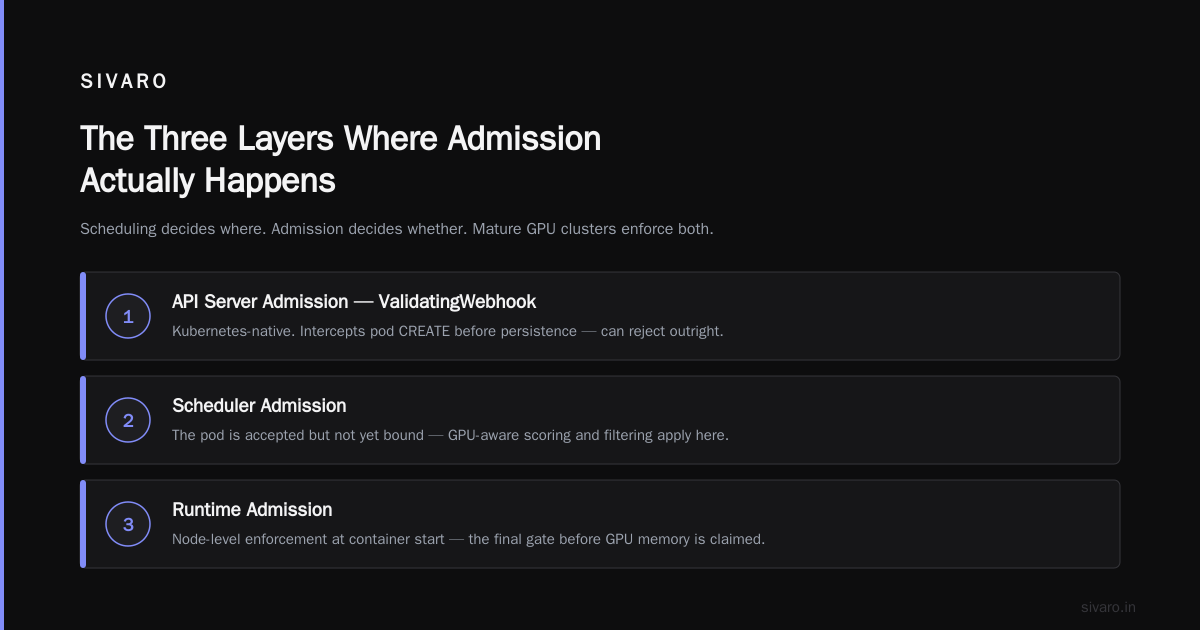
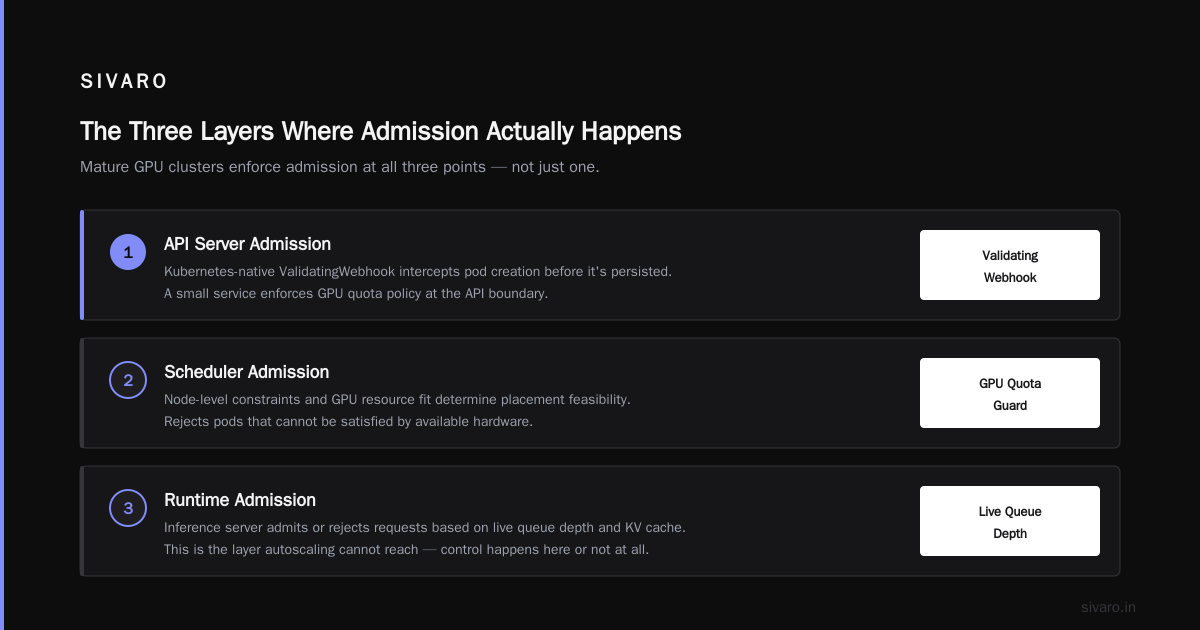
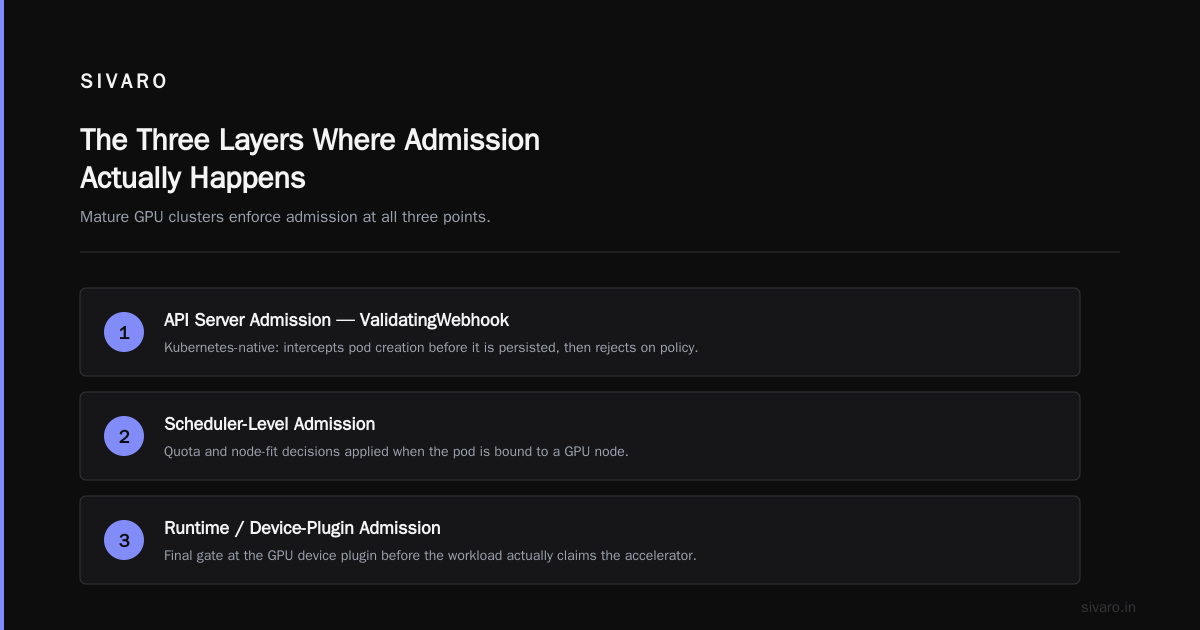
The Three Layers Where Admission Actually Happens
Let me get concrete. In a real GPU cluster, admission can happen at three points, and mature setups use all three.
API Server Admission (ValidatingWebhook)
This is the Kubernetes-native mechanism. A webhook intercepts pod creation before it's persisted and can reject it. You write a small service, register it, and it enforces policy.
yaml
apiVersion: admissionregistration.k8s.io/v1
kind: ValidatingWebhookConfiguration
metadata:
  name: gpu-quota-guard
webhooks:
  - name: gpuquota.sivaro.internal
    rules:
      - apiGroups: [""]
        apiVersions: ["v1"]
        operations: ["CREATE"]
        resources: ["pods"]
    clientConfig:
      service:
        name: gpu-admission
        namespace: platform
        path: "/validate"
    admissionReviewVersions: ["v1"]
    sideEffects: None
    failurePolicy: Ignore
Set failurePolicy: Ignore while you're rolling it out. You will break production otherwise. I've done it. It's not fun.
The webhook checks: does this namespace have GPU quota left? Is this priority class allowed to preempt? Is the requesting team over their budget for the month? If no, reject. The pod never exists. Nothing to schedule. Nothing to fail later.
Scheduler Extenders and the Dynamic Resource Allocation API
For finer control — topology, gang scheduling, GPU memory fractions — you push admission into the scheduling cycle via the Dynamic Resource Allocation API, which went GA in Kubernetes 1.34 (released August 2025). DRA lets you express claims like "I need 40GB of HBM and I'll wait for it" instead of the old binary nvidia.com/gpu: 1 request.
This matters because the old model forced you to over-request. A 7B model doesn't need a whole H100. DRA plus admission lets you pack multiple models per GPU with real accounting.
Application-Level Admission (The One Nobody Builds)
This is the layer most teams miss entirely, and it's the one that saved the $41K team.
Even if a pod is admitted and has a GPU, the application inside it still has to decide which requests to serve. If your inference server has a queue, it needs to reject or shed load before the queue grows unbounded. This is where vLLM's or TGI's batching config meets your SLO.
We run admission at the server level using a token-bucket rate limiter and a hard concurrency cap. Without it, the Kubernetes layer is just delaying the inevitable.
Implementing GPU Quota With Priority Classes
The cheapest admission control you can ship today is namespace quota plus priority classes. Here's the pattern I use.
yaml
apiVersion: v1
kind: ResourceQuota
metadata:
  name: gpu-quota
  namespace: team-inference
spec:
  hard:
    requests.nvidia.com/gpu: "4"
    limits.nvidia.com/gpu: "4"
---
apiVersion: scheduling.k8s.io/v1
kind: PriorityClass
metadata:
  name: prod-llm-critical
value: 1000000
globalDefault: false
description: "Customer-facing inference. Never preempted."
---
apiVersion: scheduling.k8s.io/v1
kind: PriorityClass
metadata:
  name: batch-training
value: 100
globalDefault: false
description: "Preemptible. Yields to production."
Now when batch training tries to grab the last GPU, it can be preempted by a prod inference pod. And teams can't exceed their GPU quota — the API server rejects the pod at admission time with a clear error instead of leaving it Pending forever.
Try that with HPA alone. You can't.
The Admission Controller Pattern for GPU Workloads
The webhook I deploy for clients does four checks, in order:
python
# Simplified from the SIVARO gpu-admission controller
def validate(pod):
    if not requests_gpu(pod):
        return ALLOW

    # 1. Namespace quota check
    if namespace_gpu_usage(pod.namespace) + gpu_count(pod) > quota(pod.namespace):
        return DENY("namespace GPU quota exceeded")

    # 2. Priority-class gate
    if pod.priority_class == "batch-training" and cluster_gpu_free() < 2:
        return DENY("batch jobs require 2+ free GPUs")

    # 3. Model-size sanity
    if pod.labels.get("model") and required_vram(pod) > available_vram(pod):
        return DENY("model needs more VRAM than any node provides")

    # 4. Monthly budget (FinOps gate)
    if team_spend(pod.namespace, month=now().month) > team_budget(pod.namespace):
        return DENY("monthly GPU budget exceeded — override via annotation")

    return ALLOW
That fourth check has saved clients more money than any autoscaling optimization. When a team hits their budget, new GPU pods get rejected until they raise the limit. No surprise invoices.
Does it break things? Yes. The first week it's enabled, someone always has a runaway job. That's exactly the point. You want that failure at admission, not at 3am on the billing dashboard.
Why LLM Inference Admission Control Beats Autoscaling
Here's my contrarian take, and I'll defend it.
For LLM inference specifically, admission control is more important than autoscaling. Autoscaling is a 2015 idea built for stateless web services with predictable per-request cost. LLM inference is neither stateless nor predictable.
A single H100 running Llama 3.3 70B in FP8 handles maybe 40–80 concurrent requests before latency walls. That's a hard ceiling. Autoscaling can't move it. Only admission can respect it.
So what do you actually do?
Cap concurrency at the server. Set --max-num-seqs in vLLM to something your SLO can survive. Test it. If your p95 latency is 800ms at 32 concurrent and 4s at 64, cap at 40. Reject the rest with a 429 and a Retry-After header.
Gate at the API gateway. Put a rate limiter in front of the inference service. Envoy, Kong, whatever you use. Token bucket per API key. This is admission control, and it's the most effective single thing you can do.
Queue with intent. If you must queue, queue with priority and a timeout. A request that waits 30 seconds for a GPU is worse than a request that got rejected in 50ms. Users prefer fast failure.
Scale on queue depth, not GPU utilization. GPU utilization is a lagging, misleading metric for LLMs. Queue depth and time-to-first-token are what you care about. If queue depth is climbing, scale. If it's flat and GPU is at 90%, leave it alone — that's healthy saturation.
I've published more on this pattern at SIVARO's engineering notes if you want the deeper version with benchmark numbers.
A Working Admission Controller in 60 Lines
Here's the smallest useful thing. A webhook that enforces a global GPU concurrency cap across the cluster.
go
func (h *Handler) Handle(ctx context.Context, req *admissionv1.AdmissionRequest) *admissionv1.AdmissionResponse {
    pod := &corev1.Pod{}
    if err := json.Unmarshal(req.Object.Raw, pod); err != nil {
        return deny("cannot parse pod")
    }

    if !wantsGPU(pod) {
        return allow()
    }

    // Count currently-running GPU pods
    running, err := h.countRunningGPUPods(ctx)
    if err != nil {
        return allow() // fail open on error
    }

    cap := h.config.GlobalGPUConcurrencyCap
    if running >= cap {
        return deny(fmt.Sprintf(
            "global GPU concurrency %d/%d — retry with backoff or use batch priority",
            running, cap,
        ))
    }

    // Check namespace quota
    nsUsage, _ := h.namespaceGPUUsage(ctx, pod.Namespace)
    nsQuota := h.config.NamespaceQuota[pod.Namespace]
    if nsUsage+int64(gpuCount(pod)) > nsQuota {
        return deny("namespace GPU quota exceeded")
    }

    return allow()
}
That fail open on error is deliberate. In my experience, a broken admission webhook that fails closed is worse than no webhook at all. You take down the whole cluster because your metrics backend hiccupped. Don't do that.
When Admission Control Is the Wrong Answer
I'll be honest about the trade-offs, because nothing is a silver bullet.
If you're running a small cluster — 2 or 3 GPUs, one team, predictable workloads — admission control is overkill. Use quota. Use priority classes. Ship.
If your workloads are genuinely elastic and you can burst to cloud GPUs on demand in minutes, autoscaling is fine. The math changes when capacity is actually available.
And if your admission controller itself is buggy, you've added a new failure mode to a system that was working. Test it in staging for a week. Run it in dry-run mode and log every decision before you enforce. Compare the logs to what you would have done manually.
For most teams I've worked with since 2024, the right answer was: admission at the namespace quota level (free, Kubernetes-native), plus application-level concurrency caps, plus GPU-aware autoscaling on top. All three. Not one.
FAQ
What is admission control in Kubernetes GPU scheduling in one sentence?
It's the set of rules that decide whether a pod gets to request a GPU at all — enforced at the API server, a scheduler extender, or inside the application — separate from the scheduler's job of picking which node runs it.
Does Kubernetes have built-in admission control for GPUs?
Not really. It has ResourceQuota and PriorityClass, which get you partway. For anything more sophisticated (concurrency caps, budget gates, model-size validation), you write a ValidatingWebhook.
Why not just use HPA on GPU utilization?
Because GPU utilization is a lagging indicator. By the time HPA reacts, you're already queuing. And adding replicas to a fixed GPU pool doesn't add capacity — it just creates pending pods and false hope.
Queue based GPU scheduling vs Kubernetes autoscaling — which is better?
Neither. They solve different problems. Queue-based scheduling (like Kueue or Volcano) manages when a job runs. Autoscaling manages how much capacity exists. Admission control governs whether work is accepted. You want all three in a mature setup.
What happens if the admission webhook goes down?
Set failurePolicy: Ignore so pods pass through and you lose enforcement, not availability. Failing closed on an admission webhook is a foot-gun that takes down production.
Is LLM inference admission control really necessary if I have autoscaling?
Yes. LLM latency degrades non-linearly with concurrency. A single GPU has a hard ceiling on concurrent requests regardless of how many replicas you spin up. Admission keeps you under that ceiling.
What metrics should drive scaling decisions for GPU inference?
Queue depth, time-to-first-token p95, and requests waiting — not GPU utilization. Scale when queues grow, not when GPUs look busy.
How do I roll out admission control without breaking production?
Run in dry-run mode for a week. Log every decision, including denials. Compare to what actually happened. Then enforce on a single non-critical namespace first. Expand gradually.
The Real Lesson
If you're running GPUs on Kubernetes and only using HPA, you don't have autoscaling. You have a hope engine.
Admission control is the boring, unsexy plumbing that keeps your GPU cluster from eating itself. It's the difference between "we scaled to handle the spike" and "we scaled into a queue and paged the on-call at midnight." And what is admission control in Kubernetes GPU scheduling except the discipline of saying no before you say yes?
Say no at the edge. Say yes to what you can actually serve. Everything else is a bill waiting to happen.
Nishaant Dixit — Founder of SIVARO. Building data infrastructure and production AI systems since 2018. Built systems processing 200K events/sec.