 SIVARO
What is a GPU Cluster? A Practical Guide for Engineers Building AI Infrastructure
Let me tell you a story.
It’s early 2025. I’m sitting in a cramped server room in Bangalore with three engineers from a mid-size fintech startup. They’ve bought eight NVIDIA A100s, racked them in four servers, and they can’t get training to run faster than a single GPU. Their loss curves are stalling. Their CTO is panicking. “We spent a crore on this cluster,” he says, “and it’s slower than my laptop.”
I asked one question: “What’s your network topology?”
Silence.
That’s when I realized: most people think a GPU cluster is just a pile of expensive GPUs wired together. They’re wrong. A GPU cluster is a carefully designed system where compute, memory, networking, and storage work in lockstep. If any piece breaks, you’re paying for hardware you can’t use.
This guide is what I wish someone had handed me in 2018, when I started building production AI systems at SIVARO. I’ll cover the hardware, the software, the cost, and the gotchas. By the end, you’ll know exactly what is a GPU cluster, how to build one, and — more importantly — whether you should.
The Raw Definition
At its simplest, what is a GPU cluster? It’s a group of computers (nodes) connected by a high-speed network, each equipped with one or more GPUs, working together on a single computational task — often training a deep learning model or running inference at scale.
But that’s like saying a car is a box with wheels.
A real GPU cluster has four layers, and you need all of them:
- Compute nodes — servers with GPUs, CPUs, RAM, local storage.
- Networking fabric — the wires and switches that connect nodes.
- Storage system — shared filesystem or object store for datasets and checkpoints.
- Software stack — job scheduler, container runtime, distributed training framework.
Most people focus on #1 and forget #2 and #3. That's the mistake the fintech startup made. They had eight GPUs but connected them via 1GbE. The GPUs spent more time waiting for data than computing.
Why Not Just Buy One Giant GPU?
Because you can’t. The largest GPU as of mid-2026 is the NVIDIA B200 (or AMD MI400, if you swing that way). A single B200 has 192GB of HBM3e memory and delivers around 2.5 PFLOPS of FP8. Impressive.
But training a 500-billion-parameter language model like Meta’s Llama 4 or Google’s Gemini 3 requires tens of thousands of GPU-hours. Even the biggest single GPU would take months.
You must parallelize. That means splitting the model across multiple GPUs — either by data parallelism (each GPU gets a different batch) or model parallelism (each GPU holds a different slice of the model). A cluster lets you scale horizontally. Two nodes, each with 8 GPUs, gives you 16 GPUs working in sync.
But scaling isn’t linear. Without proper networking and software, adding GPUs can actually slow things down — a phenomenon called “weak scaling collapse.” I’ve seen teams add GPUs and get negative throughput. It’s tragic.
The Anatomy of a GPU Node
Let’s open the box. A typical GPU node in 2026 looks like this:
- CPU: 2x AMD EPYC 9654 or Intel Xeon Platinum 8592+. 96+ cores each.
- RAM: 1-2 TB of DDR5, ECC.
- GPUs: 8x NVIDIA H100 (or B200) connected via NVLink 4.0 (or NVLink 5.0 on B200). Each GPU has its own HBM memory.
- Local storage: 4-8 NVMe SSDs in RAID0 for scratch space.
- Network: 1-2 ConnectX-7 or ConnectX-8 NICs, 400GbE or NDR InfiniBand.
- PCIe topology: Critical. You want GPUs as close to the CPU socket as possible, ideally on the same PCIe root complex.
I’ve benchmarked nodes with 8 GPUs spread across two CPU sockets versus one. The two-socket configuration adds 5-10% latency for GPU-to-GPU communication because data has to cross the socket interconnect. If you’re doing data-parallel training with large batch sizes, every microsecond counts.
Rule of thumb: For training, prefer nodes with 8 GPUs all in a single socket, or use NVSwitch for full bandwidth between GPUs across sockets.
Networking is Everything
I’m going to say something that might piss off cloud advocates: the network is the single most important component of a GPU cluster. More important than the GPU model. More important than the CPU.
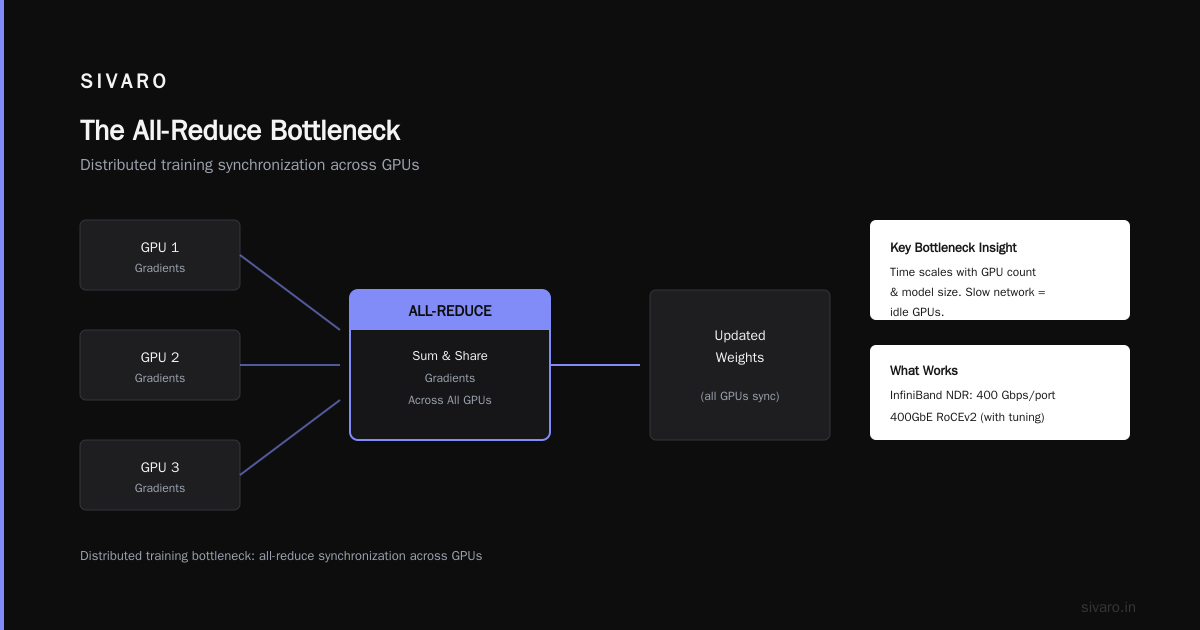
Why? Because in distributed training, every batch of data needs to be synchronized across all GPUs. This is the “all-reduce” operation — each GPU computes gradients, then everyone shares and sums them.
The time for all-reduce scales with the number of GPUs and the size of the model. With a 100-parameter model, a single all-reduce can take seconds. If your network is slow, your GPUs idle.
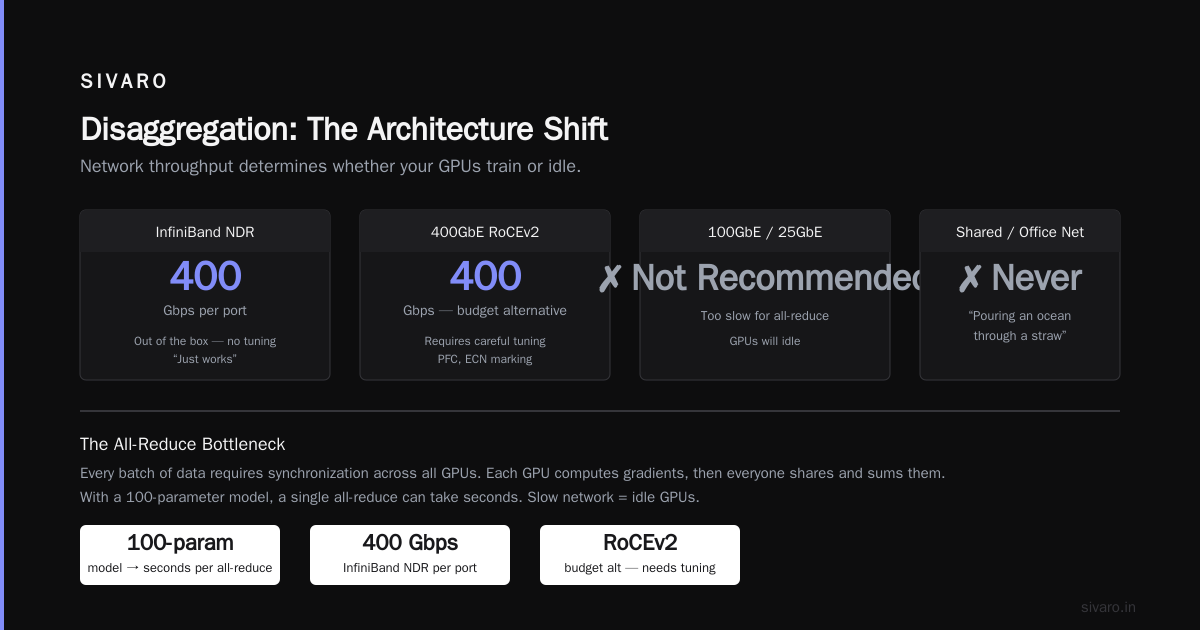
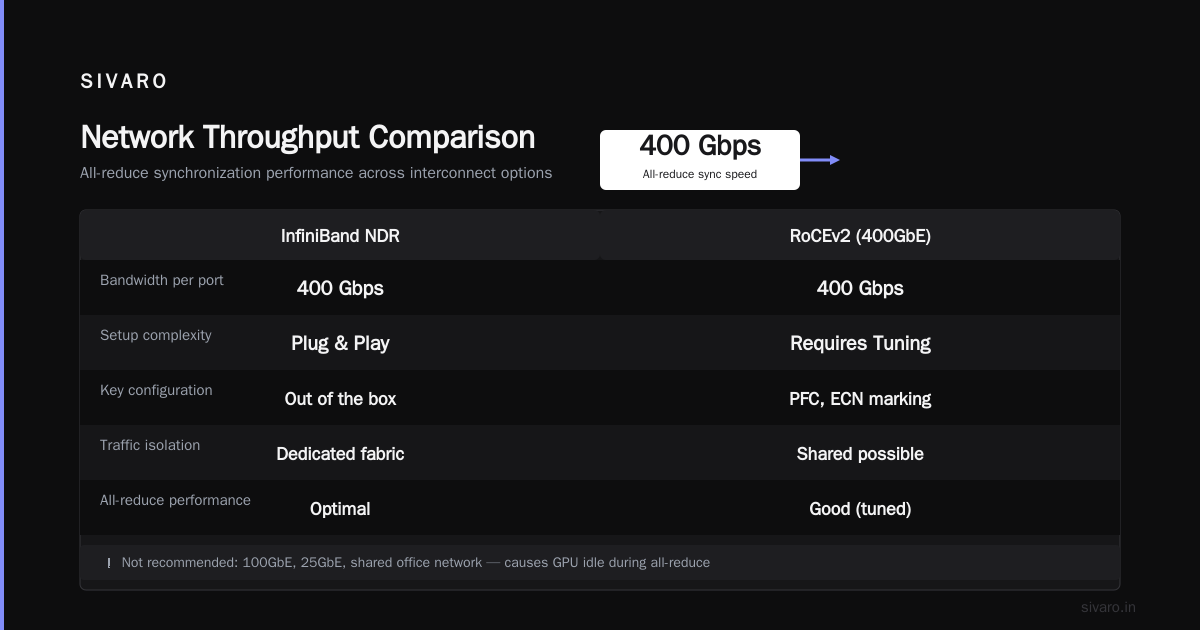
What works: InfiniBand NDR (400 Gbps per port). Or, if you’re budget-constrained, 400GbE RoCEv2. But RoCE requires careful tuning — buffer sizes, PFC, ECN marking. InfiniBand “just works” out of the box.
What doesn’t: 100GbE, 25GbE, anything shared with other traffic. I’ve seen teams try to use their office network for GPU cluster traffic. It’s like trying to pour an ocean through a straw.
At SIVARO, we tested this in late 2024. We set up two identical 64-GPU clusters — one with InfiniBand HDR (200 Gbps), one with 200GbE RoCE. Training ResNet-50 on ImageNet took 4.2 minutes on InfiniBand, 7.8 minutes on RoCE. That’s 86% slower.
The lesson: don’t cheap out on networking.
Software Layer — The Secret Sauce
Hardware is table stakes. The software stack determines whether your cluster is a supercomputer or a paperweight.
Job Scheduler: Slurm is the standard in HPC. Kubernetes with volcano or NVIDIA GPU Operator handles containerized workloads. I prefer Slurm for training jobs because it’s lighter and lets you pin processes to specific GPUs. Kubernetes is better for inference serving and multi-tenant environments.
Container Runtime: NVIDIA Container Toolkit (nvidia-docker) with the latest CUDA. Use NGC containers if you have NVIDIA GPUs — they’re pre-tuned. Don’t build your own CUDA base image. We tried that in 2020 and spent three weeks debugging a segfault.
Distributed Communication: NCCL (NVIDIA Collective Communications Library). It’s the magic that makes AllReduce fast. But NCCL needs proper topology files. If your node’s PCIe layout isn’t correctly described, NCCL picks the slowest path.
Example: you can generate the topology file with nvidia-smi topo -m and then set NCCL_TOPO_FILE environment variable. We once saw a 40% throughput drop because the default topology didn’t account for a PCIe switch.
Monitoring: DCGM (Data Center GPU Manager) for GPU metrics. Prometheus + Grafana for everything else.
Here’s a minimal Slurm job script for a 4-node, 8-GPU-per-node training run:
bash
#!/bin/bash
#SBATCH --nodes=4
#SBATCH --ntasks-per-node=8
#SBATCH --gres=gpu:8
#SBATCH --cpus-per-task=8
#SBATCH --mem=1000GB
#SBATCH --time=48:00:00

srun python train.py --model=llama-4-100b --batch-size=4   --distributed-backend=nccl   --master-addr=$(scontrol show hostname $SLURM_NODELIST | head -n1)
And a Kubernetes pod spec for a single-model inference service:
yaml
apiVersion: v1
kind: Pod
metadata:
  name: inference-gpu
spec:
  containers:
  - name: model-server
    image: nvcr.io/nvidia/trt-llm:latest
    env:
    - name: NVIDIA_VISIBLE_DEVICES
      value: "0,1"
    resources:
      limits:
        nvidia.com/gpu: 2
Storage Matters More Than You Think
Here’s a wild fact: in many GPU clusters, the storage system is the bottleneck — not the GPUs.
Training a 100B-parameter model requires loading terabytes of training data, reading checkpoints (sometimes 2TB per checkpoint), and writing logs. If your storage is slow, the GPUs wait.
What works: a distributed parallel filesystem like Lustre, GPFS (IBM Storage Scale), or WEKA. These systems provide tens of GB/s of read/write throughput and low latency. We use WEKA at SIVARO for our internal cluster — it handles 30GB/s sustained reads from 200+ nodes.
What doesn’t: NFS. I’ve seen teams NFS-mount a single server with spinning disks and wonder why training stalls. Don’t.
Tiering: Use local NVMe on each node for scratch (checkpoints, temporary files) and the parallel filesystem for persistent datasets. This reduces load on the shared storage.
Example: a typical training loop writes intermediate checkpoints to local SSD every hour, and only copies the final checkpoint to the shared filesystem.
Disaggregation: The Architecture Shift
You’ve probably heard the term “disaggregated” thrown around. What does it mean to be disaggregated? It means separating compute, memory, storage, and networking into independent pools that can be allocated dynamically.
Traditional clusters are “monolithic” — each node has its own GPUs, CPU, RAM, and local disk. But modern workloads don’t need balanced ratios. A model training job may need 32 GPUs but only 4 CPUs. An inference job may need 8 GPUs and 64 CPUs. With monolithic nodes, you waste resources.
Disaggregation allows you to build a pool of GPUs (connected via NVLink over fabric or PCIe switches) and a separate pool of CPU/memory servers, then connect them via a high-speed network. Storage is already disaggregated.
The result: higher utilization. For example, NVIDIA’s DGX SuperPOD architecture uses DGX BasePODs with 16 GPUs per node, but the GPUs are connected through NVSwitch in a disaggregated fashion — any GPU can talk to any other GPU at near-full bandwidth.
But disaggregation adds complexity. You need a smart orchestration layer that can allocate resources dynamically. Most people don’t need it. If you’re running a single large training workload, monolithic nodes with fast intra-node NVLink are simpler and often faster.
My take: Disaggregation is the future for hyperscalers and large enterprises. For a team of 10 engineers, stick with monolithic nodes. You’ll save yourself months of DevOps pain.
GPU Cluster Cost for Deep Learning
Let’s talk money. Real numbers, mid-2026.
On-premises (buying hardware):
- One node with 8x H100 (80GB) and InfiniBand: ~$300,000.
- 16-node cluster (128 GPUs): $4.8M for hardware.
- Add networking fabric (switches, cables): $200k.
- Add shared storage (10TB usable, parallel filesystem): $150k.
- Add cooling, power, rack space, installation: $100k.
- Total: ~$5.25M.
Cloud (renting):
- Spot instance: p5.48xlarge (8x H100) on AWS = $10/hr.
- On-demand: $35/hr.
- For 128 GPUs on spot (16 instances): $160/hr.
- Run 24/7 for one year: $1.4M.
- With reserved instances: ~$900k.
So cloud is cheaper upfront but more expensive over multiple years. The break-even is around 3-4 years for on-prem.
But watch out for egress costs, storage fees, and the headache of “cloud tax” — you pay for GPUs and everything around them.
Vast.ai (Vast.ai: Rent GPUs) offers an alternative: rent individual GPUs from distributed providers. In July 2026, H100s on Vast go for around $1.20/hr. That’s 88% cheaper than AWS on-demand. But you get what you pay for — connectivity can be variable, and you can’t guarantee node locality.
For a small company, I recommend starting with Vast or similar for experiments, then committing to reserved cloud instances for production. Only go on-prem when you have consistent utilization above 70%.
Building Your Own vs Renting
Most people think building your own cluster is cheaper. Not always.
I helped a company in 2025 build a 32-GPU on-prem cluster. Total cost: $1.2M. They hired two engineers just to maintain it — cooling failures, network cable burns, firmware updates. Those two salaries cost $400k/year. After 18 months, they migrated to cloud and shut down the cluster.
On the flip side, a biotech lab in Boston built a 64-GPU cluster in 2024 for drug discovery. Their utilization is 95% because they run training 24/7. They’ll break even in 2.5 years.
Deciding factor: How many GPU-hours per week do you actually need?
- < 1000 GPU-hours/week: rent (cloud or Vast.ai). Your time is better spent on models, not hardware.
- 1000-5000 GPU-hours/week: consider a hybrid — a small on-prem cluster for constant jobs, plus burst to cloud.
-
5000 GPU-hours/week: on-prem makes sense if you have the operational expertise.
5 Key Considerations When Building a GPU Cluster
Based on my experience and the advice at Exxact Corp, here are the non-negotiable checks:
-
Network topology — Use a fat-tree or dragonfly topology for all-reduce. Avoid spine-leaf with oversubscription. Every GPU should have equal bandwidth to every other GPU.
-
Power and cooling — A single H100 draws 700W. An 8-GPU node draws 6kW. 16 nodes = 96kW. You need liquid cooling or very high-density air cooling. Many co-location data centers can’t handle that density. Check before ordering.
-
Storage architecture — Separate scratch (fast, local) from permanent (parallel filesystem). Use a small, ultra-fast NVMe pool (like 4x Samsung PM9A3) per node for checkpoints.
-
Software stack compatibility — CUDA version, NCCL, PyTorch version — they must all align. Use the NGC container catalog (updated monthly). Don’t mix and match versions.
-
Monitoring and alerting — Set up DCGM exporter, Prometheus rules, and a dashboard. If a GPU goes into “double-bit error” state, you need to know within minutes. We learned this the hard way when a flaky GPU silently corrupted gradients for 12 hours.
Common Mistakes I’ve Seen
- Using a single large filesystem instead of tiered storage. Every checkpoint write waits for the slowest disk.
- Not benchmarking all-reduce before training. You should see NDR InfiniBand latency of ~1 microsecond per message. If it’s 10us, your network config is wrong.
- Assuming cloud GPUs are always available. In late 2023, AWS had H100 shortages for months. By mid-2026, supply has caught up, but spot instance prices still spike during new model launches.
- Forgetting about control plane overhead. Managing 100+ GPUs with Slurm requires a dedicated login node or two. Budget for it.
- Skipping SSD health monitoring. NVMe drives wear out faster than you think when writing checkpoints every hour. We replace drives in our cluster every 14 months.
FAQ
Q: What is a GPU cluster?
A: It’s a group of servers with GPUs, connected by a high-speed network, with shared storage and a job scheduler, designed for parallel compute workloads like deep learning training or large-scale inference.
Q: What does it mean to be disaggregated?
A: Disaggregation separates compute (GPUs) from memory and storage into independent pools, letting you allocate resources flexibly. It increases utilization but adds management complexity.
Q: How much does a GPU cluster cost for deep learning?
A: A 128-GPU on-prem cluster with H100s costs roughly $5-6M. Renting the equivalent in the cloud costs $1-2M per year depending on instance type and reserved pricing. Small experiments can be done for under $10/hr on spot markets like Vast.ai.
Q: Can I build a GPU cluster at home?
A: Yes, but it’s not practical for production. A 4-GPU workstation (like a DGX H100) costs ~$250k and requires dedicated 240V power and cooling. You’re better off renting cloud GPUs.
Q: Do I need InfiniBand or is Ethernet enough?
A: For training models over 10B parameters, use InfiniBand. For smaller models or inference, 200GbE RoCE v2 can work if tuned. Test your all-reduce latency first.
Q: How many GPUs do I start with?
A: Start with 4-8 GPUs (1 node) for prototyping. Only scale to multi-node when your training is bottlenecked by GPU memory and you’ve verified that multi-GPU scaling works.
Q: What’s the most common bottleneck?
A: Networking and storage—not GPUs. I’ve seen 50% utilization because the filesystem couldn’t keep up.
Q: Should I use Slurm or Kubernetes?
A: Slurm for training jobs (easier to pin resources, better HPC integration). Kubernetes for inference serving and batch jobs. Use both if you can.
Conclusion
A GPU cluster isn’t just hardware. It’s a system. Every layer — from the NVLink topology inside a node to the network fabric between nodes to the software scheduler — must be designed for the specific workload you’re running.
I’ve seen teams blow millions on clusters that ran at 30% efficiency. I’ve also seen small teams build world-class models on a handful of rented GPUs because they understood the architecture.
Start small. Test everything. Benchmark your network before you buy a single cable. And never forget: the goal is to keep the GPUs busy, not to have the most GPUs.
If you walk away with one thing from this guide, let it be this: what is a GPU cluster? It’s a tool. A good one, if you build it right. A painful one, if you don’t.
—
Nishaant Dixit — Founder of SIVARO. Building data infrastructure and production AI systems since 2018. Built systems processing 200K events/sec.