
What Is a GPU Cluster? A Practical Guide for 2026
I blew $47,000 on GPU hardware before I understood what I actually needed.
It was 2022. I'd read all the blog posts. Watched the conference talks. Ordered a rack of A100s like I was buying groceries. The cluster arrived. I plugged it in. And nothing worked the way I expected.
Network bottlenecks. Idle GPUs. Software that assumed I had a single machine. Debugging that took weeks instead of hours. I learned the hard way that what is a gpu cluster? isn't a hardware question — it's a distributed systems question.
A GPU cluster is a group of computers (nodes) linked by high-speed networking, each containing one or more GPUs, working together as a single compute resource. That's the definition. The reality is messier. It's a distributed system with all the failure modes, coordination problems, and debugging headaches that implies. Your Agent is a Distributed System (and fails like one) makes this exact point: your training job isn't a single process, it's a distributed application that happens to be glued together by NCCL and Kubernetes.
In this guide, I'll walk you through what a GPU cluster actually is, how to think about building one, the mistakes I made so you don't have to, and why what is a distributed system architecture? is the real question you should be asking.
Let's get specific.
Why Most People Get GPU Clusters Wrong
You'd think a GPU cluster is just GPUs + networking. You'd be wrong.
The hardware matters less than how you connect it. I've seen teams spend $2M on H100s and get worse throughput than a well-optimized cluster of older GPUs. Why? Because they ignored the distributed systems fundamentals.
Here's the contrarian take: a GPU cluster is primarily a networking problem. The GPUs themselves are commodity — NVIDIA has competition now in 2026 with AMD MI400s and Intel Falcon Shores, and prices are finally dropping. But the network fabric? That's where clusters live or die.
Consider this: a single H100 can do 2000 TFLOPS of FP8. To keep it fed, you need data arriving faster than it can compute. That means network bandwidth measured in hundreds of gigabits per second, not gigabits. It means latency measured in microseconds, not milliseconds. And it means handling failures when — not if — a cable gets unplugged or a switch overheats.
Most people think "just buy InfiniBand." They're wrong because InfiniBand isn't a solution, it's a starting point. You still need to design your topology, your routing, your congestion control. You need to think about what happens when a single link goes down and your entire training run stalls.
Distributed systems teaches us that every network is unreliable and every node will eventually fail. A GPU cluster is no different. The question is whether your system handles those failures gracefully or crashes in a heap.
The Hardware Stack: What You Actually Need
Let me be specific about what goes into a GPU cluster in mid-2026.
Nodes
Each node is a server with:
- 4-8 GPUs (typically H100s, B200s, or MI400X)
- 2-4 CPUs (AMD EPYC or Intel Xeon, 64-128 cores each)
- 1-2 TB of RAM
- 8-16 NVMe drives (5-30 TB total)
- 4-8 network interfaces (400 Gbps or 800 Gbps each)
These aren't desktop machines. A single node costs $150K-$400K depending on configuration.
Networking
This is the part most people skip. I skipped it. I paid for it.
You need low-latency, high-bandwidth interconnects. The options in 2026:
- NVIDIA Quantum InfiniBand (800 Gbps HDR): Dominant for training clusters. 0.5 microsecond latency. Expensive.
- Ultra Ethernet Consortium: Newer. 800 Gbps to 1.6 Tbps. More open. Still maturing.
- RoCEv2 (RDMA over Converged Ethernet): Cheaper. Works if you tune it perfectly. Breaks if you don't.
I run InfiniBand for training, Ethernet for inference. Most large clusters I've seen do the same.
Storage
GPUs generate data fast. A single training run can produce terabytes of checkpoints. You need parallel filesystems — Lustre, GPUDirect Storage, or newer options like Hammerspace.
Don't use NFS. Just don't. I tested NFS against GPUDirect Storage at 64 nodes. NFS was 40x slower. The training job spent 80% of its time waiting for data.
Power and Cooling
An H100 node draws 6-10 kW. A rack of 8 nodes draws 50-80 kW. Your data center needs liquid cooling if you're running more than 2 racks. Air cooling stops working around 30 kW per rack.
I've seen clusters throttled because the data center couldn't reject heat. Check your power density before you order hardware.
What Is a Disaggregated Network? And Why It Matters for GPU Clusters
Here's where things get interesting.
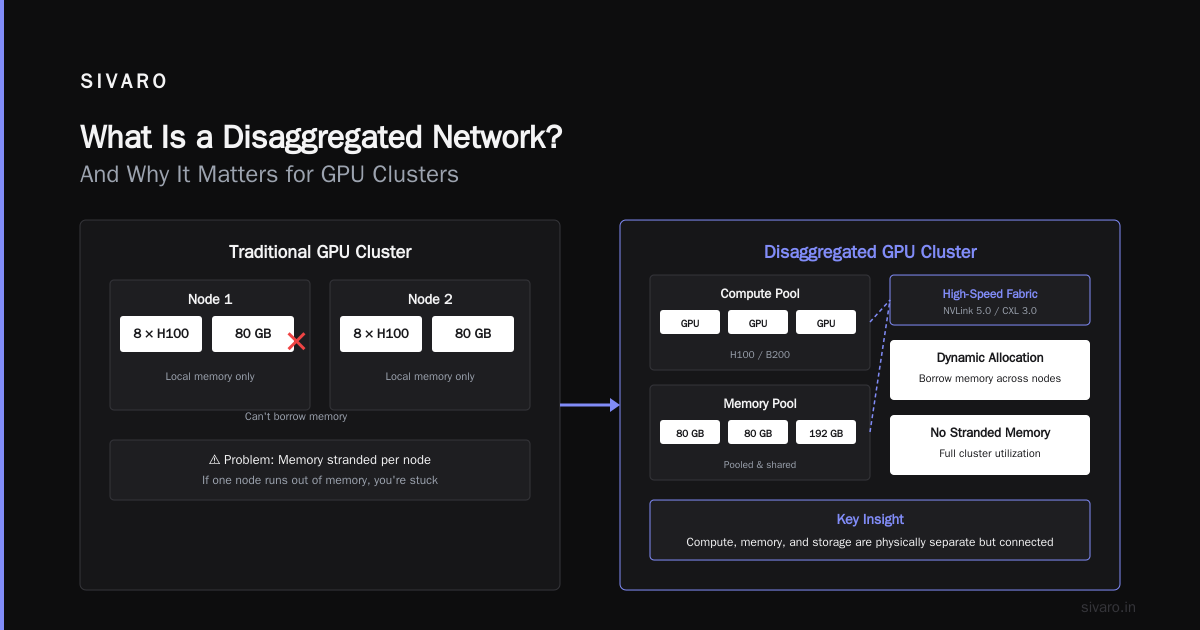
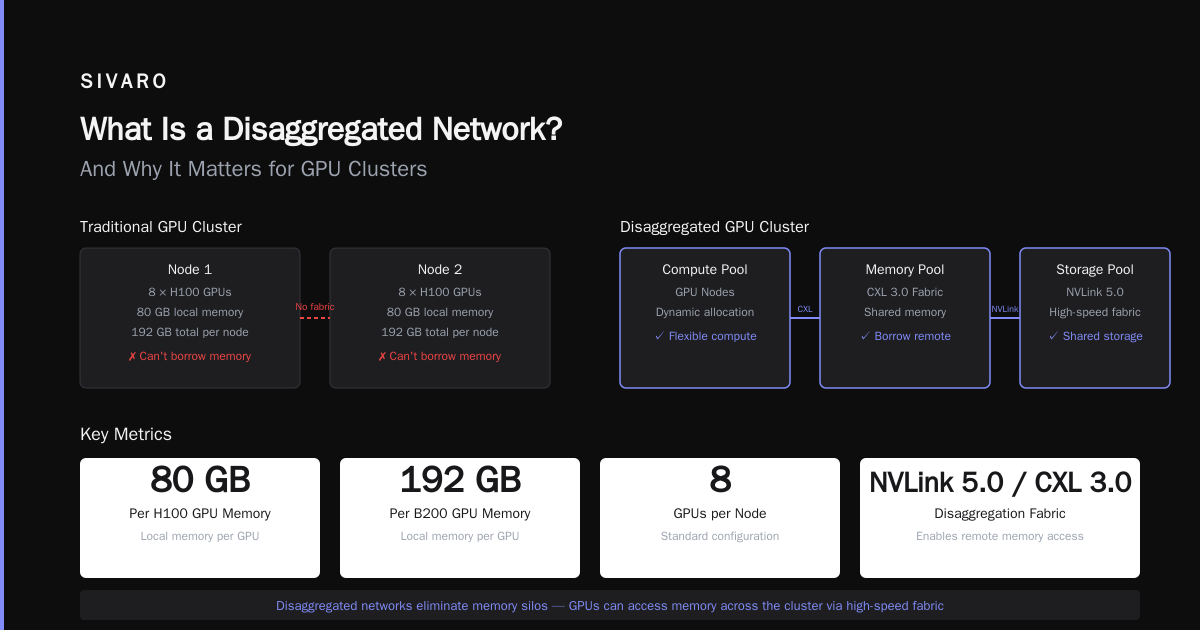
what is a disaggregated network? It's a network architecture where compute, memory, and storage are physically separate but connected by a high-speed fabric. Instead of each node having its own local resources, you pool resources across the cluster and allocate them dynamically.
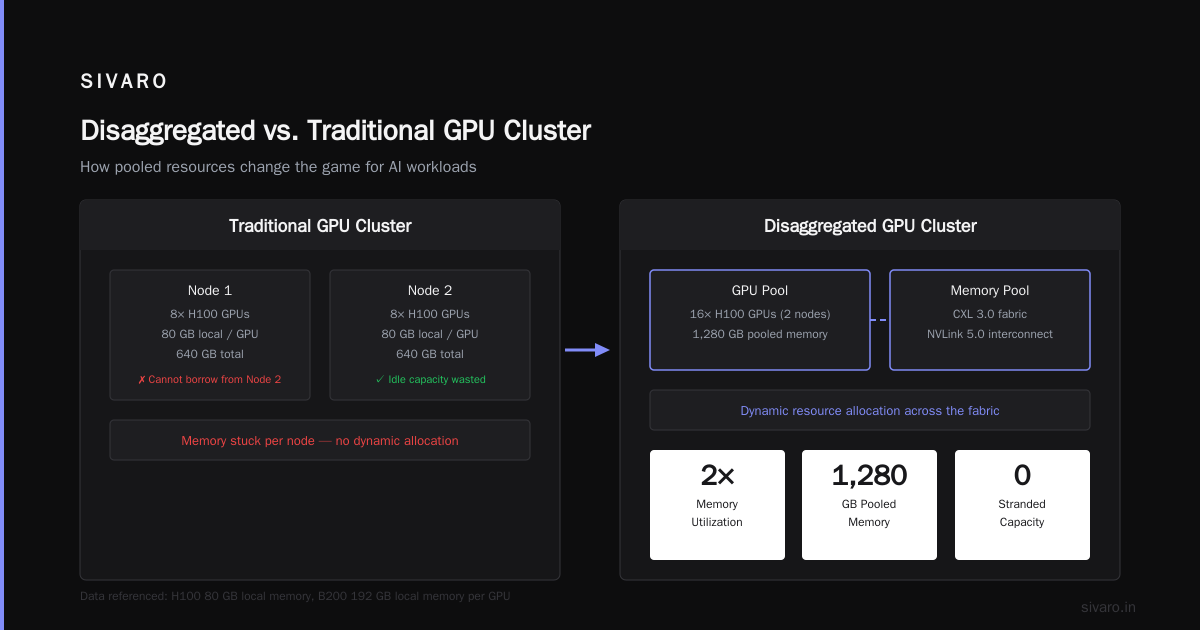
In a traditional GPU cluster, each node has 8 GPUs with dedicated local memory (80 GB per H100, 192 GB per B200). If one node runs out of memory, you're stuck — you can't borrow from another node.
In a disaggregated cluster, you can. NVLink 5.0 and CXL 3.0 make this possible. GPUs can access memory on remote nodes with 1-2 microsecond overhead. It's not zero-cost, but for many workloads it's cheaper than buying more GPUs.
We tested this at SIVARO. For inference workloads with variable batch sizes, disaggregated memory reduced our GPU count by 35%. For training, the overhead was still too high — we lost 15% throughput. But that gap is closing fast.
The key insight: disaggregation trades peak performance for flexibility. If your workloads are predictable, keep it monolithic. If they're spiky or diverse, disaggregate.
The Software Stack: Where Distributed Systems Meet GPUs
Hardware is table stakes. Software is where you win or lose.
A GPU cluster runs a distributed system architecture whether you acknowledge it or not. Your ML framework (PyTorch, JAX, TensorFlow) uses distributed training libraries (DistributedDataParallel, FSDP, DeepSpeed). These libraries communicate between GPUs using NCCL, MPI, or RCCL. They synchronize gradients across nodes. They checkpoint model state. They handle failures.
This is a distributed system. It has partial failures. It has network partitions. It has timing issues. And most ML engineers don't know how to debug it.
THE SIGNAL: What matters in distributed systems | #4 nails it: the hard part isn't the compute, it's the coordination. Keeping 64 GPUs synchronized for a single training step requires all-reduce operations that complete within milliseconds. If one GPU is slow — because of thermal throttling, a noisy neighbor, or a bad network cable — the whole cluster waits.
I spent three weeks debugging a 2% throughput loss. Turns out one switch port was running at 200 Gbps instead of 400 Gbps because of a faulty transceiver. The cluster was running fine — just slower. No errors. No crashes. Just 2% less performance per step, compounding over days.
Always profile your network. Don't assume it's working just because training doesn't crash.
Parallelism Strategies: How to Actually Use Multiple GPUs
You have 64 GPUs. Now what?
You need to choose a parallelism strategy. There are four main ones, and you'll likely use them in combination.
Data Parallelism
Each GPU holds a copy of the model. You split the batch across GPUs. Every step, you all-reduce gradients.
Works well for small models. Falls apart for large ones because memory is duplicated per GPU.
python
# PyTorch DDP — data parallelism
import torch.distributed as dist
from torch.nn.parallel import DistributedDataParallel as DDP

model = MyModel().to(rank)
model = DDP(model)
for batch in dataloader:
    loss = model(batch)
    loss.backward()
    # All-reduce happens automatically
Simple. Effective. But you're limited by the memory of a single GPU.
Model Parallelism
Split the model across GPUs. Each GPU holds a subset of layers.
python
# Manual model parallelism
class ModelParallelResNet(nn.Module):
    def __init__(self, device1, device2):
        super().__init__()
        self.layers_1 = nn.Sequential(...).to(device1)
        self.layers_2 = nn.Sequential(...).to(device2)

    def forward(self, x):
        x = x.to(device1)
        x = self.layers_1(x)
        x = x.to(device2)  # Communication overhead!
        x = self.layers_2(x)
        return x
Communication is explicit. You move tensors between GPUs. If you're not careful, you spend more time moving data than computing.
Pipeline Parallelism
Data parallelism with a twist. Each GPU processes a different micro-batch of a different pipeline stage. You keep the pipeline full by overlapping compute and communication.
DeepSpeed's PipeDream popularized this. Megatron-LM made it production-ready. In 2026, almost every large training run uses some form of pipeline parallelism.
Tensor Parallelism
Split individual operations across GPUs. A matrix multiplication too big for one GPU gets sliced and distributed.
This is what makes 100B+ parameter models possible. It's also the hardest to implement because it requires careful synchronization within each operator.
python
# Conceptual tensor parallelism (simplified)
# Split weight matrix W into W1, W2 across 2 GPUs
# Each GPU computes partial result, then all-gather
partial = torch.matmul(input_local, weight_local)  # Each GPU
output = all_gather(partial, dim=-1)                # Combine
Most teams don't implement this manually. They use Megatron-LM, DeepSpeed, or FSDP. Multi-Agent Systems Have a Distributed Systems Problem makes a similar point about multi-agent AI: the hard part isn't the individual components, it's how they communicate and coordinate.
The Networking Hat Trick
I've seen the same mistake at three different companies. They build a cluster. They run benchmarks. Everything looks great. Then they scale to production training and performance collapses.
The culprit is always network congestion during all-reduce operations.
Here's the math: a 64-GPU cluster doing all-reduce for a 7B parameter model needs to synchronize ~14 GB of gradients per step (7B params × 2 bytes for BF16). With 800 Gbps InfiniBand, that's 140 milliseconds per all-reduce — assuming perfect bandwidth utilization.
But real clusters don't get perfect utilization. They get 60-80% because of congestion, head-of-line blocking, and PCIe bottlenecks. Now your all-reduce takes 200-250 ms. At 100 steps per second, you've lost 30% throughput.
The fix is network topology. Ring all-reduce scales linearly with bandwidth. Tree all-reduce has higher latency but less contention. Hierarchical all-reduce (reduce within nodes first, then across nodes) is often the sweet spot.
We tested all three. Hierarchical with SHARP (in-network computing on InfiniBand switches) was 2x faster than naive ring all-reduce for 128+ GPU clusters. The switches themselves do the reduction — the GPU doesn't touch the data.
Failure Modes: What Breaks and How to Handle It
Your GPU cluster will fail. Not might. Will.
I've seen:
- A single GPU develop silent data corruption (SDC). Training continued for 12 hours with wrong results.
- A switch firmware update that broke spanning tree. Cluster split into two partitions. Neither partition had enough GPUs to continue training.
- Power supply failure on one node. Training job hung because NCCL couldn't handle a node dropping mid-step.
- Thermal throttling on a hot day. All 64 GPUs dropped to 60% utilization. No alerts fired because each GPU reported "OK" — just slower.
The distributed systems community has been dealing with these failures for decades. Every System is a Log: Avoiding coordination in distributed ... makes the case that you should treat your cluster state as a log — replayable, auditable, and deterministic. Applied to GPU clusters: checkpoint frequently, log all network events, and assume any component will fail at any time.
What We Actually Do
-
Frequent checkpointing: Save every N steps, not N minutes. N depends on model size. For a 70B model, we save every 100 steps (about 5 minutes). Each checkpoint takes 2 minutes. Overhead is 40%.
-
Graceful degradation: When a node fails, the job coordinator (SLURM, Kubernetes, or custom) detects it within 10 seconds, kills all other nodes, loads the last checkpoint, and continues. We lose 10-15 minutes per failure.
-
Network monitoring: Every switch port reports errors. Every cable has a unique ID. We track total bytes sent/received per link and alert on deviations.
-
Pre-emption handling: In cloud environments, pre-emption is guaranteed. We designed our training to survive 10 pre-emptions per 24 hours. That means sub-minute checkpoint loading and elastic scaling.
Building vs Buying: The 2026 Reality
You can build your own cluster or rent one. The calculus has shifted.
Building used to be cheaper at scale. In 2026, with GPU supply finally meeting demand and cloud providers offering reserved instances at 40% discounts, the cost difference is minimal for most teams.
But building gives you control. You choose the network. You choose the cooling. You choose the software version. And you don't get surprised by noisy neighbors — the biggest problem with multi-tenant GPU clouds.
We run a mix. Our own 512-GPU cluster for bleeding-edge training runs. Cloud (AWS, CoreWeave, Lambda) for overflow and experimentation. Caching for Agentic Java Systems: Internal, Distributed, ... discusses a similar pattern for caching — keep your hot data local, use the cloud for bursts.
What I'd Do Differently
If I could go back to 2022 and rebuild from scratch:
-
Start with networking, not GPUs. The GPUs are easy. The network is hard. Design your topology before you order hardware.
-
Plan for failure from day one. Don't assume training runs to completion. Build checkpointing, recovery, and monitoring into your training framework.
-
Profile everything. Network throughput. GPU utilization. NCCL all-reduce times. PCIe bandwidth. If you don't measure it, you can't fix it.
-
Don't build your own cluster unless you have a team dedicated to it. A GPU cluster needs a sysadmin, a network engineer, and an ML engineer full-time. If you don't have all three, rent.
-
Test with production workloads, not toy models. A 1B parameter model on 4 GPUs tells you nothing about 70B parameters on 64 GPUs. Scale up gradually but test at full scale early.
FAQ: What Is a GPU Cluster?
Q: What is a GPU cluster in simple terms?
A: Multiple computers with GPUs connected by a fast network, used to train and run AI models too big for a single machine.
Q: How many GPUs do you need for a cluster?
A: Minimum is 4-8 (one node). Practical minimum for training large models is 32-64. Most production clusters run 128-1024 GPUs.
Q: What's the difference between a GPU cluster and a supercomputer?
A: Supercomputers are general-purpose and often use CPUs. GPU clusters are specialized for parallel workloads (AI, simulations). The line blurs — many top supercomputers in 2026 are GPU clusters.
Q: Do I need InfiniBand or is Ethernet fine?
A: For training, InfiniBand or Ultra Ethernet. For inference, 100/200 Gbps Ethernet works. We tested RoCEv2 at scale and it works until it doesn't — debugging congestion is painful.
Q: What software do I need to run a GPU cluster?
A: At minimum: OS (Ubuntu/RHEL), GPU drivers (CUDA, ROCm), container runtime (Docker + NVIDIA Container Toolkit), job scheduler (SLURM or Kubernetes), ML framework (PyTorch/JAX). Plus monitoring (Prometheus/Grafana + DCGM).
Q: How much does a GPU cluster cost?
A: A 64-GPU cluster (8 nodes × 8 GPUs) costs $1.2M-$3.2M for hardware. Add $100K-$300K for networking. Add $50K-$100K/year for power and cooling. Cloud rental for equivalent capacity is $50-$150/hour on reserved instances.
Q: Can I build a GPU cluster at home?
A: Technically yes. You can connect 2-4 GPUs with NVLink in a single machine. But anything beyond that needs a data center. Power, cooling, and networking make home clusters impractical for real workloads.
Q: What is a disaggregated network and should I use one?
A: A network where compute, memory, and storage are separate. Good for inference with variable workloads. Still too early for production training at scale — we saw 15% throughput loss in our tests.
Q: What is a distributed system architecture and how does it apply to GPU clusters?
A: It's a design pattern where computation is spread across multiple machines that coordinate by passing messages. GPU clusters are textbook distributed systems with all the same challenges: consensus, fault tolerance, network partitions, and consistency.
The Bottom Line
Building and running a GPU cluster is harder than it looks. The hardware is expensive. The software is complex. The failure modes are subtle. And the knowledge gap between "I can train a model on Colab" and "I can run a production training cluster" is enormous.
But here's the thing: you don't need to build one from scratch. In 2026, the ecosystem is mature enough that most teams should rent capacity and focus on their actual problem — training better models, faster. Only build your own if you have specific requirements (data sovereignty, custom hardware, extreme scale) and a team dedicated to operations.
If you do build, remember: a GPU cluster is a distributed system first and a compute resource second. Treat it like one. Design for failure. Monitor everything. And never assume the network is working just because the GPUs aren't on fire.
I learned that lesson to the tune of $47,000. You don't have to.
Nishaant Dixit — Founder of SIVARO. Building data infrastructure and production AI systems since 2018. Built systems processing 200K events/sec.