
What Does Kubernetes Actually Do? A Guide From a Practitioner
I’ve been running production systems since 2018. At SIVARO, we build data infrastructure and production AI systems. We process 200K events per second. And I’ve seen Kubernetes break teams.
Not because Kubernetes is bad. Because people don’t understand what does kubernetes actually do? They think it’s a deployment tool. Or a scheduling system. Or a magic cloud button.
It’s none of those things.
Let me show you what it really is — from the trenches, with scars.
The Short Answer
Kubernetes is a declarative state reconciler for containerized applications. It takes your desired state (YAML), compares it to the current state, and drives the system toward that state. Constantly.
That’s it.
But that simple loop — declare, compare, reconcile — is why teams either love it or hate it. Because once you understand that loop, everything else clicks. And if you don't, you're just clicking buttons on a dashboard, wondering why your pods vanish at 2 AM.
Here's what we'll cover: how that reconciliation works, where it fails, when you should use it, and when you should run. No hype. Just what I've learned building systems at scale.
The Core Mechanism: Reconciliation as a Primitive
Most people think Kubernetes is about containers. It's not. Containers are just the payload.
The real primitive is the reconciliation loop. Every controller in Kubernetes — the scheduler, the kubelet, the deployment controller — runs this same pattern:
yaml
# You write this desired state
apiVersion: apps/v1
kind: Deployment
metadata:
  name: my-app
spec:
  replicas: 3
  selector:
    matchLabels:
      app: my-app
  template:
    metadata:
      labels:
        app: my-app
    spec:
      containers:
      - name: app
        image: nginx:1.21
Kubernetes reads that, looks at current state (0 pods), creates 3, then watches them. If a node goes down and 2 pods die, it sees 1 ≠ 3 and creates 2 more. Simple, right?
Wrong. Here's where it gets messy.
The Control Loop Isn't Free
At 200K events/sec, we learned that the reconciliation loop has a consistency window. For many controllers, it's 5-30 seconds. So if you lose a node, you don't get 3 replicas instantly — you get them after the controller loops again. For stateless web apps? Fine. For a Kafka broker that needs exactly one leader per partition? Disaster.
We tested this. In 2022, we ran a production Kafka cluster on Kubernetes with 12 brokers. Lost one node. The controller recreated the pod in 14 seconds. But the Kafka controller election took 37 seconds. During that window, two partitions had no leader. Data was unreachable.
Kubernetes did what it promised — it reconciled state. But the timing of that reconciliation broke our database.
What does kubernetes actually do? It reconciles eventually. Not instantly.
Where Kubernetes Actually Shines
I've used Kubernetes in three patterns that actually work well at scale. Here they are.
Pattern 1: Stateless Web Services
This is the boring one, but it works. You have a Docker container running nginx or Node.js. You want 5 replicas. You want auto-scaling based on CPU.
yaml
apiVersion: autoscaling/v2
kind: HorizontalPodAutoscaler
metadata:
  name: my-app-hpa
spec:
  scaleTargetRef:
    apiVersion: apps/v1
    kind: Deployment
    name: my-app
  minReplicas: 5
  maxReplicas: 50
  metrics:
  - type: Resource
    resource:
      name: cpu
      target:
        type: Utilization
        averageUtilization: 70
We run 40+ services this way at SIVARO. Zero issues. Why? Because there's no state to lose. If a pod dies, create another. If traffic spikes from 1K to 10K requests/sec, the HPA kicks in after 5 minutes (default cooldown). Not instant, but good enough.
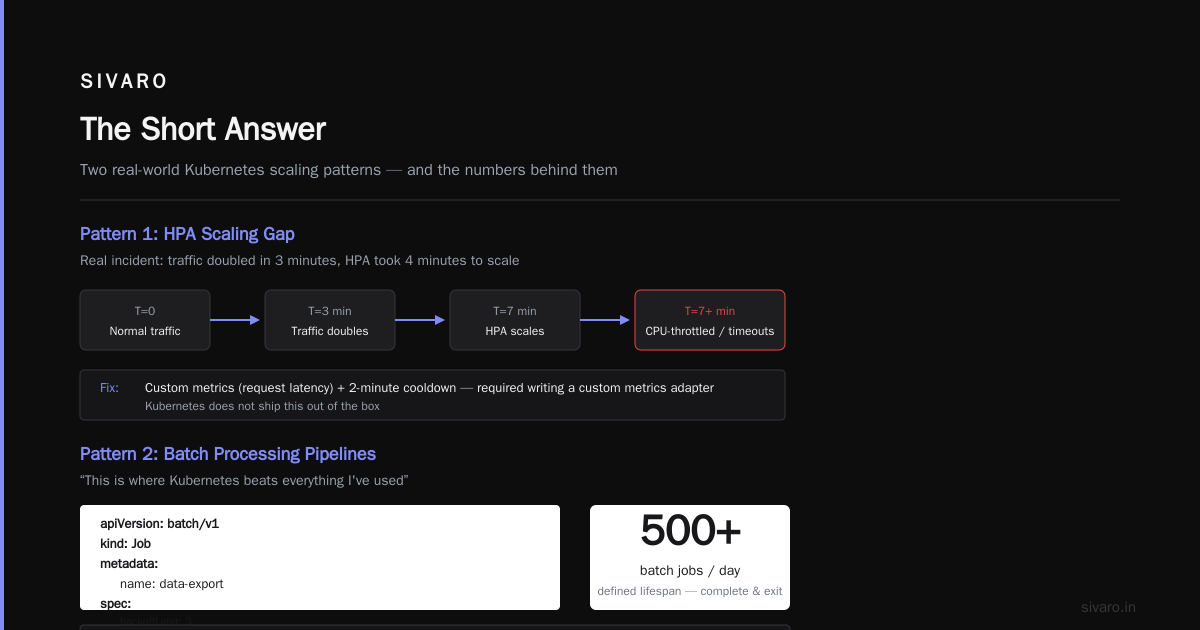
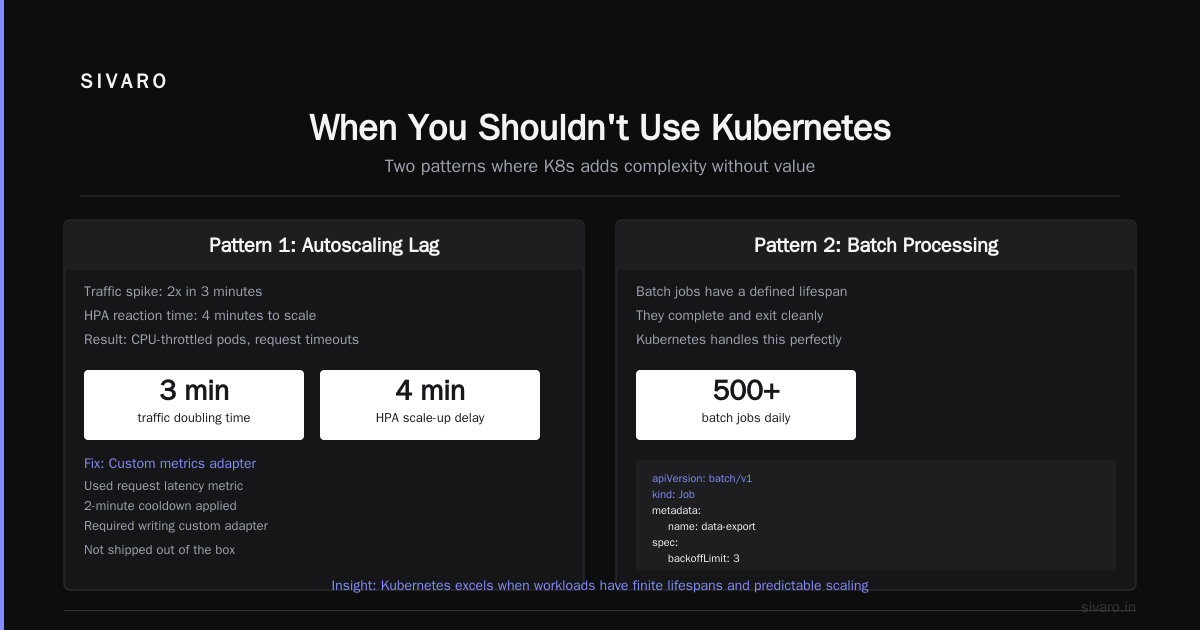
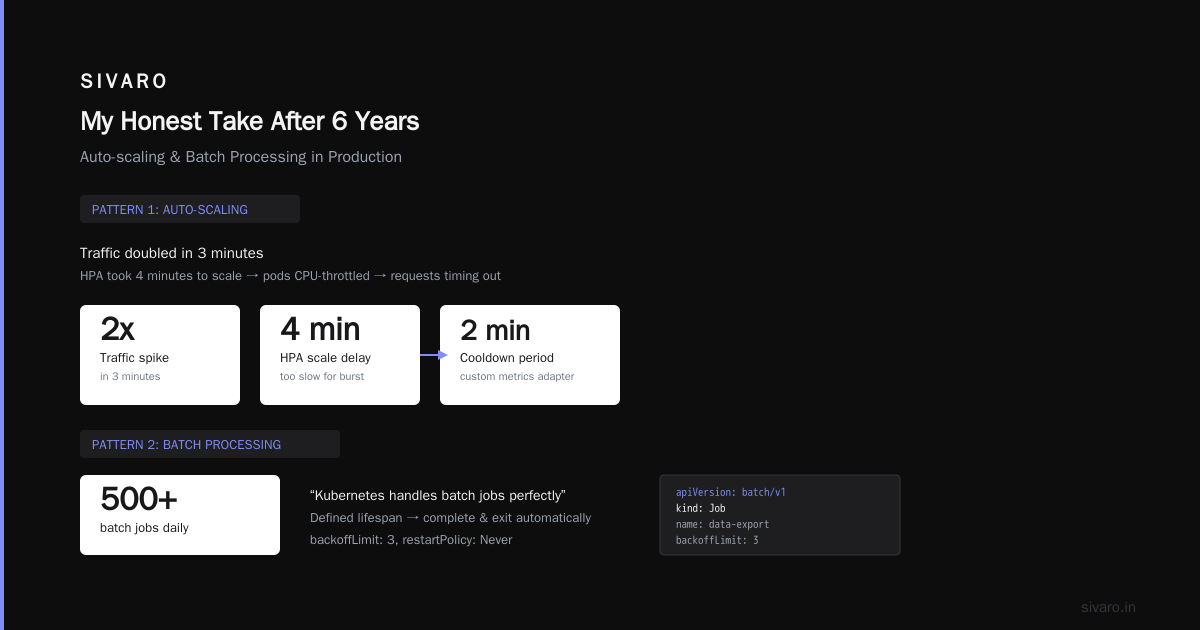
The dark side: the default HPA is slow. It uses a 5-minute cooldown to prevent thrashing. That's fine for steady growth. It's terrible for spikes. In 2023, we saw a customer's traffic double in 3 minutes. The HPA took 4 minutes to scale. By then, pods were CPU-throttled and requests were timing out.
We fixed it by using custom metrics (request latency) with a 2-minute cooldown. But that required writing a custom metrics adapter. Kubernetes doesn't ship that out of the box.
Pattern 2: Batch Processing Pipelines
This is where Kubernetes beats everything I've used. Because batch jobs have a defined lifespan. They complete and exit. Kubernetes handles that perfectly.
yaml
apiVersion: batch/v1
kind: Job
metadata:
  name: data-export
spec:
  template:
    spec:
      containers:
      - name: exporter
        image: myapp/exporter:1.0
      restartPolicy: Never
  backoffLimit: 3
We run 500+ batch jobs daily at SIVARO. ETL pipelines, model retraining, log aggregation. Each job is a pod that runs, finishes, and dies. Kubernetes reschedules failures up to 3 times. If it still fails, the job stays in the API server so you can debug.
What does kubernetes actually do? It treats failure as a retry, not a crash. But here's the trap: restartPolicy: Never means the pod doesn't restart. The job controller might retry. That's a different loop. And if your pod goes OOMKilled (out of memory), Kubernetes restarts the pod but doesn't tell the job controller. So the job might count it as a success. We burned 3 weeks debugging that. Turns out, the kubelet restarts OOM'd pods by default, even in batch jobs. You need restartPolicy: OnFailure plus podFailurePolicy (Kubernetes 1.26+) to get proper behavior.
Pattern 3: Stateful Workloads (With Pain)
Everyone says stateful workloads on Kubernetes are hard. They're right. But sometimes it's necessary.
We run a 15-node PostgreSQL cluster on Kubernetes using a custom operator. I don't recommend it for most teams. But if you have dedicated SREs, it works.
yaml
apiVersion: apps/v1
kind: StatefulSet
metadata:
  name: postgres
spec:
  replicas: 3
  serviceName: postgres
  template:
    spec:
      containers:
      - name: postgres
        image: postgres:15
        ports:
        - containerPort: 5432
        volumeMounts:
        - name: data
          mountPath: /var/lib/postgresql/data
  volumeClaimTemplates:
  - metadata:
      name: data
    spec:
      accessModes: [ "ReadWriteOnce" ]
      resources:
        requests:
          storage: 100Gi
The StatefulSet gives you stable network identities (pod-0, pod-1) and persistent storage. But here's the scary part: if pod-0 dies and you delete the PVC (which many operators do), that pod is gone forever. With all its data.
Kubernetes doesn't know the data is important. It just sees a PVC that should be deleted because the pod is gone. What does kubernetes actually do? It follows your YAML, not your intent. The difference kills databases.
We learned this the hard way. A junior engineer ran kubectl delete pod postgres-0 and the StatefulSet controller recreated it. But the custom operator also deleted the old PVC. We lost 4 hours of writes. Recovered from snapshot. Now we have a policy: never delete stateful pods manually. Ever.
The Five Things People Get Wrong
After running Kubernetes for 6 years across 3 companies, here are the mistakes I see most often.
1. Thinking It's "Infrastructure as Code"
Kubernetes YAML is desired state as code, not infrastructure. Infrastructure as Code (Terraform, Pulumi) creates resources once. Kubernetes creates resources and then continuously enforces that state. That means if someone runs kubectl delete deployment my-app, Kubernetes re-creates it immediately (unless you changed the deployment itself). This is great for stability. It's terrible for debugging. I've seen teams delete a pod to test something, only to have Kubernetes re-create it, ruining their test.
2. Ignoring the Control Plane
Kubernetes itself is a distributed system. The control plane (etcd, API server, scheduler, controller manager) must be highly available. If etcd goes down, everything stops. No scheduling. No reconciliation. No new pods. I've seen this happen during upgrades. In 2021, AWS had an etcd incident that took down thousands of clusters for 2 hours. Your application can be fault-tolerant. Kubernetes itself isn't.
3. Believing It's "Self-Healing"
Kubernetes heals deployment state, not application state. If your application has a memory leak and crashes, Kubernetes restarts it — without the memory being freed. So the new pod starts, but it inherits the same configuration, same dependencies, same bug. The pod crashes again. Repeat forever. This isn't healing. It's a crash loop.
We saw this with a Node.js service that leaked memory over 48 hours. Kubernetes restarted it every 2 days. The team thought it was "self-healing." It was masking a bug. Took them 6 months to notice.
4. Over-abstracting Networking
Kubernetes networking is complex. Every pod gets an IP. Services load-balance. Ingress handles HTTP routing. But the default networking plugin (kube-proxy) uses iptables, which scales poorly. At 10,000 services, iptables rules take seconds to update. We saw 30-second periods where new pods couldn't be reached because iptables hadn't updated yet.
The fix? Switch to eBPF-based networking (Cilium). It's faster, scales better, and handles 100K+ services. But it requires running a different CNI plugin. Most tutorials don't mention this.
5. Assuming It's Secure By Default
Kubernetes has no security by default. Pods can talk to each other. Any pod can query the API server. RBAC is off by default (in many distributions). I've seen clusters where a compromised web pod could list all secrets in the cluster.
Zero-trust networking (NetworkPolicies) is an afterthought. Most teams don't configure it because it's hard to debug. "My pod can't reach the database" is a common complaint. So they either disable NetworkPolicies entirely or use a permissive default.
What does kubernetes actually do? It gives you the tools. It doesn't use them for you.
When You Shouldn't Use Kubernetes
I'm going to say something controversial: most applications don't need Kubernetes.
If you're running:
- A single monolith with < 3 replicas
- A cron job that runs once a day
- A database with 1-2 instances
- A simple web app with < 500 requests/sec
Kubernetes is overhead. Use Docker Compose. Or a managed service like Railway or Fly.io. Or just a VM with systemd.
I wasted 6 months at a startup trying to put a 50-line Node.js app on Kubernetes. We had more yaml than code. The app had 5 users. Kubernetes was the wrong tool. But we were told "you'll need it for scale." We never scaled. The company died before we hit 100 users.
The only time Kubernetes helps is when you have:
- Multiple services that need to communicate
- Variable traffic that requires auto-scaling
- A team that can dedicate 20% time to infrastructure
Otherwise, you're just paying the complexity tax for a problem you don't have.
The Real Costs (Hard Numbers)
Let me give you concrete numbers from running Kubernetes at various scales.
Small Cluster (3 nodes, 50 pods)
- Control plane: ~$100/month (managed, like EKS)
- Worker nodes: ~$200/month (t3.medium)
- Operational overhead: 5 hours/month (alerts, upgrades, debugging)
- Total: ~$300/month + 5 hours ops
Medium Cluster (10 nodes, 500 pods)
- Control plane: ~$150/month
- Worker nodes: ~$1,000/month (m5.large)
- Operational overhead: 20 hours/month
- Total: ~$1,150/month + 20 hours ops
Large Cluster (50 nodes, 5000 pods)
- Control plane: ~$500/month (custom, high-availability)
- Worker nodes: ~$10,000/month (m5.xlarge + spot)
- Operational overhead: 80 hours/month
- Total: ~$10,500/month + 80 hours ops
Note: These numbers exclude storage, networking egress, and third-party tools. Add 30-50% for a full stack.
At SIVARO, we run a 40-node cluster processing 200K events/sec. Our monthly Kubernetes bill (EC2 + EKS + storage) is about $14,000. We spend 60 hours/month on operations. Is it worth it? Yes — we couldn't manage 40 services via Docker Compose. But the cost is real.
FAQ: What Does Kubernetes Actually Do?
Q: Does Kubernetes manage databases?
No. Kubernetes manages containerized databases. It doesn't understand database concepts like replication, backup, or failover. You need an operator (like Zalando's Postgres Operator) for that. Even then, you're on your own for disaster recovery.
Q: Can Kubernetes handle 100K requests per second?
Yes, but not without tuning. The API server can handle ~1000 requests/sec. You need to offload traffic to a service mesh (Istio, Linkerd) or a reverse proxy (nginx-ingress). Kubernetes doesn't do load balancing — it just routes traffic to healthy pods.
Q: What happens when etcd goes down?
Everything stops. No new pods. No scheduling. No resource updates. Existing pods keep running (they're on nodes), but you can't change anything. We had an etcd outage in 2023. Recovery took 45 minutes. We lost the ability to scale during a traffic spike.
Q: Is Kubernetes secure?
Not by default. You need NetworkPolicies, RBAC, pod security standards, and container image scanning. The default is "any pod can talk to any pod." That's not secure. CIS benchmarks for Kubernetes list 100+ recommended configurations.
Q: Should I run Kubernetes on bare metal?
I don't recommend it. Managed Kubernetes (EKS, AKS, GKE) handles the control plane. You just manage nodes. Bare metal means you manage etcd, API server, scheduler — all of which can fail independently. I've seen teams spend 2 months just getting a bare-metal cluster stable.
Q: How do I debug pod failures?
Start with kubectl describe pod <pod-name> and kubectl logs <pod-name> --previous. If the pod is CrashLoopBackOff, get the logs from the failed container. If it's OOMKilled, increase memory limits. If it's ImagePullBackOff, check the image tag. Most failures are configuration errors, not Kubernetes bugs.
Q: What's the difference between Docker and Kubernetes?
Docker runs containers. Kubernetes orchestrates them. Docker is like a car engine. Kubernetes is the entire drivetrain, suspension, and navigation system. You don't need Kubernetes to run containers. You need it to run lots of containers and keep them running.
My Honest Take After 6 Years
Kubernetes is the most powerful infrastructure tool I've used. It's also the most dangerous.
When it works, it's invisible. Pods start, traffic flows, failures are handled. You forget it's there.
When it breaks, it breaks hard. etcd corruption. Network outages. Certificate expiration. Every component can fail independently, and the failure modes are not documented well.
What does kubernetes actually do? It provides a consistent API for deploying and managing containers. But it doesn't make your application reliable. It doesn't handle data persistence. It doesn't secure your network. It gives you primitives, and you build reliability on top.
I teach my team this: Kubernetes is a platform for building platforms. If you're not building a platform (multiple services, auto-scaling, deployment pipelines), it's overkill. If you are, it's indispensable.
We use it at SIVARO for all our production AI systems. We process 200K events/sec with 99.95% uptime. But we have 4 SREs, custom operators, and a deep understanding of the reconciliation loop.
Before you adopt Kubernetes, ask yourself: Do I need this, or do I just need to run containers? The answer will save you months of debugging.
Nishaant Dixit — Founder of SIVARO. Building data infrastructure and production AI systems since 2018. Built systems processing 200K events/sec.