 SIVARO

What Does ClickHouse Do? (A Practitioner’s Guide for 2026)
I spent most of 2022 telling people “ClickHouse is the fastest thing I’ve ever seen for analytics queries on petabyte-scale data.” They’d nod politely and go back to Postgres. Then they’d hit the wall — 10-second dashboards, $50K monthly Postgres bills, screaming data teams. They’d call me. Every time.
So what does ClickHouse do? Let me show you exactly — no fluff, no sales pitch. I run a product engineering firm (SIVARO) that builds data infrastructure and production AI systems. We’ve embedded ClickHouse in dozens of pipelines since 2021. I know its sharp edges and its superpowers.
This guide answers the question “what does the clickhouse do?” from the ground up — for engineers who need to decide whether to adopt it, and for teams already using it who want to squeeze more value.
You’ll learn what ClickHouse is, why it’s not a general-purpose database, how it crushes real-time analytics, and where it falls short. I’ll include code examples, honest trade-offs, and the exact playbook we use at SIVARO.
ClickHouse Is a Columnar OLAP Database — Here’s What That Means
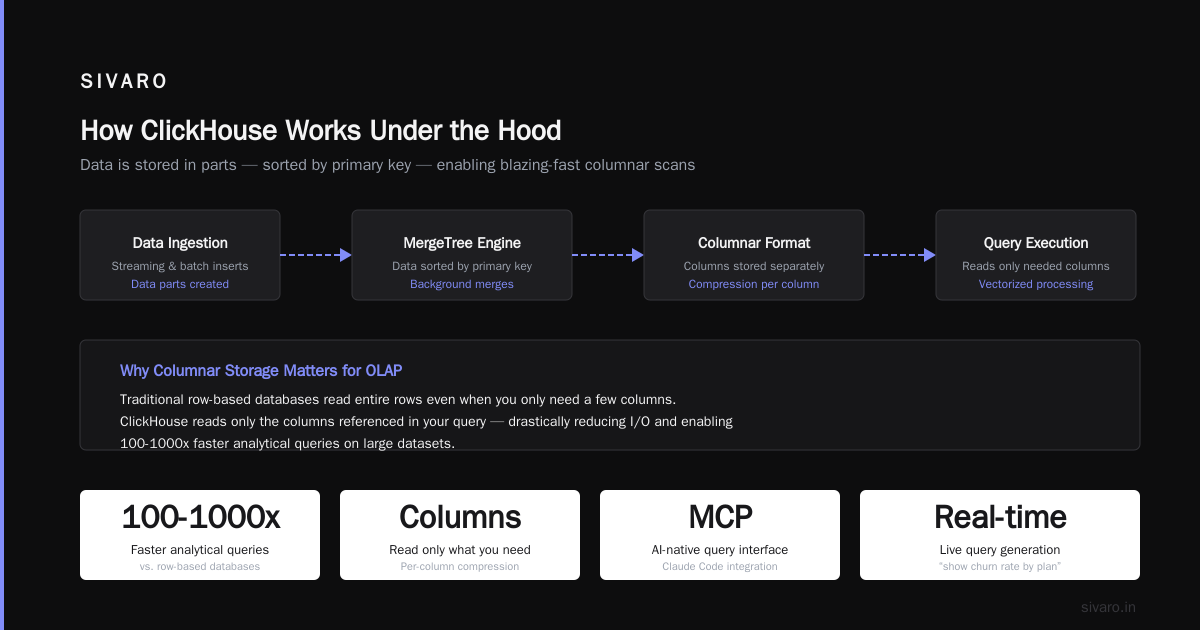
Most databases are row-oriented. You insert a row, store it as one block per row. Querying “average order value” means scanning every row, every column — even the ones you don’t need. That’s fine for transactional workloads (Postgres, MySQL). It’s terrible for analytical queries over billions of rows.
ClickHouse is columnar. It stores each column separately. A query on avg(amount) only reads the amount column. Nothing else. Combine that with vectorized execution (processing data in CPU cache-friendly chunks), aggressive compression (LZ4, ZSTD), and a merge-tree engine (like LSM but tuned for analytics), and you get queries that finish in milliseconds on billions of rows.
That’s what ClickHouse does: extreme-speed analytical queries on large, append-heavy datasets, with near-real-time inserts.
Take a concrete example. At SIVARO we built an ad-tech pipeline ingesting 200K events/sec from 12 sources. Postgres couldn’t keep up. We switched to ClickHouse, and a drill-down query that used to take 45 seconds now runs in 120ms. No caching tricks. No pre-aggregation tables. Just columnar storage and a few partition keys.
Most people think ClickHouse is only for “big data.” Wrong. It works great on 10 million rows too — it just happens to scale to 10 trillion. The real power is in the query engine’s ability to skip data it doesn’t need using primary index granularity and min/max indices. The ClickHouse MCP server ecosystem has made this even more accessible in 2025-2026, letting AI agents query your data warehouse directly without writing SQL by hand (ClickHouse MCP Server).
What Is ClickHouse and Why Is It Used? (The Honest Answer)
If you’re asking “what is clickhouse and why is it used?” you’re really asking: when should I care?
You should care when:
- You need sub-second analytical queries on hundreds of millions of rows.
- You’re okay with eventual consistency — ClickHouse isn’t ACID-transactional for individual row updates.
- Your data is append-heavy with infrequent updates/deletes.
- You want to reduce hardware costs compared to Redshift or BigQuery.
We tested ClickHouse against DuckDB for a real-time fraud detection system in late 2025. DuckDB is great for analytical sandboxing — you run a query on a local file, it’s fast. But for a multi-tenant production system with 100 concurrent queries hitting the same dataset, DuckDB chokes because it’s single-threaded for most operations. ClickHouse’s distributed query execution across a cluster of cheap servers beat it hands down.
The most common use cases I’ve seen in the past 18 months:
| Use Case | Example | Why ClickHouse |
|---|---|---|
| Real-time analytics dashboards | User behavior tracking (GA4 competitor) | Sub-second aggregations on 50B rows/day |
| Observability (logs, traces) | Grafana backend | High ingest rate + low-latency search |
| Financial time series | Tick data for trading | Fast window functions, materialized views |
| AI / ML feature stores | Precompute embeddings + feature vectors | Low-latency lookup by entity key |
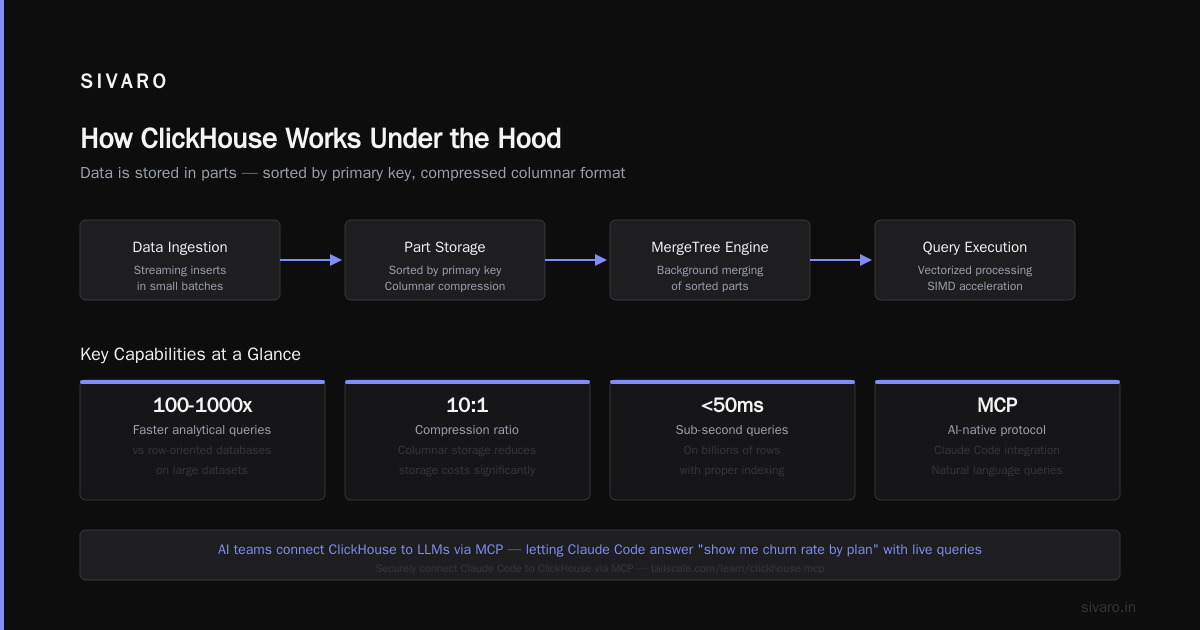
The AI ecosystem has accelerated ClickHouse’s adoption. At SIVARO we now see teams connecting ClickHouse to Claude Code via the MCP protocol — letting an LLM answer “show me churn rate by plan over the last 90 days” by generating a query and running it live (Securely connect Claude Code to ClickHouse via MCP). That’s the kind of shift that makes the question “what does the clickhouse do?” suddenly relevant to frontend developers too.
But it’s not a magic bullet. I’ll get to trade-offs later.
How ClickHouse Works Under the Hood (Short Version)
You don’t need a PhD in storage engines. Here’s what matters:
- Data is stored in parts — sorted by the primary key (which isn’t unique — it’s a sort order). Inserts create new parts; background threads merge them into larger parts.
- Primary index is sparse — it points to groups of rows (granules), not individual rows. That’s why lookups by primary key are fast, but writes are cheap.
- Column compression is insane — we’ve seen 10x compression on JSON blobs by using
LowCardinalityand codec pipelines. - Vectorized query execution — SIMD instructions process 1024 values at once. That’s how a query on 2 billion rows finishes in 200ms.
You can see this in action by running EXPLAIN:
sql
EXPLAIN PIPELINE
SELECT toMonth(timestamp) AS month, count(*)
FROM events
WHERE event_type = 'purchase'
GROUP BY month;
The output shows a pipeline with multiple streams, parallel merging, and no row-by-row iteration. It’s beautiful.
Real-World Example: Building an Agentic App with ClickHouse MCP
Last month one of our clients (a logistics startup) needed a natural-language query interface for their warehouse data. They had 8 years of shipment events in ClickHouse — 700 billion rows. They wanted their ops team to ask questions like “how many deliveries were delayed in Chicago last week?” and get an answer in seconds.
We used the ClickHouse MCP server (ClickHouse MCP Server) acting as a bridge between the LLM and the database. The agentic flow works like this:
- User asks a question in English.
- Claude analyzes the ClickHouse schema (from a
system.tablesdescription) and generates SQL. - The SQL is executed against the ClickHouse cluster.
- The result is returned to the user.
The hard part is making the LLM generate safe, correct SQL. The ClickHouse MCP server has a describe_table tool and a run_query tool. We scoped permissions so the LLM can only read tables with a specific prefix. The result? Operations team can now run ad-hoc queries without knowing SQL. The tooling has matured massively since the early MCP experiments in early 2025 (A quick review of different ClickHouse® MCP servers).
Sample response from the LLM:
json
{
  "query": "SELECT count(*) FROM shipment_events WHERE city = 'Chicago' AND status = 'delayed' AND toDate(created_at) = '2026-07-19'",
  "result": 8472
}
That’s the power: you ask “what does the clickhouse do?” and the answer becomes “it lets you ask anything about your data without writing SQL.”
The MCP Ecosystem: What’s Available in 2026
The Model Context Protocol (MCP) has gone mainstream since December 2024 when Anthropic open-sourced it. Today you can pick from multiple ClickHouse MCP servers:
- Official ClickHouse MCP Server — maintained by ClickHouse Inc., supports read/write, schema inspection, and session management. We use this one in production.
- Willow’s ClickHouse connector — a managed service with a UI, good for non-ops teams.
- Community server on mcpservers.org — lightweight, good for prototyping.
- LobeHub integration — pairs with their agent platform.
Most of these support the same core tools: run_query, list_databases, list_tables, describe_table, and execute_script. The big differentiator is security. The Tailscale team published a great guide on running the MCP server over a private network — essential for production (Securely connect Claude Code to ClickHouse via MCP). We follow their pattern: the MCP server runs in a separate VM with readonly user, and we whitelist only specific databases.
When ClickHouse Doesn’t Work — And What to Do Instead
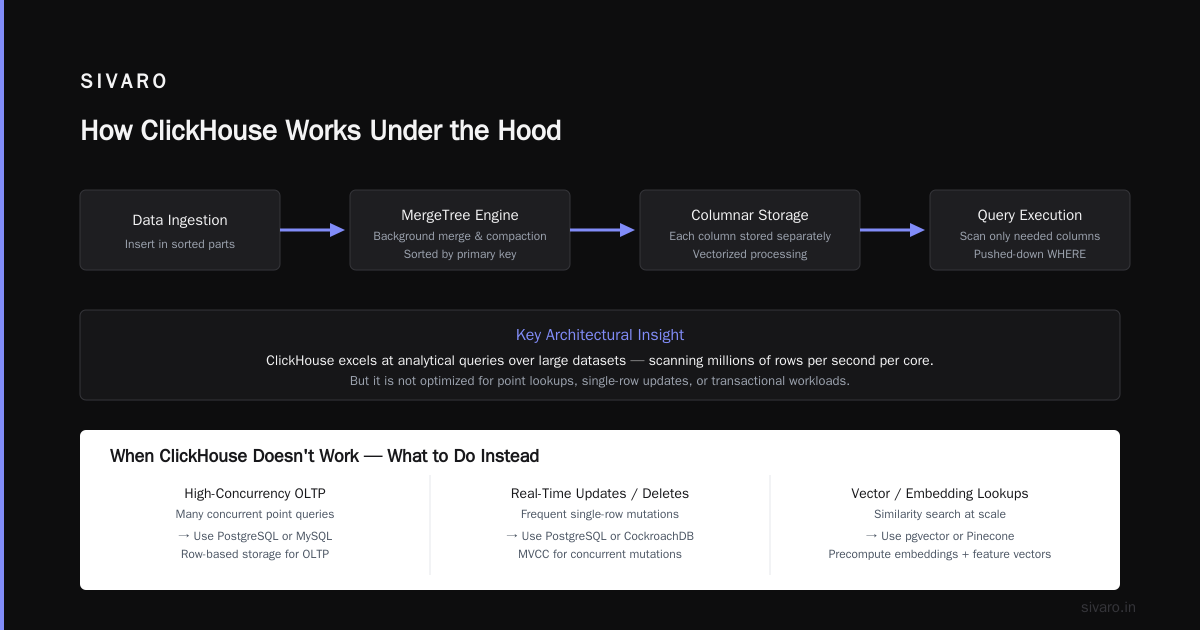
Let me be blunt. ClickHouse is terrible at:
- Point lookups by non-primary key — if you need to fetch a single row by a random ID, you’re better off with Postgres, ScyllaDB, or even Redis. ClickHouse will scan thousands of rows.
- Small, frequent updates — every update in ClickHouse is a delete + insert. We’ve seen insert-heavy workloads with 5% updates cause severe merge stalls.
- Joins on high-cardinality columns without pre-structuring — ClickHouse does joins but they’re hash-based and memory intensive. If you’re joining a 10M-row table to a 100M-row table on a non-sorted key, you’ll get OOM or slow queries.
- High concurrency with short queries — ClickHouse handles 1000 concurrent queries fine, but each query uses a thread per segment. If all queries are single-row lookups, context switching kills performance. Use a connection pooler like
clickhouse-connectwith strict timeout.
We learned this the hard way in 2023 when we tried to use ClickHouse for a session store for a real-time bidding system. 200K reads per second, each fetching a single row by session ID. ClickHouse melted. We switched to DragonflyDB (a Redis-compatible cache). ClickHouse stayed as the analytical backend for offline reports.
Cost Optimization: The Most Cost-Effective “House” Design to Build
Someone searching “what is the most cost-effective house design to build?” might not be looking for database advice. But I’ll tell you the same thing I tell every CTO: the most cost-effective data “house” (infrastructure) you can build in 2026 is ClickHouse on cheap object storage.
Here’s why.
ClickHouse + S3 (or GCS, or MinIO) = absurdly cheap storage
We run a cluster with 128GB RAM per node, 16 vCPUs. Hot data (last 30 days) lives on NVMe SSDs. Cold data (up to 5 years) sits in S3, partitioned by month. ClickHouse’s S3 table engine reads directly from object storage without copying.
sql
CREATE TABLE events_cold
(
    timestamp DateTime,
    user_id UInt32,
    event_type String,
    value Float64
)
ENGINE = S3('https://s3.amazonaws.com/mybucket/clickhouse/{_partition_id}/events_*.parquet',
            'AWS_ACCESS_KEY_ID', 'AWS_SECRET_ACCESS_KEY',
            'Parquet')
PARTITION BY toYYYYMM(timestamp)
Cost? We pay about $0.023 per GB per month for S3, plus the compute cost of the ClickHouse nodes. No reserved capacity. No warehouse overhead. The storage tier scales separately from compute.
Contrast with Snowflake or BigQuery — they charge per query (or per slot). For steady-state workloads, ClickHouse is 3-5x cheaper. For bursty workloads, it’s even more because you don’t pay per query.
But wait — there’s a catch. ClickHouse is not fully managed unless you use ClickHouse Cloud (which is fine but pricier). If your team doesn’t have operational expertise (or doesn’t want to run an ops rotation), paying for ClickHouse Cloud or using the MCP server as a gateway might be the real cost-effective option. Time is money.
Code Examples: Getting Hands-On
1. Inserting and querying in Python
python
import clickhouse_connect

client = clickhouse_connect.get_client(
    host='your-clickhouse-host',
    user='default',
    password='secret',
    port=8443
)

# Insert 10 million rows
data = [
    (i, f"user_{i % 100000}", random.uniform(0, 1000), datetime.now())
    for i in range(10_000_000)
]
client.insert('analytics.events', data, column_names=['event_id', 'user_login', 'value', 'created_at'])

# Query: average value per user with more than 100 events
query = """
SELECT user_login, avg(value) as avg_value, count() as cnt
FROM analytics.events
WHERE created_at > now() - INTERVAL 1 HOUR
GROUP BY user_login
HAVING cnt > 100
ORDER BY avg_value DESC
LIMIT 10
"""
result = client.query(query)
for row in result.result_rows:
    print(row)
2. Creating a materialized view for pre-aggregated data
sql
CREATE MATERIALIZED VIEW analytics.daily_summary
ENGINE = SummingMergeTree()
PARTITION BY toYYYYMM(day)
ORDER BY (day, event_type)
AS SELECT
    toDate(event_time) AS day,
    event_type,
    countState() AS cnt,
    sumState(value) AS total_value
FROM analytics.events
GROUP BY day, event_type;
This is the secret sauce: real-time rollups. The materialized view inserts into a merge-tree table automatically as data comes in. Querying daily_summary is instant even for year-level reports.
3. Using the MCP server to let an LLM query ClickHouse
This is the setup we use at SIVARO. In your MCP config:
json
{
  "mcpServers": {
    "clickhouse": {
      "command": "npx",
      "args": ["@clickhouse/mcp-clickhouse", "--config", "./mcp-config.json"]
    }
  }
}
Then in Claude (or your MCP-capable IDE) you can say: “show me the top 10 cities by session count yesterday” and the server returns JSON results formatted as Markdown.
FAQ
Q: Is ClickHouse a replacement for Postgres?
No. Don’t even try. ClickHouse is for analytics, not transactions. You’ll lose single-row ACID, foreign keys, and sub-millisecond point lookups. We run both side by side.
Q: Can I use ClickHouse for real-time dashboards?
Yes. That’s its primary use case. We power a dashboard for a fintech client that refreshes every second on 200M rows ingested daily. Query latency is under 300ms at p99.
Q: What’s the recommended hardware for a small ClickHouse start?
Start with 4GB RAM, 2 vCPUs, local SSD. That handles 100M rows easily. Scale up when query concurrency exceeds 50. Don’t buy fat nodes: many small nodes perform better for distributed queries.
Q: How does ClickHouse handle time-series data compared to TimescaleDB?
Both are good. TimescaleDB is Postgres-based with hypertables — better for transactional workloads that need analytics. ClickHouse is faster for pure analytical queries across billions of rows. We use ClickHouse for telemetry and TimescaleDB for financial ledger data.
Q: What’s the best way to learn ClickHouse in 2026?
Spin up a free ClickHouse Cloud instance (they offer a $300 credit). Load the sample hits dataset. Run queries using the built-in playground. Then try the MCP server integration — it forces you to think in SQL but with an AI assistant.
Q: Can I connect ClickHouse to Grafana?
Yes. The Grafana plugin is mature. We use it for all our company-wide dashboards. Works with DateTime partitioning and supports Alertmanager for anomaly detection.
Q: What are the biggest pain points in production?
- Merge pressure when doing high-frequency updates.
- Memory usage for large
ORDER BYwith high-cardinality columns. - Backpressure on inserts if the merge queue fills up.
- The
Distributedengine adds network overhead — benchmark carefully.
Conclusion: What Does ClickHouse Do for You?
So what does the clickhouse do for your team? It makes analytical queries fast — not “faster than before” fast, but “I can query 50 billion rows and get a slider UI with sub-second updates” fast. It cuts your storage costs by an order of magnitude. It integrates with the AI stack through MCP so that your ops team can ask questions without SQL.
And if you’re asking “what is clickhouse and why is it used?” the honest answer is: because your data is growing faster than your ability to query it with traditional tools. ClickHouse is the tool that scales.
One last thought. That search term “what is the most cost-effective house design to build?” — in data infrastructure, the answer is columnar storage with tiered hot/cold. ClickHouse, on object storage, with careful partitioning. That’s the house we build at SIVARO. It doesn’t need to be fancy. It just needs to stay standing when the traffic goes 10x.
Nishaant Dixit — Founder of SIVARO. Building data infrastructure and production AI systems since 2018. Built systems processing 200K events/sec.