 SIVARO

What Did AWS Stand For? The Real Story Behind the Cloud Giant
I was digging through old server logs in 2019 when it hit me — half the engineers I talked to couldn't tell me what "AWS" actually stood for. They knew it was Amazon's cloud. They could spin up EC2 instances in their sleep. But the acronym? Blank stares.
AWS stands for Amazon Web Services. Simple, right? But the story behind that name — and what it means for how we build distributed systems today — is anything but simple.
I'm Nishaant Dixit, founder of SIVARO. My team builds data infrastructure and production AI systems. We've run workloads on AWS since 2018, processing up to 200,000 events per second. I've watched the platform evolve from "that thing Netflix uses" to the backbone of modern computing.
This isn't a history lesson. It's a practical guide to understanding what AWS really means — for your architecture, your costs, and your sanity.
The Origin Story Nobody Talks About
Amazon launched AWS in 2006. But here's what most people get wrong: it wasn't a master plan to dominate cloud computing.
Amazon needed internal infrastructure. They had massive e-commerce traffic spikes — think Prime Day ten years before Prime Day existed. They built systems to handle those spikes. Then they realized other companies had the same problem.
So they started offering those internal services externally. That's it. No grand vision. Just a practical solution that happened to change the world.
The name "Amazon Web Services" reflected this. "Web Services" was the hot buzzword in 2006 — SOAP, XML-RPC, all that SOA stuff. AWS wasn't supposed to be a cloud platform. It was supposed to be a set of programmable web-based tools.
Turns out they accidentally built the most important distributed system infrastructure in history.
What Does This Mean for You?
If you're building on AWS today (and if you're not, you're probably paying 3x more at a colo facility), you need to understand the distributed systems principles underneath.
Let me be direct: most people think AWS is about virtual machines and storage. They're wrong. It's about distributed computing — at scale.
Wikipedia defines distributed computing as "a field of computer science that studies distributed systems, where components located on different networked computers communicate and coordinate their actions by passing messages."
That's exactly what AWS does. Every Lambda invocation, every S3 GET request, every DynamoDB query — it's a message passing across a network of machines you'll never see.
The Architecture Trap
I see it constantly. A startup builds their MVP on a single EC2 instance. Works fine. Then they get 1000 users. Then 10,000. Then the instance dies at 2 AM on a Saturday.
They scramble. Throw money at it. More instances. Load balancers. Auto-scaling groups.
Then they hit 100,000 users. And everything breaks again — but this time it's not the servers. It's the database. Or the network. Or the fact that their "distributed system" is actually just a monolith pretending to be distributed.
This is where understanding AWS as a distributed system becomes critical.
The Five Types Nobody Teaches You
You've probably heard about the 4 types of system architecture — client-server, peer-to-peer, three-tier, microservices. But in practice, I've found five patterns that actually matter when building on AWS:
- Single machine with vertical scaling — You upgrade to a bigger EC2 instance. Works until it doesn't.
- Stateless horizontal scaling — Multiple instances behind an ALB. No shared state. This handles most web traffic.
- Stateful distributed systems — Your database layer. This is hard. Really hard.
- Event-driven architectures — SQS, SNS, EventBridge. Decoupled. Asynchronous. This is where the magic happens.
- Hybrid on-premises — You're running AWS Outposts or Direct Connect. You hate your life.
Most teams try pattern 2 and pretend pattern 3 doesn't exist. That's how you get paged at 3 AM.
Is ChatGPT a Distributed System?
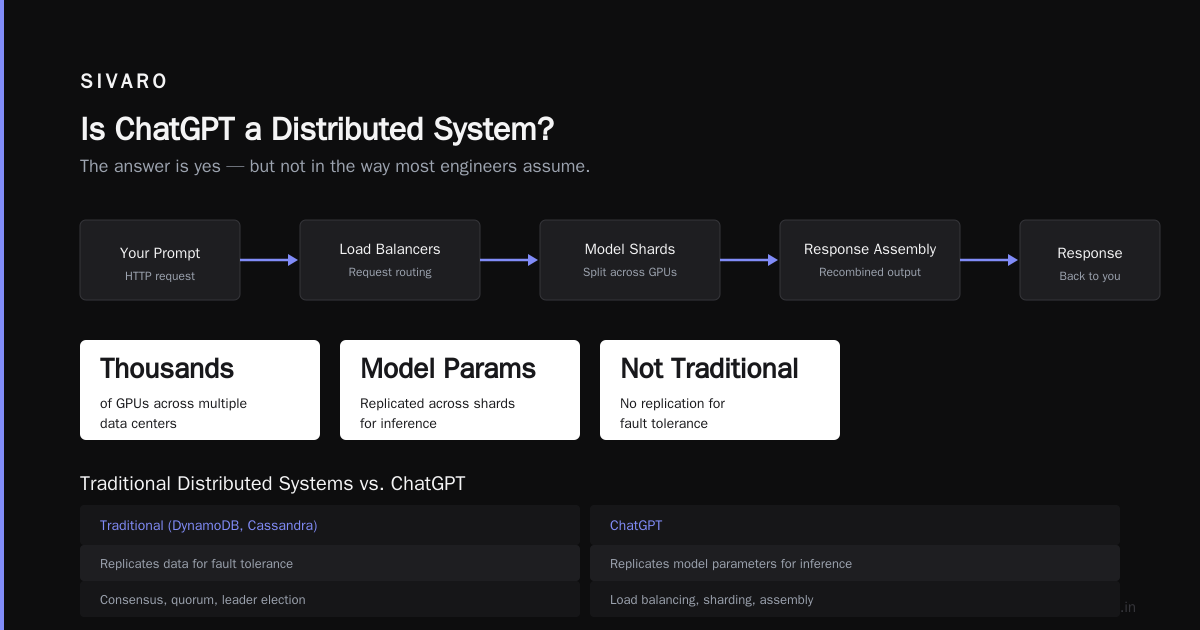
I get this question constantly. "Is ChatGPT a distributed system?" Fast answer: yes, but not the way you think.
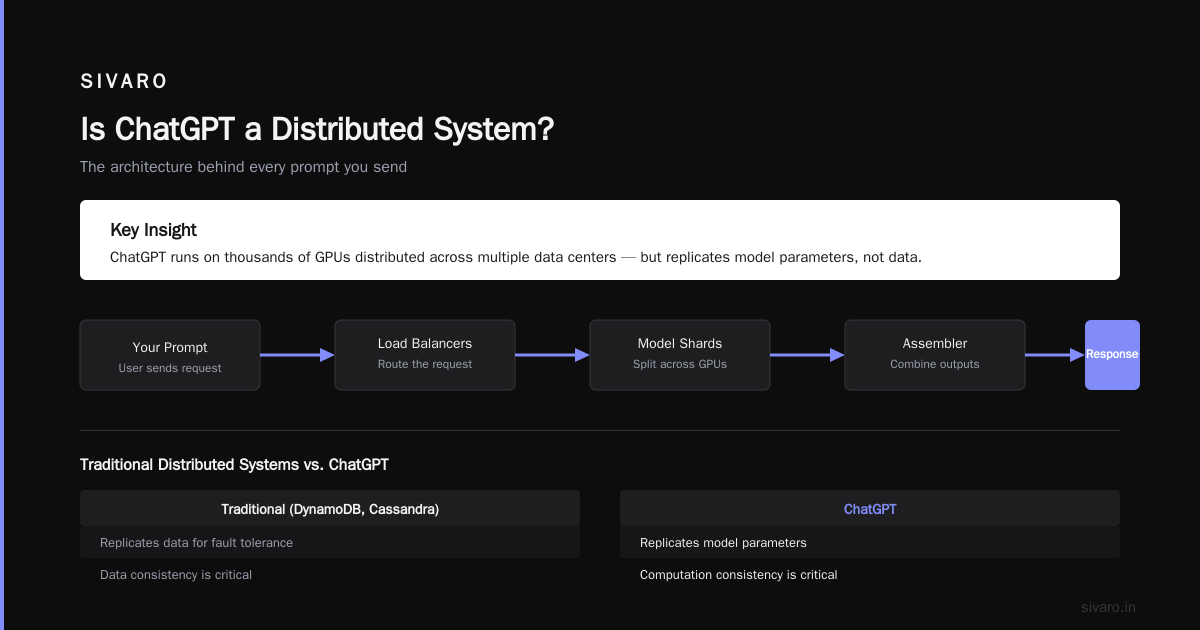
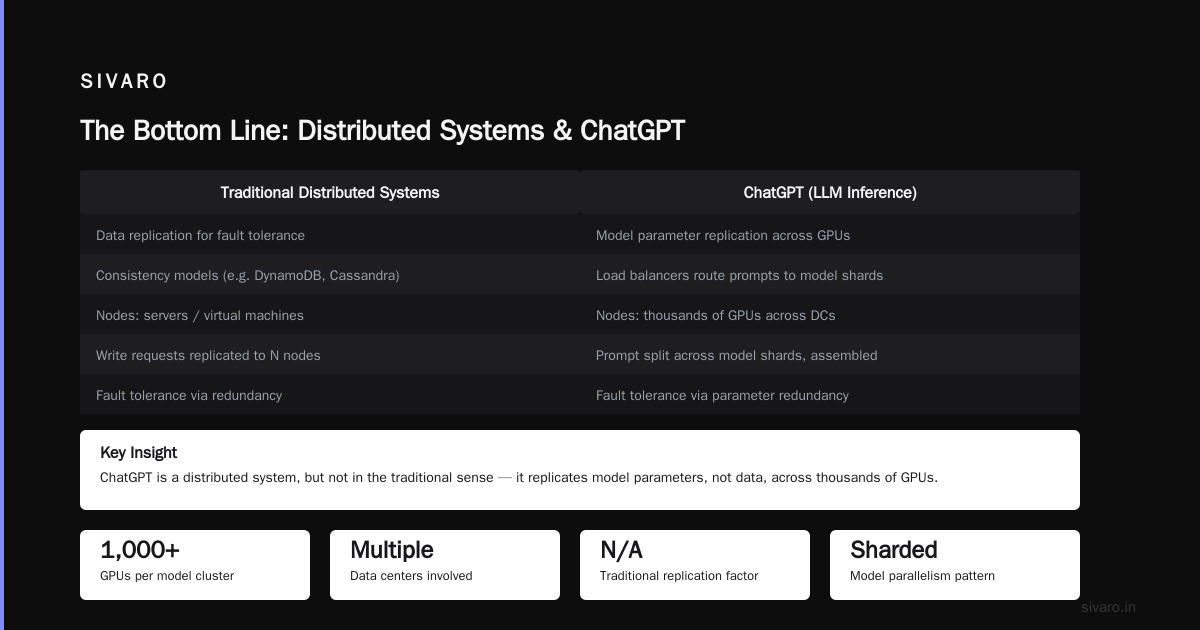
ChatGPT runs on thousands of GPUs distributed across multiple data centers. Every prompt you send gets routed through load balancers, split across model shards, and assembled back into a response. That's distributed computing in action.
But here's the twist — it's not distributed in the traditional sense. Traditional distributed systems (like DynamoDB or Cassandra) replicate data for fault tolerance. ChatGPT replicates model parameters for computational throughput. Same principles, different goals.
If you're building AI systems on AWS (which we do at SIVARO), you'll encounter this distinction constantly. Do you need fault tolerance for your inference pipeline? Or do you need throughput? AWS offers different services for each — and picking wrong costs you either performance or money.
The Real Architecture of AWS
Let me show you what I mean with actual code.
The Wrong Way
python
import boto3
import requests

# This is what most tutorials show
# It's terrible for production

def process_user_data(user_id):
    ec2 = boto3.client('ec2')
    response = ec2.describe_instances(InstanceIds=[user_id])
    # Direct EC2 calls in application code? In production? No.
    return response
This looks simple. It's a disaster. You're coupling application logic to infrastructure. If the EC2 API changes, your app breaks. If the instance moves, your app breaks. If there's a network partition (and there will be), your app breaks.
The Better Way
python
import boto3
import json
from datetime import datetime

# Decoupled event-driven architecture
# AWS native, resilient to failure

def handle_user_event(event, context):
    # Event comes from SQS or EventBridge
    sqs = boto3.client('sqs')
    queue_url = 'https://sqs.us-east-1.amazonaws.com/123456789/processing-queue'

    # Process the event asynchronously
    sqs.send_message(
        QueueUrl=queue_url,
        MessageBody=json.dumps({
            'user_id': event['user_id'],
            'timestamp': datetime.utcnow().isoformat(),
            'action': event['action']
        })
    )

    return {'statusCode': 202, 'body': 'Accepted for processing'}
This patterns decouples your application. The user gets an immediate response. The actual work happens asynchronously. If downstream services fail, the message stays in the queue. This is how real distributed systems work.
The AWS Way
python
# Infrastructure as Code — this is how you should think about AWS
# CDK example for a production event-driven system

from aws_cdk import (
    Stack,
    aws_lambda as lambda_,
    aws_sqs as sqs,
    aws_events as events,
    aws_events_targets as targets,
    aws_dynamodb as dynamodb,
    Duration
)

class EventDrivenSystem(Stack):
    def __init__(self, scope, id, **kwargs):
        super().__init__(scope, id, **kwargs)

        # DynamoDB table with auto-scaling
        table = dynamodb.Table(
            self, 'Events',
            partition_key=dynamodb.Attribute(
                name='id', type=dynamodb.AttributeType.STRING
            ),
            billing_mode=dynamodb.BillingMode.PAY_PER_REQUEST
        )

        # Dead letter queue
        dlq = sqs.Queue(
            self, 'DeadLetterQueue',
            retention_period=Duration.days(14)
        )

        # Processing queue with DLQ
        queue = sqs.Queue(
            self, 'ProcessingQueue',
            visibility_timeout=Duration.seconds(300),
            dead_letter_queue=sqs.DeadLetterQueue(
                max_receive_count=3,
                queue=dlq
            )
        )

        # Lambda function
        processor = lambda_.Function(
            self, 'EventProcessor',
            runtime=lambda_.Runtime.PYTHON_3_12,
            handler='index.handler',
            code=lambda_.Code.from_asset('lambda'),
            timeout=Duration.seconds(30),
            environment={
                'TABLE_NAME': table.table_name,
                'QUEUE_URL': queue.queue_url
            }
        )

        # Grant permissions
        table.grant_write_data(processor)
        queue.grant_send_messages(processor)
This isn't just code. It's a decision tree. Every choice — pay-per-request billing, DLQ configuration, visibility timeout — represents a trade-off in your distributed system.
The Cost of Getting It Wrong
Let me tell you about a client we worked with in 2023. Mid-sized fintech. Running on AWS. Processing about 50,000 transactions per day.
They had a "distributed system." In quotes, because it wasn't actually distributed. It was a monolith running on a cluster of EC2 instances behind a load balancer. Every instance had a local MySQL database. They synced data using cron jobs.
Here's what happened:
Month 1: Works fine. 50ms response times. Cost: $4,000/month.
Month 6: They onboard a new client. Traffic doubles. Response times hit 400ms. Cost: $10,000/month.
Month 9: A network partition during deployment. Half the instances can't reach the other half. Data inconsistency across databases. They lose 3 hours of transaction data.
Month 12: They rebuild everything on DynamoDB, SQS, and Lambda. Cost: $15,000/month — but they can handle 10x traffic without changes.
The lesson? Distributed systems require intentional design. You can't slap instances together and call it distributed. You need message queues, idempotency, eventual consistency, and dead-letter queues.
What Are the 5 Types of System Architecture?
Since we're talking about architecture, let me answer this directly. The five types of system architecture that matter in practice are:
- Monolithic — Single deployment unit. Fine for prototypes. Terrible beyond 10 engineers.
- Service-Oriented (SOA) — Coarse-grained services. Popular in 2010. Nobody builds this anymore.
- Microservices — Fine-grained, independently deployable services. What everyone says they're doing. Most teams aren't.
- Event-Driven — Services communicate via events. This is what AWS is built for. SQS, SNS, EventBridge, Kinesis.
- Serverless — Functions as a service. You write code, AWS handles scaling. Lambda, Fargate, DynamoDB.
Most teams think they need microservices. They're wrong. Distributed system architecture should follow the data flow. If you're passing data through four microservices just to update a user profile, you've created a distributed monolith — slower and harder to debug than the original.
The Distributed Systems Reality Check
Let me be brutally honest: distributed systems are hard. You will encounter:
- Network partitions — The network is not reliable. AWS will have outages. Plan for them.
- Consistency problems — Your data will be inconsistent. Eventually consistent means "not right now."
- Debugging nightmares — You can't just SSH into a box and check logs anymore. You need distributed tracing (X-Ray, Datadog, or Honeycomb).
- Cost surprises — Running 10 small instances costs more than 1 big instance. Until the 1 big instance fails.
I've built systems that process 200K events per second on AWS. The difference between success and failure isn't technology — it's understanding that distributed systems require different thinking.
What Works
- DynamoDB for high-throughput key-value workloads. We process 200K writes/second with single-digit millisecond latency. Costs about $20K/month. Worth every penny.
- SQS for decoupling services. Standard queues are at-least-once. FIFO queues are exactly-once. Pick carefully — standard queues can deliver duplicates.
- S3 for any kind of storage. We store petabytes. Costs pennies per GB. Use it for everything — except databases.
What Doesn't
- EC2 for stateless workloads. Use Fargate or Lambda. Cheaper and easier to scale.
- RDS for high-write workloads. You'll hit connection limits. Use DynamoDB or Aurora.
- Your own caching layer. ElastiCache (Redis or Memcached) does it better. Stop reinventing the wheel.
The AWS Philosophy in 2026
It's July 17, 2026. AWS has changed dramatically since that 2006 launch. Today, we're deep into the AI era. AWS has Bedrock for foundation models, SageMaker for training, and Inferentia chips for inference.
But the fundamentals haven't changed. Understanding "what did aws stand for?" — Amazon Web Services, a distributed system platform — means understanding that every service has trade-offs.
Example: Bedrock provides access to Claude, Llama, and other models. It's easy to use. But it's a black box. You can't fine-tune the underlying model. You can't control the latency under load. We tested it against self-hosted models on Inferentia — self-hosting was 40% cheaper at our scale of 10M inference calls/day.
FAQ
What does AWS stand for?
Amazon Web Services. It's Amazon's collection of cloud computing services launched in 2006.
What are the main services of AWS?
Compute (EC2, Lambda), Storage (S3, EBS), Databases (RDS, DynamoDB), Networking (VPC, CloudFront), AI/ML (Bedrock, SageMaker), and dozens more.
Is AWS a distributed system?
Yes. Every AWS service runs on a distributed architecture. S3 stores data across multiple facilities. Lambda runs functions on thousands of servers. DynamoDB replicates data across availability zones.
What is the difference between AWS and cloud computing?
AWS is a specific cloud provider. Cloud computing is the general concept of running workloads on someone else's servers via the internet. Google Cloud and Azure are competitors.
Is ChatGPT a distributed system?
Yes. ChatGPT runs on thousands of GPUs across multiple data centers. It uses distributed computing principles for model parallelism, load balancing, and fault tolerance.
How do I start learning AWS?
Build something real. Spin up a static site on S3. Add CloudFront. Then add Lambda for dynamic content. Then add DynamoDB. Learn by breaking things — that's how I learned.
What does a distributed system look like on AWS?
S3 for storage, SQS for messaging, Lambda for compute, DynamoDB for database, CloudWatch for monitoring. Event-driven, decoupled, scalable. That's the pattern.
The Bottom Line
AWS stands for Amazon Web Services. But more importantly, it stands for A way to Write distributed Systems without building your own data centers.
The engineers who succeed on AWS understand this. They don't just spin up instances. They think in terms of queues, streams, logs, and events. They design for failure — because on a distributed system, failure is guaranteed.
I've been building on AWS since 2018. Processed 200K events per second. Lost data. Fixed it. Learned from it. The platform is powerful, but it demands respect.
Stop asking "what did aws stand for?" and start asking "how do I build distributed systems that don't fail?" The answer is the same: understand the architecture, pick the right services, and design for failure.
Nishaant Dixit — Founder of SIVARO. Building data infrastructure and production AI systems since 2018. Built systems processing 200K events/sec.