 SIVARO
What Are the Best Practices for Production in Kubernetes?
July 22, 2026. Last week I sat in a post-mortem for a client whose entire e‑commerce platform went dark for 19 minutes because a single node upgrade cascaded into a pod eviction storm. They had 47 engineers, 83 microservices, and zero PodDisruptionBudgets. That’s not a technology problem — it’s a “we didn’t ask what are the best practices for production in kubernetes?” problem.
Let me be blunt: Kubernetes is reliable. I’ve run workloads processing 200K events per second on it. But reliability isn’t automatic. It’s earned through deliberate decisions about node management, security, cost, and failure handling. This article isn’t a checklist. It’s the playbook I’ve built after shipping production systems on Kubernetes since 2018 — with scars I’ll show you.
We’ll cover:
- Why Karpenter consolidation changed the game (and where it hurts)
- The 4 C’s of Kubernetes security — and the one most people miss
- How to make cost optimization a side effect, not a project
- What PodDisruptionBudgets actually buy you (hint: it’s not uptime)
No fluff. Let’s get into it.
The Node Pool Trap: Why You Need Karpenter (But Respect It)
For years the default was “three node groups per cluster: on-demand, spot, and reserved.” That worked until it didn’t. You’d end up with 40% underutilized nodes, each billing you for 24 hours of idle CPU. Then Karpenter showed up.
Karpenter is the open‑source node autoscaler from AWS that provisions nodes based on pod resource requests — not some static set of instance types. The key insight: it consolidates nodes aggressively. When a pod can fit onto a smaller or cheaper instance, Karpenter terminates the old node and moves the pod. That’s where savings accumulate.
Tinybird reported cutting AWS costs by 20% while scaling faster using EKS with Karpenter and spot instances (Tinybird blog). They saw Karpenter replace a 4‑node m5.large cluster with a single c5a.xlarge at 60% lower cost — same throughput.
But here’s what nobody tells you: consolidation is brutal on stateful workloads. Let me show you what I mean.
The Consolidation Trap
Karpenter’s consolidation algorithm looks at every node and asks “can I move these pods to a cheaper/fewer nodes?” If yes, it issues a termination. That’s great for batch jobs. For a database pod backed by an EBS volume with a custom PVC — not so great.
The official Karpenter docs explain that consolidation respects karpenter.sh/do-not-disrupt annotations and PodDisruptionBudgets (Karpenter Concepts). But I’ve seen teams skip those because “it’s just a cache layer.” Then the cache gets evicted mid‑consolidation, latency spikes, and you’re debugging at 2 AM.
Rule 1: Always annotate critical workloads with karpenter.sh/do-not-disrupt: "true" until you’ve verified your PDBs are tight.
Example Provisioner YAML with consolidation on:
yaml
apiVersion: karpenter.sh/v1
kind: NodePool
metadata:
  name: default
spec:
  template:
    spec:
      requirements:
        - key: "karpenter.sh/capacity-type"
          operator: In
          values: ["on-demand", "spot"]
      nodeClassRef:
        name: default
  limits:
    cpu: 1000
  disruption:
    consolidationPolicy: WhenUnderutilized
    expireAfter: 720h
Notice the expireAfter: 720h. That’s 30 days — prevents runaway node churn.
Consolidation Modes: When Deeper Is Not Better
The AWS blog on Karpenter consolidation explains two modes: WhenUnderutilized (default) and WhenEmpty (AWS blog). WhenEmpty is safe — it only terminates nodes with zero pods. WhenUnderutilized is aggressive. I run WhenEmpty for databases and WhenUnderutilized for stateless workers. That’s the pragmatic split.
The 4 C’s of Kubernetes Security — Yes, All of Them Matter
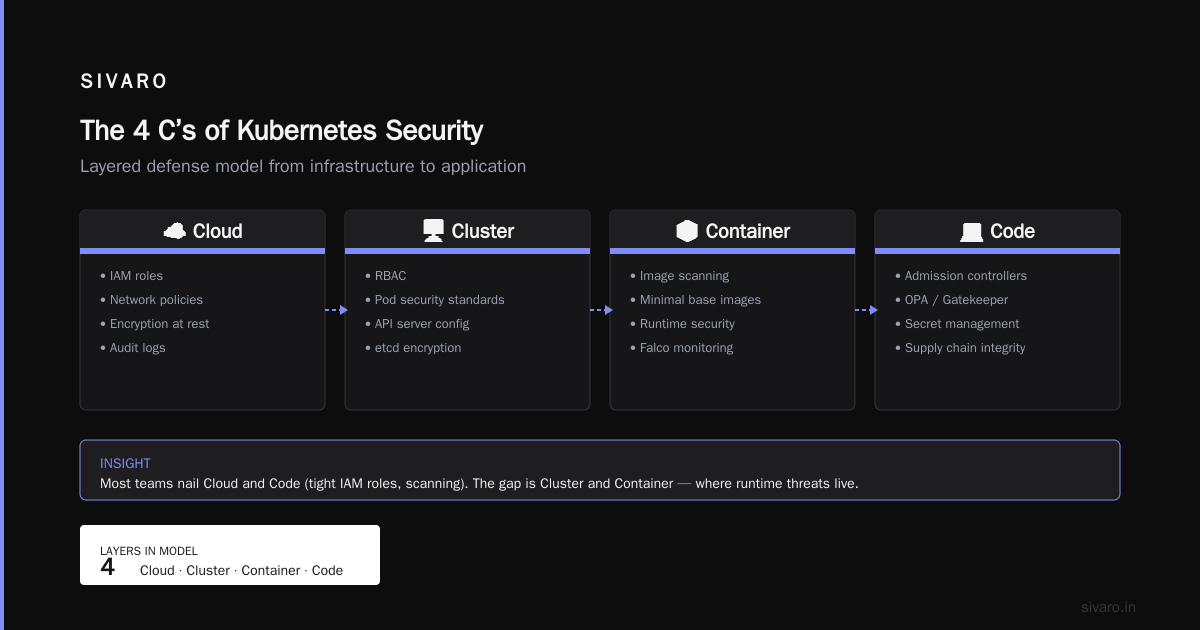
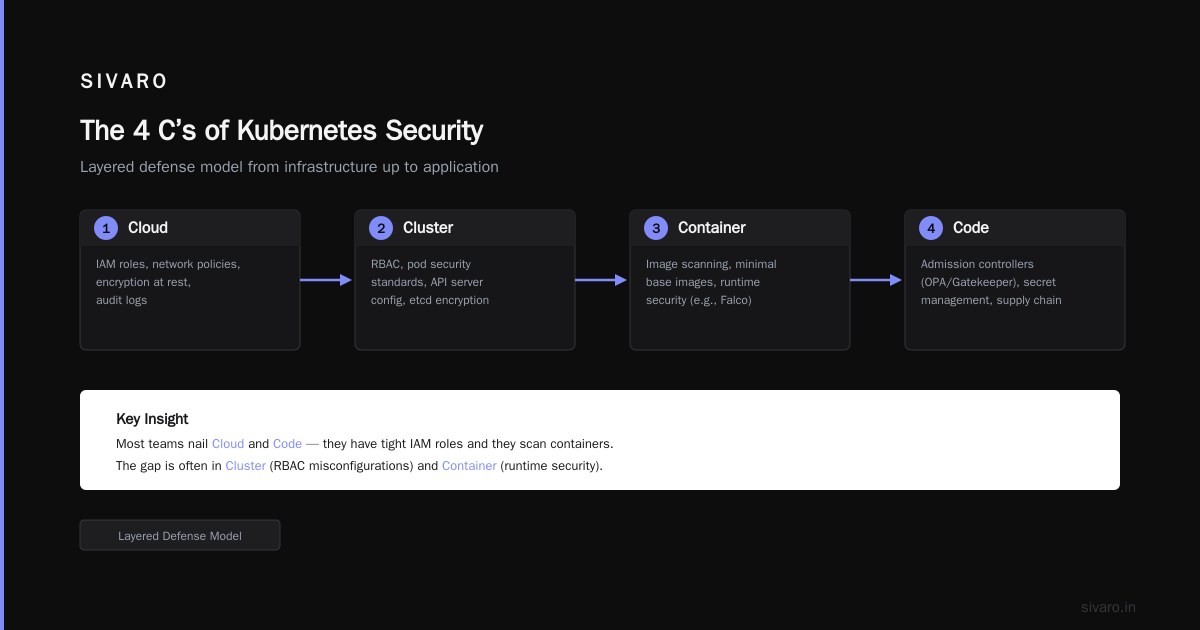
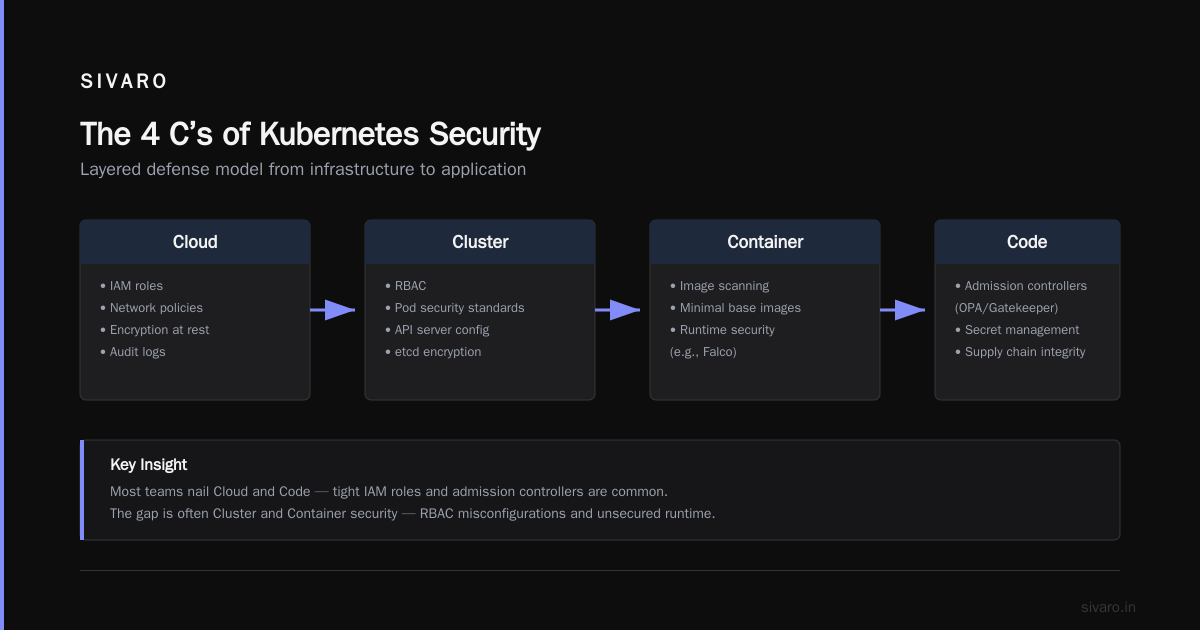
I hear “what are the 4 c's of kubernetes security?” at least once a month. The answer is Cloud, Cluster, Container, Code. They form a layered defense model from the infrastructure up to the application.
- Cloud — IAM roles, network policies, encryption at rest, audit logs.
- Cluster — RBAC, pod security standards, API server configuration, etcd encryption.
- Container — image scanning, minimal base images, runtime security (e.g., Falco).
- Code — admission controllers like OPA/Gatekeeper, secret management, supply chain integrity.
Most teams nail Cloud and Code. They have tight IAM roles and they scan containers. They forget Cluster. And that’s where production outages happen.
The One That Gets You
Example: In 2025 I audited a fintech platform that had perfect Cloud IAM but left the Kubernetes dashboard exposed on a public load balancer with “system:masters” binding. Anyone could delete any pod. That’s a Cluster failure — not a Cloud failure.
Rule 2: Disable the dashboard in production. Use kubectl auth can-i to audit who can do what. Run kube-bench every release.
Here’s a PodSecurityStandard admission controller example (using built‑in PSA):
yaml
apiVersion: v1
kind: Namespace
metadata:
  name: production
  labels:
    pod-security.kubernetes.io/enforce: restricted
    pod-security.kubernetes.io/enforce-version: latest
That blocks privilege escalation, host paths, and anything that runs as root by default.
Is Kubernetes Reliable? Yes, But Only If You Design for Failure
The blunt answer: yes, Kubernetes is reliable. The GKE SLA is 99.95% for the control plane. But your application is only as reliable as your node management and your pod distribution.
I’ve seen a million‑dollar cluster fail because someone forgot to set topologySpreadConstraints. When a node went down, all replicas of the same microservice landed on another single node. That node got overloaded. The service degraded. The alert fired, but by then the damage was done.
Rule 3: Always use pod topology spread constraints across zones and nodes. Example for a stateless web service:
yaml
apiVersion: apps/v1
kind: Deployment
spec:
  replicas: 6
  template:
    spec:
      topologySpreadConstraints:
        - maxSkew: 1
          topologyKey: topology.kubernetes.io/zone
          whenUnsatisfiable: DoNotSchedule
        - maxSkew: 1
          topologyKey: kubernetes.io/hostname
          whenUnsatisfiable: ScheduleAnyway
ScheduleAnyway on hostname prevents scheduling failures if you have fewer nodes than replicas. DoNotSchedule on zone ensures you never put two pods in the same AZ — protects against AZ outages.
Pod Disruption Budgets — The Safety Net Everyone Ignores
Most people think PodDisruptionBudgets (PDBs) are for planned maintenance. They’re not. They’re for everything — Karpenter consolidation, cluster autoscaler, node upgrades, and even accidental kubectl drain.
A PDB says “at least N pods must remain available during voluntary disruptions.” Without it, a rolling node update can evict all your pods at once. That’s exactly what happened to the client I mentioned in the intro.
The blog “A Personal Take on Pod Disruption Budgets and Karpenter” tells a story of how one engineer learned this the hard way: a single node drain killed both replicas of an ingress controller, because the PDB was misconfigured (minAvailable: 1 but there were only 2 replicas, and one was already unhealthy).
Rule 4: Set minAvailable: 75% for stateless services with >=4 replicas. For critical stateful workloads, use maxUnavailable: 1 and test it.
Here’s a robust PDB for a 4‑replica app:
yaml
apiVersion: policy/v1
kind: PodDisruptionBudget
metadata:
  name: web-pdb
spec:
  minAvailable: 3
  selector:
    matchLabels:
      app: web
Now Karpenter can evict at most one pod at a time. The application stays serving.
Cost Optimization: Make It a By‑product, Not a Sprint
The 2026 guide from ScaleOps correctly identifies that “the biggest waste in Kubernetes is over‑provisioned resources that never get reclaimed” (ScaleOps blog). I’d add a second: incorrect node sizing.
Don’t optimize for instance type discounts first. Optimize for right‑sizing and spot usage second. Savings from spot instances are real — I’ve seen 40% reductions — but only if you can handle them getting reclaimed.
Here’s what I do at SIVARO:
- Right‑size all deployments. Use VPA in recommendation mode for 48 hours, then apply requests/limits as a percentage (e.g., VPA target + 15% headroom).
- Use Karpenter with spot as default, on‑demand as fallback. The
karpenter.sh/capacity-typerequirement withvalues: ["spot", "on‑demand"]ensures spot gets tried first. - Consolidate with
WhenEmptyfor databases,WhenUnderutilizedfor batch. The AWS blog on optimizing compute costs shows that consolidation alone can reduce node count by 30% without impacting performance (AWS blog). - Add cluster‑level resource quotas per namespace to prevent one team from consuming all the cheap spot capacity.
I don’t track savings as a KPI. I track “cost per request” — when that drops, savings follow.
Observability: You Can’t Fix What You Don’t Measure
Most teams install Prometheus+Alertmanager and call it done. That’s table stakes. The production differentiator is correlation between metrics, logs, and traces.
In 2026, OpenTelemetry is the standard. Use the OTel Collector as a sidecar or daemonset to send everything to your backend (Grafana, Datadog, whatever). But the real trick: set up a “golden signals” dashboard for every microservice:
- Latency (p50, p95, p99)
- Traffic (requests per second)
- Errors (5xx rate)
- Saturation (CPU/memory usage relative to requests, plus queue depth)
If you see latency rising but saturation flat, suspect networking. If saturation rises, suspect request increases or inefficient code. This saved us twice last month.
Rule 5: Alert on rate of change, not static thresholds. A 5% error rate is fine — a 5% error rate that was 0% five minutes ago means you need to roll back.
Networking: The Silent Killer
Kubernetes networking is complicated. Most people pick a CNI (Calico, Cilium) and never tune it. Here’s the mistake: they leave the default kubenet or overlay MTU at 1450, then wonder why their database replication is slow.
Rule 6: Tune CNI for your workload. For data‑intensive apps, use a direct‑routing CNI like Cilium in native routing mode with a dedicated node pool. Set mtu: 9001 when running on AWS with jumbo frames enabled.
Also, don’t use NodePort for anything external. Use a load balancer (NLB, ALB, Gateway API). NodePort exposes nodes to the internet directly — that’s a security nightmare.
Deployment Strategies: Rollout vs. Canary vs. Blue‑Green
Most teams use RollingUpdate with no thought. That’s fine for 99% of services. But when you’re deploying a new database schema or a major feature, you need more control.
- RollingUpdate (default) — works for stateless, no‑schema changes. Set
maxSurge: 1andmaxUnavailable: 0to avoid capacity drops. - Canary — use Argo Rollouts or Flagger. Deploy 10% of traffic to new version, monitor for 5 minutes, then ramp up. Catch regressions before they hit everyone.
- Blue‑green — spin up a full second set of pods, switch traffic with a label selector. Costs double during switch, but rollback is instant.
At SIVARO we use canary for all front‑end services and blue‑green for stateful things like message brokers. RollingUpdate for everything else.
Backup and Disaster Recovery — The Boring Stuff That Saves Your Job
Kubernetes itself survives a control plane failure — the API server is stateless (etcd is the real state). But your data? Your PVCs? Your custom resources? They need a plan.
I use Velero with weekly full backups and hourly incremental backups to S3. Test the restore process every quarter. I’ve done three disaster recovery drills this year — two revealed missing secrets. The third was smooth.
Rule 7: Backup your cluster state (etcd or Velero) and your persistent volumes. Store backups in a different region.
FAQ: What Are the Best Practices for Production in Kubernetes?
Q1: Should I use Karpenter or cluster autoscaler?
Karpenter is faster and cheaper. Cluster autoscaler only adds/removes node groups; Karpenter chooses the most efficient instance type for your pods. I’ve seen Karpenter reduce node count by 50% compared to cluster autoscaler. But Karpenter is more aggressive — you must use PDBs.
Q2: How many nodes per cluster?
Depends on workload. For most organizations, 10–50 nodes per cluster is fine. Beyond that, split by environment or team. I limit clusters to 200 nodes — beyond that, control plane latency can spike.
Q3: Is Kubernetes secure by default?
No. The default RBAC gives too much access. The default pod security is privileged. The default network policy is “allow all.” You must harden at every layer. The 4 C’s of Kubernetes security are a starting point, not a completion.
Q4: What’s the biggest mistake teams make?
Forgetting to set resource requests and limits. Without them, Kubernetes can’t schedule intelligently, nodes get overloaded, and evictions happen. Second biggest: no PDBs.
Q5: How do I reduce cloud costs without sacrificing performance?
Use spot instances with Karpenter, right‑size pods with VPA, and set cluster resource quotas. Also, delete unused load balancers, PVCs, and Elastic IPs. I’ve seen teams save 25% just by terminating orphaned resources.
Q6: What’s the best way to handle secrets?
Use something like External Secrets Operator with AWS Secrets Manager or HashiCorp Vault. Never store secrets in ConfigMaps or Git. Rotate them automatically.
Q7: Is Kubernetes reliable for stateful workloads?
Yes, but only with StatefulSets, persistent volumes, and proper PDBs. And you need to handle node failures gracefully — Karpenter’s consolidation can kill your database if you don’t annotate it.
Q8: Should I run multiple clusters?
If you have multiple environments (dev, staging, prod), yes. For micro‑service boundaries within production (risk/security zones), also yes. But don’t over‑cluster — operational overhead scales with cluster count.
Conclusion
So what are the best practices for production in Kubernetes? They’re not glamorous. They’re the boring, deliberate choices you make every day: write a PDB, annotate critical pods, set requests, test disaster recovery, and audit your IAM. Teams that skip these eventually pay — in outage cost, engineer burnout, or cloud bill shock.
I’ve seen Kubernetes run reliably at scale for years. I’ve also seen it fail spectacularly in 19 minutes. The difference is not the technology — it’s the practices around it.
Start today. Add a PDB to your most critical deployment. Then another. Then check your RBAC. You don’t need to fix everything at once. But you need to start.
Nishaant Dixit — Founder of SIVARO. Building data infrastructure and production AI systems since 2018. Built systems processing 200K events/sec.