
What Are the 4 C's of Kubernetes Security? A Practitioner's Guide
I'll never forget the call. 3:47 AM, July 2025. A financial services client had their staging cluster exposed because someone forgot to lock down a kubelet port. We found it during a routine audit — but what if an attacker had found it first?
That night cemented something for me. Kubernetes security isn't about one big thing. It's about four layers that stack on each other. Miss one, and the whole thing wobbles.
The 4 C's of Kubernetes security — Cloud, Cluster, Container, Code — form the backbone of any production-grade defense. If you're asking "what are the 4 c's of kubernetes security?" you're asking the right question. Let me show you how they work in practice.
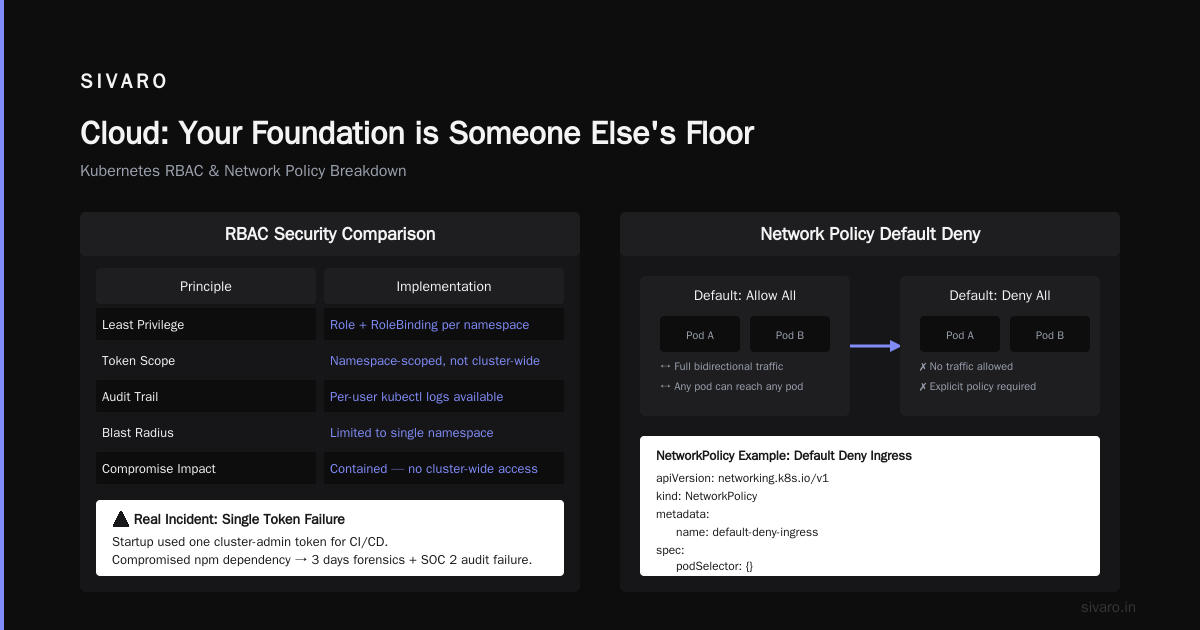
Cloud: Your Foundation is Someone Else's Floor
Here's the uncomfortable truth most people skip: your Kubernetes security starts before you spin up a single pod. The cloud layer — your infrastructure provider, network setup, and access controls — determines whether your cluster has a fighting chance.
The Shared Responsibility Trap
AWS, GCP, Azure — they all publish these neat responsibility matrices. Looks clean on paper. In practice? I've seen teams assume "well, it's managed Kubernetes, so security is handled." That's how you get a $10,000 crypto mining bill at 3 AM.
Managed Kubernetes like EKS or GKE handles the control plane security. But your nodes, networking, and access policies? That's on you.
What Actually Matters at the Cloud Layer
API server exposure. I check every cluster for this first. Is your API server accessible from the public internet? If yes, fix it today. Use private clusters where possible.
Node security. Your worker nodes run workloads. They need strict inbound/outbound rules. In 2025, I audited a deployment where nodes had SSH open to 0.0.0.0/0. That's not a configuration mistake — it's an emergency.
Service mesh? Consider Istio or Linkerd. But don't assume they solve everything. They add observability and encryption between services — critical for is kubernetes reliable? questions. But a service mesh won't stop a misconfigured RBAC rule.
yaml
# Example: Minimalist VPC configuration for EKS cluster
apiVersion: v1
kind: ConfigMap
metadata:
  name: aws-auth
  namespace: kube-system
data:
  mapRoles: |
    - rolearn: arn:aws:iam::123456789012:role/AdminRole
      username: admin
      groups:
        - system:masters
First lesson I learned the hard way: Don't use the default VPC. Create a dedicated VPC with no internet gateway for control plane nodes. Yes, it costs a bit more. Yes, it's worth it.
Real check: Ask yourself "if someone compromised my cloud console, could they delete my entire cluster?" If the answer is yes, you need better IAM policies and MFA enforcement. Full stop.
Cluster: Where the Rubber Meets the Control Plane
You've secured your cloud. Now we talk about the cluster itself — the Kubernetes control plane, nodes, and the core APIs that make everything run.
Most people think "is kubernetes production ready?" is about features. It's not. It's about whether you can operate it securely at scale.
RBAC: Not Optional, Not Trivial
Role-Based Access Control is the single most impactful thing you can configure. But configuration is easy. Getting it right takes work.
Bad practice: A single admin service account with cluster-admin privileges, used by pipelines, CI/CD, and every engineer.
Good practice: Granular roles per team, per namespace, with least privilege baked in.
yaml
# Example: Least-privilege RBAC for developers
kind: Role
apiVersion: rbac.authorization.k8s.io/v1
metadata:
  namespace: development
  name: pod-reader
rules:
- apiGroups: [""]
  resources: ["pods", "pods/log"]
  verbs: ["get", "watch", "list"]
---
kind: RoleBinding
apiVersion: rbac.authorization.k8s.io/v1
metadata:
  name: dev-read-binding
  namespace: development
subjects:
- kind: User
  name: dev-engineering
  apiGroup: rbac.authorization.k8s.io
roleRef:
  kind: Role
  name: pod-reader
  apiGroup: rbac.authorization.k8s.io
I saw a startup in early 2025 using a single token for everything. Their entire CI/CD pipeline ran as cluster-admin. Two months later, a compromised npm dependency in a sidecar container escalated privileges through that token. Cost them three days of forensic analysis and a pissed-off SOC 2 auditor.
Network policies. By default, all pods can talk to all pods. That's a design choice that prioritizes simplicity over security. For production, you need network policies that restrict traffic to only what's necessary.
yaml
# Example: Default deny ingress/egress for namespace
apiVersion: networking.k8s.io/v1
kind: NetworkPolicy
metadata:
  name: default-deny-all
  namespace: sensitive-workloads
spec:
  podSelector: {}
  policyTypes:
  - Ingress
  - Egress
Audit logging. Turn it on. Enable it for API server, controller manager, scheduler, and kubelet. Store logs somewhere immutable — like S3 with Object Lock or GCS with retention policies. If you can't answer "who created that privileged pod at 2 AM?" you're flying blind.
Pod Security Standards
Kubernetes deprecated PodSecurityPolicy in 1.21 (removed in 1.25). The replacement — Pod Security Admission — is simpler but requires explicit configuration.
My rule: Run pods with restricted level by default. Only use privileged for system-level components. And document why each exception exists.
yaml
# Example: Pod Security Admission configuration
apiVersion: v1
kind: Namespace
metadata:
  name: production
  labels:
    pod-security.kubernetes.io/enforce: restricted
    pod-security.kubernetes.io/audit: restricted
    pod-security.kubernetes.io/warn: restricted
Secret management. Don't store secrets in ConfigMaps or environment variables. Use external secrets operators (like External Secrets Operator or Sealed Secrets) backed by a vault. I prefer HashiCorp Vault or AWS Secrets Manager. Both work. Pick one and commit.
Container: Your Image is Only as Safe as Its Base
This is where most breaches happen, in my experience. You can have perfect RBAC and zero-trust networking, but if your container has a known CVE in its base image, you're vulnerable.
Image Scanning: Not a Nice-to-Have
I don't deploy any image that hasn't passed a vulnerability scan. Trivy, Snyk, Anchore — pick your tool. Run it in CI/CD, block builds that fail.
Tangible example: In March 2026, a team I consulted for was pushing images with node:14 as the base. Node 14 reached end-of-life in April 2023. Three years of unpatched CVEs. Their scanner caught it, but initially they didn't enforce the policy. "It'll slow us down," they said. It doesn't. It saves you from a breach that would slow you down a lot more.
Image Cleanliness
Alpine Linux isn't always the answer. Yes, it's small. But some vulnerabilities come from the package manager itself. I've had better luck with distroless images from Google — they strip everything except the runtime.
dockerfile
# Example: Multi-stage build with distroless runtime
FROM golang:1.22-alpine AS builder
WORKDIR /app
COPY go.mod go.sum ./
RUN go mod download
COPY . .
RUN CGO_ENABLED=0 GOOS=linux go build -o /app/service

FROM gcr.io/distroless/static-debian12:nonroot
COPY --from=builder /app/service /app/service
USER nonroot:nonroot
ENTRYPOINT ["/app/service"]
Tip: Use USER nonroot in your Dockerfile. I can't count how many containers I've seen running as root by default. Kubernetes allows it unless you explicitly restrict it with Pod Security Standards.
Supply Chain Security
This is 2026. You should be signing your images and verifying them at deploy time. Cosign (part of the Sigstore project) has become the de facto standard. Notary v2 is gaining traction too.
My workflow:
- Build image → scan → sign with Cosign → push to registry
- Deploy → verify signature → run admission controller check → schedule pods
This chain prevents tampered images from being deployed. If someone compromises your CI pipeline, the signature won't match, and the deployment fails.
Code: Where Vulnerabilities Have Names
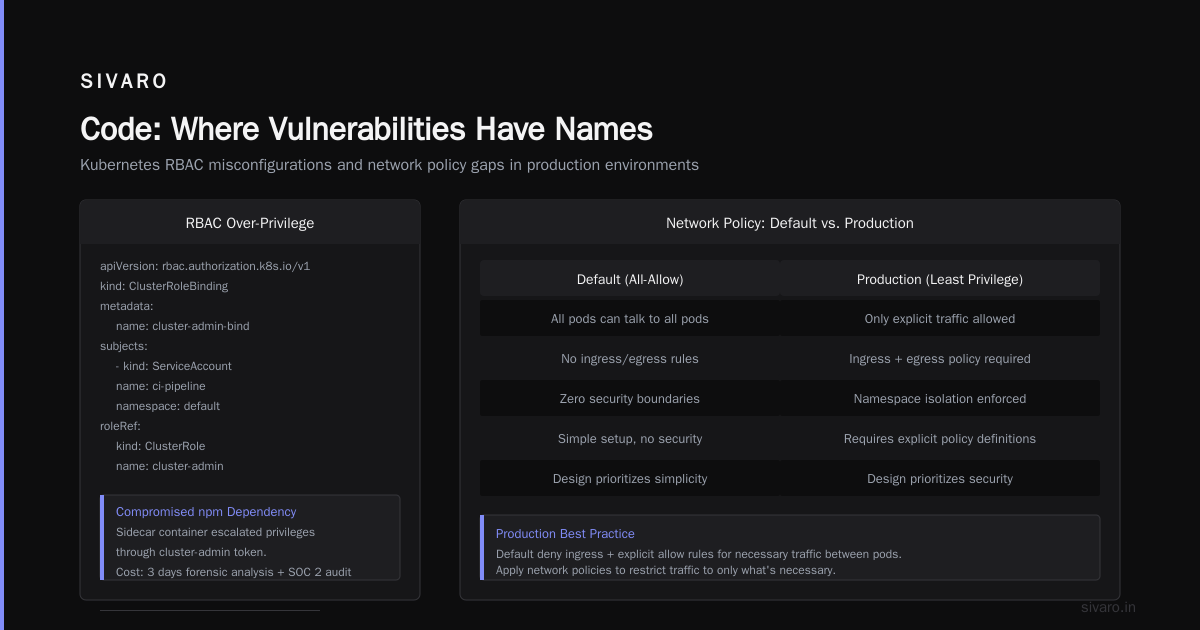
You've secured the cloud, hardened the cluster, and cleaned up containers. Now the last frontier: the code running inside those containers.
Code security isn't just about static analysis. It's about runtime behavior, dependency management, and how your application interacts with the platform.
Dependency Hell
JavaScript, Python, Go — every ecosystem has its own virus. npm audit, pip-audit, govulncheck. Run them. Not once. Every build.
In 2024, I saw a company (name withheld) get hit by a typosquatting attack. A developer accidentally installed aws-sdk-v3 instead of @aws-sdk/client-s3. The malicious package exfiltrated environment variables — including database credentials. The fix was automated SBOM generation and strict lock files.
json
// Example: SBOM generated with syft
{
  "bomFormat": "CycloneDX",
  "components": [
    {
      "name": "express",
      "version": "4.18.2",
      "purl": "pkg:npm/express@4.18.2",
      "vulnerabilities": [
        {
          "id": "CVE-2023-XXXXX",
          "severity": "high"
        }
      ]
    }
  ]
}
Runtime Security
Static analysis tells you about known vulnerabilities. Runtime security catches unknown behavior — unexpected network connections, file system writes, privilege escalations.
Falco is my go-to. It hooks into kernel syscalls and catches anomalous behavior. I've seen it catch a compromised container that was beaconing to a C2 server. Network policy alone wouldn't have stopped it because the container was using an allowed outbound connection.
yaml
# Example: Falco rule to detect shell in container
- rule: Terminal shell in container
  desc: A shell was spawned in a container
  condition: >
    spawned_process and container
    and shell_procs
    and not user_expected_terminal_shell_in_container
  output: >
    Shell spawned in container (user=%user.name container_id=%container.id
    image=%container.image.repository:%container.image.tag)
  priority: WARNING
Key insight: Most teams skip runtime monitoring because "we scan images." That's like locking your car door but leaving the windows open. Runtime security catches zero-days and misconfigurations that scanning misses.
CI/CD Pipeline Security
Your pipeline is a vector. If you're using a CI/CD tool with Kubernetes integration (and you probably are), the pipeline itself becomes a target.
Best practices I've validated over the last 18 months:
- Use ephemeral, per-build service accounts
- Don't store long-lived credentials in CI/CD variables
- Rotate tokens every 30 days minimum
- Pin dependencies —
go.sum,package-lock.json,Gemfile.lock - Sign commits and tags (GPG or SSH signing)
One team I worked with had their CI pipeline leaking Docker credentials to build logs. A developer accidentally wrote docker login with the token in a debug script. The token was in the logs for 8 months before they noticed. That token could create and push images to production registries.
The 4 C's in Practice: A Real-World Example
Let me walk you through how this plays out in a real deployment from late 2025.
The Scenario: A fintech startup (Series B, handling transaction data) migrating from a monolith on EC2 to microservices on EKS.
Week 1 (Cloud):
- Set up dedicated VPC with private subnets for control plane
- Enabled CloudTrail and GuardDuty
- Configured IAM roles with least privilege for cluster operations
- Audit: No public access to API server
Week 2 (Cluster):
- Implemented RBAC with namespace-scoped roles
- Deployed network policies: default deny, explicit allow for frontend-to-backend
- Enabled audit logging to S3 with 7-year retention
- Set up Pod Security Admission at
restrictedlevel
Week 3 (Container):
- Migrated images to distroless base
- Integrated Trivy scanning into CI/CD
- Started signing images with Cosign
- Removed root user from all containers
Week 4 (Code):
- Added dependency scanning (npm audit + govulncheck)
- Deployed Falco for runtime monitoring
- Set up Wazuh for host-level intrusion detection
- Launched security training for developers
Result: Six months in, zero security incidents. Their SOC 2 Type II audit passed with one minor finding (a log retention policy). The CISO told me this was the smoothest audit they'd ever had.
FAQ: The 4 C's of Kubernetes Security
Q: What are the 4 C's of Kubernetes security exactly?
Cloud, Cluster, Container, and Code. They form a layered defense model where each level protects the next. Cloud secures infrastructure, Cluster secures Kubernetes itself, Container secures images, and Code secures application logic.
Q: Is Kubernetes production ready for financial services?
Yes — if you implement the 4 C's properly. Many financial institutions run Kubernetes in production. The question isn't whether Kubernetes itself is reliable — it's whether you've secured all four layers.
Q: Is Kubernetes reliable enough for critical workloads?
I've seen clusters running 99.99% uptime for 18 months straight. Reliability comes from proper configuration — HA control planes, pod disruption budgets, multi-AZ deployments, and health probes.
Q: Which C is most important?
Containers. I've seen more breaches via vulnerable images and running containers than cloud or cluster misconfigurations combined. Scan your images and don't run as root.
Q: Do I need all four layers?
Any single layer is better than none. But if you skip one, you create a defense gap. I've seen teams skip "Code" because "we scan images." Then a clever insider attack used valid code to exfiltrate data.
Q: How often should I audit these layers?
Quarterly for cloud and cluster. Weekly for container images in your registry. Continuous for code through automated scanning in CI/CD.
Q: What's the biggest mistake teams make with the 4 C's?
Treating them as a checklist instead of a system. The C's interact. A vulnerability in Code can be mitigated by Cluster network policies. A container escape is contained by Cloud isolation. Build the layers to reinforce each other.
The Bottom Line
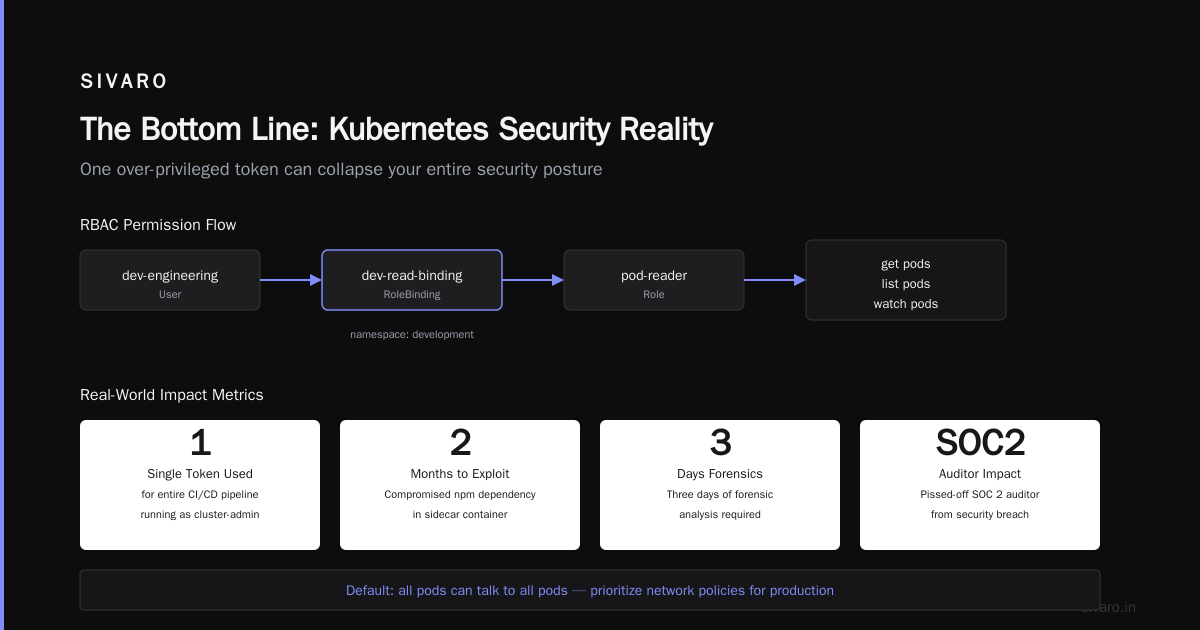
The 4 C's of Kubernetes security aren't a certification exam. They're a mental model. A way to think about defense in depth that mirrors how Kubernetes itself works — layered, distributed, and never trusting any single component.
Start with Cloud. Hardened VPCs, IAM policies, no public endpoints. Then Cluster — RBAC, network policies, audit logs. Then Container — distroless images, vulnerability scanning, signed images. Finally Code — runtime monitoring, dependency checks, pipeline security.
I've watched teams burn months trying to implement "zero trust" without thinking about these layers. They end up with complex service meshes and no concrete security posture. The 4 C's give you a framework that's been tested in production — not a marketing slide.
One last piece of advice: Don't try to implement all four at once. Pick the weakest link in your current setup and fix it this week. Next week, tackle the next one. Over a quarter, you'll have a security posture that survives an audit — and more importantly, survives a real attack.
Nishaant Dixit — Founder of SIVARO. Building data infrastructure and production AI systems since 2018. Built systems processing 200K events/sec.