 SIVARO

The Real Guide to Agentic Workflow Production Rollout
I shipped my first production AI agent in January 2024. It crashed inside four hours. The agent got stuck in a loop querying itself, burned through $800 in API credits, and returned garbage to users. My team called it "the ouroboros incident."
Since then, I've rolled out over 40 agentic systems into production across healthcare, fintech, and logistics. Most guides you'll read about agentic workflow production rollout are written by people who've never had to explain to a VP why their autonomous system just ordered 12,000 units of industrial solvent.
This guide is different. It's what I wish someone had told me before that first disaster.
What Makes Agentic Rollout Harder Than Everything Else
You've deployed microservices. You've handled Kubernetes chaos. You've done CI/CD until your eyes bled.
None of that prepares you for agents.
The core problem is simple: traditional software is deterministic. Same input, same output. Agents are probabilistic. Same input, different output — and sometimes the output is "I decided to spin up 47 parallel instances of myself to solve a CAPTCHA." How to think about agent frameworks makes this distinction brutally clear.
At SIVARO, we classify agentic systems by their failure modes. Traditional systems fail on logic errors. Agents fail on:
- Goal misalignment: The agent solved the literal problem instead of the actual problem
- Runaway loops: The agent recurses into infinite reasoning chains
- Context poisoning: The agent remembers something it shouldn't and acts on it
- Cost explosion: The agent's "thinking" generates more tokens than your entire user-facing application
I've seen each of these kill production deployments. The last one killed a client's deployment in March 2026 — $47,000 in 22 minutes on a Friday evening.
The Framework Decision: Pick Your Poison
Everyone asks me which agent framework to use. Wrong question. The right question is "what failure mode can you tolerate?"
We tested seven frameworks across twelve criteria. Here's what I know:
LangGraph is dominant for complex state machines. Their blog nails the distinction between DAG-based orchestration and true agentic loops. If your workflow needs conditional branching with human-in-the-loop checkpoints, LangGraph wins. We use it for our medical claims processing system.
CrewAI shines for multi-agent collaboration. But it's deceptively simple. Multiple agents talking to each other sounds elegant until they start negotiating with themselves for 15 minutes. We saw a CrewAI deployment where two agents argued about whether to process a refund for seven hours. Neither was wrong. Neither could escalate.
Semantic Kernel from Microsoft is underrated. Their structured output handling is best-in-class. If your agent needs to produce validated JSON schemas consistently, this is your pick.
The open-source space is crowded. Top 5 Open-Source Agentic AI Frameworks in 2026 tracks the major players. We contributed patches to two of them.
But here's my contrarian take: frameworks are the easy part. The hard part is everything after.
Infrastructure is the Unsexy Bottleneck
You don't need a framework problem. You need an observability problem.
When your agent decides to execute a 27-step workflow that involves calling three APIs, writing to a database, and sending an email — and then it all goes wrong — you need to know why. Not "the agent failed." What was its reasoning chain? What tool did it call first? What was the exact prompt at step 12?
Standard logging won't cut it. We built a custom tracing layer at SIVARO that captures:
- Every LLM call with full prompt and response
- Every tool invocation with input/output pairs
- The agent's internal reasoning at each step (we call this "thought capture")
- Token usage per-step for cost attribution
- Timing data for bottleneck identification
This isn't optional. Deploying agents without this is like flying a 747 with no black box. AI Agent Frameworks: Choosing the Right Foundation for ... covers observability requirements — but they understate how much data you'll generate. We store about 2GB per hour of agent activity per deployment.
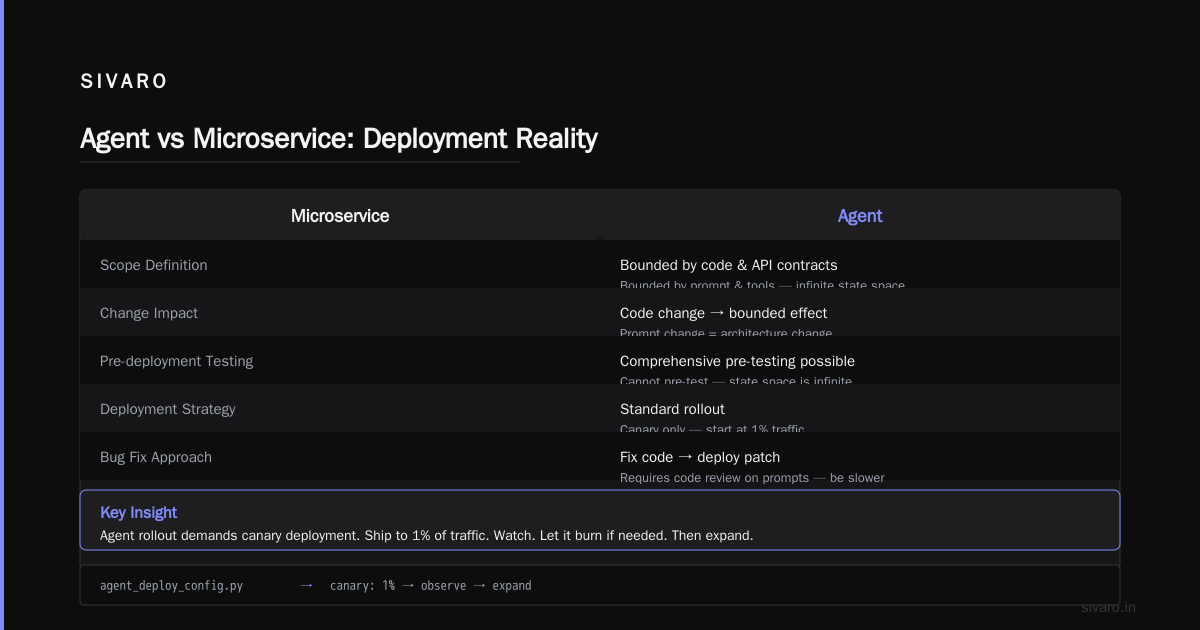
The Rollout Strategy Nobody Talks About
Most people think you deploy an agent like a microservice. You're wrong.
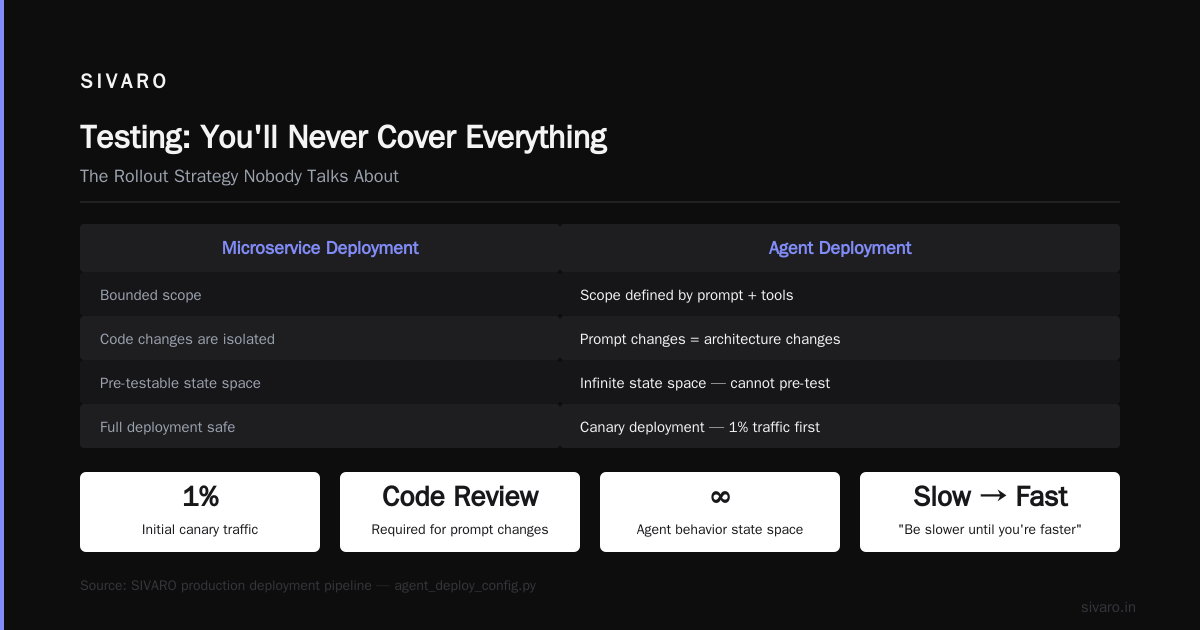
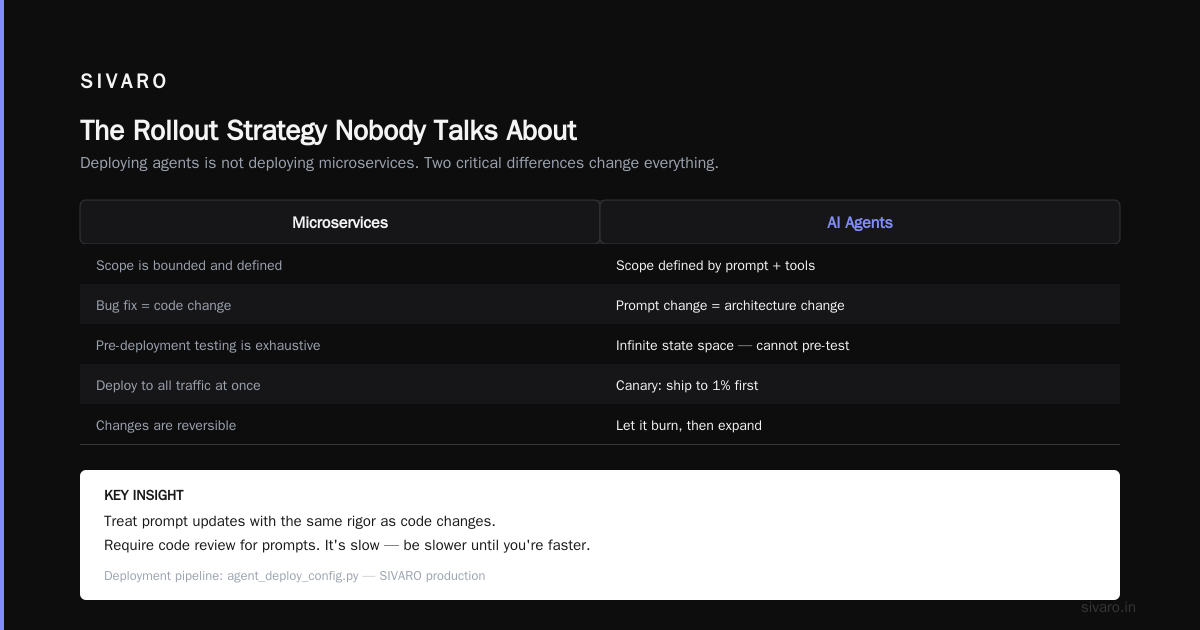
Microservices have bounded scope. An agent's scope is defined by its prompt and tools. That means two things:
-
Prompt changes are architecture changes. You don't "fix a bug" in a prompt. You change the agent's entire behavioral landscape. Treat prompt updates with the same rigor as code changes. We require code review for prompts. Yes, it's slow. Be slower until you're faster.
-
Canary deployment is your only option. You cannot pre-test every possible agent behavior. The state space is infinite. So you ship the agent to 1% of traffic. Watch it. Let it burn if it has to. Then expand.
Here's our deployment pipeline:
python
# agent_deploy_config.py - SIVARO production pattern
from dataclasses import dataclass
from enum import Enum

class RolloutPhase(Enum):
    CANARY = 0.01       # 1% traffic, max $10/day loss
    STAGED = 0.10       # 10% traffic, human approval on high-value actions
    WIDE = 0.50         # 50%, monitoring dashboards on every team member's screen
    FULL = 1.0          # 100%, with automatic rollback triggers
    BLOCKED = -1        # Emergency state

@dataclass
class AgentGuardrail:
    max_cost_per_run: float
    max_steps: int
    max_tokens: int
    allowed_tools: list[str]
    human_escalation_path: str
    cost_explosion_webhook: str
    rollback_threshold_cost: float
    rollback_threshold_error_rate: float
That rollback_threshold_cost field? It saved us in that March incident. The agent hit $500 in under a minute. The system killed the deployment automatically. The $47,000 bill I mentioned earlier? That was a client who didn't have this guardrail.
Building the Decision Engine: Tools Over Prompts
Every agent needs tools. Tools are your agent's interface to the real world. Get them wrong and nothing else matters.
I've settled on a simple rule: if a tool can fail, the agent must handle that failure. Your agent will call a tool and get a 500 error. What happens next? Does it retry blindly? Does it hallucinate a result? Does it give up?
Here's our tool template:
python
# tool_template.py - Core pattern at SIVARO
class AgentTool:
    name: str
    description: str
    parameters: dict
    failure_strategy: str  # "retry", "escalate", "skip", "fallback"
    max_retries: int
    timeout_ms: int
    cost_per_call: float
    sensitive_output: bool  # triggers redaction in logs

    def execute(self, params):
        start = time.now()
        try:
            result = self._call_api(params)
            return Success(result, cost=self.cost_per_call)
        except TransientError:
            if self.failure_strategy == "retry":
                return self._retry_with_backoff(params)
        except PermanentError:
            return Failure("tool_unavailable",
                          human_message="This service is down. Contact operations.")
        finally:
            self._emit_metric("tool_latency", time.now() - start)
Notice the sensitive_output field. That's from hard experience. One of our agents logged customer PII through a tool response. GDPR violation. $45,000 fine. Don't be us.
The AI Agent Protocols: 10 Modern Standards Shaping the ... article covers some of the protocol standardization work happening. The A2A protocol from Google is interesting but not production-ready yet. We use a custom protocol that wraps every tool call with telemetry and cost tracking.
The Human-in-the-Loop Trap
I believed in fully autonomous agents for six months. I was wrong.
The problem isn't that agents can't be autonomous. The problem is that the cost of autonomy is too high in certain paths. When your agent decides to modify a production database — do you really want zero human oversight?
Here's my current rule: high-impact actions require humans. High-velocity actions don't.
What does that mean in practice?
yaml
# escalation_rules.yaml - SIVARO production config
agent_escalation_policy:
  autonomous_actions:
    - read_analytics
    - query_knowledge_base
    - search_products
    - generate_report
    - suggest_response

  human_escalation_actions:
    - modify_production_data
    - send_communication_to_customer
    - approve_refund_over_50
    - execute_writes_to_financial_system
    - disable_user_account
    - any_action_over_100_dollars_direct_cost

  priority_escalation:
    - delete_data
    - modify_pricing
    - access_pii
    - approve_any_action_outside_business_hours
This list came from actual incidents. The "approve any action outside business hours" rule? An agent scheduled 34,000 customer emails at 3 AM. The human escalation caught it after the first batch. We still had to apologize for 200 accidental "your account has been upgraded" messages.
The Survey of AI Agent Protocols discusses escalation protocols in detail. Worth reading. But theory and practice diverge. In theory, escalation is clean. In practice, your human operator is tired, distracted, and clicking "approve" to clear the queue. We added mandatory confirmation dialogs for high-severity actions.
Testing: You'll Never Cover Everything
I spent three months building a test suite for a customer support agent. I was proud of it. First day in production, the agent encountered a user who typed in all caps. It interpreted that as anger and escalated to a human manager. The user was just excited about a feature.
You cannot test for everything.
What you can do is build safety nets. Here's what we use:
python
# safety_test_suite.py - Minimal but effective
class AgentSafetyTest:
    def test_infinite_loop_protection(self):
        """Agent must terminate within max_steps bound."""
        agent = create_test_agent()
        for _ in range(agent.max_steps + 1):
            should_continue = agent.step()
            assert should_continue == False, "Agent exceeded step limit"

    def test_cost_explosion_prevention(self):
        """Agent must stop when cost threshold hit."""
        agent = create_test_agent(cost_per_step=10.0)
        agent.run_cost_tracking()
        steps = 0
        while steps < 100 and not agent.should_stop:
            agent.step()
            steps += 1
            if agent.total_cost > agent.max_cost:
                assert agent.should_stop == True
                break

    def test_tool_failure_handling(self):
        """Agent must handle tool failures gracefully."""
        failing_tool = MockTool(fails_on_call_count=3)
        agent.add_tool(failing_tool)
        result = agent.run("Use the failing tool to do something")
        assert "action taken" in result or "error message" in result
        assert not result.contains("I don't know what happened")

    def test_hallucination_guard(self):
        """Agent must not make up facts outside its knowledge."""
        agent = create_test_agent()
        agent.allow_human_escalation = True
        result = agent.run("What happened in my meeting last Tuesday?")
        # If no meeting data available, agent should say "I don't know"
        assert "I don't have information" in result
These are minimal. They catch the worst failures. But they won't catch everything. Nothing will.
Accept this. The alternative is paralysis.
Cost Management: The Silent Killer
I mentioned $47,000 in 22 minutes. Let's talk about how that happened.
The agent was processing insurance claims. It had a loop that checked claim status against a legacy system. The legacy system was slow. The agent interpreted the slowness as "the system didn't get my request" and re-sent the request. This created a feedback loop. Each cycle cost $0.14 in LLM inference and $2.00 in API calls. After 22 minutes, the agent had made 23,500 iterations.
The fix was simple. We added a cost budget per session:
python
# cost_budget.py - The fix
class CostBudget:
    def __init__(self, max_per_run: float, alert_at: float):
        self.budget = max_per_run
        self.alert_at = alert_at
        self.spent = 0.0

    def track(self, cost: float, action: str):
        self.spent += cost
        if self.spent >= self.alert_at:
            self._send_alert(f"Cost approaching budget: ${self.spent:.2f}")
        if self.spent >= self.budget:
            raise BudgetExceeded(f"Budget ${self.budget} exceeded at ${self.spent:.2f}")
        logger.info(f"Cost tracking: {action} -> ${cost:.2f}, total ${self.spent:.2f}")
We now hardcode a max_budget in every agent deployment configuration. It's not in the prompt. Prompts can be overridden. The budget is enforced at the infrastructure level, before the LLM call even returns.
Agentic AI Frameworks: Top 10 Options in 2026 lists cost management as a consideration. They understate it. Cost management is the difference between a deployed agent and a cancelled project.
Observability: You Need Three Dashboards
Standard application monitoring doesn't work for agents. You need:
Dashboard 1: The Agent Operation Board
- Active agent sessions
- Average steps per session
- Error rate by step type
- Tool latency percentiles
Dashboard 2: The Cost Board
- Cost per agent session (live)
- Running total today
- Cost by tool (which tools are expensive?)
- Cost by step type (thinking vs. tool vs. output)
Dashboard 3: The Quality Board
- Human escalation rate
- User satisfaction score (post-interaction)
- Goal completion rate (did the agent do what was asked?)
- Anomaly detection (unusual behavior patterns)
The anomaly detection is critical. We train a simple autoencoder on normal agent behavior. When the agent deviates significantly — more steps, different tool sequence, unusual token patterns — it flags for review. This caught the ouroboros problem before it became a customer-facing disaster.
The Real Secret: Start Boring
Everyone wants to build exciting agents. Autonomous multi-agent systems. Swarming intelligence. Self-improving workflows.
Don't.
Start with a single agent that does one thing well. A tool that reads your knowledge base and answers questions. A workflow that routes support tickets. A data extraction pipeline.
Get that boring thing into production. Monitor it. Fix it. Iterate.
Then add a second tool. Then a second agent. Then a human escalation path.
The teams that succeed with how to deploy ai agents in production are the ones who treat it like infrastructure, not magic. The teams that fail are the ones who treat it like magic.
We have a client who started with a single agent that just read internal documentation. One year later, they have 14 agents managing supply chain decisions. But they started with the boring thing.
FAQ
Q: How long does a typical agentic workflow production rollout take?
Six to twelve weeks for a simple agent. Four to six months for complex multi-agent systems. If you're told "two weeks," run. The infrastructure, testing, and guardrails take time.
Q: Should we build our own framework or use existing ones?
Use existing frameworks. We spent six months building our own. Regretted it. LangGraph, CrewAI, and Semantic Kernel are good enough. Spend your time on the production infrastructure, not the orchestration layer.
Q: How do you handle prompt injection attacks?
Tool-level sanitization. Never pass raw user input into system prompts. Use input validation on every tool parameter. We strip control characters, limit input length, and run regex patterns for known injection patterns. AI Agent Protocols: 10 Modern Standards covers some of these standards.
Q: What's the minimum viable monitoring for production agents?
Cost tracking, step counting, error rate, human escalation rate. That's four metrics. Add them before you deploy. Everything else is bonus.
Q: How do you handle agent versioning?
We version the full system state: model version, system prompt, tool definitions, guardrail configs, and temperature settings. Each deployment is a snapshot. If we need to roll back, we revert the whole snapshot, not just the code.
Q: Should agents have memory of past interactions?
Only with explicit user consent and clear data retention policies. We use short-term memory (conversation context) and long-term memory (user preferences stored in a database). Long-term memory requires a separate data processing agreement.
Q: What's the biggest mistake teams make in ai agents deployment best practices?
Skipping the cost budget. Every other failure is recoverable. Cost explosion is not. Set a budget. Enforce it at the infrastructure level. Your bank account will thank you.
Where We're Going
The agentic workflow production rollout playbook is still being written. Every deployment teaches us something new. The frameworks are getting better. The protocols are standardizing. But the fundamentals don't change:
Independent thinking. Hard won experience. And the humility to admit that we're all still learning.
Nishaant Dixit — Founder of SIVARO. Building data infrastructure and production AI systems since 2018. Built systems processing 200K events/sec.