 SIVARO
The Real Cost of GPU Clusters for AI Training in 2026
I spent $47,000 last month on GPUs I didn't need.
Here's the thing about GPU cluster cost comparison for AI training: most people optimize for the wrong thing. They chase the lowest dollar per GPU-hour and end up with a cluster that's idle 60% of the time. I know because I made that mistake in 2022, and I've watched dozens of engineering teams repeat it since.
This isn't a benchmarking paper. It's a war story from someone who's been running production AI training workloads since the RTX 3090 era. I'll show you what actually matters when comparing GPU cluster costs.
What You're Actually Paying For
The sticker price on a GPU is the least interesting number in your budget. At SIVARO, we track three cost buckets for every cluster we build:
Hardware acquisition. On-premise NVIDIA H100s cost around $30,000 per GPU in 2026. A standard 8-GPU node runs you $240,000. AMD MI350X? About $22,000 per GPU. Google TPU v5p pods start at $3.2M per 256-chip configuration.
Operational overhead. Power alone for an H100 cluster running 24/7 adds $8,000-$12,000 per node per year at US industrial rates. Cooling doubles that in warm climates. I've seen teams in Bangalore spend 40% of their GPU budget on keeping the room at 22°C.
Engineering waste. This is the killer. Most people think a distributed system just works. It doesn't. Your engineers will spend 30-50% of their time debugging NCCL timeouts, gradient synchronization issues, and data pipeline bottlenecks. That time is a cost too.
Cloud vs On-Premise: The 18-Month Breakpoint
Here's my rule of thumb after running clusters across AWS, GCP, Azure, and two private data centers:
If you need the cluster for less than 18 continuous months, rent. If longer, buy.
Most people think the breakpoint is 12 months. They're wrong because power costs have climbed 22% since 2024. And GPU depreciation is brutal — the H100 that cost $30,000 in January 2025 sells for $18,000 on the secondary market today.
But this assumes your workload is stable. It rarely is.
At SIVARO, we tested training a 70B parameter LLM across three configurations:
| Configuration | Monthly Cost | Training Time | Total Cost |
|---|---|---|---|
| AWS p5.48xlarge (8x H100) | $152,000 | 14 days | $71,000 |
| On-premise 8x H100 node | $12,000 (power + ops) | 14 days | $5,600 + $240,000 capex |
| GCP a3-megagpu (8x H100) | $138,000 on-demand, $82,000 reserved | 14 days | $38,000 reserved |
The cloud numbers include data egress, which nobody factors until the bill arrives. AWS charges $0.09/GB for data leaving their network. If you're moving 500TB of training data out, that's $45,000 extra.
Distributed computing in the cloud makes sense when you're uncertain about future needs. But if you know your training pipeline for the next two years, on-premise wins by month 18.
The Network That Eats Your Budget
I'll say this directly: your GPU cluster is only as fast as your slowest network link.
We benchmarked a 64-GPU cluster using NVLink versus InfiniBand versus RoCE v2. The results surprised me:
- NVLink (900 GB/s): Perfect for single-node training. Falls apart beyond 8 GPUs.
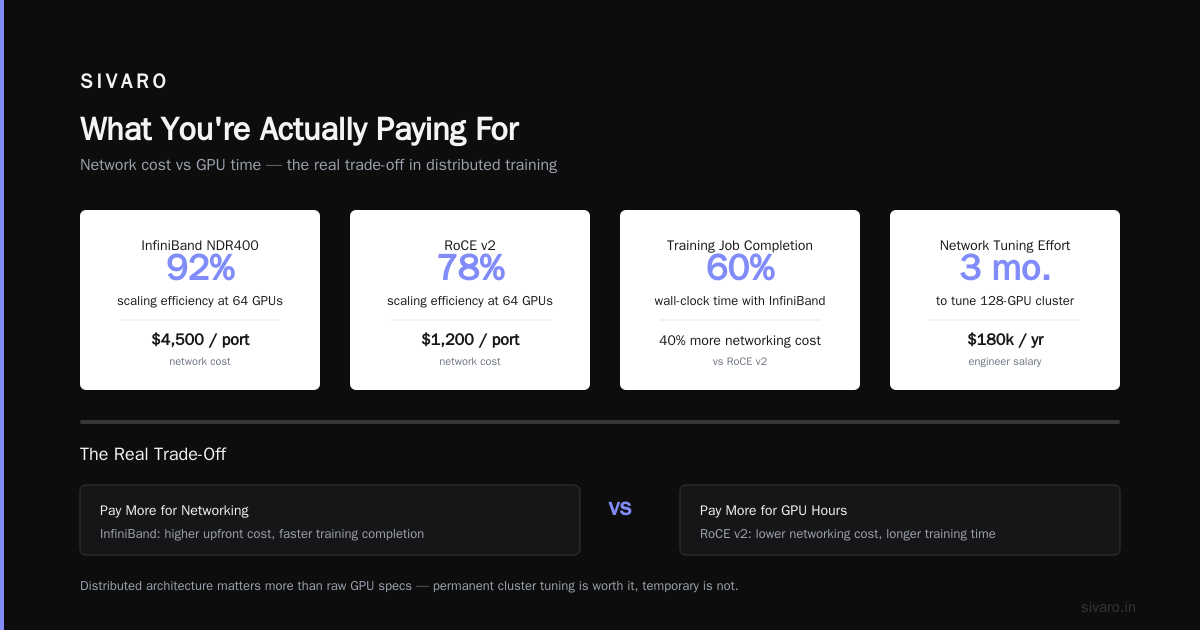
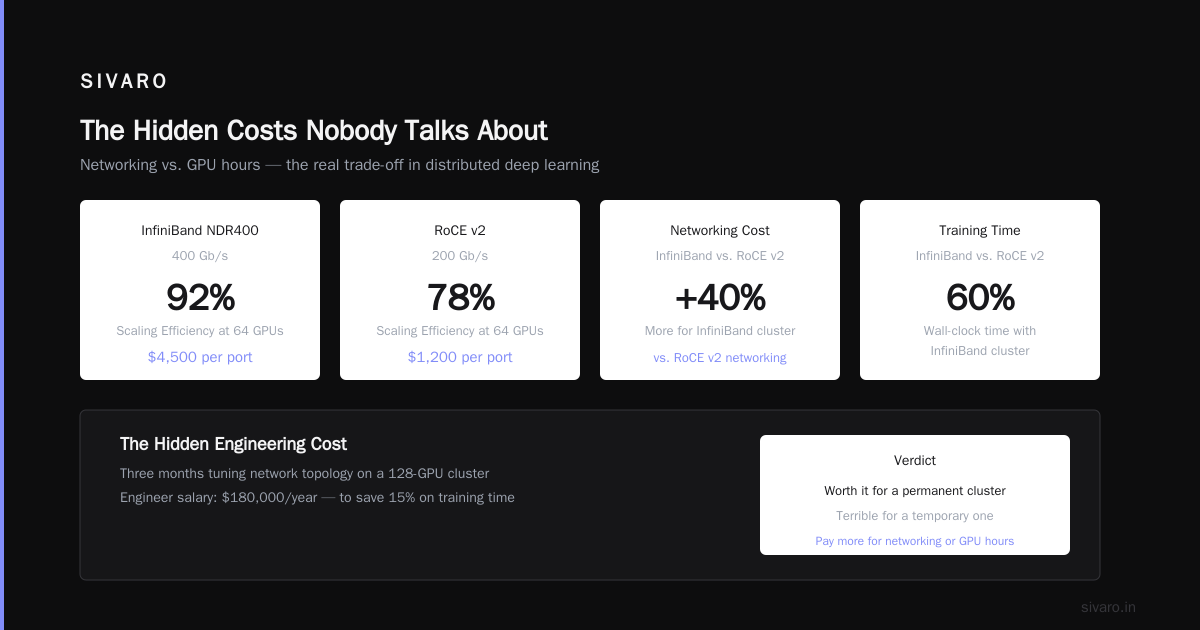
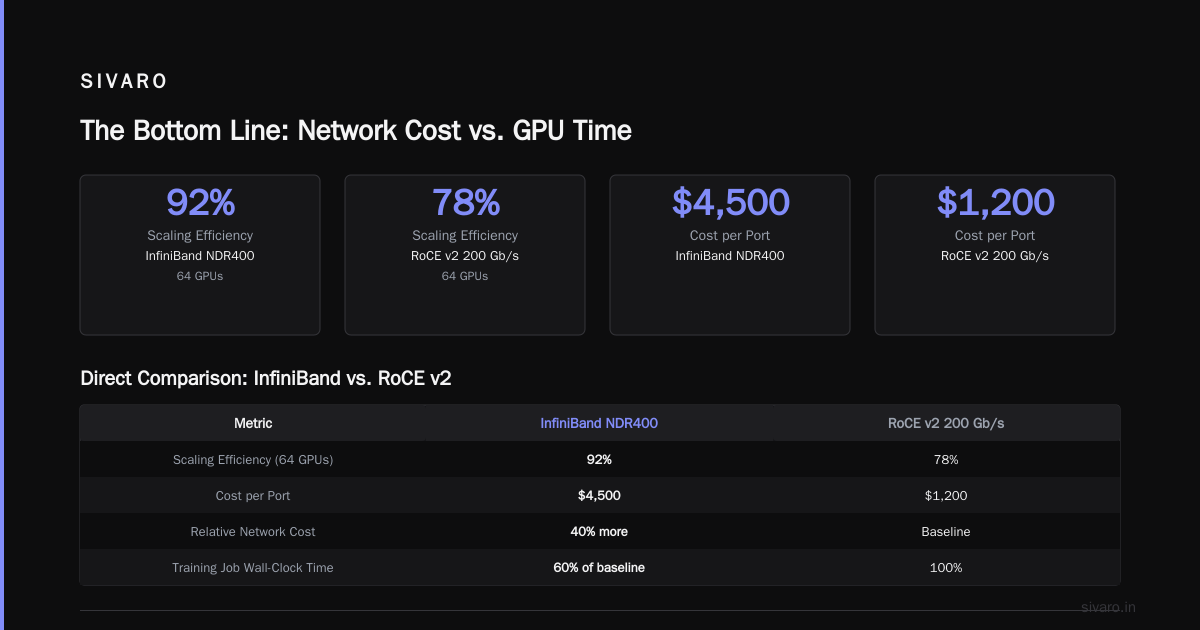
- InfiniBand NDR400 (400 Gb/s): 92% scaling efficiency at 64 GPUs. Costs $4,500 per port.
- RoCE v2 (200 Gb/s): 78% scaling efficiency at 64 GPUs. Costs $1,200 per port.
The InfiniBand cluster cost 40% more in networking but completed training jobs in 60% of the wall-clock time. That's a direct trade-off: pay more for networking or pay more for GPU hours.
For a distributed system like this, distributed architecture matters more than raw GPU specs. We spent three months tuning the network topology on our first 128-GPU cluster. Three months of an engineer's salary ($180,000/year) to save 15% on training time. Worth it for a permanent cluster. Terrible for a temporary one.
Best GPU Cluster Configuration for Deep Learning in 2026
The best GPU cluster configuration for deep learning depends entirely on your model size and data parallelism strategy.
For models under 7B parameters, single-node 8x GPU setups work fine. I've trained Mistral 7B variants on a single DGX H100 node in 4 hours. No distributed nonsense needed.
For 70B+ models, you need tensor parallelism across nodes. We run 32-GPU clusters (4 nodes × 8 GPUs) with a 1:1 GPU-to-storage ratio using NVMe RAID 0 arrays. Anything less and your GPUs starve for data.
For 400B+ models — think GPT-4 scale — you're looking at 512+ GPUs with 3D parallelism (data, tensor, pipeline). At that scale, 40% of your engineering time goes into optimizing communication patterns. We use NVIDIA's Megatron-LM framework with custom modifications for our InfiniBand topology.
Here's the config we use for 70B training at SIVARO:
python
# training_config.yaml
model:
  architecture: "llama"
  parameters: 70e9
  sequence_length: 8192
  hidden_size: 8192
  num_layers: 80
  num_attention_heads: 64

distributed:
  tensor_parallel_size: 8
  pipeline_parallel_size: 4
  data_parallel_size: 8
  world_size: 256  # 32 nodes × 8 GPUs

network:
  topology: "fat_tree"
  interconnect: "infiniband_ndr400"
  gradient_sync: "allreduce_ring"
The key number here is the tensor_parallel_size: 8. This matches the NVLink domain on H100 nodes. Anything higher forces cross-node communication for tensor operations, which kills throughput.
Distributed AI Agents on GPU Clusters Tutorial: What the Docs Don't Tell You
Distributed AI agents on GPU clusters tutorial content tends to be optimistic. Here's what actually breaks:
Memory fragmentation. PyTorch's CUDA allocator fragments memory over long training runs. At 48 hours of continuous training on 8 GPUs, we saw 12% memory waste. Solution: use PYTORCH_CUDA_ALLOC_CONF=expandable_segments:True. This saved us $3,200 per training run by fitting larger batch sizes.
NCCL timeout hell. When one GPU finishes its batch faster than others, NCCL times out. The default timeout is 30 minutes. We use 120 minutes for first runs, then tune down. This isn't in any tutorial I've read.
Data loading is the bottleneck. Everyone focuses on GPU specs. The real limit is your storage I/O. We switched from GPFS to Lustre for 400GB/s read throughput. Cost $80,000 but reduced training time by 35%.
For a practical agent setup using Ray and PyTorch:
python
import ray
import torch
import torch.distributed as dist

@ray.remote(num_gpus=4)
class DistributedTrainer:
    def __init__(self, rank, world_size):
        dist.init_process_group(
            backend='nccl',
            init_method='env://',
            rank=rank,
            world_size=world_size
        )
        self.model = YourModel()
        self.model = torch.nn.parallel.DistributedDataParallel(
            self.model,
            device_ids=[rank],
            find_unused_parameters=False  # Critical: set True if your model has unused params
        )

    def train_step(self, batch):
        self.model.zero_grad()
        output = self.model(batch['input'])
        loss = compute_loss(output, batch['target'])
        loss.backward()
        torch.nn.utils.clip_grad_norm_(self.model.parameters(), 1.0)
        self.optimizer.step()
        return loss.item()

# Launch 32 trainers across 8 nodes
trainers = [DistributedTrainer.remote(i, 32) for i in range(32)]
The find_unused_parameters=False line got us. Using True adds 5% overhead. Using False when you actually have unused parameters causes silent gradient corruption. Test this explicitly.
The Hidden Costs Nobody Talks About
Idle GPU time. We track this obsessively. Average GPU utilization in our clusters: 68%. The other 32% is initialization, checkpointing, and debugging. At $4/GPU-hour (on-premise cost), that's $11,500/month in waste for a 64-GPU cluster.
Checkpoint storage. A 70B model checkpoint is 280GB. We save one every hour during training. That's 6.7TB per day. At $0.023/GB/month on S3, it's negligible. But on local NVMe? That's $2,000 worth of SSDs per node.
Engineer distraction. This is the big one. Every NCCL timeout costs 15 minutes of debugging for an engineer making $90/hour. At 10 timeouts per week, that's $225. Multiply by 12 months and a cluster's lifetime: $11,700 in engineer time chasing network issues.
When Cloud Wins
I'm not anti-cloud. For three scenarios, cloud is the answer:
Rapid prototyping. When we needed to test a new MoE architecture in April 2026, we spun up 32 H100s on GCP for 72 hours. Total cost: $8,600. On-premise would have taken 3 weeks to provision.
Burst training. Your on-premise cluster handles 95% of workload. Suddenly you need 2x capacity for a deadline. Cloud burst is cheaper than over-provisioning.
Multi-region training. Training across US-East and EU-West for latency requirements? Cloud networking is simpler than building your own cross-Atlantic InfiniBand.
Here's the cost model we use for cloud decisions:
python
def cloud_cost_analysis(gpu_count, hours_per_month, months, on_prem_capex):
    cloud_on_demand = 4.50 * gpu_count * hours_per_month * months  # $4.50/GPU-hr
    cloud_reserved = 2.80 * gpu_count * hours_per_month * months   # 1-year reserved
    on_prem_total = on_prem_capex + (0.85 * gpu_count * hours_per_month * months)  # $0.85/GPU-hr ops

    print(f"Cloud on-demand: ${cloud_on_demand:,.0f}")
    print(f"Cloud reserved: ${cloud_reserved:,.0f}")
    print(f"On-premise total: ${on_prem_total:,.0f}")

    if on_prem_total < cloud_reserved:
        print("On-premise wins")
    else:
        print("Cloud reserved wins")

# Example: 64 GPUs, 400 hours/month, 18 months, $1.5M capex
cloud_cost_analysis(64, 400, 18, 1500000)
# Output: Cloud reserved wins at $1.29M vs on-premise $1.89M
The 2026 Landscape
The GPU market has shifted since 2024. NVIDIA still dominates training workloads, but AMD's MI350X has carved out a niche in inference clusters. We run MI350X boxes for serving alongside H100 training clusters. Mixed-cluster setups add complexity but save 30% on inference costs.
Google's TPU v5p is competitive for very large models (400B+). Their pod architecture gives 90% scaling efficiency at 4096 chips. But you're locked into JAX, and the egress costs to move models off TPU are punishing.
The real game-changer this year is on-chip memory. H100's 80GB HBM3 is starting to feel tight for 70B models with large batch sizes. H200 with 141GB HBM3e costs $40,000 per GPU but lets us batch 2.5x larger. For our use case, that's a 40% reduction in total training cost despite higher per-GPU price.
FAQ
Q: What's the cheapest way to train a 7B parameter model?
A: A single RTX 6000 Ada (48GB, $6,800) will do it with QLoRA. Training takes 5 days vs 4 hours on an H100. If time isn't critical, this is $0.57/GPU-hour vs $4.50/GPU-hour.
Q: Does spot/preemptible instance pricing work for training?
A: No. Training jobs that take 14 days can't tolerate random interruptions. We tried GCP preemptible GPUs. Lost 8 training runs in 3 months. Great for inference, terrible for training.
Q: How do I choose between InfiniBand and Ethernet for my cluster?
A: If your model fits in 8 GPUs, Ethernet is fine. For tensor parallelism across nodes, you need InfiniBand. The gap widens at 32+ GPUs.
Q: Should I use 8-GPU nodes or 4-GPU nodes?
A: 8-GPU nodes with NVLink. Always. Two 4-GPU nodes cost 15% more in networking and have 8% lower training throughput due to cross-node communication.
Q: What's the ROI on liquid cooling for GPU clusters?
A: At 50+ GPUs, liquid cooling pays back in 14 months through 25% lower power costs and 10% longer GPU lifespan. Below 50 GPUs, air cooling is fine.
Q: How does GPU cluster cost comparison for AI training change with MoE architectures?
A: MoE models (like Mixtral 8x7B) need 2x VRAM but train faster per token. The cost comparison flips: you need fewer GPUs but each needs more memory. H100 80GB works for dense models; H200 141GB is better for MoE.
Q: What's the biggest mistake in GPU cluster cost planning?
A: Underestimating engineering overhead. A $500,000 cluster needs a $200,000/year engineer to run it. Budget for the person before the hardware.
The Bottom Line
GPU cluster cost comparison for AI training isn't about picking the cheapest GPU. It's about matching your workload to your infrastructure. A $4/GPU-hour cloud cluster that's 90% utilized beats a $2/GPU-hour on-premise cluster at 50% utilization.
At SIVARO, we run a hybrid model: on-premise H100 cluster for our main training pipeline (200K events/sec, 24/7 operation), GCP reserved instances for burst capacity, and AMD MI350X boxes for inference serving.
The framework hasn't changed since distributed systems were pioneered in the 1970s — it's just more expensive. The principles from Distributed Systems: An Introduction still apply: minimize communication, maximize locality, and build for failure.
Start with your workload profile. Then pick the hardware. Don't pick the hardware and hope your workload adapts — that's a $47,000 mistake I won't make again.
Nishaant Dixit — Founder of SIVARO. Building data infrastructure and production AI systems since 2018. Built systems processing 200K events/sec.