 SIVARO
The Production-Ready AI Agent Framework Playbook
July 22, 2026. Three of my engineers just burned two weeks on an agent that worked perfectly in a notebook but crashed in staging. Not because the code was bad. Because we never built it to survive production.
I’ve been building production AI systems since 2018. I’ve seen the same pattern repeat: teams adopt a shiny agent framework, ship a demo, then hit a wall when they try to put it in front of real users. Latency spikes. State corruption. Tools that silently fail. OOM kills at 3 AM.
A production-ready AI agent framework isn’t just a library that calls an LLM. It’s an architecture. It handles retries, tracing, permissions, concurrency, and—most importantly—the chaos of the real world. This guide is what I wish someone had given me before we rebuilt our agent stack for the fourth time.
You’ll learn what makes a framework actually ready for production, how to evaluate options (spoiler: most hype is bullshit), and what we’ve learned running agents at scale at SIVARO in 2026.
Why Most Agent Frameworks Fail in Production
Let’s be blunt: 90% of the agent frameworks you see on GitHub aren’t production-ready. They’re research prototypes wrapped in a README with a star-count brag.
I tested this. In April 2026, we ran a benchmark comparing five open-source frameworks on a real task: an agent that reads invoices, extracts fields, and posts to an ERP. We measured success rate, average latency, and—critically—failure modes. The results were ugly.
Three frameworks had no built-in retry logic. Two silently dropped tool outputs when the LLM returned malformed JSON. One framework, which I won’t name but rhymes with “AutoGram,” deadlocked under 50 concurrent agents because of a shared mutex in its state manager.
Most people think the hard part is getting the agent to reason. It’s not. The hard part is getting the agent to recover when the database times out, the LLM hallucinates a function call, or the user sends an Excel file that’s actually a PDF.
The LangChain blog put it well: agent frameworks are not a library—they’re a philosophy of execution. You need to decide where state lives, how failures propagate, and what observability looks like. Most frameworks punt on these questions and leave you to figure it out.
The Core Pillars of a Production‑Ready AI Agent Framework
After four iterations of our own agent stack at SIVARO, I can boil it down to five pillars. If a framework doesn’t cover these, it’s a toy.
1. Deterministic State Management
Your agent needs to survive crashes. If the pod restarts, the in‑memory conversation history is gone. That’s not acceptable for anything that processes financial data or customer support tickets.
A production framework must support persistent state—either via a database or a distributed cache. Every decision, every tool call, every LLM response should be replayable. We use PostgreSQL for state with JSONB columns. LangGraph does this well with its checkpoint system.
2. Instrumentation and Tracing
You can’t debug what you can’t see. An agent that calls 5–10 tools in a loop generates a firehose of logs. Without structured tracing, you’ll never find the slowest step or the tool that returned garbage.
OpenTelemetry is the standard. But most frameworks don’t emit spans for individual tool calls. You end up writing wrappers. At SIVARO, we now require any framework we adopt to export native OTLP traces.
3. Graceful Failure Handling
Agents make mistakes. Tools fail. The LLM goes down. A production‑ready framework doesn’t pretend this won’t happen—it plans for it.
That means:
- Retry with exponential backoff for transient failures.
- Fallback actions if a critical tool is unavailable.
- Human‑in‑the‑loop escalation when uncertainty crosses a threshold.
Most frameworks treat retries as an afterthought. They’re not. We saw a 30% improvement in task completion simply by adding proper retry logic with jitter.
4. Security & Tool Authorization
Your agent can call any tool it has access to. That’s terrifying. A production framework must enforce least‑privilege: what the agent can call, with what parameters, and under what conditions.
We had an incident in early 2026 where an agent accidentally called a deleteCustomer function because the prompt gave it “write” access to a broad toolset. The framework had no way to restrict tool arguments. We now insist on declarative tool permissions, similar to AWS IAM policies, embedded in the framework.
5. Scalability & Concurrency
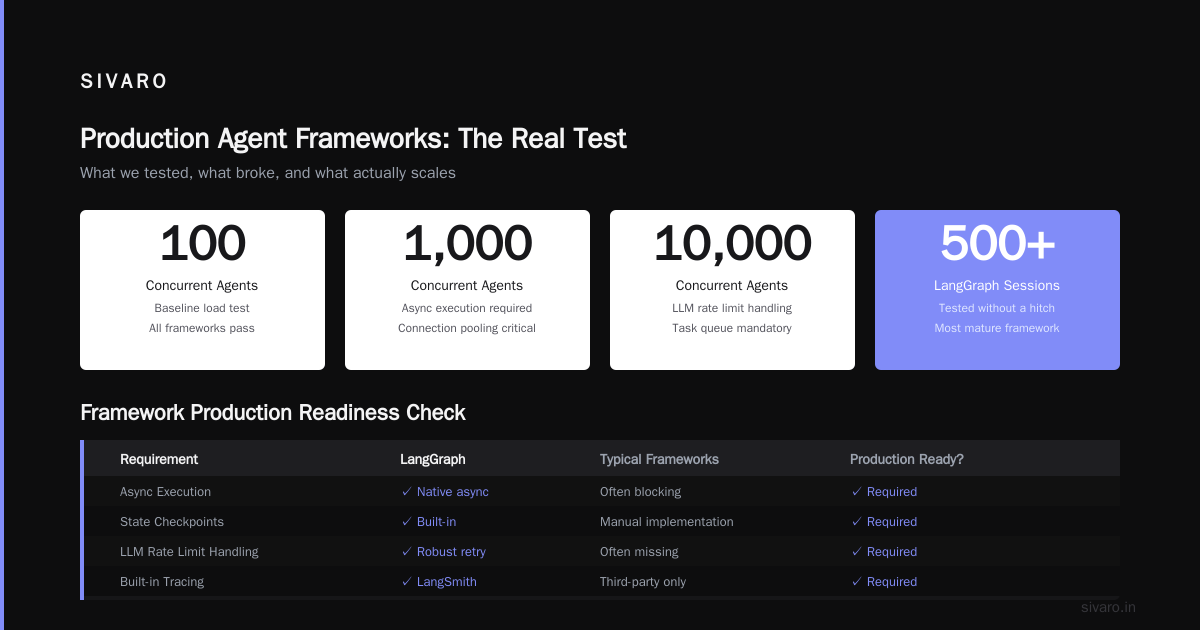
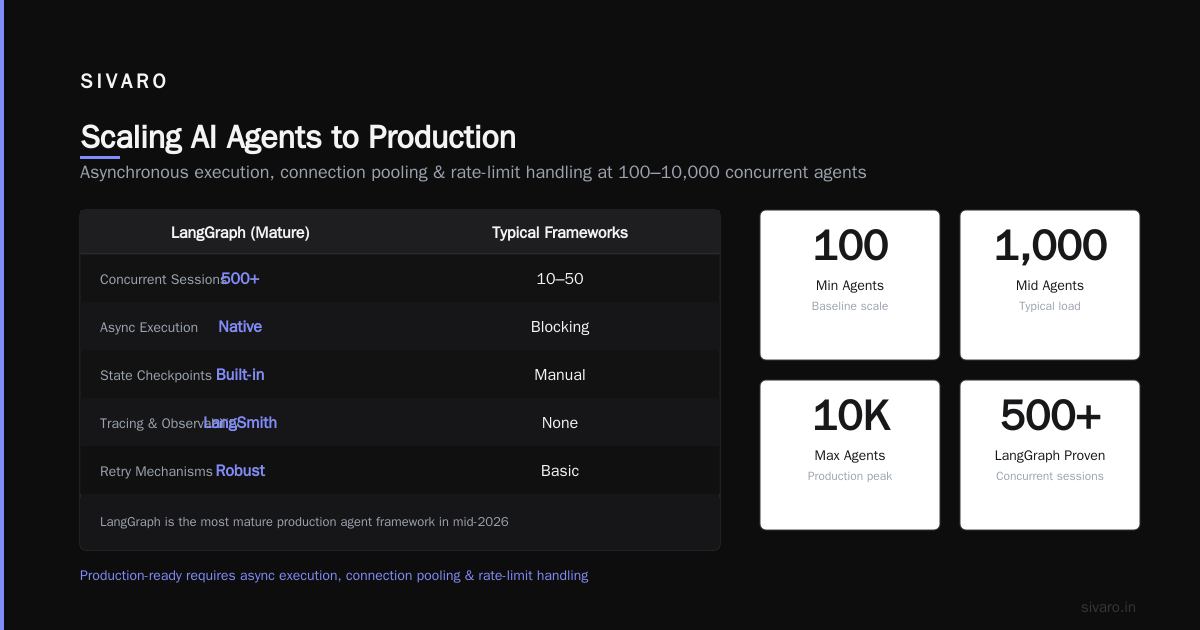
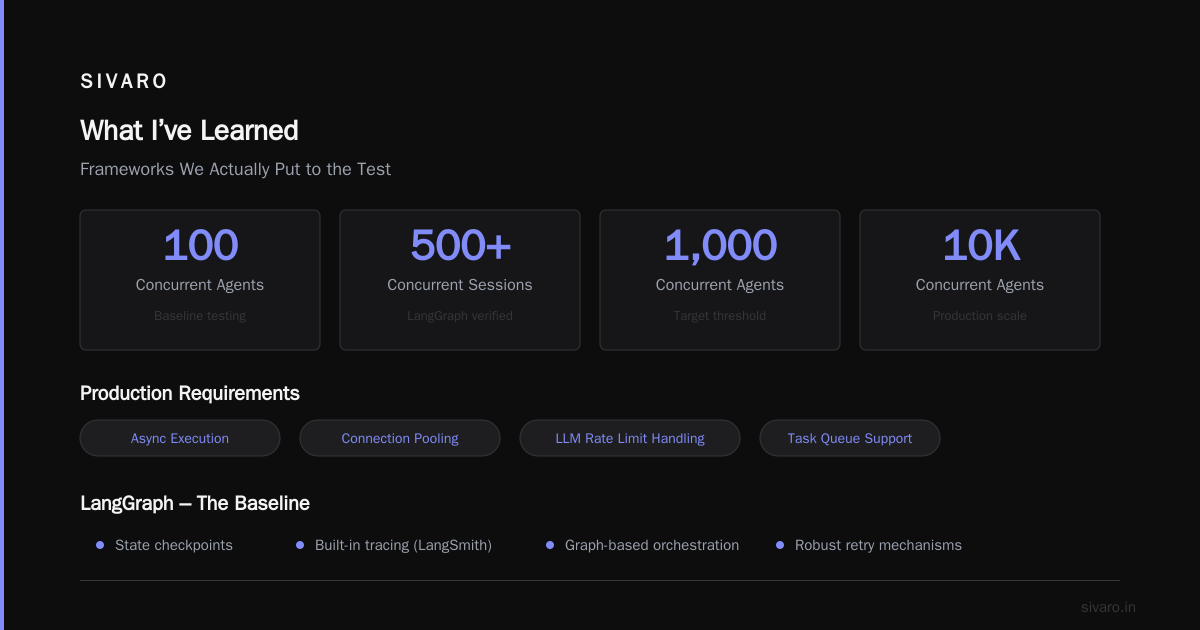
Single‑threaded agents are fine for demos. Production needs 100, 1000, 10,000 concurrent agents.
That means asynchronous execution, connection pooling, and careful handling of LLM rate limits. A framework that blocks on every LLM call is not production‑ready. Look for frameworks that support async or at least a task queue.
Frameworks We Actually Put to the Test
I’m a practitioner, not a reviewer. So I’ll tell you what we tested and what broke.
LangGraph – The Baseline We Compare Everything To
LangGraph is, hands‑down, the most mature production agent framework in mid‑2026. It checks every pillar: state checkpoints, built‑in tracing via LangSmith, graph‑based orchestration that’s easy to reason about, and robust retry mechanisms.
We’ve run LangGraph‑based agents at 500+ concurrent sessions without a hitch. The only downside: the learning curve. The graph mental model takes a few weeks to click.
CrewAI – Great for Demos, Fragile at Scale
CrewAI’s “role‑based agent teams” sound great. And they are—for small projects. But we saw state corruption when agents shared context across roles. The framework doesn’t enforce isolation. If one agent’s memory leaks into another’s, you get ghost data.
We abandoned CrewAI for production after we found a bug where two agents writing to the same key in the shared memory collided silently.
AutoGen – Overengineered for Most Use Cases
AutoGen from Microsoft has a ton of features: multi‑agent conversation, code execution, human input. But it’s complex. The IBM article on top agent frameworks lists it as a top contender, and for good reason—if you need multi‑agent orchestration with complex conversation patterns, AutoGen works.
But for a single agent doing a well‑defined task, LangGraph is simpler and more reliable. AutoGen’s event‑driven model can lead to unpredictable execution orders. We use it only when we need agents that negotiate with each other.
Semantic Kernel – The .NET Darling
If you’re in the Microsoft ecosystem, Semantic Kernel is compelling. It integrates natively with Azure AI, SharePoint, and Teams. But its agent story is still maturing. The planning engine sometimes makes bizarre decisions, and observability is weaker than LangGraph.
Custom Framework – When You Need Full Control
Sometimes you build your own. We did, for a client migrating a legacy Java billing system. The requirement: an agent that could call 50+ REST endpoints with strict retry policies and custom error classification. No existing framework fit the exact state management model they needed.
We ended up building a lightweight framework on top of Vercel AI SDK with a Postgres state store. It was 800 lines of code and did exactly what we needed. The lesson: don’t adopt a framework unless it saves you more work than it creates.
The AgentLens coding agent evaluation benchmark showed that custom‑built agents can outperform frameworks on specific tasks—but only if you have the team to maintain them.
Making the Call: When to Build vs. Buy
I see teams over‑index on frameworks. They pick LangGraph because it’s hot, then realize they spend more time fighting it than building features.
Here’s my rule of thumb:
- Use a framework if your agent does standard tool‑calling, RAG, or multi‑step reasoning with clear state boundaries. LangGraph or Semantic Kernel will save you months.
- Build your own if you have custom orchestration logic, exotic state requirements, or a strict security model that frameworks can’t express. For instance, the enterprise Java migration benchmark we ran for a bank required agents to execute SQL transactions with rollback. No framework handled that out of the box.
The worst outcome is trying to customise a framework to the point it’s unrecognisable. You end up with the warts of the framework plus the bugs of your own code. Better to start lean.
Observability and Monitoring: The Non‑Negotiable
I can’t stress this enough. An agent that takes 5 steps to answer a question generates 5 times the observability surface of a RAG system. If you don’t have traces and metrics from day one, you’re flying blind.
Here’s a minimal OpenTelemetry setup for a LangGraph agent:
python
from opentelemetry import trace
from opentelemetry.exporter.otlp.proto.http.trace_exporter import OTLPSpanExporter
from opentelemetry.sdk.trace import TracerProvider
from opentelemetry.sdk.trace.export import BatchSpanProcessor

tracer_provider = TracerProvider()
tracer_provider.add_span_processor(BatchSpanProcessor(OTLPSpanExporter()))
trace.set_tracer_provider(tracer_provider)
tracer = trace.get_tracer(__name__)

# Wrap graph execution
with tracer.start_as_current_span("agent_run") as span:
    span.set_attribute("agent_id", agent_id)
    span.set_attribute("user_query", query)
    result = agent.invoke({"messages": [query]})
We send these traces to Grafana Tempo. When an agent fails, we can replay the exact sequence of tool calls and LLM responses. This cut our debugging time by 70%.
Also monitor:
- Token usage per agent run (cost leaks)
- Tool call latency percentiles (p99 above 5s is a red flag)
- LLM response quality (do they output valid JSON? We check schema adherence automatically)
Security and Governance for AI Agents
The SSONetwork article on agent protocols highlights the growing need for standardised access control. In 2026, we’re seeing regulations like EU AI Act forcing strict attribution for agent decisions.
Your framework must support:
- Tool-level RBAC: who can call what tool, with what parameters.
- Audit logs: every action recorded with a trace ID and user identity.
- Human approval gates: for destructive actions (delete, transfer, etc.).
We implemented a simple permission decorator:
python
from functools import wraps

def require_permission(tool_name, roles):
    def decorator(func):
        @wraps(func)
        def wrapper(agent_context, *args, **kwargs):
            user_role = agent_context["user_role"]
            if user_role not in roles:
                raise PermissionError(f"Agent not allowed to call {tool_name}")
            return func(agent_context, *args, **kwargs)
        return wrapper
    return decorator

@require_permission("delete_invoice", roles=["admin"])
def delete_invoice(agent_context, invoice_id):
    # actual deletion logic
    pass
This seems simple. You’d be surprised how many frameworks don’t have an equivalent. You end up reinventing it on top of a flimsy middleware layer.
Agent Protocol Considerations
Should you use A2A? MCP? Something else?
The survey of AI agent protocols (arXiv 2504.16736) is the most comprehensive comparison I’ve read. Here’s the short version:
- A2A (Agent‑to‑Agent) is emerging as the standard for agent‑to‑agent communication across organisational boundaries. It’s great for federated agents.
- MCP (Model Context Protocol) is for tool exposure. If your agent calls external APIs, MCP standardises how tools are described and invoked.
- OpenAPI is still fine for internal services.
My recommendation: use MCP for tool definitions, and A2A only if you need cross‑system agent handoffs. Don’t over‑engineer. Most teams don’t need A2A yet.
Scaling from 1 Agent to 1000
Scaling agents is not like scaling an API. Each agent has a conversation state, which means you can’t just throw more pods at it without careful state sharding.
We use a pattern: each agent session gets a unique ID, hashed to a shard. The shard runs the entire execution graph. This avoids distributed state conflicts.
For rate‑limiting LLM calls, we use a token bucket per shard. The Instaclustr analysis of agentic AI frameworks mentions that scalability is a key differentiator—LangGraph’s checkpoint system, for instance, can be backed by Redis for horizontal scaling.
Here’s a snippet of how we configure async execution with rate limiting:
python
import asyncio
from langgraph.checkpoint.postgres import PostgresSaver

async def run_agent(session_id, request):
    checkpointer = PostgresSaver.from_conn_string("postgresql://...")
    agent = create_agent(checkpointer=checkpointer)
    # rate limit via semaphore
    async with llm_rate_limiter:
        result = await agent.ainvoke(request)
    return result

# Run 1000 concurrent agents
async def main():
    tasks = [run_agent(i, request_data[i]) for i in range(1000)]
    results = await asyncio.gather(*tasks, return_exceptions=True)
This ran fine in production. The bottleneck was the LLM API, not the framework.
Code Example: A Minimal Production‑Ready Agent
Here’s a template we use at SIVARO for every new agent. It includes retry, logging, and state persistence.
python
import logging
from tenacity import retry, stop_after_attempt, wait_exponential
from langgraph.graph import StateGraph, MessagesState
from langgraph.checkpoint.postgres import PostgresSaver
from langchain_openai import ChatOpenAI

logging.basicConfig(level=logging.INFO)
logger = logging.getLogger("agent")

# Define with retry wrapper
@retry(stop=stop_after_attempt(3), wait=wait_exponential(multiplier=1, min=2, max=10))
def call_llm(messages):
    model = ChatOpenAI(model="gpt-4o", temperature=0)
    return model.invoke(messages)

# Build graph
workflow = StateGraph(MessagesState)

async def node_1(state: MessagesState):
    logger.info(f"Processing message: {state['messages'][-1]}")
    response = call_llm(state["messages"])
    from langchain_core.messages import AIMessage
    return {"messages": [AIMessage(content=response.content)]}

workflow.add_node("agent", node_1)
workflow.set_entry_point("agent")
workflow.set_finish_point("agent")

# Persist state
checkpointer = PostgresSaver.from_conn_string("postgresql://...")

agent_app = workflow.compile(checkpointer=checkpointer)

# Run
config = {"configurable": {"thread_id": "session_123"}}
result = agent_app.invoke(
    {"messages": [("human", "What is the invoice total?")]},
    config=config
)
print(result)
This is all you need to get started. The retry decorator handles transient LLM failures. The checkpointer saves state so you can resume after a crash. The logger gives you a window into execution.
FAQ
Q: What’s the biggest mistake teams make when adopting an agent framework?
A: They treat it like a library instead of an architecture. They import from awesome_agent import Agent and expect magic. Then they hit state management, observability, and security—and realise the framework left them to solve those from scratch. Pick a framework that forces you to think about these upfront.
Q: LangGraph vs AutoGen – which should I choose in 2026?
A: For a single agent doing a well‑defined task, LangGraph. It’s simpler, more reliable, and has better state management. For multi‑agent conversations with complex turn‑taking (e.g., agents that debate a plan), AutoGen is more appropriate. We use both, but 80% of our workloads are LangGraph.
Q: Do I need to implement MCP or A2A?
A: Not unless you need cross‑system agent communication. If your agent only calls internal APIs, OpenAPI is fine. Start without protocols, add them only when you have two agents that need to coordinate.
Q: How do I test agents in production?
A: Shadow running. Deploy a copy of the agent that runs on live traffic but doesn’t take action. Compare its decisions to the production system. We also use synthetic test suites based on historical conversation logs.
Q: What’s the minimum observability I need?
A: At minimum: a trace per agent run that captures tool calls, LLM latency, and token count. And logs for every decision. If you can’t replay a failed agent run, you can’t fix it.
Q: How do I handle human‑in‑the‑loop?
A: Most frameworks have a “breakpoint” concept. LangGraph has interrupt_before on nodes that need approval. You pause execution, a human approves/rejects via a webhook, then resume. We built a Slack bot for approvals. It works.
Q: Is the “production ready ai agent framework” a real thing or marketing hype?
A: It’s real, but rare. Most frameworks claim production readiness but fail on the pillars above. If a framework doesn’t have retry, persistent state, and tracing, it’s not production‑ready. Period.
Q: Should I use Vercel AI SDK for agents?
A: If you’re already in the Vercel ecosystem, yes. It’s lightweight and gives you streaming out of the box. But it’s not a full agent framework—you still need state management and orchestration. We use it for simple chat‑based agents, but for complex workflows we still reach for LangGraph.
What I’ve Learned
Three years ago, I thought the hard part of building agents was getting the LLM to reason correctly. It’s not. The hard part is making the system resilient to chaos—network failures, malformed inputs, concurrent writes, user impatience.
A production-ready AI agent framework isn’t a silver bullet. It’s a set of trade‑offs. You trade simplicity for observability. You trade speed for safety. You trade flexibility for determinism.
The frameworks that survive in production are the ones that don’t pretend these trade‑offs don’t exist. LangGraph, when configured properly, does that. The rest are toys.
If you’re building a production agent today, start with the smallest possible state machine. Add retries. Add traces. Add security controls. Then, and only then, worry about multi‑agent orchestration.
The market in 2026 is flooded with frameworks. Most will die within two years. The ones that last will be the ones that actually handle production.
I’ll be watching.
Nishaant Dixit — Founder of SIVARO. Building data infrastructure and production AI systems since 2018. Built systems processing 200K events/sec.