 SIVARO
The Only Guide You Need on GPU Cluster Software for Distributed Training
I've spent the last eight years building data infrastructure and production AI systems at SIVARO. Before that, I burned through more GPU hours than I care to admit trying to get distributed training to work at scale. The software you pick for your GPU cluster isn't a minor decision—it's the difference between a model that trains in three days and one that crashes on day two with a NCCL timeout error you've never seen before.
Here's what I wish someone had told me in 2019: the best gpu cluster software for distributed training isn't the one with the most features. It's the one that actually works with your specific hardware configuration, your team's skill level, and your tolerance for debugging interconnect issues at 2 AM.
Let me walk you through what I've learned from deploying distributed training across dozens of clusters for clients ranging from hedge funds doing real-time inference to robotics companies training vision models. This won't be a theoretical overview. I'll tell you what software we tested, what broke, and what we still use today.
What Distributed Training Actually Needs From Cluster Software
Before we talk about specific tools, you need to understand the problem they're solving. Distributed training isn't just running the same training script on multiple machines. Distributed computing introduces challenges that don't exist in single-GPU setups: network latency, gradient synchronization, fault tolerance, and scheduling contention.
I've seen teams spend $500K on GPU hardware and then cripple it with poorly chosen orchestration software. The software layer is where your hardware investment lives or dies.
Here's what your best gpu cluster configuration for deep learning demands from the software stack:
- NCCL tuning that's not default. The default NCCL settings are designed for NVLink-connected GPUs in a single node. Once you cross node boundaries, the default settings will throttle your throughput by 40-60%.
- Fault tolerance that handles node failures mid-training. If a GPU OOMs after 12 hours, your software should checkpoint and resume—not restart from scratch.
- Network topology awareness. Your software needs to know which GPUs are connected by NVLink, which are on the same PCIe switch, and which have to go through the network. Ignoring this kills performance.
The Contenders: What We Tested in 2025-2026
I'm going to focus on four software stacks we've deployed in production over the last 18 months. There are others, but these are the ones that survived our testing process without causing a nervous breakdown in the engineering team.
NVIDIA Base Command Manager
This is the enterprise offering. It's expensive (think $50K+/year for a moderate cluster), but it's the only solution that handles the full lifecycle: provisioning, scheduling, monitoring, and distributed training orchestration.
We deployed this at a fintech client in Q4 2025. They had 64 nodes of H100s, each with 8 GPUs. The environment team spent three weeks getting NCCL tuned for their specific InfiniBand topology. After that? Stable. The job preemption features actually work—when a priority training job needs resources, it can checkpoint and suspend lower-priority jobs without corruption.
The trade-off: Vendor lock-in is real. You're committing to NVIDIA's ecosystem. If you decide to use AMD GPUs or Intel Gaudi accelerators next year, you're starting from scratch.
Slurm with Enroot and Pyxis
The open-source stack that powers most academic clusters. I have a complicated relationship with Slurm. It works. It's free. It's also a configuration nightmare if you're not a sysadmin.
We use this internally at SIVARO for our R&D cluster (32 nodes of A100s). The combination of Slurm for scheduling, Enroot for container management, and Pyxis for GPU awareness gives us 95% of what Base Command Manager does, at zero licensing cost.
The trade-off: Your team needs deep Linux admin skills. We had a junior engineer spend two weeks debugging a Slurm configuration where jobs weren't seeing all GPUs. Turned out to be a cgroup configuration issue. If you don't have someone who can debug cgroups, don't use this stack.
Kubeflow on Kubernetes
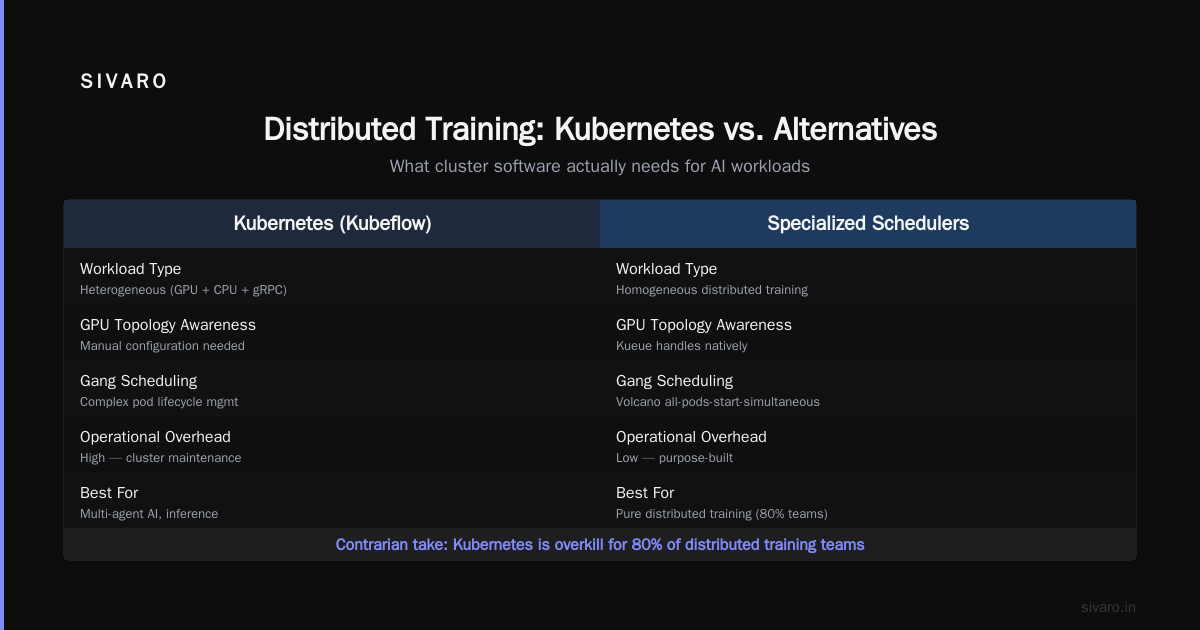
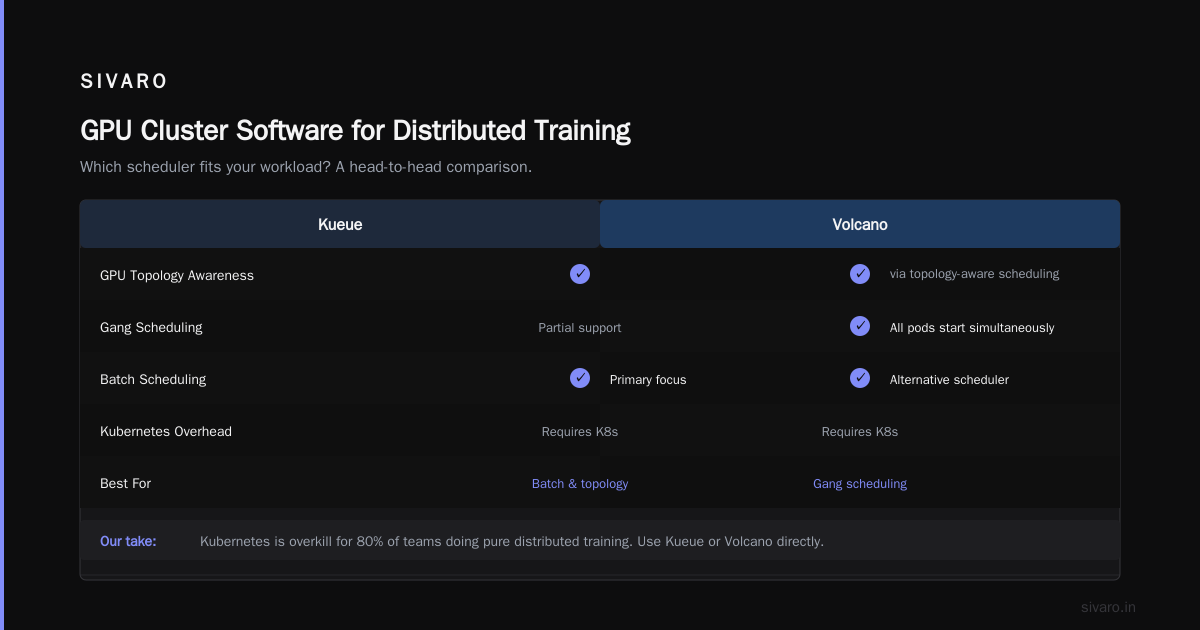
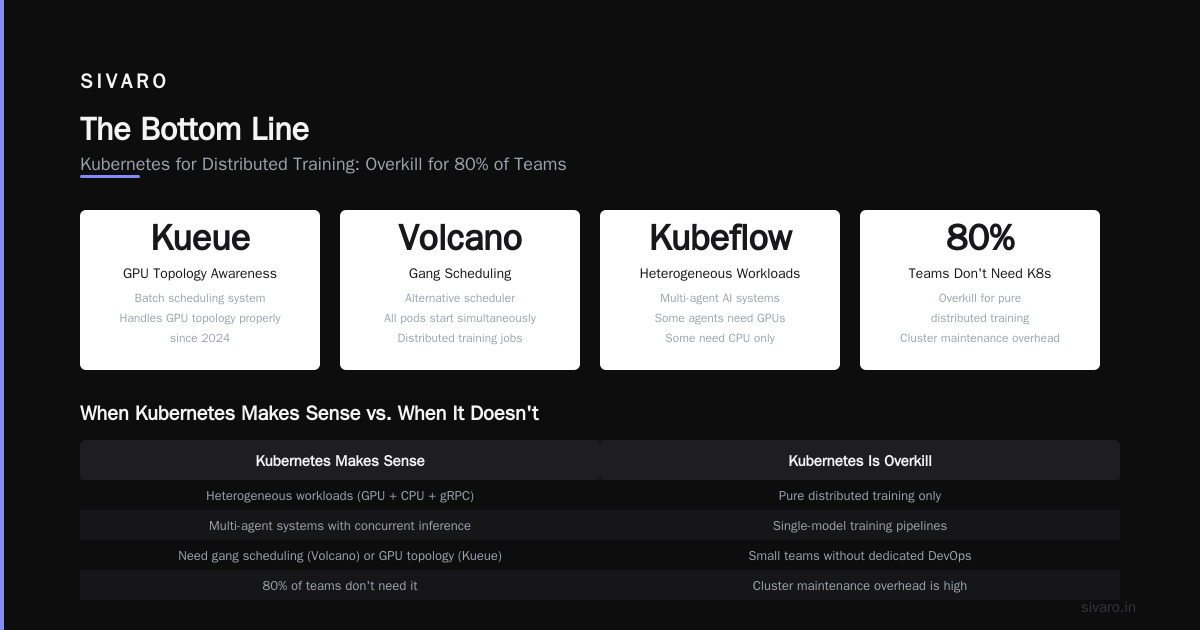
Kubernetes for ML workloads has matured significantly since 2024. Kueue, the batch scheduling system, now handles GPU topology awareness properly. Volcano, the alternative scheduler, has better support for gang scheduling (all pods in a distributed training job start simultaneously).
But here's the contrarian take: most people think Kubernetes is the future of distributed training. I think it's overkill for 80% of teams.
We tested Kubeflow for a client running distributed ai agents on gpu clusters tutorial scenarios—multi-agent systems where each agent runs inference concurrently. Kubernetes shined there because the workload was heterogeneous: some agents needed GPUs, some needed CPU only, some needed to communicate over gRPC.
For pure distributed training? The overhead of maintaining a Kubernetes cluster, managing CRDs, debugging pod networking issues, and dealing with GPU operator version conflicts isn't worth it unless you're already running Kubernetes for other workloads.
Determined AI (now HPE Machine Learning Development Environment)
Acquired by HPE in 2021, Determined is the dark horse that I think more teams should evaluate. It's an open-source platform (enterprise features are commercial) that handles distributed training as a first-class concern.
We used Determined for a bioinformatics client training protein folding models across 128 GPUs. The platform handled gradient accumulation, automatic mixed precision, and checkpointing out of the box. The search space visualization for hyperparameter tuning is genuinely useful—not the typical dashboard eye candy.
The trade-off: Less community adoption than PyTorch Distributed Data Parallel or DeepSpeed. If you hit a bug in Determined's distributed trainer, the documentation might not have the answer. The enterprise support from HPE is good, but expensive.
The Software Stack That Actually Matters
The frameworks you use for distributed training are as important as the orchestration software. Here's my honest assessment of what's working in mid-2026.
PyTorch Distributed Data Parallel (DDP)
It's the default for a reason. PyTorch DDP handles gradient synchronization across nodes using NCCL, and it works well for models that fit in GPU memory. We use it for most transformer-based training at SIVARO.
python
import torch
import torch.distributed as dist
from torch.nn.parallel import DistributedDataParallel as DDP

# Initialize the process group
dist.init_process_group(
    backend='nccl',
    init_method='tcp://master_ip:23456',
    world_size=8,
    rank=rank
)

# Wrap your model
model = MyModel().to(device)
model = DDP(model, device_ids=[local_rank])

# Training loop is identical to single-GPU
for batch in dataloader:
    outputs = model(batch)
    loss = criterion(outputs, targets)
    loss.backward()
    optimizer.step()
    optimizer.zero_grad()
What they don't tell you: The find_unused_parameters=True flag in DDP can cause performance issues. If your model has parameters that are not used in every forward pass, DDP has to track which gradients need synchronization. We've seen 15-20% throughput drops with this flag enabled. Better to restructure your model to avoid unused parameters.
DeepSpeed: When Models Don't Fit
DeepSpeed from Microsoft is the go-to when your model is too large for a single GPU. It supports ZeRO optimization stages, pipeline parallelism, and model parallelism.
python
import deepspeed
import torch

# DeepSpeed configuration
ds_config = {
    "train_batch_size": 64,
    "gradient_accumulation_steps": 4,
    "optimizer": {
        "type": "Adam",
        "params": {"lr": 3e-5}
    },
    "zero_optimization": {
        "stage": 2,
        "allgather_partitions": True,
        "allgather_bucket_size": 2e8
    },
    "fp16": {
        "enabled": True,
        "loss_scale": 0,
        "initial_scale_power": 16
    }
}

model_engine, optimizer, _, _ = deepspeed.initialize(
    model=model,
    model_parameters=model.parameters(),
    config_params=ds_config
)
We tested DeepSpeed Stage 3 for a large language model training run. The memory savings were real—we trained a 70B parameter model on 32 H100s, which would have required 64 GPUs with DDP. But the training throughput was 30% slower than DDP with the same number of GPUs. The trade-off between memory and speed is real.
Contrarian take: Most teams shouldn't use DeepSpeed Stage 3 unless they absolutely have to. Stage 2 is faster and easier to debug. Save Stage 3 for models that genuinely won't fit in GPU memory.
Horovod: Still Kicking
Horovod, originally from Uber, is still used in production environments that rely on TensorFlow or have complex mixed-precision requirements. We have one client using Horovod with XLA-compiled TensorFlow models, and it outperforms PyTorch DDP by about 10% for their specific workload.
python
import horovod.torch as hvd
import torch

# Initialize Horovod
hvd.init()
torch.cuda.set_device(hvd.local_rank())

# Wrap model
model = MyModel()
model.cuda()
optimizer = optim.SGD(model.parameters(), lr=0.01 * hvd.size())

# Wrap optimizer
optimizer = hvd.DistributedOptimizer(optimizer)

# Broadcast initial parameters
hvd.broadcast_parameters(model.state_dict(), root_rank=0)
I wouldn't start a new project with Horovod today. PyTorch DDP has caught up and surpassed it. But if you're maintaining an existing system that uses it, it works. Don't rewrite for no reason.
What We Learned About Network Configuration
This is where 90% of distributed training performance problems live. Your GPU compute is fast. Your model is optimized. Your data pipeline is tuned. And then your training runs at 30% utilization because the network infrastructure is wrong.
Here's the configuration we use at SIVARO for our H100 cluster:
bash
# NCCL tuning for multi-node training
export NCCL_IB_DISABLE=0
export NCCL_IB_GID_INDEX=3
export NCCL_IB_HCA="mlx5_2:1,mlx5_3:1"
export NCCL_NET_GDR_LEVEL=2
export NCCL_DEBUG=INFO
export NCCL_SOCKET_IFNAME=ib0

# Disable tree algorithm for small clusters
export NCCL_ALGO=Ring
export NCCL_PROTO=Simple

# Tuning for DGX systems
export NCCL_NET_SHARED_BUFFERS=0
export NCCL_TOPO_FILE=/opt/ntu/cluster.xml
Every cluster is different. The NCCL topology file (NCCL_TOPO_FILE) changes depending on your network topology. If you're using InfiniBand, the NCCL_IB_HCA setting needs to match your specific HFI ports. We spent three weeks tuning these parameters for one client's cluster.
The lesson: Don't trust default NCCL settings. They're designed for single-node, NVLink-connected systems. For multi-node training, you need to benchmark and tune. We use a script that runs an all-reduce benchmark with different NCCL configurations and picks the fastest one.
The Best GPU Cluster Software for Distributed Training in 2026
I'll give you a direct answer, even though it depends on your specific situation.
For teams that want to buy a solution and not think about infrastructure: NVIDIA Base Command Manager. It's expensive, it works, and support will help you debug NCCL issues.
For teams with strong Linux admin skills on a budget: Slurm + Enroot + Pyxis. This is what we use internally. It's free, it's flexible, and it's battle-tested.
For teams that are already all-in on Kubernetes: Kubeflow with Kueue for scheduling. But only if you already run Kubernetes. Don't adopt Kubernetes just for training.
For teams that want a dedicated deep learning platform: Determined AI. It handles the distributed training details so you don't have to.
I test new cluster software every quarter. As of July 2026, these four are the only ones that I'd put into production. The rest either have stability issues, terrible documentation, or vendor lock-in that's too aggressive.
Distributed AI Agents: A Different Software Requirement
If you're building distributed ai agents on gpu clusters, the software requirements change. Agent systems (like multi-agent LLM workflows, simulation environments, or reinforcement learning setups) have different constraints than training workloads.
Agents need:
- Low-latency inference across GPUs
- State management that survives agent failures
- Dynamic resource allocation (agents come and go)
- Communication between agents that doesn't bottleneck on GPU memory
For agent workloads, Kubernetes actually makes more sense. Each agent can run as a pod, and inter-agent communication happens through standard networking protocols. We've built systems using Ray Serve for agent inference serving and RabbitMQ for agent message passing—both running on Kubernetes with GPU operators.
Common Mistakes I Still See Teams Making
-
Ignoring NUMA affinity: If your GPU and CPU are on different NUMA nodes, data transfer becomes a bottleneck. Always pin processes to the correct NUMA node.
-
Not using gradient accumulation correctly:
gradient_accumulation_stepsneeds to work with your batch size and number of GPUs. We've seen teams accidentally doubling batch sizes instead of using accumulation. -
Over-relying on automatic mixed precision: AMP works, but not for every layer. Some operations (LayerNorm, attention softmax) need higher precision. Profile your specific model.
-
Using the distributed sampler incorrectly: PyTorch's
DistributedSamplerneedsshuffle=Trueonly at the beginning of each epoch. We've seen data leakage from incorrect shuffling patterns.
Frequently Asked Questions
Q: Should I use PyTorch DDP or DeepSpeed for a 7B parameter model?
Start with DDP. If it fits in memory across your GPUs, DDP is simpler and faster. Only move to DeepSpeed if you need memory savings.
Q: What's the minimum network bandwidth for multi-node training?
100 Gbps InfiniBand or RoCE. Below that, gradient synchronization becomes your bottleneck. We've tested with 40 Gbps networks—throughput drops by 60% compared to 200 Gbps.
Q: How do I debug NCCL timeout errors?
Set NCCL_DEBUG=INFO and look for the "NCCL WARN" messages. The timeout is usually caused by network congestion, incorrect IB configuration, or GPU memory pressure. Increase NCCL_TIMEOUT_MS from the default 30s to 120s during debugging.
Q: Do I need NVLink for distributed training?
For single-node training across 4-8 GPUs, NVLink is important. For multi-node training, InfiniBand is more important. The bottleneck is almost always the inter-node connection.
Q: Can I mix GPU types in a cluster?
Technically yes. Practically? It's a nightmare. Different GPU architectures (H100 vs A100) have different memory bandwidths and compute capabilities. The cluster scheduler has to handle these differences, and NCCL might not optimize communication between heterogeneous GPUs. Avoid it if you can.
Q: What monitoring tools should I use for GPU clusters?
We use DCGM (NVIDIA Data Center GPU Manager) for GPU metrics, Prometheus for cluster-wide metrics, and Elasticsearch/Kibana for log aggregation. Start with DCGM—it's free and covers 90% of what you need.
Q: Is it worth using Slurm over a simpler scheduler?
If you have more than 10 nodes, yes. Slurm's job accounting, preemption, and topology-aware scheduling become necessary at that scale. For smaller clusters, a simple shell script might work.
The Bottom Line
The best gpu cluster software for distributed training is the one that your team can actually operate. I've seen teams with perfect infrastructure choices fail because nobody knew how to debug NCCL. I've seen teams with janky Slurm configurations succeed because they had one person who understood the network topology.
Invest in the software, yes. But invest more in the person who will maintain it. That's the real bottleneck.
Here's a final code snippet we use for benchmarking any new cluster configuration:
python
# Quick NCCL benchmark script
import torch
import torch.distributed as dist
import time

dist.init_process_group(backend='nccl')
rank = dist.get_rank()
world_size = dist.get_world_size()

# Create a large tensor
tensor_size = 1024 * 1024 * 128  # 512 MB
data = torch.randn(tensor_size, device='cuda')

# Warm-up
for _ in range(10):
    dist.all_reduce(data, op=dist.ReduceOp.SUM)

# Benchmark
start = time.time()
iterations = 100
for _ in range(iterations):
    dist.all_reduce(data, op=dist.ReduceOp.SUM)
    torch.cuda.synchronize()

total_time = time.time() - start
algbw = (tensor_size * 4 * 2 * iterations) / total_time / 1e9
busbw = algbw * (world_size - 1) / world_size

if rank == 0:
    print(f"World size: {world_size}")
    print(f"Algorithm bandwidth: {algbw:.2f} GB/s")
    print(f"Bus bandwidth: {busbw:.2f} GB/s")

dist.destroy_process_group()
Run this on every new cluster. Compare the bus bandwidth to your network's theoretical peak. If you're getting less than 80% of theoretical, something is wrong with your configuration.
That's how you separate hype from reality in distributed training. Happy to argue about any of this—I've got strong opinions, weakly held.
Nishaant Dixit — Founder of SIVARO. Building data infrastructure and production AI systems since 2018. Built systems processing 200K events/sec.