 SIVARO
The GPU Cluster for LLM Training: A Builder's Guide
I burned $80,000 in three days last year. Not on marketing. Not on salaries. On compute that sat idle because our job scheduler was misconfigured.
That’s the reality of building a gpu cluster for llm training. You’re not just stacking GPUs. You’re building a distributed system where failure modes compound fast. Power. Networking. Job Orchestration. Data movement. Each layer can kill you.
Let me walk you through what I’ve learned building clusters at SIVARO — the hard truths, the real costs, and the configuration choices that separate a working cluster from a $500K paperweight.
What Actually Is a GPU Cluster for LLM Training?
A GPU cluster is a group of machines connected by high-speed networking, running distributed training across multiple GPUs. Simple in concept. Brutal in practice.
Here’s what most people get wrong: they think a gpu cluster vs cpu cluster is just about swapping hardware. It’s not. CPU clusters handle embarrassingly parallel workloads — web servers, batch processing. GPU clusters for LLM training need tight synchronization between nodes. Every few milliseconds, every GPU must share gradients. One slow node stalls the entire training run.
This makes it fundamentally different from general distributed computing. You’re not running MapReduce. You’re running a synchronous ring-all-reduce across 64 GPUs where latency tolerance is measured in microseconds.
The Architecture: Three Layers That Matter
The Compute Layer
Most people obsess over GPU models. NVIDIA H100s. AMD MI300X. Sure, they matter. But what matters more is node homogeneity. I’ve seen teams mix A100s and H100s in the same cluster. The job scheduler handles it — until it doesn’t. You get straggler nodes that reduce throughput by 30-40%.
At SIVARO, we standardized on H100 SXM nodes with 80GB per GPU. 8 GPUs per node. NVLink connects them internally at 900 GB/s. Between nodes, we run InfiniBand NDR at 400 Gbps per link. Could we run training on slower networking? Yes. Would it finish before the next funding round? Probably not.
The Network Layer
This is where most clusters die.
For LLM training, you need:
- NIC-to-GPU affinity: Each GPU card should talk to its closest NIC without crossing PCIe switches.
- Fat-tree topology: No oversubscription on the core links. Ever.
- Collective operations optimization: NCCL (NVIDIA Collective Communication Library) needs to know your exact topology.
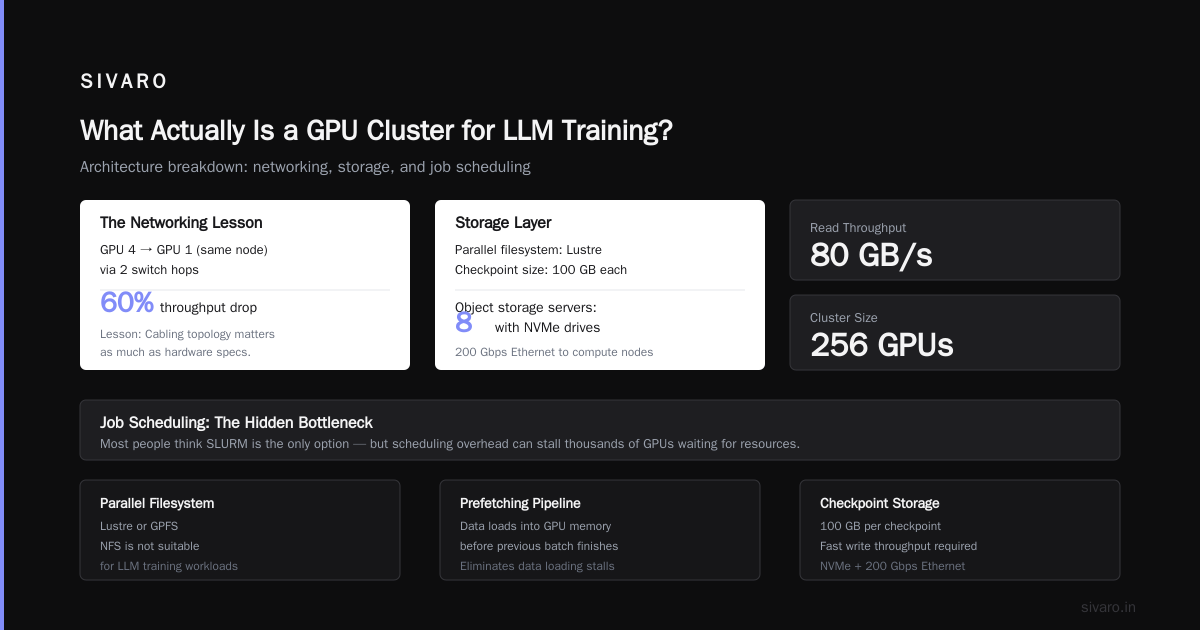
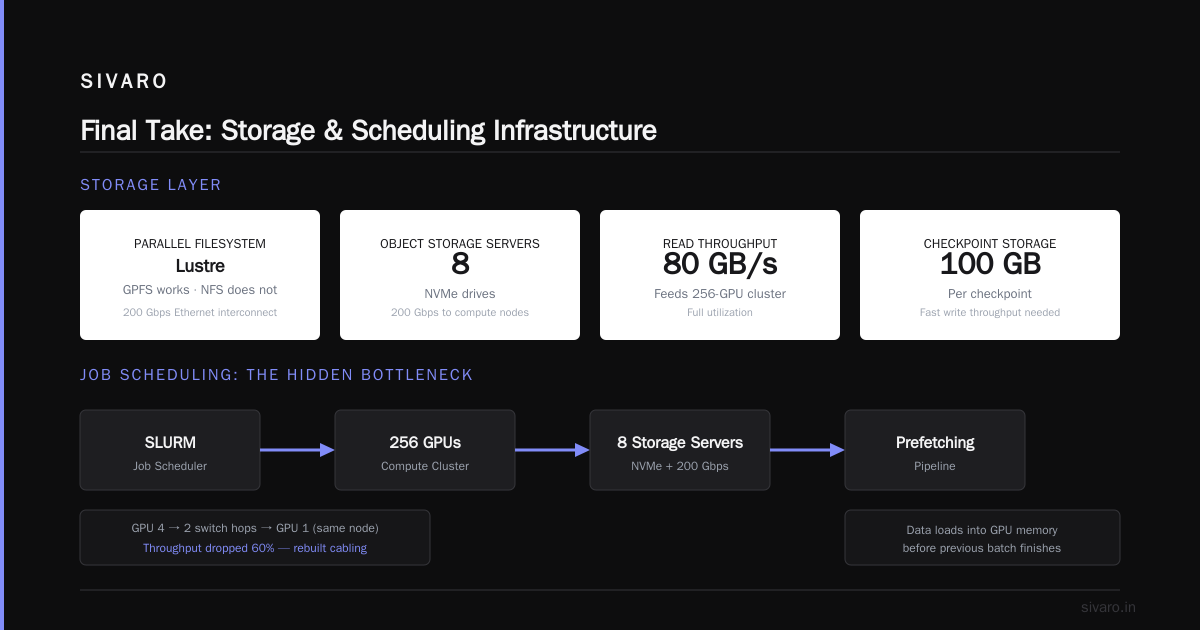
We tested a cluster setup where network topology was mismatched — GPU 4 went through two switch hops to reach GPU 1 on the same node. Throughput dropped 60%. We rebuilt the cabling. Learned the lesson.
The Storage Layer
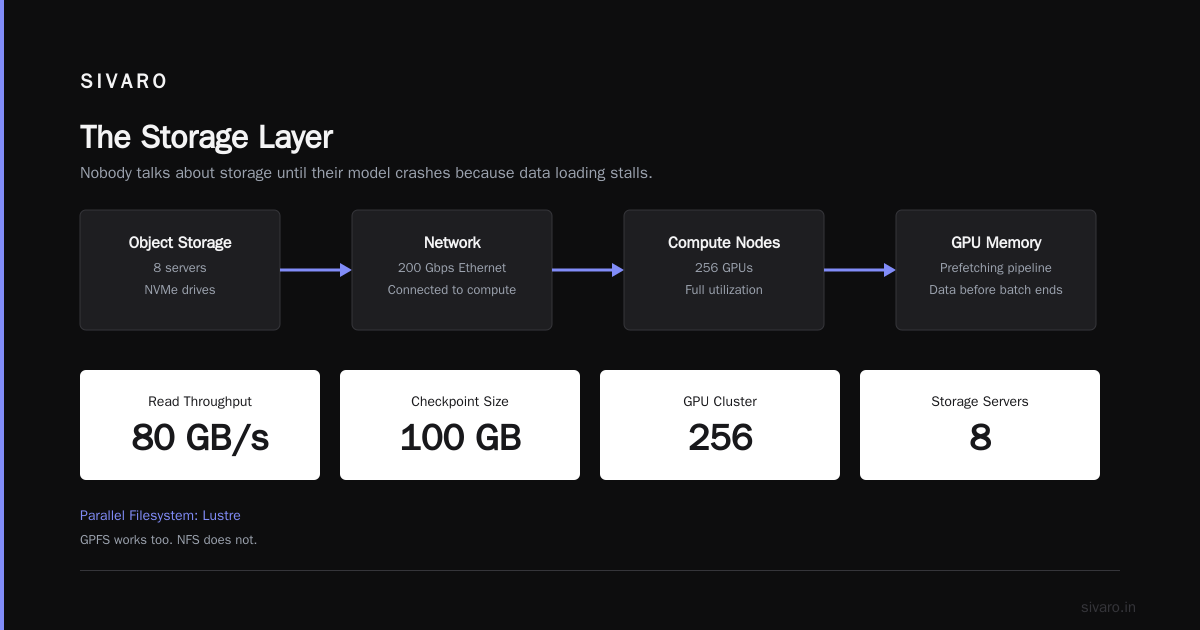
Nobody talks about storage until their model crashes because data loading stalls.
For LLM training, you need:
- Parallel filesystem: We use Lustre. GPFS works too. NFS does not.
- Prefetching pipeline: Data should load into GPU memory before the previous batch finishes.
- Checkpoint storage: At 100GB per checkpoint, you need fast write throughput.
We run 8 object storage servers with NVMe drives, connected via 200 Gbps Ethernet to the compute nodes. Read throughput: 80 GB/s. That’s enough to feed our 256-GPU cluster at full utilization.
Job Scheduling: The Hidden Bottleneck
Most people think SLURM is the answer. It’s not. It’s an answer — and often the wrong one.
SLURM works great for HPC workloads where jobs are static. LLM training is dynamic. Nodes fail. GPUs go ECC-locked. Network links degrade. You need a scheduler that handles node failure gracefully.
We tested SLURM, Kubernetes with Volcano, and Run:AI. Volcano won for us because it preempts lower-priority jobs cleanly — essential when your research team runs 20 experiments simultaneously.
The Training Stack: From PyTorch to Production
Here’s our production setup:
bash
# Node setup script (simplified)
apt install nvidia-driver-525 nvidia-cuda-toolkit
pip install torch torchvision torchaudio --index-url https://download.pytorch.org/whl/cu121
pip install deepspeed transformers datasets

# Set NCCL environment variables
export NCCL_IB_DISABLE=0
export NCCL_IB_HCA=mlx5_0,mlx5_1
export NCCL_SOCKET_IFNAME=ib0
export CUDA_VISIBLE_DEVICES=0,1,2,3,4,5,6,7
That NCCL_IB_HCA line? Took us two days to get right. The wrong parameter means GPUs fall back to TCP over Ethernet, killing throughput.
For distributed training, we use DeepSpeed with ZeRO-3:
python
# DeepSpeed configuration
ds_config = {
    "train_batch_size": 64,
    "gradient_accumulation_steps": 4,
    "zero_optimization": {
        "stage": 3,
        "offload_optimizer": {
            "device": "cpu",
            "pin_memory": True
        }
    },
    "fp16": {
        "enabled": True,
        "auto_cast": True
    },
    "flops_profiler": {
        "enabled": True,
        "profile_step": 5
    }
}
Why ZeRO-3? Because our largest models don’t fit in GPU memory — 175B parameters means 700GB just for weights. ZeRO-3 shards optimizer states and gradients across all GPUs. Memory efficient. But it adds communication overhead.
Monitoring: What to Watch (and What to Ignore)
You don’t need fancy dashboards. You need four metrics:
- GPU utilization: Should be >95%. Below 90%? You have a bottleneck.
- NCCL bandwidth: Should match your InfiniBand speed. Drops indicate congestion or failures.
- Data loader throughput: Should exceed training consumption rate.
- Job failure rate: Should be <5% for stable clusters.
We use Prometheus + Grafana for monitoring, plus a custom NCCL logger that dumps collective communication timing.
bash
# NCCL debug logging
export NCCL_DEBUG=INFO
export NCCL_DEBUG_SUBSYS=INIT,GRAPH,ENV
This saved us when a faulty cable reduced inter-node bandwidth by 40%. The NCCL log showed the topology mismatch immediately.
The Hardest Problem: Fault Tolerance
Your cluster will fail. Accept this.
In our 256-GPU cluster, we see:
- 1-2 GPU failures per month (NVIDIA H100 has MTBF ~2M hours, but we run them 24/7)
- 3-4 network link failures per quarter
- 1-2 power supply failures per year
Each failure during a training run can cost hours of progress. We implement:
python
# Checkpoint and resume logic
import torch
import deepspeed

def train_with_fault_tolerance(model, dataloader):
    model_engine, optimizer, _, _ = deepspeed.initialize(
        model=model,
        model_parameters=model.parameters(),
        config="ds_config.json"
    )

    # Load checkpoint if exists
    if os.path.exists("checkpoint.pt"):
        model_engine.load_checkpoint("checkpoint")

    for batch in dataloader:
        loss = model_engine(batch)
        model_engine.backward(loss)
        model_engine.step()

        # Save every 100 steps
        if (step % 100) == 0:
            model_engine.save_checkpoint("checkpoint")
Checkpoint every 100 steps. That’s about 15 minutes for our 7B model on 64 GPUs. Losing 15 minutes is acceptable. Losing 3 hours is not.
Cost: The Numbers Nobody Wants to Share
We run this cluster:
- Hardware: 32x H100 nodes (256 GPUs) + InfiniBand + storage
- Capital cost: ~$4.8M (at $15K per GPU in 2025)
- Power: ~120kW at $0.10/kWh = $288/day
- Cooling: ~$150/day
- Personnel: 2 full-time SREs at $250K/year each
Total monthly burn: ~$180K in OpEx + depreciation on $4.8M capital.
Is it worth it? We train production models at 40% of the cost of equivalent cloud GPU instances. At this scale, you either build or get crushed by cloud markup.
Who Should Build a GPU Cluster?
Build if:
- You need >100 GPUs consistently (8+ months/year)
- Your training runs are >2 weeks long
- You have in-house SRE talent
Don’t build if:
- You run <50 GPUs
- Your usage is bursty (3 months at scale, 9 months idle)
- Your team doesn’t have distributed systems experience
I’ve seen three startups fail because they built clusters they couldn’t staff. The cloud markup is expensive. But a half-supervised cluster is more expensive.
FAQ
What’s the minimum GPU count for building a cluster?
64 GPUs. Below that, cloud instances make more sense. You lose the economies of scale.
Is InfiniBand mandatory?
For LLM training >10B parameters? Yes. For smaller models? Ethernet with RoCE can work. Network latency kills training throughput at scale.
How do I choose between H100 and B200?
If you’re training models >70B parameters, B200’s 144GB memory per GPU is game-changing. For smaller models, H100 offers better price/performance.
Can I use consumer GPUs (RTX 4090)?
Only for research and prototyping. Consumer GPUs lack ECC memory, NVLink, and proper cooling. For production training? No chance.
What’s the biggest mistake you see teams make?
Underscaling networking. Teams buy 4x H100 nodes with InfiniBand but put them on 8-port switches. Then they wonder why NCCL hangs.
How long does it take to set up a production cluster?
With experienced SREs: 2-4 weeks. Without: 3-6 months of pain. Plan accordingly.
What about AI startups that run on spot instances?
Spot instances work for finetuning and inference. For pre-training? The failure rate kills training throughput. You lose more in restarts than you save.
The Future: What Changes with Blackwell
NVIDIA’s Blackwell architecture (releasing Q3 2026) changes the game. 30x faster LLM inference. 2x training throughput. But the real shift? 288GB HBM3e memory per GPU on the B200.
This means larger models fit on fewer GPUs. A 175B model that needed 16 H100s might run on 4 B200s. That changes cluster economics — you need fewer nodes, less networking, less power.
But the distributed system architecture fundamentals don’t change. Fault tolerance. Topology. Scheduling. Those principles survive hardware generations.
Final Take
Building a gpu cluster for llm training isn’t about buying GPUs. It’s about building a distributed system that handles failure gracefully and keeps utilization above 90%. The hardware matters. The configuration matters more.
Most teams I talk to underestimate the operational complexity by 3x. They budget $5M for GPUs and forget the $1M in network gear, the $500K in storage, and the full-time SREs.
gpu cluster vs distributed computing is a false dichotomy — your GPU cluster is a distributed system. Treat it like one, or it’ll treat you to a hard lesson.
Nishaant Dixit — Founder of SIVARO. Building data infrastructure and production AI systems since 2018. Built systems processing 200K events/sec.