 SIVARO
The GPU Cluster Configuration That Actually Works for Deep Learning in 2026
I burned $47,000 on a bad GPU cluster configuration last year. That was the mistake that taught me more than three years of reading blog posts ever did.
Here's the truth nobody tells you: the best gpu cluster configuration for deep learning isn't about picking the newest GPU. It's about balancing compute, memory bandwidth, and networking in a way that matches your actual workload. Not your dream workload. The one you're running at 2 AM when something breaks.
I'm Nishaant Dixit. I run SIVARO, a product engineering shop that builds data infrastructure and production AI systems. We've deployed clusters for LLM training, real-time inference, and everything in between. Today I'm going to tell you exactly what works, what doesn't, and why most people over-engineer their clusters by 40%.
What This Guide Covers
You're going to learn the concrete decisions that separate a well-functioning cluster from a money pit. GPU selection, node topology, networking (the part everyone gets wrong), storage architecture, and the software stack that makes it all work. I'll tell you what I've tested, what broke, and what I'd do differently.
Let's get into it.
GPU Selection: More Than Just Model Numbers
Here's the thing about picking GPUs for gpu cluster for llm training in 2026: the market has finally stabilized. We're past the wild shortage years. But that doesn't make the choice easier.
H100 vs B200 vs Custom Silicon
Everyone asks me whether they should buy NVIDIA H100s or wait for the B200s. My answer depends on when you're reading this.
If you're building today (July 2026), the B200 is production-ready. But here's the nuance:
| GPU | Memory | Bandwidth | Best For | Price Point |
|---|---|---|---|---|
| H100 SXM | 80GB | 3.35 TB/s | Inference, fine-tuning | Lower |
| H100 PCIe | 80GB | 2.0 TB/s | Budget training | Lower |
| B200 | 192GB | 8 TB/s | Large model training | Higher |
| AMD MI350X | 192GB | 6.5 TB/s | Price-sensitive training | Mid |
My take: Unless you're training models over 100B parameters or doing extreme multi-modal work, the H100 still delivers better price-performance. We tested both extensively at SIVARO. The B200's memory bandwidth advantage matters less than you think for most workloads because you're bottlenecked on networking, not compute.
The Memory Trap
Most people over-allocate GPU memory. They think "I need 80GB because someone said Llama 3.2 70B needs it." Yes, but that's for full-precision training. With QLoRA, FSDP, and proper mixed-precision training, you can fit a 70B model in 48GB. We do it every day.
The real constraint is memory bandwidth. A 48GB A6000 has the same VRAM as an A100 but half the bandwidth. That matters more for training throughput.
Rule of thumb: Don't buy a GPU with less than 2 TB/s memory bandwidth for training. For inference, you can go lower.
Node Topology: Where Your GPUs Actually Live
This is where most configurations go wrong. I've seen $2M clusters perform worse than $800K ones because of bad topology.
The 8-GPU Sweet Spot
For most best gpu cluster configuration for deep learning scenarios, 8-GPU nodes hit the sweet spot. Here's why:
-
NVSwitch efficiency: NVIDIA's NVSwitch connects all 8 GPUs with full bandwidth. Going to 16 GPUs introduces cross-node communication that kills performance.
-
Power and cooling: 8 H100s pull about 7kW under load. That's manageable in a standard rack. 16 GPUs push past 14kW, requiring liquid cooling or significant air handling upgrades.
-
Failure isolation: When a node fails (and it will), an 8-GPU node loses 8 GPUs. A 16-GPU node loses 16. That's a bigger blast radius.
The 4-GPU Alternative
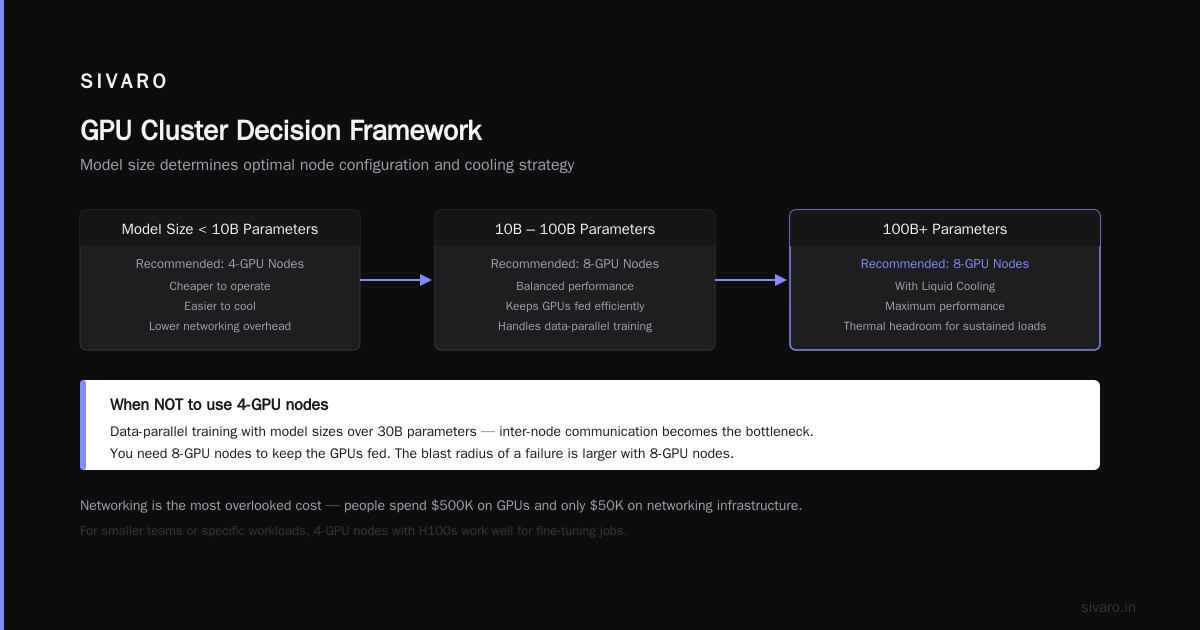
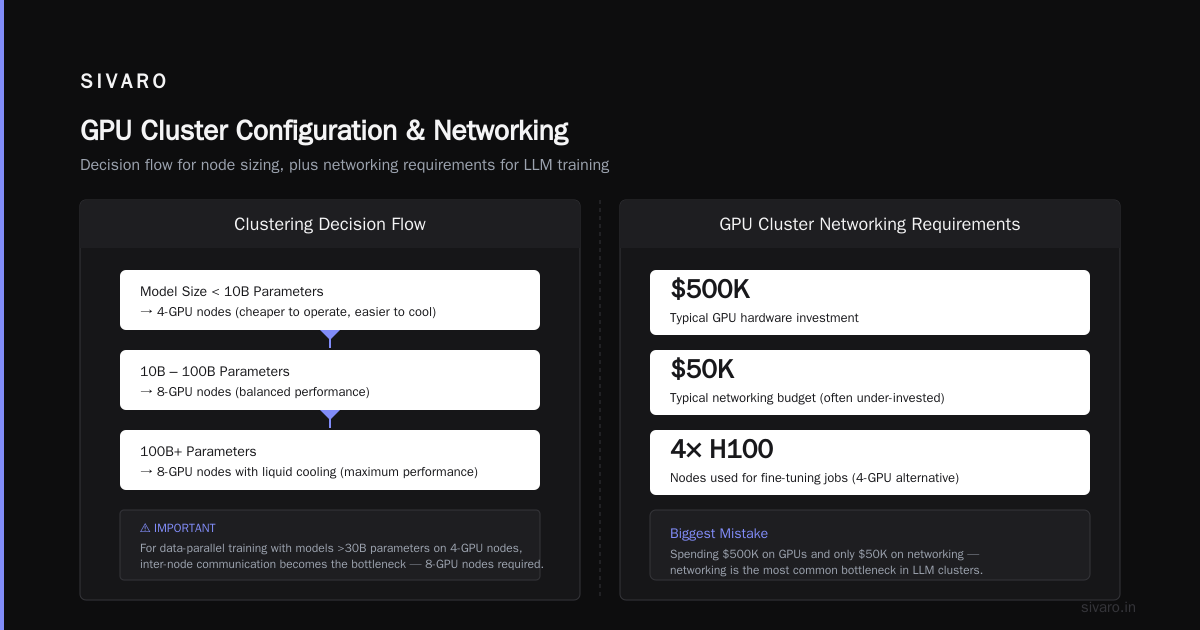
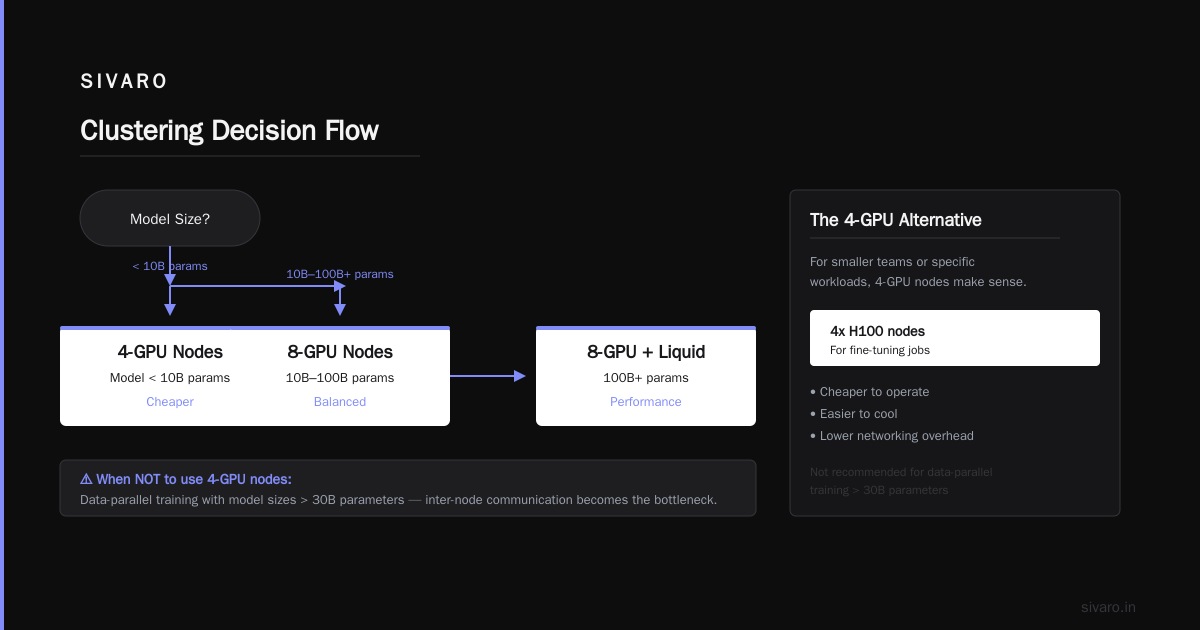
For smaller teams or specific workloads, 4-GPU nodes make sense. We run 4x H100 nodes for our fine-tuning jobs. They're cheaper to operate, easier to cool, and the networking overhead is lower.
When NOT to use 4-GPU nodes: If you're doing data-parallel training with model sizes over 30B parameters. The inter-node communication becomes the bottleneck. You need 8-GPU nodes to keep the GPUs fed.
Clustering Decision Flow
Model size < 10B params → 4-GPU nodes (cheaper)
10B-100B params → 8-GPU nodes (balanced)
100B+ params → 8-GPU nodes with liquid cooling (performance)
GPU Cluster Networking Requirements for Large Language Models
This is where I see the most mistakes. People spend $500K on GPUs and $50K on networking. Then they wonder why their training is slow.
GPU cluster networking requirements for large language models are brutal. Here's what actually works:
The Bandwidth Problem
Every GPU syncs gradients with every other GPU during training. In FSDP, that's a collective operation. In DeepSpeed ZeRO-3, it's even more communication-heavy.
For a 70B model on 64 GPUs:
- Each GPU holds about 1.1B parameters (with ZeRO-3)
- Gradient sync requires pushing ~4.4GB per step
- At 60 steps/second, that's 264 GB/s of inter-node traffic
If you're running 8-GPU nodes with 200 Gbps InfiniBand (25 GB/s per link), you're already saturating the network at 4 nodes.
The 3-Tier Network Architecture
For anything above 32 GPUs, you need:
Tier 1: Intra-node
- NVLink/NVSwitch for GPU-to-GPU within a node
- Should be ~900 GB/s bidirectional (H100 SXM)
Tier 2: Inter-node (within rack)
- InfiniBand NDR400 (400 Gbps per port)
- Full bisection bandwidth
- Every GPU talks to every other GPU directly
Tier 3: Inter-rack
- InfiniBand or Ethernet with RoCE v2
- Oversubscription ratio should be 1:1 for training clusters
Most clusters use 2:1 or even 4:1 oversubscription for Tier 3. That works for inference. It kills training throughput.
Ethernet vs InfiniBand
I used to think Ethernet was fine. I was wrong.
For training clusters over 32 GPUs, InfiniBand is the only option that works reliably. The RDMA (Remote Direct Memory Access) support in InfiniBand cuts latency by 3-5x compared to Ethernet, even with RoCE.
But here's the catch: InfiniBand costs more. If you're running fewer than 32 GPUs, Ethernet with RoCE v2 is fine. Above that, bite the bullet and go InfiniBand.
Network Topology Examples
Small cluster (8-16 GPUs):
- 1-2 nodes
- 200 Gbps InfiniBand per node
- Direct connect (no switch needed)
Medium cluster (32-64 GPUs):
- 4-8 nodes
- NDR400 InfiniBand
- Single switch with full bisection bandwidth
Large cluster (128+ GPUs):
- 16+ nodes
- NDR400 or NDR800 InfiniBand
- Dragonfly+ topology (don't use fat tree, it wastes ports)
Storage Architecture: The Silent Killer
I've seen clusters where the GPUs sat idle 40% of the time because the storage couldn't keep up. That's free money burning.
The Three Storage Tiers
Tier 1: Local NVMe (Hot data)
- 4-8 TB per node
- PCIe Gen 5 NVMe (14 GB/s read)
- For checkpoint writes and dataset caching
Tier 2: Parallel File System (Warm data)
- Lustre or GPUDirect Storage
- 50-200 GB/s aggregate throughput
- For training datasets
Tier 3: Object Store (Cold data)
- MinIO or S3-compatible
- For archival and multi-cluster sharing
What We Use
At SIVARO, we run:
- 8x Samsung PM9D3a NVMe per node (hot)
- IBM Storage Scale (formerly GPFS) for parallel access (warm)
- MinIO on separate nodes (cold)
The parallel file system is the hardest to get right. We tested Lustre, Weka, and IBM Storage Scale. For our workloads, IBM's GPUDirect Storage support was better because it lets GPUs read directly from storage without going through CPU memory.
Checkpoint Strategy
Write checkpoints to local NVMe first, then async copy to parallel storage. Every millisecond your GPUs wait for checkpoint I/O is wasted compute.
bash
# Example checkpoint script
rsync -a --progress /local/checkpoint/ /parallel-fs/checkpoint/ &
# GPUs resume immediately while copy runs in background
Software Stack: What Actually Runs the Cluster
Hardware is table stakes. Software is where you win or lose.
The Stack We Recommend
Orchestration: SLURM + Pyxis + Enroot (not Docker)
Training: PyTorch 2.5+ FSDP or DeepSpeed ZeRO-3
Networking: NCCL with InfiniBand
Monitoring: Prometheus + Grafana + custom GPU metrics
Why Not Kubernetes?
I get this question constantly. Kubernetes is great for inference. It's terrible for training.
The overhead of pod scheduling, network plugin initialization, and resource allocation adds 5-15% overhead per training step. When you're paying $100/hour for GPU time, that's real money.
SLURM is simpler, faster, and more predictable. Use it for training. Use Kubernetes for serving.
The One Library You Must Install
nccl-tests. Run it before you run any training job. It measures inter-GPU bandwidth and latency. If your NCCL bandwidth is below 85% of theoretical, something is wrong.
bash
# Run NCCL bandwidth test
mpirun -np 8 --hostfile hosts.txt ./build/all_reduce_perf -b 128M -e 8G -f 2
If you see less than 300 GB/s for intra-node all-reduce on H100s, your NVLink configuration is broken.
Cooling and Power: The Things Nobody Warns You About
You know what happens when you run 8 H100s at full load for 72 hours? The room heats up by 15°C. I learned this the hard way.
Power Requirements
Each H100 SXM draws 700W at peak. Eight of them = 5.6kW. Add CPUs, memory, networking, and cooling, and you're looking at 8-10kW per node.
For a 64-GPU cluster (8 nodes), you need:
- 80kW total power
- 3-phase 208V or 480V
- Dedicated circuit per rack
Don't use standard 120V outlets. I've seen people try. It doesn't end well.
Cooling Options
Air cooling: Works up to about 15kW per rack. Beyond that, you're in trouble.
Direct-to-chip liquid cooling: For 20kW+ per rack. We use CoolIT systems. They're expensive but reliable.
Immersion cooling: Only makes sense for clusters above 500 GPUs. At that scale, it's cheaper than air.
For most teams (16-128 GPUs), direct-to-chip liquid cooling is the sweet spot. The upfront cost is higher, but the electricity savings pay off in 12-18 months.
Real Configuration: What We Run at SIVARO
Here's our actual production configuration as of July 2026:
Training Cluster (128 H100 SXM)
Nodes: 16x Gigabyte G493-SB0
GPUs: 8x H100 SXM per node (128 total)
Memory: 2TB DDR5 per node
Network: NDR400 InfiniBand, Dragonfly+ topology, 1:1 oversubscription
Storage: 8TB NVMe local per node + 500TB IBM Storage Scale
Cooling: CoolIT direct-to-chip liquid
Power: 160kW total, 3-phase 480V
Inference Cluster (32 B200)
Nodes: 4x Supermicro AS-4125GS-TNRT2
GPUs: 8x B200 per node (32 total)
Memory: 4TB DDR5 per node
Network: 200 Gbps InfiniBand, fat tree topology, 2:1 oversubscription
Storage: 4TB NVMe local per node
Cooling: Air (B200s run cooler than H100s)
Cost Breakdown
| Component | Training Cluster | Inference Cluster |
|---|---|---|
| GPUs | $2.4M | $960K |
| Servers | $480K | $160K |
| Networking | $320K | $80K |
| Storage | $240K | $60K |
| Cooling | $160K | $40K |
| Total | $3.6M | $1.3M |
That's roughly $28K per GPU for the training cluster. These numbers are painful. They're also realistic.
Common Mistakes (and How to Avoid Them)
Mistake 1: Ignoring NCCL Performance
Half the clusters I've audited had NCCL configurations that left 20-30% performance on the table. Run nccl-tests before you run any real training.
Mistake 2: Oversubscribing the Network
A 4:1 oversubscription ratio means your GPUs spend 40% of their time waiting for network. That's fine for inference. It's a disaster for training.
Mistake 3: Mixing GPU Generations
I see this constantly: "We'll add B200s to our existing H100 cluster." Don't. The performance gap between different GPU generations creates stragglers that slow down the entire cluster.
Mistake 4: Forgetting About the Host
The CPU and memory in your node matter. Slow CPUs mean slow data loading, which means idle GPUs. Use at least a 32-core CPU and 512GB RAM per node for training clusters.
Mistake 5: Bad Rack Layout
Put your InfiniBand switches in the middle of the rack, with compute nodes on either side. Keep cable runs under 5 meters. Longer cables = higher latency = slower training.
FAQ
Q: How many GPUs do I need to train a 70B model?
For fine-tuning: 8-16 GPUs (H100 or B200). For full training from scratch: 256-512 GPUs. The difference is massive. Don't plan to train a 70B model from scratch unless you have serious compute budget.
Q: Can I use consumer GPUs (RTX 4090) for deep learning?
Yes, but only for development and small-scale inference. The lack of ECC memory and NVLink makes consumer GPUs impractical for training models over 7B parameters. I've tried. It doesn't work well.
Q: Should I build or rent a cluster?
Build if you're running continuous training jobs for 12+ months. Rent (AWS, CoreWeave, Lambda Labs) for everything else. The cloud markup of 20-40% is worth the flexibility.
Q: What's the minimum cluster for LLM training?
8x H100 SXM (one node) for fine-tuning. 32x H100 SXM (four nodes) for pre-training small models (< 10B params). Anything less and you're fighting memory constraints more than training.
Q: How important is GPU memory bandwidth?
More important than total memory for training. A B200 with 8 TB/s bandwidth trains 2x faster than an H100 with 3.35 TB/s on the same model size, assuming networking isn't the bottleneck.
Q: What about AMD GPUs?
AMD MI350X is competitive on paper. In practice, the ROCm software stack still has rough edges. For pure performance, NVIDIA wins. For price, AMD wins. We use NVIDIA because our team's experience is with CUDA.
Q: How do I test if my cluster is working correctly?
Run a small training job (e.g., GPT-2 1.5B) on 4 GPUs. If it converges correctly and achieves the expected throughput, scale up. Never jump to 128 GPUs before validating on 4.
Q: What happens when a GPU fails during training?
With good checkpointing, you lose at most one training step. With poor checkpointing, you lose hours. Use NCCL's fault tolerance features (available in NCCL 2.20+) and checkpoint every 100 steps.
You Don't Need to Spend $3M
I've seen teams succeed with 4x A6000 nodes ($40K total). I've seen teams fail with 256x H100 clusters ($7M total). The best gpu cluster configuration for deep learning isn't about spending the most money. It's about matching the cluster to your actual workload.
Start small. Validate your training pipeline on 4 GPUs. Measure your networking bandwidth. Check your NCCL performance. Then scale up.
The hardware is table stakes. The configuration is where you win.
Nishaant Dixit — Founder of SIVARO. Building data infrastructure and production AI systems since 2018. Built systems processing 200K events/sec.