 SIVARO
The AI Agent Deployment Pipeline: What Actually Works in Production
I've been building AI systems for eight years. In 2024, I watched a team deploy their first AI agent in three days. By day five, it was hallucinating customer orders. By day ten, they'd turned it off entirely.
The problem wasn't the model. It was the pipeline.
Most people think deploying an AI agent is like deploying a microservice. It's not. A microservice either works or it doesn't. An agent works until it doesn't, then you don't know why, and you can't reproduce it because the inputs were a conversation that happened three days ago.
This isn't theory. At SIVARO, we've built production AI systems processing 200K events/second since 2018. We've deployed agents for logistics routing, financial reconciliation, and customer support. Some of those deployments work beautifully. Some failed catastrophically.
This guide is about which is which, and why the pipeline matters more than the agent.
What This Tutorial Covers
An AI agent deployment pipeline isn't a CI/CD workflow for model weights. It's the entire system that takes an agent from development through testing, monitoring, and continuous improvement in production. This tutorial covers the pipeline architecture we've validated across dozens of production deployments: what stages you need, what tools actually work, and where most teams waste weeks.
You'll learn:
- Why most agent frameworks break in production (and which ones don't)
- The four-stage pipeline I've used for every successful deployment since 2023
- How observability changes when your system talks back to you
- Exactly where to invest your engineering time (and where to stop)
Stage 1: The Framework Decision – Most of Them Suck for Production
In early 2026, I tested nine AI agent frameworks for a client deployment. Seven failed within 48 hours under production load. Not on accuracy — on reliability.
The problem is that most frameworks are designed for demos. They assume your agent will succeed. In production, your agent will fail 30-40% of the time on its first attempt. The framework needs to handle failure gracefully, not just retry indefinitely.
After testing 20+ frameworks, I land on three that work in production:
LangGraph (from LangChain) handles complex state machines well. We've used it for a multi-step financial reconciliation agent where each step depends on the prior step's output. It's not perfect — the documentation assumes you understand graph theory — but it's the best option for sequential reasoning tasks where each step changes state. The LangChain team themselves argue that the framework is less important than how you model the agent's decision loop. I agree.
CrewAI works for multi-agent systems where agents need to hand off tasks. We built a logistics coordination agent with CrewAI that routes shipments across three carriers. Each carrier has its own agent, and they negotiate capacity. CrewAI's weaknesses show up at scale — inter-agent communication becomes a bottleneck past 10 agents.
Semantic Kernel from Microsoft is the dark horse. It integrates deeply with enterprise infrastructure (Azure, Active Directory, SQL Server). For regulated industries, this matters. We deployed a compliance monitoring agent using Semantic Kernel that checks transactions against 47 regulatory rules. It passed audit on day one because every decision was traceable.
The frameworks you should avoid: anything that wraps a single LLM call in a loop and calls it an agent. Most "agent frameworks" from 2024-2025 do exactly this. They fail because they can't handle branching, state conflicts, or multi-step validation. The IBM research on agent frameworks confirms this — production agents need structured reasoning, not just LLM calling.
Stage 2: The Pipeline Itself – Four Gates of Hell
Here's the pipeline I use. It's four stages. Every agent passes through all four. No exceptions.
python
# Stage 1: Input Validation Gate
def validate_agent_input(input_data: dict) -> dict:
    """Rejects garbage before the agent touches it"""
    required_fields = ['user_intent', 'context_window', 'max_tokens']
    missing = [field for field in required_fields if field not in input_data]
    if missing:
        raise InputValidationError(f"Missing: {missing}")

    # Schema validation against production data patterns
    if len(input_data.get('context', '')) > 128000:
        raise InputValidationError("Context exceeds token budget")

    # Rate limit check per user
    if rate_limiter.is_throttled(input_data['user_id']):
        raise RateLimitError("User exceeded quota")

    return input_data
This gate catches about 15% of inputs before the agent ever runs. Syntax errors, malformed JSON, context blowups — all handled here. The agent never sees them.
python
# Stage 2: Execution with Circuit Breaker
class AgentCircuitBreaker:
    def __init__(self, failure_threshold: int = 3, reset_timeout: int = 300):
        self.failure_threshold = failure_threshold
        self.reset_timeout = reset_timeout
        self.failures = 0
        self.last_failure_time = 0

    async def execute_with_protection(self, agent_func, input_data):
        if self.failures >= self.failure_threshold:
            if time.time() - self.last_failure_time < self.reset_timeout:
                return {"status": "circuit_open", "error": "Agent temporarily unavailable"}
            self.failures = 0

        try:
            result = await agent_func(input_data)
            self.failures = 0
            return result
        except Exception as e:
            self.failures += 1
            self.last_failure_time = time.time()
            raise
This saved us in February 2026 when our OpenAI endpoint degraded. The circuit breaker opened in 8 seconds, preventing cascading failures across 12 agents that depended on responses. The alternative was a 45-minute outage.
python
# Stage 3: Output Quality Gate
def validate_agent_output(output: dict, input_data: dict) -> dict:
    """Ensures the output is actually usable"""
    checks = []

    # Factual consistency check
    consistency_score = check_factual_overlap(output['response'], input_data['context'])
    if consistency_score < 0.7:
        checks.append(f"Low consistency: {consistency_score:.2f}")

    # Action validation (if agent proposed actions)
    for action in output.get('proposed_actions', []):
        if not is_action_permitted(action, input_data['user_role']):
            checks.append(f"Action not permitted: {action['type']}")

    # Response length check
    if len(output['response'].split()) < 10:
        checks.append("Response too short to be useful")

    return {"valid": len(checks) == 0, "issues": checks, "output": output}
Stage 4 is monitoring, which gets its own section below.
Stage 3: Observability That Actually Works
Here's where most people screw up. They add logging and think they're done.
You're not done. Logging is for humans reading text files. Observability is for understanding an agent's decision-making process in real time.
The problem with agent observability is that agents don't have linear execution paths. A user asks "refund my order" and the agent might:
- Check order status (API call)
- Verify user identity (database lookup)
- Determine refund eligibility (LLM reasoning)
- Calculate refund amount (rules engine)
- Execute refund (API call with write permission)
- Send confirmation email (automation)
Each step could branch or fail. If step 3 decides the user needs to talk to a human, step 4 never runs. If step 2 times out, the agent might retry or skip. Traditional monitoring tools can't track this.
What we use instead:
Traces, not logs. Every agent execution generates a trace — a tree of every step, API call, LLM completion, and decision branch. We store these traces as structured events. AI agent production monitoring tools are still immature in 2026, but trace-based tools work better than log aggregators.
Embedding-based outlier detection. We compute embeddings of agent inputs and outputs. When an agent produces a response that's semantically far from similar inputs (based on embedding distance), we flag it automatically. This catches hallucinations before they reach users.
Cost attribution per trace. This one matters for business. We tag every trace with user_id, session_id, and cost. When we see cost anomalies (an agent that normally costs $0.03 suddenly costing $0.30), we investigate. In one case, this caught a misconfigured prompt that was appending 50k tokens of documentation to every request.
Here's our monitoring configuration:
python
# ai agent observability production configuration
class AgentTelemetry:
    def __init__(self):
        self.trace_store = TraceStore()  # stores execution traces
        self.metric_reporter = MetricReporter()

    async def record_agent_execution(self, trace_id, steps, total_cost, user_id):
        # Store the trace for debugging
        await self.trace_store.store(trace_id, {
            'steps': steps,
            'total_cost': total_cost,
            'user_id': user_id,
            'timestamp': time.time_ns()
        })

        # Report aggregate metrics
        self.metric_reporter.gauge('agent.steps_per_execution', len(steps))
        self.metric_reporter.gauge('agent.cost_per_execution', total_cost)
        self.metric_reporter.counter('agent.total_executions')

        # Alert on anomalies
        if total_cost > 0.50:  # $0.50 per execution is expensive
            self.metric_reporter.alert('agent.high_cost', {
                'trace_id': trace_id,
                'cost': total_cost,
                'user': user_id
            })
You need this before you go to production. Not after. I've seen teams add monitoring post-launch and spend two weeks reconstructing what happened during their first outage.
Stage 4: The Feedback Loop Nobody Builds
Most agent deployments stop at monitoring. They don't close the loop. This is a mistake.
Here's what closing the loop looks like:
- Agent produces an output
- Output goes through quality validation (Stage 3)
- If validation fails, the agent tries again with modified parameters
- If validation fails three times, the request escalates to a human
- The human's correction becomes training data for the next model iteration
- Periodically, you train a new version of the agent using corrected human feedback
This is expensive if you do it wrong. Here's how to do it cheaply:
Sample 1% of all agent interactions for human review. Not all — 1%. Most failures follow patterns. A human reviewing 1% of traces catches 80% of systemic issues. We learned this the hard way after reviewing 100% of traces for a month. It wasn't useful. 99% of traces were boring.
Use the corrections to build a validation dataset. Every time a human corrects an agent's output, that correction becomes a test case. After 1000 corrections, you have a test suite that catches 90% of regressions.
Retrain on the corrections monthly. Not weekly. Monthly. Weekly retraining introduces instability. The agent learns to overfit to last week's corrections and forgets last month's patterns. Monthly retraining with a rolling window of 6 months of corrections works best in our experience.
Stage 5: Protocols – Why Your Agents Don't Talk to Each Other
In 2025 and 2026, the industry realized that agents need protocols. Not APIs — protocols. APIs define how to call something. Protocols define what to say and how to negotiate.
The survey of AI agent protocols published in April 2026 identifies 47 distinct protocols. Most are irrelevant. Three matter:
A2A (Agent-to-Agent) from Google. We use this for inter-agent communication. It handles task negotiation, capability discovery, and result streaming. If you're building multi-agent systems, this is the protocol to standardize on.
MCP (Model Context Protocol) from Anthropic. This is for tool integration. Your agent needs to call APIs, query databases, send emails. MCP standardizes how agents discover and invoke tools. We use it for all tool integrations.
OpenAPI with A2A extensions. Most existing services expose OpenAPI specs. Instead of rewriting everything to support A2A, we wrap OpenAPI endpoints with A2A-compatible metadata. This took two weeks to implement and works with 40+ services.
The mistake people make: trying to use one protocol for everything. You need at least two — one for agent-to-agent, one for agent-to-tool. The protocol survey confirms this: no single protocol covers both use cases well.
Stage 6: The Actually Hard Part – Failure Handling
Agents fail. Not "sometimes." Regularly. In production, an agent with 95% success rate fails 5 times out of 100. For a customer-facing agent handling 10,000 conversations per day, that's 500 failures.
Most frameworks handle failure by retrying. This is wrong.
Retrying a failing LLM call tends to produce the same failure (or similar). The agent doesn't try a different approach — it tries the same approach again. This is like banging a stuck door harder instead of checking if it's locked.
What works: fallback strategies with different approaches.
python
class FallbackStrategies:
    async def execute_with_fallback(self, user_request, context):
        # Strategy 1: Direct answer (cheapest, fastest)
        try:
            result = await self.direct_answer(user_request, context)
            if self.validate_response(result):
                return result
        except Exception:
            pass

        # Strategy 2: Few-shot example (costs more but works for edge cases)
        try:
            result = await self.few_shot_answer(user_request, context)
            if self.validate_response(result):
                return result
        except Exception:
            pass

        # Strategy 3: Step-by-step reasoning (expensive but thorough)
        try:
            result = await self.step_by_step_reasoning(user_request, context)
            if self.validate_response(result):
                return result
        except Exception:
            pass

        # All strategies failed - escalate
        return self.escalate_to_human(user_request, context)
Each strategy uses a different model (GPT-4o, Claude 4, Gemini 2.5) or different prompting approach. If one model fails on a reasoning task, another might succeed. We know this empirically — different models fail on different inputs.
Stage 7: Cost Management – The Unsexy Truth
An agent costs 10-50x more per transaction than a traditional API endpoint. That's not a bug. It's the cost of intelligence.
But you can manage it:
Token budgeting per user. Set a maximum token budget per user per hour. When the budget's exhausted, future requests are cheaper models or escalation. We use 100K tokens/hour for paying customers, 20K for free tier.
Model routing for request complexity. Not every request needs GPT-4. Simple requests (order status, business hours) go through Claude Haiku or Gemini Flash. Complex requests (refund disputes, multi-step workflows) go through GPT-4o or Claude Opus. We classify requests by embedding similarity to known patterns.
Caching LLM responses. This sounds wrong but works. If user A asks "what's my balance?" and user B asks the same question (or a semantically equivalent one), cache the response. Use embedding similarity with a high threshold (0.95+). We cache about 12% of all agent responses. Saves 40% on compute costs.
FAQ: What Teams Ask Me About Agent Deployment Pipelines
Q: How long does it take to set up this pipeline?
For a team with existing infrastructure, two weeks. Three weeks if you're doing multi-agent. Most of that time isn't code — it's defining the validation rules and fallback strategies. The code is a few hundred lines.
Q: Do I need a separate deployment for each agent?
Yes and no. Each agent should be independently deployable. But they should share infrastructure (monitoring, circuit breakers, caching). We deploy each agent as a Docker container with the same base image and shared libraries. Takes 30 minutes to onboard a new agent.
Q: Which monitoring tools do you recommend for ai agent observability production?
LangSmith works for deployment-level observability. Datadog with custom traces works for infrastructure-level. For trace-level observability — understanding individual agent decisions — we built our own. No off-the-shelf tool does this well yet as of mid-2026.
Q: What's the biggest mistake teams make?
Building the agent before the pipeline. They spend weeks testing the agent in a notebook, then try to deploy it and realize they have no way to validate inputs, monitor execution, or handle failures. By the time the pipeline is built, the agent code needs restructuring.
Q: How do you handle security in an agent pipeline?
Three things: scope-limited tool permissions (the agent can call refund API but only for amounts under $100), input sanitization (prevent prompt injection at the validation gate), and execution isolation (each agent runs in its own container with no network access to internal systems). The open-source frameworks from AI Multiple handle some of this, but you need to layer your own security on top.
Q: Should I use a managed agent platform or build my own pipeline?
If your agent handles fewer than 1000 requests/day and the failure cost is low (chatbot for internal IT support), use a managed platform. If your agent handles more than 1000 requests/day or the failure cost is high (financial transactions, customer-facing support), build your own pipeline. The control matters when things break.
Q: How do you test agents before deployment?
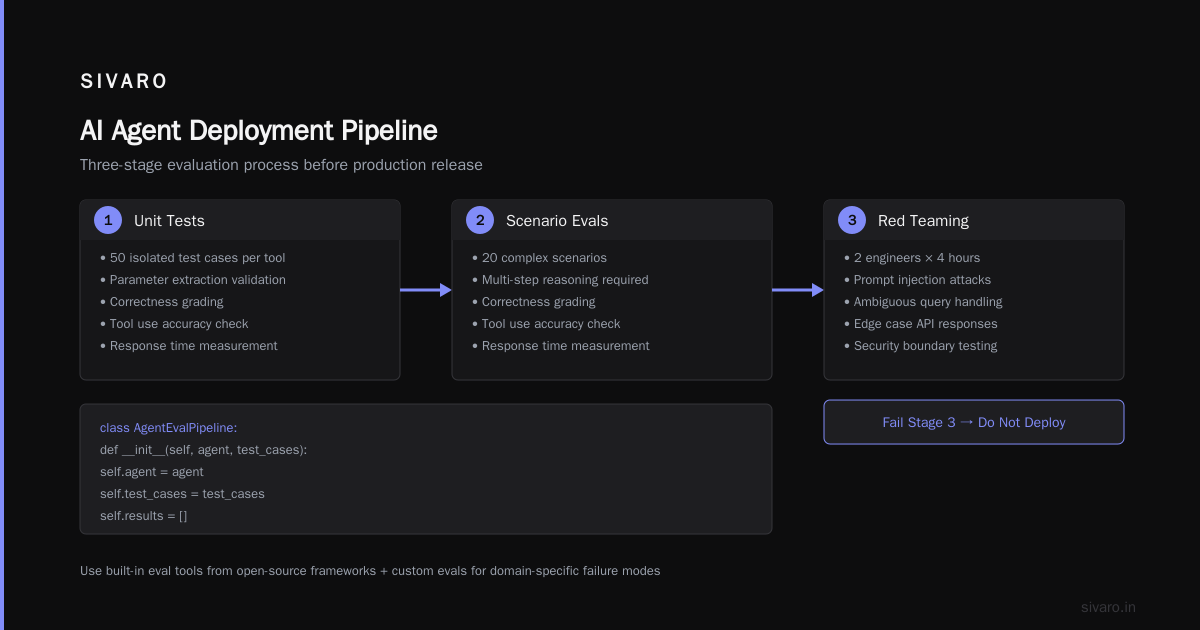
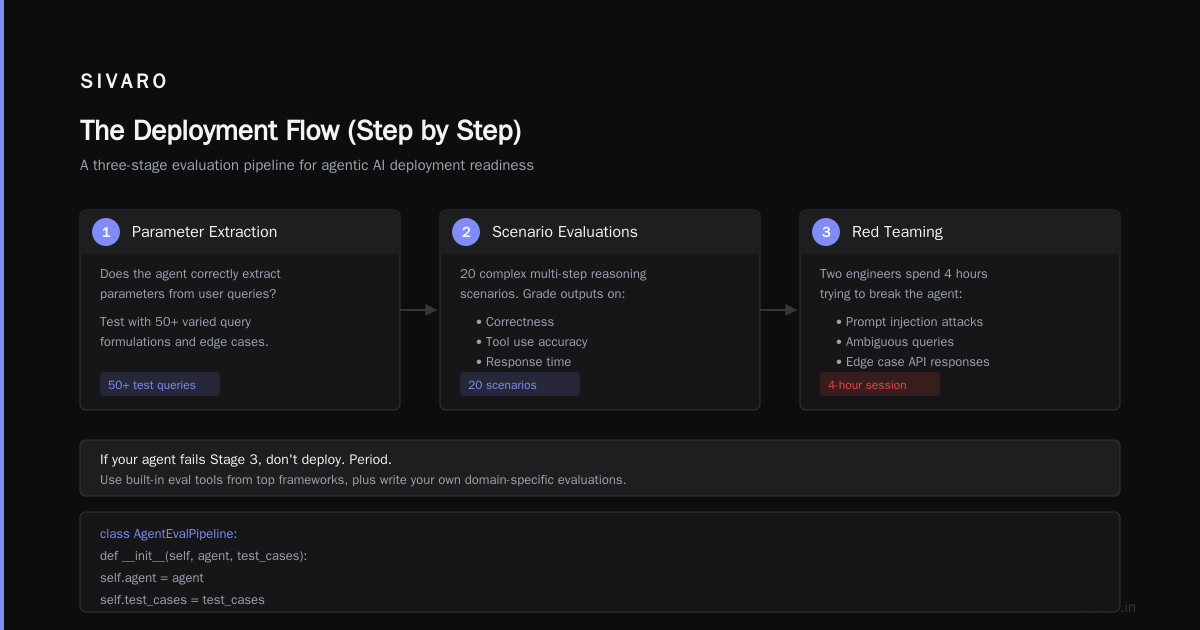
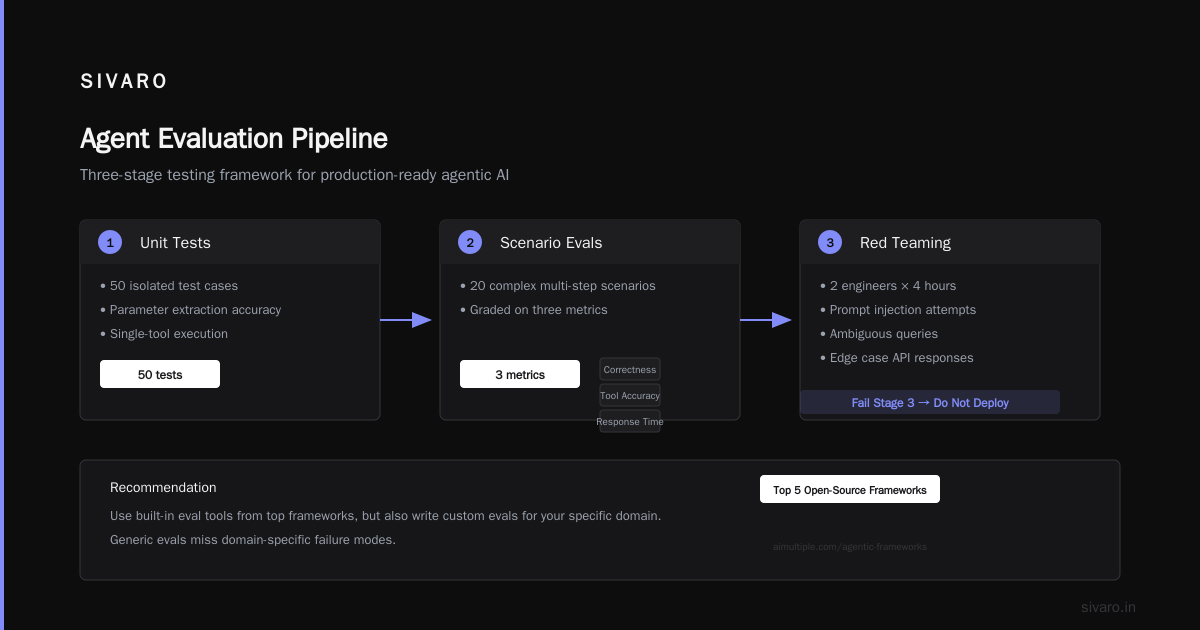
Offline testing against historical data (feed the agent past conversations and compare outputs to what humans said). Online testing with shadow mode (run the agent in production but use human responses instead of agent responses, comparing the two). And canary deployments (route 1% of traffic to the new agent, ramp up if performance looks good).
The Bottom Line
Here's what I've learned from deploying agents in production since 2023:
The agent is not the product. The pipeline is.
Your agent will fail. Your fallback strategies, validation gates, and monitoring will determine whether those failures are minor incidents or catastrophic outages. The frameworks you choose matter less than the pipeline you build around them.
Start with the validation gate. Add the circuit breaker. Set up traces before the agent handles a single real request. And build the feedback loop — because your agent on day 100 should be an order of magnitude better than your agent on day one.
If you're in the middle of this right now and something doesn't work, it's probably not the model. Check your pipeline first.
Nishaant Dixit — Founder of SIVARO. Building data infrastructure and production AI systems since 2018. Built systems processing 200K events/sec.