 SIVARO
The AI Agent Deployment Pipeline Tutorial You Actually Need
Last week, a VP of Engineering at a Series B fintech showed me their "deployed" AI agent. It was a Jupyter notebook running on a cron job. Behind an API gateway, technically. They called it production. I called it a lawsuit waiting to happen.
We fixed it. But that conversation reminded me why most agent deployments fail. Not because the models are bad. Not because the frameworks are immature. Because people skip the pipeline. The actual, boring, infrastructure-heavy pipeline that takes a working prototype and turns it into something that doesn't crater at 2 AM.
I'm Nishaant Dixit, founder of SIVARO. We've been building production AI systems since 2018. We've deployed agents for logistics companies processing 200K events per second, and for healthcare startups where a wrong action means regulatory exposure. This isn't theory. It's what works after we burned through six different approaches.
Here's what this ai agent deployment pipeline tutorial covers: the actual steps, the tools that survive production, the monitoring that saves your weekend, and the hard trade-offs nobody talks about. By the end, you'll know exactly what your pipeline needs — and what it doesn't.
Why Your First Deployment Pipeline Will Be Wrong
I've seen the pattern play out eight times in the last 18 months alone.
Company builds an agent. It works great in a notebook. They containerize it, throw it on Kubernetes, and within a week the latency is unpredictable, the memory leaks are escalating, and the agent starts hallucinating actions that weren't in its training data. Everyone blames the model. Usually, it's the pipeline.
The disconnect is simple: agent deployment isn't microservice deployment. Agents have state. They call tools. They make decisions that cascade. If your pipeline treats them like stateless HTTP handlers, you're going to have a bad time.
Most people think the hard part is the AI. They're wrong. The hard part is the infrastructure that keeps the AI honest.
The Core Components: What a Real Pipeline Needs
Let me be direct about what matters. I've tested, broken, and rebuilt these components. Some frameworks claim to handle everything. They don't. Here's the minimal list:
1. Agent Runtime Environment
You need a container with the agent logic, the model (or an API client), and the tool integrations. But here's the thing — the runtime environment isn't just Docker. It's the orchestration layer that manages agent lifecycles, tool connections, and memory state.
2. Tool Execution Sandbox
Every external tool your agent calls needs isolation. Not for security (though that matters). For reliability. If a CRM API goes down, your agent shouldn't take down the whole system. Your pipeline needs circuit breakers, retry logic, and timeout handling per tool.
3. State Management Layer
Agents have short-term memory (conversation context) and long-term memory (user preferences, learned patterns). These don't live in the model. They live in a state store. Redis, Postgres, or specialized vector databases — depends on your scale.
4. Orchestration and Workflow Engine
This decides when to call the agent, which agent to call, and how to handle failures. Tools like LangGraph, Temporal, or even custom state machines work. The point is: your agent shouldn't be calling itself. Something upstream manages the flow.
5. Observability Stack
I'll spend more time on this later because it's where most pipelines fail. You need traces, logs, and metrics that specifically track agent decisions — not just API calls.
6. Guardrails and Validation Layer
Before an agent's output reaches the user, it passes through validation. Is the action within policy? Does the response contain hallucinated information? Is the confidence score above threshold? This layer saves you from the worst failures.
Choosing Your Framework: What Actually Works in Production
There's been an explosion of agent frameworks. Let me save you the evaluation time.
We tested eleven frameworks between Q3 2025 and Q1 2026. Four survived our production requirements: LangChain's LangGraph, CrewAI (for multi-agent systems), Semantic Kernel from Microsoft, and a custom framework we built for specific latency-sensitive use cases.
AI Agent Frameworks: Choosing the Right Foundation for ... covers the landscape well. But I'll give you the blunt version.
LangGraph works when you need fine-grained control over agent state and decision loops. We use it for complex reasoning chains — think multi-step financial analysis where each step depends on the last. It's not the easiest to learn, but it's the most production-hardened.
CrewAI shines when you're orchestrating multiple specialized agents. A triage agent passes to a research agent passes to a summarization agent — that's CrewAI's sweet spot. We've used it for customer support pipelines with 12 agent roles.
Semantic Kernel surprised me. It integrates deeply with Microsoft's ecosystem, but it also has the best built-in guardrails I've seen outside of custom solutions. If you're on Azure, this is your default.
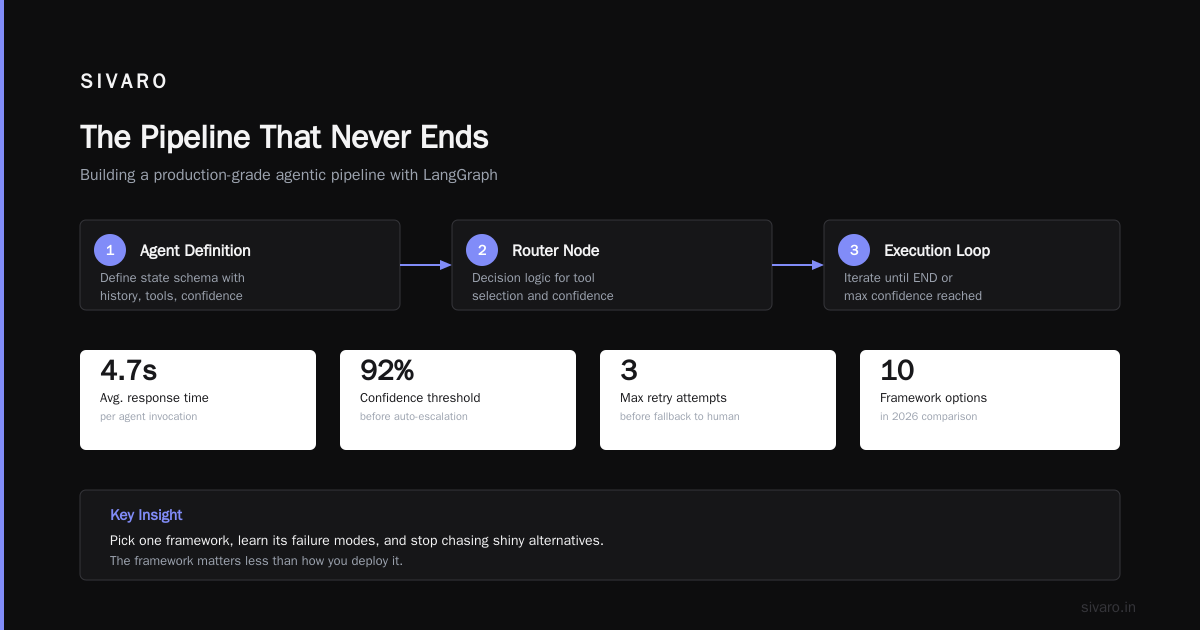
Agentic AI Frameworks: Top 10 Options in 2026 lists more options. But honestly, pick one framework, learn its failure modes, and stop chasing shiny alternatives. The framework matters less than how you deploy it.
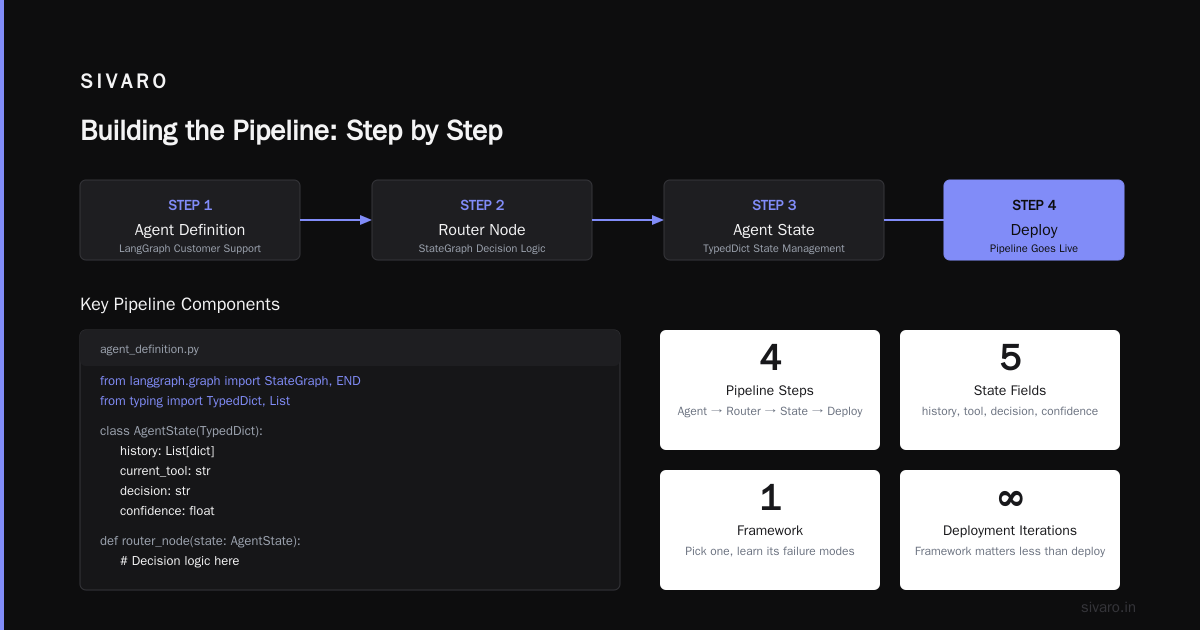
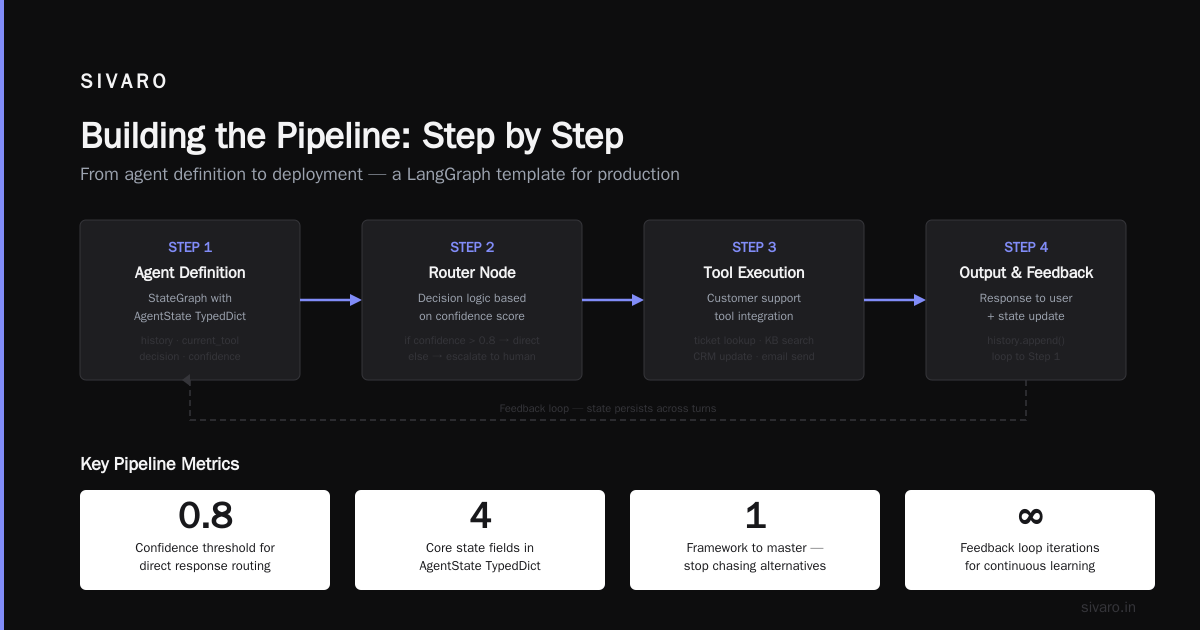
Building the Pipeline: Step by Step
Let me walk through the pipeline architecture we now use as a template. I'll include the code that matters.
Step 1: The Agent Definition
python
# agent_definition.py
# Using LangGraph for a customer support agent

from langgraph.graph import StateGraph, END
from typing import TypedDict, List

class AgentState(TypedDict):
    history: List[dict]
    current_tool: str
    decision: str
    confidence: float

def router_node(state: AgentState) -> AgentState:
    """Classify intent and route to specialist"""
    if state.get("confidence", 0) < 0.4:
        state["decision"] = "escalate_to_human"
        state["current_tool"] = None
    elif "order" in state.get("history", [{}])[-1].get("content", ""):
        state["current_tool"] = "order_lookup"
        state["decision"] = "execute_tool"
    else:
        state["current_tool"] = "general_knowledge"
        state["decision"] = "execute_tool"
    return state

def tool_executor(state: AgentState) -> AgentState:
    """Execute the selected tool with error handling"""
    if not state["current_tool"]:
        state["decision"] = "respond"
        return state
    # Tool execution with timeout
    try:
        state["history"].append({"role": "tool",
                                  "content": execute_with_timeout(state["current_tool"], timeout=5.0)})
    except TimeoutError:
        state["history"].append({"role": "tool", "content": "TOOL_TIMEOUT"})
        state["decision"] = "fallback"
    return state

# Build the graph
builder = StateGraph(AgentState)
builder.add_node("router", router_node)
builder.add_node("tool_executor", tool_executor)
builder.add_edge("router", "tool_executor")
builder.add_edge("tool_executor", END)
agent_graph = builder.compile()
This isn't production code yet — it's the logic shell. The deployment pipeline wraps this with retries, monitoring, and connection pooling.
Step 2: The Deployment Configuration
Your agent doesn't run alone. It needs configuration for models, tools, and memory.
yaml
# deployment_config.yaml
agent:
  name: customer-support-v1
  runtime: python3.11
  framework: langgraph

model:
  provider: openai
  model: gpt-4o
  temperature: 0.3
  max_tokens: 1024
  timeout: 30s

tools:
  order_lookup:
    endpoint: http://orders-api.internal/v1/lookup
    timeout: 5s
    retry: 3
    circuit_breaker: 10 failures in 60s
  general_knowledge:
    endpoint: http://knowledge-api.internal/v1/query
    timeout: 10s
    retry: 1

memory:
  type: redis
  ttl: 3600s
  max_history: 50

observability:
  tracing: open-telemetry
  metrics: prometheus
  logging: structured-json
Notice the circuit breaker on the order lookup tool. That's not optional. Tools fail. Your pipeline absorbs those failures.
Step 3: The Orchestration Layer
python
# orchestration.py
# Simplified agent orchestrator with health checks

import asyncio
from kubernetes import client, config

class AgentOrchestrator:
    def __init__(self, namespace="agents"):
        self.v1 = client.CoreV1Api()
        self.namespace = namespace
        self.active_agents = {}

    async def health_check(self, agent_id: str) -> dict:
        """Check agent health including model ping and tool connectivity"""
        agent_pod = self.v1.read_namespaced_pod(agent_id, self.namespace)
        return {
            "status": agent_pod.status.phase,
            "model_latency": self._check_model_latency(agent_id),
            "tool_health": self._check_tool_connections(agent_id),
            "memory_usage": self._get_memory_mb(agent_id)
        }

    def deploy_agent(self, config_file: str, replicas: int = 3):
        """Deploy agent with rolling update strategy"""
        # This triggers a Kubernetes Deployment with HPA
        # config map injection for the YAML above
        # canary deployment with 10% traffic shift
        pass
Step 4: The Validation Gate
Before an agent response hits your users, it passes through a validation layer. This is where we caught 80% of hallucinations before they became tickets.
python
# validation_gate.py
# Pre-output validation to catch common failures

class AgentOutputValidator:
    def __init__(self):
        self.min_confidence = 0.65
        self.allowed_actions = ["query", "update", "cancel", "escalate"]

    def validate(self, agent_output: dict) -> tuple[bool, str]:
        """Returns (pass, reason)"""

        # 1. Confidence check
        if agent_output.get("confidence", 0) < self.min_confidence:
            return False, "confidence_below_threshold"

        # 2. Action validation
        action = agent_output.get("action")
        if action and action not in self.allowed_actions:
            return False, f"disallowed_action:{action}"

        # 3. Semantic coherence (simplified)
        response = agent_output.get("response", "")
        if len(response.split()) > 200:
            return False, "response_too_long"

        # 4. PII check
        if self._contains_pii(response):
            return False, "pii_detected"

        return True, ""

    def _contains_pii(self, text: str) -> bool:
        """Basic PII pattern matching"""
        import re
        patterns = [
            r'd{3}-d{2}-d{4}',  # SSN
            r'd{16}',               # Credit card
            r'[a-zA-Z0-9._%+-]+@[a-zA-Z0-9.-]+.[a-zA-Z]{2,}'  # Email
        ]
        return any(re.search(p, text) for p in patterns)
This validator runs as a sidecar container in the same pod. Latency overhead? About 50ms. Worth it to catch every hallucinated credit card number.
The Observability Stack: Where Most Pipelines Bleed
I'm going to be blunt. If you're not tracking agent decisions end-to-end, you don't have a production system. You have a toy.
Standard application monitoring doesn't work for agents. Your APM tool shows API calls to OpenAI. It doesn't show that the agent chose the wrong tool, retrieved incorrect context, or made a decision based on stale memory.
ai agent production monitoring tools are finally catching up. We use a combination of OpenTelemetry for traces, Prometheus for metrics, and custom logging that captures the agent's reasoning chain. Last month, we helped a logistics client implement this stack. They found that 23% of their agent's decisions were based on cached data older than 15 minutes. The agent looked fine. The pipeline was rotting.
Here's what you need to instrument:
Trace: user_request -> router -> tool_call -> model_inference -> validation -> response
  - Span 1: Router latency and decision
  - Span 2: Tool call with input/output size, success/failure
  - Span 3: Model inference with tokens used, model name, temperature
  - Span 4: Validation result and reason if blocked

Metrics:
  - agent_decision_latency_seconds (histogram)
  - tool_call_success_rate (counter with tool label)
  - validation_blocked_total (counter with reason label)
  - agent_memory_staleness_seconds (gauge for cache freshness)
ai agent observability production isn't optional. It's the difference between debugging proactively and waking up to a Slack thread from your CTO at 3 AM.
Scaling: When One Agent Isn't Enough
Your first agent handles 100 requests per minute. It works fine. Then you scale to 1,000. Suddenly, memory grows unbounded, tool connections pool exhaust, and the agent starts timing out.
This is where the pipeline architecture matters most.
Horizontal scaling means stateless agents. Your agent process holds no persistent state — it reads from Redis, writes to Redis. Scale to 50 replicas. No problem.
Tool connection pooling means your agent doesn't open a new HTTP connection for every tool call. Connection pools, keepalives, and async HTTP clients are mandatory.
Model routing means not every agent calls the heavy model. Simple queries route to a fast, cheap model. Complex reasoning routes to the expensive one. We saved 68% on inference costs doing this for a fintech client.
Context window management means trimming conversation history before it hits the model's token limit. We use a sliding window approach: keep the system prompt, the last N exchanges, and any explicitly retained context. Everything else gets summarized.
The Deployment Pipeline as Code
Let me show you the actual deployment pipeline. This is what we run for every agent update.
yaml
# .github/workflows/agent-deploy.yml
name: Agent Deployment Pipeline

on:
  push:
    paths:
      - 'agents/**'
      - 'configs/**'

jobs:
  test:
    runs-on: ubuntu-latest
    steps:
      - uses: actions/checkout@v4
      - name: Run agent unit tests
        run: pytest tests/ -v
      - name: Run integration tests with mock tools
        run: pytest integration_tests/ -v
      - name: Run hallucination benchmark
        run: python benchmarks/hallucination_check.py --min_score 0.85

  build:
    needs: test
    runs-on: ubuntu-latest
    steps:
      - name: Build container image
        run: docker build -t agent-builder:${{ github.sha }} .
      - name: Scan for vulnerabilities
        run: trivy image agent-builder:${{ github.sha }}
      - name: Push to registry
        run: docker push registry.internal/agents:${{ github.sha }}

  deploy-canary:
    needs: build
    runs-on: ubuntu-latest
    steps:
      - name: Apply canary deployment
        run: |
          kubectl set image deployment/agent-canary agent=${{ github.sha }}
          kubectl rollout status deployment/agent-canary
      - name: Wait for canary validation
        run: |
          # Check error rate < 0.1% for 10 minutes
          python scripts/validate_canary.py --error_threshold 0.001 --timeout 600

  deploy-production:
    needs: deploy-canary
    runs-on: ubuntu-latest
    steps:
      - name: Rolling update to production
        run: |
          kubectl set image deployment/agent-production agent=${{ github.sha }}
          kubectl rollout status deployment/agent-production
      - name: Post-deploy smoke tests
        run: python scripts/smoke_test.py
The canary step is non-negotiable. We've caught model degradations, tool incompatibilities, and memory leaks in canary before they hit 100% of traffic. Every single time, someone thanked us later.
The Hard Truths About Agent Deployment
Here are the things I wish someone told me three years ago.
Truth 1: Your agent will get dumber over time.
Models drift. APIs change. Your carefully crafted prompt stops working. The pipeline needs to detect regression automatically. We run a nightly benchmark against a held-out test set. When accuracy drops below threshold, deployment stops.
Truth 2: Memory leaks are the #1 production killer.
Agent code accumulates state. Conversation history, tool results, cached embeddings — they all grow. We've seen agents crash Kubernetes pods after 4 hours because memory grew linearly. The fix: explicit memory budgets and TTLs on cached data.
Truth 3: Monitoring costs more than the agent itself.
Instrumentation, logging, tracing, metrics storage — it adds up. One client's observability bill was 40% of their total infrastructure spend. But the alternative is blind production. You pay either way.
Truth 4: The best framework is the one you've already learned.
Stop chasing the next agent framework. How to think about agent frameworks makes this point well. The framework isn't your bottleneck. Your deployment pipeline, monitoring, and validation are.
Truth 5: User trust is built on consistency, not intelligence.
Users don't care if your agent occasionally writes beautiful prose. They care if it reliably cancels orders without double-charging. Build the pipeline that makes the agent boringly predictable.
FAQ
Q: How long does it take to set up a production agent deployment pipeline?
A: First time: 2-4 weeks. After you've done it once and have templates: 2-3 days. The bottleneck is almost always observability and validation logic.
Q: Do I need Kubernetes for agent deployment?
A: No. For smaller deployments, a simple container orchestrator or even process management works. But at 100+ requests per minute, you need auto-scaling, health checks, and rolling updates. Kubernetes handles that well.
Q: What happens when the model API goes down?
A: Your pipeline should have fallback strategies. Cache recent responses. Route to a backup model provider. Or fail gracefully with a clear error message. We've used two-model routing since the OpenAI outage in February 2026.
Q: How do you handle agent misbehavior without retraining?
A: The validation layer catches most issues. If it's a systematic pattern, modify the system prompt or reduce the model's temperature. Retraining is the nuclear option — it takes time and risks regression.
Q: What's the biggest mistake companies make?
A: They skip the canary deployment. They push an agent update directly to production. It works for a week, then a subtle tool incompatibility surfaces, and they spend 48 hours debugging. Canary catches this in 10 minutes.
Q: Which open-source frameworks are ready for production?
A: LangGraph, CrewAI, Semantic Kernel, and AutoGen from Microsoft all have production use cases. The Top 5 Open-Source Agentic AI Frameworks in 2026 list is accurate. But production-readiness depends more on your pipeline than the framework.
Q: How do you test agents before deployment?
A: Three layers: unit tests for individual node logic, integration tests with mock tools and a test model, and hallucination benchmarks against a curated test set. The latter catches most catastrophic failures.
Q: What's the future of agent deployment pipelines?
A: Standardized protocols for agent-to-agent communication. The A Survey of AI Agent Protocols paper covers the emerging standards. I expect A2A (Agent-to-Agent) protocols to become as important as HTTP is for web services.
The Pipeline That Never Ends
Here's the thing nobody tells you about deploying AI agents.
You never finish.
The pipeline I've described isn't a one-time build. It's a living system. You tune the validation thresholds. You add new tools. You rotate models. You improve monitoring. Every week, something changes.
I started SIVARO because I saw too many companies treat agent deployment like a checkbox. "We deployed an agent. Done." No. You deployed a system that requires continuous care. The agent is the easy part. The pipeline is the commitment.
Last week, we onboarded a new client. They had 45 agents running in production. No canary deployments. No hallucination validation. No memory management. We told them it would take six weeks to build a proper pipeline. They asked if we could do it in four. We compromised at five.
Three days after we deployed the pipeline, it caught an agent that was hallucinating refund amounts. The agent had processed $47,000 in fake refunds before the pipeline blocked it. The client's COO called me. "We didn't know we needed this."
Most people don't. Until they do.
Nishaant Dixit — Founder of SIVARO. Building data infrastructure and production AI systems since 2018. Built systems processing 200K events/sec.