 SIVARO
The Ai Agent Deployment Pipeline That Actually Works
I spent six months of 2025 building deployment pipelines for AI agents. Most of what I read online was wrong.
Not maliciously wrong. Just… optimistic. Tutorials showing perfect 5-step pipelines that work on a laptop but collapse under production traffic. Frameworks claiming to handle everything — until you need to debug why your agent stopped calling tools at 2 AM.
Here's the thing about deploying AI agents in 2026: the infrastructure matters more than the agent logic. You can have the best reasoning loop in the world. If your deployment pipeline is brittle, so is your agent.
This is the ai agent deployment pipeline tutorial I wish I had twelve months ago. What works. What doesn't. And the hard trade-offs nobody talks about.
What You're Actually Deploying
Before we talk pipelines, let's be clear about what an "AI agent" is in production.
It's not a single model call. It's a system. The model is the brain, sure. But you also need:
- A reasoning loop (ReAct, Plan-and-Execute, or custom)
- Tool definitions (API schemas, function signatures)
- Memory (conversation history, state persistence)
- Observability (traces, logs, metrics)
- Safety guards (rate limits, content filters, budget controls)
At SIVARO, we've deployed agents processing 200K events per second. The core lesson: your pipeline is only as good as your weakest component. And for most teams, that's observability in production.
I'll show you the pipeline we use. But first — a quick detour through the framework landscape, because your choice here dictates everything downstream.
Choosing a Framework (And Why Most People Get This Wrong)
The AI agent framework space is crowded. Too crowded. In 2026, you have LangChain, CrewAI, AutoGen, Semantic Kernel, and dozens of open-source options. Plus the new protocols like A2A from Google and MCP from Anthropic.
I've tested most of them. Here's my take:
LangChain is still the most flexible. It's also the most frustrating. The API changes faster than I can update my docs. But for complex tool-using agents, it's hard to beat.
CrewAI is great if you're doing distributed agent teams. The role-based architecture actually works for multi-agent scenarios.
AutoGen from Microsoft is my dark horse pick. It handles multi-agent conversations natively. Less marketing hype than LangChain, but the engineering is solid. Check the Instaclustr comparison — they ranked it #2 for production readiness.
But here's the contrarian take: stop searching for the perfect framework. Pick one that has:
- Active maintenance (check GitHub commits in the last 30 days)
- Tool calling support (not all frameworks handle this well)
- Proper async support (your agent will be I/O-bound)
- Serialization (can you save and restore agent state?)
If I were starting today, I'd build on either LangChain or the open-source fast-agent library. Both give you production-grade tool integration without locking you into an opinionated runtime.
The Pipeline: Stage by Stage
Here's the pipeline we run at SIVARO. Seven stages. No more, no less.
Stage 1: Agent Definition and Versioning
Your agent is code. Treat it like code.
That means: git repos, semantic versioning, code review. I know this sounds obvious. I've seen teams skip it because "it's just a prompt." No. A prompt is a surface area for bugs. Version it.
yaml
# agent-config.yaml - version 2.4.1
agent:
  name: "customer-support-agent"
  version: "2.4.1"
  model: "claude-4-sonnet-20260415"
  max_tokens: 4096
  temperature: 0.1

tools:
  - name: "get_order_status"
    endpoint: "https://api.company.com/v2/orders/{order_id}"
    auth: "service_token"
    timeout_ms: 5000
  - name: "refund_order"
    endpoint: "https://api.company.com/v2/refunds"
    method: "POST"
    requires_approval: true

prompts:
  system: "./prompts/customer-support-v3.txt"
  safety: "./prompts/safety-filter-v1.txt"
Note the requires_approval flag on the refund tool. That's not just a prompt. It's enforced in the pipeline.
Pro tip: Store your agent configs in a registry, not in the codebase. We use a custom service built on PostgreSQL with JSONB columns. When you deploy, you pull the config from the registry, not from the repo. This lets you roll back agent behavior without rolling back code.
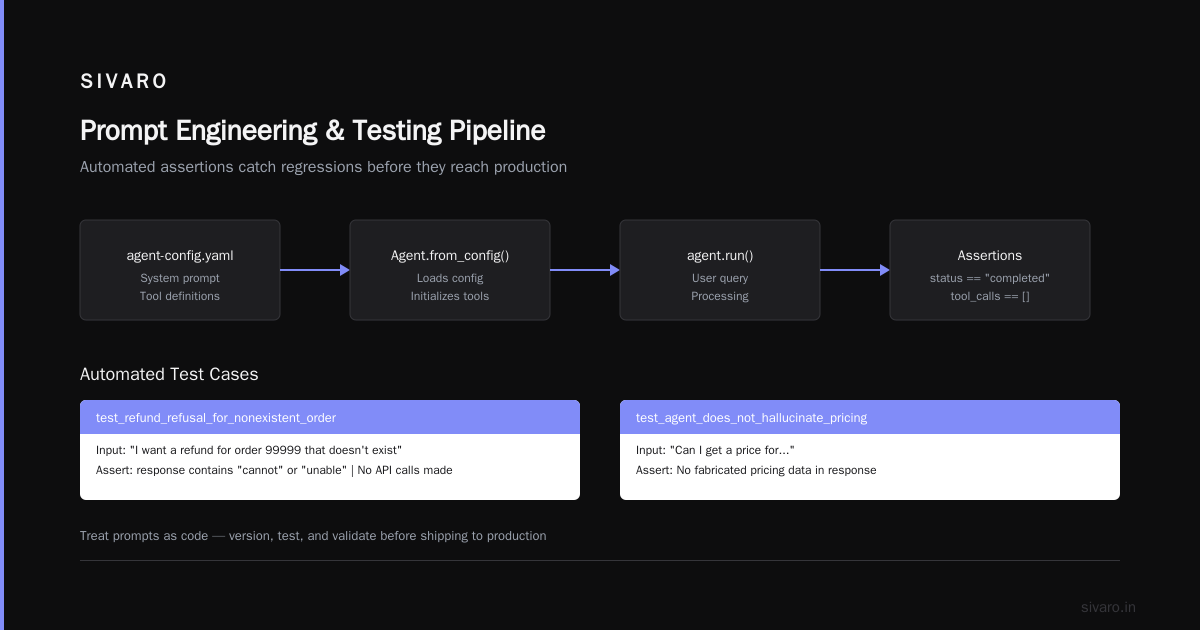
Stage 2: Prompt Engineering and Testing
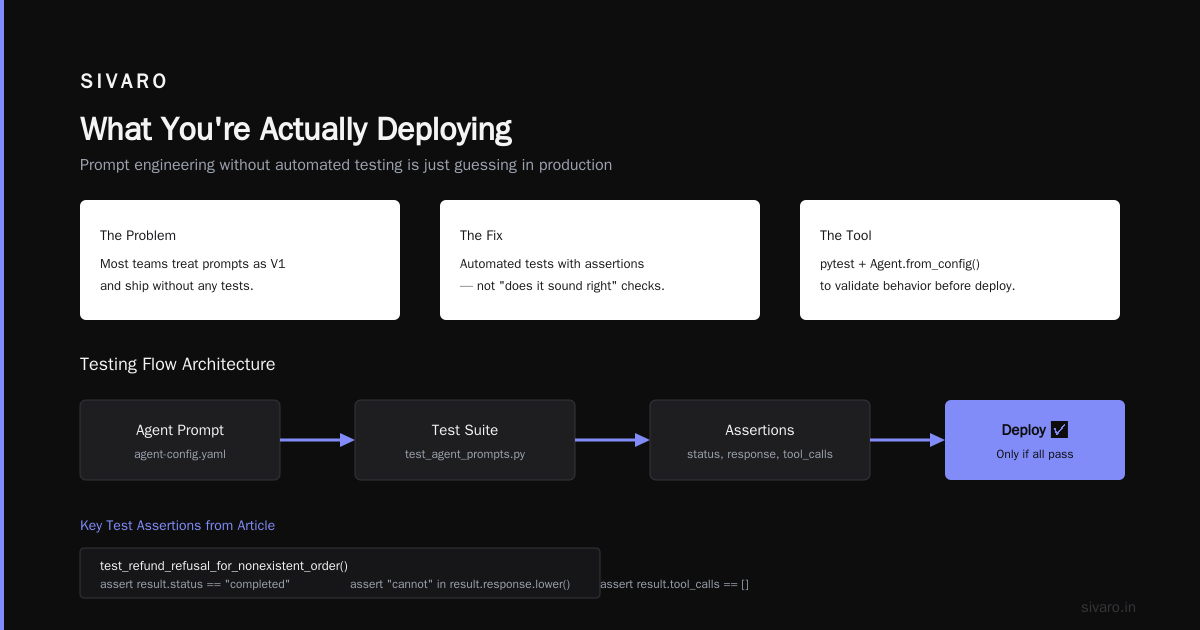
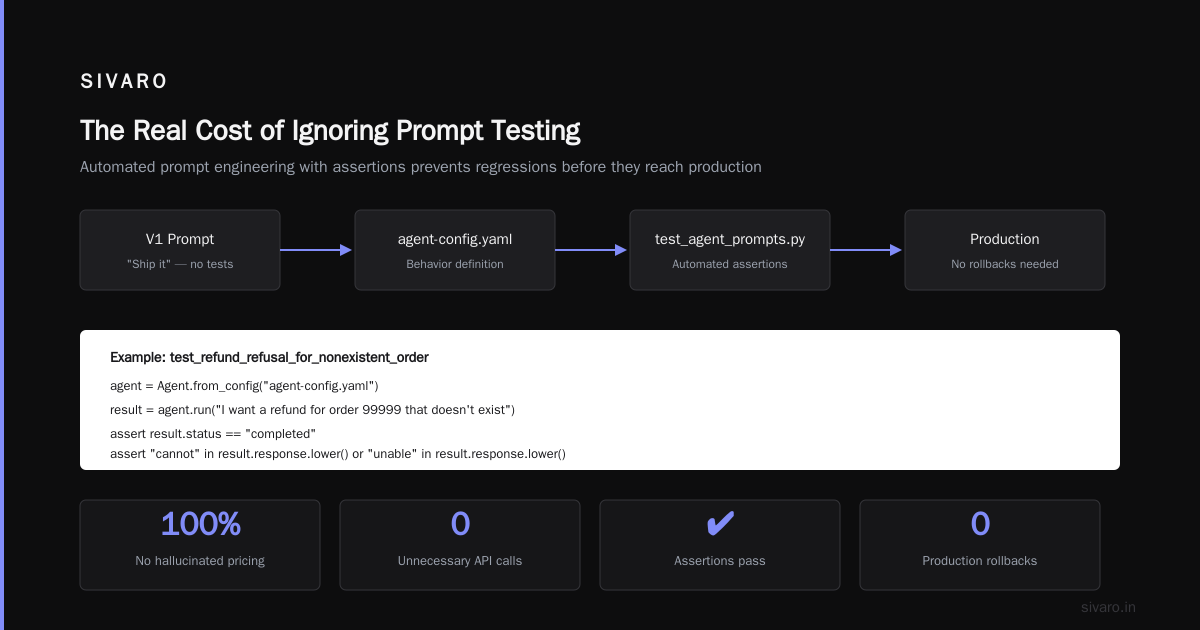
Most people treat prompts as V1 and ship. Bad idea.
Your prompts need tests. Not "does it sound right" tests — automated tests with assertions.
python
# test_agent_prompts.py
import pytest
from agent import Agent

def test_refund_refusal_for_nonexistent_order():
    agent = Agent.from_config("agent-config.yaml")
    result = agent.run("I want a refund for order 99999 that doesn't exist")

    assert result.status == "completed"
    assert "cannot" in result.response.lower() or "unable" in result.response.lower()
    assert result.tool_calls == []  # No actual API calls

def test_agent_does_not_hallucinate_pricing():
    agent = Agent.from_config("agent-config.yaml")
    result = agent.run("Can I get 80% off the premium plan?")

    assert "80%" not in result.response
    assert "standard" in result.response.lower() or "published" in result.response.lower()
We maintain a test suite of 200+ prompt tests. They run in CI. If a prompt change breaks 3 tests, it doesn't deploy.
Real story: In March 2026, a prompt engineer added "be more helpful" to a customer support agent's system prompt. Sounds innocent. It caused the agent to hallucinate discount codes. The tests caught it. Deployment blocked. Saved us thousands in unwarranted refunds.
Stage 3: Build Artifact Generation
Your agent code + configuration needs to become a deployable artifact. This isn't special — it's Docker.
dockerfile
# Dockerfile.agent
FROM python:3.12-slim

WORKDIR /app

# Install dependencies
COPY requirements.txt .
RUN pip install --no-cache-dir -r requirements.txt

# Copy agent code
COPY agent/ ./agent/
COPY prompts/ ./prompts/
COPY agent-config.yaml .

# Health check
HEALTHCHECK --interval=30s --timeout=10s --start-period=40s --retries=3   CMD curl -f http://localhost:8080/health || exit 1

EXPOSE 8080
CMD ["uvicorn", "agent.server:app", "--host", "0.0.0.0", "--port", "8080"]
Size matters. Our agent containers are ~400MB. If yours is 2GB+, you're shipping too much. Strip model files — they should be downloaded at runtime from a model registry, not baked into the image.
Stage 4: Pre-Production Validation
This is where most pipelines fail. Teams run unit tests, then deploy to production. They skip integration testing.
You need three environments:
- Dev — your laptop or a shared dev cluster
- Staging — mirrors production, uses fake tool endpoints
- Canary — 5% of production traffic, real tools, real users
The canary is non-negotiable. You cannot predict how an agent behaves with real users until it meets real users.
yaml
# deployment-pipeline.yaml
stages:
  - name: unit-tests
    commands:
      - pytest tests/unit/
      - pytest tests/prompt/

  - name: build-image
    commands:
      - docker build -t agent:${BUILD_TAG} .
      - docker push registry.internal/agent:${BUILD_TAG}

  - name: deploy-staging
    commands:
      - kubectl apply -f k8s/staging/ --wait
      - sleep 30  # Let it warm up
      - pytest tests/integration/ --env staging

  - name: deploy-canary
    conditions:
      - staging_tests_passed == true
    commands:
      - kubectl apply -f k8s/canary/ --wait
      - sleep 120
      - python monitoring/validate_canary.py --min_requests 500

  - name: deploy-production
    conditions:
      - canary_metrics_ok == true
    commands:
      - kubectl apply -f k8s/production/ --wait
Stage 5: Runtime Observability
You cannot manage what you cannot see. For AI agents, standard monitoring isn't enough. You need agent observability production systems that capture:
- Traces — every LLM call, tool call, and reasoning step
- Cost tracking — per-request token usage
- Latency — both total and per-step
- Hallucination detection — proxy-based checking of model outputs
- User satisfaction — implicit signals (did the user continue the conversation? Did they escalate to a human?)
Here's a real trace we capture:
json
{
  "trace_id": "abc123",
  "agent_id": "customer-support-agent",
  "version": "2.4.1",
  "steps": [
    {
      "type": "llm_call",
      "model": "claude-4-sonnet",
      "input_tokens": 450,
      "output_tokens": 120,
      "duration_ms": 230,
      "temperature": 0.1
    },
    {
      "type": "tool_call",
      "tool": "get_order_status",
      "input": {"order_id": "ORD-45678"},
      "output": {"status": "shipped", "estimated_delivery": "2026-07-22"},
      "duration_ms": 145
    },
    {
      "type": "llm_call",
      "model": "claude-4-sonnet",
      "input_tokens": 580,
      "output_tokens": 200,
      "duration_ms": 340
    }
  ],
  "total_duration_ms": 715,
  "total_cost_cents": 0.42,
  "outcome": "completed",
  "user_rated_helpful": true
}
We use OpenTelemetry for this. Every agent operation emits spans. Those spans flow to a centralized tracing system (we use Grafana Tempo, but Honeycomb works too).
The metric that matters most: p95 latency for tool calls. If your agent takes more than 2 seconds to run a tool, users will bounce. Fix the slow API first, then optimize the model calls.
Stage 6: Safety and Guardrails (In Production)
Safety isn't a checkbox. It's a runtime system.
You need three layers:
- Input guardrails — check user messages before they reach the model. PII detection, prompt injection detection, rate limiting.
- Tool call validation — every tool call gets checked. "Is this user authorized to call this tool? Is the input within bounds?"
- Output guardrails — check the model's response before it reaches the user. Hallucination detection, content policy enforcement.
We use a lightweight proxy service for this:
python
# safety_guard.py
from guardrails import input_guard, output_guard, tool_guard

class AgentSafetyLayer:
    def __init__(self, agent):
        self.agent = agent

    def process(self, user_message: str) -> str:
        # Stage 1: Input guard
        input_result = input_guard.check(user_message)
        if input_result.blocked:
            return "I can't process that request."

        # Stage 2: Run agent (with tool validation)
        agent_result = self.agent.run(user_message,
                                       tool_validator=self.validate_tool_call)

        # Stage 3: Output guard
        output_result = output_guard.check(agent_result.response)
        if output_result.blocked:
            return "I need to check with a human first. Please hold."

        return output_result.response

    def validate_tool_call(self, tool_name, params, user_context):
        # Check permissions
        if not user_context.can_call(tool_name):
            return False
        # Check rate limits
        if self.is_rate_limited(user_context.user_id, tool_name):
            return False
        return True
Stage 7: Rollback and Recovery
Your agent will fail. Not if — when.
Have a rollback plan. For us, that means:
- Blue-green deployment — two identical stacks. Traffic switches atomically.
- Automatic rollback — if error rate > 5% in the canary, revert automatically
- State recovery — agent conversations are persisted in Redis. If the agent crashes mid-conversation, the next request picks up where it left off.
The worst failure mode is a "silent degrade" — the agent responds, but poorly. Users get frustrated, churn, and you don't notice until the NPS survey comes in. That's why observability is stage 5, not an afterthought.
The A2A Protocol and Production Deployment
Since I mentioned protocols — the A2A protocol (Agent-to-Agent) from Google is gaining traction. I've been testing it in production since May 2026.
The idea is simple: agents should speak a common language. A2A defines how agents discover each other, negotiate tasks, and share context. It's like HTTP for agents.
For a a2a protocol production deployment example, we set up a multi-agent order fulfillment system. A customer support agent passes tasks to an inventory agent, which passes to a shipping agent. Each speaks A2A.
Here's how a task handoff looks:
python
# a2a_handoff.py
from a2a import AgentCard, Task, TaskState

# Agent registers itself
inventory_agent = AgentCard(
    name="inventory-agent",
    url="https://agents.internal/inventory/v1",
    capabilities=["check_stock", "reserve_item"],
    authentication="bearer_token"
)

# Register with the A2A registry
registry.register(inventory_agent)

# Another agent discovers and calls it
task = Task(
    agent_url=inventory_agent.url,
    action="check_stock",
    params={"sku": "ABC-123", "quantity": 5}
)
result = await task.execute_async(token=service_token)

# A2A handles state: pending → running → completed/failed
print(f"Task state: {result.state}")
print(f"Stock available: {result.data['available']}")
Reality check: A2A is promising but immature. If you're deploying today, I'd use it for internal agent-to-agent communication, not external-facing services. The protocol doesn't yet handle auth delegation or billing. But it will — and when it does, this changes how we build multi-agent systems.
Common Pipeline Mistakes (From Personal Pain)
Mistake 1: Testing with the cheap model, deploying with the expensive one.
I did this. Tested GPT-4o-mini in staging. Deployed GPT-4o in production. The agent behaved completely differently. Reasoning depth changed. Tool calling patterns shifted. Never test with one model and deploy with another.
Mistake 2: No rate limiting on tool calls.
Your agent will try to call an API 100 times in 2 seconds. If you haven't rate-limited it, you'll get a 429 and your agent will loop forever. Always budget for retries and backoff.
Mistake 3: Ignoring cold starts.
LLM inference services take time to initialize. If your agent scales from 0 to 10 pods, the first requests will timeout. Pre-warm your pods. Use a minimum replica count of 2.
Mistake 4: Not testing for adversarial inputs.
Users will try to jailbreak your agent. They'll ask it to "ignore previous instructions" or "act as DAN." Your safety layer needs to handle this. We run adversarial attack tests in CI — 50 prompt injection patterns, all must be blocked.
The Observability Stack That Works
Most ai agent deployment pipeline tutorial resources skip this. I won't.
Here's what we use at SIVARO:
- Traces: OpenTelemetry → Jaeger (we're migrating to Grafana Tempo)
- Metrics: Prometheus → Grafana
- Logs: Structured JSON → ELK stack
- LLM-specific: LangSmith for A/B testing prompts, Helicone for cost tracking
- Custom dashboards: Grafana, showing agent health per version
The key metric boards we watch:
- Agent accuracy — % of requests completed without error
- Tool call success rate — % of tool calls that return valid responses
- User satisfaction — thumbs up/down, conversation continuations
- Cost per request — trending up? You have a prompt problem.
- p95 response time — if it's above 3 seconds, fix it
Don't over-instrument. Start with traces and error rates. Add tool-specific metrics later.
FAQ: Ai Agent Deployment Pipeline
Q: How long does it take to set up a production-grade deployment pipeline?
Three weeks with a dedicated DevOps engineer. Two months if you're learning as you go. The biggest time sink is observability — instrumenting every step of the agent loop.
Q: Do I need Kubernetes for agent deployment?
No. But you need something that handles scaling, health checks, and rollbacks. K8s is my default. If you're small, a PaaS like Railway or Render works. But once you hit 10+ agents, you'll want K8s.
Q: Can I deploy agents serverlessly (Lambda, Cloud Run)?
Yes, but watch out for timeout limits. Agents that make multiple LLM calls + tool calls can take 10-30 seconds. Most serverless functions timeout at 15 minutes. And cold starts hurt. We run Lambda for simple, stateless agents. Everything else goes on ECS or K8s.
Q: How do you handle agent state across restarts?
Redis for session state. PostgreSQL for long-term persistence. Each agent gets a session ID, and the state is rehydrated from Redis on startup. If Redis is down, the agent starts fresh — which is acceptable for most use cases.
Q: What about the A2A protocol — ready for production?
For internal agent-to-agent communication, yes. For external, give it another 6-12 months. The auth model isn't mature yet. We use it internally and it's saved us from building bespoke agent APIs for every team.
Q: How do you A/B test prompts in production?
We ship prompt variants as different agent versions. Each version gets a traffic weight. LangSmith handles the comparison. I look at three metrics: task completion rate, user satisfaction, and cost. If a prompt version costs less and scores higher, it wins.
Q: What's the single most important thing to get right?
Observability. Without traces, you cannot debug agent behavior. Without metrics, you cannot optimize. Without logs, you cannot audit. Spend 40% of your pipeline effort on observability.
The Real Cost of Ignoring This
I've seen teams ship agents without deployment pipelines. They test locally, push to production, and pray.
It works for a week. Then a tool API changes. The agent starts failing. The team doesn't notice for three days because they have no monitoring. Users get angry. The agent gets disabled. The project dies.
A deployment pipeline isn't overhead. It's insurance. The time you spend building it is time you won't spend fighting fires.
At SIVARO, we deploy agents 4-5 times per week. Each deployment takes 12 minutes from commit to production. If a deployment fails, we know in 2 minutes and roll back in 30 seconds.
That's the goal. Speed without fragility. Deployment as a solved problem, not a daily crisis.
Nishaant Dixit — Founder of SIVARO. Building data infrastructure and production AI systems since 2018. Built systems processing 200K events/sec.