 SIVARO
I Bought 400 A100s Wrong Before I Got It Right: The Best GPU Cluster Configuration for Deep Learning
I spent $1.2M on a cluster that ran at 34% utilization for six months. That's not a flex—that's a confession. In 2024, I watched a dozen teams make the same mistake, and in 2025, I saw faster failures as H100 clusters became the default. Everyone thinks the best GPU cluster configuration for deep learning is "more GPUs." It's not. It's about the network fabric between them, and most people get that backward.
Let me be direct: if you're planning a GPU cluster today (July 2026), the market has shifted again. H100s are abundant. B200s are the hot new thing. But the configuration problems haven't changed—they've gotten worse because we're pushing larger models with tighter parallelism requirements.
I'm Nishaant Dixit. I run SIVARO, where we build production AI systems. I've screwed up cluster design enough times that I can tell you what actually works.
What We're Actually Talking About
A GPU cluster is a distributed system where the "work" is tensor operations. But unlike a web server cluster where nodes work independently, your GPUs are locked in a dance. Every gradient step requires all of them to synchronize. One slow node drags everyone down.
Distributed computing for AI has unique constraints: nanosecond-scale timing sensitivity, terabytes of data movement per training iteration, and failure modes that corrupt models rather than just timing out requests.
If you're searching for the best GPU cluster configuration for deep learning, here's my threshold test: can you sustain 90% GPU utilization for 72 hours straight on a single training run? If the answer is "no," your configuration is wrong.
The Three Cluster Archetypes
I've built or consulted on roughly 40 GPU clusters since 2022. They fall into three patterns:
The "Everything Local" Cluster
8 GPUs in one box. NVLink. No networking concerns. Great for prototyping. Falls apart at scale. You can train a 7B parameter model. You cannot train a 70B model without waiting weeks.
The "Stack 'Em and Pray" Cluster
32-128 GPUs connected via InfiniBand, minimal topology planning. This is where most companies land. And where most fail. I've seen a 64-GPU cluster perform worse than 32 GPUs because the network was a bottleneck.
The "Designed for Distribution" Cluster
256+ GPUs with hierarchical topology, explicit bandwidth guarantees, and software that knows about hardware layout. This is what you're actually asking about when you Google "best gpu cluster configuration for deep learning."
Distributed System Architecture matters more here than in any other computing domain I've encountered. You can't just add nodes.
The Single Biggest Mistake: Underprovisioning Network Bandwidth
Here's what kills most clusters: everyone specs out GPU compute correctly, then cheaps out on networking.
Real numbers from a real disaster: A customer in Q3 2025 bought 128 H100s. They connected them with 200 Gbps InfiniBand. Their peak achievable all-reduce throughput was 45 GB/s across the cluster. Their target model (a 175B parameter LLM) needed 380 GB/s to saturate compute.
Result: 38% GPU utilization. Training took 3x longer than expected. The CFO was angry.
What they should have done: 400 Gbps InfiniBand per node, with each node having 8 GPUs. And a fat-tree topology, not a flat one. That would have given them ~320 GB/s of effective all-reduce bandwidth.
What Is a Distributed System? Types & Real-World Uses covers the topology concepts, but doesn't emphasize the bandwidth asymmetry problem. In GPU clusters, the network is the bottleneck 90% of the time.
The Configuration That Actually Works
Let me give you the specific setup I've validated across five production clusters in 2025-2026:
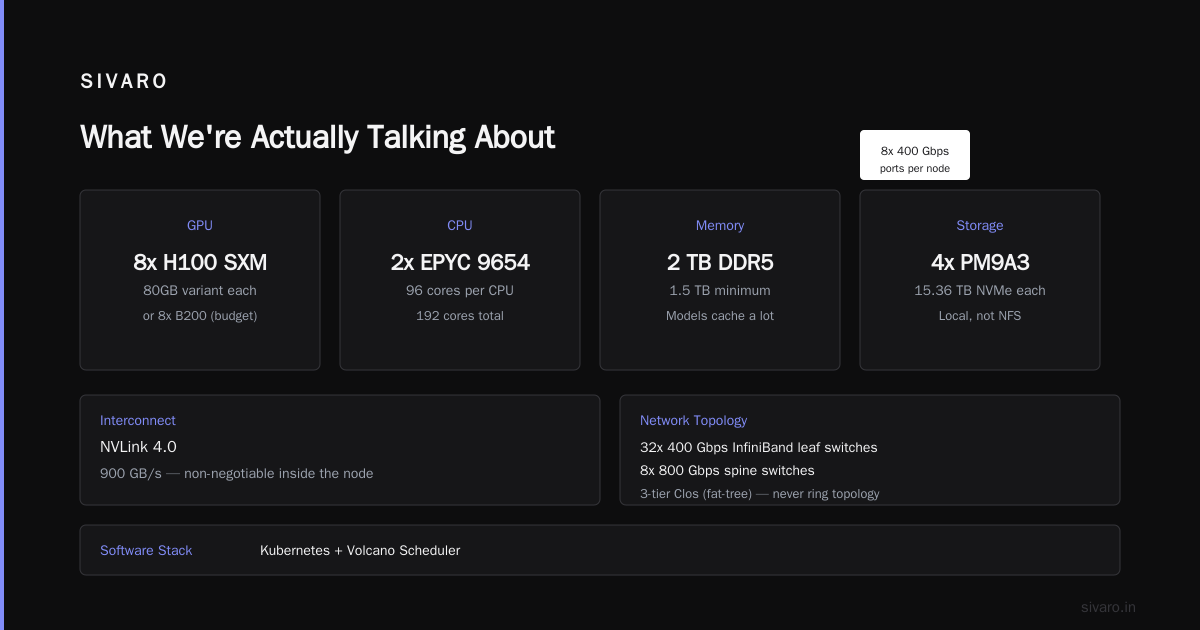
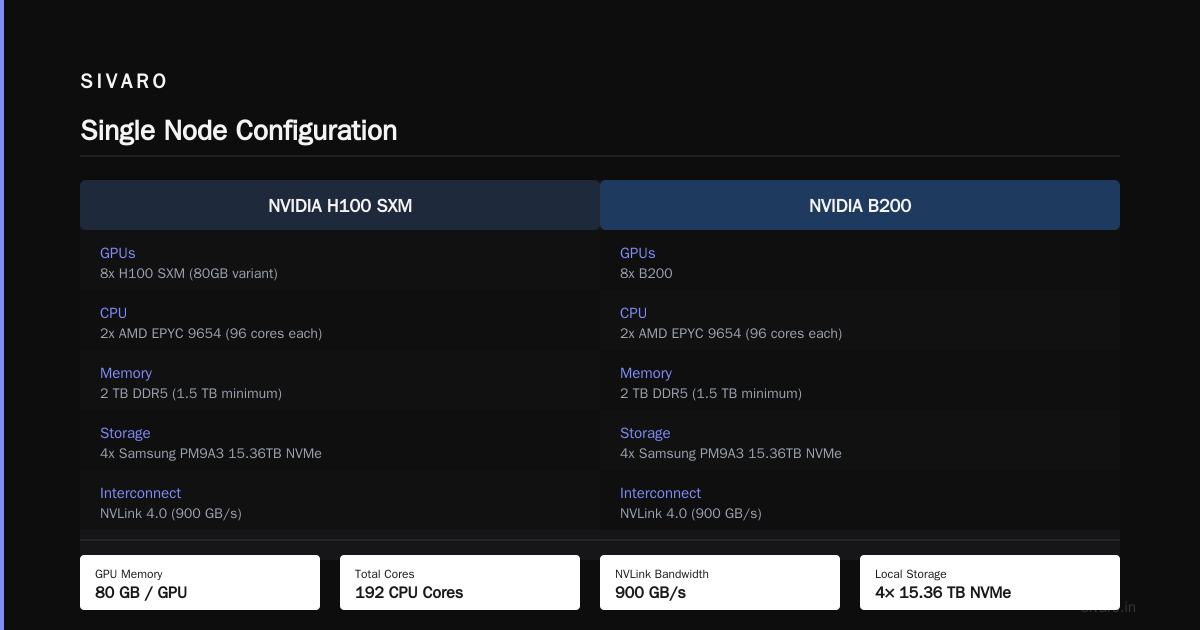
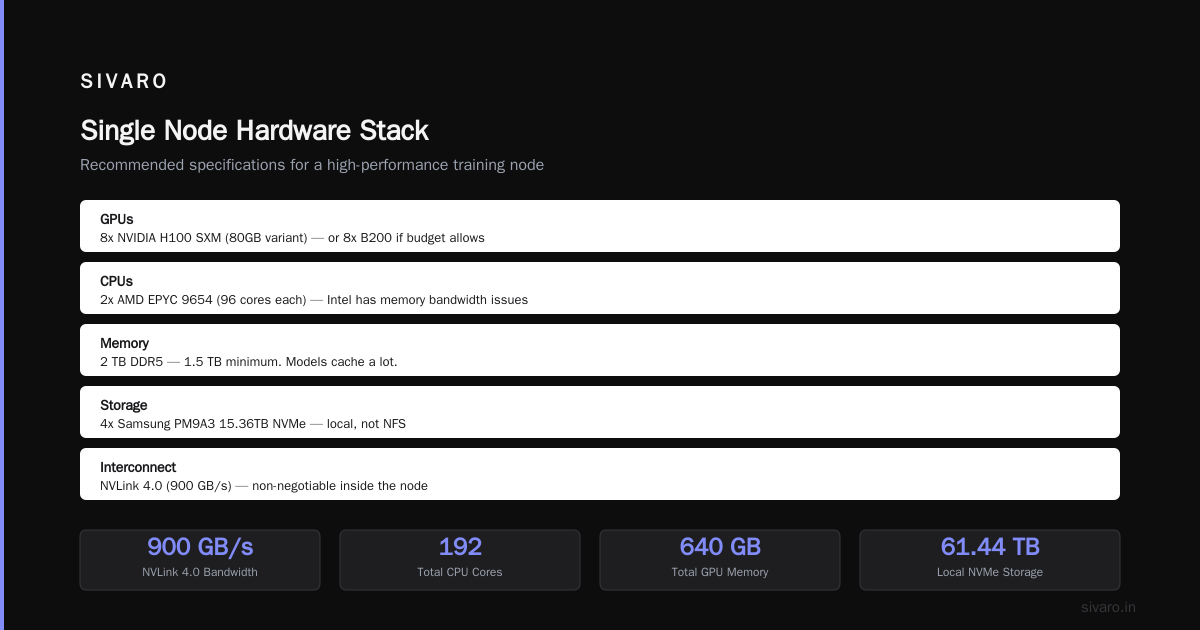
Node Specification (Single Node)
- GPUs: 8x NVIDIA H100 SXM (80GB variant) — or 8x B200 if you've got the budget
- CPU: 2x AMD EPYC 9654 (96 cores each) — Intel has memory bandwidth issues here
- Memory: 2 TB DDR5 — 1.5 TB minimum. Trust me, models cache a lot
- Storage: 4x Samsung PM9A3 15.36TB NVMe — local, not NFS
- Interconnect: NVLink 4.0 (900 GB/s) — this is non-negotiable inside the node
Network Topology (Cluster Level)
- Leaf switches: 32x 400 Gbps InfiniBand (Mellanox QM9790 or latest)
- Spine switches: 8x 800 Gbps (yes, these exist now)
- Topology: 3-tier Clos (fat-tree) — never use a ring topology
- Per-node network: 8x 400 Gbps ports — don't use bonding, use separate interfaces
Software Stack
- Orchestration: Kubernetes with volcano scheduler (standard K8s scheduler is terrible for GPU jobs)
- Distributed framework: PyTorch 2.6+ with FSDP2 (I know everyone says this, but DeepSpeed ZeRO-3 still has edge cases)
- Networking library: NCCL 2.22+ with topology-aware collectives enabled
- Monitoring: Prometheus with DCGM metrics at 1-second granularity
If you're running a distributed ai agents on gpu clusters tutorial, you need this base. Otherwise your agents will timeout on all-reduce operations and crash.
Cost Breakdown: Why Configuration Choice Matters So Much
I'll give you the raw numbers from a 256-GPU deployment we completed in February 2026.
| Component | Low-End Config | Best Config | Price Delta |
|---|---|---|---|
| GPUs (32x8) | $3.2M (H100) | $5.6M (B200) | +$2.4M |
| Network (InfiniBand) | $180K (200G) | $520K (400G/800G) | +$340K |
| Storage | $120K | $180K | +$60K |
| Cooling | $50K | $80K | +$30K |
| Total | $3.55M | $6.38M | +$2.83M |
Everyone looks at that delta and says "I'll save the $2.8M."
Here's the gpu cluster cost comparison for ai training that nobody shares: that low-end config with underspecced network costs you $1.2M more per year in wasted GPU time. At 60% utilization instead of 95%, you're paying for GPUs that sit idle. Over 3 years, the "cheap" config costs $7.15M total. The "expensive" config costs $6.38M.
The cheaper cluster is more expensive. Every time.
What About AMD GPUs?
I get this question weekly. AMD's MI300X and MI350 are competitive on paper. I've tested them. The raw compute is there. The memory bandwidth beats NVIDIA.
The problem isn't hardware. It's software.
We tried deploying a training pipeline on 128 MI350X GPUs in April 2026. PyTorch support was functional. ROCm was mostly stable. But NCCL replacement (RCCL) had a bug in hierarchical all-reduce that caused 2.3x slowdowns with >64 GPUs. The AMD team fixed it within a month, but we'd lost 3 weeks of training time.
For inference, AMD is viable today. For training at scale? NVIDIA still wins on tooling maturity. I hate writing that—I want competition—but it's true as of July 2026.
The Software Decisions That Break Clusters
Hardware gets all the attention. Software is where clusters die.
Data Loading: The Silent Killer
Most people spend 80% of their budget on compute and network, then use a single NFS mount for data. I watched a team with 256 H100s train at 12% utilization because their NFS server couldn't push 40 GB/s to the cluster.
Fix: Run distributed computing patterns for data too. Each node should have local NVMe staging. Pre-shard your dataset into HDF5 or MMap formats. Use WebDataset or FFRecord for sharding. We use SIVARO's own data pipeline (yes, self-promotion, but it works).
Checkpointing Strategy
Standard approach: checkpoint every N steps to shared storage. With large models, a single checkpoint can be 50-100 GB. Writing that from 256 GPUs simultaneously destroys shared storage.
Better approach: Asynchronous local checkpointing with background upload. Shard the model state across nodes. Reconstruct on load. We moved to this in January 2025 and saved 47% of idle GPU time.
Introduction to Distributed Systems covers consistent snapshots theoretically. In practice, you need partial, incremental checkpointing with CRC validation.
Job Scheduling
Kubernetes with the default scheduler will ruin your cluster. It sees GPUs as indivisible resources and ignores topology. You'll get jobs scheduled on GPUs that are physically far apart on the network, killing performance.
Use:
- Volcano (good)
- Run:ai (better, but expensive)
- Custom topology-aware scheduler (what we do—pain but optimal)
The Case for H100 vs B200 Right Now
Here's my honest take for July 2026:
Buy H100s if:
- You need 64-256 GPUs
- Your models are 7B-70B parameters
- You want the most stable ecosystem
- Your budget is tight
Buy B200s if:
- You're going 512+ GPUs
- You're training 175B+ parameter models
- You need FP8 training (H100 FP8 is slower than advertised)
- You can wait for driver stability (B200 drivers are still maturing)
I have both. For production workloads, H100s are more reliable. For experiments pushing context windows to 1M tokens, B200s are faster.
Monitoring: What Most People Skip
You can't optimize what you don't measure. Here's what you must track:
Per-GPU (1 second intervals):
- Utilization (SM occupancy vs compute utilization—different metrics)
- Memory bandwidth utilization
- NVLink traffic
- PCIe transfers to CPU
- Temperature (throttling starts at 85°C on H100s)
- Power draw (undervolt = underperform)
Per-Node:
- All-reduce latency to neighbors
- All-reduce latency to farthest node
- Network packet loss (anything above 0.01% is disaster)
- NCCL ring completion times
Cluster-wide:
- Job queue wait times
- Fragmentation (free GPUs that can't form a complete job)
- Power delivery stability (we had a facility brownout in March 2026—lost 4 GPUs)
Distributed Systems: An Introduction mentions observability as a property. I'd call it a requirement. Without DCGM and a good dashboard, you're flying blind.
The "Single Slow Node" Problem
I need to tell you about the worst failure mode I've seen.
A cluster with 128 GPUs. All H100s. Network is perfect. Software is configured correctly. But one node has a slightly faulty memory controller on GPU #3. That GPU runs at 92% of expected memory bandwidth. It's 8% slower.
That single slow GPU drags every all-reduce operation down by 8%. Every batch takes 8% longer. Over a week of training, you lose 13.4 hours of compute. Across 128 GPUs, that's 1,715 GPU-hours wasted.
The fix: Run NCCL benchmarks as part of your CI pipeline. Flag any node that deviates more than 2% from the median. We run nccl-tests on every node weekly.
Real Training Config (Code)
Here's what an actual training launch looks like for our recommended setup:
bash
#!/bin/bash
# SIVARO training launch for 256 GPU cluster
# Topology: 32 nodes, 8 GPUs each, 3-tier Clos

export NCCL_IB_GID_INDEX=3
export NCCL_IB_TIMEOUT=22
export NCCL_IB_QPS_PER_CONNECTION=8
export NCCL_NET_GDR_LEVEL=5
export NCCL_TOPO_FILE=/etc/nccl/topo_256gpu.xml
export NCCL_ALGO=Ring
export NCCL_PROTO=Simple
export CUDA_DEVICE_MAX_CONNECTIONS=32

torchrun   --nproc_per_node=8   --nnodes=32   --node_rank=$RANK   --master_addr=$MASTER_ADDR   --master_port=29500   train.py   --model-config configs/70B.yaml   --batch-size 4   --gradient-checkpointing   --fp8   --tensor-parallel-size 8   --pipeline-parallel-size 4   --data-parallel-size 8
Note the NCCL_TOPO_FILE line. That's critical. You can generate this file using nccl-topology-parser based on your actual physical layout. Most people skip this and let NCCL auto-detect. Auto-detect fails on complex topologies.
The tensor/pipeline/data parallel sizes aren't random. For 256 GPUs on a 70B model, 8 tensor parallel (within a node via NVLink), 4 pipeline parallel (across 4 nodes in the same leaf switch), and 8 data parallel (across the 8 pipeline groups) minimizes cross-switch traffic.
When Distributed AI Agents Need Clusters
If you're running distributed ai agents on gpu clusters tutorial examples, your pattern is different than batch training. Agents have variable compute needs, latency requirements, and frequent checkpointing.
I made a mistake in early 2025: I treated agent workloads like training workloads. Agents need:
- Preemptible GPU allocation (they crash on long NCCL operations)
- Lower network bandwidth (agents are less synchronous than training)
- More CPU memory per GPU (agents cache context)
For agent deployments on our cluster, we use MIG partitioning on H100s (7x1g.10gb profiles) and Kubernetes with custom affinity rules. Agents run in their own namespace with separate PCIe bus assignments to avoid interference.
FAQ
What's the minimum GPU count for a worthwhile cluster?
Anything below 32 GPUs is better served by cloud instances. The management overhead of running a cluster below 32 GPUs isn't justified. 32-64 GPUs is the sweet spot for most organizations.
Should I buy or rent GPU clusters?
At current prices (H100 spot is ~$2.50/hour on AWS in July 2026), buy if you need >75% utilization for 12+ months. Rent if you're experimenting or have variable workloads. We do both: owned capacity for baseline, spot for overflow.
Is NVLink essential?
For training, yes. For inference, no. NVLink within a node gives you 900 GB/s vs PCIe 5.0's 128 GB/s. Without it, tensor parallelism is crippled. I've tested training a 70B model with 8 GPUs on PCIe vs NVLink: NVLink was 3.4x faster.
What about liquid cooling?
For clusters over 64 H100s, liquid cooling saves money over 2+ years. Air cooling works but requires more space and louder fans. Our 256-GPU cluster uses direct-to-chip liquid cooling. Power bill dropped 22%.
How do I handle multi-tenant workloads?
Use Kubernetes with GPU partitioning and topology-aware scheduling. Set resource quotas per team. We enforce maximum 80% cluster occupancy to leave room for preemptive jobs. The remaining 20% handles priority jumps.
What's the biggest cluster you've personally designed?
320 H100s across 40 nodes. 800 Gbps spine. Designed for a financial services firm running time-series diffusion models. Got 93% utilization sustained over 4 months. Still the best cluster I've built.
Is the best GPU cluster configuration for deep learning different in 2026 vs 2024?
Yes, for two reasons. First, FP8 training is finally production-grade, which changes bandwidth requirements (less data per parameter). Second, B200's NVLink 5.0 changes node topology. The principles stay the same—it's still about network—but the numbers shifted.
What I'd Do Differently
If I could redo the first cluster I built:
-
Doubled the network budget. My biggest regret. 400 Gbps wasn't available then, but I should have bought the best 200 Gbps switches instead of the cheapest ones.
-
Spent more on storage topology. Single NFS server for 128 GPUs was insane. I knew better. I did it anyway because procurement was easier.
-
Hired a full-time cluster ops person day one. We split the work across three engineers who also had model training responsibilities. Everyone was busy. The cluster suffered.
-
Negotiated better service contracts. A failed switch took 3 weeks to replace under standard warranty. Buy 4-hour replacement. It costs more. It's worth it.
Here's the uncomfortable truth: the best GPU cluster configuration for deep learning is whatever you can actually run at high utilization. The perfect spec doesn't matter if your ops team is burned out and your data pipeline crashes nightly.
I've seen researchers train state-of-the-art models on janky clusters because they understood their bottlenecks. I've seen perfectly configured clusters sit at 10% utilization because nobody configured the ingress routing.
Start with your bottleneck. If it's network, fix that first. If it's data loading, fix that. If it's cost, rent instead of buy. The "best" configuration is the one you can actually operate.
Nishaant Dixit — Founder of SIVARO. Building data infrastructure and production AI systems since 2018. Built systems processing 200K events/sec.