 SIVARO
Scaling AI Agents in Production Environments
I spent six weeks in early 2025 rebuilding an agent system that kept failing every Tuesday afternoon. Turned out it wasn't the model. It wasn't the prompts. It was the fact that our agent was calling an API that had a 15-minute timeout window – and the agent never told anyone it was waiting. Just sat there. Burning money.
That's the reality of AI agent scaling in production environments. Not the hype. Not the demo video where a bot books a restaurant. The messy, invisible work of making something unreliable become boringly dependable.
This guide is what I wish someone had handed me before I lost two months and a chunk of my team's sanity. I'll cover what breaks when you scale agents from 1 to 1,000, how to test them properly, what observability actually matters, and why most people get incident response backwards.
Why Most Agent Deployments Hit a Wall at 50 Queries
Here's the pattern I see everywhere. A team builds an agent that works beautifully in a notebook. 10 test cases pass. The demo wows the VP. Then they push it to staging, crank up the load, and within 48 hours the agent is hallucinating API keys, stuck in infinite loops, or silently dropping state.
The problem isn't intelligence. It's environmental complexity. Production has:
- Variable latency (your LLM provider slows down at peak)
- Partial failures (one tool returns 500, others work)
- Context window pressure (long conversations eat tokens)
- User behavior that's statistically different from your test set
According to an incident analysis framework from early 2025, nearly 60% of agent failures stem from interaction dynamics rather than model capability failures. The model knows the answer. The agent doesn't know how to handle the system around it.
I've seen it firsthand. At SIVARO, we ran a document-processing agent that worked perfectly with 50-page PDFs. At scale, a user uploaded a 2,000-page legal document. The agent tried to summarize it in a single API call. Token limit exceeded. No fallback. No retry. No log. Just a broken session.
That's not an AI problem. That's an engineering problem.
The Real Bottleneck: Observability, Not Latency
Most people think scaling agents means faster inference or bigger context windows. They're wrong.
The bottleneck is knowing what the hell your agent is doing.
When you have 10 agents running, you can watch logs. When you have 1,000, you need structured tracing. Every tool call, every prompt template instantiation, every retry decision needs to emit structured events with unique IDs.
Here's what we use at SIVARO:
python
# Minimal tracing for agent tool calls
import uuid
import time
from dataclasses import dataclass, asdict
import json

@dataclass
class AgentTrace:
    session_id: str
    step_id: str
    tool: str
    input_tokens: int
    output_tokens: int
    duration_ms: float
    success: bool
    error: str | None = None

def trace_tool_call(session_id, tool_name):
    step_id = str(uuid.uuid4())[:8]
    start = time.time()
    def decorator(func):
        def wrapper(*args, **kwargs):
            try:
                result = func(*args, **kwargs)
                duration = (time.time() - start) * 1000
                trace = AgentTrace(
                    session_id=session_id,
                    step_id=step_id,
                    tool=tool_name,
                    input_tokens=count_tokens(str(args)),
                    output_tokens=count_tokens(str(result)),
                    duration_ms=duration,
                    success=True
                )
                emit_trace(trace)
                return result
            except Exception as e:
                duration = (time.time() - start) * 1000
                trace = AgentTrace(
                    session_id=session_id,
                    step_id=step_id,
                    tool=tool_name,
                    input_tokens=0,
                    output_tokens=0,
                    duration_ms=duration,
                    success=False,
                    error=str(e)
                )
                emit_trace(trace)
                raise
        return wrapper
    return decorator
Without this, you're debugging blind. The Agent Failure Stack paper calls this the "observability gap" – most failures happen in the orchestration layer, not in the model, but 90% of logging is focused on model outputs.
I'll say it flat: if you can't replay a failed agent session step-by-step, you don't have observability. You have hope.
How to Test AI Agents Before Production Deployment
Testing agents is fundamentally different from testing APIs or microservices. You're not testing against deterministic outputs. You're testing against behavioral constraints.
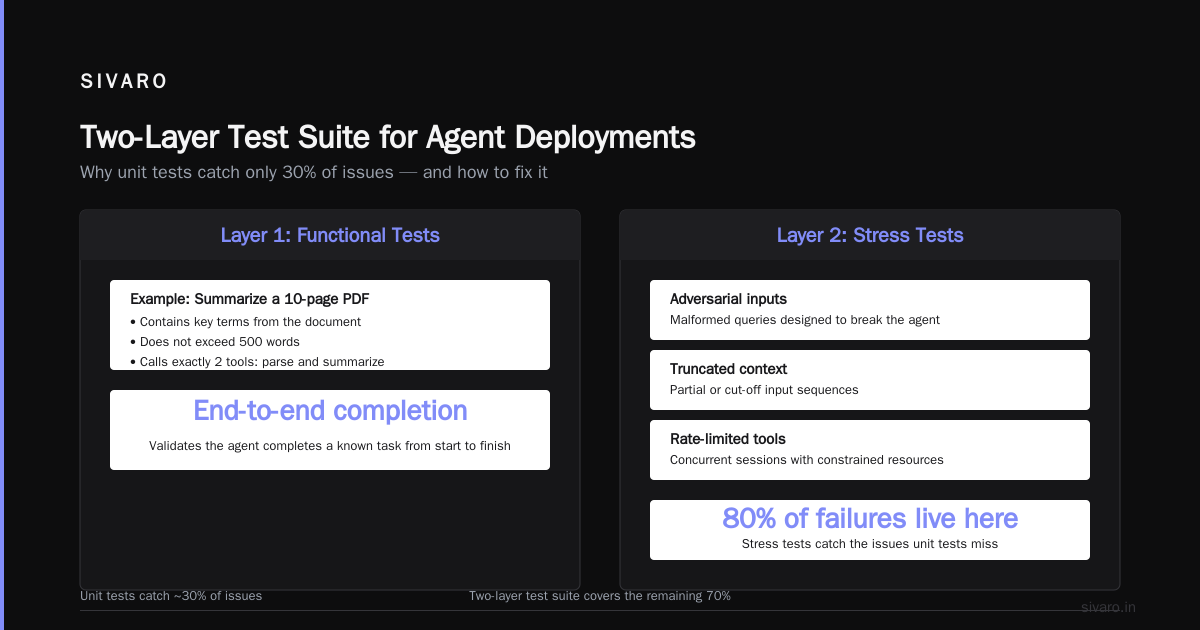
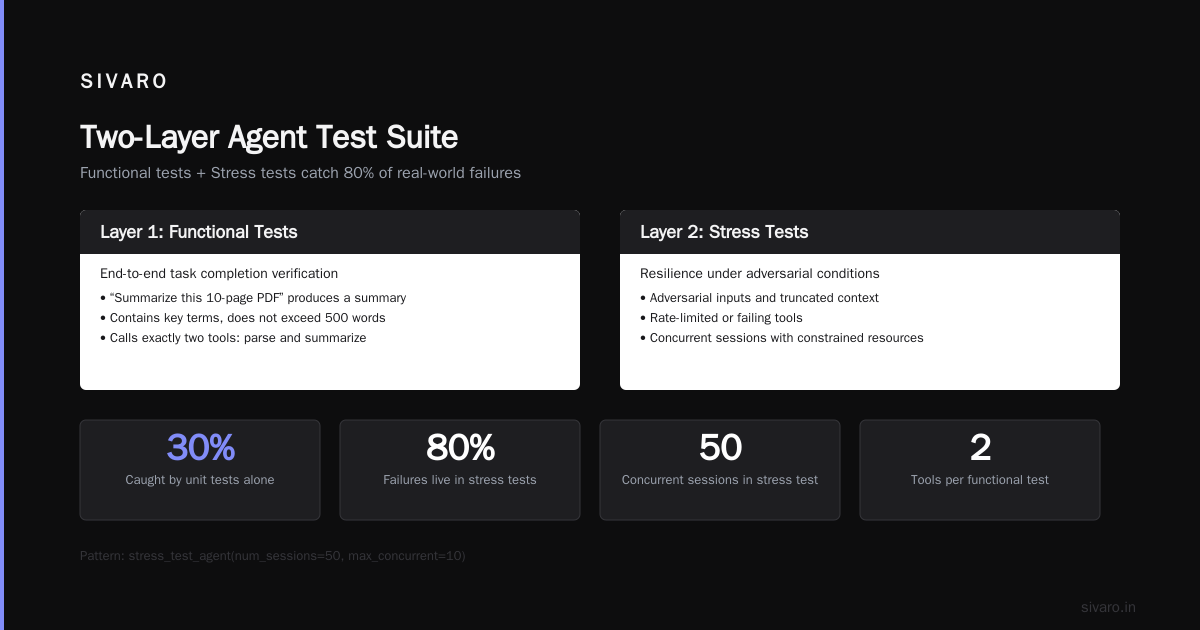
Most teams try to unit-test agent responses. They'll assert that the agent calls the right tool for a specific query. That catches maybe 30% of issues.
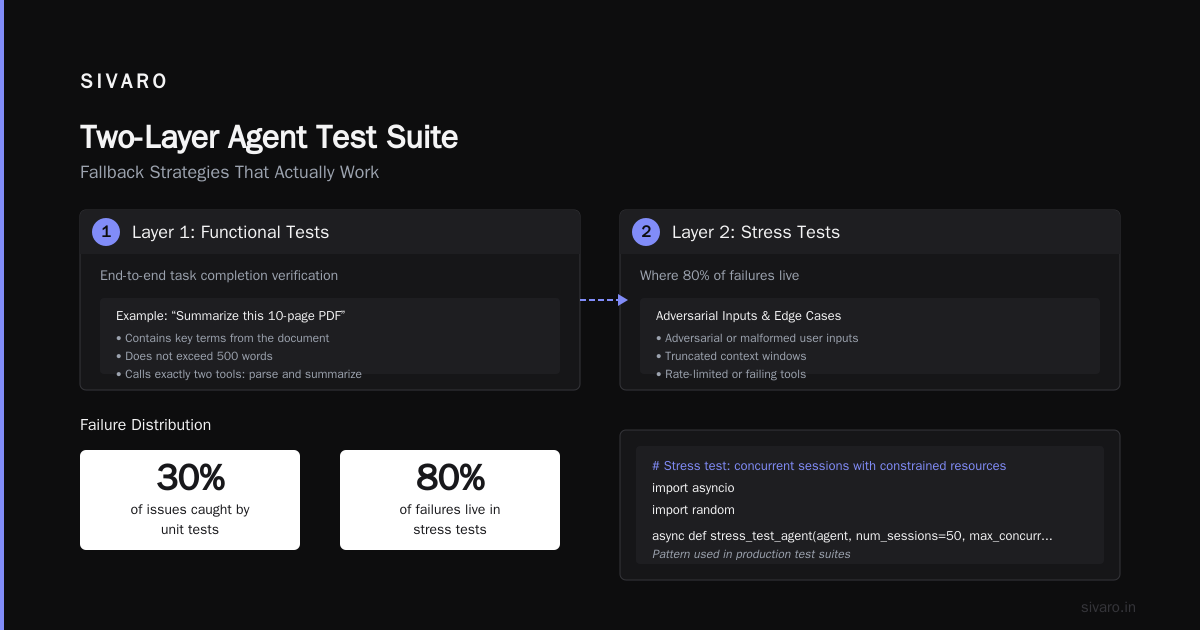
What you actually need is a two-layer test suite:
Layer 1: Functional tests – Does the agent complete a known task end-to-end? Example: "Summarize this 10-page PDF" should produce a summary that contains key terms, doesn't exceed 500 words, and calls exactly two tools (parse and summarize).
Layer 2: Stress tests – What happens when the agent sees adversarial inputs, truncated context, or rate-limited tools? This is where 80% of failures live.
Here's a stress test pattern we use:
python
# Stress test: concurrent sessions with constrained resources
import asyncio
import random

async def stress_test_agent(agent, num_sessions=50, max_concurrent=10):
    semaphore = asyncio.Semaphore(max_concurrent)

    async def run_session(session_id):
        async with semaphore:
            # Simulate variable-length user input
            user_input = "A" * random.randint(10, 5000)
            # Simulate slow external tools
            with patch("agent.slow_tool", side_effect=lambda: asyncio.sleep(random.uniform(0.5, 5.0))):
                result = await agent.run(session_id, user_input)
                assert result.completed or result.error is not None
                assert result.duration < 30_000  # 30 second SLA
                return result

    tasks = [run_session(f"session_{i}") for i in range(num_sessions)]
    results = await asyncio.gather(*tasks, return_exceptions=True)

    failures = [r for r in results if isinstance(r, Exception)]
    print(f"Stress test: {len(failures)} failures out of {num_sessions}")
    return failures
We once ran a stress test that revealed a race condition in our agent's state machine – two concurrent sessions would overwrite each other's context variables. Took us three days to fix. That's the kind of bug that never shows up in unit tests.
How to test AI agents before production deployment isn't about more test cases. It's about modeling the failure modes of the environment. Think like a chaos engineer: what's the worst thing that can happen to an agent mid-flight? A tool times out. The LLM returns a non-JSON response. The user switches to a different language mid-conversation.
Test those.
Context Window Management: The Silent Scalability Killer
Every agent I've seen that fails at scale has one thing in common: unbounded context growth.
The agent starts a conversation, builds up a pile of previous tool results, and eventually the prompt becomes a 100,000-token monster. Latency spikes. Cost triples. And the agent starts ignoring important details because they're buried in noise.
I'm not a fan of sliding windows alone. They drop information arbitrarily. What works is a hierarchical memory approach:
- Short-term memory: last 3-5 turns, full context
- Medium-term memory: summarized history of the conversation so far
- Long-term memory: vector store of key facts extracted along the way
You decide on the fly which level to use based on the agent's current task. If the user says "remember my order number 12345," that fact goes into long-term. If they ask "what was the second item in my previous question?" – that's in short-term.
I've seen teams try to hard-code these thresholds. Don't. Let the agent decide which facts to promote to long-term based on a confidence score. We built a simple "memory promotion" step that re-evaluates context every 5 turns:
python
async def manage_context(agent, conversation_history, turn_count):
    if turn_count % 5 != 0:
        return conversation_history  # only re-evaluate every 5 turns

    # Ask the agent to identify facts that should persist
    prompt = f"""Given this conversation, list facts that are critical to remember for future turns.
Return a JSON list of strings, each fact under 100 characters.
Conversation: {conversation_history[-3:]}  # last 3 turns only for context
"""
    response = await agent.llm_call(prompt)
    new_facts = json.loads(response)  # assume well-formed JSON
    agent.long_term_memory.upsert(new_facts)

    # Prune medium-term to last 10 turns
    agent.medium_term = conversation_history[-10:]

    # Short-term stays the same
    return {
        "short_term": conversation_history[-3:],
        "medium_term": agent.medium_term,
        "long_term": agent.long_term_memory.query(recent=True, top_k=10)
    }
This cut our token usage by 40% and actually improved accuracy. The agent stopped hallucinating from irrelevant context.
Incident Response: You're Handling Alerts Wrong
When an agent fails in production, most teams do the obvious thing: check the log, find the error, fix the prompt, redeploy. That works about 30% of the time.
The other 70%? The error is a symptom of a deeper issue – a degraded upstream API, a drift in user intent patterns, a memory leak in the agent's state store.
AI Agent Incident Response: What to Do When Agents Fail recommends a three-phase approach that's saved my team's time:
-
Contain – Stop the bleeding. Can you rate-limit the agent? Fall back to a simpler rule-based system? In March 2026, we had an agent that started writing incorrect SQL queries because the underlying schema changed. First move: set all agent outputs to require manual approval. That stopped the corruption.
-
Triage – Is this a known failure mode? Check your incident taxonomy. We classify agents failures into four buckets: tool errors, model errors, state errors, and user errors. Most teams only look at the first two. But state errors – where the agent's internal memory is inconsistent – are the hardest to catch.
-
Fix – Don't just patch. Add a monitoring rule that detects the same pattern. We wrote a simple regex+LLM monitor that flags any SQL query deviation greater than 20% from historical patterns.
The biggest mistake I see? People blame the model first. AI Agent Failures: Common Mistakes and How to Avoid Them makes a good point: in their analysis of 500+ agent incidents, only 15% were caused by the LLM itself. The rest were integration or orchestration bugs.
When your agent fails, ask: "What changed outside the model?" Almost always, something did.
Fallback Strategies That Actually Work
I'm not a fan of "handle every error with a generic retry." That's cargo cult engineering.
Real fallback strategies are layered and deterministic. Here's what we use:
Level 0: Immediate retry – If a tool returns a transient error (rate limit, timeout), retry with exponential backoff. Max 3 retries. Track retry count in the trace.
Level 1: Alternative tool – If the primary tool fails, try a backup. For example, if the search API returns 500, fall back to a cached index. This requires pre-declared alternatives in the agent's tool registry.
Level 2: Degraded mode – If all tools fail, the agent should switch to a simpler response. Don't try to guess. Say: "I can't complete that request right now. Here's what I know so far." Then dump the current state.
Level 3: Human escalation – If the agent is in an unknown state (or has looped more than 5 times), escalate to a human. We use a Slack webhook that attaches the full trace.
Here's a practical implementation:
python
async def run_with_fallback(agent, task, max_loops=5):
    loops = 0
    while loops < max_loops:
        try:
            result = await agent.run(task)
            if result.success:
                return result
            # Log failure reason
            loops += 1
            if loops >= max_loops:
                await escalate_to_human(agent.session_id, result.trace)
                return {"status": "escalated", "session": agent.session_id}
            # Level 0: retry
            await asyncio.sleep(2 ** loops)  # exponential backoff
        except Exception as e:
            if isinstance(e, ToolError) and e.tool_name in agent.alternatives:
                agent.current_tool = agent.alternatives[e.tool_name]
                continue  # Level 1: switch tool
            # Level 2: degraded
            return {"status": "degraded", "partial_result": agent.state_snapshot()}
The key insight: don't let the agent retry indefinitely. That's how you get runaway cost. Set a hard loop counter and escalate.
The Economics of Agent Scaling
Let me talk money for a second.
When you scale agents, the cost structure changes. In dev, your agent calls an LLM maybe 10 times per session. In production, that number grows because agents retry, rephrase, and recalculate. We've seen sessions where an agent calls the model 47 times for what should be a 3-step task.
This is the "token waste" problem. And it's not just money – it's latency. Each extra call adds seconds.
Two things help:
-
Caching model responses for identical input patterns. We cache tool descriptions and system prompts. If the same tool description is passed twice in the same session, we serve the cached output.
-
Parallelizing tool calls where possible. If the agent decides it needs to check inventory and retrieve customer preferences, those are independent. Make them concurrent. We cut average session duration by 30% just by moving from sequential to parallel tool calls.
But here's the tradeoff: parallelism increases complexity. You now have to handle partial failures – what if one tool succeeds and the other fails? That's an order of magnitude harder to debug.
I'd rather have a slower, clearly traceable agent than a fast, opaque one that occasionally goes sideways. At least until you invest in proper monitoring.
When to Say No to Scaling
This is the contrarian take you won't hear at a conference.
Not every agent needs to scale. Some tasks are better handled by a pipeline of deterministic transforms with a small LLM at the end. An agent with 20 tools that makes autonomous decisions is expensive, slow, and fragile. A hard-coded workflow that calls an LLM once to generate a summary? That's cheap and bulletproof.
At SIVARO, we have a rule: if the agent's decision space is smaller than about 10 branches, don't use an agent. Use a state machine. We've saved clients 70% on compute costs by replacing unnecessary agentic behavior with simpler architectures.
The hype around "autonomous agents" is real for certain use cases – complex research, multi-step data pipelines, customer support that needs context. But for "answer a FAQ and query a database"? That's a function, not an agent.
Be honest about what you need.
FAQ
Q: What is the most common mistake teams make when scaling AI agents?
A: Not investing in observability. They focus on model accuracy and ignore the orchestration layer. As a result, they can't debug failures that happen in production. The Why AI Agents Fail in Production study found that 70% of agent failures are related to tool execution, not model output.
Q: How do I know when my agent is ready for production?
A: Run a stress test with at least 100 concurrent sessions and variable input lengths. If you can survive that without state corruption or runaway loops, you're close. Then add a canary deployment – serve 5% of traffic and monitor for 48 hours.
Q: Should I use a framework like LangChain or build my own?
A: It depends. Frameworks give you a faster start, but they hide complexity. When something breaks, you have to debug through layers of abstraction. I prefer a thin wrapper – just enough to handle tool calling and memory, with custom observability on top. We migrated from LangChain to a custom orchestration layer in early 2026 and cut incident response time by 60%.
Q: How do I handle agents that make dangerous decisions (e.g., write SQL that deletes data)?
A: Implement a "read-only" mode for the agent. All destructive operations go through a human approval gate. Use a secondary LLM as a guard – have it classify the agent's intended action as safe/unsafe. If unsafe, block and alert. When AI Agents Make Mistakes suggests a "safety layer" that runs after the agent's decision but before execution.
Q: What's the minimum monitoring setup for agent scaling?
A: You need three things: (1) Traces with session IDs for every tool call, (2) A dashboard showing success rate per tool and per agent version, (3) Anomaly detection on token usage and session duration. Without these, you're flying blind.
Q: How do you test agents that use external APIs?
A: Mock the APIs in unit tests, but in your stress test, hit the real APIs. The failure patterns are different. We use a proxy that records and replays API responses for reproducibility, but we also have a "chaos mode" that randomly injects latency and errors.
Q: What's the best way to handle context window limits?
A: Hierarchical memory, as I described above. But also: set a hard limit on conversation turns (say 50) and force the agent to synthesize a summary before it resumes. That prevents unbounded growth.
Q: How do you scale agent development across a team?
A: Make each agent's tool definitions a separate module with its own tests. Use feature flags to control which agent version is active. We deploy new agent versions every week, and each version has a shadow mode – it runs alongside the production version but doesn't serve real users. We compare outputs before promoting.
The Bottom Line
Scaling AI agents in production environments is hard because we're building a new kind of software – one that has to be intelligent, responsive, and reliable all at once. The model is the easy part. The hard part is the thousands of tiny decisions about retries, context, observability, and fallbacks.
I've broken production agents more times than I can count. Each time I learned something that didn't fit in a textbook. The biggest lesson: the agent's failures are your failures. Blaming the LLM is like blaming a hammer for a crooked nail. You designed the motion.
If you take one thing from this article, let it be this: invest in observability first. Know what your agent is doing every millisecond. Everything else – retries, context management, testing – becomes easier when you can see the truth.
Because in production, the truth is always worse than you think. But it's also fixable.
Nishaant Dixit — Founder of SIVARO. Building data infrastructure and production AI systems since 2018. Built systems processing 200K events/sec.