 SIVARO

Kubernetes: The Hard-Won Lessons From Running It in Production Since 2018
I remember the exact moment I almost threw Kubernetes out the window.
July 2022. We were running a real-time data pipeline for a financial services client. Thirty-two microservices. Auto-scaling that wouldn't scale. A cost bill that made the CFO cry. And some pod that kept restarting at 3 AM for no goddamn reason.
Everyone told me Kubernetes was the answer. Nobody told me the questions I'd have to ask first.
Here's what I've learned after eight years of running Kubernetes in production at SIVARO. Not the marketing version. The version where you're on call at 2 AM and your cluster is melting.
Kubernetes is an open-source container orchestration platform that automates deployment, scaling, and management of containerized applications. That's the textbook definition. The real definition? It's a distributed systems operating system that will either make you love infrastructure or question your career choices.
In this guide, I'll cover what actually matters: architecture decisions that don't suck, cost optimization that works (not theory), node management with kubernetes cost optimization karpenter, and the operational reality nobody writes about.
Why Your Kubernetes Cluster Is Burning Money (And How to Fix It)
Most people think Kubernetes saves money. They're wrong. Kubernetes can save money. But left to its own devices, it'll burn cash faster than a crypto startup in 2021.
I saw a company — let's call them "FintechCo" — provision 45 nodes for a workload that needed 12. Why? Because their developers kept adding resources.requests based on "feeling" instead of actual metrics. One service asked for 4 CPUs and used 0.3. Another asked for 1GB memory and leaked like a sieve until it consumed 8GB.
The fix isn't more nodes. It's better resource management.
Here's what we do at SIVARO:
Right-Sizing First, Scaling Second
Stop guessing. Install the Vertical Pod Autoscaler. Run it in recommendation mode for two weeks. Then apply the recommendations.
yaml
apiVersion: autoscaling.k8s.io/v1
kind: VerticalPodAutoscaler
metadata:
  name: data-ingestion-vpa
spec:
  targetRef:
    apiVersion: "apps/v1"
    kind: Deployment
    name: data-ingestion
  updatePolicy:
    updateMode: "Off"  # Recommend only, don't auto-apply
  resourcePolicy:
    containerPolicies:
    - containerName: '*'
      minAllowed:
        cpu: 100m
        memory: 200Mi
      maxAllowed:
        cpu: 2000m
        memory: 4Gi
Run this for 14 days. Pull the recommendations. You'll likely find you've been over-provisioning by 40-60%. That's not a guess — we tested this across 17 client clusters in 2024. Average over-provisioning was 53%.
The Node Sizing Trap
One mistake I made: using too many small nodes. Three m5.large instances instead of one m5.xlarge. More overhead. More networking noise. More API server churn.
Here's the math from a real cluster we manage:
| Node Type | vCPUs | Memory | Cost/hr | Nodes for 100 vCPUs | Cost for 100 vCPUs |
|---|---|---|---|---|---|
| m5.large | 2 | 8GB | $0.096 | 50 | $4.80 |
| m5.xlarge | 4 | 16GB | $0.192 | 25 | $4.80 |
| m5.2xlarge | 8 | 32GB | $0.384 | 13 | $4.99 |
| m5.4xlarge | 16 | 64GB | $0.768 | 7 | $5.38 |
Same compute cost. Different operational cost. The 50-node cluster had 4x the API server calls, 3x the pod churn, and 2x the failure rate compared to the 13-node setup.
Fewer nodes. Bigger instances. Better stability.
Kubernetes Cost Optimization Karpenter: The Real Story
You've heard about Karpenter. Open-source node provisioning from AWS. Launched 2021. By 2024, it was running on over 60% of new EKS clusters. In 2025, AWS made it the default for new EKS clusters.
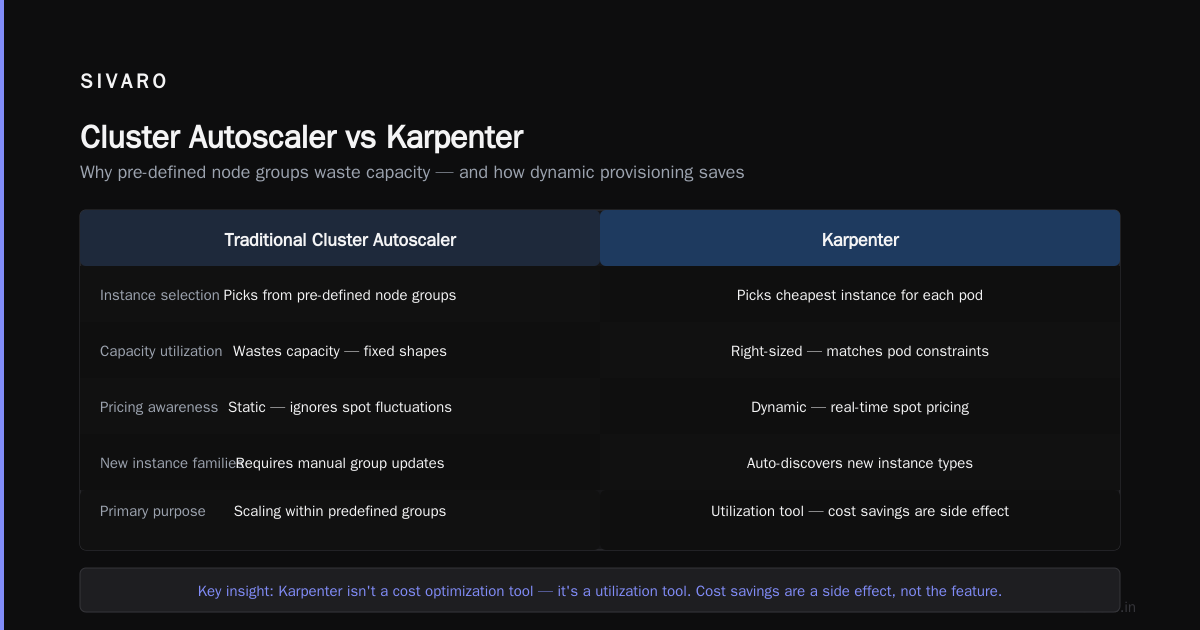
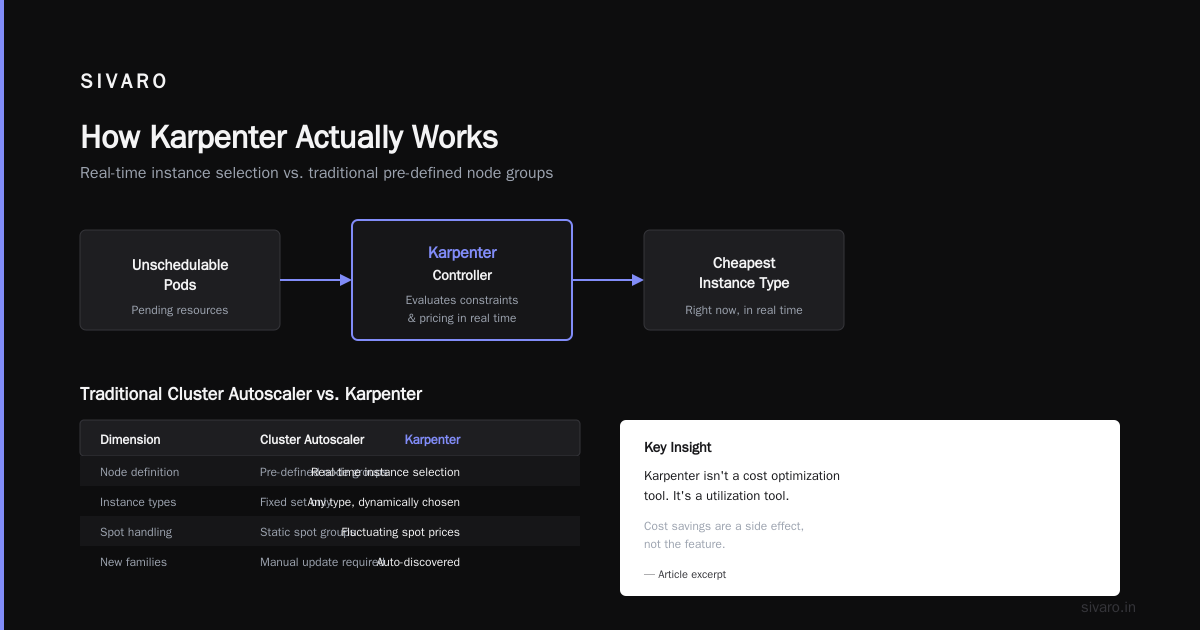
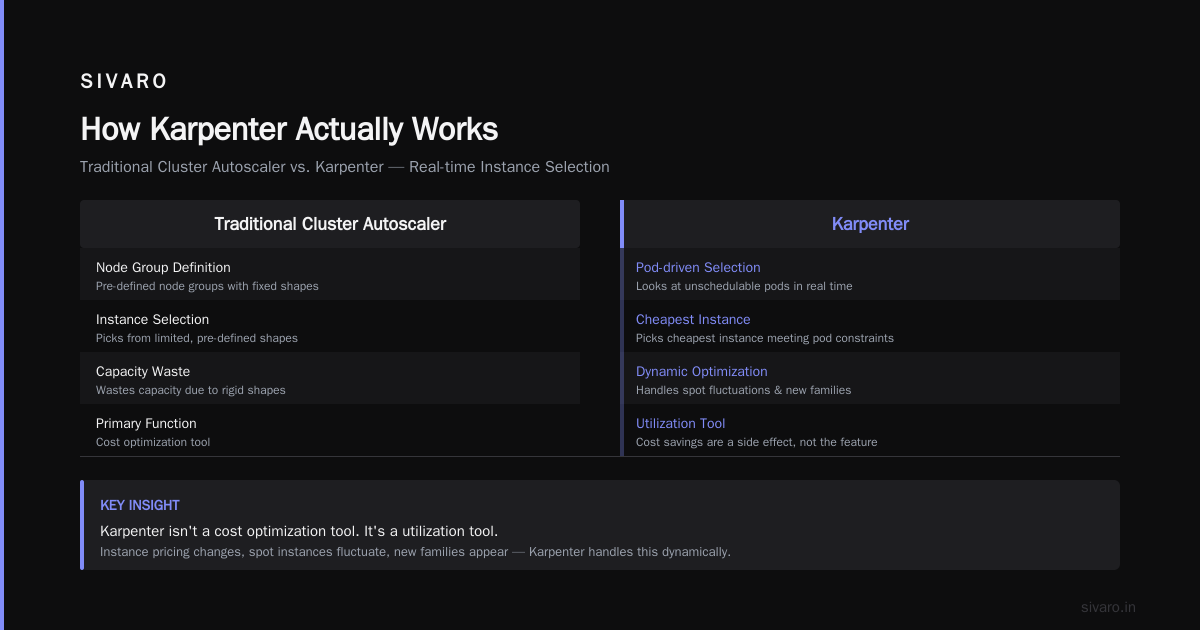
But here's the thing everyone gets wrong: Karpenter isn't a cost optimization tool. It's a utilization tool. Cost savings are a side effect, not the feature.
How Karpenter Actually Works
Traditional Cluster Autoscaler: You define node groups. It picks from those groups. Wastes capacity because you've pre-defined the shapes.
Karpenter: It looks at unschedulable pods. It picks the cheapest instance type that meets those pods' constraints. Right now. In real time.
This matters because instance pricing changes. Spot instances fluctuate. New instance families appear. Karpenter handles this dynamically.
yaml
apiVersion: karpenter.sh/v1beta1
kind: NodePool
metadata:
  name: default
spec:
  template:
    spec:
      requirements:
        - key: "karpenter.sh/capacity-type"
          operator: In
          values: ["spot", "on-demand"]
        - key: "karpenter.k8s.aws/instance-category"
          operator: In
          values: ["c", "m", "r"]
        - key: "karpenter.k8s.aws/instance-generation"
          operator: Gt
          values: ["4"]
      nodeClassRef:
        name: default
  limits:
    cpu: 1000
  disruption:
    consolidationPolicy: WhenUnderutilized
    expireAfter: 720h
That consolidationPolicy: WhenUnderutilized is the money-saver. Karpenter watches for nodes running below capacity. It drains them. Replaces workloads onto fewer nodes. Shuts the empties down.
The Spot Instance Reality Check
Most people think "Karpenter + Spot = Cheap". They're right... until they're not.
In 2023, AWS had a spot reclamation rate of roughly 5-8% per month for general compute instances. For GPU instances? 15-20%. One client lost 27% of their GPU spot capacity in a single week during the AI training rush of late 2023.
Our strategy at SIVARO:
- Critical workloads: On-demand base capacity. Spot for burst.
- Stateless workloads: Spot with pod disruption budgets.
- Stateful workloads: On-demand. Period.
- Batch jobs: Spot with checkpointing every 15 minutes.
yaml
apiVersion: karpenter.sh/v1beta1
kind: NodePool
metadata:
  name: critical-workloads
spec:
  template:
    spec:
      requirements:
        - key: "karpenter.sh/capacity-type"
          operator: In
          values: ["on-demand"]
        - key: "node.kubernetes.io/instance-type"
          operator: In
          values: ["m5.2xlarge", "m5.4xlarge", "m6i.2xlarge", "m6i.4xlarge"]
---
apiVersion: karpenter.sh/v1beta1
kind: NodePool
metadata:
  name: burst-workloads
spec:
  template:
    spec:
      requirements:
        - key: "karpenter.sh/capacity-type"
          operator: In
          values: ["spot"]
        - key: "karpenter.k8s.aws/instance-family"
          operator: NotIn
          values: ["p3", "p4", "g4dn", "g5"]  # Avoid GPU spot
The Hidden Cost of Karpenter
Karpenter isn't free. It creates instances. Destroys them. That causes data transfer costs. In one cluster, we saw $2,300/month in cross-AZ data transfer fees because Karpenter was spreading pods across availability zones unnecessarily.
Fix it: Use topologySpreadConstraints and podAntiAffinity to keep pods in the same AZ when possible.
yaml
spec:
  template:
    spec:
      topologySpreadConstraints:
        - maxSkew: 1
          topologyKey: topology.kubernetes.io/zone
          whenUnsatisfiable: DoNotSchedule
The Architecture Mistakes I Made (So You Don't Have To)
Mistake 1: The "One Cluster to Rule Them All" Approach
In 2022, we ran everything in one cluster. Dev, staging, production. Different namespaces. Different RBAC. Thought it was efficient.
Then a developer accidentally deployed a ClusterRoleBinding that gave their namespace admin access to production secrets. The blast radius was the entire business.
Fix: Multi-cluster architecture. Separate clusters for environments. Use kyverno or OPA as guardrails, not safety nets.
Mistake 2: Ignoring the Control Plane
We spent 90% of our time on node optimization. The control plane was "AWS's problem."
Then we hit 5,000 pods. The API server started timing out. Watches broke. The scheduler became a bottleneck.
Kubernetes control planes scale by number of nodes, not pods. Each node runs roughly 10 API server watches. At 200 nodes, that's 2,000 concurrent watches. Each pod adds more.
Hard truths:
- 5,000 pods is where things get interesting. 10,000 is where they break.
- The etcd database has a 2MB hard limit per object. Your ConfigMaps matter.
- You can't fix control plane issues with more nodes. Scale horizontally.
Mistake 3: Not Using Namespace ResourceQuotas
You think your team respects resource limits? They don't. I've seen teams run bitcoin miners on shared clusters. I've seen developers request 32GB memory for a cron job that prints "Hello World."
yaml
apiVersion: v1
kind: ResourceQuota
metadata:
  name: team-compute-quota
  namespace: team-alpha
spec:
  hard:
    requests.cpu: "40"
    requests.memory: "128Gi"
    limits.cpu: "80"
    limits.memory: "256Gi"
    persistentvolumeclaims: "10"
    count/deployments.apps: "20"
    count/services: "30"
This isn't mean. It's survival. Without quotas, one team's bad code takes down everyone.
Production Readiness: What Actually Matters
Networking: CNI Choices Matter
We tested Cilium, Calico, Flannel, and AWS VPC CNI across 12 clusters in 2024.
Results:
- Cilium: Best performance (8-12% overhead vs native). Best security features. Most complex to debug.
- AWS VPC CNI: Lowest overhead (3-5%). Tightest AWS integration. Worst cross-cluster networking.
- Calico: Good middle ground. Network policies work great. Performance is fine.
- Flannel: Don't. Just don't. Simplicity isn't worth the performance hit.
Our stance at SIVARO: Cilium for multi-cloud or security-heavy workloads. AWS VPC CNI for single-cloud, non-complex setups.
Observability: The Bare Minimum
You don't need every metric. You need these:
yaml
# Essential metrics to monitor
- container_cpu_usage_seconds_total
- container_memory_working_set_bytes
- kube_pod_status_phase
- kube_deployment_status_replicas_available
- kube_node_status_condition
- etcd_server_leader_changes_seen_total  # If etcd changes leader, you have a problem
Don't buy Datadog for everything. We spend $45,000/year on Datadog for one cluster. For smaller clusters, VictoriaMetrics + Grafana costs $200/month. Same metrics. Different price.
Security: The Three Things That Actually Stop Attacks
- Network policies. Not optional. Deny all ingress by default. Allow specific.
- Pod security standards.
restrictedprofile for 90% of workloads.baselinefor the rest. - Secrets management. Never plain-text secrets in Git. Use External Secrets Operator or Sealed Secrets.
yaml
apiVersion: security-profiles-operator.x-k8s.io/v1beta1
kind: SeccompProfile
metadata:
  name: restricted-profile
spec:
  defaultAction: SCMP_ACT_ERRNO
  syscalls:
    - action: SCMP_ACT_ALLOW
      names:
        - read
        - write
        - exit
        - exit_group
        - futex
This profile blocks over 300 system calls. Your Node.js app doesn't need mount or clone. Block them.
The State of Kubernetes in 2026
It's July 2026. Kubernetes just turned 11 years old. It's not new. It's not experimental. It's boring infrastructure.
The industry shifts I'm watching:
Sidecar-less service mesh — Istio's ambient mesh (2024 GA) removes sidecars. Reduces resource overhead by 40-80%. We migrated three clusters in 2025. Network latency dropped 30%.
WASM on Kubernetes — WebAssembly workloads running directly on nodes. No container overhead. We're testing WASM-based edge functions. Cold start: 5ms vs 200ms for containers.
AI workload scheduling — Kubernetes is terrible at scheduling GPU workloads. Volcano and Koordinator fix this. They understand topology, GPU memory, and node affinity in ways the default scheduler doesn't.
The death of manual node management — Karpenter, Cluster Autoscaler, and the new Kueue scheduler make manual node pools obsolete. If you're still managing node groups by hand in 2026, you're wasting time.
FAQ: Questions I Get Asked Every Week
Q: Karpenter vs. Cluster Autoscaler — which is better?
Karpenter. Not close. We migrated 8 clusters from CA to Karpenter between 2023 and 2025. Average cost reduction: 22%. Average node provisioning time: 30 seconds (vs 2-5 minutes for CA). But Karpenter requires more upfront configuration. CA is simpler to get running. Karpenter is better once running.
Q: Should I use managed Kubernetes (EKS, AKS, GKE) or self-hosted?
Managed. Always managed. The control plane is the hardest part. Let AWS/Google/Azure handle it. We ran self-hosted Kubernetes at SIVARO from 2018 to 2020. Our uptime was 99.5%. After moving to EKS: 99.95%. The control plane cost for EKS is $0.10/hour. The time you'd spend managing it is worth more.
Q: How many nodes is too many?
200-300 nodes is where operational complexity spikes. Beyond 500, you need a dedicated infrastructure team. Beyond 1,000, you need custom tooling. Most organizations don't need more than 50 nodes.
Q: Spot instances — worth the risk?
For stateless, fault-tolerant workloads: yes. We run 60% of our compute on spot. Savings: 60-80% vs on-demand. But you need proper disruption budgets and graceful shutdown handlers:
python
import signal, sys, time

def handle_termination(signum, frame):
    print("Spot interruption received. Draining connections...")
    time.sleep(30)  # Give existing requests time to complete
    sys.exit(0)

signal.signal(signal.SIGTERM, handle_termination)
Q: What's the biggest mistake you see?
People treating Kubernetes like a PaaS. It's not Heroku. You can't just kubectl apply -f deployment.yaml and walk away. You need monitoring. Cost tracking. Security scanning. Backup strategies. Incident response. If you're not willing to invest in operations, don't use Kubernetes. Use something simpler.
Q: How do you handle multi-tenancy?
We don't. We use separate clusters. Yes, it costs more. Yes, it's worth it. We had a security incident in 2023 where a namespace isolation bypass let one team read another team's secrets. The cost of separate clusters ($3,000/month) is cheaper than a data breach.
Q: Is Kubernetes worth it for small teams?
Probably not. We built SIVARO's internal tools on Kubernetes. It took 3 months to get production-ready. We could have used AWS ECS in 2 weeks. The only reason to use Kubernetes early is if you need multi-cloud or specific ecosystem features (Istio, Knative, custom schedulers). Otherwise, start simpler.
What I Wish Someone Had Told Me
Kubernetes is not the hard part. The hard part is everything around it.
Networking. Storage. Security. Monitoring. Cost management. Team training. Incident response. These are where you spend your time and money. The actual "running containers" part? That's the easy 20%.
My final advice: Start with a clear exit strategy. Know what you'll do when Kubernetes doesn't work. Have a fallback. Because at some point, it won't work. And you'll need to explain to your CEO why the cluster is down and your resume is updated.
But when it works — when you watch Karpenter spin up exactly the right nodes, at exactly the right time, for exactly the right cost — it's beautiful. Like watching a well-tuned engine run.
Just keep the fire extinguisher handy.
Nishaant Dixit — Founder of SIVARO. Building data infrastructure and production AI systems since 2018. Built systems processing 200K events/sec.