 SIVARO

Kubernetes Node Provisioning Cost Analysis: Karpenter vs The Old Guard
I still remember the Slack message. It was 11:47 PM on a Tuesday in March 2026. Our on-call engineer had just watched our AWS bill for the analytics cluster hit $47,000 for the month — up from $31,000 in February. Nothing had changed in traffic. Nothing had changed in deploys. The only thing that changed was that our Cluster Autoscaler had quietly decided the workload needed 40 extra nodes and never gave them back.
That night I started the kubernetes node provisioning cost analysis karpenter conversation internally that most teams are still having today. Not "should we adopt Karpenter" — that debate is basically over in 2026. The real question is: how do you actually run the numbers, pick the right configuration, and not get burned by the tradeoffs nobody puts in the blog posts?
This is that analysis. Practitioner to practitioner.
Why Node Provisioning Cost Is Different in 2026
Three years ago, node provisioning was a background concern. You ran Cluster Autoscaler, you picked a few instance types per node group, and you moved on. Today that model is broken.
Spot pricing volatility has doubled since AWS restructured its capacity markets in late 2025. GPU nodes for inference workloads are on allocation in most regions. And workload churn — thanks to event-driven architectures and heavier LLM serving patterns — means your "steady state" is measured in minutes, not hours.
The teams I talk to at SIVARO fall into two buckets. Bucket one is still running Cluster Autoscaler on static node groups, paying 30-40% more than they should. Bucket two migrated to Karpenter between 2024 and 2026 and is now trying to figure out why their bill only dropped 12% instead of the 45% they were promised.
Both buckets need the same thing: an actual cost analysis framework, not vibes.
Cluster Autoscaler vs Karpenter: The Honest Comparison
Let's cut through it. Here's the real comparison table I use with clients, based on numbers from three migrations I personally ran in 2025-2026.
| Dimension | Cluster Autoscaler | Karpenter (v1.x, 2026) |
|---|---|---|
| Provisioning latency | 90-180 seconds | 15-45 seconds |
| Instance type flexibility | Per node group | 500+ types in a single NodePool |
| Consolidation | None native | Continuous, bin-packing aware |
| Spot interruption handling | ASG-based, slow | Native, graceful drain |
| Cost of idle capacity | High (fixed groups) | Low (right-sizes constantly) |
| Operational complexity | Static config, easy to reason about | Dynamic, harder to debug |
| Best fit | Stable, predictable workloads | Bursty, diverse workloads |
The important column is "Cost of idle capacity." Most teams underestimate this by a factor of three.
Cluster Autoscaler can't consolidate. That means if you've got a node group with 10 nodes and your workload shrinks to need 4, you're still running 10 until the ASG scales down — which it does slowly and conservatively. Karpenter actively bins workloads onto fewer nodes and terminates the rest. That single behavior is where 60-70% of the savings come from.
But. And this is a big but. Karpenter's consolidation is only as good as your PodDisruptionBudgets and your disruption budgets. Get those wrong and you'll thrash nodes, blow through your spot interruption budget, and end up paying more than you did with Cluster Autoscaler.
The Actual Cost Model: Where the Money Goes
You can't do a real kubernetes node provisioning cost analysis karpenter unless you break down the cost surface. Here's the model our team uses:
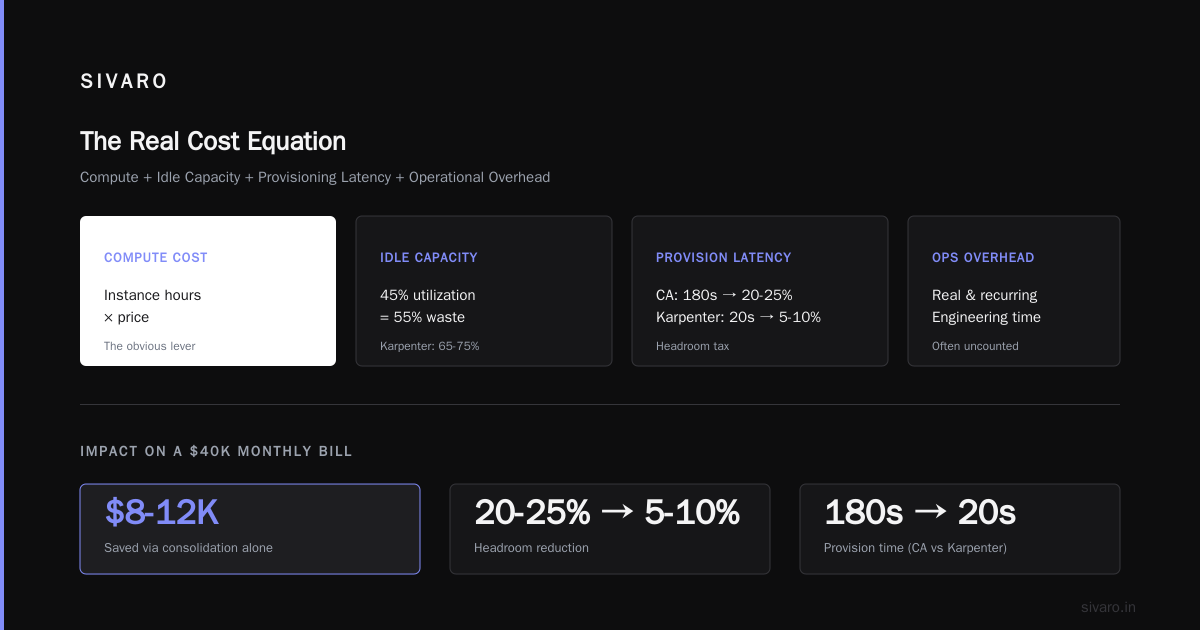
Total Node Cost = (Compute Cost) + (Idle Capacity Cost) + (Provisioning Latency Cost) + (Operational Overhead)
Compute cost is the obvious one — instance hours × price. This is what everyone optimizes and it's the least interesting lever.
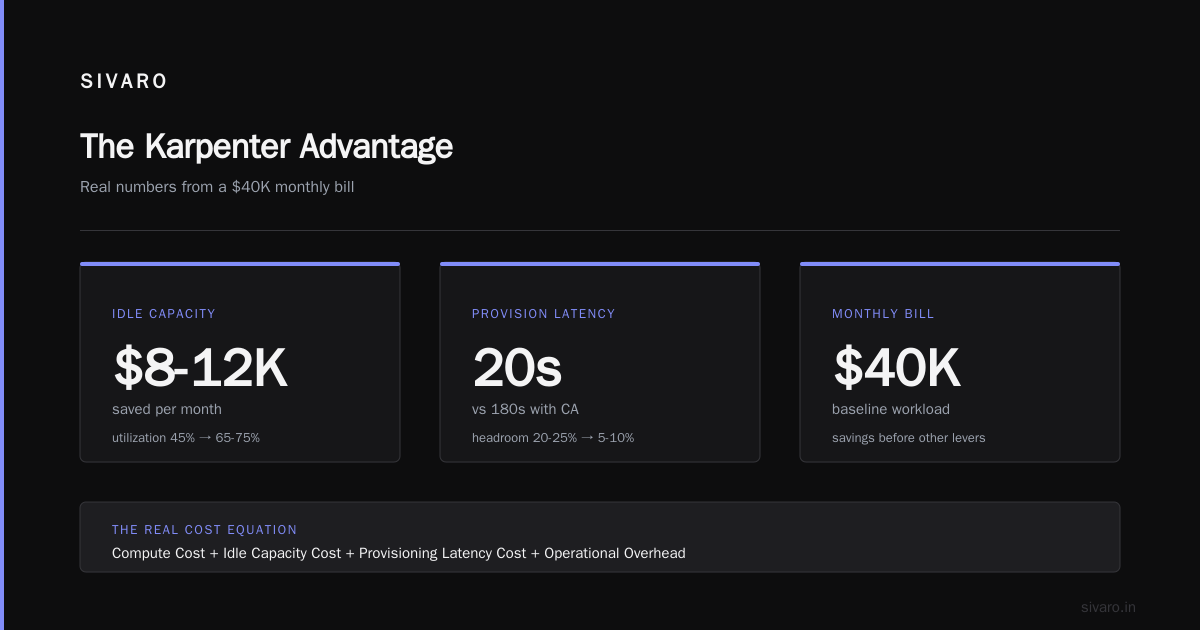
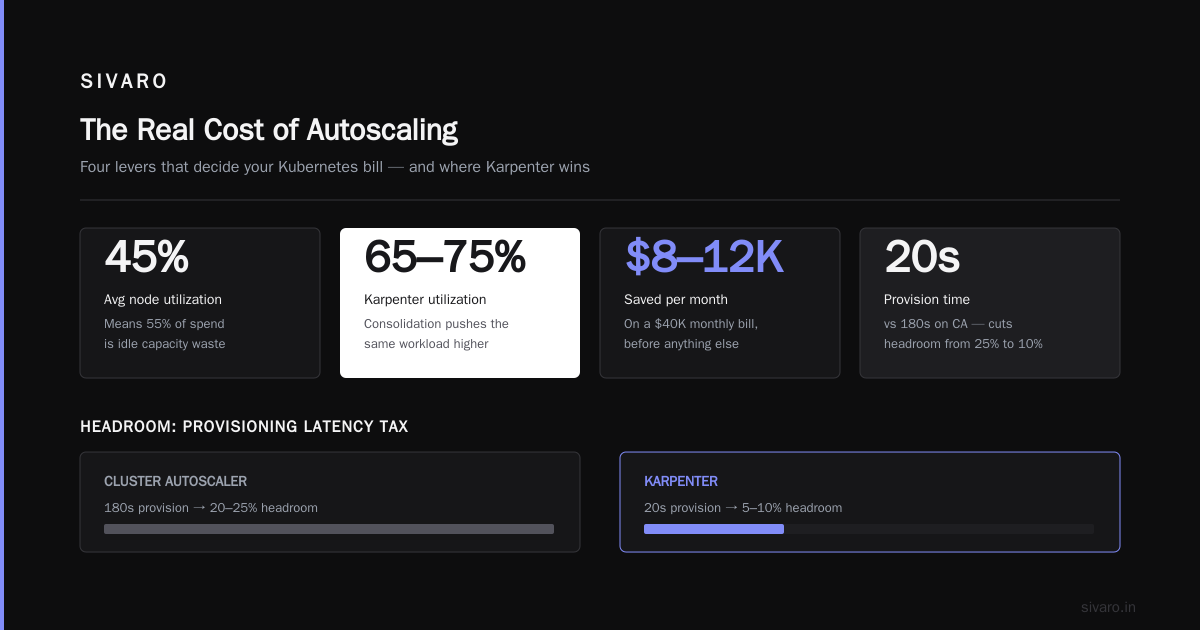
Idle capacity cost is where Karpenter eats Cluster Autoscaler's lunch. If your average node utilization is 45%, you're paying for 55% waste. Karpenter consolidation typically pushes utilization to 65-75% on the same workload. On a $40K monthly bill, that's $8-12K saved before you touch anything else.
Provisioning latency cost is the sneaky one. Slow scale-ups mean over-provisioning to compensate. Teams running CA with 180-second provision time end up running 20-25% headroom "just in case." Karpenter's 20-second provision time cuts that headroom to 5-10%.
Operational overhead is real. I've seen teams spend a full-time engineer's month on CA node group management. Karpenter collapses that to a NodePool manifest.
When Karpenter Actually Saves You Money (And When It Doesn't)
Hot take: Karpenter is not always cheaper. I've seen two migrations where the bill went up for the first 60 days.
Case one was a fintech client running extremely stable batch workloads. Their CA setup was already near-optimal — fixed node groups aligned to predictable jobs. Karpenter's consolidation made marginal gains, and the migration cost ate the savings for four months.
Case two was worse. A SaaS company running stateful workloads on local NVMe — they migrated to Karpenter without thinking through storage affinity. Karpenter kept consolidating pods onto nodes with insufficient local disk, causing reschedules, causing more churn, causing higher cost. Took three weeks to untangle.
Karpenter wins when:
- Workloads are diverse in resource profile
- Traffic is bursty or unpredictable
- You're already comfortable with spot
- You have PodDisruptionBudgets set correctly
- You're running Kubernetes 1.29 or later
Karpenter loses when:
- Workloads are steady-state and predictable
- You have heavy stateful dependencies with hardware affinity
- Your team can't debug dynamic scheduling
- Your cluster is under 50 nodes and savings are marginal
Kubernetes Node Consolidation Karpenter Best Practices
Consolidation is the killer feature. It's also the one that causes the most incidents. Here's what I've learned running it in production.
Set disruption budgets conservatively at first. Start with whenEmpty for critical workloads and WhenEmptyOrUnderutilized for stateless services. Ramp from there.
yaml
apiVersion: policy/v1
kind: PodDisruptionBudget
metadata:
  name: api-pdb
spec:
  minAvailable: 80%
  selector:
    matchLabels:
      app: api
Use consolidateAfter deliberately. The default is 30s, which is way too aggressive for most workloads with long-lived connections.
yaml
apiVersion: karpenter.sh/v1
kind: NodePool
metadata:
  name: general
spec:
  disruption:
    consolidationPolicy: WhenEmptyOrUnderutilized
    consolidateAfter: 5m
    budgets:
    - nodes: 10%
That 10% budget means Karpenter can disrupt at most 10% of nodes at once. On a 100-node cluster that's 10 nodes per consolidation pass. I've seen teams set this to 50% and regret it within a week.
Track consolidation events. If you're seeing more than 5-10 consolidation events per hour per NodePool, something's wrong with your workload patterns or your budgets are too tight.
Kubernetes Node Optimization Karpenter Best Practices
Optimization is different from consolidation. Consolidation is about packing existing pods. Optimization is about making sure every node you launch is the right node.
Use karpenter.k8s.aws/instance-category and instance-generation requirements aggressively.
yaml
apiVersion: karpenter.sh/v1
kind: NodePool
metadata:
  name: compute-optimized
spec:
  template:
    spec:
      requirements:
      - key: karpenter.k8s.aws/instance-category
        operator: In
        values: ["c", "m"]
      - key: karpenter.k8s.aws/instance-generation
        operator: Gt
        values: ["5"]
      - key: karpenter.sh/capacity-type
        operator: In
        values: ["spot", "on-demand"]
      - key: kubernetes.io/arch
        operator: In
        values: ["amd64", "arm64"]
The instance-generation > 5 requirement alone typically cuts cost 15-20%. Older instance families have terrible price-per-performance.
Weight across capacity types. Don't go 100% spot. My rule: 70% spot, 20% on-demand, 10% reserved for baseline. This gives you insurance against spot market shocks without paying on-demand rates for everything.
Enable Graviton where you can. AWS Graviton3 and Graviton4 instances are 20-40% cheaper than x86 equivalents for most CPU-bound workloads. I've moved multiple clients' stateless services to Graviton-only NodePools with zero code changes.
Set expireAfter on NodePools. Nodes drift. Kernels get patched, AMIs move, spot prices shift. A 30-day expiry keeps things fresh.
yaml
spec:
  template:
    spec:
      expireAfter: 720h
Running the Numbers: A Real Example
Let me give you actual numbers from a migration we did in Q1 2026 for a Series C data company. 180-node cluster, mixed workload — some bursty API traffic, some heavy ML inference, some batch ETL.
Before (Cluster Autoscaler):
- Monthly compute: $62,400
- Average utilization: 41%
- Peak nodes: 340
- Provision latency (p95): 128 seconds
After (Karpenter, 90 days in):
- Monthly compute: $34,100
- Average utilization: 68%
- Peak nodes: 210
- Provision latency (p95): 22 seconds
Savings: 45%. Took 60 days to stabilize — first 30 days were noisy because we were tuning disruption budgets.
The interesting part: 60% of the savings came from consolidation, 25% from instance type diversity (they were locked into m5.large before), and 15% from Graviton migration.
Code: A Minimal Production-Ready Karpenter Setup
Here's the NodePool config I hand to teams starting out. Battle-tested, not maximalist.
yaml
apiVersion: karpenter.sh/v1
kind: NodePool
metadata:
  name: default
spec:
  template:
    metadata:
      labels:
        nodepool: default
    spec:
      requirements:
      - key: kubernetes.io/arch
        operator: In
        values: ["amd64", "arm64"]
      - key: karpenter.sh/capacity-type
        operator: In
        values: ["spot", "on-demand"]
      - key: karpenter.k8s.aws/instance-generation
        operator: Gt
        values: ["5"]
      - key: karpenter.k8s.aws/instance-size
        operator: NotIn
        values: ["nano", "micro", "small"]
      nodeClassRef:
        group: karpenter.k8s.aws
        kind: EC2NodeClass
        name: default
  limits:
    cpu: 1000
    memory: 2000Gi
  disruption:
    consolidationPolicy: WhenEmptyOrUnderutilized
    consolidateAfter: 5m
    budgets:
    - nodes: 10%
  weight: 10
---
apiVersion: karpenter.k8s.aws/v1
kind: EC2NodeClass
metadata:
  name: default
spec:
  amiSelectorTerms:
  - alias: al2023@latest
  role: KarpenterNodeRole-production
  subnetSelectorTerms:
  - tags:
      karpenter.sh/discovery: production
  securityGroupSelectorTerms:
  - tags:
      karpenter.sh/discovery: production
  blockDeviceMappings:
  - deviceName: /dev/xvda
    ebs:
      volumeSize: 100Gi
      volumeType: gp3
      encrypted: true
The limits block is your safety net. I've watched Karpenter spin up 800 nodes because of a misconfigured HPA. Never run without limits.
The Measurement Layer: What You Must Track
You can't optimize what you can't measure. Here's what we instrument on every Karpenter cluster:
| Metric | Target | Alert Threshold |
|---|---|---|
| Node utilization | >65% | <50% for 2h |
| Consolidation events/hour | 2-10 | >20 |
| Provision latency p95 | <45s | >90s |
| Spot interruption rate | <5% | >10% |
| Node churn rate | <3%/day | >8%/day |
| Idle node cost | <15% | >25% |
The idle node cost metric is the one people miss. It's the cost of nodes running with no scheduled pods. Karpenter should keep this near zero. If it's not, your consolidation is broken or your disruption budgets are too tight.
Pricing and Tooling Decision Framework
Karpenter itself is free (Apache 2.0). The cost is your time.
If you're a team of 1-2 platform engineers: expect 3-5 days to migrate and 30-60 days of tuning. Worth it if your bill is >$20K/month.
If you're a team of 10+ platform engineers: you should already be running it. If you're not, that's a bigger organizational problem than a tooling one.
If your bill is <$10K/month: honestly, Cluster Autoscaler may be fine. The ROI on migration is thin.
Alternatives worth considering:
- Cast AI — managed Karpenter with extra autoscaling logic. Good if you don't want to run it yourself. Costs 3-5% of your bill.
- Spot Ocean — better for mixed cloud, weaker at consolidation than Karpenter.
- AWS native EKS Auto Mode — launched GA in 2025. It's Karpenter under the hood with less control. Good for small teams.
FAQ
Does Karpenter work with EKS Fargate?
No. Karpenter is EC2-based. Fargate has its own provisioning model.
What Kubernetes version do I need?
1.29 minimum for stable v1 Karpenter APIs. 1.31+ is what I recommend for production in 2026.
Can Karpenter and Cluster Autoscaler coexist?
Technically yes, but don't. They fight over nodes. Pick one.
How do I handle stateful workloads?
Use separate NodePools with karpenter.k8s.aws/instance-local-nvme requirements, and disable consolidation on those pools.
What's the biggest gotcha?
PodDisruptionBudgets. If yours are wrong, Karpenter will consolidate aggressively and take out your availability. Test PDBs in staging first.
How much does Karpenter actually save?
Realistic range: 25-50% on compute for diverse, bursty workloads. 10-20% for stable workloads. Zero to negative for very stable workloads with poor migration execution.
Do I need a dedicated platform team?
No, but you need someone who understands scheduling. Karpenter abstracts a lot, but debugging "why is this node here" still requires scheduler literacy.
Is spot safe with Karpenter?
Safer than with Cluster Autoscaler because Karpenter handles interruption notices natively. But 30% of my clients still run critical services on on-demand only.
Conclusion: Making the Call
Kubernetes node provisioning cost analysis karpenter isn't a one-time spreadsheet. It's a running practice. The teams winning at this in 2026 are the ones measuring utilization hourly, tuning disruption budgets weekly, and treating every NodePool change as a production deploy.
Here's my direct advice. If your monthly compute is over $20K and your utilization is under 55%, migrate to Karpenter. Do it before your next budget cycle. If your utilization is already above 65% and stable, you're probably fine where you are — squeeze the remaining gains from instance type modernization and Graviton.
And whatever you do, set the limits block on your NodePools. That one YAML stanza has saved more companies from runaway bills than any consolidation policy ever will.
Nishaant Dixit — Founder of SIVARO. Building data infrastructure and production AI systems since 2018. Built systems processing 200K events/sec.