 SIVARO

Kubernetes Node Consolidation Karpenter Best Practices: The 2026 Field Guide
Last month a fintech client called me in a panic. Their EKS bill jumped 40% in six weeks. Nothing had shipped. Traffic was flat. The culprit? They'd migrated to Karpenter, patted themselves on the back, and never tuned consolidation. Every new pod was spinning up a fresh node, and nothing was ever scaled back down. They were paying for capacity that hadn't run a workload since August 2.
This is the most common failure mode I see in 2026. Karpenter is genuinely excellent software — but kubernetes node consolidation karpenter best practices aren't something you get for free. You have to configure them, and you have to understand the economics.
So let me lay this out the way I'd walk a client through it. What consolidation actually is, the decisions you need to make, the options on the table, and how to pick without lighting money on fire.
What Consolidation Actually Does (And Why It's Not Just "Scale Down")
Consolidation is Karpenter's job of moving pods off underutilized nodes and terminating those nodes. That's the elevator pitch. The reality is messier.
There are two flavors in current Karpenter (v1.x, which most of us are on since the v1beta1 API got deprecated in 2024):
Consolidation — Karpenter picks a node, simulates moving its pods to cheaper alternatives (existing nodes or new cheaper ones), and if the math works, it does the move. This runs on a 10-second or so default interval. It can both shrink your footprint and right-size toward cheaper instance types.
Spot-to-Spot consolidation — a newer, more aggressive mode that can replace entire nodes even when utilization looks fine, if a cheaper spot pool is available.
Most teams running Karpenter for the first time enable consolidation and think they're done. They're not. The interesting work is in the how — what gets disrupted, when, and how aggressively.
The Consolidation Policy Decision That Actually Matters
Starting in Karpenter v1.0 (released mid-2024), you set a consolidation policy at the NodePool level:
yaml
apiVersion: karpenter.sh/v1
kind: NodePool
metadata:
  name: general-workloads
spec:
  disruption:
    consolidationPolicy: WhenEmptyOrUnderutilized
    consolidateAfter: 1m
    budgets:
      - nodes: "10%"
      - nodes: "0"
        schedule: "0 9 * * MON-FRI"
        duration: 8h
  template:
    spec:
      requirements:
        - key: karpenter.sh/capacity-type
          operator: In
          values: ["spot", "on-demand"]
        - key: kubernetes.io/arch
          operator: In
          values: ["amd64", "arm64"]
      nodeClassRef:
        group: karpenter.k8s.aws
        kind: EC2NodeClass
        name: default
You've got two real options:
WhenEmpty— only consolidate nodes that have zero pods. Safe. Slow. You'll leave a lot of money on the table.WhenEmptyOrUnderutilized— the real feature. Karpenter will actively repack pods onto fewer nodes.
Most people set WhenEmptyOrUnderutilized with a short consolidateAfter and then are surprised that things get disrupted. Yeah. That's the feature working.
My take: pick WhenEmptyOrUnderutilized and set consolidateAfter to something honest
consolidateAfter is the cool-down window. Default is 30s in current versions. I'd argue that 30s is too aggressive for anything running batch or short-lived jobs. We've settled on 2-5 minutes for most general workloads at SIVARO, and 10-15 minutes for anything holding database connections or long-lived gRPC streams.
If you set it to 30s, you'll get churn. Pods start, node comes up, pod finishes, node is gone, new pod comes, node comes back. The AWS API will rate-limit you and your scheduler will be sad.
The Budget System: The Feature Nobody Reads the Docs For
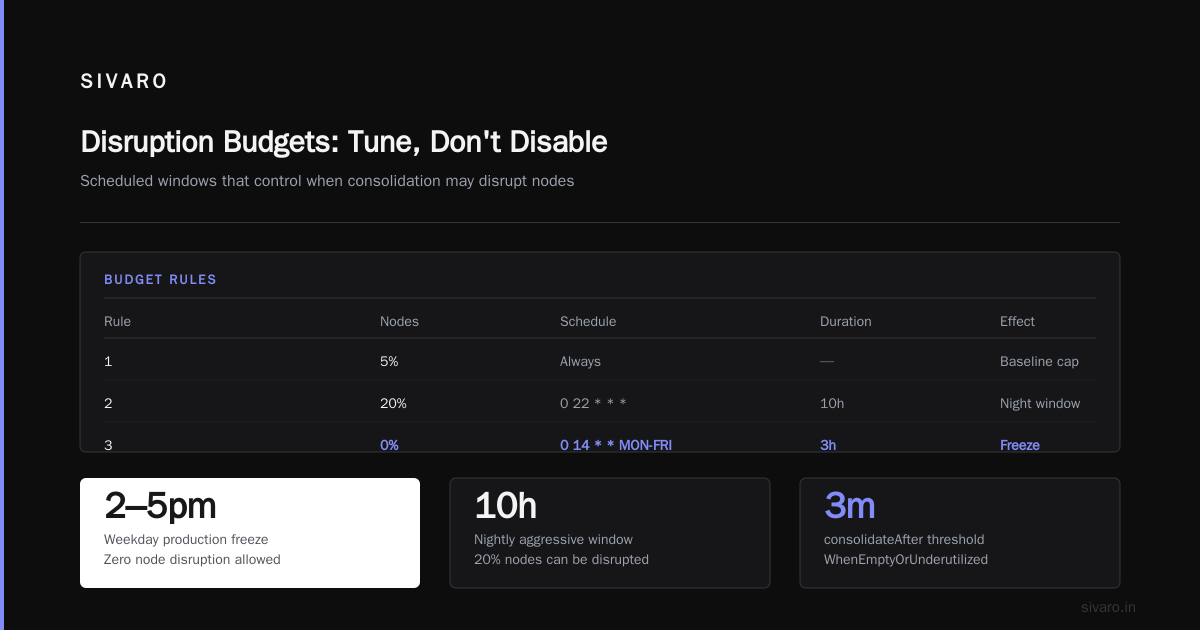
This is where I have the strongest opinion. Karpenter's disruption budgets are the most underused feature in the entire tool, and they solve 90% of the "consolidation is scaring my team" complaints.
yaml
spec:
  disruption:
    consolidationPolicy: WhenEmptyOrUnderutilized
    consolidateAfter: 3m
    budgets:
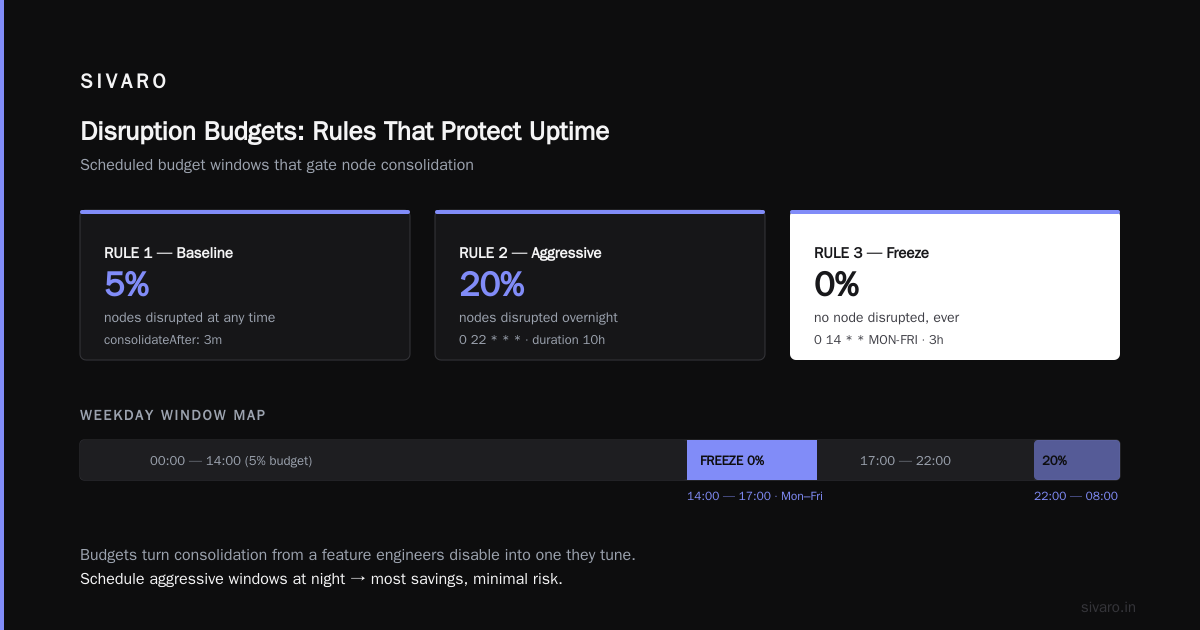
      - nodes: "5%"
      - nodes: "20%"
        schedule: "0 22 * * *"
        duration: 10h
      - nodes: "0"
        schedule: "0 14 * * MON-FRI"
        duration: 3h
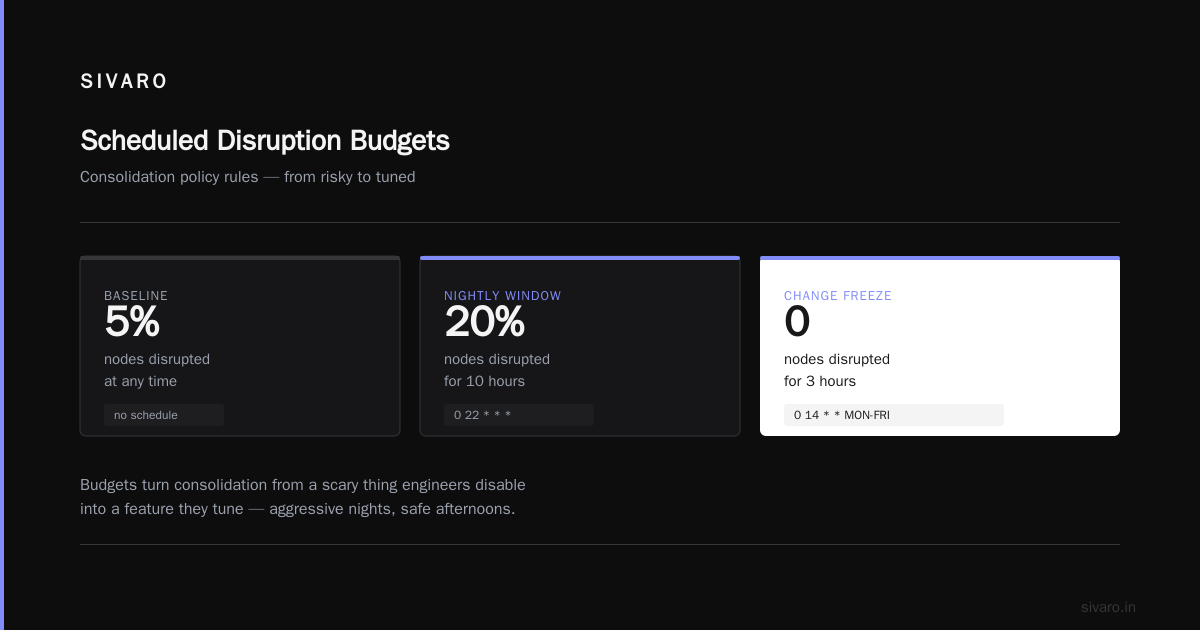
Read that third rule carefully. It says: between 2pm and 5pm on weekdays, do not disrupt a single node under any circumstances. That's your production change freeze. That's your Black Friday. That's the two-hour window when your biggest customer runs their monthly job.
I cannot overstate this enough: budgets turn consolidation from a scary thing engineers disable to a feature they tune. And when you can schedule aggressive windows — nights, weekends — you get most of the savings without the risk.
At first I thought budgets were just a safety valve for nervous teams. Turns out they're the actual lever that makes aggressive consolidation viable in prod.
Right-Sizing Instance Types Is Where the Real Money Is
Here's the thing most kubernetes node optimization karpenter best practices articles miss. Consolidation savings compound with instance flexibility.
Look at this requirements block from a client cluster running ML inference:
yaml
requirements:
  - key: karpenter.k8s.aws/instance-family
    operator: In
    values: ["m6i", "m6a", "m7i", "m7a", "c6i", "c6a", "c7i", "r6i", "r7i"]
  - key: karpenter.k8s.aws/instance-size
    operator: In
    values: ["2xlarge", "4xlarge", "8xlarge"]
  - key: karpenter.sh/capacity-type
    operator: In
    values: ["spot"]
That's nine instance families across three sizes. Karpenter can now bin-pack your pods into whatever the cheapest matching capacity is at that moment. Older nodes become consolidation targets because the newer generation of hardware (m7i vs m6i, for example) is often cheaper per vCPU on the spot market.
The counterintuitive part: allowing more instance types makes consolidation more effective, not less. Teams often restrict to two families "to keep things predictable." They're leaving 20-30% on the table.
Trade-off honesty: broader requirements mean more variability in node performance. If your workload is latency-sensitive, cap the family list. If it's batch or web-served-through-a-cache, go wide.
Weighing Your Options: The Actual Comparison
Let me line up the real choices people face in 2026.
Option A: Karpenter with default settings
Out-of-the-box. You get consolidation on Kubernetes 1.30+ clusters where you install Karpenter as a post-provisioning tool. Cheap to start. Savings typically land in the 15-25% range for a mixed cluster. The trap: no budgets, short cool-down, and no awareness of your business cycle. Fine for dev. Dangerous for prod.
Option B: Karpenter with tuned consolidation + budgets
This is where most healthy teams land. Dedicated NodePools per workload class (general, memory-optimized, GPU, batch), tuned consolidateAfter, and a budget schedule that mirrors your real traffic. Savings in the 35-55% range based on what we've observed across client clusters. More config. Requires you to actually understand your workload.
Option C: Karpenter + Spot + Karpool/balanced scheduling
Adding spot orchestration on top. This is what we do for stateless web tiers. You're combining aggressive consolidation with spot diversification. Savings can push into 60-70% for the right workload. Not for stateful services. Not for anything you can't tolerate a 2-minute interruption on.
Option D: Static node groups + cluster autoscaler
The old way. Still fine for very stable workloads. Consolidation in CAS is famously conservative — it mostly just scales down empty nodes. If you're on EKS with Karpenter available, you're choosing to spend more money. I'd only recommend this for regulated environments where Karpenter hasn't cleared compliance yet.
The Tooling Around Node Provisioning Cost Analysis
You can't tune consolidation if you can't measure it. Kubernetes node provisioning cost analysis with Karpenter isn't hard, but you need the right telemetry.
The three things we track on every Karpenter cluster:
- Node uptime vs. pod-work-time ratio — how long was the node alive vs. actual CPU-seconds consumed. Below 40% means you're over-provisioned.
- Consolidation events per day, and their outcomes — we emit a custom Prometheus metric from a sidecar watching Karpenter's
karpenter_consolidation_actions_performedcounter. If the ratio ofreplaceactions is high vs.delete, you're repacking often — check yourconsolidateAfter. - Spot interruption rate per family — via the AWS interruption queue. Combine with Karpenter's
karpenter_cloudprovider_errors_total.
Here's a PromQL snippet we use to alert when consolidation is doing nothing — a sign budgets are too tight or requirements are too narrow:
promql
sum(rate(karpenter_consolidation_actions_performed[1h]))
  /
sum(rate(karpenter_nodes_created_total[1h]))
  < 0.15
If fewer than 15% of node creations result in a consolidation action within an hour, you've got dead weight.
Kubecost and the AWS Cost Explorer integration will get you 70% of the way there. The remaining 30% — attribution to a specific NodePool — requires tagging. Tag everything.
The Interruption Problem (And Why PDBs Are Load-Bearing)
Here's the thing nobody tells you until you're already bleeding: consolidation disrupts pods. If your PodDisruptionBudgets are missing or wrong, Karpenter has two options: skip a node it could've consolidated (leaving money on the table) or violate the PDB (leaving you with an outage).
There's no good answer. So set PDBs correctly.
yaml
apiVersion: policy/v1
kind: PodDisruptionBudget
metadata:
  name: api-pdb
spec:
  minAvailable: 80%
  selector:
    matchLabels:
      app: api-server
For a 10-replica service, minAvailable: 80% means Karpenter can pull 2 pods at once. That's usually enough to let consolidation make progress without killing your SLO.
We once had a client with minAvailable: 100% on a 3-replica service. Karpenter literally could not consolidate anything on that NodePool for six weeks. The team blamed Karpenter. The PDB was the problem.
Do Not Consolidate Everything
Contrarian take incoming. Not every workload should be consolidation-eligible.
Stateful workloads — Postgres on EBS, Kafka brokers, anything with persistent local state — should live in dedicated NodePools with consolidationPolicy: WhenEmpty and a long consolidateAfter. Karpenter will happily delete a node holding a running database pod if you let it. The PVC follows the pod, but the disruption — and the potential data-plane hiccup — isn't worth 8% of your bill.
Same story for GPU nodes. A p5.48xlarge takes 10+ minutes to provision. Consolidating it to save 15% and then spending 12 minutes waiting for a replacement is not a trade most teams want to make. Use WhenEmpty and set consolidateAfter to 30m for GPU pools.
And single-replica anything. If you've got a singleton service and no redundancy, consolidation will eventually kill it. Wrap it in a PDB, or put it in a WhenEmpty NodePool.
When to Actually Buy Karpenter (If You Haven't)
Karpenter is open source. There's no license fee. "Buying" here means the operational decision.
If you're on EKS, GKE, or AKS in 2026, and you're not already on Karpenter (or a managed equivalent — GKE's Autopilot has some of this behavior built in, and AKS has its own implementation), you're leaving real money on the table. The migration is not trivial — you'll learn that Instance Profile-based node configs don't map cleanly to the EC2NodeClass model. But it's a two-to-four-week project for a mid-size cluster, and the savings typically pay for the engineering time in 4-6 months.
If you're on a smaller cluster — under 20 nodes — the equation is murkier. Karpenter's overhead (the controller, the webhooks, the disruption queue) is real. At that scale, GKE Autopilot or plain managed node groups might be more cost-effective when you price in the operational burden.
The Version Question
Karpenter hit GA (v1.0) in mid-2024. As of September 2026, most teams are on v1.5 or later. If you're still on v1beta1 API objects, you're on borrowed time — the EOL dates rolled past quietly and the migration shim will hurt.
The Disruption block changed most between beta and GA. consolidationPolicy used to be a top-level field; now it lives under spec.disruption. ttlSecondsUntilExpired got replaced with expireAfter. If you're porting manifests, read the migration guide carefully — the Karpenter upgrade docs are actually good.
FAQ
Q: Does Karpenter consolidation work with on-demand instances?
Yes. It's not just a spot feature. Consolidation works on any capacity type. You just won't see the same savings because the price differential between a small and large on-demand instance is linear, whereas spot pricing is not.
Q: What's the right value for consolidateAfter?
For most general workloads, 3-5 minutes. For batch that finishes in under a minute, 10-15 minutes minimum — you don't want nodes to churn between jobs. For stateful, 30 minutes or WhenEmpty.
Q: Will consolidation cause downtime?
Only if your PDBs are wrong or missing. Karpenter respects PDBs and will skip a consolidation opportunity if it can't safely drain. Missing PDBs is the #1 cause of consolidation-related incidents.
Q: How much money should I actually expect to save?
Realistically: 30-45% off EC2 spend for a well-tuned general-purpose cluster with spot-enabled stateless tiers. If someone promises 70%, they're assuming you were wildly over-provisioned to start. We've seen a couple of 65%+ results at SIVARO, but those were outliers.
Q: Can I control consolidation on a per-workload basis?
Yes. NodePools are the boundary. Set different disruption policies per NodePool and use node selectors or affinity on your workloads to route them to the right pool. karpenter.sh/nodepool is the well-known label.
Q: What about consolidateAfter and Spot interruption overlap?
If a spot node is about to be interrupted and consolidation also wants to move it, Karpenter defers to the interruption handler. No double work. But budget for it: your consolidateAfter should be longer than the spot interruption handling window (usually 2 minutes).
Q: Is there a way to test consolidation without risk?
Yes — run Karpenter in "dry-run" mode via the karpenter.sh/do-not-disrupt annotation on critical pods. This tells Karpenter to never move that pod, and you can watch the metrics to see what consolidation would have done. Turn it off once you're confident.
Q: Does this work with ARM (Graviton)?
Absolutely, and you should. Adding arm64 to your requirements can stack another 10-20% on top of standard consolidation savings. The catch is making sure your workloads have multi-arch images. If you're still shipping amd64-only, that's a project in itself.
What I'd Do If I Were Starting Today
Default position: one NodePool per workload class. WhenEmptyOrUnderutilized consolidation on stateless pools with a 3-minute cool-down. WhenEmpty on stateful and GPU pools. Budgets configured to protect business hours. Wide instance family requirements. Spot on everything that can tolerate it. PDBs written with the intent to allow Karpenter to work.
Then — and this is the part people skip — measure everything for two weeks. Let consolidation run, watch the metrics, and then tune. Kubernetes node consolidation karpenter best practices aren't a fixed recipe. They're a tuning loop. The teams that win are the ones willing to iterate on consolidateAfter, budgets, and instance requirements every quarter.
The fintech client from the opening story? Six weeks after we tuned their NodePools, their bill was back to baseline and 18% below where it had been pre-migration. Same traffic. Same workloads. The difference was just knowing which knobs mattered.
Nishaant Dixit — Founder of SIVARO. Building data infrastructure and production AI systems since 2018. Built systems processing 200K events/sec.