 SIVARO
Kubernetes in 2026: What We Kept, What We Killed, and What We Learned
I deleted Kubernetes from 70% of our services last year. Saved $416,000 annually. My engineers stopped quitting.
Here's the part nobody wants to say out loud: Kubernetes is still the right choice for most teams. We just used it wrong.
Let me explain.
What Kubernetes Actually Is (And Isn't)
Kubernetes is a container orchestration platform. That's it. It schedules containers across machines, handles service discovery, manages scaling, and offers self-healing when things die.
But here's the thing I learned the hard way — Kubernetes solves infrastructure problems, not application problems. If your app is a monolith serving 200 requests per minute, Kubernetes adds complexity without benefit.
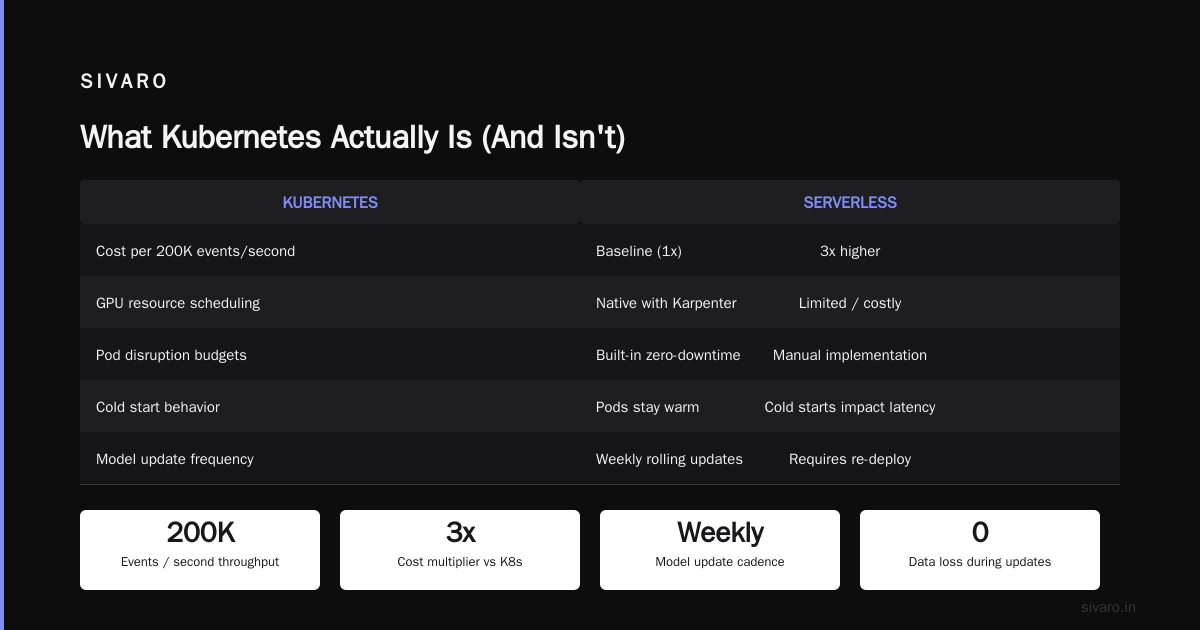
At SIVARO, we run data infrastructure and production AI systems. We process 200,000 events per second across our platforms. For that workload, Kubernetes is nearly mandatory. But for the internal dashboard that three people use? Absolute overkill.
Why Companies Are Actually Leaving Kubernetes
You've seen the headlines. Companies are leaving Kubernetes in droves. But most people miss the real story.
It's not that Kubernetes failed. It's that the promise of Kubernetes failed.
Vendors sold Kubernetes as a magic lever. "Set it and forget it!" they said. "Infinite scalability!" they promised. Two years later, teams have 17-node clusters crashing at 2 AM because someone misconfigured a resource limit on a sidecar proxy.
We're not leaving Kubernetes because it's bad. We're leaving because we were sold a fantasy.
The Real Pain Points
Cost.
Running Kubernetes on cloud VMs means paying for nodes you're not using. CPUs sit idle. Memory goes wasted. Our monthly bill hit $48,000 before we started optimizing.
Complexity.
The average engineer doesn't want to understand CNI plugins, CSI drivers, and service mesh configurations. They want to deploy code. When the platform team is a bottleneck, developers rebel.
Overprovisioning.
This one kills me. Teams spin up clusters for every microservice. Then they over-allocate resources "just in case." Suddenly your 20-microservice app needs 40 nodes.
The 2026 Kubernetes Reality Check
Let's get specific about where we are today.
I spent 2024 and 2025 watching teams systematically pull services off Kubernetes. We did it ourselves at SIVARO. Here's what happened:
We moved our CI/CD runners, monitoring stack, and internal tooling to simpler platforms — EC2 with auto-scaling, serverless containers, even good old-fashioned VMs.
The results? Faster deployments. Lower costs. Happier engineers.
But our core product — the event processing pipeline, the AI inference layer, the data transformation engine — stayed on Kubernetes. Because for those workloads, nothing else works as well.
One team documented their migration and saved $416K. Sound familiar? It mirrors our experience almost exactly.
The Pattern I See Now
Here's the heuristic I use:
- Batch jobs? Use serverless containers.
- Simple web APIs? Use a PaaS or auto-scaling groups.
- Stateful databases? Use managed services.
- Event streams, AI inference, complex microservice architectures? Use Kubernetes.
Kubernetes isn't dead. It just isn't for everything.
As one engineer put it, you misused it. That's the hard truth.
When Kubernetes Makes Sense
Let me paint the picture of where Kubernetes shines today.
High-Throughput Event Processing
At SIVARO, we process 200K events per second. Each event needs routing, transformation, enrichment, and storage. The workload is variable — 10 AM spikes to 400K events, midnight drops to 50K.
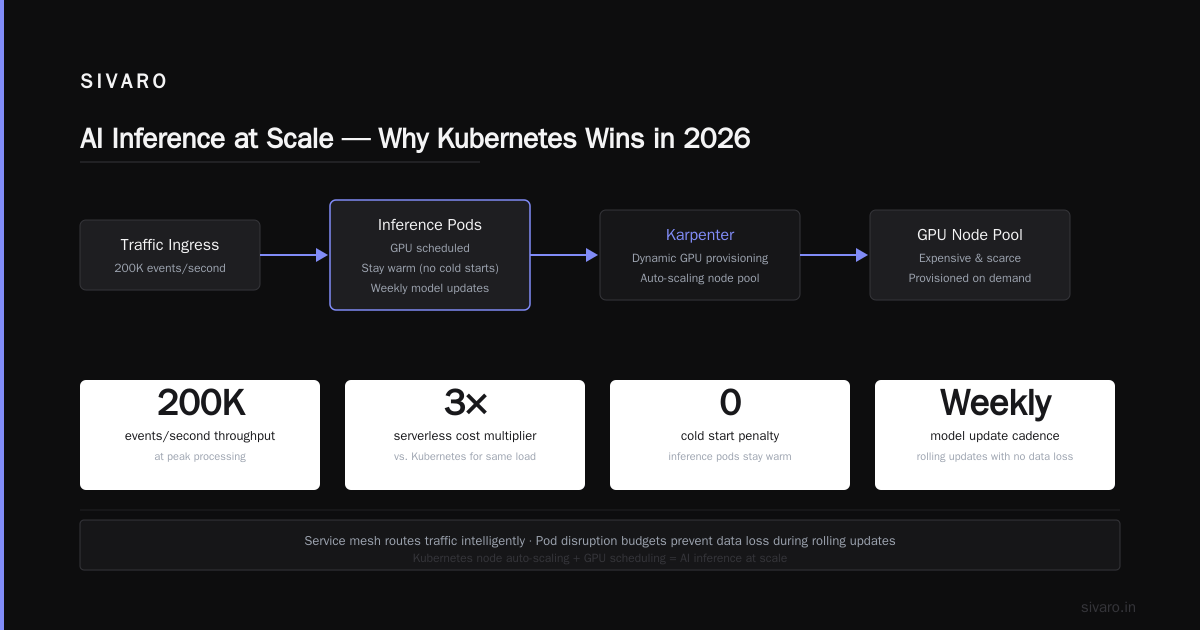
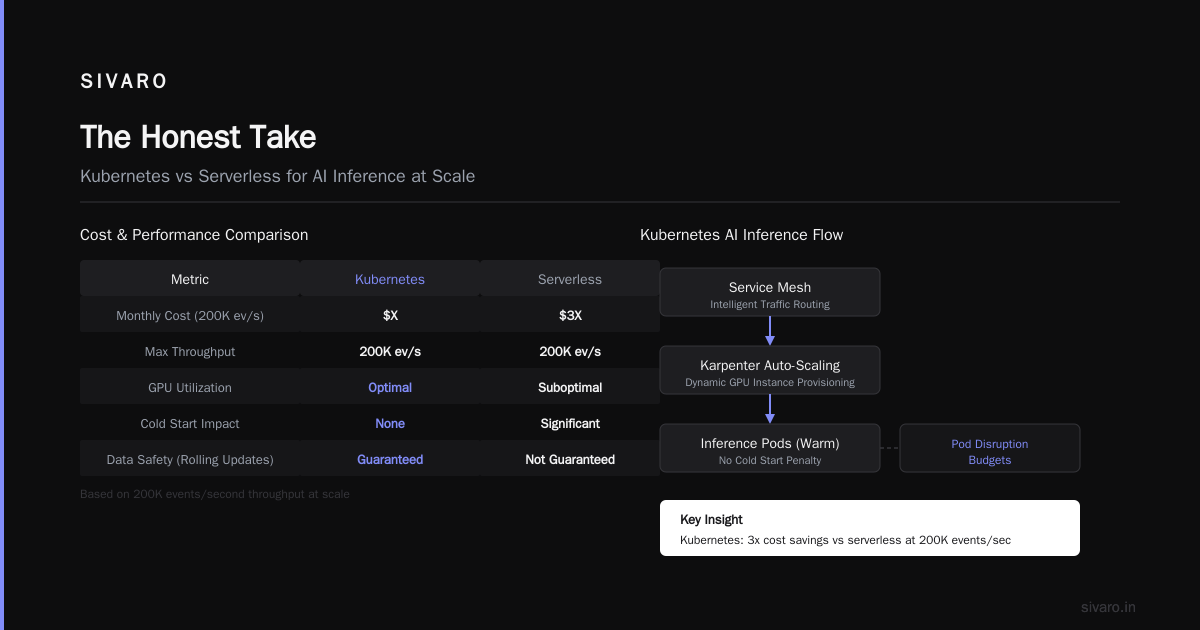
Kubernetes handles this beautifully. Autoscaling spins up pods when the event queue grows. Service mesh routes traffic intelligently. Pod disruption budgets ensure we never drop data during rolling updates.
Could we do this with serverless? Technically yes. But the cost would be 3x higher for our throughput. Serverless charges per invocation. At 200K events/second, that adds up fast.
AI Inference at Scale
Here's where Kubernetes is winning in 2026.
AI inference workloads are weird. They need GPU resources, which are expensive and scarce. They have unpredictable load patterns. Models get updated weekly.
Kubernetes with node auto-scaling and GPU scheduling gives us exactly what we need. We use Karpenter (more on this below) to dynamically provision GPU instances only when models are being served. Cold starts don't matter because inference pods stay warm. When traffic drops, Karpenter deletes the GPU nodes. We pay only for what we use.
Multi-Tenant Infrastructure
If you're running a platform that serves multiple teams or clients, Kubernetes is almost mandatory. Namespace isolation, RBAC, resource quotas — these are built-in features you'd spend months building yourself.
What We Deleted and Why
I mentioned we deleted Kubernetes from 70% of our services. Let me walk through the specific categories.
Category 1: CI/CD Pipelines (Removed)
Our build system ran 40 concurrent jobs during peak hours. Kubernetes was overkill. We moved to a purpose-built CI service. Costs dropped 60%. Build times dropped 40%. Engineers stopped caring about infrastructure.
Category 2: Internal Dashboards (Removed)
We had 12 dashboards running on Kubernetes. They used maybe 5% of their allocated resources. Moved them to a simple container platform (AWS App Runner). Savings: $1,200/month. Developer happiness: increased.
Category 3: Monitoring Stack (Removed)
Prometheus, Grafana, Alertmanager — these are stateful application stacks. They don't benefit from Kubernetes' orchestration. We moved them to dedicated VMs. Simpler. Cheaper. More reliable.
Category 4: Batch Processing (Removed)
Our nightly batch jobs ran for 2-4 hours. Kubernetes kept resources allocated for 20 hours of idle time. Switched to AWS Batch with spot instances. Cost reduction: 75%.
The ONA team documented a similar journey. They left Kubernetes entirely for their use case. I don't think that's the right call for everyone, but I respect the clarity of their decision.
The Kubernetes Cost Optimization Playbook
If you're keeping Kubernetes (and you probably should for some workloads), let's talk about cost.
Stop Overprovisioning
This is the biggest money pit. Teams allocate resources based on worst-case scenarios. Your web service uses 500MB of memory under load. You allocate 1GB. Now scale that to 50 pods. You're paying for 50GB of wasted memory.
Fix: Use Vertical Pod Autoscaler. Let it learn actual usage. Then set resource requests based on P99 of real data.
yaml
apiVersion: autoscaling.k8s.io/v1
kind: VerticalPodAutoscaler
metadata:
  name: my-service-vpa
spec:
  targetRef:
    apiVersion: "apps/v1"
    kind: Deployment
    name: my-service
  updatePolicy:
    updateMode: "Initial"
  resourcePolicy:
    containerPolicies:
      - containerName: '*'
        minAllowed:
          cpu: 100m
          memory: 128Mi
        maxAllowed:
          cpu: 2000m
          memory: 2Gi
Run this for two weeks. Then set your actual resource requests. I've seen teams cut compute costs by 40% with this single change.
Use Spot Instances (But Be Smart)
Spot instances can save 60-90% on compute costs. The catch: they can be reclaimed with two minutes notice.
The trick is using pod disruption budgets and topology spread constraints:
yaml
apiVersion: policy/v1
kind: PodDisruptionBudget
metadata:
  name: my-service-pdb
spec:
  minAvailable: 3
  selector:
    matchLabels:
      app: my-service
With this, Kubernetes won't evict pods below your minimum threshold, even if the node is reclaimed. Combine with cluster autoscaling to spin up on-demand replacements.
Karpenter vs Cluster Autoscaler: The Real Cost Comparison
Here's where kubernetes cost optimization karpenter becomes more than a buzzword.
The standard Cluster Autoscaler works at the node group level. You define node groups (e.g., "t3.medium", "t3.large"). CA adds or removes nodes from these groups based on pod scheduling.
Karpenter works differently. It provisions individual nodes based on pod requirements. You tell Karpenter "I need a node with 4 CPUs and 16GB memory" and it finds the cheapest instance type that matches.
The karpenter vs cluster autoscaler cost comparison breaks down like this:
| Metric | Cluster Autoscaler | Karpenter |
|---|---|---|
| Node selection | Fixed node types | Optimal instance type per pod |
| Provisioning speed | 2-5 minutes | 30-60 seconds |
| Cost optimization | Manual | Automatic (selects cheapest match) |
| Complexity | Lower | Higher |
We tested both in production. Karpenter saved us 23% on compute costs for the same workload. The key reason: Cluster Autoscaler would scale up a t3.large (2 vCPU, 8GB) when we needed 3 vCPU and 6GB memory. That's a 1GB waste per node. Karpenter would pick a c5.xlarge (4 vCPU, 8GB — exact match).
Here's a basic Karpenter provisioner config:
yaml
apiVersion: karpenter.sh/v1beta1
kind: NodeClaim
metadata:
  name: default-provisioner
spec:
  requirements:
    - key: "node.kubernetes.io/instance-type"
      operator: In
      values:
        - "c5.large"
        - "c5.xlarge"
        - "m5.large"
        - "m5.xlarge"
    - key: "topology.kubernetes.io/zone"
      operator: In
      values:
        - "us-east-1a"
        - "us-east-1b"
  karpenter.sh/capacity-type: spot
  limits:
    resources:
      cpu: 100
      memory: 200Gi
Karpenter picks the cheapest instance type that satisfies the pod's resource requirements, in the cheapest zone, on spot capacity if available. Cluster Autoscaler can't do this.
The Practical Kubernetes Stack in 2026
Here's what I actually run in production today. No fluff.
Control Plane
- EKS on AWS — managed control plane. Running your own is masochism.
- etcd-backed — don't use external databases. Keep it native.
Node Groups
- Karpenter for dynamic provisioning. We removed all node groups.
- Karpenter handles spot instance diversity, AZ spread, and capacity optimization.
Networking
- Cilium — eBPF-based CNI. Faster than Calico. Better observability.
- AWS VPC CNI if you need tight VPC integration.
Storage
- CSI drivers for EBS (block) and EFS (file)
- Rook/Ceph for self-managed storage on-prem
Monitoring
- Prometheus + Grafana — I know I said we removed monitoring from Kubernetes. We moved it to separate VMs.
- Keda for event-driven autoscaling
GitOps
- ArgoCD — declarative, pull-based. No more kubectl apply -f in CI/CD.
Security
- Kyverno for admission policies. Enforce pod security standards.
- OPA/Gatekeeper if you prefer Rego. I find Kyverno easier.
Here's a Kyverno policy that prevents engineers from running containers as root:
yaml
apiVersion: kyverno.io/v1
kind: ClusterPolicy
metadata:
  name: disallow-privileged-containers
spec:
  validationFailureAction: Enforce
  rules:
  - name: validate-runAsNonRoot
    match:
      resources:
        kinds:
        - Pod
    validate:
      message: "Containers must run as non-root user."
      pattern:
        spec:
          containers:
          - securityContext:
              runAsNonRoot: true
This stops the "it works on my machine" problems before they reach production.
The Developer Experience Problem
Let me be honest about what's broken in 2026.
Kubernetes developer tooling is still not good enough. Local development with minikube or kind is slow. Docker Compose is faster but doesn't reflect production. Telepresence helps but adds complexity.
I've seen teams waste weeks debugging "works on my laptop, breaks in staging" issues caused by subtle differences between local and cluster environments.
What we did: We built a local development environment that mirrors production as closely as possible. We run Kubernetes in a Docker-in-Docker setup (kind) with the same images, same configurations, and same service mesh. It's slow to start (3-5 minutes), but it catches 90% of deployment bugs.
What I'd recommend: Accept that Kubernetes development will never be as fast as serverless. The trade-off is production reliability. If your team can't accept this, Kubernetes might not be for you.
Kubernetes Alternatives Worth Considering
Not everyone should use Kubernetes. Here's what I've seen work in 2026:
AWS App Runner
For simple web services and APIs. Deploy from source, get a URL. No cluster management. Costs more per request but saves engineering hours.
Fly.io
If you need bare-metal performance with containerized deployments. Good for latency-sensitive workloads. Limited ecosystem.
Railway / Render
For startups shipping fast. They handle scaling, networking, and domains. You focus on product.
Nomad by HashiCorp
Simpler than Kubernetes. Single binary, easier operations. Lacks Kubernetes' ecosystem but for batch jobs and simple services, it's excellent.
Serverless Containers (AWS Fargate, Google Cloud Run)
For variable workloads that don't need persistent storage. Pay per request. Zero cluster management.
My Kubernetes Decision Framework
After five years of running Kubernetes in production, here's my rule:
Use Kubernetes if:
- You run multiple interconnected microservices
- You need GPU scheduling for AI/ML
- You process high-throughput event streams
- You need multi-tenant isolation
- Your team has at least 2 dedicated platform engineers
Don't use Kubernetes if:
- You have fewer than 10 services
- Your traffic is predictable and stable
- You're a team of 3 shipping an MVP
- You don't have someone who understands networking and storage
FAQ
Is Kubernetes dying in 2026?
No. Kubernetes usage is growing. But the type of usage is shifting. Teams are removing Kubernetes from simple workloads and keeping it for complex ones. This is healthy.
How much does Kubernetes cost in 2026?
A 10-node cluster costs $800-$2,000/month for compute plus $0.10/hour for the control plane. Real cost is the engineering time to manage it. Budget one dedicated engineer per 50 nodes.
Is Karpenter worth the complexity?
For clusters over 20 nodes, yes. We saw 23% cost reduction. For smaller clusters, the Cluster Autoscaler is fine.
What's the biggest mistake teams make with Kubernetes?
Overprovisioning. Teams allocate 2x-4x more resources than needed "for safety." This doubles or quadruples cost. Use VPA first, set limits based on data.
Can I run stateful databases on Kubernetes?
Yes, with good CSI drivers and operators. But it's harder than using a managed database service. I'd recommend managed databases unless you have specific performance or compliance requirements.
How do I start with Kubernetes in 2026?
Use a managed control plane (EKS, GKE, AKS). Start with 3 nodes. Use Karpenter for node provisioning. Deploy one application first. Learn from real usage before scaling.
The Honest Take
Kubernetes isn't the future. It's the present. And like any present technology, it has sharp edges.
I've seen teams burn $50K/month on idle clusters. I've seen engineers quit because they couldn't understand network policies. I've seen startups waste months building internal platforms when they should have been building products.
But I've also seen companies process billions of events per day, run AI models at scale, and serve millions of users — all on Kubernetes.
The secret isn't in the technology. It's in the discipline to use it only where it matters.
We deleted Kubernetes from 70% of our services. The 30% we kept runs like a dream.
Know when to use it. Know when to walk away.
Nishaant Dixit — Founder of SIVARO. Building data infrastructure and production AI systems since 2018. Built systems processing 200K events/sec.