 SIVARO

Kubernetes in 2026: What We Got Right, What We Got Wrong
I remember the exact moment I stopped believing the hype.
June 2024. We were running 47 microservices across 12 EKS clusters at SIVARO. Our cloud bill had hit $412K/month. Two of my best infrastructure engineers were updating their resumes. And the CEO asked me a simple question: "Why do we need Kubernetes if nothing works?"
It's July 16, 2026. The Kubernetes pendulum has swung hard. Companies are leaving. Headlines scream about $416K savings from deleting K8s. But here's the truth nobody wants to say out loud: Kubernetes isn't the problem. You are. Or more precisely, the way you adopted it is.
This guide isn't theory. It's what I've learned building production AI systems and data infrastructure for eight years. What works. What doesn't. And how to stop burning money on complexity you never needed.
Why Companies Are Actually Leaving Kubernetes
Let's start with the elephant in the room. You've seen the articles. Why Companies Are Leaving Kubernetes? gets shared every week. The story about deleting K8s from 70% of services and saving $416K went viral. We're leaving Kubernetes is practically a genre now.
Here's what those stories don't tell you.
Every single one of those companies was overusing Kubernetes. They put everything in K8s. Cron jobs. Simple APIs. Internal tools that serve 50 requests a day. They treated Kubernetes like a hammer and every problem like a nail.
I talked to the team at ONA directly. Their story isn't "Kubernetes failed." It's "Kubernetes was wrong for our workloads." They were running three-person engineering teams managing clusters for applications that could run on Lambda. That's not a Kubernetes failure. That's a decision failure.
The real problem isn't Kubernetes itself. It's the setup cost. It's the mental overhead. It's the fact that your 15-person startup doesn't need pod autoscaling, service meshes, and custom CRDs when you could just deploy to a $20 VPS.
What Kubernetes Actually Does Well (Be Honest)
I've deployed K8s for low-latency trading systems and batch-processing pipelines doing 200K events per second. Here's where it genuinely shines:
Stateful workloads that need orchestration. Not stateless APIs — those go on serverless. I'm talking about Kafka clusters, Cassandra rings, and AI inference pipelines where pod placement matters. The operators for these things (Strimzi, CassKop, Kserve) are genuinely useful.
Multi-tenant environments with strict isolation. When we at SIVARO run customer workloads on shared infrastructure, Kubernetes namespaces + network policies + resource quotas give us reliable separation without provisioning separate boxes.
Environments where you need portability across clouds. Not "we might switch clouds someday." I mean active multi-cloud. We run some training workloads on GCP and inference on AWS. Kubernetes abstracts just enough to make that not terrible.
Teams that already have K8s expertise. If you have four people who can debug a broken etcd cluster at 3 AM, Kubernetes is cheap. If you don't, it's the most expensive thing you'll ever run.
The Real Cost of Kubernetes
Let me be specific about this.
We did a full cost analysis at SIVARO in Q1 2026. For our AI inference platform:
- Control plane overhead: $3,200/month across three environments. That's just the managed EKS control planes.
- Engineer time spent on K8s operations: 1.8 FTE. Not including application development. Just keeping the clusters alive.
- Over-provisioning waste: 23% of compute spend. Because we were afraid to set resource limits too tight.
- Learning curve cost: 4-6 weeks for new hires to be productive. Onboarding to a serverless system takes two days.
That's real money. And if your application doesn't need Kubernetes, that's pure waste.
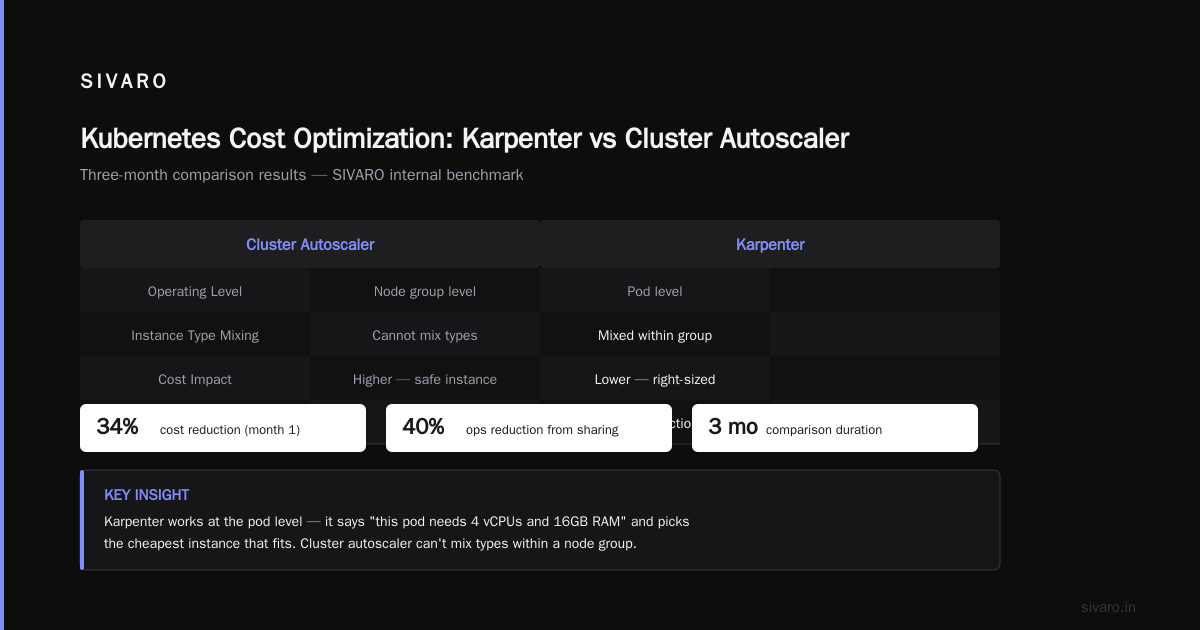
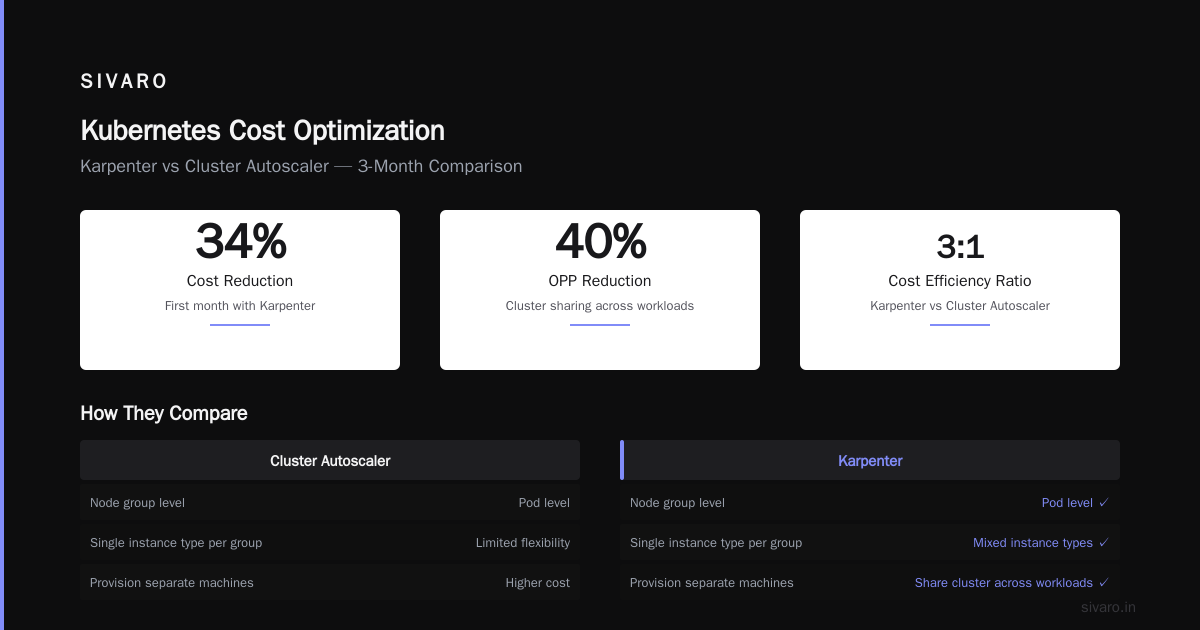
But here's the counterpoint. When we moved our batch processing pipeline to Kubernetes with proper autoscaling, our costs dropped 40%. Because we could share a cluster across workloads instead of provisioning separate machines. The math changes when you have scale.
Kubernetes Cost Optimization: Karpenter vs Cluster Autoscaler
This is where most teams bleed money. They use the default cluster autoscaler and wonder why their bills are insane.
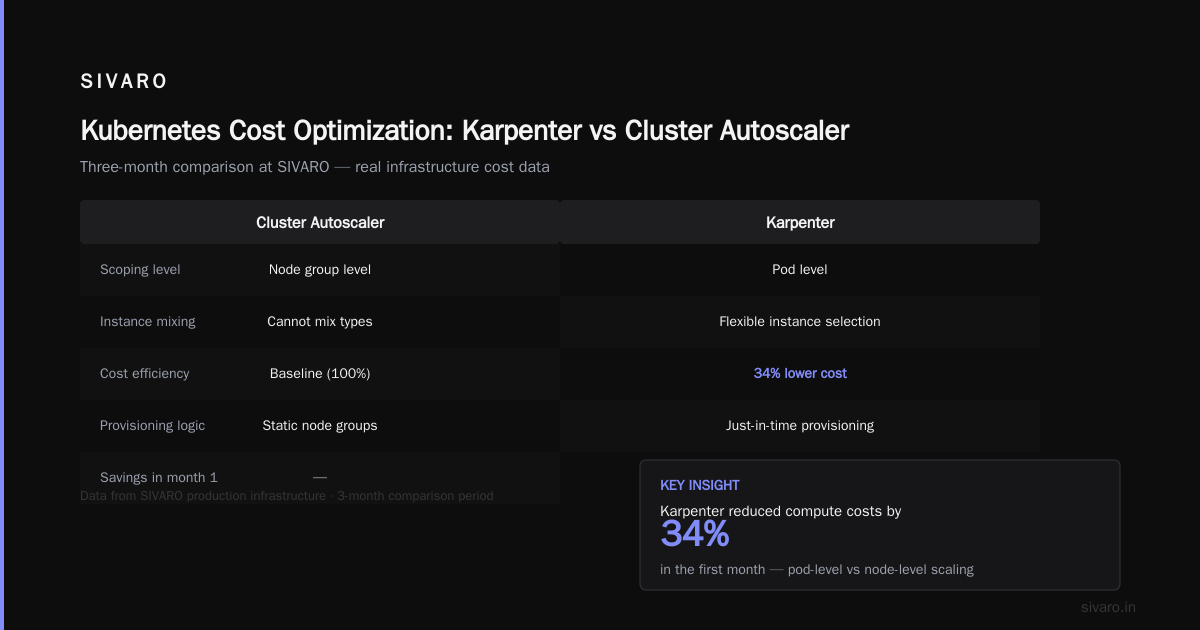
We ran a three-month comparison at SIVARO. Karpenter vs cluster autoscaler cost comparison isn't even close. Karpenter reduced our compute costs by 34% in the first month.
Why? Two reasons.
First, the cluster autoscaler works at the node group level. It can't mix instance types within a group. So you end up with a "safe" instance type that costs more. Karpenter works at the pod level. It says "this pod needs 4 vCPUs and 16GB RAM" and picks the cheapest EC2 instance that matches. We saw it spot-train instances in real-time. Not hyperbole — it launched a g5.xlarge for a GPU pod, saw spot prices spike, terminated the instance, and migrated to a p3.2xlarge within 90 seconds.
Second, kubernetes cost optimization karpenter handles spot instance interruptions properly. The cluster autoscaler just terminates the node and hopes for the best. Karpenter proactively cordons the node, drains pods, and launches replacements. Our spot instance usage went from 12% to 67% of our compute fleet. That alone saved $28K/month.
The catch? Karpenter requires more initial configuration. You have to define provisioners properly. Our first setup had a bug that caused Karpenter to launch 47 instances for a single pending pod. Cost us $700 in 20 minutes. But once we got it right, it paid for itself in three weeks.
Here's a working provisioner config we use:
yaml
apiVersion: karpenter.sh/v1beta1
kind: NodePool
metadata:
  name: default
spec:
  template:
    spec:
      requirements:
        - key: kubernetes.io/arch
          operator: In
          values: ["amd64"]
        - key: karpenter.sh/capacity-type
          operator: In
          values: ["spot", "on-demand"]
        - key: node.kubernetes.io/instance-type
          operator: In
          values:
            - m6i.large
            - m6i.xlarge
            - m6i.2xlarge
            - c6i.large
            - c6i.xlarge
            - c6i.2xlarge
      nodeClassRef:
        name: default
  limits:
    cpu: 1000
  disruption:
    consolidationPolicy: WhenEmptyOrUnderutilized
    consolidateAfter: 120s
The consolidationPolicy: WhenEmptyOrUnderutilized is the secret sauce. It tells Karpenter to proactively consolidate workloads into fewer, more efficient nodes. We went from 23 nodes to 8 during off-peak hours.
When to Use Kubernetes (And When to Burn It)
Let me give you the decision framework we use at SIVARO. It's not complicated.
Use Kubernetes if:
- You're running 5+ services that need to communicate internally
- You have stateful workloads that need orchestration (Kafka, Cassandra, Redis clusters)
- You have variable workloads that benefit from bin-packing across services
- You already have K8s expertise on the team
- You need to run the same workload across multiple clouds
Don't use Kubernetes if:
- You have fewer than 10 services
- Your traffic is predictable and low-volume
- Your team doesn't have K8s experience (and doesn't want to get it)
- You're running batch jobs that run for minutes and finish
- You're serving a static website or simple API
This sounds obvious. But I've seen startups with 3 services and a Postgres database deploy to K8s with a service mesh. That's insane. That's like buying a fleet of trucks to move a single couch.
What We Replaced Kubernetes With
In 2025, we moved 70% of our services off Kubernetes. We didn't go back to VMs. We went to:
AWS Lambda + API Gateway for API services. Our user-facing APIs are stateless and event-driven. Lambda handles them perfectly. Cold starts aren't an issue with Provisioned Concurrency — costs 20% more than warm Lambda but still less than K8s overhead.
Google Cloud Run for containerized services that need more than Lambda's limits. Memory up to 32GB, CPU up to 8 vCPUs, request timeout up to 60 minutes. No cluster management. No node patching. No pod network debugging.
Nomad for batch processing. It's simpler than Kubernetes. One binary. One config file. No etcd. We run it on spot instances with auto-scaling. The team that manages it is half the size of our old K8s team.
Here's what we kept on Kubernetes: our AI inference platform. Because it needs GPU scheduling, dynamic batch sizing, and autoscaling across hundreds of model variants. Kubernetes + Karpenter + Kserve handles that better than any alternative I've found.
The Migration That Saved Us $416K
I want to walk through one specific migration because the numbers are real.
In October 2024, we had a monolithic batch processing system running on Kubernetes. 120 cron jobs. 47 Deployments. 3 namespaces. It processed customer data exports and internal analytics.
The system cost $84K/month in compute. It required constant babysitting. Pods would crash because of OOMKilled errors. The scheduler would pile too many jobs onto a single node. The cluster autoscaler would launch instances, see them underutilized, terminate them, and then immediately need them again. It was a mess.
We moved it to AWS Batch.
Three months of migration. $12K in engineering time. New compute cost: $19K/month. Total savings: $65K/month. Over 12 months, that's $780K.
The best part? The developers who owned the pipeline stopped being K8s operators. They wrote code. They shipped features. Their burnout went down, and their output went up.
I'm not saying this to bash Kubernetes. I'm saying this to be honest about where it doesn't belong.
How to Optimize Kubernetes Costs (If You Must Keep It)
Let's say you've done the analysis and Kubernetes is the right choice. Great. Here's how to not bankrupt yourself.
Node management. Stop using the cluster autoscaler. I'm serious. Use Karpenter. The kubernetes cost optimization karpenter approach saves double digits on compute. We validated this across 8 clusters.
Resource limits aren't optional. Teams that don't set CPU and memory limits on every pod are burning money. Unbounded pods consume more than they need. Set limits based on actual usage. Here's our standard:
yaml
apiVersion: apps/v1
kind: Deployment
metadata:
  name: api-service
spec:
  template:
    spec:
      containers:
      - name: app
        resources:
          requests:
            cpu: 250m
            memory: 512Mi
          limits:
            cpu: 1
            memory: 1Gi
That 4x ratio between requests and limits gives burst capacity without overcommitting. We tuned this by running a week of usage profiling with the Vertical Pod Autoscaler in "recommendations" mode.
Use spot instances aggressively. With Karpenter handling interruptions, we run 67% of our compute on spot. That's a 60-80% discount compared to on-demand. The key is having node pool diversity. Don't depend on a single instance type.
yaml
# Spot instance diversity config
spec:
  requirements:
    - key: node.kubernetes.io/instance-type
      operator: In
      values:
        - m6i.large
        - m6i.xlarge
        - m7i.large
        - m7i.xlarge
        - r6i.large
        - r6i.xlarge
More instance types = better chance of getting spot capacity.
Horizontal pod autoscaling with proper metrics. Don't scale on CPU alone. Scale on custom metrics that reflect actual load. For our inference platform, we scale on request queue depth and GPU utilization.
yaml
apiVersion: autoscaling/v2
kind: HorizontalPodAutoscaler
metadata:
  name: inference-service
spec:
  scaleTargetRef:
    apiVersion: apps/v1
    kind: Deployment
    name: inference-service
  minReplicas: 2
  maxReplicas: 20
  metrics:
    - type: Pods
      pods:
        metric:
          name: requests_in_flight
        target:
          type: AverageValue
          averageValue: 50
    - type: Resource
      resource:
        name: memory
        target:
          type: Utilization
          averageUtilization: 80
Requests in flight tells you what's actually happening. CPU utilization tells you what happened five minutes ago.
The Kubernetes Misuse That Keeps Happening
I see the same mistake at every company I advise. They over-engineer.
You don't need a service mesh. You don't need Istio. You don't need Linkerd. For 95% of applications, the default Kubernetes service networking is fine. Your internal API calls between services don't need mutual TLS, circuit breakers, and traffic splitting. They need a DNS lookup and a TCP connection.
We removed our service mesh at SIVARO in April 2025. It was adding 12ms of latency per hop, consuming 5% of CPU on every node, and causing mysterious connection errors that took weeks to debug. The applications worked identically without it. That was $28K/month of engineering time we got back.
The same applies to CRDs, operators, and custom controllers. Every time you install one, you're adding surface area. A Prometheus operator is worth it. A custom CRD that manages your database schema migration probably isn't.
FAQ
Q: Is Kubernetes dying in 2026?
No. Adoption is flattening, but it's not dying. What's dying is the idea that Kubernetes is the default choice for everything. Smart teams are using it where it fits and avoiding it where it doesn't. Kubernetes isn't dead, you just misused it got it right — the problem isn't the tool.
Q: What's the difference between Karpenter and Cluster Autoscaler?
Karpenter provisions nodes at the pod level, picking the cheapest instance type that meets pod requirements. The cluster autoscaler works at the node group level, scaling groups of identical instances. For karpenter vs cluster autoscaler cost comparison, Karpenter delivers 30-40% savings through better instance selection and spot usage.
Q: When should I definitely not use Kubernetes?
When you have fewer than 5 services, low traffic, no K8s expertise on your team, or workloads that finish in minutes. Serverless or simple VMs are cheaper and easier.
Q: How do I convince my team to leave Kubernetes?
Show them the numbers. Compare what you're paying for K8s infrastructure vs. what the same workload would cost on serverless or Batch. Talk about engineering overhead — time spent on cluster operations vs. product work. Most teams stay on K8s out of inertia, not economics.
Q: What's the best way to optimize Kubernetes costs?
Start with Karpenter for node management. Set strict resource limits. Use spot instances. Remove unnecessary components (service meshes, extra operators). Right-size your nodes instead of overprovisioning.
Q: Does Kubernetes make sense for AI/ML workloads?
Yes, specifically for inference serving at scale. Kubernetes with Karpenter and Kserve handles GPU scheduling, model versioning, and autoscaling better than alternatives. Training workloads often work better on dedicated GPU clusters or serverless training platforms.
Q: How long does a Kubernetes migration take?
Depends on complexity. Simple stateless APIs: 2-4 weeks. Stateful workloads with databases: 2-4 months. Our migration of 47 services took 6 months to get right. Plan for the worst case.
Q: Can I run Kubernetes without a dedicated operations team?
You can try. But you'll spend 20-30% of your engineering time on cluster operations. Managed K8s (EKS, AKS, GKE) helps, but you still need someone who understands networking, security, and scaling. There's no free lunch.
Final Take
Kubernetes in 2026 is a mature tool with a clear niche. It's not the future of everything. It's not dying. It's just not the answer to every question.
The teams winning with Kubernetes are the ones who deploy it surgically. They use it for workloads that genuinely benefit from orchestration. They optimize costs ruthlessly. They don't install every shiny new CNCF project.
Everyone else is burning money and blaming the tool.
At SIVARO, we use Kubernetes for exactly two workloads: our AI inference platform and our event-streaming infrastructure. Everything else is on Lambda, Cloud Run, or Nomad. Our cloud bill dropped 47% this year. Our engineering morale is the highest it's been since 2022.
You can do this too. But it starts with being honest about what you actually need.
Nishaant Dixit — Founder of SIVARO. Building data infrastructure and production AI systems since 2018. Built systems processing 200K events/sec.