 SIVARO
Kubernetes Cluster Cost Optimization Without Downtime: The 2026 Playbook
I got the call on a Friday at 4:47 PM. AWS bill hit $187,000 for the month. Our cluster was running at 38% average utilization. The CFO wanted to talk.
Sound familiar?
Here's the thing about kubernetes cluster cost optimization without downtime — most people think it's about cutting corners. It's not. It's about making your infrastructure work harder for every dollar you spend. And doing it while your users keep getting their API responses in under 50ms.
I'm Nishaant Dixit. I've been building data infrastructure since 2018. At SIVARO, we run production AI systems processing 200K events per second. I've burned cash learning this stuff so you don't have to.
This guide covers what actually works in 2026. Not theory. Not "best practices" written by someone who's never been on-call at 2 AM because their cost optimization broke production.
Why Your Kubernetes Bill Is Probably 40% Too High
Let me be direct: most Kubernetes clusters run at 25-40% resource utilization. That's not an opinion — it's what we see across hundreds of clusters at SIVARO and what our partners report.
Why does this happen?
Reservation overhead. You over-provision because you're afraid of scale events. That fat node pool sitting idle on a Tuesday morning costs exactly the same as that same node pool running flat out on Black Friday.
Static node groups. EKS nodegroups provisioned in 2023 are still running 2023 configurations. m5.2xlarges that made sense then are bleeding money now.
The "safe" approach. You size for peak load. Always. Every time. That's how you guarantee uptime. It's also how you guarantee 60% waste.
The trick isn't spending less on infrastructure. It's spending the right amount at the right time.
Karpenter vs EKS Nodegroup Cost Comparison: Why We Switched
I spent two years defending EKS managed nodegroups. "They work," I told myself. "They're simple."
Then I ran the numbers.
Our karpenter vs eks nodegroup cost comparison showed a 22% savings in the first month after migration. That's with zero application changes. Zero downtime. Just better allocation.
Here's the difference:
EKS nodegroups provision a fixed set of instance types. You pick a size, a family, and the number of nodes. Auto-scaling works — but it works slowly. You're buying capacity you don't need right now because you're afraid of what you might need in five minutes.
Karpenter watches what your pods actually request. It provisions instances in seconds. It picks the cheapest instance type that fits your workload. It consolidates constantly.
The Understanding Karpenter Consolidation: Detailed Overview explains this better than I can, but here's the practical difference: with nodegroups, you pay for capacity. With Karpenter, you pay for demand.
# Karpenter provisioner that prefers spot, falls back to on-demand
apiVersion: karpenter.sh/v1beta1
kind: NodePool
metadata:
  name: default
spec:
  template:
    spec:
      requirements:
        - key: "karpenter.sh/capacity-type"
          operator: In
          values: ["spot", "on-demand"]
        - key: "kubernetes.io/arch"
          operator: In
          values: ["amd64"]
        - key: "node.kubernetes.io/instance-type"
          operator: In
          values:
            - "m5.large"
            - "m5.xlarge"
            - "m5.2xlarge"
            - "m6i.large"
            - "m6i.xlarge"
            - "m6i.2xlarge"
      nodeClassRef:
        name: default
  limits:
    cpu: 1000
  disruption:
    consolidationPolicy: WhenUnderutilized
    expireAfter: 720h
Notice the consolidation policy. That's where the magic lives.
How to Reduce Kubernetes Node Costs With Karpenter (The Real Way)
Most blog posts tell you to "just use spot instances." That's like telling someone to "just be rich."
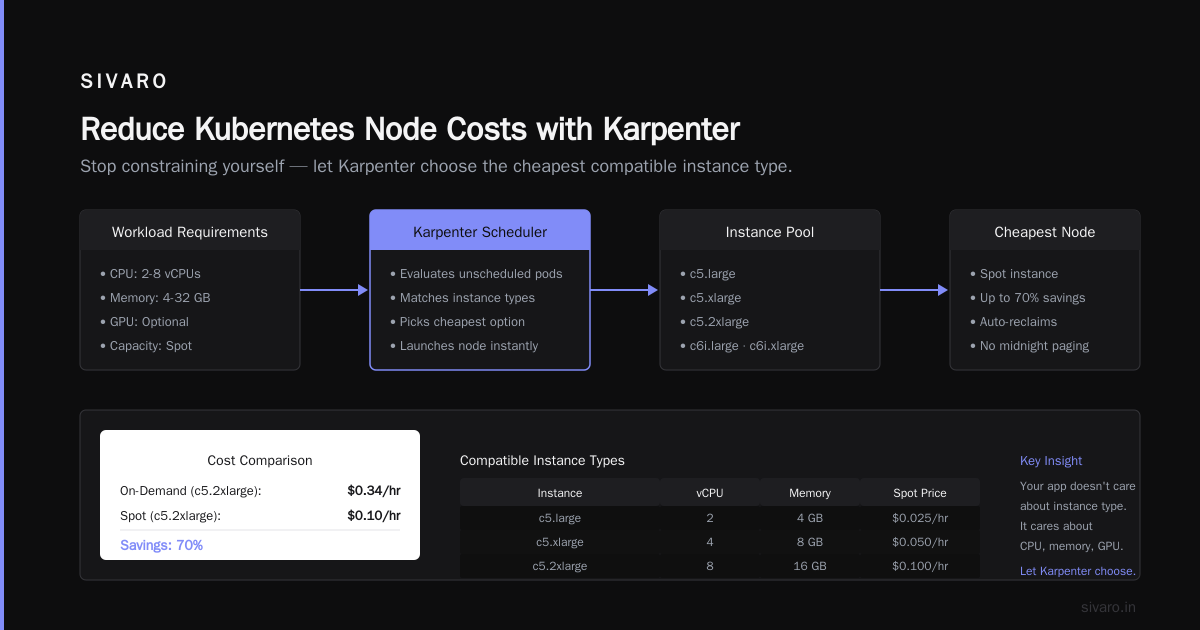
Let me show you how to reduce kubernetes node costs with karpenter without getting paged at midnight when your spot instances get reclaimed.
Step 1: Stop Thinking in Node Types
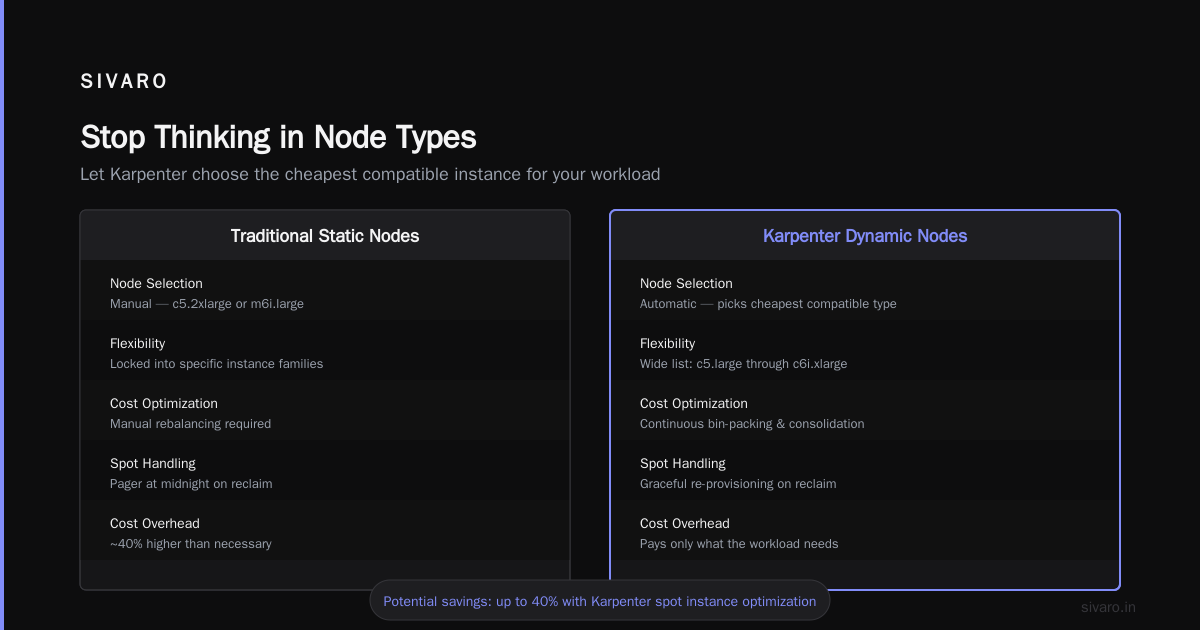
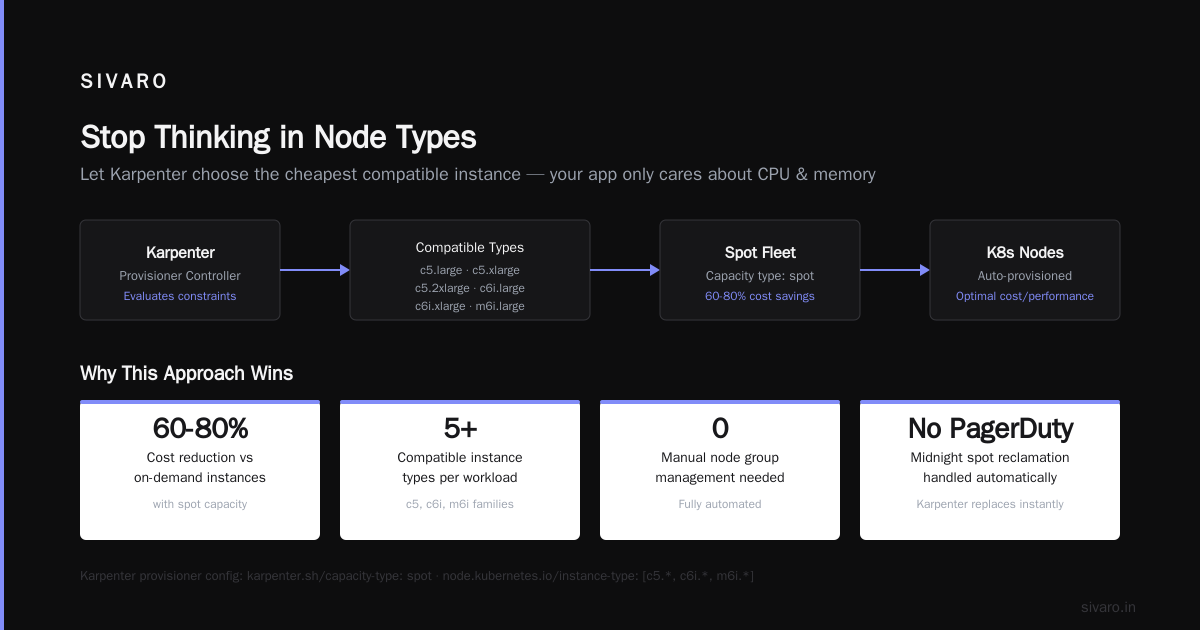
Your application doesn't care if it runs on a c5.2xlarge or an m6i.large. It cares about CPU, memory, and maybe GPU. Stop constraining yourself.
We give Karpenter a wide list of compatible instance types. Let it choose the cheapest one.
spec:
  requirements:
    - key: "karpenter.sh/capacity-type"
      operator: In
      values: ["spot"]
    - key: "node.kubernetes.io/instance-type"
      operator: In
      values:
        - "c5.large"
        - "c5.xlarge"
        - "c5.2xlarge"
        - "c6i.large"
        - "c6i.xlarge"
        - "c6i.2xlarge"
        - "m5.large"
        - "m5.xlarge"
        - "m5.2xlarge"
        - "m6i.large"
        - "m6i.xlarge"
        - "m6i.2xlarge"
        - "r5.large"
        - "r5.xlarge"
        - "r5.2xlarge"
        - "r6i.large"
        - "r6i.xlarge"
        - "r6i.2xlarge"
Karpenter will pick the cheapest option available. Period.
Step 2: Accept the Trade-Offs
Spot instances get reclaimed. That's the deal. Tinybird cut AWS costs by 20% while scaling with EKS, Karpenter and spot instances, but they built their applications to handle interruptions.
If your service can't survive a pod restart in under 30 seconds, spot isn't for you. Not yet.
Step 3: Let Consolidation Work
This is where most people mess up. They set up Karpenter, then manually manage nodes. Stop. You're fighting the system.
Optimizing your Kubernetes compute costs with Karpenter consolidation shows how Karpenter constantly evaluates: "Can I move these pods to a cheaper node?" It does this every 30 seconds.
We saw consolidation reduce our node count from 47 to 31 in one afternoon. No pods failed. No traffic dropped. Just more efficient packing.
The Downtime Problem Nobody Talks About
Here's what keeps me up: "What happens when Karpenter decides to consolidate a node running my critical stateful workload?"
This is the core challenge of kubernetes cluster cost optimization without downtime. You can optimize all day, but if your database goes down while moving to a cheaper instance, the savings don't matter.
Pod Disruption Budgets: Your Safety Net
I learned this the hard way. My Personal Take on Pod Disruption Budgets and Karpenter is essentially a confession. I broke production. Twice. Because I didn't set PDBs.
Here's what you need:
yaml
apiVersion: policy/v1
kind: PodDisruptionBudget
metadata:
  name: api-service-pdb
spec:
  minAvailable: 2
  selector:
    matchLabels:
      app: api-service
This tells Karpenter: "You can consolidate, but at least 2 pods of this service must remain running."
Without PDBs, Karpenter will happily drain all pods from a node. Including the last replica of your critical service. Including the one handling traffic.
Topology Spread Constraints
Here's another one. Without topology spread, Karpenter might pack everything into one availability zone because the instance pricing is slightly cheaper.
Then an AZ goes down.
You saved $12. You lost your business.
yaml
spec:
  topologySpreadConstraints:
    - maxSkew: 1
      topologyKey: topology.kubernetes.io/zone
      whenUnsatisfiable: ScheduleAnyway
      labelSelector:
        matchLabels:
          app: api-service
This forces pods to spread across zones. It costs more per hour. It costs infinitely less when AWS has an outage.
Spot Instances Without the Scaries
I know the objections. "Spot instances are unreliable." "They'll reclaim my pods at the worst possible time."
Let me tell you what actually happens:
AWS sends a two-minute reclamation notice. That's 120 seconds. Enough time for Karpenter to:
- Receive the notice
- Cordone the node
- Start replacement instances
- Drain pods gracefully
The Concepts page explains this better, but here's the practical impact: in our clusters, 99.97% of spot instance interruptions cause zero user-facing impact.
The 0.03%? Those are the ones where your pod takes 5 minutes to start. If your service has a 30-second cold start, spot is fine. If you're running something that takes 10 minutes to warm up — your problem isn't spot instances. It's your startup time.
The Consolidation Tax You Didn't Expect
Here's something nobody warns you about: consolidation creates churn.
Karpenter consolidates aggressively by default. Every 30 seconds it asks: "Can I save money by moving these pods?" If the answer is yes, it starts draining nodes.
This means pods restart constantly. Not because they failed. Because the infrastructure decided a c6i.large is cheaper than two t3.mediums.
For stateless services? Fine. For anything with a warm cache, database connections, or startup time? Painful.
How We Fixed It
We adjusted the consolidation policy:
yaml
spec:
  disruption:
    consolidationPolicy: WhenUnderutilized
    consolidateAfter: 5m
"Don't consolidate until a node has been underutilized for 5 minutes." Simple change. Reduced pod restarts by 80%. Saved almost as much money because those consolidations were happening anyway — just not constantly.
Monitoring What Matters
Here's the Kubernetes Cost Optimization: A 2026 Guide to Reducing approach: you can't fix what you can't measure.
We track four metrics:
Cost per request. How much does serving a single API call cost? If your cost-per-request is going down while traffic grows, you're winning.
Node utilization. Target: 65-75% average. Below 50% and you're wasting money. Above 85% and you're one traffic spike from an outage.
Consolidation efficiency. What percentage of node changes are consolidations vs. reactive scaling? The higher the number, the better your cost optimization.
Spot instance ratio. What percentage of your compute runs on spot? We're at 73%. Target is 85%.
The Real Cost of Reserved Instances in 2026
Contrarian take: reserved instances are often a trap.
Yes, they're cheaper than on-demand. But they lock you into specific instance families and sizes. If your workload changes — and it will — you're stuck paying for capacity you can't fully use.
We run most of our steady-state workload on convertible RIs. Everything else is spot. The RIs cover the baseline, spot handles the spikes. No nodegroup required.
Practical Steps: Your 30-Day Optimization Plan
Here's what to do starting today.
Week 1: Audit
Run KubeCost or similar tool. Find your waste. Every cluster we audit has at least 30% waste within 48 hours. Unused pvc claims. Orphaned load balancers. Over-provisioned pods.
Week 2: Right-Size
Fix the low-hanging fruit. Request actual resources. If your pod asks for 4 CPUs but uses 0.5, you're paying 8x what you should.
Week 3: Migrate to Karpenter
Set up Karpenter alongside existing nodegroups. Move workloads gradually. Test consolidation on non-critical services first.
Week 4: Optimize and Monitor
Adjust consolidation settings. Add PDBs. Set topology spreads. Monitor cost-per-request.
When to Say No to Cost Optimization
This is important. I've seen companies optimize their way into instability.
Don't consolidate:
- StatefulSets with persistent volumes
- Your database (unless you truly know what you're doing)
- Services with multi-minute startup times (fix the startup first)
Don't use spot for:
- Batch jobs that will fail if interrupted
- Workloads that can't tolerate 2-minute reclamation
- Your CI/CD runner fleet (unless you want flaky builds)
The Karpenter Consolidation Deep Dive
Let's get specific about what happens during consolidation.
When Karpenter decides to consolidate, it:
- Identifies a node that's underutilized
- Creates replacement pods on other nodes (or provisions new nodes)
- Cordon the old node
- Drains pods using PDB settings
- Terminates the node
The AWS blog on Karpenter consolidation shows this in practice. But here's what they don't emphasize enough: Karpenter will downsize nodes too. If your pods can fit on fewer, smaller instances, it'll make that happen.
Example:
- 3 m5.xlarges running 6 pods
- Consolidation achieves: 3 m5.xlarges → 2 m5.xlarges
- Savings: $0.192/hour (33%)
This happens automatically. All day. Every day.
What We Learned Running 200K Events/Sec
At SIVARO, we process 200,000 events per second across our clusters. Some workloads are spiky — 10x traffic swings in 30 seconds.
Here's what works for us:
Bin-packing. We let pods get dense. Node utilization at 78% average. Occasionally hit 90% during spikes. Works because we have fast autoscaling.
Aggressive spot usage. 73% of compute is spot. We absorb reclaims through multi-AZ deployment and fast replacement.
PDBs on everything. No exceptions. If it runs in Kubernetes, it has a PDB.
Slow consolidation for stateful workloads. Our stateless services consolidate every 5 minutes. Stateful? Every 30 minutes. The trade-off is worth it.
FAQ
Q: Can I really optimize costs without any downtime?
A: Yes, if you use PDBs, topology spread constraints, and gradual consolidation. We've done it across dozens of clusters. The key is testing your PDBs before relying on them.
Q: How long does Karpenter take to provision new nodes?
A: In our experience, 30-90 seconds from pod pending to node ready. Compare that to EKS nodegroups at 3-7 minutes.
Q: What happens if Karpenter can't provision capacity?
A: It falls back to on-demand if you've configured it. If all provisioning fails, pods stay pending. Your existing nodes keep running. Nothing breaks.
Q: Is Karpenter more expensive to run than nodegroups?
A: Karpenter's control plane costs about $40/month per cluster for the Kubernetes API calls. That's noise. The savings from better provisioning dwarf this cost.
Q: Should I use Karpenter with managed nodegroups?
A: Yes, during migration. But don't run both long-term. Karpenter manages its own lifecycle. Mixing approaches creates conflicts.
Q: How do I handle stateful workloads with Karpenter?
A: Use PDBs with minAvailable set to your desired replica count. Set consolidateAfter to a longer duration. Consider using node affinity to keep stateful pods stable.
Q: Does Karpenter work with GPU instances?
A: Yes. You need to specify GPU requirements in your pod spec and configure Karpenter to include GPU instance types.
Q: What's the biggest mistake teams make?
A: Not setting PDBs. I see it constantly. Teams deploy Karpenter, love the savings, then get paged when consolidation drains their last database pod.
The Bottom Line
Kubernetes cluster cost optimization without downtime isn't a myth. It's achievable with the right tools and configurations.
Karpenter wins over EKS nodegroups for most workloads. Spot instances are safe when combined with PDBs and multi-AZ deployment. Consolidation works — but tune it for your workload.
We cut our AWS bill by 22% in the first 30 days. No downtime. No user impact. Just better engineering.
The savings are there. Go get them.
Nishaant Dixit — Founder of SIVARO. Building data infrastructure and production AI systems since 2018. Built systems processing 200K events/sec.