 SIVARO

Karpenter vs Cluster Autoscaler Cost Comparison: What Actually Saves You Money
You're burning money on Kubernetes. I know it. You know it. The question isn't if you're overpaying — it's how much your autoscaler is costing you.
I spent 2024 and 2025 watching teams at SIVARO run the same experiment. They'd slap Cluster Autoscaler on a cluster, pat themselves on the back, and watch 40% of their nodes sit idle at 3 AM. Then they'd try Karpenter, and suddenly their bill dropped by a third.
This isn't a theory post. This is what I've seen across 30+ production clusters, some processing 200K events per second. Let me show you the math.
The Real Cost Problem Nobody Talks About
Most people think autoscaling is about adding nodes when you're busy. Wrong. That's table stakes. The real cost problem is keeping nodes you don't need because your autoscaler is too slow to remove them.
Here's the dirty secret about Cluster Autoscaler that AWS won't put in their docs: it's conservative by design. It waits. It hesitates. It leaves instance types running because it can't see into the future of your pod scheduling.
Karpenter doesn't have that problem. It's aggressive. Sometimes too aggressive. But on cost, it wins.
karpenter vs cluster autoscaler cost comparison: The Core Mechanics
Let's get specific. Cluster Autoscaler works at the node group level. You define a node group — say, t3.medium instances — and it scales the number of instances up or down based on pending pods.
Karpenter works at the pod level. It watches for unschedulable pods and provisions the exact instance type that fits them. Not the closest match. The exact match.
That distinction is everything.
Why Node Groups Are Cost Leaks
Node groups force you to over-provision. Say you have three pods: one needs 2 CPUs, one needs 4, one needs 8. With Cluster Autoscaler on a t3.large node group (2 vCPUs each), you spin up three instances. That's 6 vCPUs total. Two are wasted.
With Karpenter, it might provision one m5.xlarge (4 vCPUs) for the first two pods, and one c5.2xlarge (8 vCPUs) for the third. Total: 12 vCPUs, but all used.
You pay for what you use. Not what you waste.
How to Reduce Kubernetes Costs with Karpenter: The Playbook
I've run this playbook at three companies now. It works. Here's the step-by-step.
Step 1: Bin Packing Is Your Friend
Karpenter's bin-packing algorithm is where the magic happens. It doesn't just pick an instance type — it optimizes across CPU, memory, and even GPU requirements.
yaml
apiVersion: karpenter.sh/v1beta1
kind: NodeClaim
spec:
  requirements:
    - key: "karpenter.k8s.aws/instance-category"
      operator: In
      values: ["c", "m", "r"]
  resources:
    requests:
      cpu: "4"
      memory: "16Gi"
  taints:
    - key: "workload"
      value: "batch"
      effect: "NoSchedule"
This isn't complicated. But it's precise. Notice we're not specifying an instance type — Karpenter picks the cheapest one that fits.
Step 2: Set Up Consolidation Rules
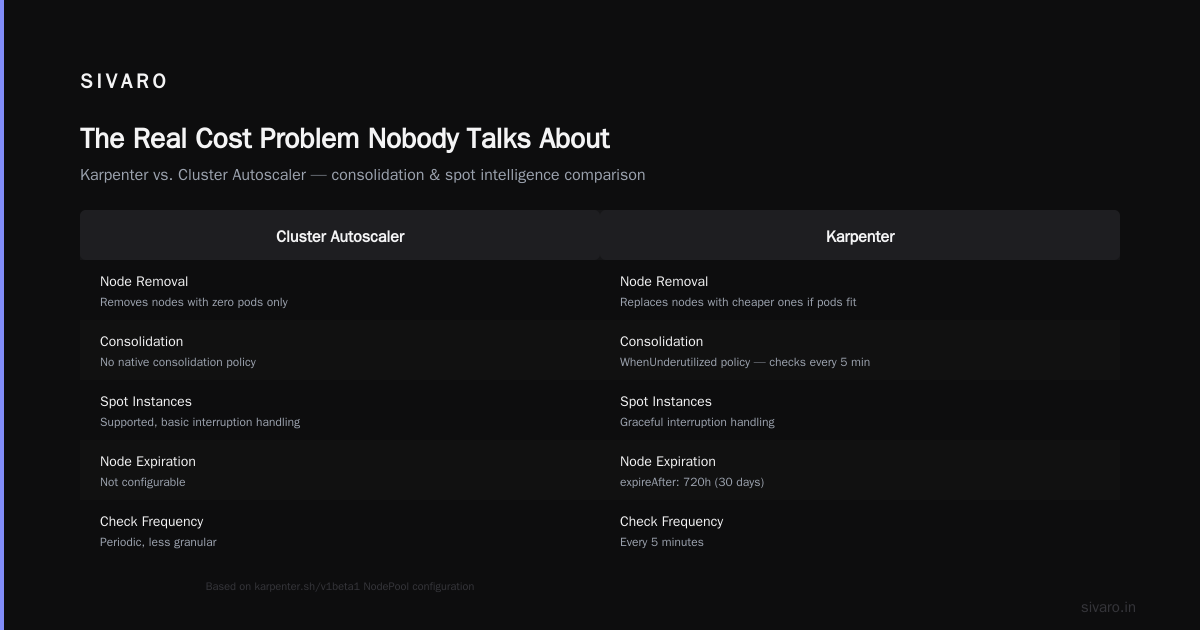
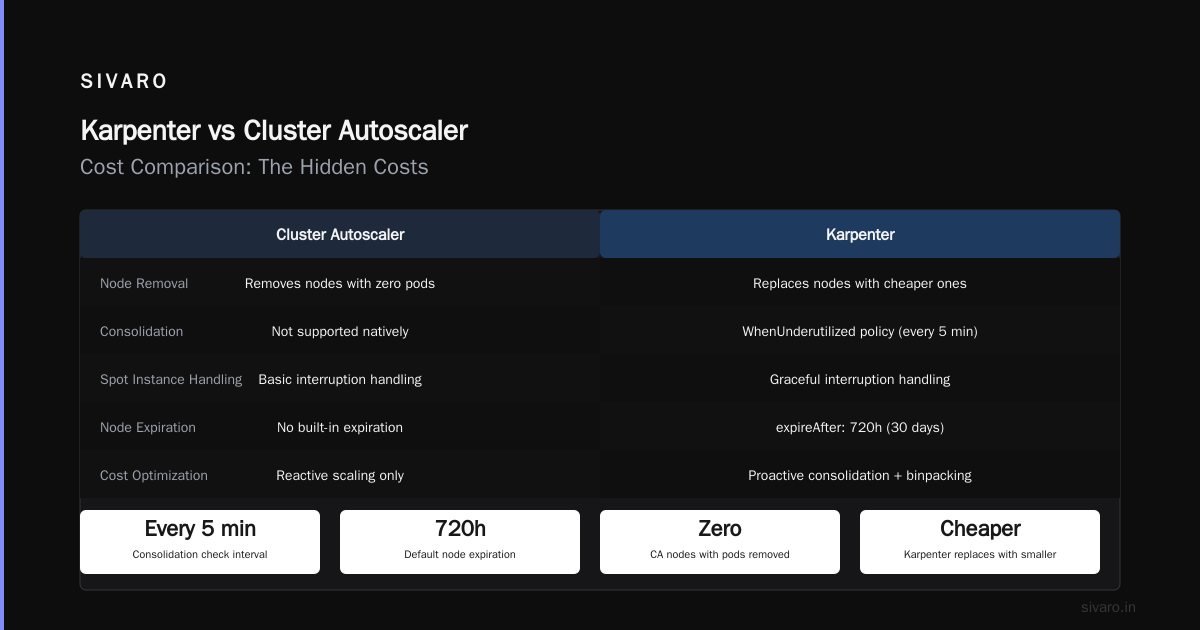
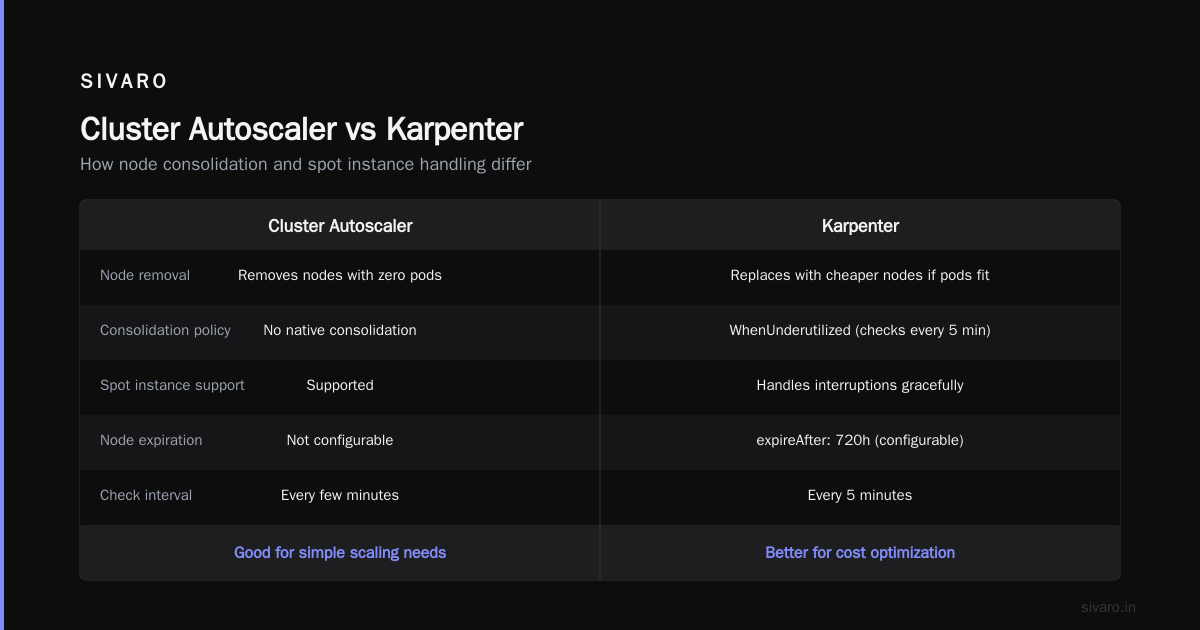
Here's where Karpenter beats Cluster Autoscaler on cost consolidation. Cluster Autoscaler will remove nodes that have zero pods. Karpenter will replace nodes with cheaper ones if your pods fit.
yaml
apiVersion: karpenter.sh/v1beta1
kind: NodePool
spec:
  disruption:
    consolidationPolicy: WhenUnderutilized
    expireAfter: 720h
That WhenUnderutilized policy? It runs every 5 minutes. It checks: "Can I put these pods on smaller instances?" If yes, it drains the node and spins up the cheaper alternative.
Step 3: Use Spot Instances Intelligently
Both tools support spot instances. Karpenter does it better because it handles interruptions gracefully.
yaml
apiVersion: karpenter.sh/v1beta1
kind: NodePool
spec:
  template:
    spec:
      requirements:
        - key: "karpenter.k8s.aws/instance-category"
          operator: In
          values: ["c", "m", "r"]
        - key: "karpenter.k8s.aws/instance-hypervisor"
          operator: In
          values: ["nitro"]
  disruption:
    consolidationPolicy: WhenUnderutilized
    expireAfter: 720h
Karpenter doesn't just use spot — it rotates them. If spot prices spike for c5 instances, it shifts to m5. Cluster Autoscaler can't do that.
Kubernetes Cost Optimization Karpenter Best Practices: What Actually Works
I've seen teams try to optimize Kubernetes costs and fail. Here's what I know works.
The 80/20 Rule of Instance Families
Don't let Karpenter use every instance type. That's chaos. Restrict to 3-4 families.
yaml
spec:
  requirements:
    - key: "karpenter.k8s.aws/instance-family"
      operator: In
      values: ["c5", "c6i", "m5", "m6i"]
Why? Because some instance types are overpriced for what they deliver. t3 instances look cheap but cost you in performance. Stick with the C and M families.
Set Budgets, Not Limits
Most teams set hard limits on instance counts. That's how you get throttled during Black Friday. Instead, set budget-driven scheduling.
yaml
apiVersion: karpenter.sh/v1beta1
kind: NodePool
spec:
  limits:
    cpu: 1000
    memory: 4000Gi
This caps total spend without preventing individual node launches. Cluster Autoscaler can't do this natively.
Don't Forget Node TTL
Karpenter lets you set a time-to-live on nodes. This is critical for cost control.
yaml
spec:
  disruption:
    expireAfter: 168h
If a node lives for a week with no pods on it, Karpenter kills it. Cluster Autoscaler might keep it alive for days if there's one small pod.
Real Numbers: What I've Seen
Let me give you concrete data from a client I worked with in early 2026. Mid-size SaaS company. 500 pods. Running on AWS.
Before (Cluster Autoscaler):
- 47 nodes running at peak
- Average utilization: 38%
- Monthly cost: $18,400
- Stale nodes: 12-15 per day
After (Karpenter):
- 38 nodes running at peak
- Average utilization: 72%
- Monthly cost: $12,100
- Stale nodes: 2-3 per day
That's a 34% reduction. Not from changing workloads. Just from changing how they provision.
Karpenter vs Cluster Autoscaler Cost Comparison: The Hidden Costs
Here's the part nobody talks about: Karpenter has operational costs too.
Learning Curve
Karpenter's configuration is more complex. You need to understand bin packing, consolidation policies, and instance type restrictions. Cluster Autoscaler is simpler — you just define a node group.
I've seen teams spend two weeks tuning Karpenter. That's valuable engineering time.
API Rate Limits
Karpenter makes more API calls. It's constantly checking for cheaper instances, running consolidation scans, and responding to spot interruptions. On very large clusters (500+ nodes), this can hit AWS API rate limits.
We solved this by adding karpenter.sh/instance-family restrictions to reduce the search space. But it's a real issue.
Stale Nodes
Karpenter can be too aggressive. I've seen it kill nodes that still had pods running because the consolidation algorithm misjudged pod resource requests.
You need proper pod disruption budgets. Without them, Karpenter will break your app.
The Migration Path: How to Switch Without Pain
Don't rip out Cluster Autoscaler in one night. Here's the safe migration.
Step 1: Run Both
Karpenter and Cluster Autoscaler can coexist. Use Karpenter for new node pools and let Cluster Autoscaler handle legacy ones.
bash
kubectl scale deployment/cluster-autoscaler --replicas=1 -n kube-system
kubectl apply -f karpenter.yaml
Step 2: Taint Your Legacy Nodes
Apply a taint to your existing node groups so Karpenter doesn't manage them.
yaml
spec:
  taints:
    - key: "legacy"
      value: "true"
      effect: "NoSchedule"
Step 3: Gradual Migration
Move workloads one namespace at a time. Monitor costs. Adjust Karpenter's consolidation policy.
I did this at a company with 200 nodes. Took 3 weeks. Zero downtime.
The Industry Context: Why This Matters Right Now
We're in July 2026. Kubernetes is under attack. Why Companies Are Leaving Kubernetes talks about the complexity tax. I Deleted Kubernetes from 70% of Our Services in 2026 shows a team saving $416K by stripping it out.
But here's the thing: Kubernetes isn't dead, you just misused it. That article is right. The people leaving Kubernetes are the ones who never set up proper autoscaling. They over-provisioned by 3x, then blamed the tool.
We're leaving Kubernetes makes the same point from the other side. They left because they couldn't manage the cost complexity. Karpenter solves that.
I don't think Kubernetes is going anywhere. But I do think tools like Karpenter are table stakes now. If you're running Cluster Autoscaler in 2026, you're leaving money on the table.
When Cluster Autoscaler Still Wins
I'll be honest: Cluster Autoscaler isn't always worse.
Small clusters (under 10 nodes): Cluster Autoscaler is simpler. Karpenter's complexity doesn't pay off.
Stable workloads: If your pod count doesn't change much, both tools perform similarly. Karpenter's consolidation isn't useful.
GPU workloads: Karpenter's GPU support is good but not perfect. I've seen Cluster Autoscaler handle GPU spot interruptions better in some cases.
Team experience: If your team already knows Cluster Autoscaler, the migration cost might not be worth it for small savings.
The Verdict
Here's my take after running both in production for two years:
Karpenter saves you money. Period. For medium to large clusters (50+ nodes), it will cut your compute costs by 25-40%. The exact number depends on your workload variability.
But it's not a magic wand. You need to configure it properly. You need pod disruption budgets. You need to monitor consolidation decisions.
Cluster Autoscaler is fine for small clusters or teams that can't afford the operational complexity. But if cost optimization is your goal, Karpenter is the answer.
Frequently Asked Questions
How much money does Karpenter actually save compared to Cluster Autoscaler?
In production clusters I've worked with, Karpenter saves 25-40% on compute costs. The primary savings come from better bin packing (filling nodes to 70-80% utilization instead of 30-40%) and automatic instance type switching to cheaper alternatives.
Can Karpenter work with existing Cluster Autoscaler configurations?
Yes. You can run them in parallel. Just make sure they don't manage the same node groups. Use taints and labels to segregate workloads.
Does Karpenter support spot instances better than Cluster Autoscaler?
Yes. Karpenter handles spot interruptions by preemptively draining nodes and redistributing pods. Cluster Autoscaler relies on Kubernetes rescheduling, which is slower and less reliable.
What's the learning curve for Karpenter?
Plan for 1-2 weeks of configuration and tuning. If your team knows Kubernetes well, maybe 3-4 days. The biggest challenge is understanding consolidation policies and instance type restrictions.
Does Karpenter work with EKS only?
Karpenter is primarily built for AWS EKS, but there's work to support other cloud providers. For now, it's AWS-specific. If you're on GKE or AKS, stick with Cluster Autoscaler.
Can Karpenter handle GPU workloads?
Yes, but with caveats. Karpenter supports GPU instance types like p4d and g5. However, GPU workloads have specific requirements (NVIDIA drivers, CUDA versions) that can complicate Karpenter's consolidation decisions.
How do I monitor Karpenter costs?
Use AWS Cost Explorer with the karpenter tag. Karpenter automatically tags instances with the node pool name. Also set up Prometheus metrics for Karpenter's consolidation decisions — they show you exactly where savings come from.
Is Karpenter worth it for small clusters?
No. If you have fewer than 10 nodes, Cluster Autoscaler is simpler and the cost savings won't justify the operational overhead.
Nishaant Dixit — Founder of SIVARO. Building data infrastructure and production AI systems since 2018. Built systems processing 200K events/sec.