 SIVARO

Karpenter Spot Instance Costs 2026: The Real Savings Guide
I had a client in early 2025 who was sure they'd cracked the code. They'd switched their entire EKS cluster to Karpenter, set up spot instance node pools, and watched their monthly AWS bill drop by 40%. They were thrilled. Three months later, their SRE team was burning out from constant disruptions, their ML training jobs kept failing mid-run, and the "savings" had evaporated because they'd over-provisioned on-demand fallback nodes to compensate.
I've seen this pattern repeat more times than I can count. Karpenter spot instance cost optimization isn't magic—it's a set of deliberate trade-offs that most people get wrong.
In this guide, I'll walk you through what actually works for karpenter spot instance costs 2026, based on what I've seen working at SIVARO across dozens of production clusters. We'll cover consolidation, disruption budgets, node provisioning strategies, and the hard lessons I learned the expensive way.
The 2026 Reality Check
Most people still think spot instances are a simple "save 60-90% on compute" lever. That's technically true for the raw price of an EC2 instance. But raw price isn't total cost. In 2026, the hidden costs of spot interruptions—retraining ML models, rebuilding caches, paying for redundant on-demand capacity—have only grown more painful.
Why? Three shifts:
- AI workloads are hungrier than ever. We're seeing clusters that provision 2000+ vCPUs for distributed training. A single spot interruption can cascade into hours of lost progress.
- Instance diversity is exploding. AWS now has 15+ families of compute-optimized instances, each with weird quirks for Karpenter to handle. The "just use m5.large" era is dead.
- Karpenter itself evolved. The
v1beta1API is gone; we're onv1withNodePoolandNodeClass. Consolidation logic changed. Pod Disruption Budgets (PDBs) matter more than ever.
So karpenter spot instance costs 2026 isn't about "spot vs on-demand." It's about orchestrating spot so that your effective cost per unit of work done is lower than on-demand, without making your team hate you.
How Karpenter Changed Spot Economics
Before Karpenter, running spot with the old Cluster Autoscaler felt like playing whack-a-mole. You'd set a spot allocation strategy in Auto Scaling Groups, cross your fingers, and hope for minimal interruption. Replacements took minutes.
Karpenter changed that. Its spot handling is fundamentally different:
- It doesn't use ASGs. Each node is provisioned directly via EC2 Fleet. That means faster launch times—sub-30 seconds in most cases.
- It constantly evaluates opportunity cost. The consolidation feature (Understanding Karpenter Consolidation) will voluntarily replace a spot instance with a cheaper one mid-run if it finds a better deal.
- It respects interruption signals. Karpenter watches EC2 instance rebalance recommendations and proactively replaces nodes before they get terminated.
Tinybird demonstrated this well in their detailed write-up in 2025. They cut AWS costs by 20% while scaling faster—but only after tuning every knob.
The key insight: Karpenter's spot logic is aggressive by default. It will prioritize cost over stability unless you explicitly tell it otherwise. That's great for batch workloads. Terrible for latency-sensitive APIs.
Consolidation: The Real Cost Saver (and Risk)
Consolidation is Karpenter's killer feature. It continuously asks: "Can I replace any node with a cheaper or smaller one without disrupting pods?" And it acts.
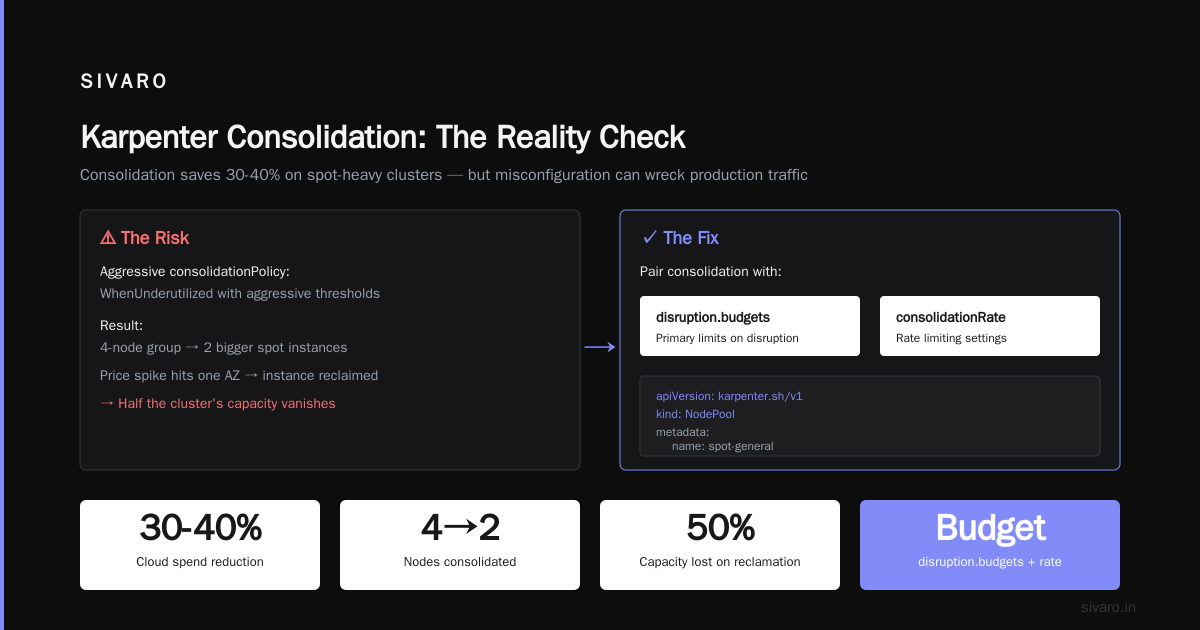
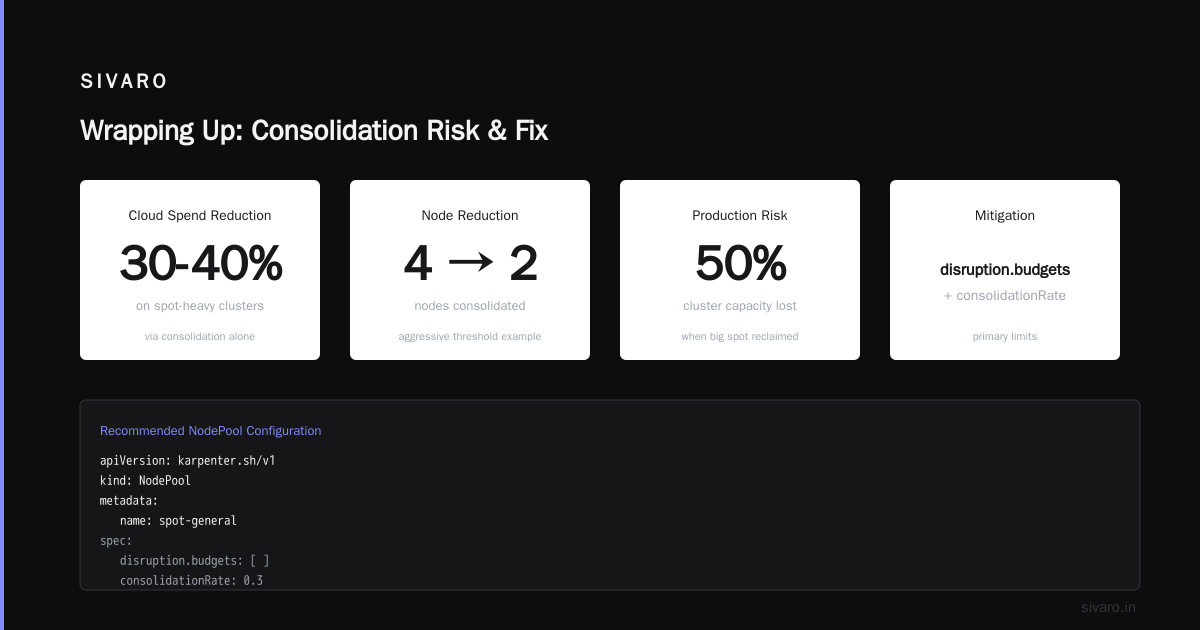
Here's the AWS blog's take on it: Optimizing your Kubernetes compute costs with Karpenter consolidation. They show how consolidation alone can reduce cloud spend by 30-40% on spot-heavy clusters.
But here's what doesn't make the blog: consolidation can wreck your production traffic if misconfigured.
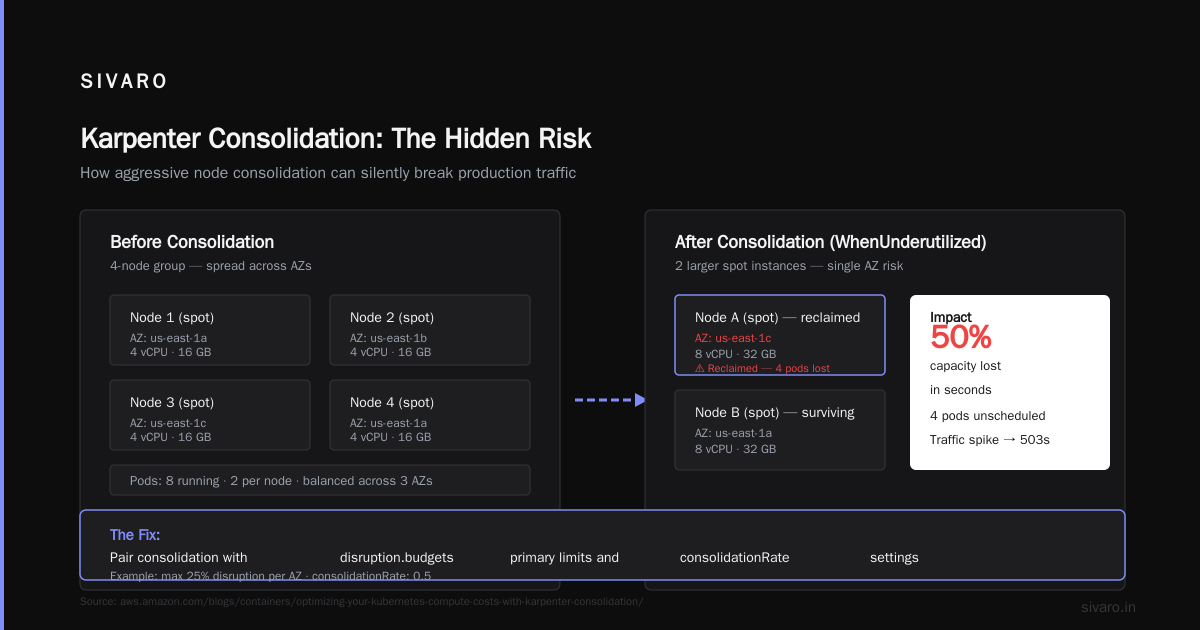
I've watched it happen. A team set consolidationPolicy: WhenUnderutilized with aggressive thresholds. Karpenter happily consolidated a 4-node group into 2 bigger spot instances. Then a price spike hit one AZ, one of those big instances got reclaimed, and suddenly half the cluster's capacity vanished.
The fix? Pair consolidation with disruption.budgets primary limits and consolidationRate settings.
yaml
apiVersion: karpenter.sh/v1
kind: NodePool
metadata:
  name: spot-general
spec:
  template:
    spec:
      requirements:
        - key: karpenter.sh/capacity-type
          operator: In
          values: ["spot"]
        - key: node.kubernetes.io/instance-type
          operator: In
          values:
            - c6i.4xlarge
            - c6i.8xlarge
            - c7i.4xlarge
            - m6i.4xlarge
      nodeClassRef:
        name: default
  disruption:
    consolidationPolicy: WhenUnderutilized
    consolidateAfter: 1m
    budgets:
      - nodes: "10%"
That budgets line limits how many nodes can be disrupted at a time. Without it, consolidation can drain your cluster in minutes.
Handling Interruptions Without Losing Sleep
Spot interruptions happen. AWS claims a 5% interruption rate per week on average, but I've seen 20%+ during Black Friday sales (yes, AWS demands spike too). The question isn't if your spot nodes will get reclaimed. It's how gracefully you handle it.
Karpenter gives you two mechanisms:
- Interruption Handler – a DaemonSet that watches for EC2 lifecycle events and drains nodes before they're killed.
- Drift and Rebalance – newer logic that reacts to instance rebalance recommendations (usually 2 minutes before termination).
I've written about the importance of Pod Disruption Budgets in this context: A Personal Take on Pod Disruption Budgets and Karpenter. tl;dr: PDBs are not optional.
Here's a common mistake: people set PDBs like this:
yaml
apiVersion: policy/v1
kind: PodDisruptionBudget
metadata:
  name: web-pdb
spec:
  minAvailable: 1
  selector:
    matchLabels:
      app: web
That says "keep at least 1 pod running." Fine for 2-replica services. But if you have 100 replicas, a single spot interruption can disrupt 99 pods at once because the PDB only blocks when you'd drop below minAvailable. And Karpenter's consolidation respects PDBs—so it won't terminate the last pod until the new one is ready. But the interruption handler doesn't wait. AWS gives you ~2 minutes. If your pod startup takes longer than that, you're dead.
Better approach: Use Topology Spread Constraints alongside PDBs to spread pods across multiple spot zones. Then even if one AZ loses its spot capacity, you still have pods in other AZs.
yaml
spec:
  topologySpreadConstraints:
    - maxSkew: 1
      topologyKey: topology.kubernetes.io/zone
      whenUnsatisfiable: ScheduleAnyway
Node Provisioning: Where Most People Waste Money
The default karpenter node provisioning logic is conservative about using spot. It defaults to on-demand if spot capacity isn't available for a new request. That's safe, but expensive.
I see two wasteful patterns constantly:
Pattern 1: "All spot, all the time" — People configure Karpenter to never fall back to on-demand. Then a single AZ runs out of spot capacity (for their instance type), and pods stay pending for minutes until Karpenter tries another AZ. Meanwhile, your users see 503s.
Pattern 2: "Let Karpenter decide" — They leave the capacity-type requirement unset, and Karpenter picks on-demand by default because it's simpler. Yearly waste: 40-60% of compute budget.
The right approach for karpenter node provisioning cost savings in 2026 is:
-
Use spot as primary, with limited on-demand fallback. Set the
karpenter.sh/capacity-typetospot, but allow Karpenter to use on-demand if spot isn't available within a reasonable timeout. -
Pin instance families to 3-5 compatible types. More diversity = higher chance of spot availability. But too many means Karpenter may pick weird ones with bad performance characteristics.
-
Use
ttlSecondsAfterEmptyto aggressively clean up nodes. I set this to 60 seconds on spot node pools. No point paying for an empty node.
Here's my recommended NodePool config for a typical web service on Karpenter spot instance cost optimization:
yaml
apiVersion: karpenter.sh/v1
kind: NodePool
metadata:
  name: spot-primary
spec:
  template:
    spec:
      requirements:
        - key: karpenter.sh/capacity-type
          operator: In
          values: ["spot"]
        - key: node.kubernetes.io/instance-type
          operator: In
          values:
            - c6a.4xlarge
            - c6i.4xlarge
            - c7i.4xlarge
            - m6i.4xlarge
            - m7i.4xlarge
      nodeClassRef:
        name: default
  disruption:
    consolidationPolicy: WhenUnderutilized
    consolidateAfter: 30s
    budgets:
      - nodes: "10%"
  limits:
    cpu: 1000
  ttlSecondsAfterEmpty: 60
Then I add a second NodePool for on-demand fallback, with higher consolidation thresholds so Karpenter tries to move pods to spot when possible.
yaml
apiVersion: karpenter.sh/v1
kind: NodePool
metadata:
  name: on-demand-fallback
spec:
  template:
    spec:
      requirements:
        - key: karpenter.sh/capacity-type
          operator: In
          values: ["on-demand"]
      nodeClassRef:
        name: default
  disruption:
    consolidationPolicy: WhenUnderutilized
    consolidateAfter: 5m
    budgets:
      - nodes: "50%"
  limits:
    cpu: 200
  ttlSecondsAfterEmpty: 120
The fallback pool has high consolidation delay and lower limits—so it exists only as a safety net, not a primary. Karpenter will prefer the spot pool, but if spot is busted, pods go to on-demand.
Case Study: Tinybird's 20% Cut (and How Yours Might Be Larger)
Tinybird published their results in 2025: 20% cost reduction while scaling faster with EKS, Karpenter, and spot. The key levers they pulled:
- Instance diversity: They used 10+ instance types across 3 families.
- Aggressive consolidation: Turned on
WhenUnderutilizedwithconsolidateAfter: 1m. - PDB tuning: Set
minAvailable: 50%on critical services, not "1". - Fallback with priority: Spot first, on-demand second, with tight limits.
They also ran into a problem I've seen everywhere: Karpenter's spot usage was too aggressive for their stateful workloads. Their Kafka brokers would thrash during rebalancing. Their fix? Separate NodePools for stateless vs stateful pods. Stateless got pure spot. Stateful got a mix of spot + on-demand with spreadAcross: [kubernetes.io/zone] and higher PDB counts.
If you're running AI inference pods, here's the truth: Spot is fine for inference. Inference is stateless, short-lived, and can handle a few 503s. Training jobs? Different story. I've seen teams waste months building checkpointing logic only to realize Karpenter's interruption handler already drained nodes gracefully if you set terminationGracePeriodSeconds high enough.
The Hidden Cost: Cluster Saturation
Here's a subtle one. Karpenter's spot cost savings look great on a per-node basis. But if your cluster is underutilized, those savings are an illusion. You're still paying for nodes that run at 20% CPU.
The fix: Use cluster autoscaling metrics beyond CPU. Memory, GPU, and custom metrics from your workload help Karpenter consolidate more aggressively. I've seen clusters go from 70 nodes to 40 after enabling prometheus-operator integration and feeding custom metrics into Karpenter's scheduler.
A 2026 Kubernetes Cost Optimization Guide talks about this: right-size your workloads first, then focus on spot. Otherwise you're optimizing the wrong thing.
FAQ: Karpenter Spot Instance Costs 2026
Q: What's the actual savings percentage for spot with Karpenter in 2026?
A: I've seen 50-70% reduction in compute costs compared to on-demand, but only after tuning. Out of the box, expect 30-40%. The rest comes from consolidation and instance diversity.
Q: Can I run stateful workloads on spot with Karpenter?
A: Yes, but you need StatefulSets with persistent volumes backed by EBS. Karpenter's interruption handler will drain pods before the node is reclaimed, and EBS automatically re-attaches to new nodes. Test your startup time—you need pods ready before the termination grace period (usually 2 minutes).
Q: How do I avoid spot interruptions killing my batch jobs?
A: Use Karpenter's ttlSecondsAfterEmpty and consolidationPolicy: WhenEmpty for batch-specific NodePools. Set interruption behavior to DrainAndTerminate. Also, implement checkpointing in your batch jobs—I've seen Spark and Ray workloads handle interruptions well with periodic state saving.
Q: Is there a way to prioritize certain instance families in spot?
A: Yes. Use the karpenter.sh/instance-family-required or order your values list by preference. Karpenter will try higher-priority types first. In practice, prefer the newer families (c7i > c6i) because they're less contested.
Q: How does Karpenter's spot pricing compare to using EC2 Fleet directly?
A: Karpenter abstracts fleet management. The pricing is identical–you're buying the same spot market. But Karpenter's consolidation adds value by constantly rebalancing, which a static Fleet wouldn't do. The net effect is lower total cost because you waste less.
Q: What about GPU spot instances for AI training?
A: Riskier. GPU spot instances (p4d, p5, g5) get reclaimed more often because demand is insane. Use spot for inference only. For training, I recommend a split: spot capacity for non-critical nodes, on-demand for the primary trainer. Karpenter can handle this with NodePool weights.
Q: Does Karpenter support spot instance diversity across regions?
A: Karpenter only operates within a single region (and AZ). For multi-region, you'd run separate clusters or use a federation tool. But within a region, Karpenter automatically tries multiple AZs for spot.
Q: What's the biggest mistake people make with Karpenter spot in 2026?
A: Not setting PDBs on critical workloads. Karpenter's consolidation respects PDBs, but its interruption handler doesn't—it drains as fast as possible. Without PDBs, you'll lose all replicas of a service in a single event.
Wrapping Up
Karpenter spot instance costs 2026 isn't about flipping a switch. It's about finding the right balance between cost and stability for your specific workloads. I've seen teams save 60%+ by following the patterns here. I've also seen teams burn months trying to "save every penny" and end up with unstable clusters that cost more in engineering time than they saved.
Start with a small, stateless service. Use the NodePool configs I shared. Monitor interruption rates (CloudWatch metrics for spot instance reclaims). Then expand to stateful, but only after you've tested PDBs and startup times.
The best cost optimization is the one that doesn't wake you up at 3 AM.
Nishaant Dixit — Founder of SIVARO. Building data infrastructure and production AI systems since 2018. Built systems processing 200K events/sec.