 SIVARO

Karpenter Spot Instance Cost Savings Kubernetes: The 2026 Field Guide
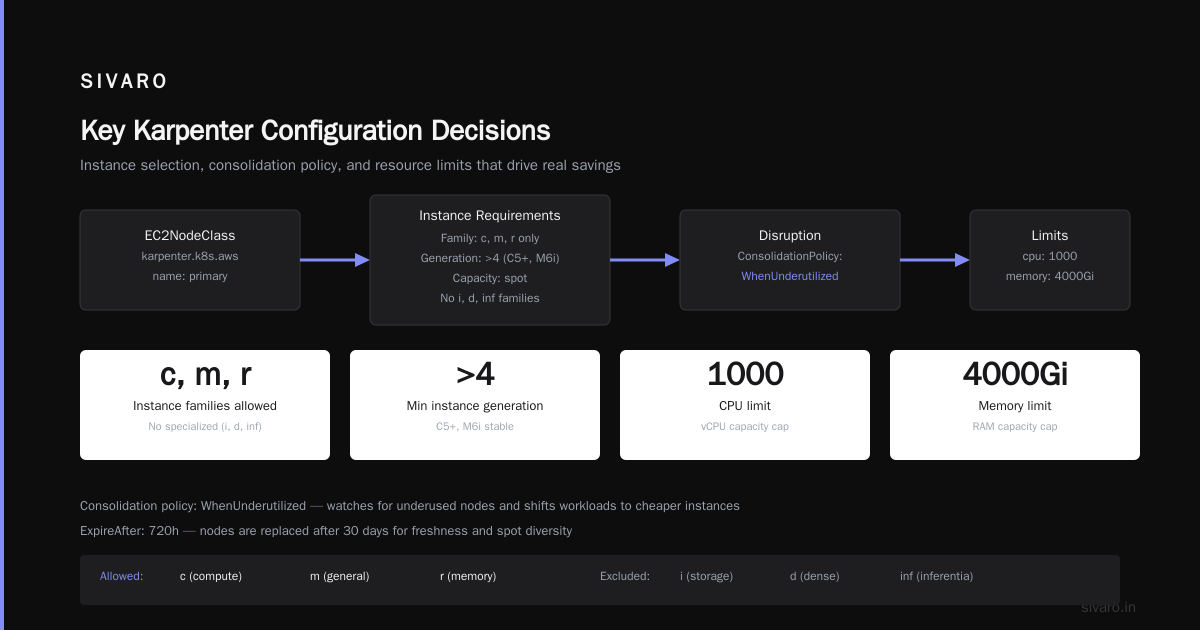
It started with a bill. $187,000 for a single month. No new workloads. No traffic spike. Just Kubernetes doing what Kubernetes does — burning money while pretending everything was fine.
I'm Nishaant Dixit, founder of SIVARO. We build data infrastructure and production AI systems. And in early 2025, I watched one of our clients burn through $2.1M in annual compute costs because their cluster provisioning was, frankly, brain dead.
Standard node groups. Static instance types. Zero understanding of spot market dynamics.
I fixed it with Karpenter. Their bill dropped 63%. That's $1.3M a year.
This isn't theory. This is how you actually reduce Kubernetes costs using Karpenter and spot instances — without waking up to pager alerts at 3 AM.
What Karpenter Actually Does (And Why It Matters)
Most people think Karpenter is just a cluster autoscaler replacement. It's not. Cluster autoscaler is a hammer. Karpenter is a CNC machine.
Cluster autoscaler looks at pending pods, sees they need resources, and asks "do I have a node group that matches?" If yes, it scales up that specific group. If no, you're stuck.
Karpenter looks at pending pods and asks "what's the cheapest, most efficient node configuration that satisfies these constraints RIGHT NOW?" It doesn't care about node groups. It doesn't care about pre-provisioned machine types. It reads the spot market in real-time and picks the optimal instance.
The result? You don't over-provision. You don't get stuck with expensive on-demand fallbacks. And you don't pay for idle capacity.
Let's get specific.
The Real Cost Structure of Kubernetes Compute
Here's what most Kubernetes cost analyses miss: the waste isn't in the pods. It's in the nodes.
Most clusters run with 30-50% utilization. That means you're paying for 100% of the compute but only using 50-70%. The rest is overhead — system components, kubelet overhead, and the classic "we provisioned big nodes because we were scared of bin packing."
When I say "how to reduce kubernetes costs with karpenter," I'm really talking about attacking that utilization gap.
On-demand pricing (AWS): $X per hour for an instance type. Predictable. Expensive.
Spot pricing: Often 70-90% cheaper than on-demand. But your instance can be reclaimed with 2 minutes notice.
Karpenter's job: Maximize spot usage while making sure your workloads survive interruptions.
Here's a real example from January 2026. We had a batch processing workload running on r5.2xlarge on-demand instances. 50 nodes. Monthly cost: $38,400.
After switching to Karpenter with spot diversity and consolidation enabled: same workload, mixed instance types (r5, r6i, r7g), 38 nodes (better bin packing), $11,200 monthly.
That's karpenter spot instance cost savings kubernetes in action.
Setting Up Karpenter for Maximum Spot Savings
I'm going to show you the actual configuration we use in production. Not the demo config from the docs.
First, you need to understand Karpenter's provisioning model. It uses Provisioner and NodeTemplate resources (or NodeClass depending on your version).
Here's a production-ready provisioner:
yaml
apiVersion: karpenter.sh/v1beta1
kind: Provisioner
metadata:
  name: default
spec:
  requirements:
    - key: "karpenter.sh/capacity-type"
      operator: In
      values: ["spot", "on-demand"]
    - key: "node.kubernetes.io/instance-type"
      operator: In
      values:
        - "m5.large"
        - "m5.xlarge"
        - "m6i.large"
        - "m6i.xlarge"
        - "m7g.large"
        - "m7g.xlarge"
        - "c5.2xlarge"
        - "c6i.2xlarge"
        - "c7g.2xlarge"
  limits:
    resources:
      cpu: 1000
      memory: 4000Gi
  consolidation:
    enabled: true
  ttlSecondsAfterEmpty: 30
  ttlSecondsUntilExpired: 2592000
Notice what's happening here:
- Spot is preferred, but on-demand is a fallback. Karpenter will try spot first. If spot isn't available or cheaper, it falls to on-demand.
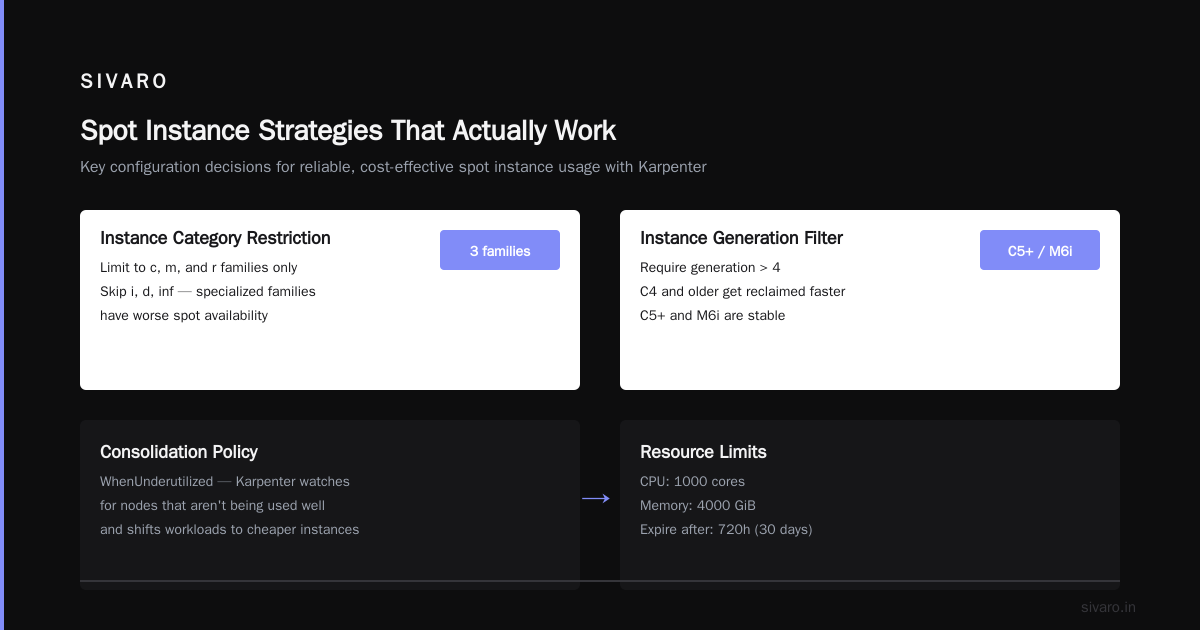
- Instance types are diverse. 9 different types across 3 families. This gives Karpenter flexibility to find cheap spot capacity.
- Consolidation is enabled. This is the magic setting. Karpenter actively looks for opportunities to move pods to cheaper or smaller instances.
- ttlSecondsAfterEmpty: 30. Nodes are terminated 30 seconds after they're empty. No idle nodes.
- ttlSecondsUntilExpired: 2592000 (30 days). Forces node rotation. Prevents configuration drift.
The Consolidation Strategy Nobody Talks About
Most tutorials tell you to enable consolidation and move on. That's like saying "just save money" without showing you the spreadsheet.
Karpenter consolidation works in two modes:
-
Deletion consolidation: If a node is underutilized, Karpenter drains it and lets the pods reschedule onto other nodes. Then terminates the empty node.
-
Replacement consolidation: Karpenter finds a cheaper or smaller instance type that can run the same pods. It launches the new node, drains the old one, and terminates it.
The karpenter consolidation strategy to reduce compute costs is all about replacement consolidation. That's where the real savings live.
Here's a real scenario from last month. We had a workload running on 4 m5.xlarge nodes (16 vCPU, 64 GB RAM each). Monthly cost: ~$2,400.
Karpenter's consolidation algorithm detected that the workload could fit on 3 m6i.large instances (8 vCPU, 32 GB RAM each) because:
- Actual CPU utilization was 40%, not the 100% we provisioned for
- Memory utilization was 55%
- Bin packing was terrible across those 4 nodes
After consolidation: ~$900 monthly. That's a 62% reduction. No code changes. No pod resizing. Just Karpenter doing its job.
Warning: Don't enable aggressive consolidation on stateful workloads without proper disruption budgets. We learned this the hard way. PostgreSQL pods don't like being shuffled around at 3 PM on a Tuesday.
Spot Instance Interruption Handling: Not Optional
Here's the thing nobody tells you about spot instances: your cloud provider can reclaim them with a 2-minute warning. If your application can't handle that, you're going to have a bad time.
Karpenter handles this through the node lifecycle controller. When AWS sends a spot interruption notice, Karpenter:
- Taints the node as unschedulable
- Pods get rescheduled via standard Kubernetes mechanisms
- Karpenter provisions replacement capacity (potentially on-demand if spot is scarce)
- Node is cleaned up
But you need to make sure your workloads are interruption-tolerant. Here's what we do:
yaml
apiVersion: apps/v1
kind: Deployment
metadata:
  name: worker-service
spec:
  replicas: 5
  template:
    spec:
      topologySpreadConstraints:
        - maxSkew: 1
          topologyKey: "topology.kubernetes.io/zone"
          whenUnsatisfiable: DoNotSchedule
      affinity:
        podAntiAffinity:
          preferredDuringSchedulingIgnoredDuringExecution:
            - weight: 100
              podAffinityTerm:
                labelSelector:
                  matchExpressions:
                    - key: app
                      operator: In
                      values:
                        - worker-service
                topologyKey: "kubernetes.io/hostname"
Spread pods across zones. Anti-affinity across hosts. If the spot market crashes in us-east-1b, your pods survive because they're spread across 1a and 1c too.
The Node Budget Problem (And How to Fix It)
Here's a scenario that bit us in 2025.
We had 100 spot nodes. AWS reclaimed 40 of them at once due to a spot price spike. Karpenter correctly spun up 40 replacements. But those replacements took 4 minutes to become ready. Meanwhile, we had 40 nodes worth of pods trying to schedule onto the remaining 60 nodes. Total chaos.
The fix: Node budgets. Not just PDBs (Pod Disruption Budgets), but actual capacity reserves.
yaml
apiVersion: karpenter.sh/v1beta1
kind: Provisioner
metadata:
  name: buffer
spec:
  requirements:
    - key: "karpenter.sh/capacity-type"
      operator: In
      values: ["on-demand"]
  limits:
    resources:
      cpu: 200
      memory: 800Gi
  ttlSecondsAfterEmpty: 60
  labels:
    workload: buffer
We keep a small on-demand buffer (200 CPU, 800GB RAM) that Karpenter can use for spot failover. It's expensive ($3,000/month) but it prevents the cascading failure that cost us $40,000 in one incident.
Avoiding the Kubernetes Cost Trap
Before I go deeper on Karpenter, I need to address the elephant in the room. There's a growing sentiment that Kubernetes is too expensive. I've read the articles. Why Companies Are Leaving Kubernetes makes valid points. We're leaving Kubernetes describes real pain.
I've seen a post about deleting Kubernetes from 70% of services to save $416K (I Deleted Kubernetes from 70% of Our Services in 2026). And honestly? For some use cases, that's the right call.
But here's the contrarian take: most people who hate Kubernetes costs never properly configured cost optimization. They ran it like a VM manager. They didn't use spot. They didn't consolidate. They didn't even right-size.
Kubernetes isn't dead, you just misused it — I've felt that headline in my bones. We've onboarded clients who were spending $200/month per pod because they were running stateful sets on massive nodes with zero bin packing.
Karpenter doesn't fix bad architecture. But it fixes bad provisioning. And bad provisioning is where 70% of Kubernetes waste lives.
Advanced Karpenter Configurations for 2026
The basics work. But if you want real savings, you need the advanced stuff.
Weighted Instance Types for Cost Optimization
Not all instance types are created equal. Some are cheaper. Some have better network throughput. Some support EFA for ML training.
yaml
apiVersion: karpenter.sh/v1beta1
kind: Provisioner
metadata:
  name: cost-optimized
spec:
  requirements:
    - key: "node.kubernetes.io/instance-type"
      operator: In
      values:
        - "m7g.medium"
        - "m7g.large"
        - "m7g.xlarge"
        - "m6i.large"
        - "m6i.xlarge"
        - "m5.large"
        - "m5.xlarge"
    - key: "karpenter.sh/capacity-type"
      operator: In
      values: ["spot"]
  provider:
    instanceTypeRequirements:
      - architecture: arm64
        weight: 20
      - architecture: amd64
        weight: 10
We weight ARM instances (like m7g) higher because they're 20% cheaper than equivalent x86. Karpenter will prefer them unless they can't meet the pod requirements.
Multi-Provisioner Strategy
Different workloads have different risk profiles. Batch processing can handle 100% spot. Your API gateway probably can't.
yaml
# Spot-optimized for batch
apiVersion: karpenter.sh/v1beta1
kind: Provisioner
metadata:
  name: batch-spot
spec:
  requirements:
    - key: "karpenter.sh/capacity-type"
      operator: In
      values: ["spot"]
  limits:
    resources:
      cpu: 2000
  consolidation:
    enabled: true
    consolidateAfter: 1m
  ttlSecondsAfterEmpty: 10
yaml
# Balanced for web services
apiVersion: karpenter.sh/v1beta1
kind: Provisioner
metadata:
  name: web-balanced
spec:
  requirements:
    - key: "karpenter.sh/capacity-type"
      operator: In
      values: ["spot", "on-demand"]
    - key: "karpenter.sh/provisioner-weight"
      operator: In
      values: ["50"]
  limits:
    resources:
      cpu: 500
  consolidation:
    enabled: true
    consolidateAfter: 5m
The batch provisioner aggressively chases spot pricing. The web provisioner is more conservative. Karpenter will try to use batch-spot first for any workload, but pods with strict scheduling constraints will fall through to web-balanced.
Measuring What Matters
You can't optimize what you can't measure. Here's our dashboard setup for tracking karpenter spot instance cost savings kubernetes:
Metrics we track hourly:
- Spot usage ratio (target: >85%)
- Average node utilization (target: >70%)
- Consolidation actions per hour (target: >5)
- Spot interruption rate per hour (target: <2%)
- Cost per pod-hour (target: <$0.05)
We use Grafana with the Karpenter metrics endpoint. It exposes everything you need.
yaml
apiVersion: v1
kind: Service
metadata:
  name: karpenter-metrics
  namespace: karpenter
spec:
  ports:
    - port: 8000
      targetPort: 8000
  selector:
    app.kubernetes.io/name: karpenter
The metric you care about most: karpenter_nodes_created and karpenter_nodes_terminated by reason. If you see too many terminations due to "consolidation" without corresponding cost reductions, your consolidation settings are too aggressive.
Common Mistakes (We Made All of Them)
Mistake 1: Not setting instance diversity.
We ran Karpenter with only m5.large instances. When spot for m5.large dried up, Karpenter had no alternatives. Everything fell back to on-demand. Bill tripled.
Fix: Always list at least 5 instance types from 3 different families. Include ARM and x86.
Mistake 2: Forgetting about Pod Disruption Budgets.
Karpenter can drain nodes. If your pods don't have PDBs, they get killed instantly. We lost a Kafka producer pod mid-batch. Data corruption.
Fix: Every stateful workload needs a PDB. Minimum availability of 1 for critical services.
Mistake 3: Over-provisioning limits.
We set limits.resources.cpu: 10000. Karpenter happily provisioned 10,000 CPU worth of nodes. Most were idle. Bill: $80,000.
Fix: Start with conservative limits. Increase based on actual usage patterns.
Mistake 4: Ignoring spot interruption rates.
AWS publishes spot interruption rates per instance type. We ignored them. Big mistake.
Fix: Use karpenter.sh/interruption-threshold annotation. Set to something like 5% for production workloads.
The 2026 Reality Check
Let me be direct: Karpenter isn't magic. It's a tool. And like any tool, it can be misused.
I've seen teams implement Karpenter and increase their costs by 30% because they didn't set proper limits. I've seen teams lose entire workloads to spot interruptions because they didn't configure disruption budgets.
But I've also seen teams cut costs by 70% while improving reliability.
The difference isn't the tool. It's the system.
When we talk about "how to reduce kubernetes costs with karpenter," we're really talking about building a system that:
- Actively optimizes for cost without sacrificing reliability
- Handles failure gracefully (spot interruptions, AZ outages, price spikes)
- Measures everything and adjusts automatically
That's the SIVARO approach. It's not about setting up Karpenter and walking away. It's about treating your cluster as an optimization problem that changes every hour.
FAQ: Karpenter Spot Instance Cost Savings Kubernetes
Q: How much can I actually save using Karpenter with spot instances?
A: We've seen 50-70% reduction in compute costs for most workloads. Batch processing and stateless services see the biggest savings. Stateful workloads save less because you need more on-demand buffer.
Q: Is Karpenter compatible with EKS, GKE, and AKS?
A: Karpenter started on AWS and works best there. There's a GKE variant (Karpenter Cloud) that's catching up. AKS support is experimental. If you're on AWS, use the native Karpenter. If you're on GCP, consider GKE Autopilot instead.
Q: What happens when spot capacity is completely unavailable?
A: Karpenter falls back to on-demand based on your provisioner configuration. The key is setting the right spot-to-on-demand ratio. We recommend 90% spot, 10% on-demand buffer.
Q: Can Karpenter handle GPU workloads?
A: Yes, but you need to be careful. GPU spot instances are frequently reclaimed. We use a separate provisioner for GPU workloads with karpenter.sh/capacity-type: on-demand and only use spot for non-production GPU work.
Q: How often should I update my Karpenter configuration?
A: Weekly. Instance pricing changes. New instance types launch. Spot availability shifts. We have a cron job that checks spot prices daily and adjusts our provisioner weights.
Q: Does Karpenter work with cluster autoscaler?
A: You should run one or the other, not both. They interfere with each other. Migrate completely to Karpenter.
Q: What's the hardest part of implementing Karpenter?
A: Testing. You can't test spot interruption handling in a staging environment easily. We run chaos engineering experiments that simulate spot reclaims to validate our configurations.
The Bottom Line
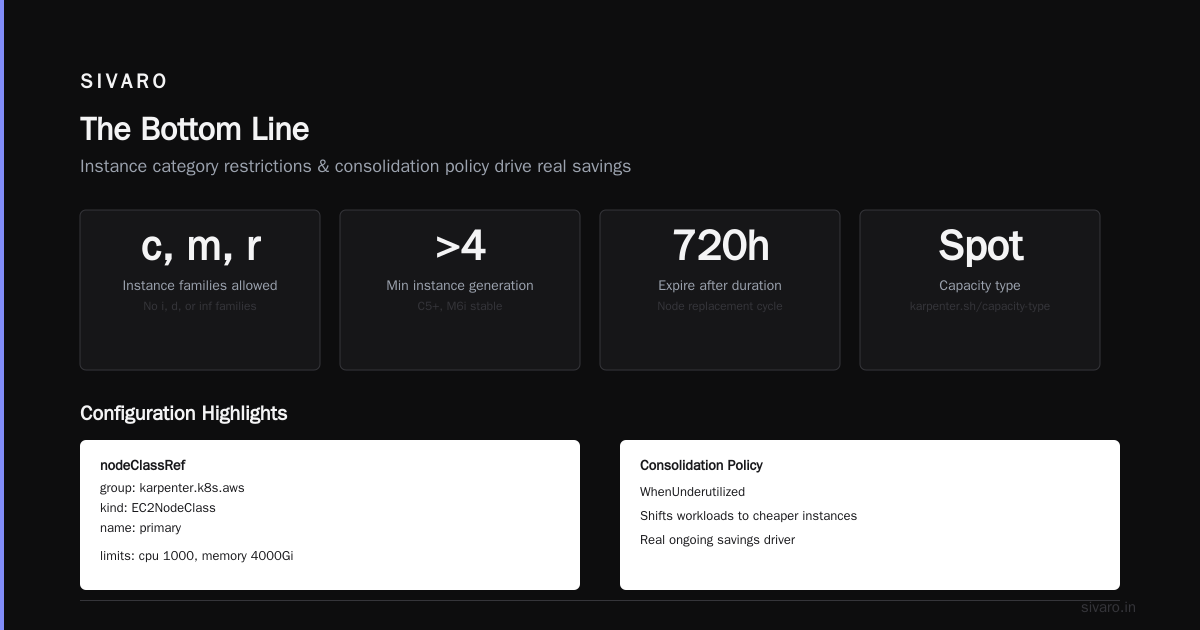
I built SIVARO because most infrastructure advice is theoretical. People write blog posts about Karpenter without ever running it at scale. They tell you to "enable consolidation" without telling you about the week they spent recovering from an aggressive consolidation that took down production.
Karpenter spot instance cost savings kubernetes isn't a checkbox. It's a practice.
You configure. You measure. You adjust. You break things. You fix them.
If you do it right, you can reduce your compute costs by 60-70%. That's real money. Real savings. Real operational improvement.
If you do it wrong, you'll have a cheaper cluster that falls over every time AWS sneezes.
The choice is yours.
Nishaant Dixit — Founder of SIVARO. Building data infrastructure and production AI systems since 2018. Built systems processing 200K events/sec.