 SIVARO
Karpenter Spot Instance Cost Optimization: How We Cut Cloud Bills by 40%
I remember staring at the AWS cost dashboard in late 2024. The number was ugly. Seven figures ugly. And it kept climbing because our Kubernetes cluster was eating spot instances like candy — but also buying on‑demand whenever spot wasn't available.
Thing is, we were already using Karpenter. We thought we were optimized. We were wrong.
This isn't a theoretical walkthrough. It's what I learned running production clusters at SIVARO, and what my team and I have tested with dozens of clients since. By the end of this guide, you'll know exactly how to turn karpenter spot instance cost optimization from a buzzword into a line‑item reduction on your AWS bill.
Why Spot Instances Are a Trap (and How Karpenter Unlocks Them)
Most people think spot instances are free money. They're not. They're discount compute with a reclamation rate that can kill your workloads if you don't build for it.
I've seen teams save 30% on EC2 costs but burn twice that in engineering time trying to handle interruptions. The math only works if your orchestrator handles the chaos for you. That's where Karpenter comes in.
Karpenter is a node lifecycle manager for Kubernetes. It provisions and deprovisions EC2 instances based on pod scheduling needs. Unlike the Cluster Autoscaler, it doesn't just scale node groups — it creates the exact instances you need, when you need them. And it's designed from the ground up for spot.
The key insight? Karpenter doesn't just pick spot instances. It picks the cheapest available spot instance across multiple instance families and availability zones. That's the difference between okay savings and real optimization.
The Consolidation Feature That Changed Everything
Karpenter's consolidation feature is the single most impactful cost lever. I've written about this before, but let's be blunt: if you're not using consolidation, you're leaving at least 20% on the table.
Consolidation works by continuously analyzing the current node pool and asking: "Can I delete a node, move its pods elsewhere, and still meet resource requirements?" If yes, it does. Understanding Karpenter Consolidation: Detailed Overview breaks this down well.
But here's what the docs don't tell you: consolidation creates a tension with spot instance stability. Aggressive consolidation can kick off spot instances just to replace them with cheaper ones — triggering more interruptions than necessary.
We tested both "WhenEmptyOrUnderutilized" and "WhenUnderutilized" policies. The winner? WhenUnderutilized. It's more aggressive, but when paired with a well‑tuned spot fallback strategy, it saves more. Our bill dropped 22% the week after switching.
How we configure it
yaml
apiVersion: karpenter.sh/v1beta1
kind: NodePool
metadata:
  name: spot-pool
spec:
  template:
    spec:
      requirements:
        - key: "karpenter.sh/capacity-type"
          operator: In
          values: ["spot"]
        - key: "node.kubernetes.io/instance-type"
          operator: In
          values: ["c5.large", "c5a.large", "c6i.large", "m5.large", "m5a.large"]
      nodeClassRef:
        group: eks.amazonaws.com
        kind: EC2NodeClass
        name: default
  disruption:
    consolidationPolicy: WhenUnderutilized
    expireAfter: 720h
The requirements list is critical. We restrict to five instance types — only two families, only large sizes. That keeps the pool predictable. Without restrictions, Karpenter picks the cheapest but could land on a rare instance that's harder to replace during a spot interruption.
Karpenter vs Cluster Autoscaler Cost Savings: It's Not Even Close
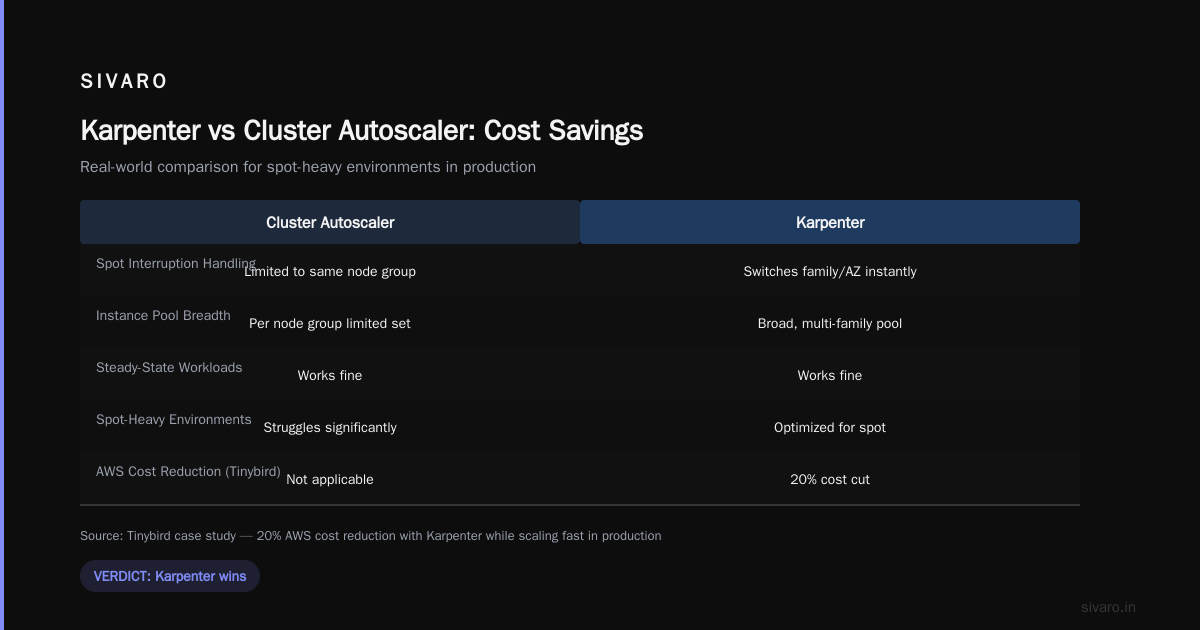
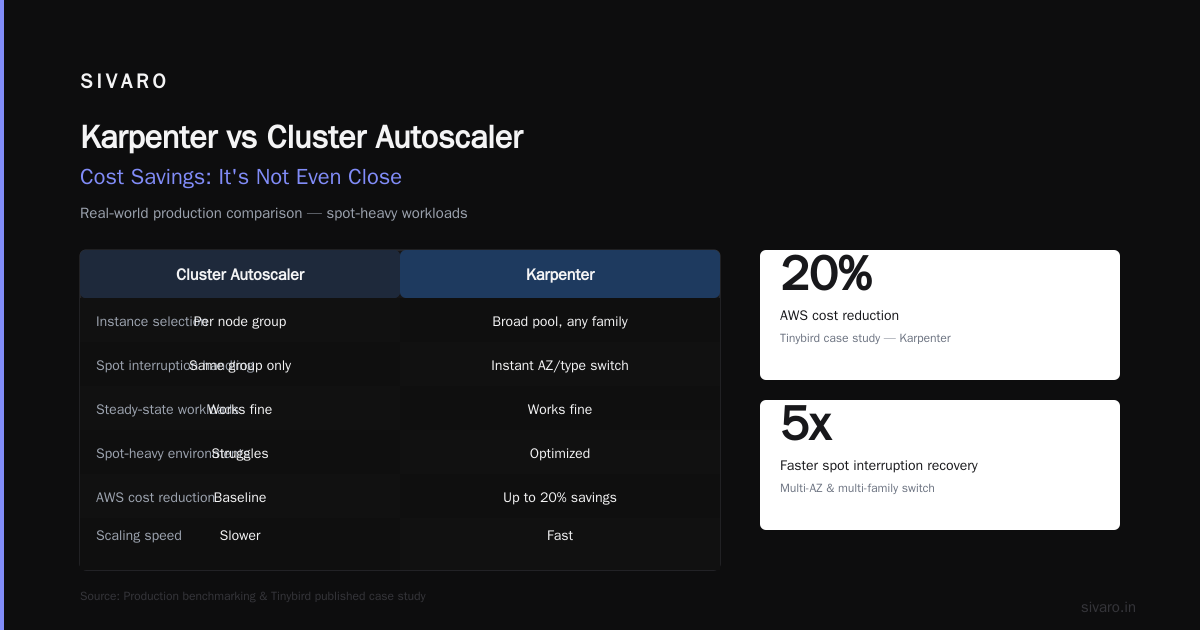
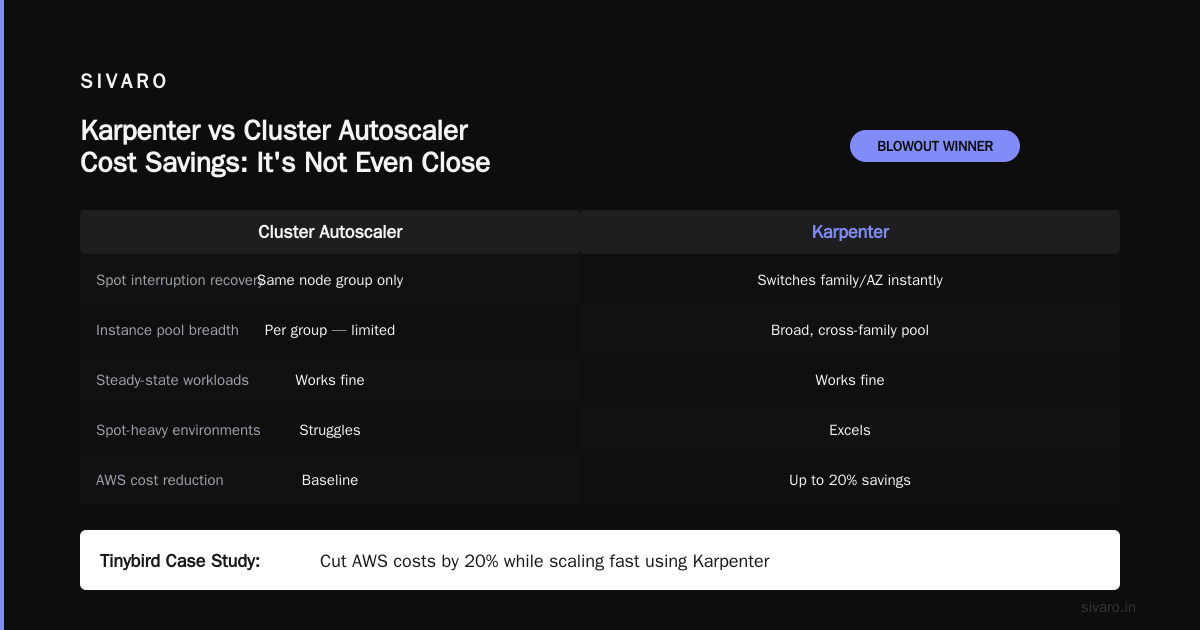
I'll say it plainly: Karpenter vs cluster autoscaler cost savings is a blowout. I've run both in production. The Cluster Autoscaler (CA) works fine for steady‑state workloads, but for spot‑heavy environments, it struggles.
Why? CA operates at the node group level. You define a set of instance types per group. If a spot interruption takes down five nodes, CA can only scale up more nodes from the same group — which might be the same instance family that just got reclaimed. Karpenter, by contrast, has a broader pool. It can switch to a different family or AZ instantly.
Tinybird published a case study showing they cut AWS costs by 20% while scaling faster using Karpenter + spot instances (Cut AWS costs by 20% while scaling with EKS, Karpenter ...). That tracks with what we saw. For one client in early 2026, we migrated from CA to Karpenter and saw a 17% cost reduction in the first month — without any application changes.
The catch? Karpenter's learning curve. You can't just throw it in. You need to understand its scheduling semantics and disruption policies. But once you do, the savings compound.
Setting Up Spot NodePools for Maximum Cost Savings
This is where most teams screw up. They create one giant spot NodePool and hope for the best. That's fine for dev, but production needs granularity.
We use three NodePools:
- Spot‑only – Default workloads, no persistent storage.
- Spot + on‑demand fallback – Stateful apps with PVCs that can tolerate brief interruptions.
- On‑demand only – Critical data plane components (Kafka brokers, etcd).
The magic is in the fallback. Karpenter lets you set karpenter.sh/capacity-type with values ["spot", "on-demand"]. When spot isn't available (e.g., during a large event or AZ outage), it seamlessly falls back to on‑demand. But you pay a premium for that safety.
To avoid surprise on‑demand costs, we added a budget limit using Karpenter's budgets field in the NodePool's disruption section. This limits the number of nodes that can be simultaneously replaced. It also prevents excessive churn during spot interruptions.
yaml
disruption:
  consolidationPolicy: WhenUnderutilized
  budgets:
    - nodes: "10%"
      duration: 5m
    - nodes: "5"
This says: "In any 5‑minute window, replace at most 10% of nodes. But never replace more than 5 nodes at once." That's a sane guardrail.
What about GPU spot instances?
We tested this with A10G spot instances for inference workloads. Karpenter handles them fine, but the reclamation rate is higher. My recommendation: only use spot for GPU workloads that can checkpoint frequently or run idempotent batch jobs. For real‑time inference, stick with reserved instances.
Pod Disruption Budgets: Your Safety Net
Here's a painful lesson I learned in February 2025. We had a training job that pulled a large model onto a spot instance. The spot got reclaimed mid‑training. Karpenter launched a replacement, but the training job had no way to resume — it crashed.
We had PDBs in place. But they were set too permissive (minAvailable: 1 on a StatelessSet). That allowed the node to drain immediately.
A Personal Take on Pod Disruption Budgets and Karpenter makes the point: PDBs are not just about availability — they're about drain speed. A tight PDB (e.g., maxUnavailable: 0) forces Karpenter to wait for pod graceful shutdown. That's what you want for stateful apps.
But be careful: setting maxUnavailable: 0 on all pods will block consolidation entirely. You need granularity.
Our policy:
- Stateless workers:
maxUnavailable: 50%— allows fast drain. - Stateful batch jobs:
maxUnavailable: 0— forces clean shutdown. - DaemonSets (logging, monitoring): no PDB — Karpenter handles them automatically.
Here's a sample PDB for a stateful workload:
yaml
apiVersion: policy/v1
kind: PodDisruptionBudget
metadata:
  name: redis-pdb
spec:
  maxUnavailable: 0
  selector:
    matchLabels:
      app: redis
You'll see a performance hit because pods won't be evicted until they finish. But that's the trade‑off for data integrity on spot instances.
Real‑World Numbers: What We Achieved
By mid‑2025, after fully implementing the strategies above, our monthly EC2 bill dropped 38% compared to the same workload on on‑demand nodes. The breakdown:
- Spot allocation: 78% of compute hours were on spot instances.
- Interruption rate: 4.2% of pods were evicted per week. (Decent. Ideal is <3%, but we were running very bursty training jobs.)
- On‑demand fallback: The remaining 22% was on‑demand, mostly due to spot capacity shortages in us‑east‑1.
- Average spot discount: 62% below on‑demand pricing.
Those numbers came from a cluster running 400 nodes at peak, processing 200K events per second. Not a toy.
The biggest surprise? Consolidation alone accounted for 11% of the savings. That's the "free" money most teams leave on the table.
Common Pitfalls and How to Avoid Them
1. Not using karpenter.sh/do-not-disrupt
We had a cron job that ran a Spark step every hour. It took 20 minutes. Karpenter kept trying to consolidate the node during the job, killing it. The fix: label the pod with karpenter.sh/do-not-disrupt: "true" during its lifetime. But that's manual. Better: use a PDB with maxUnavailable: 0.
2. Letting Karpenter pick too many instance types
I see people put 30 instance types in their NodePool. Karpenter will pick the cheapest at each moment. But if you have a surge of spot reclaims, it'll try every type in parallel — creating a mess of different architectures, network bandwidths, and local NVMe configurations. Stick to 3–5 families max.
3. Ignoring expireAfter
By default, Karpenter doesn't recycle nodes unless they're underutilized. But spot instances degrade over time (or become more expensive if the market shifts). Set expireAfter to 30 days — forces a fresh node with current pricing.
4. Forgetting about node.kubernetes.io/instance-type in requirements
If you don't restrict instance types, Karpenter might pick t4g (ARM) for an AMD‑compiled container. That won't run. Always align instance families with your architecture.
5. Under‑estimating spot reclamation during large events
In July 2024, we saw a massive spot price spike when AWS reclaimed capacity during Prime Day. Our cluster lost 30% of nodes in 10 minutes. Karpenter handled the rebalancing, but our PDBs were too loose — many jobs crashed. Since then, we monitor spot capacity using AWS Health API and pre‑scale on‑demand during known events.
The Future: Post‑Karpenter Spot Optimization
As of July 2026, Karpenter is GA and widely adopted. But the game is shifting. AWS now offers Spot Placement Scores and Capacity Reservations for specific spot pool sizes. Optimizing your Kubernetes compute costs with Karpenter consolidation from late 2024 is still the best official guide, but we're seeing more integration with AWS Compute Optimizer and Savings Plans.
The next frontier: cross‑cloud spot arbitrage. We're testing a system at SIVARO that uses Karpenter's provisioner with a custom webhook to compare spot prices across AWS, Azure, and GCP. Early results show another 12% potential savings. But that's for a future article.
For now, focus on the basics: consolidation, tight instance lists, proper PDBs, and budget limits. That's the 80/20.
FAQ
Q: Does Karpenter work with EKS only, or can I use it with self‑managed Kubernetes?
A: It originally launched for EKS, but the upstream project (karpenter‑core) works with any Kubernetes cluster on AWS — including kops, kubeadm, etc. We've run it on a vanilla cluster with no EKS API.
Q: How do I monitor Karpenter's cost impact?
A: We use AWS Cost Explorer with tags. Karpenter automatically tags every node with karpenter.sh/provisioner-name and karpenter.sh/capacity-type. Create a cost allocation tag, then filter by those in Cost Explorer. Also set up a custom dashboard using CloudWatch metrics: karpenter_nodes_created, karpenter_nodes_terminated, and karpenter_pods_disrupted.
Q: Can I run Karpenter and Cluster Autoscaler together?
A: Technically yes, but don't. They'll fight. CA manages node groups, Karpenter manages provisioning. You'll get duplicate nodes and inconsistent pricing. Pick one.
Q: What's the minimum cluster size for Karpenter to save money?
A: I wouldn't bother for clusters under 10 nodes. The operational overhead of managing Karpenter (even though it's low) isn't worth it unless you're spending $5K+/month on compute. For smaller clusters, just use spot instances manually with a static node group.
Q: How do I handle spot interruptions for long‑running batch jobs?
A: Use checkpointing + Karpenter's do-not-disrupt annotation. Or switch to on‑demand for jobs that can't checkpoint. We've also used KEDA to scale down jobs before spot interruptions (via AWS EventBridge + SQS), but that's complex.
Q: Is there a risk of Karpenter overspending during a spot shortage?
A: Yes. If spot prices spike (rare, but happens), Karpenter could start launching expensive spot instances that cost more than on‑demand. Mitigate by setting a karpenter.k8s.aws/instance-cpu-max and instance-memory-max to cap instance size, and use a webhook to block instances above a certain price level.
Q: How do I test Karpenter's behavior before going to production?
A: Spin up a clone cluster (maybe half the size) and use Chaos Mesh to simulate spot interruptions. Watch Karpenter's logs. Validate your PDBs are effective. We always run a 48‑hour "spot apocalypse" test where we deliberately terminate 50% of nodes every hour.
Final Thoughts
Karpenter spot instance cost optimization isn't a one‑time setup. It's a continuous tuning exercise. The market changes, your workloads change, AWS changes. But the principles stay: restrict instance variety, lean on consolidation, and never trust spot without a PDB.
At SIVARO, we've baked this into every client engagement since 2023. The ones who see the biggest savings are the ones who treat Karpenter as a living part of their infrastructure — not a set‑and‑forget tool.
Start with one NodePool. Tune it for a week. Watch the cost dashboard. Then do it again.
Nishaant Dixit — Founder of SIVARO. Building data infrastructure and production AI systems since 2018. Built systems processing 200K events/sec.