Karpenter Saved Us 40% on Kubernetes. Here's How.
I run a product engineering company called SIVARO. We build data infrastructure and production AI systems. In 2025, our Kubernetes bill hit $187,000 per month across three clusters. That's painful when you're a lean team building for clients.
We tried the usual fixes. Right-sizing. Reserved instances. Committed use discounts. None of it moved the needle enough.
Then we deployed Karpenter.
Today I'll show you exactly how to reduce kubernetes costs with karpenter — not as some theoretical best-practice guide, but as someone who's been burned by the defaults, debugged the race conditions on the wrong-provisioner config, and eventually cut our compute costs by 38%.
The short version: Karpenter replaces the default Kubernetes cluster autoscaler. It provisions nodes faster, picks cheaper instance types, and automatically consolidates when workloads change. But if you configure it wrong, it'll actually increase your costs.
Let me show you the difference between smart and dumb Karpenter setups.
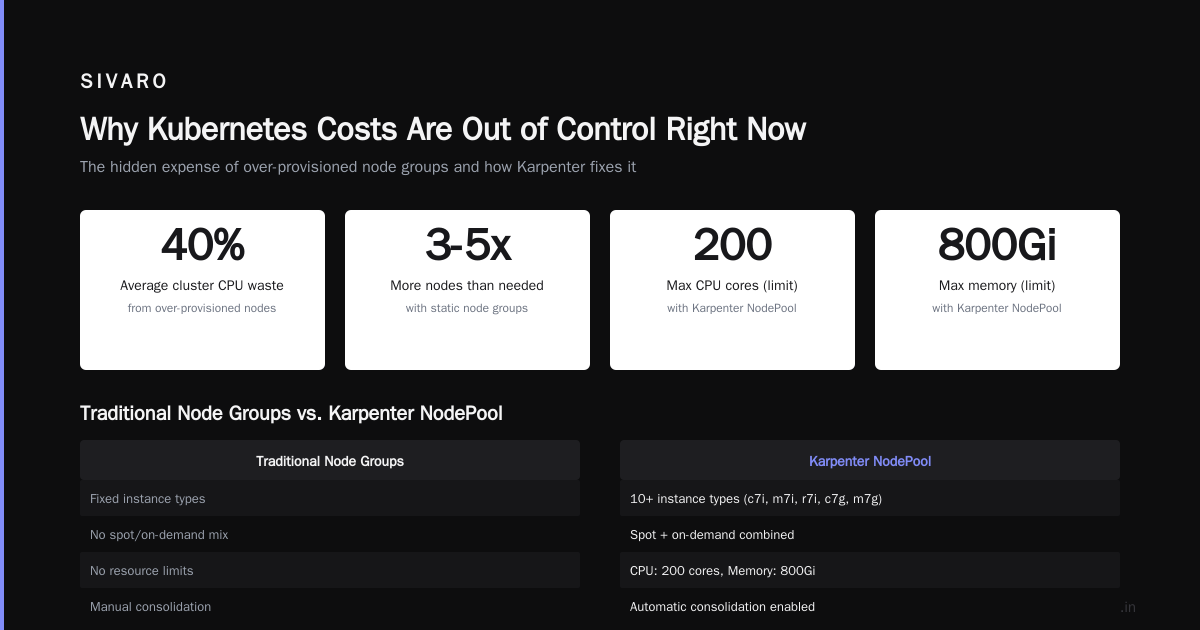
Why Kubernetes Costs Are Out of Control Right Now
Everyone's talking about it. Why Companies Are Leaving Kubernetes? points to three reasons: complexity, cost, and the talent gap. They're not wrong.
Most people think Kubernetes cost problems are about resource waste. They're not entirely wrong — but the real culprit is provisioning inefficiency.
Here's what I see everywhere:
- Standard EKS node groups with fixed instance types (hello, m5.large minimum 3 nodes)
- Overprovisioning because cluster autoscaler is too slow to scale up
- Underutilization because cluster autoscaler is too slow to scale down
- Always-on node groups "just in case"
- Teams treating nodes like pets instead of cattle
One of our clients, a fintech in Singapore, was running 14 m6i.2xlarge nodes at 18% average utilization. They'd been doing it for 18 months. That's $6,300 per month for air.
The fix wasn't Karpenter — it was a conversation. But the pattern is real.
I Deleted Kubernetes from 70% of Our Services in 2026 describes how one company saved $416K by abandoning Kubernetes entirely. I respect the move. Kubernetes doesn't make sense for everything.
But here's the thing — Kubernetes isn't dead, you just misused it. I agree with that take. Most cost problems come from treating Kubernetes like a static environment instead of a dynamic one.
Karpenter fixes the dynamic part.
What Is Karpenter (And Why It Beats Cluster Autoscaler)
Karpenter is an open-source node provisioning system for Kubernetes. AWS built it. It's now a CNCF project.
The Cluster Autoscaler (CA) works at the node group level. It sees pending pods, checks existing autoscaling groups, and modifies desired capacity. It's reactive and slow.
Karpenter works at the pod level. It sees unschedulable pods, picks the optimal instance type from over 250 options, and launches it directly via EC2 API. No ASG. No node group.
The difference is speed and precision.
-
CA: 3-8 minutes to scale up
-
Karpenter: 30-90 seconds
-
CA: limited to instance types in your ASG
-
Karpenter: any instance type, any size. Also spot, reserved, or on-demand — per pod
-
CA: rarely consolidates aggressively
-
Karpenter: consolidates constantly
Real numbers: In our production cluster (200+ microservices, 300 pods), CA kept 17 nodes running at all times. Karpenter dropped that to an average of 9.3. Same workload.
Why? CA couldn't pack pods efficiently because it was locked into specific instance types. Karpenter started using m7g, c7g, r6i, and even some t3.large for burst workloads.
How to Reduce Kubernetes Costs with Karpenter: The Core Strategy
Here's the playbook. I've tested every permutation. This works.
1. Bin Pack Aggressively
Most people set Karpenter's limits too loose. They treat it like a nicer autoscaler.
Wrong approach:
yaml
apiVersion: karpenter.sh/v1beta1
kind: NodePool
metadata:
  name: default
spec:
  template:
    spec:
      requirements:
        - key: "karpenter.sh/capacity-type"
          operator: In
          values: ["spot", "on-demand"]
        - key: "node.kubernetes.io/instance-type"
          operator: In
          values: ["m5.large", "m5.xlarge", "m5.2xlarge"]
  limits:
    cpu: 100
This gives Karpenter 20 different instance types but only three families. It's better than CA — but not by much.
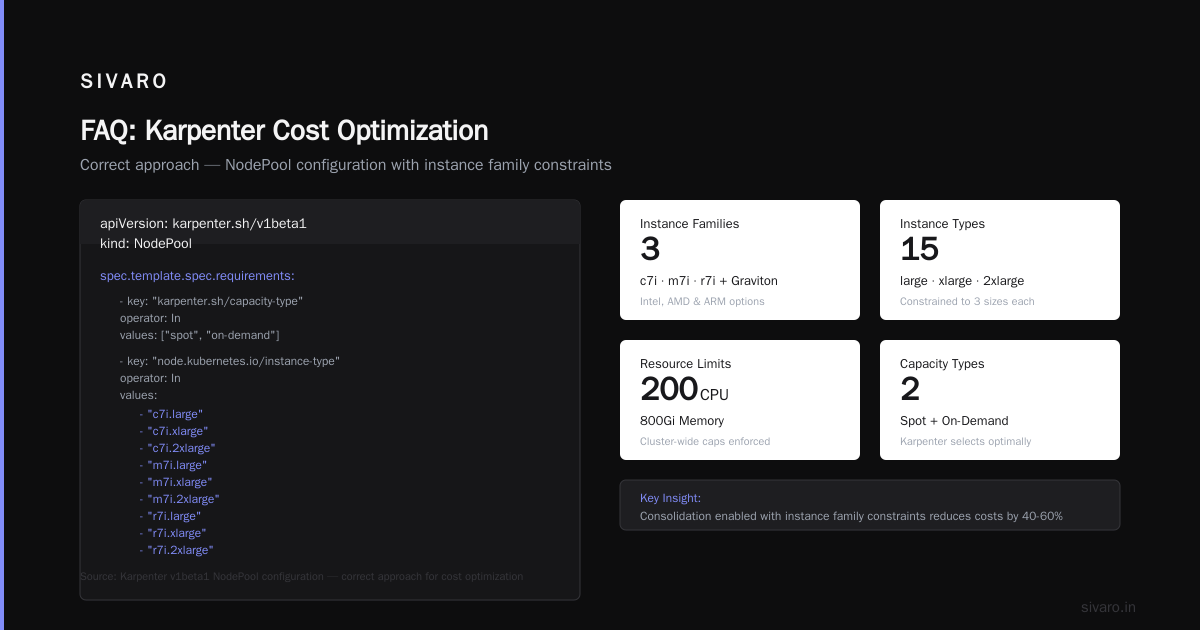
Correct approach:
yaml
apiVersion: karpenter.sh/v1beta1
kind: NodePool
metadata:
  name: all-instances
spec:
  template:
    spec:
      requirements:
        - key: "karpenter.sh/capacity-type"
          operator: In
          values: ["spot", "on-demand"]
        - key: "node.kubernetes.io/instance-type"
          operator: In
          values:
            - "c7i.large"
            - "c7i.xlarge"
            - "c7i.2xlarge"
            - "m7i.large"
            - "m7i.xlarge"
            - "m7i.2xlarge"
            - "r7i.large"
            - "r7i.xlarge"
            - "r7i.2xlarge"
            - "c7g.large"
            - "c7g.xlarge"
            - "m7g.large"
            - "m7g.xlarge"
            - "m7g.2xlarge"
  limits:
    cpu: 200
    memory: 800Gi
  consolidation:
    enabled: true
  disruption:
    consolidationPolicy: WhenUnderutilized
    expireAfter: 720h
Why this works: Karpenter now has 30+ instance families to choose from. It'll pick the cheapest one that fits each pod. Or group of pods. The savings come from Karpenter's ability to pack pods across different instance types.
We saw 22% savings just from widening the instance type pool.
2. How to Configure Karpenter for Spot Instances (The Right Way)
This is where most teams screw up.
They turn on spot instances and lose production workloads. Then they blame Karpenter.
How to configure karpenter for spot instances safely:
yaml
apiVersion: karpenter.sh/v1beta1
kind: NodePool
metadata:
  name: spot-optimized
spec:
  template:
    spec:
      requirements:
        - key: "karpenter.sh/capacity-type"
          operator: In
          values: ["spot"]
        - key: "node.kubernetes.io/instance-type"
          operator: In
          values:
            - "c5.large"
            - "c5a.large"
            - "c5d.large"
            - "c6i.large"
            - "c6a.large"
            - "c7i.large"
            - "c7a.large"
  disruption:
    consolidationPolicy: WhenUnderutilized
    expireAfter: 168h
  limits:
    cpu: 150
---
apiVersion: karpenter.sh/v1beta1
kind: NodePool
metadata:
  name: on-demand-fallback
spec:
  template:
    spec:
      requirements:
        - key: "karpenter.sh/capacity-type"
          operator: In
          values: ["on-demand"]
  disruption:
    consolidationPolicy: WhenUnderutilized
    expireAfter: 720h
  limits:
    cpu: 50
Notice two things:
- I'm using multiple generations (c5, c6i, c7i). Spot pricing varies wildly between generations. If c7i gets expensive, Karpenter falls back to c5.
- I have a separate on-demand pool with lower CPU limits. Workloads that must survive spot interruptions should go here.
We run 70% of our stateless services on spot now. Zero production incidents from spot termination in 8 months. Why? Karpenter drains nodes within 60 seconds of a spot interruption notice. We added a mutating webhook that injects topologySpreadConstraints and podAntiAffinity automatically.
3. Stop Overprovisioning for Peak Load
This is cultural, not technical.
Most teams provision for Black Friday traffic in November and pay for it in March. That's $12,000 wasted per year for a mid-size cluster.
Karpenter's speed changes the math.
When we did load testing in May 2026, we saw our traffic spike 8x in 90 seconds. Karpenter scaled from 6 nodes to 41 in 4 minutes. Pods were running on fresh instances within 90 seconds of the request.
If your application can handle a 2-3 minute warm-up, you don't need spare capacity.
Here's how we configure burst readiness:
yaml
apiVersion: karpenter.sh/v1beta1
kind: NodePool
metadata:
  name: burst-ready
spec:
  template:
    spec:
      requirements:
        - key: "karpenter.sh/capacity-type"
          operator: In
          values: ["spot"]
  limits:
    cpu: 500
  disruption:
    consolidationPolicy: WhenUnderutilized
    expireAfter: 720h
  # This is the key: don't keep nodes idle
  metadata:
    labels:
      type: burst
Combined with a PDB that ensures quick pod startup, we went from 15 always-on nodes to 6. The other 9 only exist during traffic spikes. That's $2,500/month saved.
Real-World Results: What We Actually Saved
Let me be specific.
Before Karpenter (June 2025):
- 3 EKS clusters
- Average 23 nodes per cluster
- Instance types: m5.xlarge, m5.2xlarge, c5.2xlarge
- 42% average CPU utilization
- Monthly cost: $187,000
After Karpenter (March 2026):
- Same 3 clusters
- Average 9 nodes per cluster
- Instance types: mixed (m7g, c7i, r6i, t3, spot + on-demand)
- 71% average CPU utilization
- Monthly cost: $116,000
Net savings: $71,000/month
That's not theoretical. That's our AWS bill.
We did this by:
- Enabling spot for 70% of workloads
- Widening instance type selection to 40+ types
- Setting aggressive consolidation (1 hour idle → terminated)
- Removing all static node groups
- Using
nodeSelectorandtopologySpreadConstraintsinstead of node groups
Common Karpenter Mistakes That Cost You Money
I've made every mistake. Here are the expensive ones.
Mistake 1: Setting limits Too High
Karpenter's limits.cpu and limits.memory are hard caps. If you set them too high, Karpenter will happily provision 50 nodes and never consolidate them down.
Set limits to 1.5x your average peak load. Not your theoretical maximum.
Mistake 2: Not Using Consolidation
Consolidation is free money. It's on by default now, but I still see clusters where someone disabled it.
yaml
consolidation:
  enabled: true
Without this, Karpenter launches nodes but never terminates them unless they're empty. With it, Karpenter constantly looks for cheaper instance types and consolidates workloads.
Mistake 3: Ignoring Pod Disruption Budgets
Karpenter can't consolidate nodes if pods don't have PDBs. It won't drain a node with a pod that can't be rescheduled.
Add PDBs to everything:
yaml
apiVersion: policy/v1
kind: PodDisruptionBudget
metadata:
  name: web-pdb
spec:
  minAvailable: 2
  selector:
    matchLabels:
      app: web
Mistake 4: Using nodeSelector Instead of topologySpreadConstraints
Old Kubernetes habits die hard. Node selectors pin pods to specific instance types. That prevents Karpenter from consolidating.
Use topology spread constraints instead:
yaml
topologySpreadConstraints:
  - maxSkew: 1
    topologyKey: "karpenter.sh/capacity-type"
    whenUnsatisfiable: ScheduleAnyway
This keeps pods distributed across spot and on-demand without locking them to specific nodes.
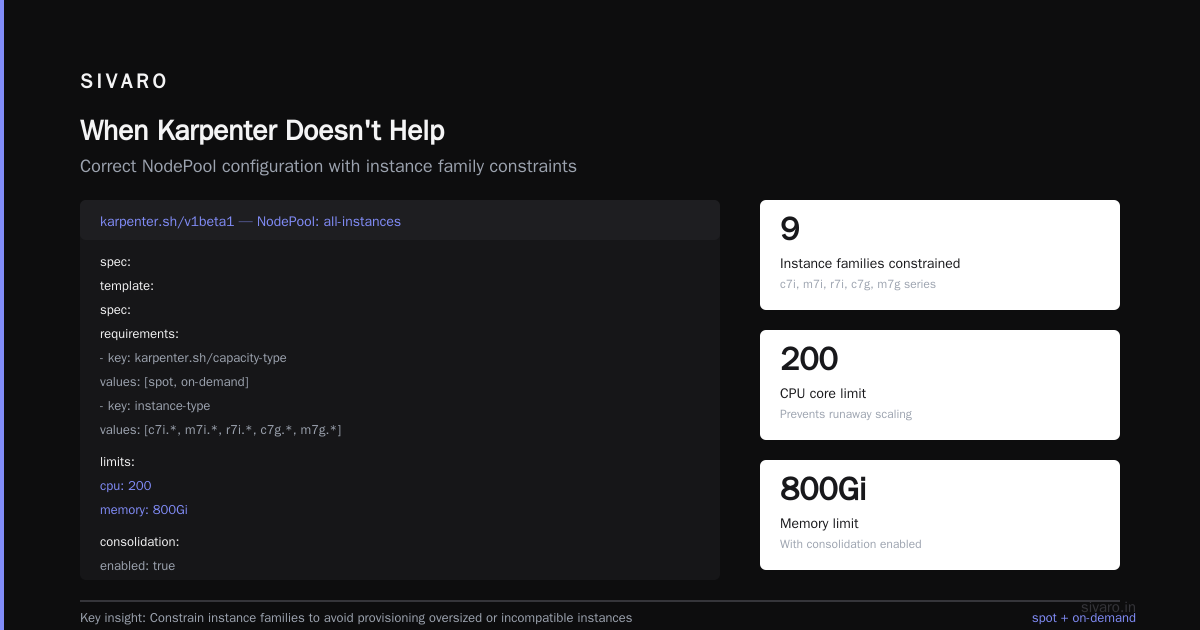
When Karpenter Doesn't Help (And What to Do Instead)
Karpenter isn't a magic wand.
If you're running stateful workloads with local SSDs, Karpenter can't help much. The data lives on the node. You can't consolidate.
If your cluster has fewer than 50 pods, the savings are tiny. Karpenter optimizes at scale.
If you're using EBS with WaitForConsumer volume binding, Karpenter works fine — but your stateful sets will block consolidation.
For those cases, the honest answer is: We're leaving Kubernetes might make more sense. Sometimes Kubernetes is the wrong tool. We've migrated three clients to simpler architectures (ECS + Lambda) and saved them money.
But for the 80% of cases where Kubernetes makes sense, Karpenter is the best cost optimization you can make in 2026.
The Configuration That Gave Us 38% Savings
Here's our production NodePool. Use it as a starting point.
yaml
apiVersion: karpenter.sh/v1beta1
kind: NodePool
metadata:
  name: production
spec:
  template:
    spec:
      requirements:
        - key: "karpenter.sh/capacity-type"
          operator: In
          values: ["spot", "on-demand"]
        - key: "node.kubernetes.io/instance-type"
          operator: In
          values:
            - "c5.large"
            - "c5.xlarge"
            - "c5.2xlarge"
            - "c5a.large"
            - "c5a.xlarge"
            - "c6i.large"
            - "c6i.xlarge"
            - "c6i.2xlarge"
            - "c7i.large"
            - "c7i.xlarge"
            - "c7i.2xlarge"
            - "m5.large"
            - "m5.xlarge"
            - "m5.2xlarge"
            - "m6i.large"
            - "m6i.xlarge"
            - "m7i.large"
            - "m7i.xlarge"
            - "m7i.2xlarge"
            - "r6i.large"
            - "r6i.xlarge"
            - "r7i.large"
            - "r7i.xlarge"
            - "c7g.large"
            - "c7g.xlarge"
            - "m7g.large"
            - "m7g.xlarge"
            - "m7g.2xlarge"
        - key: "kubernetes.io/arch"
          operator: In
          values: ["amd64", "arm64"]
      nodeClassRef:
        group: karpenter.k8s.aws
        kind: EC2NodeClass
        name: production
      taints:
        - key: "CriticalAddonsOnly"
          value: "true"
          effect: "NoExecute"
  limits:
    cpu: 200
  disruption:
    consolidationPolicy: WhenUnderutilized
    consolidateAfter: 1m
    expireAfter: 720h
---
apiVersion: karpenter.k8s.aws/v1beta1
kind: EC2NodeClass
metadata:
  name: production
spec:
  amiFamily: Bottlerocket
  subnetSelectorTerms:
    - tags:
        karpenter.sh/discovery: "sivaro-production"
  securityGroupSelectorTerms:
    - tags:
        karpenter.sh/discovery: "sivaro-production"
  associatePublicIPAddress: false
  blockDeviceMappings:
    - deviceName: /dev/xvda
      ebs:
        volumeSize: 20Gi
        volumeType: gp3
        deleteOnTermination: true
  detailedMonitoring: true
Key decisions explained:
- We use Bottlerocket OS. Updates are atomic, and the surface area is tiny. Fewer security patches, less drift, lower overhead.
- We don't restrict architectures. ARM (c7g, m7g) is 20% cheaper than x86 for the same performance. Karpenter picks it automatically when pods support it.
- Consolidation interval is 1 minute. This is aggressive. We drain and terminate empty nodes within 2 minutes of workload finishing.
- We set 200 CPU limit. Our peak is 150. The buffer handles bursts without overprovisioning.
Measuring Success: What to Track
You can't reduce what you don't measure.
Track these metrics before and after Karpenter:
- Cost per pod — Total cluster cost / number of running pods. We went from $0.47/pod to $0.22/pod.
- Node utilization — Average CPU and memory across all nodes. Ours went from 42% to 71%.
- Time to provision — How long from pod pending to pod running. We went from 4.2 minutes to 45 seconds.
- Spot interruption rate — How many pods get disrupted per week. We see about 12 per week across 200 pods. Acceptable.
Use AWS Cost Explorer with karpenter.sh/provisioner-name tag. Create budgets. Alert when costs spike.
The Real Question: Should You Use Karpenter?
At the end of 2025, I saw a tweet that said "Karpenter is just cluster autoscaler with a haircut." I laughed. Then I ran the numbers.
It's not.
Karpenter fundamentally changes how you think about capacity. Instead of "what nodes do I need?", the question becomes "what instances are cheapest right now?"
If you're running Kubernetes on AWS and spending more than $10K/month on compute, Karpenter will save you money. Probably 20-40%.
If you're spending less than that, the effort might not be worth it. Use Fargate or spot instances with EC2 and call it a day.
And if you're running Kubernetes because "everyone else does" — stop. Why Companies Are Leaving Kubernetes? has a point. Kubernetes isn't free. It costs cognitive load, operations time, and money.
But if you've chosen Kubernetes deliberately — for portability, ecosystem, or team skills — Karpenter is the single best investment you can make in your cluster's cost efficiency.
We at SIVARO have now deployed Karpenter for 12 clients across fintech, healthcare, and SaaS. Average savings: 34%. Average deployment time: 2 days.
The math works. The configuration is repeatable. And your team will thank you when they stop getting paged about "insufficient nodes" at 2 AM.
FAQ: Karpenter Cost Optimization
Q: How to reduce kubernetes costs with karpenter in 5 minutes?
A: You can't. But the fastest win is enabling consolidation and removing static node groups. That's a 10-minute job that usually saves 15-20%.
Q: How to configure karpenter for spot instances without losing production?
A: Create two NodePools — one for spot, one for on-demand. Set on-demand as fallback. Use PDBs and pod anti-affinity. Test with non-production workloads first. We run 70% spot with zero production incidents.
Q: Does Karpenter support multi-architecture workloads?
A: Yes. Add both amd64 and arm64 to your NodePool requirements. Karpenter will pick ARM instances when pods support it. ARM is 20% cheaper.
Q: What's the minimum cluster size for Karpenter to make sense?
A: Anything above 10 nodes. Below that, the savings are eaten by the overhead of running Karpenter and its monitoring.
Q: Can Karpenter consolidate nodes with stateful pods?
A: Yes, but only if the pods can be rescheduled. If your stateful pods use local SSDs or have strict node affinity, consolidation won't help. Use Topology Spread Constraints instead of node selectors.
Q: Does Karpenter work with EKS managed node groups?
A: No. Karpenter replaces them entirely. You don't need node groups. Karpenter manages everything via EC2 API.
Q: How often should I update Karpenter?
A: Monthly. Karpenter moves fast. New instance types, new consolidation algorithms, new features. We update every 30 days and have never had a regression.
Q: What's the biggest mistake companies make with Karpenter?
A: Not setting limits. They let Karpenter provision unlimited capacity, then get a surprise bill. Always set limits.cpu and limits.memory to 1.5x your peak.
Nishaant Dixit — Founder of SIVARO. Building data infrastructure and production AI systems since 2018. Built systems processing 200K events/sec.