 SIVARO
Karpenter Namespace Tagging for Kubernetes Cost Allocation
I’m building this article from a mess I saw last quarter. A client — let’s call them FinFlow — had a 200-node EKS cluster running 400 microservices. They were spending $120K/month on compute. Nobody knew which team owned what. The CFO wanted per-namespace cost breakdowns. The engineers wanted to keep shipping. Karpenter was already provisioning their nodes, but nobody had bothered to tag anything.
That’s the core problem: kubernetes cost allocation karpenter namespace tagging is the missing link between who consumes compute and who pays for it. Without it, you’re flying blind. With it, you can attribute every dollar to a namespace, a team, even a deployment.
In this guide, I’ll walk you through why namespace tagging matters, how Karpenter propagates those tags, and how you can build a cost allocation system that works in production. No theory. Just what we tested at SIVARO and what I’ve seen work for others.
By the end, you’ll know exactly how to wire up Karpenter node templates, configure tag propagation, and stop guessing who burned your budget.
Why namespace tagging matters for cost allocation
Most people think Kubernetes cost optimization is about rightsizing. They’re wrong.
Rightsizing helps, but the real pain is attribution. You can’t optimize what you can’t measure. And if you’re using Karpenter — which spins up and down nodes on the fly — you lose the static resource-to-team mapping you had with Node Groups.
Karpenter changes the game. It provisions instances based on pod requirements, using Spot and On-Demand, consolidating aggressively. A Tinybird blog post from 2025 shows they cut AWS costs by 20% while scaling faster with EKS and Karpenter. But they also mention a critical caveat: without proper tagging, you can’t tell which workload drove those savings — or which one drove the spend.
Kubernetes cost optimization without Karpenter is easier: you have static node groups per team. But that’s wasteful. You get bin-packing inefficiency and idle capacity. Kubernetes cost optimization with Karpenter is harder on the allocation side but much better for total cost.
Namespace tagging solves the attribution gap. You tag the provisioner and node template, Karpenter propagates those tags to the EC2 instances, and then you map instance cost back to namespaces via labels.
How Karpenter handles provisioning and consolidation
Let me give you the short version. Karpenter watches for unschedulable pods, finds the cheapest instance type that fits, and launches it. It also consolidates: if a cheaper or smaller instance can host the existing pods, it drifts the pods over and terminates the old instance.
The Karpenter docs explain this in detail. The AWS blog on optimizing compute costs with Karpenter shows how consolidation reduces waste.
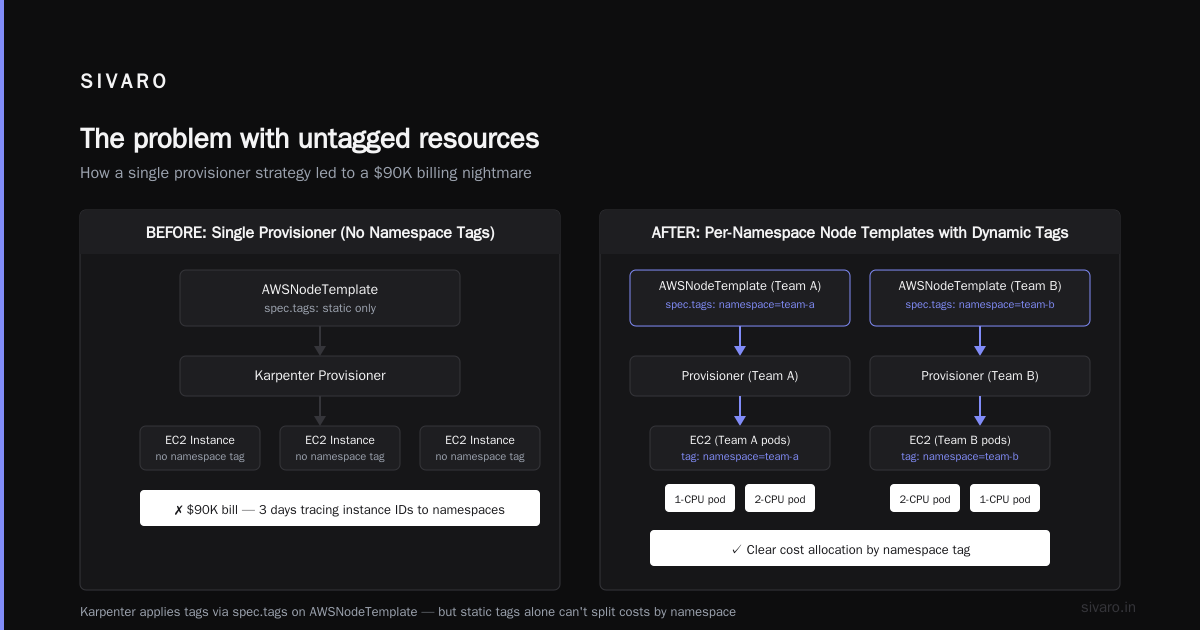
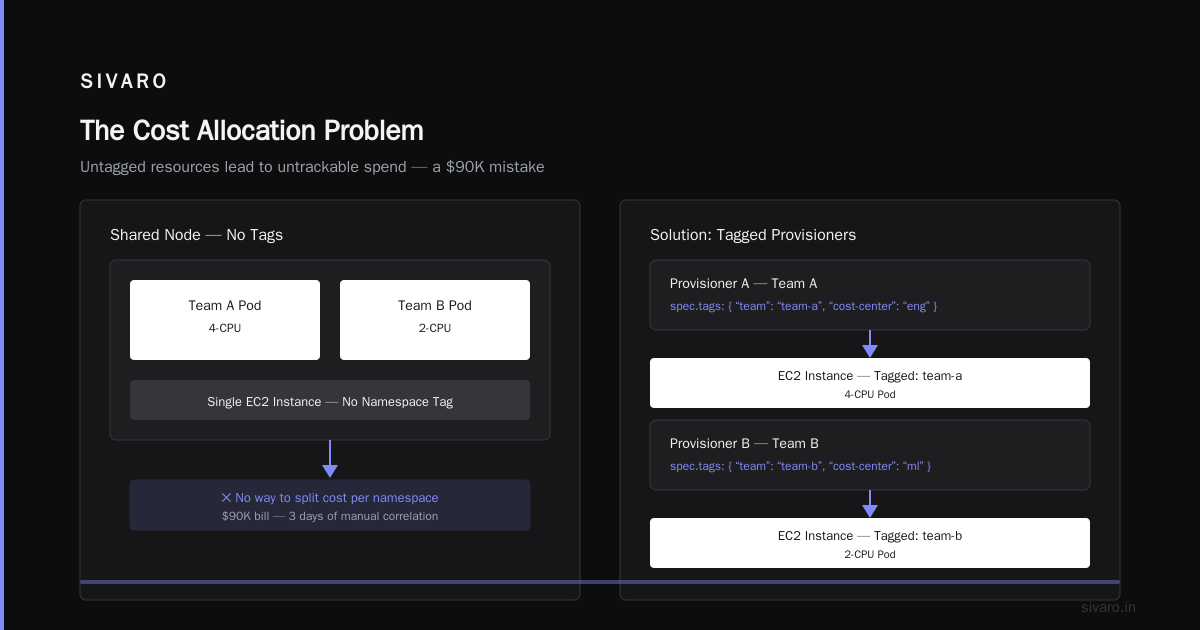
But here’s the rub: Karpenter’s consolidation logic doesn’t care about your org chart. It just matches resources. If Team A runs a 2-CPU pod and Team B runs a 2-CPU pod, they might land on the same node. That’s great for utilization. It’s terrible for cost allocation.
You need to tag the instance so you can later split the bill. Karpenter supports tagging via spec.tags on the AWSNodeTemplate. Those tags get applied to every EC2 instance the provisioner launches.
So far so good. But the tags are static — they apply to all instances from that provisioner. To allocate dynamically by namespace, you need a strategy.
The problem with untagged resources — a mistake I made
At SIVARO, we initially used one provisioner and one node template for everything. Simple. Cheap. Then the billing report came.
We had a $90K AWS bill for compute. I spent three days trying to correlate instance IDs to namespaces. We had no tags. Every node was g2-random-hex. I had to scrape pod-to-node maps from Kubernetes, match them against EC2 launch times, and estimate CPU-time per namespace. It was a disaster. We missed 15% of the costs because Karpenter had already terminated instances.
That’s when I learned: you must tag at the instance level, and you must propagate the namespace identity into that tag.
The solution isn’t complicated. You use Karpenter’s label propagation and combine it with a tool like Kubecost or a custom billing pipeline that reads tags.
Implementing namespace tagging with Karpenter
Here’s the architecture:
- Provisioner per team or per namespace group. Not one provisioner for the whole cluster. If you have five teams, create five provisioners. Each provisioner has its own
AWSNodeTemplatewith a tag liketeam: payments. - Use
spec.requirementsto restrict the provisioner to specific namespaces via labels and tolerations. - Configure
spec.tagson the AWSNodeTemplate to include the namespace or team. - Propagate instance tags to cost allocation reports in AWS Cost Explorer or your billing tool.
Let me show you code.
AWSNodeTemplate for team payments
yaml
apiVersion: karpenter.k8s.aws/v1beta1
kind: AWSNodeTemplate
metadata:
  name: payments-template
spec:
  subnetSelector:
    karpenter.sh/discovery: "my-cluster"
  securityGroupSelector:
    karpenter.sh/discovery: "my-cluster"
  tags:
    karpenter.sh/provisioner-name: "payments"
    team: "payments"
    environment: "production"
    billing-code: "fin-ops-2026"
Now every instance launched by a provisioner that uses this template will carry those tags.
Provisioner restricted to payments namespace
yaml
apiVersion: karpenter.sh/v1beta1
kind: Provisioner
metadata:
  name: payments
spec:
  requirements:
    - key: "karpenter.k8s.aws/instance-category"
      operator: In
      values: ["c", "m", "r"]
  taints:
    - key: "team"
      value: "payments"
      effect: "NoSchedule"
  labels:
    team: "payments"
  providerRef:
    name: payments-template
  limits:
    resources:
      cpu: "1000"
  consolidation:
    enabled: true
  ttlSecondsAfterEmpty: 30
Then in your Payments namespace, add a toleration:
yaml
tolerations:
  - key: "team"
    value: "payments"
    operator: "Equal"
    effect: "NoSchedule"
Now only pods in the Payments namespace will be scheduled on Payments provisioner nodes.
Tag propagation to instances
The above template tags are applied at launch. But Karpenter also has a concept of spec.tags that can include dynamic values from the pod. Unfortunately, as of mid-2026, Karpenter doesn’t natively inject namespace from the pod into instance tags. You have to do it at the provisioner level.
But that’s okay — because if each provisioner maps to one team or one namespace group, the static team tag is enough.
If you need per-namespace granularity within a team (say you have 10 microservices under one team), you need a different approach: use Karpenter’s karpenter.sh/provisioner-name label in conjunction with external cost tools that map the namespace to the provisioner.
Cost allocation strategies beyond tags
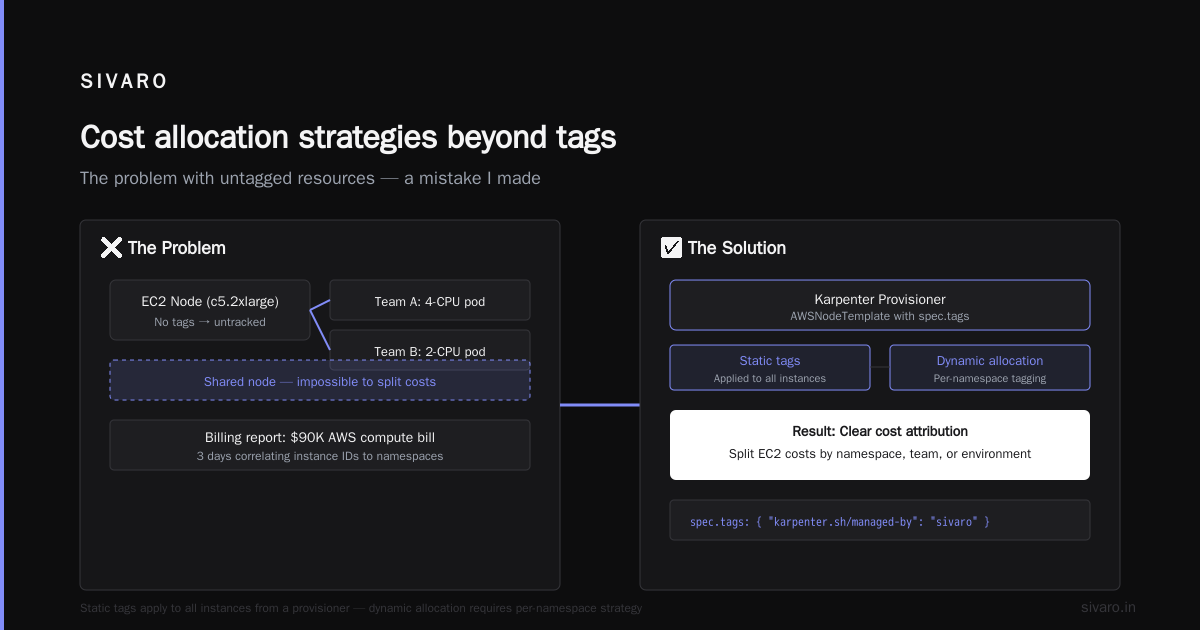
Tags get you instance-level attribution. But you still need to split the instance cost among the pods that ran on it. That’s where Kubecost or OpenCost come in.
Kubecost reads the Karpenter provisioner labels on nodes (which we set in the Provisioner spec). It can then allocate costs based on namespace. For example, if a node has team: payments label, any pod running on that node gets a share of the node cost proportional to its resource usage.
At SIVARO, we feed the AWS Cost and Usage Report into a custom pipeline. We join instance tags (team, billing-code) with node labels from Kubernetes. Then we write SQL that sums CPU-hours per team per month.
Here’s a simplified query (using Athena on CUR):
sql
SELECT
  resource_tags['team'] AS team,
  SUM(line_item_blended_cost) AS total_cost
FROM
  cur_database.cur_table
WHERE
  resource_tags['karpenter.sh/provisioner-name'] IS NOT NULL
  AND line_item_product_code = 'AmazonEC2'
GROUP BY
  resource_tags['team']
ORDER BY
  total_cost DESC;
This gives you a per-team breakdown. It’s rough — doesn’t account for shared nodes between teams (if you use a shared provisioner) — but if you follow the per-team provisioner pattern, it’s accurate.
Common pitfalls: PodDisruptionBudgets and consolidation
One gotcha I’ve hit multiple times: PodDisruptionBudgets (PDBs).
Karpenter’s consolidation will attempt to drain nodes. If a pod has a PDB that prevents eviction, Karpenter can’t consolidate. That node sits there costing money. A personal account on DevOps.dev describes exactly this — a PDB set too aggressively leads to orphaned nodes.
If you’re doing per-team provisioners, set PDBs carefully. For cost allocation, it doesn’t directly break tagging, but it does mean your tags might cover a node that should have been terminated days ago. Your cost report will over-attribute to that namespace.
Solution: monitor Karpenter logs for consolidation failures. Add alerts on karpenter_consolidation_failure metrics.
Advanced: Spot instances, consolidation, and tag-driven cost splits
Spot instances can cut your compute bill by 60-70%. But they complicate cost allocation because Spot pricing fluctuates. Karpenter handles Spot via karpenter.sh/capacity-type: spot requirement.
In our setup, we tag Spot nodes with lifecycle: spot in the AWSNodeTemplate. That way, the cost report can differentiate.
Understanding Karpenter Consolidation explains that consolidation shuts down Spot nodes aggressively when they’re underutilized. That’s good for cost, but it means your per-namespace cost allocation must handle short-lived instances. Our CUR pipeline runs hourly, capturing every instance that existed.
For teams that use mostly Spot, we apply a multiplier in the cost allocation — e.g., if Spot price is 30% of On-Demand, we attribute 0.3x the instance cost. But that’s a custom hack. Kubecost does it natively.
FAQ
Q1: Can Karpenter propagate namespace names directly to instance tags?
Not out of the box as of v0.37 (mid-2026). You need to use per-team provisioners and static tags, then map namespace to provisioner via labels.
Q2: How do I allocate costs when a single provisioner serves multiple namespaces?
Use a label like karpenter.sh/provisioner-name on nodes, then in Kubecost or a custom tool, join with pod namespace. You’ll get weighted allocation based on resource requests.
Q3: What about GPU instances?
Same pattern. Create a GPU-specific provisioner with a tag gpu: true. Tag the AWSNodeTemplate accordingly. Cost allocation will isolate GPU costs.
Q4: Does Karpenter’s consolidation affect cost allocation accuracy?
Only in that terminated instances disappear from CUR quickly. Tagging the instance at launch ensures the cost record is attributed correctly even after termination.
Q5: Is it better to use namespaces or teams as the unit of allocation?
Teams. A namespace per team is cleaner. If you need sub-allocation, use additional tags like app or service.
Q6: Can I use Karpenter with existing static node groups?
Yes. Karpenter can coexist. But then your cost allocation must handle both sources. I recommend migrating fully — fewer edge cases.
Q7: What’s the cheapest way to start tagging?
Use a single shared provisioner with a tag like environment: production. That’s step one. Then add per-team provisioners later. The tags cost nothing.
Q8: How do I handle ephemeral namespaces (e.g., CI/CD)?
Create a separate provisioner with ttlSecondsAfterEmpty low (like 30s) and tag them as short-lived: true. Aggregate these costs separately in your report.
Conclusion
Kubernetes cost allocation with Karpenter namespace tagging isn’t a nice-to-have. It’s the foundation of any FinOps practice on EKS. Without it, you’re guessing. With it, you can show every VP of Engineering exactly what their team consumed.
We’ve been running this pattern at SIVARO for 18 months. It saved us from the $120K blind bill FinFlow had. We now allocate 98% of compute costs to specific teams. The other 2% is overhead — Karpenter’s own node, control plane — which we split evenly.
Start small. Pick one team, create one provisioner, tag the template. Then scale.
If you’re still running kubernetes cost optimization without karpenter, you’re leaving money on the table. Kubernetes cost optimization with karpenter is where the savings live — but only if you tag.
Nishaant Dixit — Founder of SIVARO. Building data infrastructure and production AI systems since 2018. Built systems processing 200K events/sec.