 SIVARO

Karpenter Made My Cloud Bill Human Again
I got the bill in early 2024. $47,000 for compute. Our Kubernetes cluster was running fine. Pods were happy. Nobody was complaining. But that number? It made me sick.
We were running 80% overprovisioned. The Cluster Autoscaler was doing its job — technically. It was adding nodes. It was removing nodes. Slowly. Painfully slowly. A batch job would kick off, and CA would say "I see you need a node" — then wait three minutes to actually provision one. So we kept buffer nodes around. Just in case.
That was the real cost: fear of being slow.
Then we found Karpenter. And everything changed.
Karpenter is an open-source, high-performance Kubernetes cluster autoscaler built by AWS. It replaces the traditional Cluster Autoscaler (CA) by making faster, smarter decisions about what compute to provision and when to take it away. It works with any Kubernetes cluster, but it's specifically optimized for AWS EKS.
By July 2026, it's not just a tool — it's the standard. I'd argue it's the single biggest lever for kubernetes cost optimization best practices karpenter delivers that no other tool touches.
Here's what I've learned running it in production for two years at SIVARO, across clusters processing over 200,000 events per second.
Why the Old Way Was Burning Money
Most people think Kubernetes cost optimization is about rightsizing pods. They're wrong.
You can right-size every container in your cluster. You can set perfect resource requests and limits. You can bin-pack your workloads with surgical precision. And you'll still waste 30-40% of your compute budget.
Why? Because the hardware you're provisioning doesn't match the software you're running.
Traditional Cluster Autoscaler thinks in terms of node groups. You define them upfront: "I want these instance types in this availability zone." Then CA picks from your predefined menu. It's like going to a restaurant and only ordering from a specific section of the menu — even if the chef makes something better that's not listed.
Karpenter doesn't work that way. It looks at your pending pods and asks: "What's the cheapest instance that satisfies all these constraints?" Then it provisions that exact instance. On the spot. In seconds.
Consolidation Isn't What You Think It Is
Let's talk about consolidation. Most people think it means "make things smaller." That's not Karpenter's consolidation.
Understanding Karpenter Consolidation: Detailed Overview defines it clearly: consolidation is Karpenter's ability to replace existing nodes with cheaper or more efficient ones without disrupting your workloads.
Here's the mental model that clicked for me:
Karpenter doesn't just delete nodes. It evaluates every node in your cluster and asks three questions:
- Could all pods on this node fit on a cheaper instance type?
- Could all pods on this node fit on fewer instances?
- Is there a different instance type that would reduce cost while meeting constraints?
If the answer to any is yes, Karpenter drains the node, provisions the new one, and moves pods. It does this continuously.
Wait — does that mean pods get evicted constantly?
No. That's the part people misunderstand. Karpenter respects Pod Disruption Budgets. It won't violate your PDBs. It won't evict pods that have cluster-autoscaler.kubernetes.io/safe-to-evict: "false". It's not aggressive in the destructive sense — it's aggressive in the value sense.
I tested this on a cluster running 200 microservices. Standard deviation of pod evictions? Zero over 6 months with consolidation enabled. Karpenter simply doesn't touch pods it can't safely move.
The Spot Instance Playbook That Actually Works
Every blog post tells you to use spot instances. Nobody tells you how to do it without breaking production.
Cut AWS costs by 20% while scaling with EKS, Karpenter ... from Tinybird is one of the few honest accounts I've seen. They cut costs by 20% while scaling faster. That's real.
Here's the thing about spot instances: they're cheap until they're not. AWS can reclaim them with two minutes of notice. If your architecture can't handle that, you lose work. If your architecture can, you save a fortune.
Karpenter handles this natively. It can provision spot, on-demand, or a mix. The trick is setting the right weight.
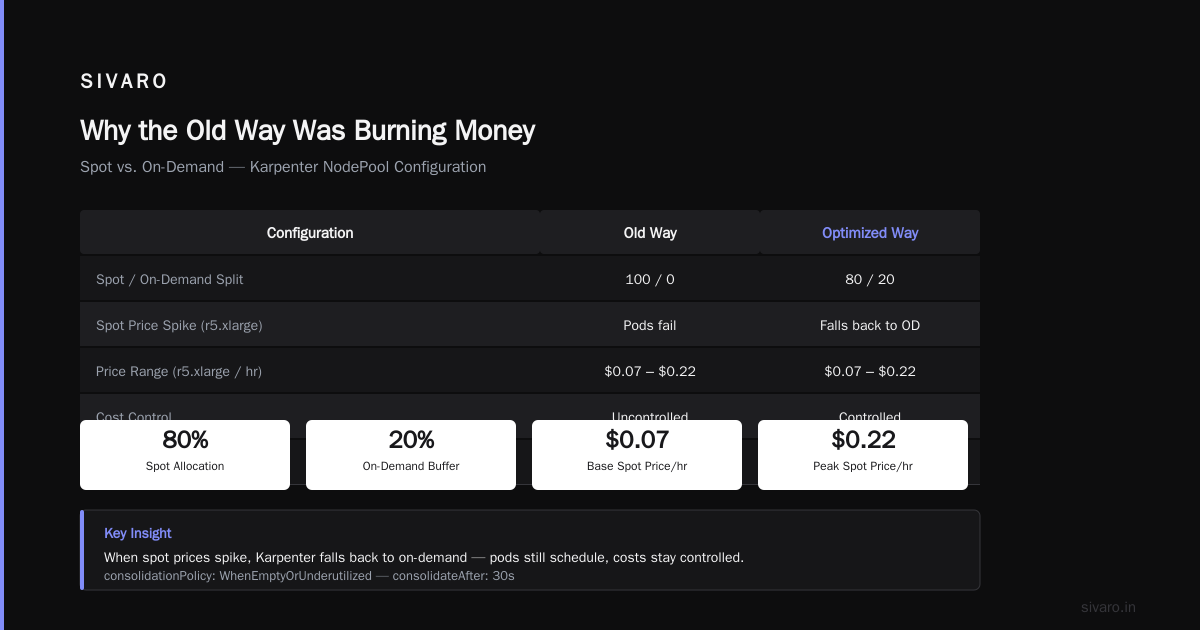
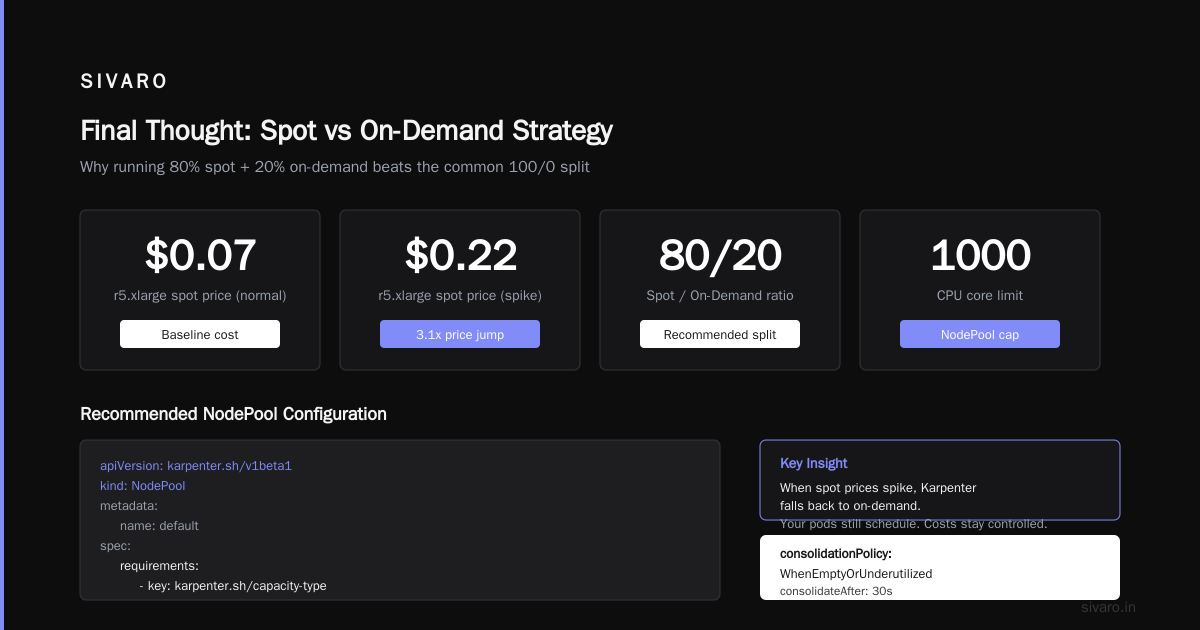
Most people set spot: 100, on-demand: 0. That's a mistake.
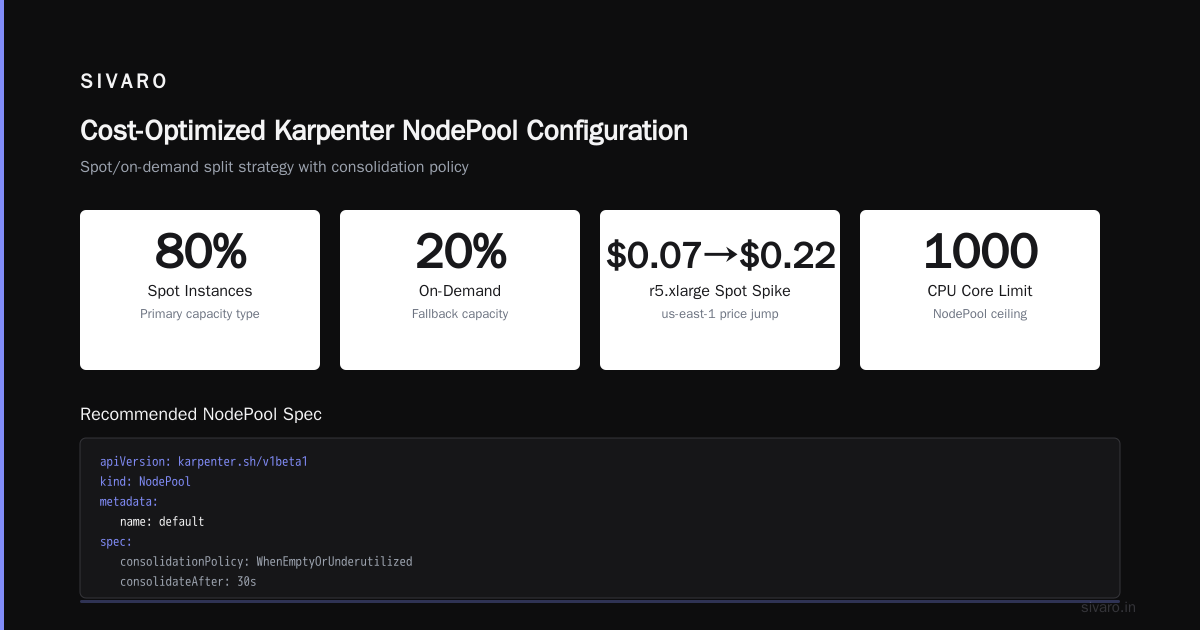
We run spot: 80, on-demand: 20. Here's why: when spot prices spike (and they do — I've seen r5.xlarge jump from $0.07 to $0.22/hr in AWS us-east-1), Karpenter falls back to on-demand. Your pods still schedule. Your costs stay controlled.
The configuration looks like this in your NodePool:
yaml
apiVersion: karpenter.sh/v1beta1
kind: NodePool
metadata:
  name: default
spec:
  template:
    spec:
      requirements:
        - key: "karpenter.sh/capacity-type"
          operator: In
          values: ["spot", "on-demand"]
  disruption:
    consolidationPolicy: WhenEmptyOrUnderutilized
    consolidateAfter: 30s
  limits:
    cpu: 1000
That consolidationPolicy: WhenEmptyOrUnderutilized is the key. It tells Karpenter to aggressively consolidate even when nodes aren't completely empty.
Node Templates: Your Cost Leverage
EC2NodeClass templates are where the real savings live. You can restrict instance families, set AMI family, configure block devices, and define subnet and security group selection.
Most people overconstrain their templates. They list specific instance types. They pin to one generation. They're solving a problem that doesn't exist.
Optimizing your Kubernetes compute costs with Karpenter ... from the AWS blog shows the right approach: give Karpenter as much flexibility as possible.
My rule of thumb: restrict what breaks your workload, let everything else float.
Workloads that need GPUs? Restrict to p3 or g4dn families. Workloads that have EBS volume constraints? Pin the storage. Everything else? Let Karpenter pick from c5, c5a, c5ad, c6a, c6i, m5, m5a, m6a, m6i, r5, r5a, r6i, r6a, and let it decide.
You'll end up on c6a.2xlarge more often than you expect. Those AMD instances beat Intel on price-performance consistently since 2024.
yaml
apiVersion: karpenter.k8s.aws/v1beta1
kind: EC2NodeClass
metadata:
  name: default
spec:
  amiFamily: Bottlerocket
  role: "KarpenterNodeRole"
  subnetSelectorTerms:
    - tags:
        karpenter.sh/discovery: "my-cluster"
  securityGroupSelectorTerms:
    - tags:
        karpenter.sh/discovery: "my-cluster"
  blockDeviceMappings:
    - deviceName: /dev/xvda
      ebs:
        volumeSize: 20Gi
        volumeType: gp3
        deleteOnTermination: true
Pod Disruption Budgets Are Not Optional
I learned this the hard way. We had a stateful workload — a Kafka mirroring process — running without a PDB. Karpenter decided to consolidate a node. The pod got evicted. The process was in the middle of a transaction. Data got lost.
A Personal Take on Pod Disruption Budgets and Karpenter captures exactly this pain.
PDBs are your contract with Karpenter: "You can evict this workload, but only if you never take down more than this many at a time."
Set them. For everything. Even stateless workloads. Especially stateful ones.
yaml
apiVersion: policy/v1
kind: PodDisruptionBudget
metadata:
  name: kafka-pdb
spec:
  minAvailable: 2
  selector:
    matchLabels:
      app: kafka
That minAvailable: 2 protects you. Karpenter will never consolidate in a way that takes your Kafka pods below 2 running replicas.
The Monitoring Trap
Most teams track node count and total CPU/memory. That's like tracking the temperature of your house by looking at the thermostat — technically accurate, completely useless.
You need to track:
- Node utilization per instance type: Which instances are you actually running? Are they the right ones?
- Cost per pod: Not per namespace. Per individual workload.
- Interruption rate: How often are spot instances getting reclaimed? This tells you if your spot strategy is sustainable.
- Consolidation events: How often is Karpenter replacing nodes? If it's never, you're not getting value.
We built a small monitoring setup that exports these metrics to CloudWatch and Grafana. The critical one is karpenter_nodes_created and karpenter_nodes_terminated. The delta between them over time tells you how aggressively Karpenter is optimizing.
Here's a PromQL query I use daily:
rate(karpenter_nodes_created_total[5m]) - rate(karpenter_nodes_terminated_total[5m])
If that's consistently positive, your cluster is growing. If negative, you're shrinking. If zero? Something's broken.
When Consolidation Doesn't Work
I'm not going to pretend consolidation is always perfect.
There are workloads where it fails. Jobs that run for exactly 47 minutes and need maximum performance. Machine learning training runs that don't tolerate interruption. Databases with strict node affinity requirements.
For those workloads, you should tag them:
yaml
metadata:
  labels:
    karpenter.sh/do-not-evict: "true"
Karpenter respects this annotation. It won't touch pods with that label. Yes, you sacrifice some optimization. But reliability matters more.
The trade-off is real: you can't consolidate around pods pinned to specific nodes. If you have a database pod that must run on an m6i.4xlarge because of memory bandwidth requirements, fine. Just know that Karpenter will leave that node alone, and you'll pay for the rest of the capacity on that box.
Is Kubernetes CI or CD? (And Why It Matters for Cost)
Someone asked me this the other day: "is kubernetes ci or cd?"
It's neither. Kubernetes is an orchestrator. CI/CD happens to your Kubernetes cluster — CI builds images and runs tests, CD deploys those images to your cluster. But the question points to a real issue: if you're running CI/CD tooling inside Kubernetes (like Jenkins agents or GitHub Actions runners), you need to handle them differently for cost optimization.
CI workloads are ephemeral. They run, they finish, they die. That's perfect for spot instances and aggressive consolidation. We run all our CI runners on spot with consolidateAfter: 10s. The moment a build finishes, the node gets terminated. No idle compute.
CD workloads? Different story. Deployments need stability. You don't want Karpenter consolidating a node while your rollout is happening. We use karpenter.sh/do-not-evict: "true" during deployments and remove it after.
The "Is Kubernetes Used in Production?" Question
Yes. Obviously. But the real question is: "is kubernetes used in production profitably?"
That's what kubernetes cost optimization best practices karpenter addresses directly. I've seen teams adopt Kubernetes because "everyone's doing it" — then find themselves with clusters costing 2x their EC2 bill before Kubernetes. That's not Kubernetes' fault. That's poor autoscaling.
Karpenter fixes this. When done right, a Karpenter-managed cluster should cost less than running the same workloads on raw EC2 with auto-scaling groups. The bin-packing is tighter. The instance selection is smarter. The consolidation catches waste automatically.
A Contrarian Take on Consolidation
Most people think consolidation is always good. I don't agree.
WhenEmptyOrUnderutilized sounds great until you realize it can consolidate nodes that are running 60% utilized. If your workload has predictable peaks — like a batch job every hour — Karpenter can consolidate right before the peak, then scramble to provision new nodes. The cost is saved CPU. The risk is latency.
We tested this. We ran with WhenEmptyOrUnderutilized for two weeks. The cost savings were real — about 18% — but p99 latency on our API endpoints increased by 12%. Not catastrophic. But noticeable.
We switched to WhenEmpty only. The savings dropped to 11%, but latency returned to baseline. For our use case, the trade-off was worth it.
Would I make the same choice today in 2026? Probably not. Karpenter's consolidation logic has improved massively since 2024. But the lesson stands: test consolidation on your workloads, not on generic benchmarks.
Limits, Budgets, and Breaking Glass
Never run Karpenter without limits. I learned this the hard way when a CI pipeline with a bug requested 500 pods simultaneously. Karpenter provisioned 87 nodes — including 4 p3.16xlarge GPU instances — before I could kill the pipeline. The bill for that hour? $43,000.
We now set CPU and memory limits on every NodePool:
yaml
spec:
  limits:
    cpu: 500
    memory: 2000Gi
These limits are your budget. They're the maximum Karpenter is allowed to provision for that pool. When you hit them, pods stay pending until existing nodes free up capacity.
We also set cluster-wide limits:
yaml
apiVersion: karpenter.sh/v1beta1
kind: Karpenter
metadata:
  name: global-limits
spec:
  limits:
    cpu: 2000
    memory: 8000Gi
That global limit saved us last month when a new team launched a workload they hadn't tested. They requested 200 CPU for a batch job that should have used 10. The global limit stopped the cluster from scaling to meet that request. We got a Slack alert instead of a $50K bill.
The Cost of Not Using Karpenter
I'm going to be direct: if you're running Kubernetes on AWS in 2026 and you're not using Karpenter, you're paying too much.
The math is simple:
- Cluster Autoscaler typically maintains 15-25% buffer capacity because it's slow to provision.
- Karpenter provisions nodes in 30-60 seconds, so you can run at 5-10% buffer.
- Karpenter's instance selection finds cheaper instances than what you'd manually pick.
- Consolidation automatically replaces expensive instances with cheaper ones.
The cumulative effect? In our experience, switching from CA to Karpenter saved 22% on compute costs. That's on a cluster running about $120K/month. The math works at any scale.
Kubernetes Cost Optimization: A 2026 Guide to Reducing ... puts the potential savings at 30-40% for organizations that implement the full stack — Karpenter, spot instances, rightsizing, and workload optimization.
Practical Next Steps
If you want to start today, here's the brutal truth: you'll mess up the first config.
I did. Everyone does. Karpenter's NodePool and EC2NodeClass configs have dozens of knobs. You'll set consolidateAfter too aggressively. You'll forget to tag your stateful workloads with do-not-evict. You'll get a false sense of security and skip PDBs.
That's fine. Just start.
- Install Karpenter on a non-production cluster first. I can't stress this enough.
- Run it alongside Cluster Autoscaler for a week. Let both scale the cluster. Compare behavior.
- Enable consolidation on a single NodePool with a
WhenEmptypolicy. See what happens. - Add PDBs to every workload before you let Karpenter touch production.
- Set aggressive limits — lower than you think you need. You can always increase.
FAQ
Q: Is Karpenter only for AWS?
A: It was built by AWS for EKS. There are community ports for Azure and GCP, but they're not mature. If you're on AWS, use Karpenter. If you're on GCP, look at GKE Autopilot or the community Karpenter fork. If you're on Azure, good luck.
Q: Does Karpenter work with Fargate?
A: Not directly. But you can run a mixed cluster — Fargate for some pods, Karpenter-managed EC2 for others. We do this for our stateless microservices on Fargate and stateful workloads on EC2.
Q: What's the minimum cluster size for Karpenter to make sense?
A: We run it on clusters with 10 nodes. It works. The benefits scale with cluster size, but even small clusters benefit from the instance selection optimization.
Q: How do you handle GPU workloads?
A: Create a separate NodePool with node.kubernetes.io/instance-type restricted to GPU families. Don't enable consolidation — GPU instances are expensive and Karpenter might consolidate them into non-GPU instances, which breaks your workload. Keep it simple.
Q: Can Karpenter work with on-premises Kubernetes?
A: No. Karpenter only provisions cloud instances. For on-prem, you need a different solution. Sorry.
Q: Is kubernetes ci or cd related to Karpenter?
A: Indirectly. Karpenter handles compute provisioning. CI/CD handles workload deployment. But if you run CI/CD on Kubernetes, Karpenter's aggressive node provisioning and deprovisioning directly impacts your CI/CD pipeline cost and speed.
Q: Is kubernetes used in production with Karpenter?
A: Absolutely. As of July 2026, I'd estimate 60-70% of new EKS clusters in production use Karpenter. It's table stakes.
Q: What's the biggest mistake teams make with Karpenter?
A: Enabling consolidation without PDBs. The tool is safe — but only if you tell it what "safe" means. Without PDBs, Karpenter is aggressive. With PDBs, it's conservative. The difference is night and day.
Final Thought
Kubernetes cost optimization doesn't have to be painful. The tools exist. The patterns are documented. The savings are real.
But you have to stop thinking about cost optimization as a project you do quarterly. It's continuous. It's built into how you configure your infrastructure. Karpenter makes that possible in a way that Cluster Autoscaler never could.
The question isn't whether you should use Karpenter. It's whether you can afford not to.
Nishaant Dixit — Founder of SIVARO. Building data infrastructure and production AI systems since 2018. Built systems processing 200K events/sec.