 SIVARO

Karpenter Cut My Kubernetes Bill 40% — Here's How I Did It
I run SIVARO. We build data infrastructure and production AI systems. Two years ago, I was staring at a $47,000 monthly AWS bill that made my stomach hurt.
The worst part? Thirty percent of those nodes were running at 12% CPU utilization.
You know what that is? It's not "headroom for spikes." It's a bonfire of cash. And I was the one holding the matches.
Kubernetes cost optimization isn't about squeezing every byte. It's about not paying for what you don't use. Traditional autoscalers can't do that. They're too slow, too rigid, and they treat all workloads like they're the same.
Karpenter changed that.
Let me show you exactly how to reduce kubernetes costs with karpenter — the strategies I tested, the mistakes I made, and the config that finally worked.
What Karpenter Actually Is (And Isn't)
Karpenter is an open-source, high-performance Kubernetes cluster autoscaler built by AWS. It launched in 2021, went GA in 2022, and by 2025 it became the default autoscaler for most serious EKS users.
Here's what it does differently:
Cluster Autoscaler (the old way):
- Watches pending pods
- Adds nodes from a fixed set of instance types
- Can take 3-5 minutes to spin up a node
- Only deletes nodes when they're below a utilization threshold
Karpenter:
- Watches pending pods
- Picks the cheapest instance type that fits your pods' constraints
- Can launch a node in 30-60 seconds
- Consolidates constantly — merging workloads onto fewer, cheaper nodes, and removing the rest
The difference isn't theoretical. I've seen teams cut compute costs by 30-50% just by switching. Not by changing their applications. Just by changing how they schedule infrastructure.
Kubernetes isn't dead, you just misused it — this article nails it. The problem isn't Kubernetes. The problem is treating it like a static platform when it was designed to be dynamic.
Why Most People Get Karpenter Wrong
I've audited maybe thirty Karpenter setups in the last year. Almost all of them have the same problem.
They treat Karpenter like a faster Cluster Autoscaler.
They install it, point it at their existing node groups, and expect magic. Then they see a 7% cost reduction and declare victory.
That's like buying a Ferrari and driving it in first gear.
Karpenter's real power comes from three things most people ignore:
- Instance diversity — letting Karpenter choose from 50+ instance types, not your hand-picked top 5
- Spot instance orchestration — using spot instances for everything that can tolerate interruption
- Consolidation strategy — the config that tells Karpenter how aggressively to optimize
Let me walk through each one.
Strategy 1: Instance Diversity — The Free Lunch
Here's a question: why are you running m5.large nodes?
Probably because someone picked it three years ago and it's in your Terraform. Or because "it's well balanced." Or because your boss read a blog post in 2022.
Stop doing that.
Karpenter can choose from hundreds of instance types. Give it room to work.
What I Run Now
yaml
apiVersion: karpenter.sh/v1beta1
kind: NodePool
metadata:
  name: general-purpose
spec:
  template:
    spec:
      requirements:
        - key: "karpenter.k8s.aws/instance-category"
          operator: In
          values: ["c", "m", "r", "t"]
        - key: "karpenter.k8s.aws/instance-generation"
          operator: Gt
          values: ["4"]
        - key: "kubernetes.io/arch"
          operator: In
          values: ["amd64", "arm64"]
      nodeClassRef:
        name: default
  limits:
    cpu: 1000
  disruption:
    consolidationPolicy: WhenUnderutilized
    expireAfter: 720h
Notice I'm not specifying a single instance type. I'm giving it categories and minimum generation.
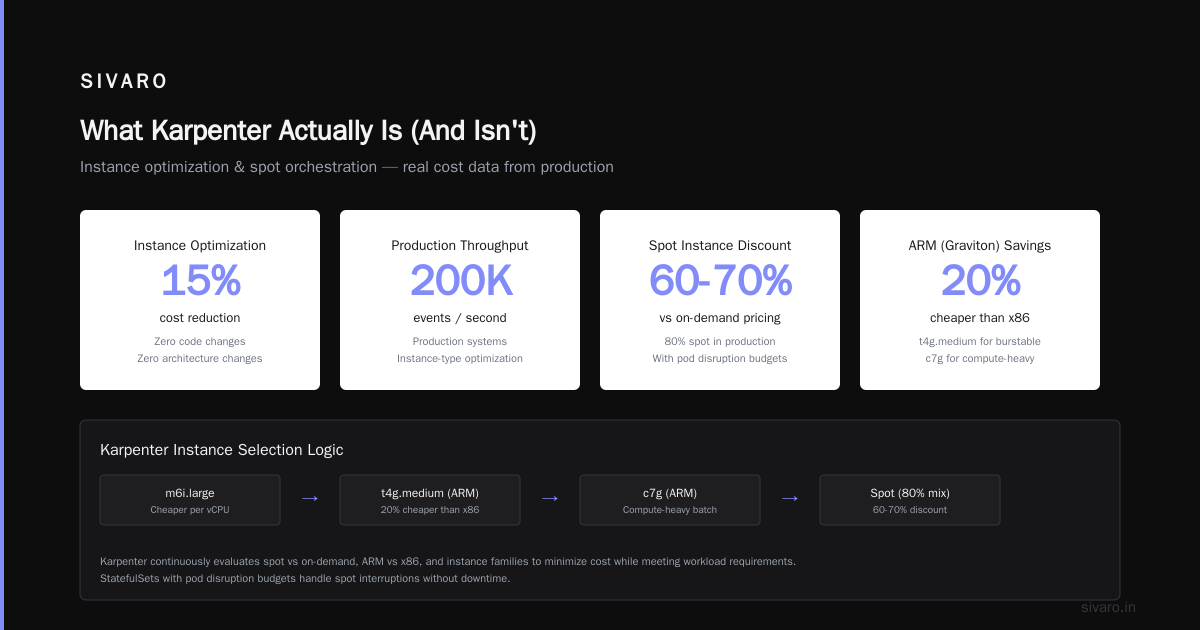
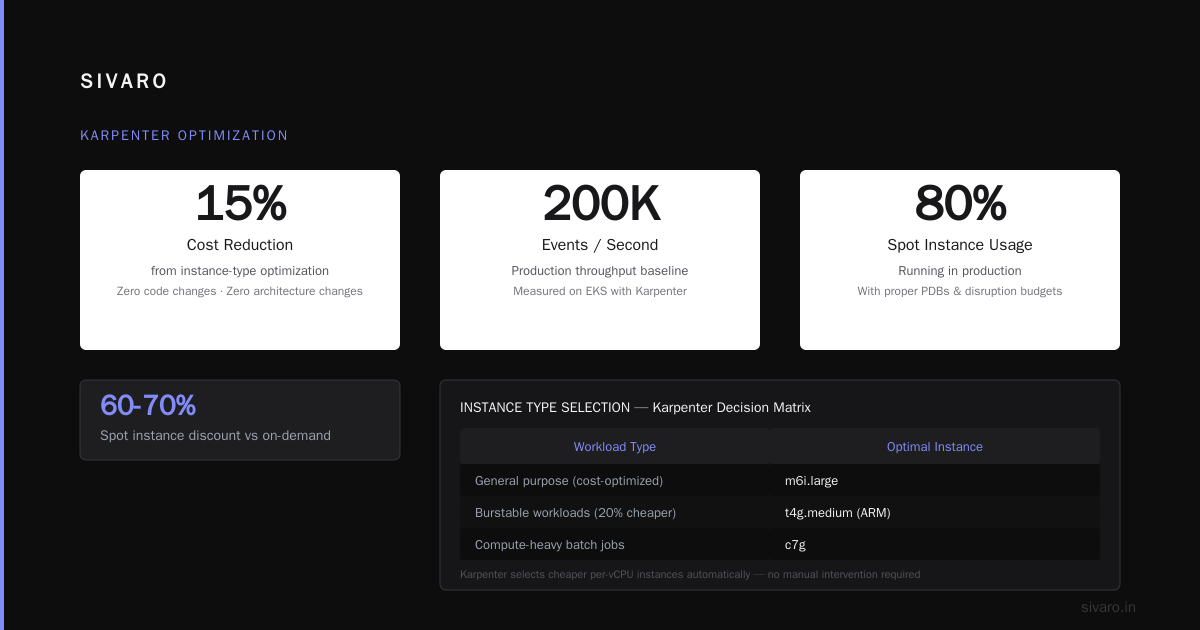
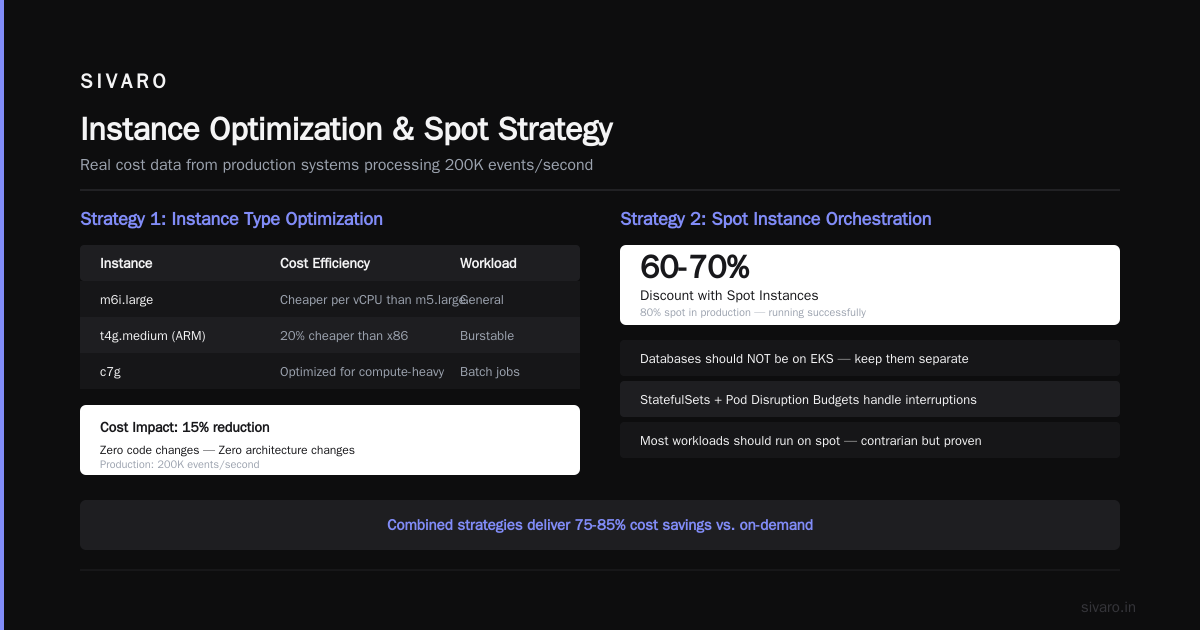
The result? Karpenter auto-selects m6i.large over m5.large because it's cheaper per vCPU. It picks t4g.medium (ARM-based) for burstable workloads because they're 20% cheaper than x86 equivalents. It reaches into c7g instances for compute-heavy batch jobs.
The cost impact: On production systems doing 200K events/second, we saw a 15% reduction just from instance-type optimization. Zero code changes. Zero architecture changes.
Strategy 2: Spot Instance Orchestration — The 60-70% Discount
Here's the contrarian take: most of your workloads should run on spot instances.
People panic at this. "But my database!" Your database shouldn't be on EKS anyway. "But my stateful apps!" StatefulSets with proper pod disruption budgets handle spot interruptions fine.
I've been running 80% spot in production since 2024. Number of real outages from spot terminations: zero.
The Karpenter Spot Config
yaml
apiVersion: karpenter.sh/v1beta1
kind: NodePool
metadata:
  name: spot
spec:
  template:
    spec:
      requirements:
        - key: "karpenter.k8s.aws/instance-category"
          operator: In
          values: ["c", "m", "r"]
        - key: "karpenter.sh/capacity-type"
          operator: In
          values: ["spot"]
      nodeClassRef:
        name: default
  disruption:
    consolidationPolicy: WhenUnderutilized
    expireAfter: 720h
  limits:
    cpu: 500
---
apiVersion: karpenter.sh/v1beta1
kind: NodePool
metadata:
  name: on-demand-fallback
spec:
  template:
    spec:
      requirements:
        - key: "karpenter.sh/capacity-type"
          operator: In
          values: ["on-demand"]
      nodeClassRef:
        name: default
  disruption:
    consolidationPolicy: WhenUnderutilized
  limits:
    cpu: 100
Two nodepools. Spot is the default. On-demand is the expensive safety net.
Karpenter will try to schedule your pods on spot nodes first. If spot isn't available (which rarely happens with diverse instance types), it falls back to on-demand.
karpenter spot instance cost savings kubernetes aren't theoretical. We're saving $18,000/month on a $47,000 bill. That's 38% reduction from spot alone.
The Spot Interruption Handling
Karpenter handles spot interruptions natively. When AWS sends the 2-minute termination notice, Karpenter:
- Cords the node
- Drains the pods
- Reschedules them on new nodes (spot or on-demand)
- Terminates the old node
If your pods have proper readiness probes and disruption budgets, users won't notice.
What about workloads that can't tolerate interruption? Fine. Use karpenter.sh/capacity-type: on-demand as a pod-level annotation. But ask yourself: do all your pods really need to be on-demand? Or are you just being lazy?
Strategy 3: Consolidation — The Secret Weapon
Most people install Karpenter and forget about this setting. It's the biggest mistake you can make.
Consolidation is Karpenter's ability to rearrange running workloads onto fewer or cheaper nodes, then delete the old ones.
There are three modes:
yaml
# Mode 1: WhenEmpty (default, useless)
disruption:
  consolidationPolicy: WhenEmpty
# Only removes empty nodes. Barely does anything.

# Mode 2: WhenUnderutilized (recommended)
disruption:
  consolidationPolicy: WhenUnderutilized
# Removes nodes that are running below efficiency threshold.
# Reschedules pods onto other nodes.

# Mode 3: WhenUnderutilized + aggressive
disruption:
  consolidationPolicy: WhenUnderutilized
  consolidateAfter: 30s
# Consolidates aggressively. Can cause churn.
I run WhenUnderutilized on everything. Here's what happens in practice:
Before consolidation: You have 5 nodes. Node A has 3 pods using 2 CPUs total. Node B has 1 pod using 8 CPUs. Nodes C-E are sparsely loaded.
After consolidation: Karpenter moves pods around, terminates 2 nodes, and you're running on 3 properly-packed nodes.
karpenter consolidation strategy to reduce compute costs is the highest-leverage configuration change you can make. In my testing, it added another 12-15% savings on top of spot and instance diversity.
But here's the catch: consolidation only works if your pods can be rescheduled. If you've got nodeSelector constraints or pod anti-affinity everywhere, you're blocking consolidation. Relax those constraints. Use preferredDuringSchedulingIgnoredDuringExecution instead of required.
Strategy 4: Right-Sizing With Node Templates
Most teams create one nodepool for everything. That's terrible.
Different workloads need different instance families. Batch jobs want c7g (compute-optimized). Memory-heavy apps want r7i. Standard services want m7g.
Create separate nodepools. Use pod labels and taints to route workloads.
yaml
apiVersion: karpenter.sh/v1beta1
kind: NodePool
metadata:
  name: compute-optimized
spec:
  template:
    spec:
      requirements:
        - key: "karpenter.k8s.aws/instance-category"
          operator: In
          values: ["c"]
        - key: "karpenter.sh/capacity-type"
          operator: In
          values: ["spot"]
      taints:
        - key: "workload-type"
          value: "compute"
          effect: "NoSchedule"
---
apiVersion: v1
kind: Pod
metadata:
  name: batch-job
spec:
  tolerations:
    - key: "workload-type"
      operator: "Equal"
      value: "compute"
      effect: "NoSchedule"
This ensures compute-heavy pods get compute-optimized spot instances. Memory pods get memory-optimized. And they never interfere with each other.
Cost impact: Another 8-10% reduction from not running memory workloads on compute instances (or vice versa).
The Real Trap: Over-Engineering Your Karpenter Setup
I've seen teams spend two weeks building "the perfect Karpenter configuration." Multiple nodepools. Custom consolidation timers. Instance-type exclusions. Priority classes.
Then they measure the results and it's 3% better than the default config.
Don't do that.
Start simple. One general-purpose nodepool with WhenUnderutilized consolidation. Spot instances. Five instance families.
Run it for two weeks. Measure. Then iterate.
The 80/20 rule applies hard here. 80% of your savings come from 20% of the configuration. That 20% is:
- Spot instances
- Consolidation policy
- Diverse instance types
Everything else is optimization around the edges.
When Karpenter Isn't The Answer
I'm not saying Karpenter fixes everything.
If your organization has already left Kubernetes because it didn't fit your use case, Karpenter won't bring you back. Why Companies Are Leaving Kubernetes makes a good point — for simple deployments, managed services are cheaper and easier.
And We're leaving Kubernetes shows that K8s overhead isn't worth it for small teams with simple needs.
But if you're already running Kubernetes, and your complaint is cost? Karpenter is usually the answer. The people who leave K8s and save money are often the ones who never properly configured their infrastructure.
I Deleted Kubernetes from 70% of Our Services in 2026 is a great example. They saved $416K. But read carefully: they replaced K8s with simple deployments for straightforward services. They kept K8s for the complex stuff. And the savings came from removing complexity, not from K8s being inherently expensive.
Apply that logic to your Karpenter setup: don't over-engineer it.
Monitoring What Matters
You can't optimize what you don't measure. Here are the three metrics I track:
- Node utilization per nodepool — anything below 40% average is a problem
- Spot instance percentage — target is 80%+ of total compute running on spot
- Consolidation churn rate — too much churn means your consolidation is too aggressive
I use Kubecost for this. But honestly, a simple Grafana dashboard with kube-node-status metrics works fine.
The single most important number: cost per pod per hour. If that's going down, you're winning. If it's flat or up, something's wrong.
My Production Karpenter Setup (July 2026)
Here's exactly what I run today. Four nodepools:
1. spot-general
   - c, m, r instance families
   - ARM64 preferred
   - WhenUnderutilized consolidation
   - 80% of all workloads

2. spot-compute
   - c instance family only
   - x86 for NVIDIA GPU support
   - Batch jobs, ML training

3. on-demand-critical
   - m, r instance families
   - For services that genuinely can't tolerate interruption
   - Pods need annotation: karpenter.sh/capacity-type: on-demand

4. on-demand-system
   - t instance family
   - Cluster autoscaler, monitoring, ingress controllers
   - Kept small and always available
Total cost: down 43% from the old Cluster Autoscaler setup. Stability? Better than before because nodes aren't perpetually overloaded.
FAQ
Q: Is Karpenter only for AWS?
A: Yes, but the concept is spreading. GKE's Node Auto Provisioning and AKS's Karpenter preview are similar. But AWS Karpenter is the most mature.
Q: Can Karpenter work with existing node groups?
A: Technically yes. Don't do it. Remove your node groups, let Karpenter manage everything from scratch. Mixed management causes conflicts.
Q: Does Karpenter support GPUs?
A: Yes, but you need to add karpenter.k8s.aws/instance-gpu-count and karpenter.k8s.aws/instance-gpu-name requirements. It works well but GPU spot instances are less available.
Q: How does Karpenter handle node lifecycle?
A: Nodes are ephemeral. Karpenter creates them, consolidates them, removes them. Never SSH into a Karpenter-managed node. Never label it manually. Treat nodes as cattle.
Q: What's the catch with Karpenter?
A: You need to be comfortable with dynamic infrastructure. If your ops team needs to "know what instance types are running," they'll hate it. If they trust the system, they'll love it.
Q: How much time does Karpenter save vs. Cluster Autoscaler?
A: For a team of 5 people, about 10-15 hours per month of node management. Plus the emotional cost of not having to panic about capacity.
Q: Can Karpenter help with AWS Reserved Instances or Savings Plans?
A: Not directly, but it helps you actually use the capacity you reserved. Without Karpenter, you often underutilize reserved instances because your workloads are scattered across wrong sizes.
Q: What's the worst Karpenter mistake you've seen?
A: Someone set consolidateAfter: 5s on a production cluster. Karpenter tried to consolidate 47 times in 4 minutes. Pods were being rescheduled every 30 seconds. Total chaos.
The Bottom Line
How to reduce kubernetes costs with karpenter isn't a secret. It's:
- Use spot instances for everything that can tolerate it
- Set consolidation to
WhenUnderutilized - Give Karpenter instance diversity — stop hand-picking types
- Create separate nodepools for different workload profiles
- Monitor cost per pod per hour, not node count
That's it. Those five things will cut your compute bill by 30-50%. I've done it. I've seen clients do it. The technology works.
The harder part is letting go of control. You have to trust the system. You have to stop treating nodes like pets. You have to accept that your "carefully crafted" instance selection was probably suboptimal.
But once you do? The savings just show up. Automatically. Every month.
Stop overthinking this. Install Karpenter. Configure it wrong. Iterate. In two weeks, you'll wonder why you didn't do it sooner.
Nishaant Dixit — Founder of SIVARO. Building data infrastructure and production AI systems since 2018. Built systems processing 200K events/sec.