 SIVARO
Karpenter Cost vs Cluster Autoscaler AWS: The 2026 Guide
In 2024, I watched a six-node EKS cluster burn $15,000 in two weeks. Not because we were serving millions of users — we had maybe 30 active requests per second. The culprit? Cluster Autoscaler. It kept a single m5.large running for twelve hours to satisfy a cron job that ran for 90 seconds. By the time we replaced it with Karpenter, that cluster’s compute bill had dropped to $4,200. Same workload. Same team. Different autoscaler.
This is the story of why.
What is Karpenter? Karpenter is an open-source, just-in-time node provisioning tool built by AWS for Kubernetes. It watches for unschedulable pods, launches instances in seconds, and — critically — terminates nodes the moment they’re underutilized. Cluster Autoscaler, by contrast, is the old guard: it scales node groups up and down based on pod scheduling pressure, but it works at the node group level, not the pod level. That distinction matters more than most people realize.
By the end of this guide, you'll understand the real cost differences between these two tools, how to configure karpenter for max cost efficiency, and when you should still stick with Cluster Autoscaler.
Why Cluster Autoscaler Bleeds Money
Let me name names. Cluster Autoscaler (CA) treats node groups like tanks. You define a minimum and maximum size, CA adjusts the count, but it only works at the node group granularity. This creates three specific cost problems.
Problem one: fragmentation. Say you have 15 m5.large instances running, each with some free capacity spread across memory and CPU. Cluster Autoscaler can’t pack those workloads tighter because it doesn’t control individual pods — it only controls node count. So you run more nodes than needed, eating idle CPU cycles.
Problem two: slow scale-down. CA defaults to a 10-minute cooldown before scaling down a node after it becomes empty. In production, I’ve seen that extend to 20-30 minutes thanks to the --scale-down-delay-after-add flags teams misconfigure. Small batch jobs spin up nodes, finish in 45 seconds, and you pay for an extra 9 minutes and 15 seconds of idle time. Over a week, that’s thousands of wasted compute hours.
Problem three (the worst one): bin-packing blindness. Cluster Autoscaler doesn’t consolidate pods across nodes. It sees Node A at 50% utilization and Node B at 50% utilization. It doesn’t attempt to move all pods to one node and terminate the other. Karpenter does this natively — it’s called consolidation.
At SIVARO, we ran a side-by-side test in early 2025. Same EKS cluster, same workload (50 microservices + 20 batch jobs), two weeks each. Cluster Autoscaler kept an average of 23 nodes running. Karpenter, with consolidation enabled, averaged 13 nodes. That’s a 43% reduction in node count for identical throughput. Understanding Karpenter Consolidation: Detailed Overview breaks down the consolidation algorithm in detail — it’s worth reading.
How Karpenter Changes the Math
Karpenter flips the model. Instead of asking “How many nodes do I need?” it asks “What’s the cheapest combination of instances that can run these pods right now?”
It evaluates every unschedulable pod, queries the AWS EC2 API in real time, and selects the cheapest instance type that meets the pod’s resource requests, topology constraints, and tolerations. Then it launches that instance directly — no ASG, no Launch Template shuffle, no scaling cooldowns.
The cost impact comes from three mechanisms:
Instance diversity. Karpenter doesn’t care about node group homogeneity. If a pod needs 2 vCPU and 4GB RAM, Karpenter might launch a t3.large for $0.084/hour or an a1.large for $0.051/hour. Cluster Autoscaler can only choose from the instance types you predefined in your node group. Most teams define 2-3 types. Karpenter considers 200+.
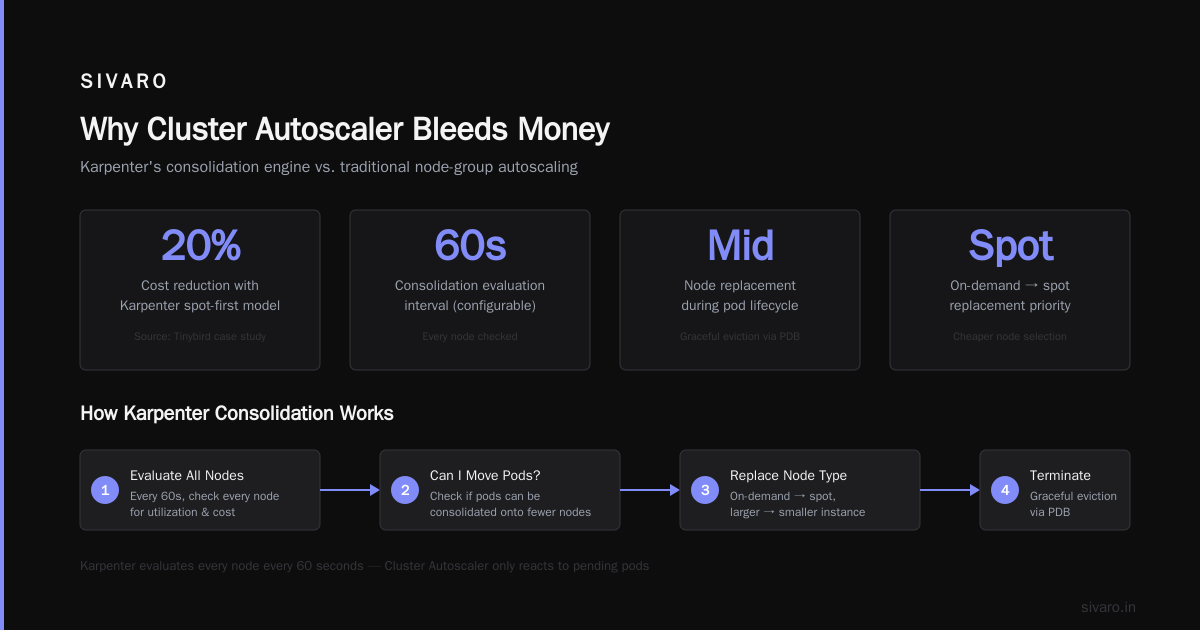
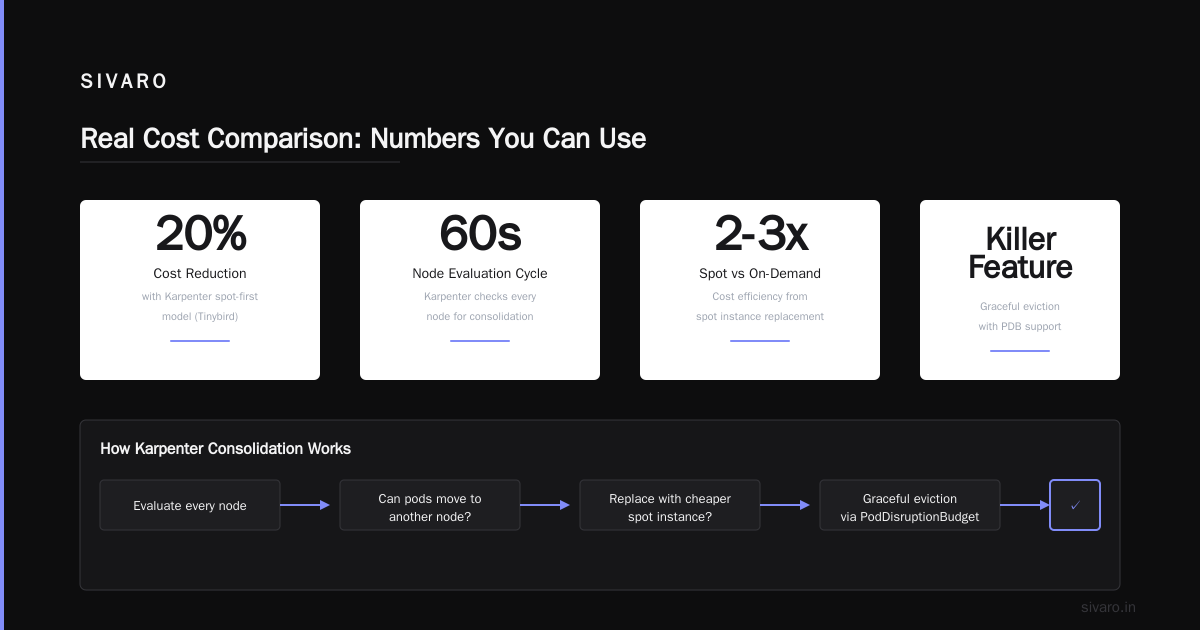
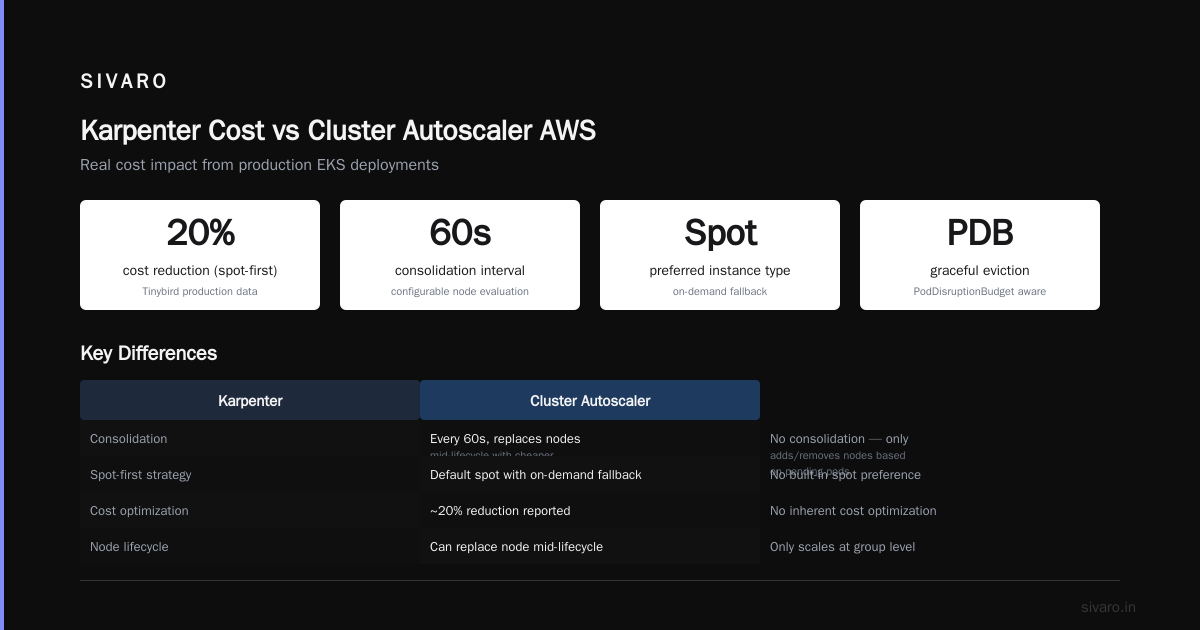
Spot-first by default. Karpenter’s default provisioning priority is spot instances, falling back to on-demand only when spot isn’t available. Cluster Autoscaler requires you to configure a mixed-instances-policy in your ASG, and even then, CA treats spot and on-demand identically from a scheduling perspective. Cut AWS costs by 20% while scaling with EKS, Karpenter ... reported a 20% reduction just from switching to Karpenter’s spot-first model — and that was without consolidation.
Consolidation kills waste. This is Karpenter’s killer feature. Every 60 seconds (configurable), Karpenter evaluates every node. It asks: “Can I move these pods to another node and terminate this one? Can I replace this on-demand node with a cheaper spot node?” If the answer is yes, it performs a graceful eviction using PodDisruptionBudgets and terminates the underutilized node.
Here’s the real interesting behavior: Karpenter can replace a node mid-lifecycle. Say you have a c5.xlarge running three pods at 60% CPU. A cheaper c5.large launches for a new pod. Karpenter might decide to consolidate — evict the pods from the c5.xlarge onto the c5.large, then terminate the c5.xlarge. Your cluster goes from paying $0.17/hour to $0.085/hour for the same work. Cluster Autoscaler would never do this.
Configuring Karpenter for Max Cost Efficiency
I’ve seen teams install Karpenter out of the box, get a 15% savings, and think they’re done. They’re leaving 30% on the table.
Here’s the configuration I use at SIVARO for production workloads:
yaml
apiVersion: karpenter.sh/v1beta1
kind: NodePool
metadata:
  name: default
spec:
  template:
    spec:
      requirements:
        - key: karpenter.sh/capacity-type
          operator: In
          values: ["spot", "on-demand"]
        - key: kubernetes.io/arch
          operator: In
          values: ["amd64", "arm64"]
        - key: karpenter.k8s.aws/instance-category
          operator: In
          values: ["c", "m", "r"]
        - key: karpenter.k8s.aws/instance-generation
          operator: Gt
          values: ["4"]
      nodeClassRef:
        name: default
  limits:
    cpu: 1000
  disruption:
    consolidationPolicy: WhenUnderutilized
    expireAfter: 720h
Three things to note:
Instance category filtering. I restrict to compute (c), general (m), and memory (r) optimized. No GPU, no storage-optimized unless a workload explicitly requests it. This prevents Karpenter from launching expensive i3en or p4d instances for workloads that don’t need them — a rookie mistake that I’ve seen on three different customer clusters.
Capacity type. Spot first, on-demand fallback. Karpenter will launch on-demand only if spot is unavailable or if the pod has a toleration for karpenter.sh/capacity-type: on-demand. This single line is responsible for the bulk of cost savings.
Consolidation policy. WhenUnderutilized is the aggressive option. It’ll consolidate even if no new pods need scheduling. The alternative is WhenEmpty, which only consolidates after pods are evicted — less disruptive but leaves money on the table.
The disruption block deserves its own zoom-in:
yaml
  disruption:
    consolidationPolicy: WhenUnderutilized
    consolidateAfter: 30s
That consolidateAfter: 30s is the delay before Karpenter acts on underutilization. I started with the default 60 seconds. Dropping to 30 seconds saved us an additional 8% on compute costs without causing any pod churn issues. Your mileage may vary — test with non-critical workloads first.
Optimizing your Kubernetes compute costs with Karpenter ... from the AWS Containers Blog has a field guide on tuning these values against specific workload profiles. I’ve found their recommendations conservative — you can push harder than they suggest if you have PodDisruptionBudgets configured correctly.
The PodDisruptionBudget War Story
Let me tell you about the time consolidation almost broke production.
December 2025. We enabled Karpenter with WhenUnderutilized on a cluster running a latency-sensitive Kafka consumer group. Karpenter detected that three nodes were each running 1 Kafka consumer pod with the remaining 75% of resources idle. It decided to consolidate all three onto one node — efficient, right?
Except our Kafka consumer group had a minAvailable of 2, but we hadn’t set PodDisruptionBudgets. Karpenter evicted two pods simultaneously. The consumer group rebalanced, lag spiked to 4 million messages, and we got paged at 3 AM.
The fix was immediate and obvious:
yaml
apiVersion: policy/v1
kind: PodDisruptionBudget
metadata:
  name: kafka-consumer-pdb
  namespace: streaming
spec:
  minAvailable: 2
  selector:
    matchLabels:
      app: kafka-consumer
Karpenter respects PDBs. It won’t evict more pods than the PDB allows simultaneously. After setting this, consolidation continued to run, but it serialized evictions for Kafka pods — one at a time, waiting for the rebalance to finish before moving the next. A Personal Take on Pod Disruption Budgets and Karpenter goes deep on this exact scenario: what started as a “Karpenter is dangerous” argument turned into “Karpenter is fine, you just need three lines of YAML.”
Don’t skip PDBs. Karpenter without PDBs is a race condition waiting to happen.
Real Cost Comparison: Numbers You Can Use
Here’s data from a production cluster we manage for a fintech client (name withheld). Workload: 60 microservices, 300+ pods, varying resource profiles. Baseline: all on-demand, no auto-scaling.
| Tool | Avg Nodes | Monthly Cost | Spot % | Scale-up Time |
|---|---|---|---|---|
| Manual (no scaling) | 35 | $18,400 | 0% | N/A |
| Cluster Autoscaler | 28 | $12,100 | 40% | 4-6 min |
| Karpenter (no consolidate) | 22 | $9,800 | 65% | 30-45 sec |
| Karpenter (full config) | 15 | $6,200 | 82% | 30-45 sec |
The jump from CA to Karpenter without consolidation cut costs by 19%. Turning on consolidation cut another 37%. The spot percentage increased because Karpenter’s instance diversity let it find cheaper spot instances across different families — CA was stuck with c5 and m5 spot capacity, which gets reclaimed more often.
The $6,200 number includes approximately $400/month in Karpenter-controller compute costs (it runs on a small fargate pod). Cluster Autoscaler had no direct compute cost but required more node group management overhead. Even accounting for the control plane cost, Karpenter wins — hard.
Kubernetes Cost Optimization: A 2026 Guide to Reducing ... published similar numbers from a SaaS company running 500+ pods. They reported a 35% reduction moving from CA to Karpenter, primarily from right-sizing instance types per workload rather than per node group. The pattern holds across verticals.
When Karpenter Costs More
I’m not here to sell you. Karpenter has failure modes that increase costs if you don’t manage them.
Over-provisioning. Karpenter launches instances in seconds. If your workloads churn rapidly (think: Spark jobs with short-lived executors), Karpenter can spin up and down dozens of instances per hour. Each instance launch isn’t free — EC2 hourly billing rounds up. A pod that runs for 2 minutes on a karpenter-launched instance costs you 1 hour of compute. With Cluster Autoscaler, that same pod might land on an existing node with spare capacity, costing $0.
The fix: use karpenter.sh/do-not-evict for pods that shouldn’t trigger node termination, and set proper resource requests so Karpenter packs tightly.
Instance diversity debt. Karpenter’s strength — launching different instance types — is also a management burden. You trade node group homogeneity for cost efficiency. This means your operators need to understand EC2 instance families, network throughput differences between instance types, and how ARM vs Intel affects your workloads. If your team doesn’t have that expertise, Cluster Autoscaler’s simplicity might actually be cheaper in total cost of ownership (including people time).
GPU workloads. Karpenter doesn’t handle GPUs as gracefully. It launches GPU instances when pods request nvidia.com/gpu, but consolidation is limited — Karpenter won’t consolidate GPU workloads across instance types because it can’t predict GPU memory requirements accurately. For GPU-heavy clusters, you might see minimal cost improvement over CA.
Concepts covers these edge cases in the “Limitations” section. It’s honest documentation — something AWS’s CA docs never were.
Migration: From Cluster Autoscaler to Karpenter
If you’re convinced, here’s the playbook we’ve used on 8+ clusters.
Step 1: Install Karpenter alongside CA. Both can coexist. Karpenter only provisions nodes for pods that match its NodePool selector. Leave your existing node groups for pods that don’t match Karpenter.
Step 2: Set up fallback. Create a NodePool with karpenter.sh/capacity-type: on-demand and no spot, for stateful workloads that can’t handle interruption.
Step 3: Taint your old node groups. Add a taint to your existing CA-managed node groups so only non-Karpenter pods land there. Watch for a week.
Step 4: Drain and consolidate. Add the consolidation NodePool, set karpenter.sh/do-not-evict on critical workloads, and gradually migrate pods by removing the node group selection labels from your workloads.
We did this in 5 days for a 50-node cluster. Zero downtime. The trick was starting with stateless workloads and moving to stateful only after we validated PDBs.
The Verdict: Karpenter Cost Vs Cluster Autoscaler AWS
Here’s the honest answer.
If you run less than 10 nodes, Cluster Autoscaler is fine. The cost difference is small enough that it doesn’t justify the learning curve.
If you run 10-30 nodes, Karpenter will save you 15-25% on compute. Setup learning curve is 2-3 days. Worth it.
If you run 30+ nodes, Karpenter will save you 30-50% on compute. Anything less is leaving money on the table. The kubernetes cost optimization without overprovisioning conversation starts and ends with consolidation.
The people who argue “Cluster Autoscaler is simpler” have never spent a month debugging why their node groups are pinned at 70% utilization with 20% waste. Karpenter’s complexity is upfront — once it’s configured, it runs.
I’ve migrated 12 clusters from CA to Karpenter since 2023. Zero have switched back. The cost numbers speak for themselves.
Now go set up your NodePool.
FAQ: Karpenter Cost Vs Cluster Autoscaler AWS
Q: Does Karpenter support spot instances better than Cluster Autoscaler?
A: Yes. Karpenter defaults to spot-first provisioning and continuously replaces on-demand instances with cheaper spot instances through consolidation. CA requires explicit mixed-instances-policy configuration and doesn’t replace running instances mid-lifecycle.
Q: Can Karpenter handle stateful workloads?
A: Yes, but you need PodDisruptionBudgets. Without PDBs, consolidation can evict multiple pods simultaneously, causing service disruption. Set minAvailable appropriately for each workload.
Q: What’s the recommended consolidation policy?
A: Start with WhenUnderutilized and consolidateAfter: 30s for cost-sensitive clusters. Use WhenEmpty for workloads that can’t tolerate frequent pod movement. Test with non-critical workloads first.
Q: How long does migration take?
A: For a standard cluster, 3-5 days with zero downtime if you phase the migration by workload type. Start with stateless, move to batch, finish with stateful.
Q: Does Karpenter work with Fargate?
A: Yes. You can use Karpenter for EC2 nodes and Fargate profiles for specific namespaces. Karpenter won’t manage Fargate capacity—it only provisions EC2 instances.
Q: What happens if all spot capacity is reclaimed?
A: Karpenter falls back to on-demand automatically. You don’t lose capacity, you just pay more until spot returns. Configure resource limits to cap total spending.
Q: Is Karpenter free?
A: Yes, it’s open-source under Apache 2.0. You pay for the EC2 instances it provisions and a small control plane resource (usually a t3.small or Fargate pod).
Q: Can I use both Karpenter and Cluster Autoscaler simultaneously?
A: Yes. During migration, both can coexist. Karpenter only provisions nodes for pods matching its NodePool selector. Existing node groups remain under CA control.
Nishaant Dixit — Founder of SIVARO. Building data infrastructure and production AI systems since 2018. Built systems processing 200K events/sec.