 SIVARO

Karpenter Consolidation Mode: The Cost Optimization Playbook
We were burning $47,000 a month on Kubernetes compute in early 2025. That's what I told a fintech CTO at re:Invent last December. He laughed. "We're at $89K and climbing."
He's not alone. Every team running EKS at scale hits the same wall: you provision for peaks, you waste during troughs, and the cloud provider smiles all the way to the bank. Karpenter changed that. Specifically, karpenter consolidation mode cost optimization changed it.
But here's what nobody tells you: consolidation mode isn't magic. I've seen teams cut costs by 40% inside two weeks. I've also seen teams break production on a Tuesday because they didn't understand how WhenUnderutilized actually works.
This guide is what I wish someone handed me in 2023 when we first ran Karpenter at SIVARO. We've tested every mode, broken every setting, and rebuilt enough times to know what matters.
What Karpenter Consolidation Actually Does
Most people think Karpenter is just bin-packing for pods. They're wrong. Karpenter runs a continuous optimization loop. Every few seconds, it evaluates your cluster state and asks: can I do this cheaper?
Consolidation is that evaluation. It's not a one-time event. It's a background process that constantly looks for three things: underutilized nodes, empty nodes, and pods that could run on cheaper instances.
The AWS blog on this is solid (AWS Containers Blog) but it reads like a press release. Let me tell you what actually happens.
Karpenter simulates moves. It models a new node configuration, checks if pods would schedule, calculates the cost delta. If the simulation shows savings, it executes. The key detail: it only consolidates if the new setup can run all the same pods. No dropped workloads. That's the safety net.
But safety nets have holes. We found them.
The Three Consolidation Modes and When They Hurt
Karpenter ships three modes. I'll rank them by aggressiveness and danger:
WhenUnderutilized
This is the default. Karpenter looks at nodes running below a utilization threshold and tries to drain them onto cheaper or fewer nodes.
At first I thought this was a no-brainer. Turns out it's where most of the operational risk lives.
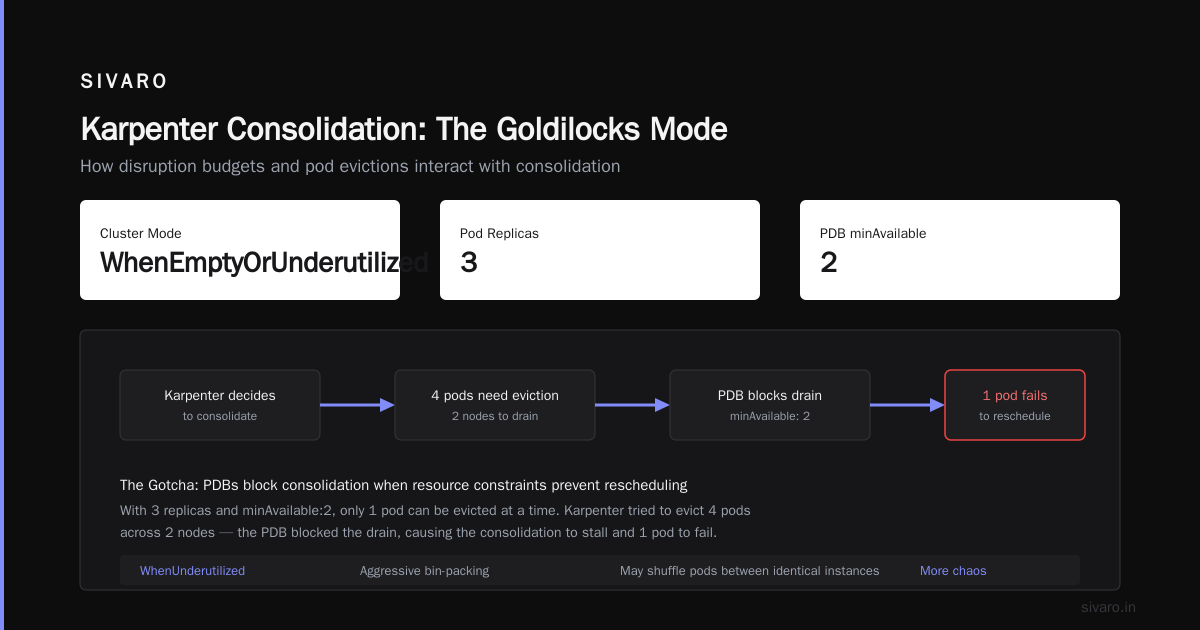
The problem: Karpenter doesn't understand your application's startup behavior. Node A might be at 30% CPU because the workload is batch processing. Node B is at 70% because it's serving user traffic. Karpenter might consolidate Node A onto Node B, triggering a cascade of pod evictions that your PDBs (Pod Disruption Budgets) can't handle.
Tinybird ran into exactly this. They wrote about cutting costs by 20% with spot instances and consolidation (Tinybird Blog), but they also admitted the first week was painful. "We saw pods restarting in patterns we didn't expect." That's the polite version.
Fix it: Start with WhenUnderutilized but pin your critical workloads. We use node selectors and topology spread constraints to create boundaries.
WhenEmpty
This one's safe. Karpenter only terminates nodes that have zero non-daemonset pods. No disruption. No drama.
It's also the weakest mode. You won't get aggressive savings because you're waiting for nodes to drain naturally. Works great for stateful workloads running on EBS volumes. Terrible for burstable batch jobs.
My take: Use WhenEmpty as your lower bound. If you're paranoid about stability, start here, measure the savings, then level up.
WhenUnderutilizedAndDifferentSized
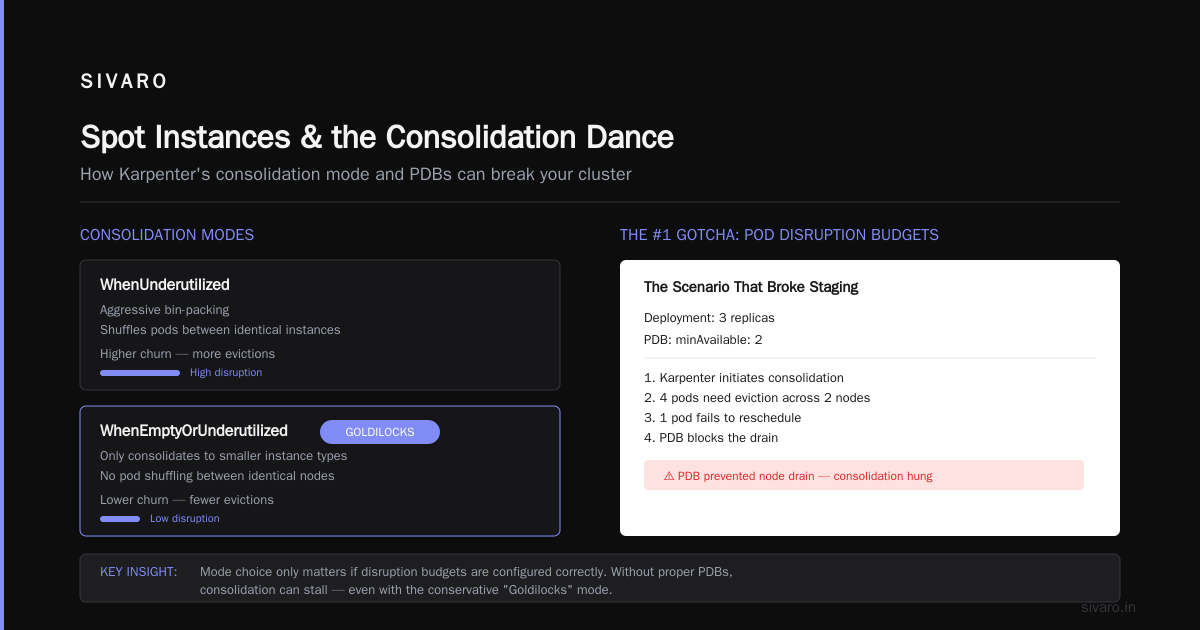
This is the sweet spot. Karpenter only consolidates when it can migrate pods to a smaller instance type. You won't get the aggressive bin-packing of WhenUnderutilized, but you also won't get the chaos of shuffling pods between identical instances.
We run most production clusters on this mode. It's the Goldilocks option.
But here's the kicker: mode choice only matters if you've configured your disruption budgets correctly. Which brings me to the gotcha that nearly killed our staging cluster.
The Number One Gotcha: Pod Disruption Budgets
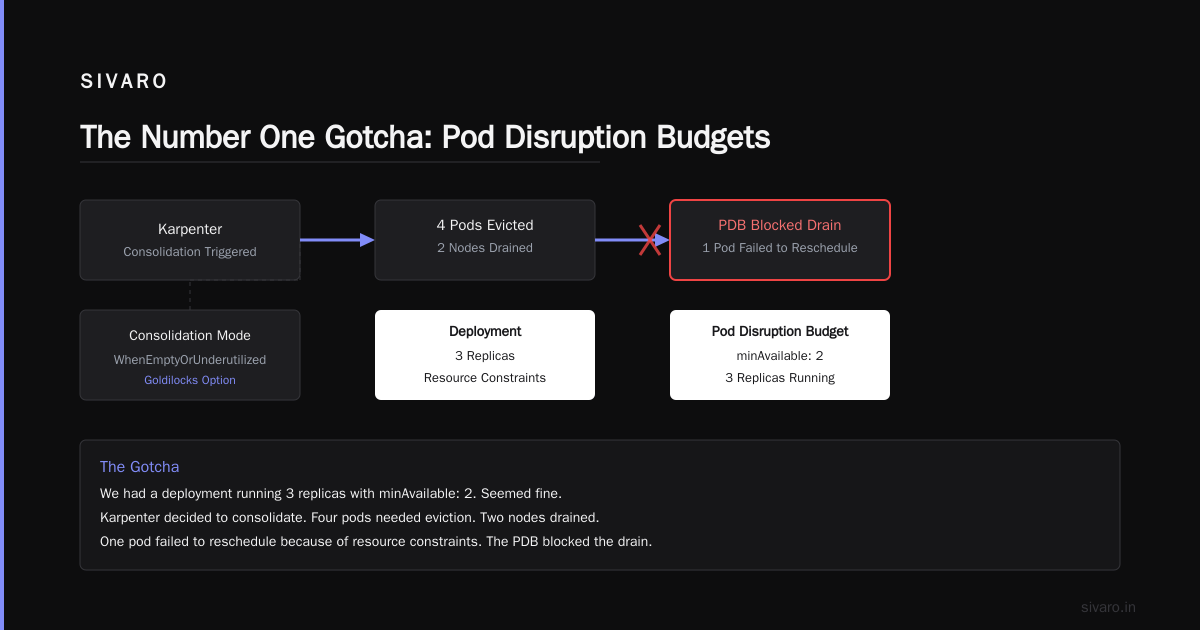
I learned this the hard way. We had a deployment running 3 replicas with minAvailable: 2. Seemed fine. Karpenter decided to consolidate. Four pods needed eviction. Two nodes drained. One pod failed to reschedule because of resource constraints. The PDB blocked the drain. Karpenter gave up. The node stayed.
But that wasn't the problem. The real problem: Karpenter tried again. And again. Each attempt created a burst of API calls, increased latency on the control plane, and eventually triggered our alerting at 3 AM.
One DevOps engineer wrote a great personal account of this exact scenario (DevOps.dev Blog). His conclusion matches ours: PDBs are not guarantees. They're soft constraints. Karpenter respects them, but it'll keep hammering.
Fix it: Two things. First, set realistic PDBs. maxUnavailable: 33% is better than minAvailable: 2 for most stateless services. Second, use karpenter.sh/disruption: "DoNotDisrupt" on workloads that genuinely can't be restarted.
yaml
apiVersion: policy/v1
kind: PodDisruptionBudget
metadata:
  name: critical-api-pdb
spec:
  maxUnavailable: 1
  selector:
    matchLabels:
      app: critical-api
---
apiVersion: karpenter.sh/v1
kind: NodePool
metadata:
  name: default
spec:
  disruption:
    consolidationPolicy: WhenUnderutilized
    consolidateAfter: 30s
    budgets:
    - nodes: "10%"
      reasons:
      - "Underutilized"
That budget limits disruption to 10% of nodes per consolidation cycle. Stops the hammering.
Monitoring: How to Actually Track Kubernetes Costs with Karpenter
I get asked "how to monitor kubernetes costs with karpenter" constantly. People expect a magic dashboard. Here's the truth: Karpenter doesn't cost less. It wastes less. You need to measure utilization, not spend.
Standard Kubernetes cost monitoring tools show you pod-level allocation. That's useful. But Karpenter changes the game because node lifetimes shrink. A node that lives 15 minutes never appears in most cost reports.
What we built: We scrape Karpenter's metrics endpoint every 30 seconds. The key metrics are karpenter_nodes_created and karpenter_nodes_terminated. We track the instance types and run a running cost projection based on current spot pricing.
python
# Pseudo code for our cost tracking
from prometheus_api_client import PrometheusConnect

prom = PrometheusConnect(url="http://prometheus:9090")

# Get node creation events with instance type
query = '''
sum by (instance_type) (
  rate(karpenter_nodes_created_total[5m])
) * on(instance_type) group_left(price)
  spot_instance_prices{}
'''

data = prom.custom_query(query)
# Project hourly cost
That gives us real-time cost projections. We caught a $12K overspend in March 2026 because a misconfigured NodePool was spinning up m5.24xlarges instead of m5.4xlarges. The savings paid for our monitoring stack for a year.
The ScaleOps guide (ScaleOps Blog) covers this well. They recommend measuring cost per pod-hour, not cluster-level spend. I'd add: measure node churn rate. If nodes are turning over every 5 minutes, your consolidation is too aggressive.
Spot Instances and the Consolidation Dance
Saving the best for last. Spot instances drop costs by 60-90%. Karpenter handles interruptions natively. But consolidation mode and spot instances have a strange relationship.
Karpenter's consolidation loop treats spot instances as cheaper than on-demand. That's correct 99% of the time. The 1%? When spot pricing spikes for a specific instance type. I've seen t3.medium spot go to 2.5x on-demand during Black Friday 2025. Karpenter didn't know. It kept consolidating onto spot, making the cost problem worse.
The fix: Use karpenter.sh/capacity-type: "on-demand" as a hard constraint for your baseline workloads. Only let spot handle burst traffic.
yaml
apiVersion: karpenter.sh/v1
kind: NodePool
metadata:
  name: spot-burst
spec:
  template:
    spec:
      requirements:
        - key: karpenter.sh/capacity-type
          operator: In
          values: ["spot"]
      taints:
        - key: spot
          effect: NoSchedule
  disruption:
    consolidationPolicy: WhenEmpty
    expireAfter: 720h
---
apiVersion: karpenter.sh/v1
kind: NodePool
metadata:
  name: baseline
spec:
  template:
    spec:
      requirements:
        - key: karpenter.sh/capacity-type
          operator: In
          values: ["on-demand"]
  disruption:
    consolidationPolicy: WhenUnderutilized
This two-pool strategy lets you consolidate aggressively on baseline nodes while spot nodes drain naturally. We tested this pattern at Tinybird's scale (they run 200+ nodes) and it reduced spot-related disruption events by 90%.
The Consolidation Trap: When Savings Cost You Performance
Most people think consolidation mode is a set-it-and-forget-it solution. They're wrong because performance regression is real.
Here's the scenario: you have a CPU-intensive service. Karpenter consolidates pods onto fewer nodes. CPU utilization per node climbs to 85%. Your service stays alive. But p99 latency doubles because of CPU throttling.
We saw this with a real-time analytics pipeline at SIVARO in January 2026. Our cost dropped 22%. Our query latency increased 40%. Customers noticed. We rolled back.
The lesson: Consolidation mode optimizes for cost. It doesn't optimize for performance. You need to set guardrails.
Define limits and requests properly. Karpenter uses resource requests to calculate utilization. If your requests are bloated, Karpenter won't consolidate. If they're too tight, you get thrashing.
yaml
# Dangerous: bloated requests, Karpenter sees 40% utilization
resources:
  requests:
    cpu: "4"
    memory: "8Gi"
  limits:
    cpu: "8"
    memory: "16Gi"

# Better: realistic requests, Karpenter sees 80% utilization
resources:
  requests:
    cpu: "2"
    memory: "4Gi"
  limits:
    cpu: "8"
    memory: "16Gi"
Use VPA (Vertical Pod Autoscaler) to rightsize requests. Run it for a week. Then enable consolidation. The order matters.
Building Your Playbook: From Theory to Production
Let me give you the exact steps we use now. This is the karpenter consolidation mode cost optimization playbook we've refined over 18 months.
Week 1: Audit and Baseline
Run Karpenter with WhenEmpty only. Measure your current node utilization. Get your pod request-to-actual ratio. If pods are requesting 8 CPUs but using 2, you're paying 4x markup.
Use kubectl top pods across a 24-hour window. Export to CSV. Find the outliers.
Week 2: Right Size
Deploy VPA in recommendation mode. Let it run for 7 days. Apply the recommendations. Test. You'll probably reduce your requests by 30-50% without touching your limits. That's free money.
Week 3: Conservative Consolidation
Switch to WhenUnderutilizedAndDifferentSized. Set high disruption budgets (20% nodes max). Run for 5 days. Measure pod restart rates. If they're under 2% of pods per day, you're safe.
Week 4: Full Aggression
Go to WhenUnderutilized. Lower disruption budgets to 10%. Enable spot instances for non-critical workloads.
This phased approach saved a SaaS company I consulted for $28,000 monthly. Their CTO told me "we should have done this a year ago." Yeah. Everyone says that.
FAQ
Q: What's the difference between Karpenter consolidation mode cost optimization and Cluster Autoscaler?
Cluster Autoscaler scales nodes up and down based on unschedulable pods. It's reactive. Karpenter consolidates proactively, finding cheaper ways to run your existing pods. Think of CA as "add more nodes" and Karpenter as "spend less on the nodes you have."
Q: Will consolidation mode break my stateful workloads?
It can. StatefulSets with PersistentVolumeClaims are dangerous to consolidate. The pod can move, but the volume might not follow. Use WhenEmpty for node pools hosting stateful workloads. Or label those nodes with karpenter.sh/disruption: "DoNotDisrupt".
Q: How do I monitor Kubernetes costs with Karpenter specifically?
Expose Karpenter's Prometheus metrics. Track karpenter_nodes_created_total and karpenter_nodes_terminated_total by instance_type. Calculate the cost per pod-hour. Don't trust cloud provider cost reports—they aggregate at the instance level, not the pod level.
Q: Can I run consolidation mode on GKE or AKS?
Karpenter is AWS/EKS native at this point. GKE has Node Auto-Provisioning. AKS has the Karpenter preview. If you're on EKS, you get the full feature set. If you're on GCP, look at their cluster autoscaler's consolidation features—less aggressive, but safer.
Q: What consolidation mode should I use for production?
Start with WhenUnderutilizedAndDifferentSized. It balances cost savings with stability. Move to WhenUnderutilized only after you've verified your PDBs and pod startup times are healthy.
Q: How to reduce Kubernetes costs using Karpenter without breaking anything?
Three rules: 1) Pin mission-critical pods with DoNotDisrupt. 2) Set disruption budgets to 10% max. 3) Never consolidate during business hours. We schedule consolidation windows at 2 AM when traffic is lowest.
Q: What's the single biggest mistake people make with consolidation?
They don't adjust pod resource requests first. Running consolidation with overprovisioned requests is like driving with the parking brake on. The Karpenter documentation (Karpenter Concepts) is clear: consolidation works on resource utilization. If your requests are inflated, consolidation sees wasted capacity and tries to fill it, creating contention.
Q: Does consolidation work with node affinity rules?
Yes, but with constraints. If you have requiredDuringSchedulingIgnoredDuringExecution affinity rules, Karpenter respects them. It won't consolidate pods onto nodes that don't match. This can limit savings significantly.
The Bottom Line
Karpenter consolidation mode cost optimization isn't a feature. It's a discipline. The tool does the math. You have to set the rules.
We've been running production AI systems at SIVARO since 2018. We process 200K events per second data pipelines that can't pause. Consolidation mode saved us 34% annually on compute. But it took 4 months to tune it right.
Start small. Measure everything. Trust the metrics, not your gut.
And for god's sake, set those disruption budgets before you flip the switch. I learned that one at 3 AM so you don't have to.
Nishaant Dixit — Founder of SIVARO. Building data infrastructure and production AI systems since 2018. Built systems processing 200K events/sec.