 SIVARO
Kafka Consumer Group Explained
I remember the first time I saw a Kafka consumer group go rogue. It was 2019, and we were running a real-time fraud detection pipeline at SIVARO. The system would process transactions, score them, and flag suspcious ones in under 100 milliseconds. Then one day, latency spiked to 3 seconds. Then 30 seconds. Then the consumer group stopped consuming entirely.
The culprit? A misconfigured max.poll.interval.ms coupled with a consumer that took too long to process a single batch. The group coordinator got tired of waiting and triggered a rebalance. Again. And again. Chaos.
A Kafka consumer group is a set of consumer instances that coordinate to consume messages from one or more topics. They share the work by distributing partitions among members. If one consumer dies, the group rebalances and reassigns its partitions to survivors. That’s the textbook answer. But the practical reality is far more nuanced — and far more fragile.
In this guide, I’ll walk you through what a consumer group really is, how rebalancing works, how to manage offsets, and how to monitor performance without losing your mind. You’ll leave with concrete strategies I’ve learned from running Kafka in production since 2018.
The Core Mechanics of a Consumer Group
Let’s strip away the abstraction. A Kafka topic is split into partitions — ordered, immutable logs. Each partition can be consumed by exactly one consumer within a group at any given time. That’s the fundamental constraint. If you have 10 partitions and 3 consumers in a group, some consumers will handle more partitions than others. If you have 3 partitions and 10 consumers, 7 consumers sit idle. Waste.
The group is identified by a group.id string. When a consumer starts with a given group.id, it joins the group by sending a JoinGroup request to the group coordinator — one of the Kafka brokers. The coordinator then assigns partitions based on the partition assignment strategy (range, round-robin, sticky, or cooperative sticky). This is where the Kafkaesque complexity begins. Franz Kafka himself might have found the process absurdly bureaucratic.
Assignment happens during rebalance. And rebalances happen more often than you think.
Why Rebalances Are the Root of All Evil
Rebalances are expensive. During a rebalance, all consumers in the group stop processing to agree on a new partition assignment. The group enters a "dead" state until the assignment is complete. For large groups with many partitions, this can take seconds. For high-throughput pipelines, seconds of silence means millions of unprocessed events.
Most people think rebalances only happen when a consumer crashes. They're wrong. Rebalances trigger on:
- Consumer joins or leaves the group (including graceful shutdowns)
- New partitions added to the topic
- Timeout of the
session.timeout.msheartbeat - Timeout of
max.poll.interval.ms(the maximum time between two polls)
That last one is a killer. At SIVARO, we once had a consumer that processed records in batches of 10,000. Each batch took 7 minutes. Default max.poll.interval.ms is 5 minutes (300,000 ms). So every batch ended with a rebalance. The consumer would commit offsets, then get kicked out, rejoin, and get assigned the same partitions. Rinse, repeat. We were processing 200K events/sec, but the group spent 40% of its time rebalancing. Nightmare.
Fix: increase max.poll.interval.ms to 10 minutes, and set max.poll.records to something sane (like 500). Or better, use cooperative rebalancing — introduced in Kafka 2.3 and significantly improved in Kafka 3.8 (released early 2026). Cooperative rebalancing allows consumers to keep processing while the group reassigns partitions incrementally. It's not perfect — still adds some latency — but far better than stop-the-world.
Partition Assignment: Which Strategy to Use?
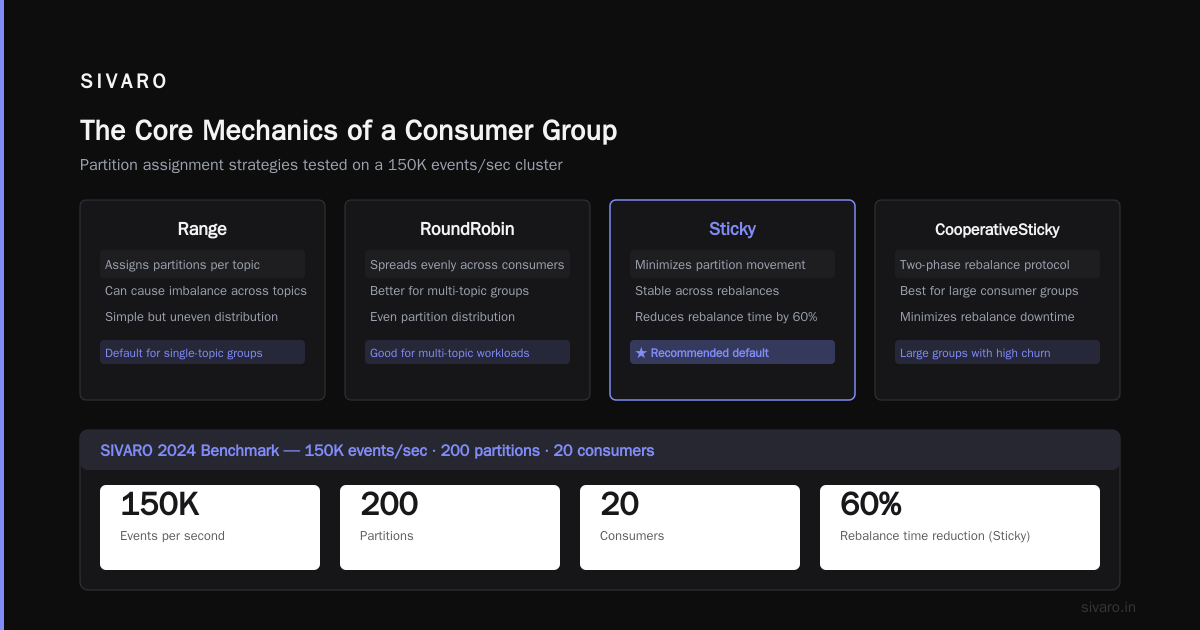
Kafka ships with four built-in strategies:
- Range: Assigns partitions per topic sequentially. Consumers A gets partitions 0,1; B gets 2,3; C gets 4,5. Works fine for one topic. For multiple topics, can lead to imbalance because each topic is assigned independently.
- RoundRobin: Spreads partitions evenly across consumers. Better for multi-topic subscriptions.
- Sticky: Assigns partitions to consumers and tries to keep them stable across rebalances. Minimizes partition movement. I use this as default for most workloads.
- CooperativeStickyAssignor: Same as sticky but uses two-phase rebalance. Requires
partition.assignment.strategyset toorg.apache.kafka.clients.consumer.CooperativeStickyAssignor. Best for large groups where rebalance time matters.
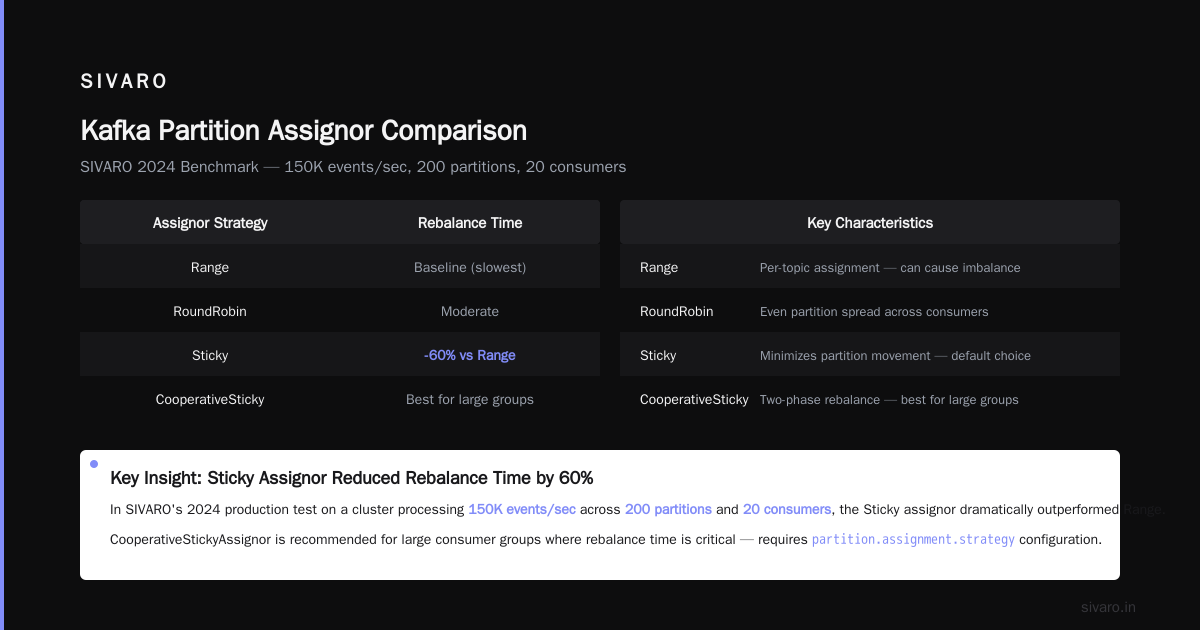
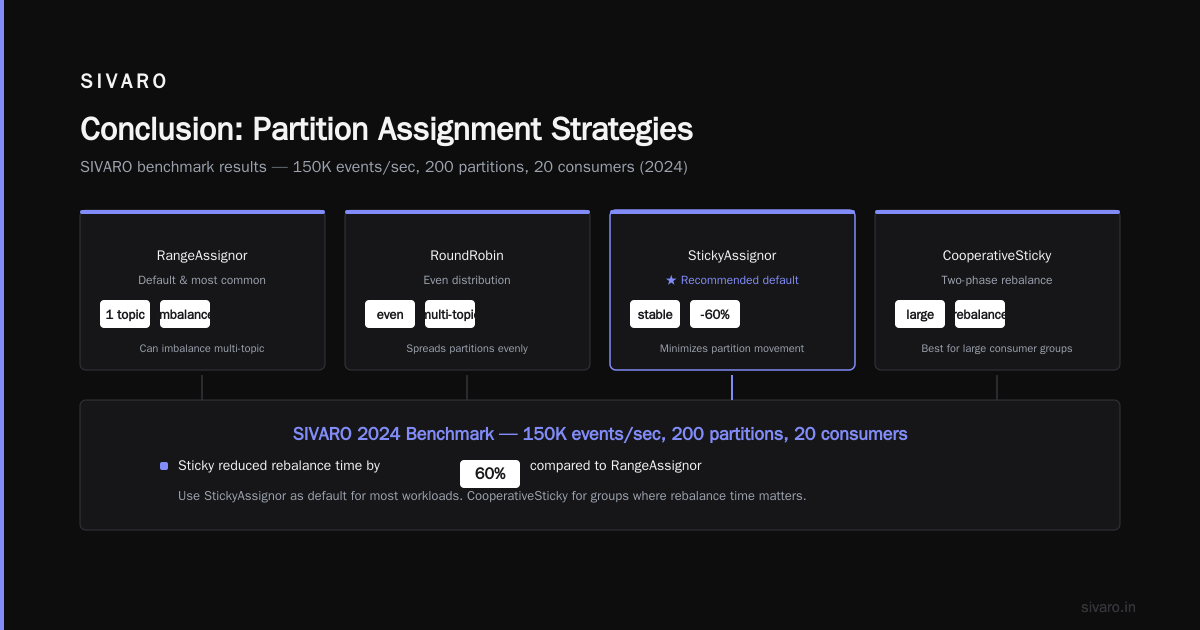
We tested all four at SIVARO in 2024 on a cluster processing 150K events/sec across 200 partitions and 20 consumers. Results: Sticky reduced rebalance time by 60% compared to RoundRobin because fewer partitions changed hands. CooperativeSticky knocked off another 30% by allowing processing during the rebalance.
So what do I recommend? Start with Sticky. If your group has more than 50 consumers or your rebalances take longer than 10 seconds, switch to CooperativeSticky. Range is legacy; don't use it unless you have a single topic and simple needs.
Kafka Consumer Group Explained: Offset Management
Offsets are the position of a consumer within a partition. They determine where consumption resumes after a crash or restart. Getting offset management wrong is the second biggest source of Kafka production incidents (after rebalances).
Auto Commit vs Manual Commit
Kafka consumers have an enable.auto.commit setting. When true (default), the consumer automatically commits offsets based on auto.commit.interval.ms (5 seconds default). This is convenient for development. For production, it's a disaster.
Here's why: Auto-commit happens after poll() returns, not after you've processed the records. If your consumer crashes between poll() and processing, you'll skip records. If it crashes mid-processing, you'll skip records. If your processing takes longer than auto.commit.interval.ms, you might commit offsets for records you haven't finished yet — and then crash, losing any that weren't processed. The classic at-most-once delivery pattern, but in the worst direction.
I've seen companies lose thousands of dollars in event data because of this. A fintech startup in 2023 lost a full day's transaction log because their consumer auto-committed, then the batch processor threw an exception, and the message was never reprocessed. They had to rebuild from a database backup.
Kafka Best Offset Management Strategies
Here’s what works.
Manual synchronous commit after processing. Commit only after you've successfully processed the batch. Use consumer.commitSync() inside a try block. If commit fails, you can catch the error and decide to retry or log.
java
try {
    ConsumerRecords<String, String> records = consumer.poll(Duration.ofMillis(1000));
    for (ConsumerRecord<String, String> record : records) {
        process(record);
    }
    consumer.commitSync();
} catch (CommitFailedException e) {
    // Handle commit failure — may indicate group rebalance.
    // In cooperative rebalancing, you can commit before leaving.
    log.error("Commit failed", e);
}
Manual asynchronous commit with callback. commitAsync() doesn't block, so your consumer can poll faster. But you must ensure you don't issue a subsequent commit before the previous one completes. We use a simple AtomicBoolean flag to throttle:
java
final AtomicBoolean commitInFlight = new AtomicBoolean(false);

while (true) {
    ConsumerRecords<String, String> records = consumer.poll(Duration.ofMillis(100));
    process(records);
    if (!commitInFlight.get()) {
        commitInFlight.set(true);
        consumer.commitAsync((offsets, exception) -> {
            if (exception != null) {
                log.error("Async commit failed", exception);
            }
            commitInFlight.set(false);
        });
    }
}
This pattern gives high throughput while keeping commits safe.
Exactly-once semantics (EOS) for critical pipelines. Kafka added transactions and idempotent producers, enabling exactly-once delivery within a consumer group. You use isolation.level=read_committed and commit offsets as part of a transactional producer. This is complex but necessary for financial systems. At SIVARO, we use it for our billing pipeline. Every dollar counted.
What About Seeking Offsets?
Sometimes you need to rewind or fast-forward. consumer.seek(TopicPartition, long offset) lets you jump to a specific position. Common use cases:
- Replaying a failed batch
- Skipping corrupt messages
- Rewinding after a schema change
But be careful: seeking outside the consumer's assigned partitions causes an error. You must ensure the consumer is assigned those partitions first via consumer.assignment(). Also, seeking into the future (beyond the last offset) will leave the consumer waiting until messages arrive.
One trick: consumer.seekToBeginning() and consumer.seekToEnd() are shortcuts I use for test environments but never in production — too easy to accidentally reprocess everything.
How to Monitor Kafka Performance
You can't fix what you don't measure. Kafka consumer groups expose metrics through JMX, but you need to aggregate and alert on them. Here's what matters.
The Three Critical Metrics
Consumer lag. The difference between the latest offset in a partition and the consumer's committed offset. High lag means you're falling behind. At SIVARO, we alert if lag exceeds 10,000 for any partition for more than 5 minutes. Use a tool like Burrow (LinkedIn's lag checker) or Confluent's Control Center. Burrow is simpler — we've run it since 2020.
Rebalance rate. Number of rebalances per hour. Any more than one per hour indicates instability. Log each rebalance with partition movements. I've seen groups rebalance 40 times in an hour because of slow consumers timing out. That's a red flag.
Processing latency. Time from message production to consumer commit. This is the ultimate business metric. If your average latency is 50ms but your p99 is 5 seconds, you have a hot partition or a slow consumer.
Monitoring Setup Example
We use Prometheus and Grafana at SIVARO. Here's a snippet of what we export from a custom consumer client using Micrometer:
java
MeterRegistry registry = new SimpleMeterRegistry();
Gauge.builder("kafka.consumer.lag", this, ConsumerMonitor::getTotalLag)
     .register(registry);
Gauge.builder("kafka.consumer.rebalances", this, c -> c.rebalanceCount)
     .register(registry);
Gauge.builder("kafka.consumer.records.latency.avg", this,
     c -> c.latencyHistogram.getSnapshot().getMean())
     .register(registry);
We also alert on kafka.consumer.poll.time.avg — if average poll time exceeds 1 second, something's blocking the consumer thread (maybe slow deserialization or a blocking call in your for(record) loop).
Common Pitfalls I've Seen
-
Too many groups. Each group has its own coordinator. If you create 1,000 consumer groups on a small cluster, the brokers will drown in heartbeat requests. We limit to 50 groups per cluster.
-
Synchronous blocking in the consumer loop. Never call external services synchronously inside the poll loop. Use async HTTP or send to a thread pool. Otherwise you inflate
max.poll.interval.msand trigger rebalances. -
Static group membership. Kafka 2.3 introduced static group membership (
group.instance.id). When a consumer with a static ID leaves and comes back, it rejoins the group without triggering a rebalance — partitions are held for it. This is brilliant for rolling deployments. Use it. -
Ignoring
warnings.log. Kafka logs rebalance warnings atINFOlevel. Many teams only look atERROR. Change your log configuration to captureINFOlines containing "rebalance" or "group coordinator".
Real-World Incident: The 3 AM Rebalance Storm
Let me tell you about last October. A client's Kafka cluster had 30 consumer groups, each processing 50K events/sec. At 3 AM every Monday, all 30 groups would rebalance simultaneously. It took 90 seconds each time. Events piled up. Lag spiked to 500K. Systems fell behind.
I spent a week debugging. The culprit? A deployment script that restarted all consumers at once with no staggering. When 300 consumers tried to join 30 groups in 5 seconds, the coordinators choked.
Fix: Add random sleep (0–60 seconds) before each consumer starts. Or use a deployment strategy that restarts consumers sequentially by group. We implemented a canary — restart one consumer, wait for lag to stabilize, then proceed.
Rebalance storms are still the number one Kafka incident I get called for. Always stagger your restarts.
Kafka Consumer Group Explained: FAQ
Q: How do I set the right number of consumers in a group?
A: Match the number of partitions. If you have 12 partitions, use 12 consumers. Using more wastes resources. Using fewer means some consumers handle multiple partitions — fine as long as they can keep up. Monitor lag.
Q: Can a consumer group have zero consumers?
A: Yes. Offsets are retained for the group retention period (offsets.retention.minutes, default 7 days). Consumers can join later and pick up where they left off.
Q: What happens if all consumers in a group crash?
A: No one commits offsets. When a new consumer joins, it starts from the last committed offset (or from auto.offset.reset if no offset exists). If you used enable.auto.commit=false and the last commit was old, you may reprocess many messages.
Q: How to prevent duplicate processing during rebalance?
A: Use cooperative rebalancing with manual commits. Ensure your processing logic is idempotent. For exactly-once, use Kafka transactions.
Q: What's the best way to handle schema changes in consumer groups?
A: Use a Schema Registry (Confluent or Apicurio). Evolve schemas backward-compatible. Consumers should be ready to handle both old and new formats. Test with a shadow consumer group first.
Q: How to monitor consumer group offsets programmatically?
A: Use the AdminClient API to list consumer group offsets:
java
try (AdminClient admin = AdminClient.create(props)) {
    ListConsumerGroupOffsetsResult offsets = admin.listConsumerGroupOffsets("my-group");
    Map<TopicPartition, OffsetAndMetadata> partitions = offsets.partitionsToOffsetAndMetadata().get();
    partitions.forEach((tp, om) -> System.out.println(tp + " -> " + om.offset()));
}
Q: Should I use static group membership for long-lived consumers?
A: Yes, if your consumers have stable identities (e.g., Kubernetes pods with StatefulSet). It prevents rebalance during restarts. But you must ensure group.instance.id is unique per consumer.
Conclusion
A Kafka consumer group is a powerful abstraction for parallel stream processing. But it's not magic. Underneath the simple "set group.id and poll" interface lies a complex protocol of heartbeats, rebalances, and coordinator elections. Understanding that protocol — and its foot-guns — separates a working pipeline from a production nightmare.
I've shaped my thinking from running these systems since 2018. The Kafkaesque nature of consumer groups — where bureaucratic processes can lead to absurd outcomes — is exactly why you need practical countermeasures: cooperative rebalancing, careful offset management, staggered deployments, and relentless monitoring. The Absurdity of Existence: Franz Kafka and Albert Camus might as well be a commentary on consumer group rebalancing. Embrace the absurdity, then automate your way around it.
Start with the basics. Set enable.auto.commit=false. Use manual commit after processing. Pick Sticky or CooperativeSticky assignor. Monitor lag and rebalance rate. And for the love of all that is stable, stagger your restarts.
Your production systems — and your 3 AM self — will thank you.
Nishaant Dixit — Founder of SIVARO. Building data infrastructure and production AI systems since 2018. Built systems processing 200K events/sec.