 SIVARO
Kafka Consumer Group Example: A Practical Guide
I’ve spent the last eight years building data infrastructure at SIVARO. One pattern that keeps coming up — and keeps tripping people up — is the Kafka consumer group. It looks simple on paper. One consumer processes one partition. Add more consumers and they split the work. But I’ve seen teams blow production because they skimmed that one paragraph in the docs.
This article is for the engineer who already knows Kafka basics but wants a real‑world kafka consumer group example — the kind with code, rebalancing gotchas, schema registry tie‑ins, and honest trade‑offs against alternatives like Pulsar or NiFi.
You’ll learn how consumer groups actually behave when your partition count doesn’t match. How to avoid the silent data‑loss trap. How to manage offsets when a consumer crashes. And where a consumer group isn’t the right tool for the job.
What a Consumer Group Actually Does (And Doesn’t Do)
A consumer group is a set of processes that subscribe to one or more topics. Kafka assigns each partition to exactly one consumer in the group. The illusion is that the group works like a single logical subscriber — messages are load‑balanced across consumers.
That’s the theory.
In practice, a consumer group is just a coordination protocol. Clients use a group coordinator (one of the brokers) to negotiate partition assignment. The protocol handles heartbeats, rebalances, offset commits. But it doesn’t guarantee ordering across partitions, and it doesn’t magically fix throughput bottlenecks caused by slow consumers.
Most people think consumer groups mean parallelism. They’re right. But parallelism is bounded by partition count. If you have 6 partitions and 10 consumers in the group, 4 will sit idle. That’s the first thing to test before scaling out.
I’ve seen teams add 20 consumers to a 3‑partition topic expecting linear speedup. Kafka doesn’t work that way.
Example 1: Three Consumers, Ten Partitions – The Basic Setup
Let’s walk through a concrete kafka consumer group example. I’ll use the Java client because it’s still the reference, but the concepts transfer to any client (Go, Python, C#).
java
// Create consumer with group.id
Properties props = new Properties();
props.put("bootstrap.servers", "broker1:9092,broker2:9092");
props.put("group.id", "order-processing-group");
props.put("key.deserializer", "org.apache.kafka.common.serialization.StringDeserializer");
props.put("value.deserializer", "org.apache.kafka.common.serialization.StringDeserializer");

KafkaConsumer<String, String> consumer = new KafkaConsumer<>(props);
consumer.subscribe(Arrays.asList("orders"));

while (true) {
    ConsumerRecords<String, String> records = consumer.poll(Duration.ofMillis(100));
    for (ConsumerRecord<String, String> record : records) {
        processOrder(record.value());
    }
    consumer.commitSync();  // or async with callback
}
This is the bare‑bones pattern. The group.id ties all instances together. The subscribe() call triggers an immediate rebalance if the group already exists.
What I learned the hard way: If you omit commitSync() and rely on auto‑commit (default: enable.auto.commit=true), offsets are committed every auto.commit.interval.ms (default 5000 ms). If your consumer crashes between commits, you replay the last 5 seconds of messages. That’s acceptable for some workloads — for financial transactions, it’s a disaster.
We now set enable.auto.commit=false in every production deployment. Explicit commits give you control.
Partition Assignment Strategies: When RoundRobin Isn’t Fair
Kafka supports three built‑in assignment strategies:
- Range (default): Each consumer gets a contiguous range of partitions. Can cause imbalance if partitions don’t divide evenly.
- RoundRobin: Distributes partitions in a round‑robin fashion across consumers. Generally more balanced, but can be expensive during rebalances.
- Sticky: Tries to keep partition assignments stable across rebalances. Redesigned in Kafka 2.3 to improve performance.
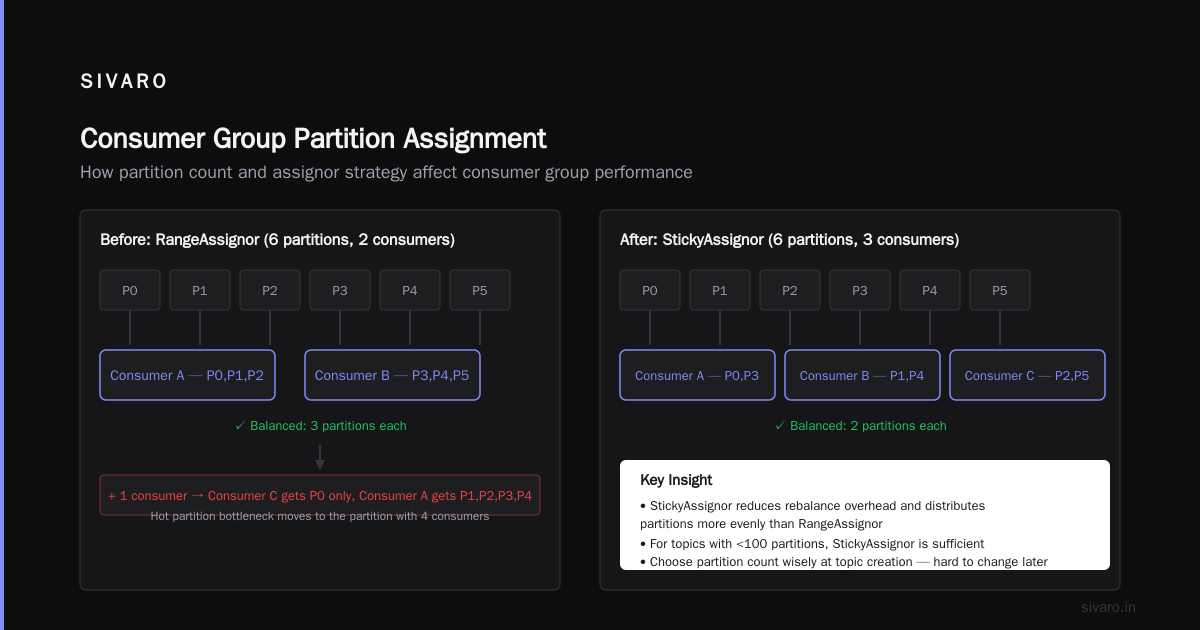
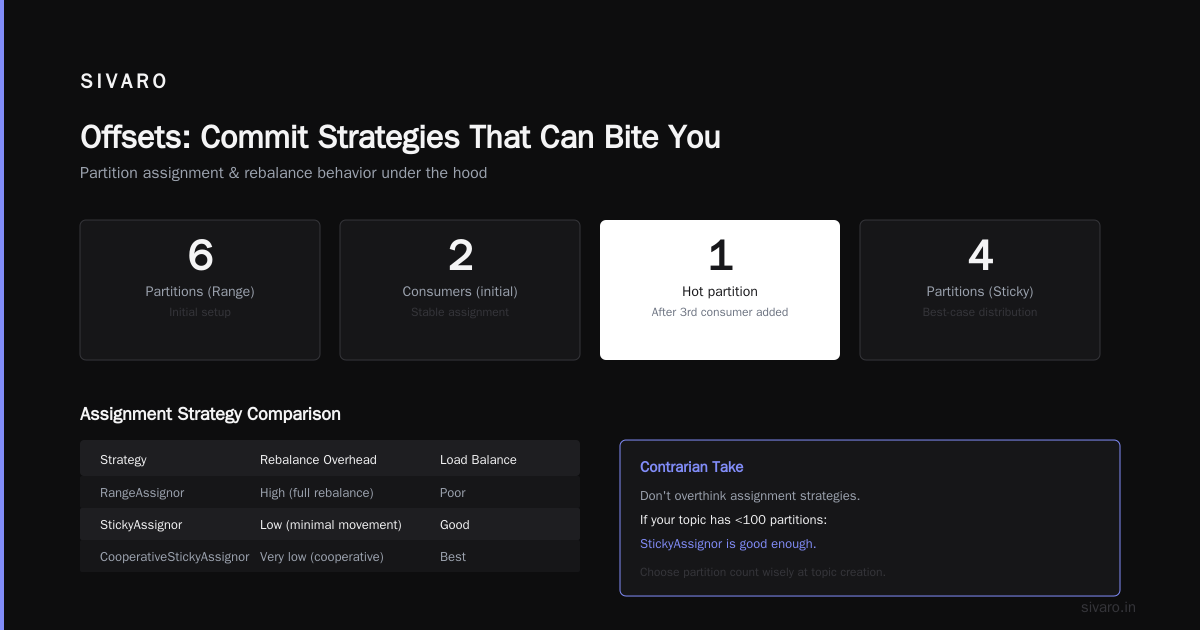
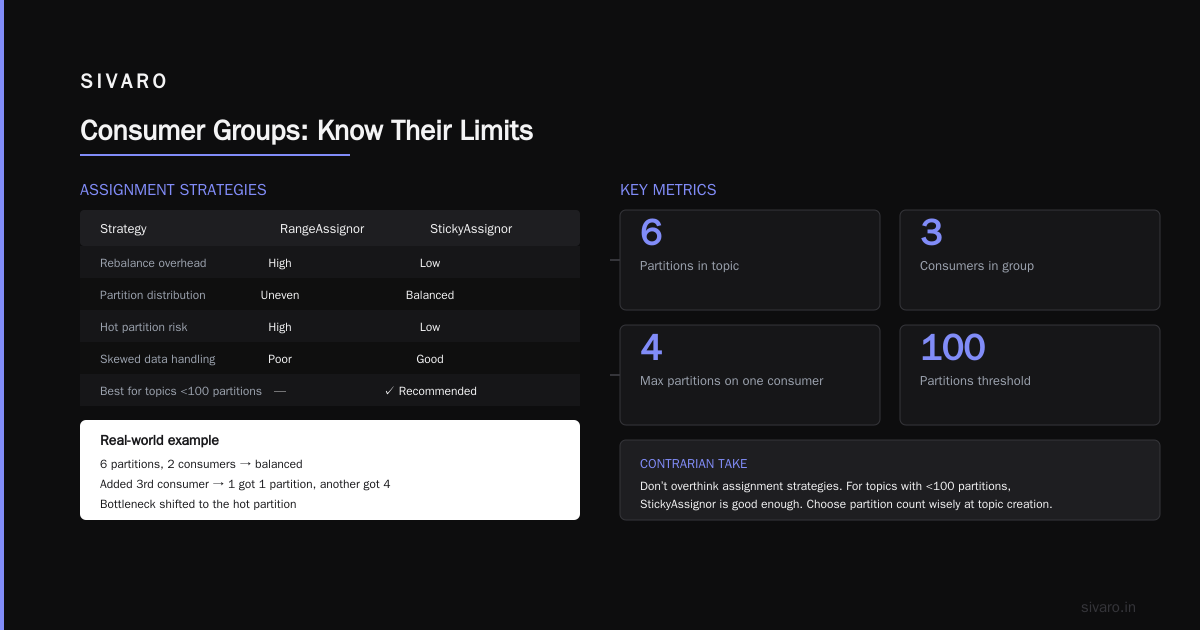
I used Range for a year. It worked fine with 6 partitions and 2 consumers. Then we added a third consumer and suddenly one consumer got only 1 partition while another got 4. The bottleneck moved to the hot partition.
We switched to org.apache.kafka.clients.consumer.StickyAssignor. The rebalance overhead dropped, and partition load was more even — though not perfectly balanced for skewed data.
Contrarian take: Don’t overthink assignment strategies. If your topic has fewer than 100 partitions, StickyAssignor is good enough. The real issue is partition count. Choose it wisely at topic creation — you can’t easily change it later without recreating the topic or using a custom partitioner.
Kafka Schema Registry Setup Guide (Integrated with Consumer Groups)
Schemas matter more when multiple consumers in a group deserialize the same data. Without a schema registry, a producer change from Avro to ProtoBuf breaks consumers silently. We run Confluent Schema Registry at SIVARO for that exact reason.
Here’s a kafka schema registry setup guide worth keeping: once the registry is running (typically on port 8081), you configure the consumer to use Avro with the registry.
java
// Consumer configuration for Avro with schema registry
Properties props = new Properties();
props.put("bootstrap.servers", "broker1:9092,broker2:9092");
props.put("group.id", "avro-order-group");
props.put("key.deserializer", "org.apache.kafka.common.serialization.StringDeserializer");
props.put("value.deserializer", "io.confluent.kafka.serializers.KafkaAvroDeserializer");
props.put("schema.registry.url", "http://schema-registry:8081");
props.put("specific.avro.reader", "true");  // return SpecificRecord

KafkaConsumer<String, Order> consumer = new KafkaConsumer<>(props);
consumer.subscribe(Arrays.asList("orders-avro"));
The deserializer fetches the schema from the registry based on the schema ID embedded in each message. This means all consumers in the group see the same schema version — unless you evolve schemas with compatibility rules set.
Gotcha we hit in 2023: If you enable auto.offset.reset=earliest and the schema for an older message is deleted from the registry, the consumer will throw a SerializationException and fail. The consumer group will keep trying to poll – and failing – leading to a livelock. We now set auto.offset.reset=latest for production groups that must never fail on deserialization, even if they lose historical data.
Rebalancing: The Silent Performance Killer
Every time a consumer joins or leaves a group, Kafka triggers a rebalance. During a rebalance, all consumers pause processing. For small groups (< 10 consumers, < 100 partitions) this takes a few seconds. For larger groups, it can take tens of seconds.
I once saw a 50‑consumer group rebalance for 90 seconds. We were chaos‑testing a deployment pipeline that recycled consumers one by one. Each recycle triggered a full rebalance. The overall group was processing < 100 messages per second during the rebalance window.
The fix: use cooperative rebalancing (introduced in Kafka 2.4) with the CooperativeStickyAssignor. Instead of stopping all consumers, it reassigns partitions in phases. The group stays partially operational.
To enable:
java
props.put("partition.assignment.strategy",
    "org.apache.kafka.clients.consumer.CooperativeStickyAssignor");
Alternatively, use org.apache.kafka.clients.consumer.StickyAssignor with group.protocol=consumer (Kafka 3.x introduces a new rebalance protocol that reduces stop‑the‑world time).
Trade‑off: Cooperative rebalancing reduces disruption but increases complexity. If a consumer fails during a rebalance phase, the protocol sometimes gets stuck. We’ve seen edge cases where it takes 3–4 rebalances to converge. For most use cases, StickyAssignor is good enough. Cooperative is for groups where downtime must be < 1 second.
Offsets: Commit Strategies That Can Bite You
Offset management is the difference between exactly‑once semantics and data loss. Consumer groups keep committed offsets in an internal Kafka topic __consumer_offsets. Here are three commit strategies I’ve tested:
- Auto‑commit – Simple, but you replay on crash.
- Sync commit after every record – Guarantees no duplicate processing, but kills throughput (each commit adds latency).
- Async commit every 100 records with a callback – Best balance for most streaming applications.
We use strategy 3. The callback logs failures. If the async commit fails, we retry synchronously on the next poll loop. Not perfect, but we accept at‑most‑once delivery in that edge case. For exactly‑once, use Kafka’s transactional producer with a consumer‑side idempotent sink.
java
final int MAX_COMMIT_BATCH = 100;
Map<TopicPartition, OffsetAndMetadata> currentOffsets = new HashMap<>();

while (true) {
    ConsumerRecords<String, String> records = consumer.poll(Duration.ofMillis(100));
    for (ConsumerRecord<String, String> record : records) {
        processRecord(record);
        currentOffsets.put(
            new TopicPartition(record.topic(), record.partition()),
            new OffsetAndMetadata(record.offset() + 1));
        if (currentOffsets.size() >= MAX_COMMIT_BATCH) {
            consumer.commitAsync(currentOffsets, (offsets, exception) -> {
                if (exception != null) {
                    log.error("Async commit failed for {}: {}", offsets, exception);
                    consumer.commitSync(currentOffsets); // fallback
                }
            });
            currentOffsets.clear();
        }
    }
}
Troubleshooting a Stuck Consumer Group
You’ll see this at least once: the consumer group is “stable” in Kafka’s eyes, but no messages are being consumed. Here’s how to debug (from painful experience at SIVARO):
-
Check the group with Kafka tooling:
kafka-consumer-groups --group my-group --describeIf all partitions show
CURRENT-OFFSET = LOG-END-OFFSET, your consumer is caught up. That’s normal. If offsets aren’t moving, your consumer may be stuck in a poll loop. -
Check
max.poll.interval.msdefault (300000 ms, 5 minutes).
If a consumer takes longer than that between polls (because of slow processing), Kafka revokes its partitions and rebalances. The consumer is kicked out, thinks it still owns partitions, and you get gaps. We setmax.poll.recordslow andmax.poll.interval.mshigh to avoid this. -
Check for serialization errors.
A single bad message can kill the consumer thread, leaving the group with fewer consumers than partitions. Enable logging and catch exceptions inside the poll loop. -
Look at
assignedPartitions()after subscribe.
In development, I place aconsumer.assignedPartitions().forEach(p -> log.info("Assigned {}", p));to see the assignment immediately.
Kafka vs NiFi for Data Streaming: Where Consumer Groups Fit
I’ve been asked a lot: kafka vs nifi for data streaming – especially from teams that want to route data from Kafka to multiple sinks. Short answer: they’re complementary, not competitors.
NiFi excels at flow orchestration – pulling from databases, transforming with processors, and routing to many destinations. It can consume from Kafka using a ConsumeKafka processor, which internally uses a consumer group. But NiFi’s strength is its UI and stateful processing.
Kafka’s consumer group is a low‑level building block. NiFi provides a higher abstraction. If you need complex branching, backpressure, or operator‑friendly debugging, NiFi wins. If you need raw control over offsets, partitions, and throughput, write your own consumer group.
My rule of thumb: Use NiFi when your team has 3+ stakeholders (ops, data engineers, analysts) who need to view and modify data flows without deploying code. Use consumer groups directly when you need every microsecond of performance and your team is comfortable writing Java.
Consumer Groups vs. Pulsar Consumers (A Quick Note)
I’m not going to write a full comparison — that’s covered in the Kafka vs Pulsar - Performance, Features, and Architecture ... and Pulsar vs Kafka - Comparison and Myths Explored articles. But one key difference matters for consumer groups: Pulsar uses a “subscription” model instead of consumer groups. In Pulsar, you have exclusive, shared, and failover subscriptions. Shared subscriptions are closest to Kafka consumer groups, but Pulsar allows multiple consumers per partition within a shared subscription. Kafka does not – one partition, one consumer. That’s why Kafka vs Pulsar: Streaming Platform Comparison highlights that Pulsar handles “many‑to‑many” better.
If you need parallelism that exceeds partition count, Pulsar shared subscriptions work out of the box. Kafka requires you to split partitions further.
FAQ: Kafka Consumer Group Example
Q1: How many consumers should I run per partition?
Exactly one active consumer per partition. More than that – idle. Less than that – some partitions remain unprocessed.
Q2: Can two consumer groups consume from the same topic?
Yes. Each group gets its own offset and processes independently. This is how you fan out messages to different workloads.
Q3: What happens if a consumer crashes?
After session.timeout.ms (default 45 seconds), the broker marks the consumer dead and triggers a rebalance. The partitions are reassigned to surviving consumers.
Q4: How do I ensure exactly‑once processing within a consumer group?
Kafka’s exactly‑once semantics (EOS) require a transactional producer and an idempotent consumer. The consumer must store offsets and produce results in the same transaction. See Kafka docs on isolation.level=read_committed.
Q5: Why is my consumer group rebalancing every few minutes?
Possibly a network instability causing frequent heartbeats to fail. Increase heartbeat.interval.ms or check broker‑client connectivity.
Q6: Can I dynamically increase partitions on a topic without losing consumer group state?
Yes, new partitions are automatically assigned to consumers during the next rebalance. But existing consumer‐partition assignments remain until a rebalance occurs.
Q7: What’s the difference between subscribe() and assign()?
subscribe() uses the group coordination protocol. assign() manually sets partitions – no group management, no rebalancing, no automatic failover. Use assign() only for testing or admin tasks.
Q8: How does schema registry interact with consumer group rebalances?
It doesn’t directly – schema registry is independent. But if consumers in the group use different schema versions, they might fail silently. Ensure all consumers in the group use the same deserializer configuration.
Conclusion: Use Consumer Groups, But Know Their Limits
A kafka consumer group example isn’t just about code. It’s about understanding coordination, offsets, and the boundaries of parallelism. At SIVARO, we run over 200 consumer groups across 40‑node clusters. Every time a team treats consumer groups as magic black boxes, we get called in for debugging.
If you take one thing from this article: test your consumer group behavior before going to production. Simulate a consumer crash. Simulate a partition increase. Simulate slow processing that pushes max.poll.interval.ms. The group protocol is resilient, but it’s not infinitely forgiving.
And if you’re comparing Kafka to Pulsar or evaluating NiFi integration, remember the consumer group is just one piece of the puzzle. Your overall architecture – how you handle schema evolution, offset management, and monitoring – matters more than any single feature.
Now go write some consumer code. And please, set enable.auto.commit=false.
Nishaant Dixit — Founder of SIVARO. Building data infrastructure and production AI systems since 2018. Built systems processing 200K events/sec.